Kanopi’s Drupal development services focus on creating functional, sustainable Drupal websites.

The Ultimate Website Maintenance for Nonprofits Checklist

When you first designed your nonprofit’s website, you probably thought it was made to last. You chose an evergreen design, incorporated uniform branding, and optimized your donation page to drive conversions. In the excitement of getting your site up and running, you may have let nonprofit website maintenance concerns fall by the wayside. 

You might be surprised to learn that the average website lifespan is just two years and one month! After this time, your design could become outdated, your messaging could use a refresh, and your CMS may need a core update. 

This guide offers best practices for keeping your nonprofit website in top shape and outlines the benefits of regular website maintenance. Here’s what we’ll cover: 

Nonprofit website maintenance is so critical because even minor tweaks to your layout, content, text, and imagery can make all the difference in encouraging someone to donate. Let’s start by reviewing a checklist of maintenance tasks. 

Nonprofit Website Maintenance Checklist

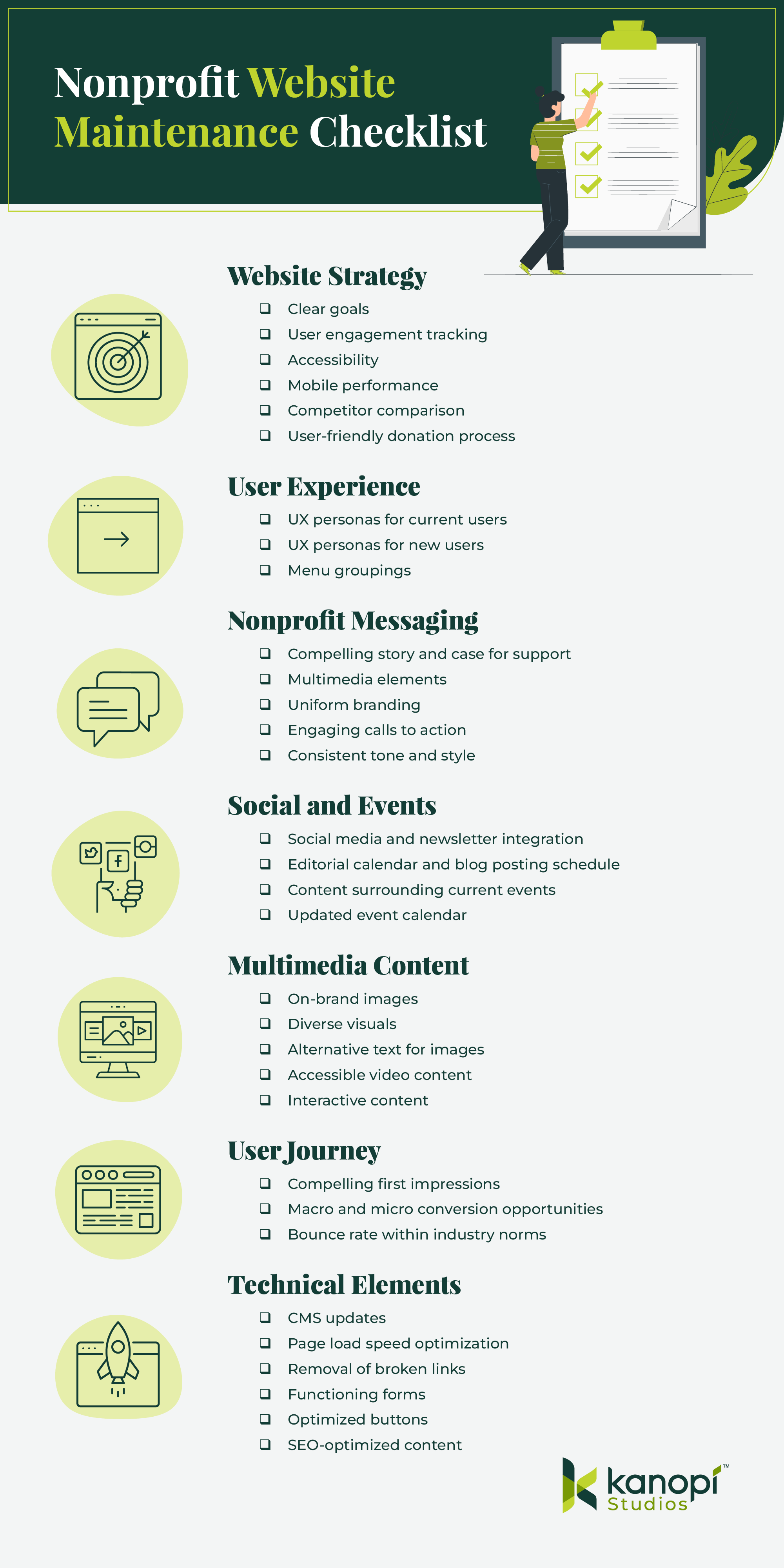
What should you check for when performing website maintenance? Use this checklist to ensure you don’t forget anything when refreshing your site:

Condensed version of the nonprofit website maintenance checklist, full version in the sections below

Website Strategy

  • Do you have clear goals for your site?
  • Do you have effective ways to track user engagement, both at the macro and micro level? (i.e. analytics tools, heatmaps, surveys, etc.) 
  • Is your site accessible? What is your current WCAG conformance level and your goal level?
  • How does your site perform on mobile?
  • How does your site compare to your competitors’ sites? Are there opportunities to learn or go beyond what they’re doing?
  • Does your site include a user-friendly, mobile-optimized donation process that makes it easy to give?

User Experience

  • Do you know who your current users are and their needs? Are your UX personas up to date and relevant to your current audience’s characteristics? 
  • Are there additional user types you need to target? Do they utilize different pathways?
  • Does your site’s menu and its groupings make sense to your users?

Nonprofit Messaging

  • Is your nonprofit’s story and case for support clear and compelling?
  • Does your site tell your nonprofit’s story through more than just words, using multimedia elements like images, videos, and audio clips? 
  • Do all website pages reflect your nonprofit’s unique branding, with your logo, brand colors, and fonts? 
  • Are your calls to action (CTAs) engaging, with action-oriented language such as “Give Now” or “Join the Fight”? Do they tell people what to do and why in the most direct way possible? 
  • Do you have a consistent tone of voice and style? Does all of the content on your site reflect this? 

Social and Events

  • Have you incorporated social media or newsletters to enhance the omnichannel experience?
  • Do you have a clear editorial calendar and a consistent blog posting schedule? 
  • Are you staying on top of relevant current events and reflecting this in your site’s content? 
  • Is your event calendar easy to find and updated with accurate logistical information? Do events have a ‘save to calendar’ option? 

Multimedia Content

  • Do your image choices represent your brand? 
  • Do your images reflect the diversity of your nonprofit’s community?
  • Does every image have accurate and descriptive alternative text? 
  • Are you taking advantage of video content and providing opportunities for supporters to share your videos?
  • Do your videos have accessibility necessities such as pause buttons and captions? 
  • Are you making use of other media types, such as interactive quizzes or infographics, that drive engagement and increase time spent on the page? 

User Journey

  • Is it clear to a new user why they should want to engage with your nonprofit, from whichever page they enter your site on? 
  • Do your top landing pages have clear user pathways for both macro and micro conversions? For example, macro conversions could include donating, while micro conversions might involve signing up for your email newsletter or following your nonprofit on social media. 
  • Is your bounce rate within industry norms? Nonprofit websites have a 60-70% bounce rate on average (for context, 40% or lower is typically considered a good bounce rate). 

Technical Elements

  • Is your CMS up to date and secure?
  • How fast is your page load speed?
  • Do you have any broken links?
  • Are all of your forms working and formatted correctly?
  • Are buttons easily clickable from laptops, tablets, and mobile devices?
  • How is your site performing for SEO? Are you receiving high-quality backlinks from reputable websites?

Your answers to these questions can clue you into whether it might be time to update your website and which areas have the greatest opportunity for enhancement. 

Website Maintenance Best Practices for Nonprofits

From assessing growth metrics to ensuring your site complies with new regulations, we’ve rounded up some best practices to follow for effective and sustainable nonprofit site maintenance. 

Take a continuous improvement approach

Similarly to taking your car in for maintenance checks to keep it safe to drive and in good condition, your nonprofit website needs regular maintenance to ensure it’s meeting users’ needs and helping you advance your mission.

However, this process entails more than just security updates and updating plugins or modules. We recommend taking a continuous improvement approach to maintaining your nonprofit site, with design and development improvements that allow for growth and flexibility beyond basic fixes. 

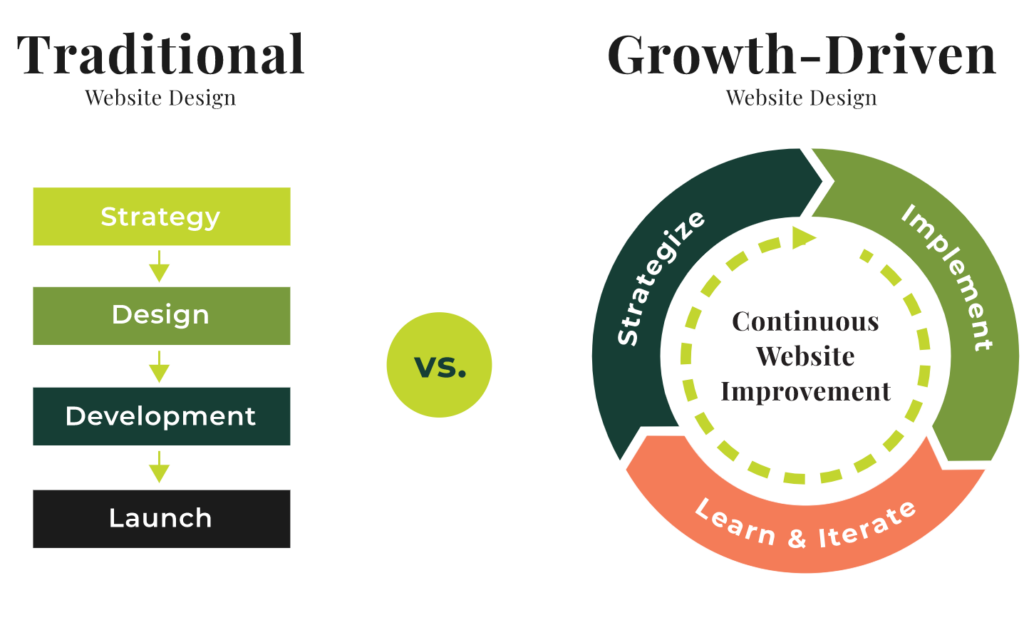
While traditional website design follows a linear approach from strategy to implementation, continuous improvement allows for a circular, iterative process.

Traditional vs continuous improvement website maintenance approach

This method allows nonprofits to create flexible websites that are constantly tested and optimized over time. With this approach, your organization can continually accept and assess feedback from analytics, heatmaps, and user surveys. Then, you can immediately implement new strategies based on this feedback without having to wait for a major refresh project. 

A continuous improvement approach helps avoid enormous update projects that can take months and cost your organization hundreds or thousands of dollars to complete. Instead, you’ll make small improvements over time that keep your site healthy and current, saving you time, money, and major headaches down the line. 

Measure growth using KPIs

You can’t celebrate your successes or mark major milestones without having a clear picture of how your site is performing. To stay up to date on your site’s performance, monitor key performance indicator (KPI) metrics such as:

  • Time on site
  • Bounce rate
  • Number of pages visited
  • New vs. returning users
  • Traffic sources

You may also want to review data from your CRM to answer the following questions:

  • Who is donating? 
  • How often are they donating? 
  • Are repeat or “lifetime” donors on the rise or fall? 
  • What are donors’ preferred donation and communication methods?

Assessing CRM data alongside website analytics will help paint a complete picture of who your donors are and how your site is currently meeting their needs. For example, when you know donors’ preferred donation methods (such as credit cards, digital wallets like Venmo or PayPal, or ACH payments) you can make sure to include those payment types on your online giving page. 

In addition, if you discover that donors’ preferred communication platforms are social media and email, you can focus your marketing efforts more heavily on those platforms to help drive site traffic. 

Keep timely elements updated

Regularly update your event calendar and sync your news and social media feeds to ensure your site remains engaging and relevant. This way, you provide up-to-date information to your users across all of your online channels. Create an editorial calendar to help stay on track, and use automated social media and email marketing tools to schedule your posts in advance.

Regularly update your CMS

Whether you’re using Drupal, WordPress, or another CMS, you’ll need to follow certain steps to keep your site updated, optimized, and secure. If you don’t regularly update your CMS, you could face risks like hacking or loss of functionality. 

Kanopi offers services for both Drupal and WordPress updates. Here’s what maintenance looks like on these platforms: 

  • Drupal maintenance involves running Drupal core updates, consistently backing up your site, running module and theme updates, optimizing caching, and fixing bugs.
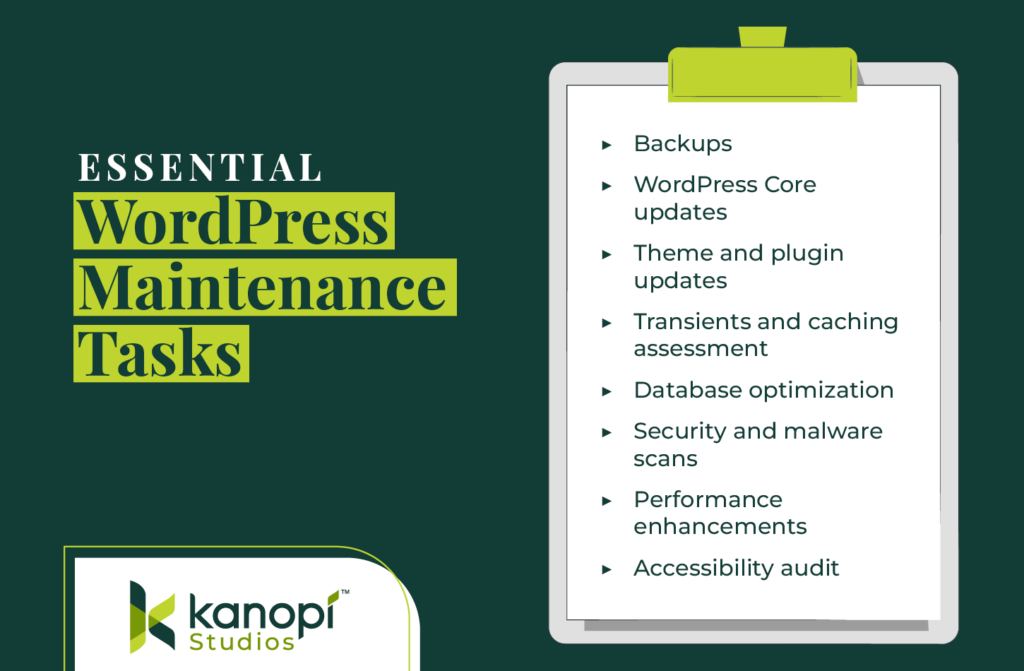
  • WordPress maintenance requires backing up your site, updating WordPress core, running theme and plugin updates, and optimizing your website’s database. 

Keeping your CMS platform up to date is essential to maintaining supporters’ trust and offering a seamless website experience. Work with a web design professional who can help create a regular schedule for updating your CMS and migrating your site to a new version as needed, like if you need to migrate to Drupal 10

Stay up to date with relevant laws

Data privacy laws are becoming more and more common as states seek to protect consumers from data misuse. New legislation for states like Texas, Oregon, and Florida is set to take effect this year. In addition, the California Consumer Privacy Act (CCPA), one of the first comprehensive consumer privacy laws in the U.S., has been on the books since 2018.

These laws all have similar provisions, such as: 

  • Consumers must be able to know what data is being collected from them. 
  • Consumers must be able to opt out of data collection. 
  • Businesses must delete data they’ve collected about consumers upon request. 

Staying up to date with new legislation can be tricky and time-consuming, so it’s helpful to partner with a trusted web design agency whose business it is to know the latest regulations and law changes affecting nonprofit sites. 

Reinforce trust with your audience by offering a clear privacy policy on your nonprofit’s website to let supporters know how you use data and how they can opt out of the collection process. Review examples from top nonprofit websites like the Leukemia and Lymphoma Society or Habitat for Humanity to get an idea of what these policies look like. 

Ensure your site is mobile-friendly

57% of nonprofit website traffic comes from mobile devices, making it critical to refresh your site’s mobile version during the maintenance process. Ensure your buttons are large and easy to touch from a phone screen, your mobile site menu is easy to navigate, and your forms are simple to complete from a mobile device. 

Continually test website forms

Users should be able to easily complete any forms on your website, whether they’re using a mobile device, tablet, or computer. Test the following forms and buttons on different devices: 

  • Donation page
  • Volunteer registration form
  • Quizzes and polls
  • Feedback surveys
  • Call to action buttons

Your forms should also be accessible, with sufficient color contrast and descriptive text that appears outside the form fields. We’ll spotlight additional accessibility best practices in the next section. 

Keep accessibility best practices in mind

Accessibility best practices constantly evolve as new assistive technologies become available. We recommend using a combination of manual and automated accessibility tests to keep your website updated. Some of our favorite accessibility tools include:

These tools help catch issues related to ARIA attributes, color contrast, headings, and other technical elements. However, we also recommend testing your site manually to catch any issues that testing tools may miss. To ensure you don’t miss anything, work with a web design agency experienced in accessibility best practices to run manual tests. 

Work with Kanopi to Maintain Your Nonprofit Site

If you’re looking for an experienced web design partner to keep your website fresh and up-to-date, Kanopi is a great choice. We currently support more than 175+ websites, and around half of those are nonprofit sites. 

We offer continuous support through every phase of website development, from research and content strategy to long-term support. Our website maintenance services include:

  • User persona development and journey mapping to better understand visitors’ goals and how your website can help to achieve them
  • User testing to ensure new features work and gather feedback from audience members
  • A full website growth plan customized to your unique needs and goals
  • Module and plugin updates to keep your site running smoothly
  • Bug fixes to maintain your website’s security
  • Conversion optimization to ensure your landing pages are effective for driving deeper audience engagement and donations
  • Performance enhancement focused on technical elements to maintain fast load speeds and optimal user experience

From researching who uses your site to developing a content strategy that serves both your organizational goals and the needs of your users, our clients value our flexible and nimble approach

“From the start, we have been very impressed with Kanopi’s creativity… They’ve been flexible and understanding as we hit roadblocks in our internal processes and decision-making. Another key element was how thorough and inclusive they were during our Discovery Process, which led to other departments in our organization feeling connected from day one. Overall, this has been a fantastic experience!”

Anthony Guido, Vice President, Communications & Public Relations, Cohen Veterans Network

For many clients, support means we act as an extension of their team and help them enhance their site. We do this through incremental improvements to strategy, design and UX, key feature development, third-party integration, and more.

Nonprofit Website Maintenance Client Study

Don’t just take our word for it—explore our website support case studies, including our work with First Tee

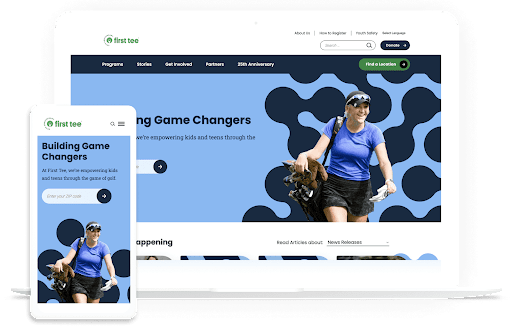
First Tee is a nonprofit dedicated to empowering kids and teens through golf programs. Their website is a resource to connect audiences to their services, and it also acts as the host for their regional chapters and member sites. 

First Tee’s homepage, representing the results of a nonprofit website maintenance project they undertook with Kanopi’s help

They came to Kanopi with several problems: their website was growing outdated, and it had originally been created using a restrictive template, which made it challenging to make ongoing updates. In addition, their site lacked cohesion, leading to brand confusion. 

We helped by designing a brand-new multi-site solution for First Tee that allows for seamless updates and consistent branding across chapter sites. We also provided ongoing website support to help launch and personalize chapter sites. As a result, First Tee’s website tells a cohesive story, with uniform branding and seamless donation opportunities. Explore the full case study here

Wrapping Up

To keep your site fresh and engaging and ensure it meets users’ needs, make website maintenance a top priority. Work with your marketing team and a web design consultant as needed to create a plan for continually improving your site so that it stands the test of time. 

Want to continue learning about different aspects of website maintenance? Start with these additional free resources from Kanopi: 

Drupal vs. WordPress: Which One is Right For You?

If you’re researching content management systems (CMS), you’ve probably come across Drupal and WordPress. These CMS platforms are two of the most popular systems that help organizations and individuals build and manage websites easily. But how do you know which platform is right for you?

In this guide, we’ll take a deep dive into the basics of each platform to help simplify your choice. Here’s what we’ll cover:

Ultimately, finding the right CMS depends on your unique needs, web design experience, and budget. This guide cuts through the noise to deliver need-to-know information for these top platforms. 

What are WordPress and Drupal?

Drupal and WordPress are both CMS solutions, which allow users to create and maintain robust websites. These platforms separate a website’s front-end content management from the back-end development process, allowing individuals with no coding experience to add new website content and make updates easily. 

Drupal and WordPress are often compared to each other since they are both “open-source,” meaning they’re freely available for anyone to download and can be expanded with additional or modified code. Because of their scalability and flexibility, Drupal and WordPress are both viable options for organizations of any size.

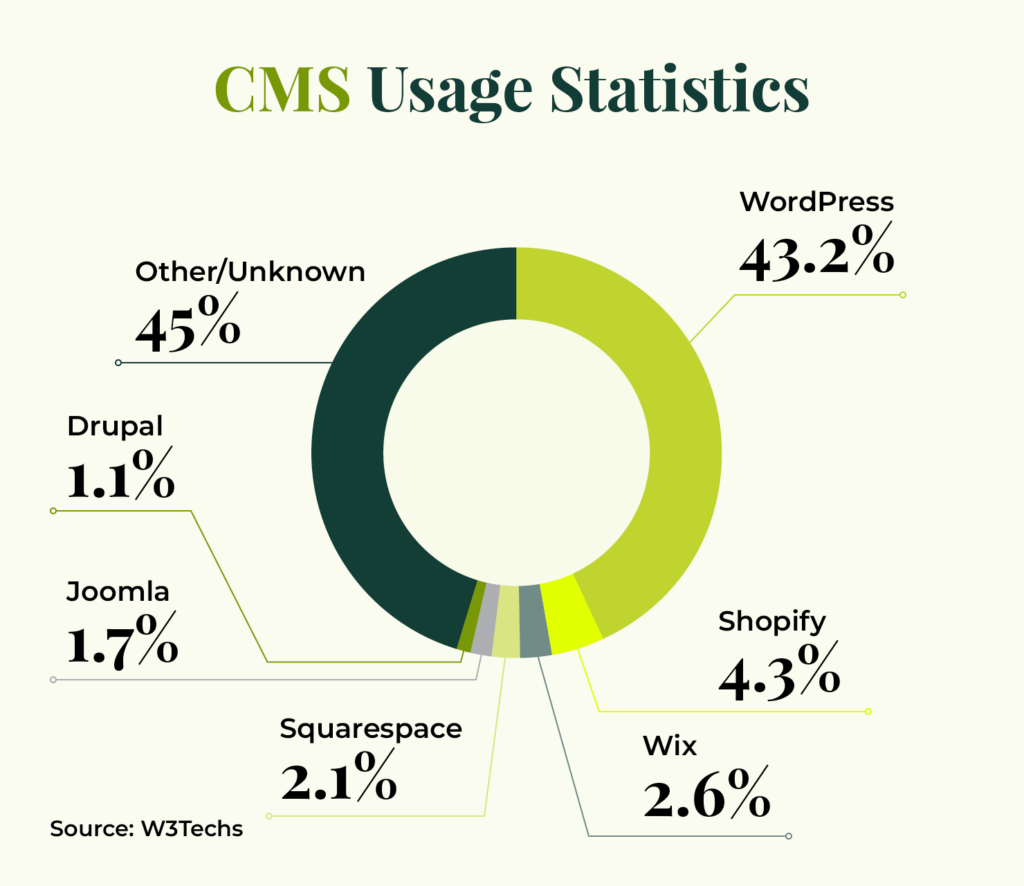
Here are some usage statistics showing how often these platforms are used in comparison to other systems: 

CMS usage statistics showing that 43.2% of websites use WordPress and 1.1% of websites use Drupal

WordPress Overview

Currently, WordPress is the world’s most popular CMS. Originally launched in 2003 as a simple blogging platform, WordPress now supports 43.2% of all websites. It’s a free and open-source CMS that many organizations use, like nonprofits and businesses. You can fully customize your WordPress website easily and quickly, with a variety of plugins and themes. 

Here are some of the benefits of using WordPress:

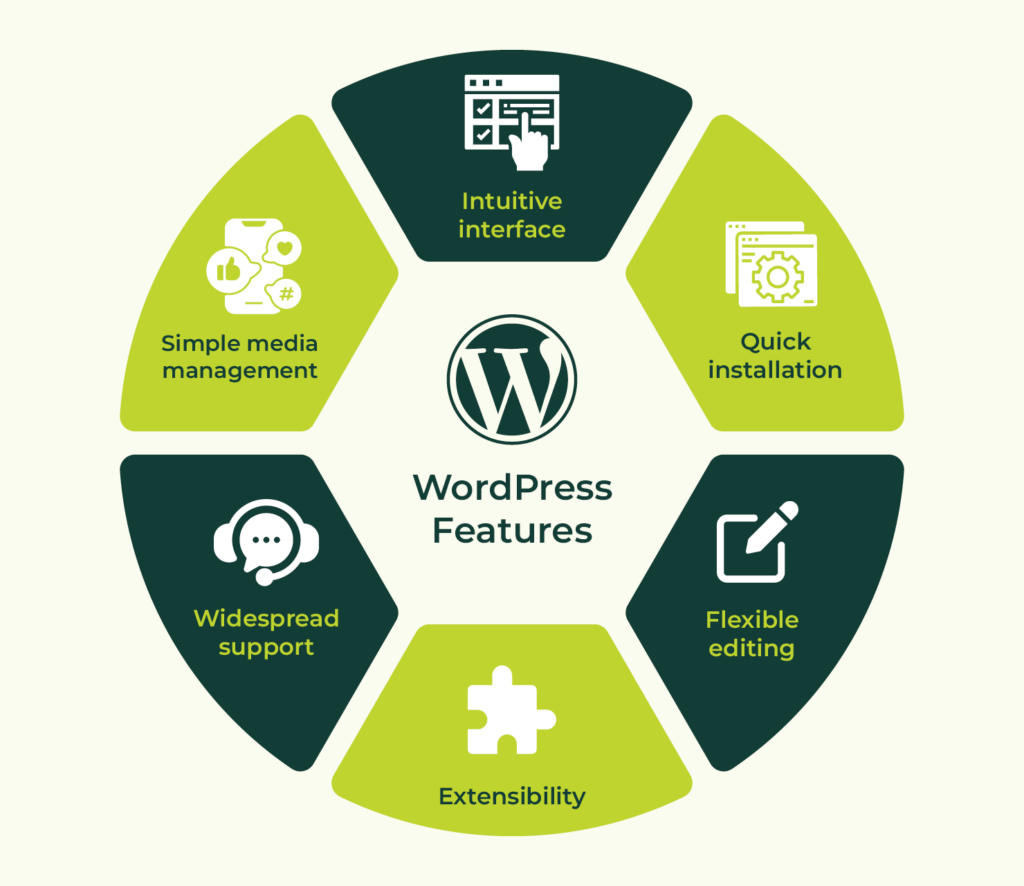
WordPress features and benefits (described in the bulleted list below)
  • Intuitive and easy to use. WordPress is very user-friendly, especially for non-developers. It features an intuitive user interface and simple media management processes. 
  • Quick installation. It’s possible to develop WordPress sites very quickly to test out new ideas, features, and approaches.
  • Flexible editing experience. The built-in Gutenberg editor and plugins that add additional types of Gutenberg blocks make it simple to visually create a wide variety of layouts for your content.
  • Robust extensions. WordPress’ third-party theme and plugin communities make it similarly easy to extend WordPress capabilities without custom development. 
  • Support. WordPress has a massive global community thanks to its open-source network, empowering you to find support for any issue.
  • SEO optimizations. WordPress offers out-of-the-box SEO features such as optimized URL structures and simple methods to verify your site with search engines. You may also download SEO plugins like Yoast that offer SEO recommendations and redirect management. 
  • Media management. The built-in media manager for WordPress is robust, intuitive, and extensible.
  • Integrations. If you use specialized systems to manage your email lists and customer relationships, chances are that these integrations already exist and are maintained by the tools themselves for WordPress.

Watch Kanopi’s webinar for more details about how to manage content in WordPress: 

Drupal Overview

Currently, Drupal powers 0.9% of all websites and 6% of the top 10,000 websites. Although it’s much less commonly used, Drupal is still a viable option for various websites, including sites for government agencies, universities, and nonprofits. 

The latest version, Drupal 11, was launched in August 2024. It offers a flexible framework with both out-of-the-box functionality and the ability to expand upon that platform with advanced features and community-contributed code.

Here are some of the benefits of using Drupal:

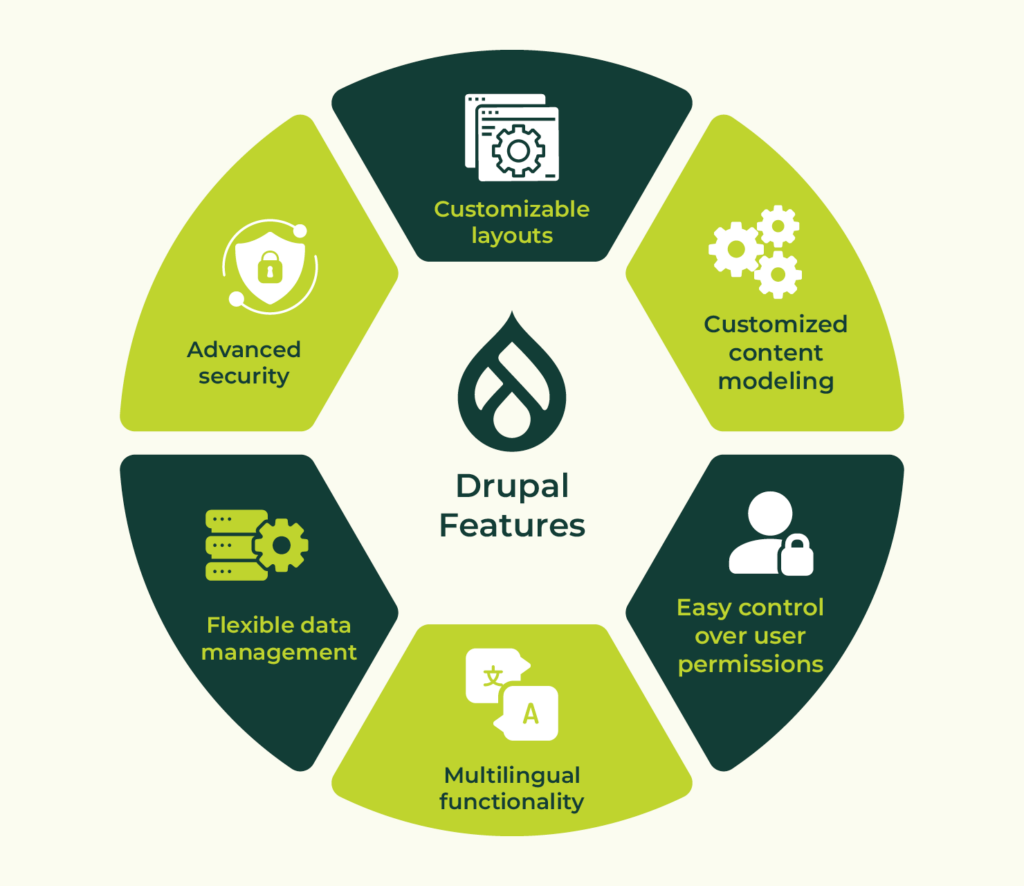
Drupal features and benefits (described in the bulleted list below)
  • Customized content modeling. Drupal offers the ability to customize content types, fields, and content presentation to meet any content strategy. 
  • Easy control over user permissions. Drupal has a built-in access control system where you can create new visitor and administrator groups with granular permissions for anywhere from a few users to hundreds of thousands.
  • Multilingual functionality. Starting with Drupal 8, different versions of the same content can be presented in multiple languages out of the box.
  • Data management. Drupal’s taxonomy system is flexible and ideal for handling lots of content metadata.
  • Security. Drupal has a dedicated security team that evaluates widely used modules for any vulnerabilities.
  • Accessibility. Drupal is committed to aligning its back-end editing experience with WCAG 2.0 guidelines as much as possible, making it a great choice for users who need assistive technologies when creating content and maintaining sites.
  • Inline editing. For simple layouts, Drupal provides the ability to edit content while “looking at” your site. Keep in mind that as content gets more customized and complex, this is more difficult to use.
  • Customizable layouts. The built-in Drupal system for managing “blocks” of content for sidebars, footers, and other areas allows for detailed control over which pages and contexts in which the content appears. Additionally, it makes it easier to show the same, editable piece of content site-wide.
  • SEO optimizations. Free community modules extend Drupal’s core offering with human-readable URLs, XML sitemaps, advanced meta tags, and schema.org vocabularies.
  • Media management. Drupal ships with a robust Media Library for managing images, videos, documents, and audio files.
  • Integrations. Drupal integrates with a wide range of third-party applications including Google Analytics, Salesforce, and several social media sites.

Let’s compare the features of these platforms side by side for a clearer understanding of their benefits and potential drawbacks. 

Drupal vs. WordPress: Side-by-Side Comparison

DrupalWordPress
Ease of useSteeper learning curve for beginners or non-developersSimple user interface that beginners can easily grasp
SecurityEnterprise-level security and in-depth security reportingMore vulnerabilities due to the plugin ecosystem
CostsDrupal developers can be more expensive to partner withWordPress developers are typically more cost-effective
DeploymentMore complicated installation processMore straightforward installation process
PerformanceBuilt to load content-heavy sites quickly; offers caching out of the boxOveruse of plugins can slow load speeds; offers plugins to manage caching
Customization51,000+ modules and 3,000+ themes59,000+ plugins and 11,000+ themes
SupportResources include forums, community documentation, training, professional services, and moreResources include a community forum, tutorials, guides, and professional services
SEO CapabilitiesModules like Pathauto available to manage SEOPlugins like Yoast available to manage SEO
Noteworthy websitesThe State of Rhode Island
Eye Recommend
Penn State
ACLU
UNDP
Meta
Salesforce
Time
Physicians for Human Rights
Disney

Ease of use

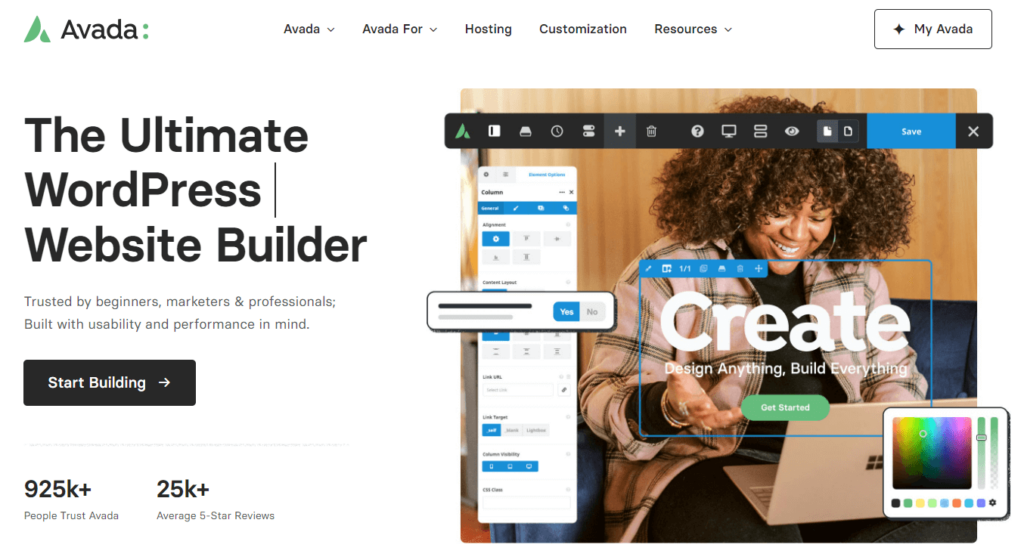
In general, WordPress provides an easier admin user experience, although Drupal is coming close with its recent version releases. The WordPress interface is simple for even the most casual of users to grasp—there’s no need for a third party to step in. WordPress also has more ready-made themes available from sites like ThemeForest, which helps with cost and timeline barriers. For example, Avada is the #1 best-selling WordPress theme.

Screenshot of the Avada website

If you decide to use WordPress, it’ll likely take less time to find a great theme and set up a fully functioning site than with Drupal. Drupal themes do exist, but many Drupal websites use custom-coded themes or at least one that’s highly customized. This is why many Drupal users end up reaching out to developers to make their sites visually appealing and functional. Drupal has become the clear leader as an enterprise-level CMS platform for more complex projects. 

While Drupal may require more technical experience and help than WordPress does, this can show in the end product. Drupal is a great option for companies that have more robust, design-heavy requirements, or a lot of customization.

Security

Whether your website hosts important organizational data or processes your constituents’ financial information, you need ample security and protective steps to ward off data breaches or hackers.

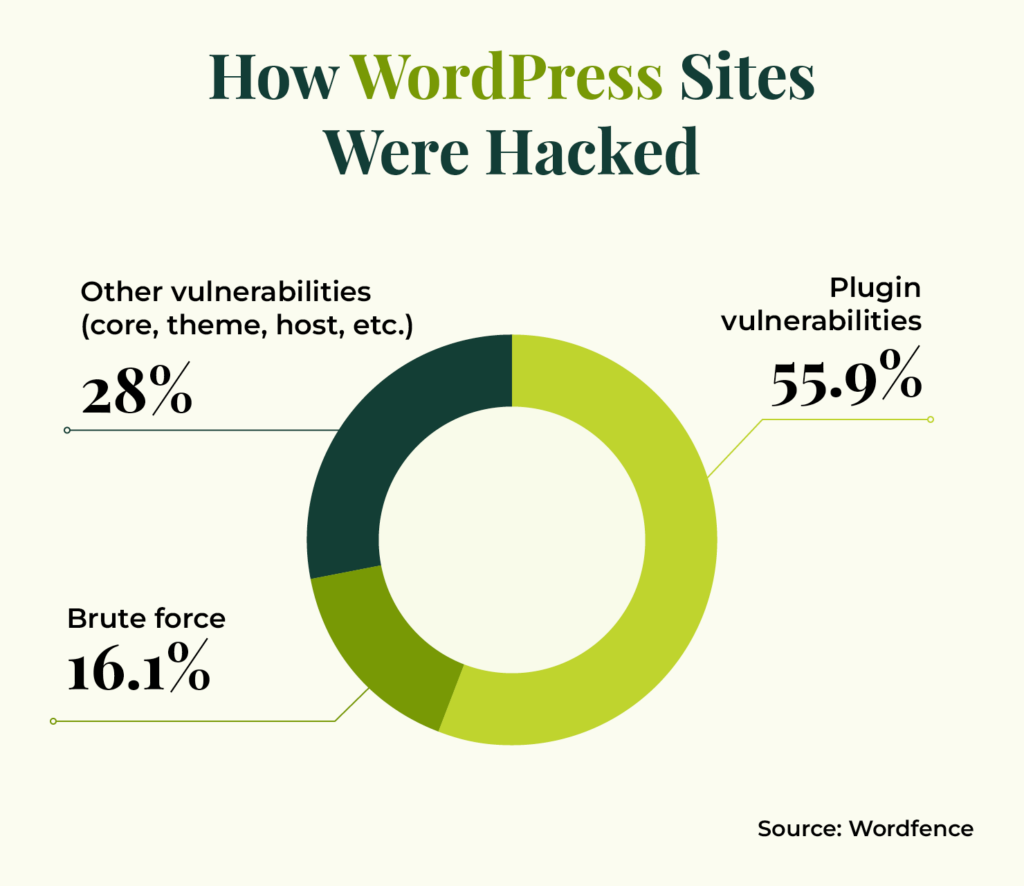
Both core systems have some sort of security measures in place. However, WordPress’ massive third-party plugin ecosystem introduces some risks that aren’t as prevalent in Drupal and its modules. Plugin vulnerabilities account for 55.9% of all known entry points of malicious actors. 

Statistics showing how WordPress websites were hacked (55.9% were plugin vulnerabilities, 28% were other vulnerabilities, and 16.1% were brute force)

On the other hand, one of Drupal’s top features is its enterprise-level security and ability to provide in-depth security reports. This is a driving factor for why Drupal is often used by government institutions and other large, security-conscious organizations. 

Costs

As open-source platforms, Drupal and WordPress are free to use. However, platform costs aren’t the only expenses to consider. If you need development or design support, you’ll have to consider the costs of partnering with a platform expert. 

In general, there are fewer Drupal developers than WordPress experts, and Drupal experts tend to offer more specialized services. That could make the cost of working with a Drupal partner more expensive.

Another cost to consider is the price of the platform you choose to host your site. Complex Drupal sites may require more costly hosts, while many WordPress hosts are available for just a few dollars a month. 

Costs that are common across both platforms include staff training expenses, maintenance and security support, and additional expenses for plugins or modules. 

Deployment 

Speed to market is another factor to consider when developing a new website. How quickly do you need to get your site up and running? In general, it tends to be faster and easier to develop a WordPress site and push it live, whereas Drupal’s development process may be more involved. 

The migration tools you use or the software experts you partner with also play a major role in the timing of the installation process. Carefully vet your support resources to get more information about the timeline you can expect for getting your site live. 

Performance

WordPress and Drupal each offer features to improve your site speed and ensure high performance. For example, Drupal offers built-in site caching tools, while WordPress has a variety of plugins that can help manage caching. 

However, WordPress’s vast plugin and theme library present some performance risks. Using too many plugins or poorly designed plugins or themes can slow your site down. 

On the other hand, Drupal is built to handle the performance needs of complex websites with robust data needs. Drupal’s built-in optimization features and enterprise-level capabilities support faster load speeds for large websites. 

Customization

Thanks to their open-source code, both Drupal and WordPress have ample opportunities for you to expand and customize your CMS to your organization’s needs:

While WordPress is famous for its clean, consistent administrative interface, Drupal allows you to apply different administrative themes to your website or even use your public-facing theme as part of your site management and editing experience.

Support

If you’re looking for support or advice to manage your website, you’ll find plenty of resources available for both Drupal and WordPress. Since WordPress is much more commonly used, there are plenty of developers and resources available if you need help, such as online tutorials and guides. Drupal also offers forums, robust community documentation, and training support. 

SEO Capabilities

Both WordPress and Drupal offer SEO features and extensions that can be integrated into the platforms to help with good search engine ranking. For example, Drupal’s PathAuto module is a great place to start—this module automatically creates user-friendly URLs for your content. In addition, WordPress’s Yoast plugin offers technical SEO suggestions, advanced XML sitemaps, and readability analysis. 

Which is better: WordPress or Drupal? 

Realistically, there is no best overall CMS, but it is worth it to explore the differences to consider which solution is right for your unique situation and needs.

Taking in the facts above, WordPress is a great solution with its wide range of plugins and extendability options. It’s easy to use, can be set up quickly, and offers a robust community of developers if you ever have questions or concerns.

However, if you are building a more complex site that will facilitate lots of important data or sensitive information, Drupal is a better choice for its high-security features. You can still expand and customize your system, but it might take a little longer. 

Partnering with WordPress and Drupal Experts

Regardless of which option you choose, consider partnering with a dedicated website service agency, like Kanopi. Kanopi knows that all organizations and websites are different—they come with their own needs and have different goals. We can aid your journey by learning about your mission and developing the best website for your organization.

On top of helping you figure out the best CMS for your needs, the Kanopi team can:

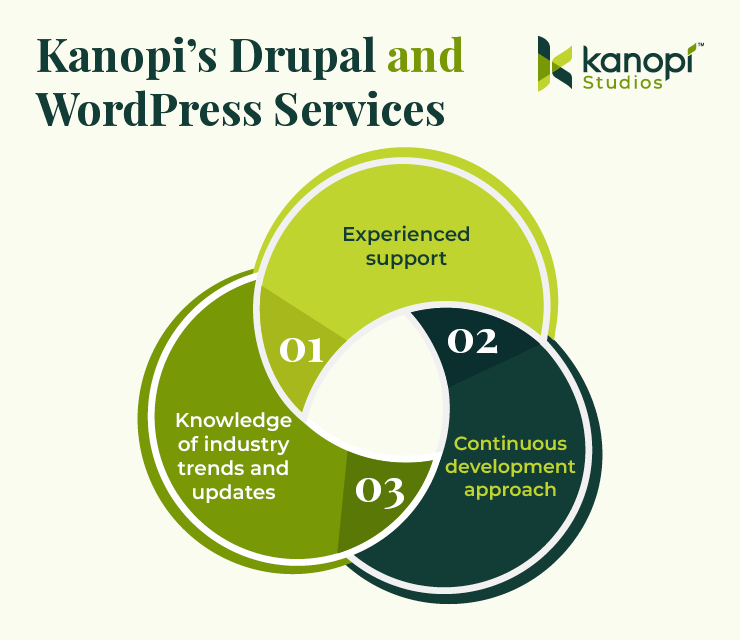
Kanopi's Drupal and WordPress services (explained in the text below)
  • Offer experienced support. Working with an experienced developer is essential to give your site the foundation it needs to succeed. Kanopi’s team offers a wealth of experience in both Drupal and WordPress. Each of our Drupal team members has an average of 11 years of Drupal development experience and our WordPress developers regularly speak at WordCamp conferences throughout North America. 
  • Promote a continuous improvement approach. Through this approach, we’ll ensure that your website is always up to date, working properly, and set up for long-term growth. This includes module/plugin upgrades, bug fixes, security patches, third-party integrations, and more.
  • Stay updated on industry trends, standards, and updates. Regardless of whether you choose WordPress or Drupal, our developers stay up to date with CMS trends by attending conferences and making regular contributions to both communities to help extend and maintain the systems. 

For examples of our work, explore our past Drupal and WordPress projects. We work with clients across multiple industries, including healthcare organizations, universities, government organizations, businesses, and nonprofits. We can manage your Drupal or WordPress project at any stage, from migrations to full builds and support. 

Our client testimonials speak for themselves—clients emphasize factors like our “honest and transparent” customer service, flexibility, inclusiveness, and “uncanny ability to understand [client] needs.” 

Interested in partnering with Kanopi? It doesn’t matter what CMS you use—we would love to hear from you and get started with a customized plan to make your website the best it can be. 

Additional Resources

Continue learning about Drupal and WordPress with the help of these additional resources: 

4 Simple Steps to Migrate from Drupal to WordPress

Are you thinking of migrating from Drupal to WordPress?

Drupal is one of the most popular content management systems (CMS). Many organizations and institutions, from airports to universities, use its open-source platform, which currently powers 6% of the top 10,000 websites.

Drupal’s CMS gives web developers fine-grain control over user permissions, the ability to handle complex queries, advanced configuration management, and a platform that can host large amounts of data storage.

However, not everyone needs the complex capabilities that Drupal offers. While it’s free to use and has a strong community of developers and users, that doesn’t necessarily mean it’s the best CMS for you. That’s where WordPress, another popular open-source CMS, comes in. 

WordPress is considered one of the most user-friendly CMSs. Its intuitive editing experience makes it easy for non-developers to add content. It’s also the most popular CMS by far, used by 62.5% of all websites. Plus, it’s easy and fast to get a WordPress website up and running. 

In this guide, we’ll explore the steps required to smoothly migrate your Drupal website to WordPress. Here’s what we’ll cover: 

Let’s begin by reviewing common situations that lead organizations to consider a Drupal to WordPress migration. 

Reasons to migrate from Drupal to WordPress

There are plenty of pros and cons for both Drupal and WordPress, but you might have recently begun to feel that Drupal’s drawbacks outweigh its advantages for your unique website. 

Here are some common reasons why some organizations might want to switch their CMS from Drupal to WordPress:

  • Drupal doesn’t have all the capabilities you need.
  • Drupal is too confusing to use.
  • Drupal costs too much money to maintain.
  • WordPress’s editorial process and media management are much easier than Drupal’s.
  • WordPress is more user-friendly and doesn’t require as many custom configurations.

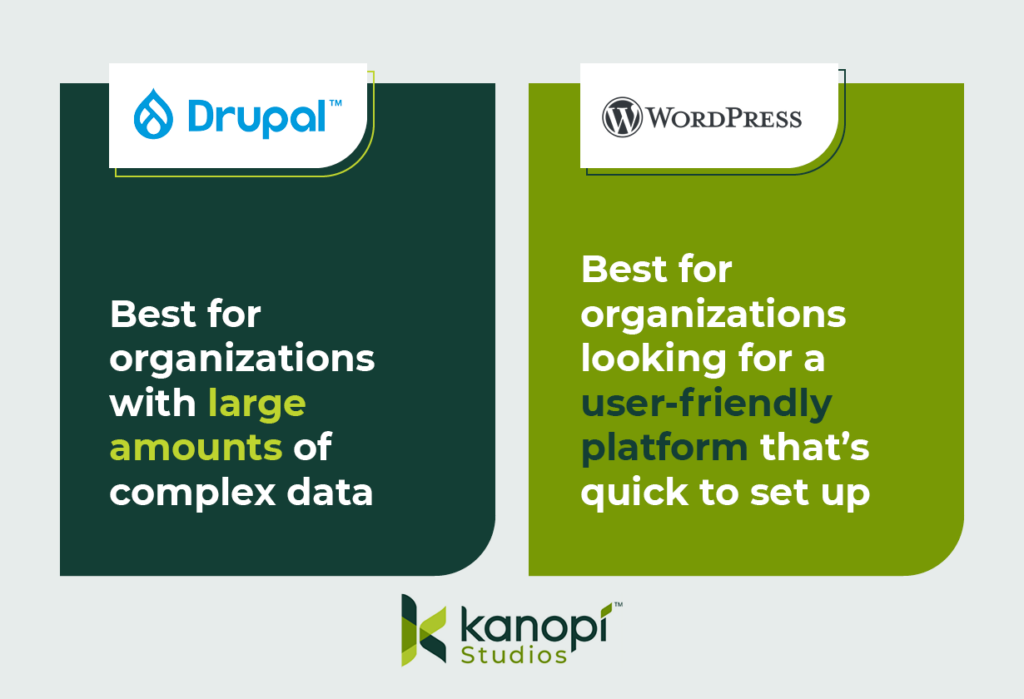
Essentially, Drupal tends to work better for more complex web projects and large amounts of data, whereas WordPress is often considered to be more user-friendly out of the box. 

This image explains the primary benefits of Drupal and WordPress. Drupal is best for organizations with complex data, while WordPress works for organizations looking for a user-friendly, quick-start platform.

Things to consider before a Drupal to WordPress migration

A Drupal to WordPress migration may require a decent amount of work. If your original Drupal site is more complicated than you thought, you might be looking at a lengthy and budget-pushing migration. So, you shouldn’t jump into the migration process without careful thought and consideration. 

Here are two initial considerations to remember when planning your Drupal to WordPress CMS migration:

Ensure you have appropriate hosting

If the host you use for your Drupal website doesn’t support WordPress installations, you’ll have to switch to a new provider. Here are some hosts that have managed WordPress offerings and support the WordPress community: 

Assess the complexity of your data

Not every site element will transfer smoothly during the migration process, especially since the code components that make up Drupal sites differ from WordPress sites. This will likely result in more custom code and alterations during the migration. For example, your Drupal site might: 

  • Use paragraphs or panels, which you’ll need to convert to Advanced Custom Fields (ACF) content in WordPress
  • Feature a lot of metadata or redirects, which can make mapping your data more complex
  • Require custom functions if you’re migrating your data into WordPress Gutenberg blocks
  • Contain many different content or user types, which also have their own fieldsets and will affect your data mapping
  • Have relationships between nodes, referencing, and related content, which you’ll need to map on the WordPress site

You might feel confident that you can handle this migration on your own, but it’s recommended to partner with a technology consultant professional for the best results. 

For instance, the Kanopi team features professionals in Drupal and WordPress development who have insight into the best ways to tackle complex data during the migration process. We can also help you determine whether the move from Drupal to WordPress is the best next step for your organization. Our philosophy isn’t that one CMS is better than the other—just that one might have capabilities that better fit your needs.

4 steps to migrate Drupal to WordPress

Every Drupal migration is unique based on the site’s structure, but there are a few standard steps that developers take throughout the process. Even if you’re a marketing professional, it’s helpful to be aware of these steps to understand how the migration process will affect elements like your site’s branding and content. 

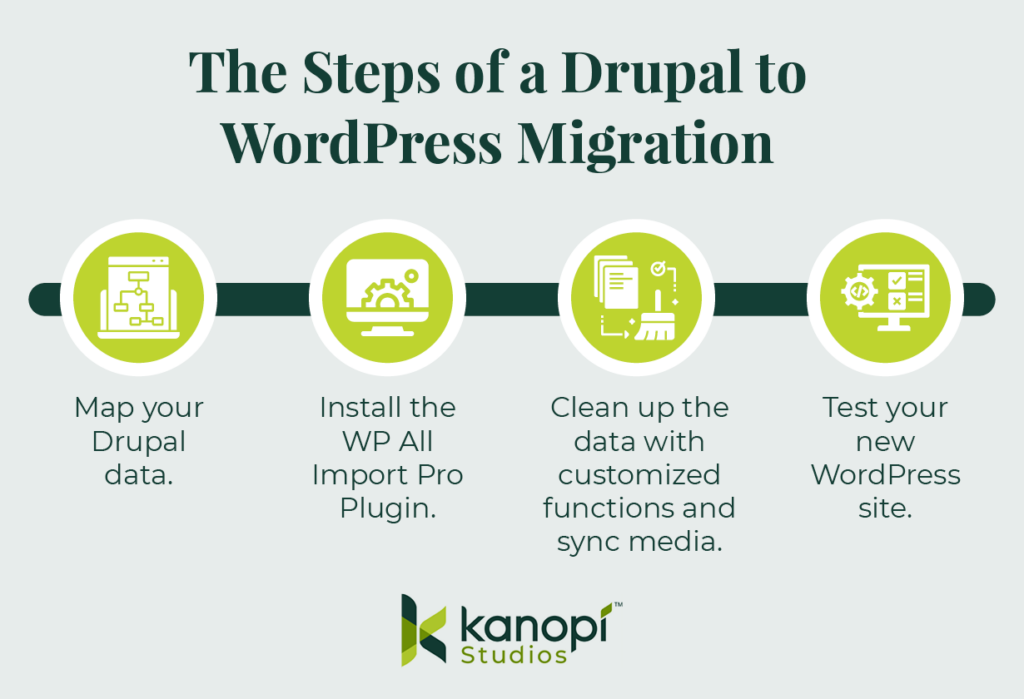
Here are the steps that you or a developer will take throughout the migration process: 

These are the steps of a Drupal to WordPress migration, outlined in the text below.

1. Map your Drupal data.

Transitioning from Drupal to WordPress requires more than just a copy and paste of a simple title and body field. Given Drupal’s complexity, your site is bound to have some custom elements and fields that need to be pulled over and converted to WordPress.

Before you begin the migration process, you’ll want to map out all of your Drupal data. This includes (but is not limited to):

  • Authoring information
  • Publishing dates
  • Images and attachments
  • SEO metadata

As you map out your data, keep in mind that you’ll want to export this on a content-type or user-type basis. This way, you can also import them into your WordPress site using the same method for each type. This is an important step because each content or user type probably also has a different field type.

Then, you’ll use Views and a Views Data Export module to output that content and create an XML, JSON, or CSV file. The type of file you use will depend on what version of Drupal you’re using.

2. Install the WP All Import Pro Plugin.

To prepare for the migration, you’ll also have to take some steps on the WordPress side. Specifically, we recommend downloading the WordPress plugin WP All Import Pro, with the ACF add-on. The add-on allows developers to map fields within Drupal to custom ACF blocks within WordPress.

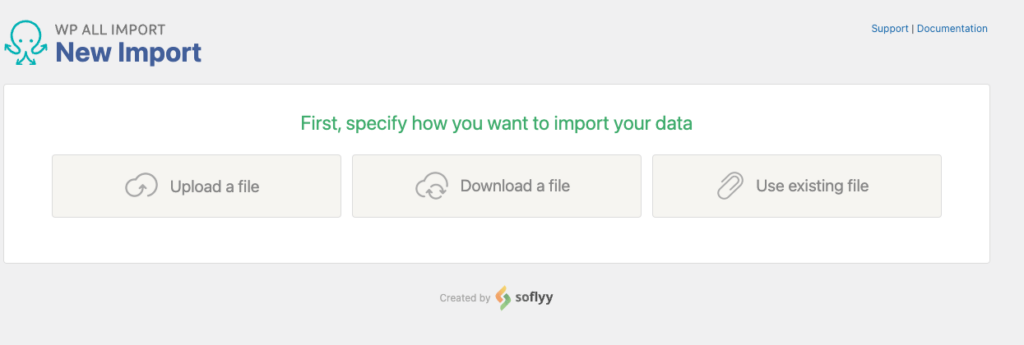
After you download the WP All Import Pro plugin, you’ll then upload the XML, JSON, or CSV file you created when you mapped your Drupal data. This first step allows you to choose how you want to import your data:

Screenshot of the All Import plugin screen asking the user how they'd like to import their data

Then, choose the data you want to import. Since you are migrating your whole site, you’ll likely import all of your data. This process can include posts, pages, taxonomies, users, or custom post types added by other themes and plugins.

3. Clean up the data with customized functions and sync media.

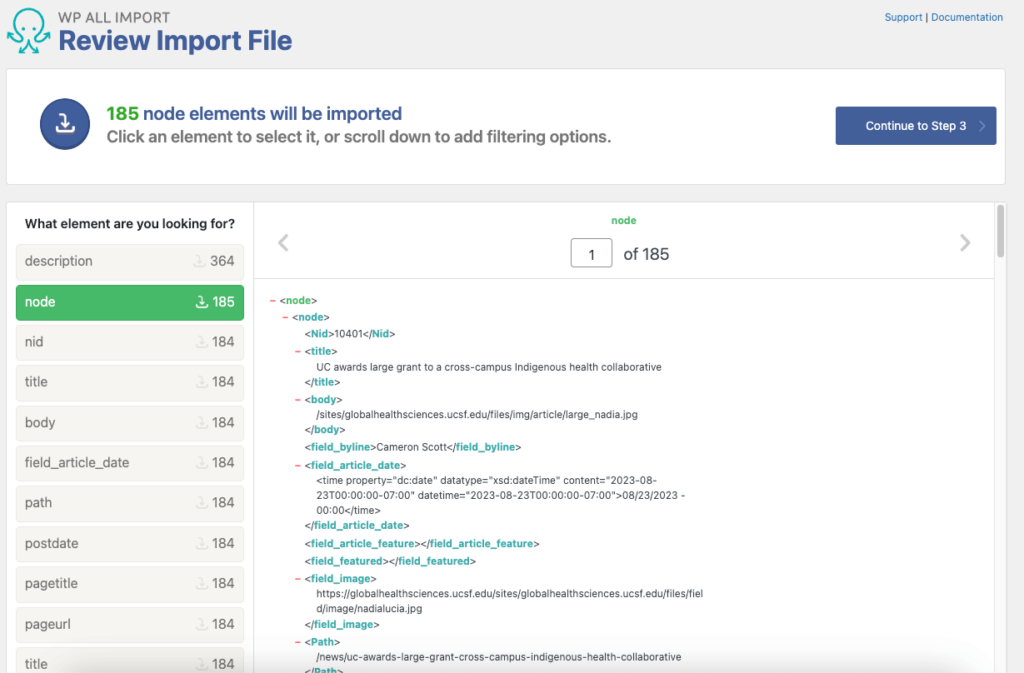
WP All Import Pro will process your import file and prepare the data you chose for import. This is the time when you can choose to configure your import data. You might need to write some custom fields to clean up, strip out, or map specific data.

Screenshot of an example of an import file in the WP All Import plugin

This step will differ depending on your Drupal site and the data you mapped, so the exact nuances you should look for and the custom functions you might create will be unique to your situation. In some cases, you may not have to make any customizations at all (but you likely will). 

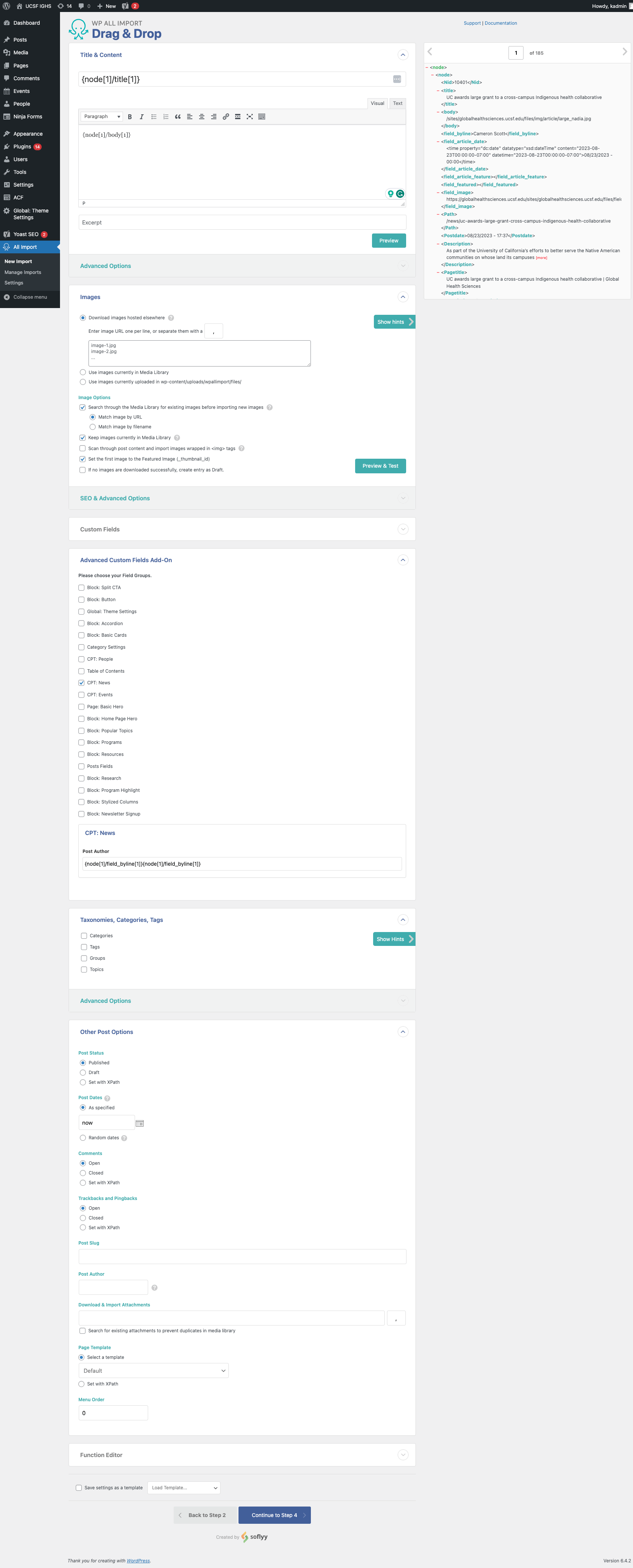
Here’s what the data will look like in the WordPress backend:

Data is shown in the WP All Import Drag & Drop editor

Additionally, sometimes images, PDFs, or other attachments don’t transfer or fail during the migration. This can lead to broken links, images that don’t load, and website issues.

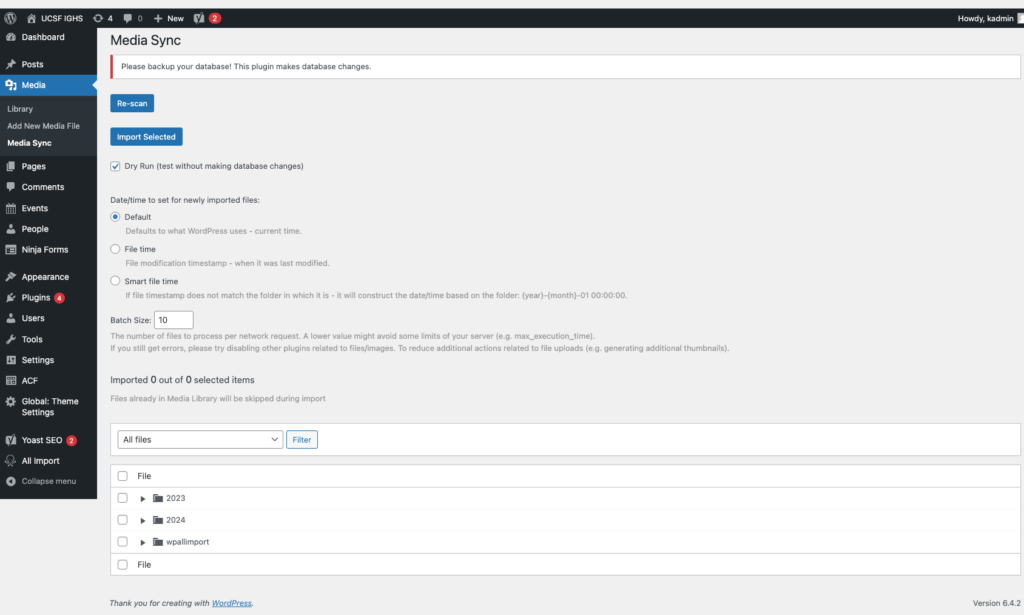
The MediaSync plugin can help resolve this issue. You can initiate a Secure File Transfer Protocol (SFTP) to transfer the files that didn’t initially move over to an uploads directory within WordPress. Then, you can use the MediaSync library to sync the data and files to resolve any broken assets. Here’s a look at this plugin in action:

The WordPress Media Sync plugin

4. Test your new WordPress site. 

Once the migration is completed, test out your WordPress site to ensure everything is functioning properly. Browse your website manually to replicate the user experience and test various elements such as your:

  • Forms
  • Links
  • Content (images, videos, text, and other media)
  • Search functionality
  • Performance (for example, assess page load times)
  • Mobile-responsiveness
  • SEO elements (meta descriptions, titles, tags, headers, internal linking, etc.) 
  • Accessibility (image alt text, color contrast, keyboard functionality, etc.) 

Testing these elements will allow you to catch errors that might have accidentally carried over or appeared during the migration process. 

Tips for optimizing your new WordPress website

After completing the migration, you can start to optimize your WordPress website to set it up for long-term success. Follow these steps to keep your website in tip-top shape: 

  • Run performance tests regularly. Tests like PageSpeed Insights can help you identify elements that may slow down your website. Common reasons for website lag include images that are too large or unnecessarily messy or complex code. Test your site regularly to catch and correct these errors before they negatively affect your site’s usability. 
  • Install any necessary plugins. Some of the most useful WordPress plugins include those for SEO, security, or caching. Make sure to carefully vet any potential plugins before using them to ensure that they won’t slow down your site. 
  • Set up Google Analytics 4 (GA4). GA4 is the latest generation of Google Analytics. It’s an event-based tracking tool that can help you better understand your website visitors’ behaviors. Set up your GA4 configuration and Google Tag Manager as soon as possible to start tracking traffic on your new WordPress site. 

These steps will help you maintain a strong website foundation, allowing you to easily adapt to any WordPress trends or new innovations as they arise. 

For more information about how to manage your WordPress content effectively, check out Kanopi’s webinar on the subject.

Wrapping up

Even if you feel confident that you can handle the Drupal to WordPress migration on your own, it’s recommended to partner with a technology consultant professional for the best results.

Here at Kanopi, we typically recommend Drupal for clients with complex needs and large amounts of data. If you think you can do without the high-power capabilities of Drupal and would rather opt for something more user-friendly, then WordPress is the right move. But, if you think Drupal will serve your organization better in the long run, our Kanopi team can also assist with any version migrations or updates you need.

Looking for more tips to help determine the best path forward for your website? Start with these additional resources: 

Drupal 7 End of Life: A Guide to Next Steps. If you’re a Drupal 7 user, you might be weighing your options ahead of Drupal 7’s upcoming end-of-life. This guide offers tips to help determine your next steps. 

Drupal vs. WordPress: Which One is Right For You? Choosing between WordPress and Drupal comes down to weighing the pros and cons of your unique website. Assess the primary differences between the platforms with this guide. 

12 Business Benefits of Using WordPress for Enterprise. If your website needs to handle complex enterprise needs, WordPress can be a great fit. Learn about the primary benefits of WordPress for Enterprise.

Dark side of Earth with lights and electricity expanding across the surface.

Translating Your Website into Other Languages

Faye
Faye Polson

In North America, language translation on websites isn’t terribly common; most websites are in a single language representative of the large demographic of English speakers. But around the world, there is a much larger demand for website translation, and even within North America, there are regulations that businesses and organizations must follow which require translation options. Canada, for example, requires French in many cases due to its status as an official language. Fun fact: every single Canadian has spent breakfast reading both the English and French sides of the cereal box.

Up until 2019, a common method for adding easy translations to a website was to use the Google Translate Widget. It was easy, free, and automatically translated the page on the fly. But if you follow that link, you’ll notice this widget has been discontinued. But you do have other options!

Where to Get Free Website Translation

Hopefully, your primary website visitors use Chrome, Edge, or Safari as their main browsers. These browsers include native translation and will prompt the user to select their chosen language without any extra effort on your part as the website owner. Google does offer a translation extension that can be used on other browsers, such as Brave or Firefox. This means you do not need to make changes to your site to offer native translation.

At the moment, if your demographic primarily speaks a single language, this is probably the route you want to take, unless you have to meet government regulations due to the nature of your organization and the country you live in. In which case, then you want a more robust solution and a budget to match.

Where to Get Paid Website Translation

If your translation needs are greater, you will be looking at a paid service. And the cost will vary depending on the size of your site, the amount of content, and the service you use. The following are the solutions Kanopi has the most direct experience with.

Cloud Translation API

Google’s recommended alternative to their former Google Translate Widget is their cloud translation service, Cloud Translation API. It’s affordable and supported by both WordPress and Drupal with the appropriate extensions. There are a few plan options to choose from, letting you decide what’s best for your site. While a developer can help integrate this solution into your site, you will also need to create your own account for your company and work with the Cloud Translation API sales team to estimate your monthly costs.

Using a Translation Service and/or Premium Extensions

Short of having employees who can do all your translation, a translation service allows you to submit your source content with language requirements and receive translated copies in return. If you need to alter the content of your pages based on language, for example switching from imperial measurements to metric, this is likely something you want to consider. 

The modules (Drupal) and plugins (WordPress) needed to make this work can help automate some of the actual translation. Yet depending on how many languages are supported, some organizations find they need at least one dedicated role to help manage and review these translation processes.

There’s a huge array of services to choose from, and the right solution will depend on your organization’s needs. Meanwhile, here are the premium extensions Kanopi recommends for adding language translation to your website.

WordPress:

Use WPML with their Automatic Translation. This plugin will also work with various translation services if needed. Cost-wise, you are looking at $99 per year, plus the optional translation service you might use.

Drupal:

TMGT allows you to work with a variety of translation services depending on what Drupal version your site is on. Price will vary with your choice of service.

Lingotek is another integration that Kanopi has used frequently. It’s a combination of an extension and translation service. Price will vary according to your needs.

Get website translation and go global!

If language translation is right for your site, start scouting your translation service options. Start with looking at the Cloud Translation API, then move on to researching the premium plugins if you need something a little more hands-on. And as always, Kanopi would love to hear from you if you’re looking for a développeuse (that’s French for developer).

12 Business Benefits of Using WordPress for Enterprise

WordPress is the most popular content management system (CMS) by far, powering 43% of all websites. WordPress hosts sites for a wide variety of organizations, including media groups, nonprofits, higher education institutions, and corporations. But is WordPress for enterprise the right platform for your business’s complex needs

Enterprise-level companies require reliable and scalable websites to grow and compete with other large organizations in the digital era. Often, enterprise leaders turn to expensive and complicated customized web solutions to host their sites. 

WordPress has evolved into a powerful and flexible solution to handle complex enterprise needs. Now, well-known brands like Facebook, Microsoft, and Spotify run their websites using WordPress. 

In this guide, we’ll walk through the following sections to give you a better sense of how WordPress for Enterprise can benefit your organization:

Let’s start by answering some of the most frequently asked questions about WordPress for Enterprise. 

WordPress for Enterprise: FAQs

What does WordPress for Enterprise mean?

WordPress for Enterprise is the application of the WordPress platform to meet the needs of large businesses. These organizations are usually multinational corporations with multiple domains and thousands of users accessing their sites at once.

According to WordPress, their enterprise solutions are used “wherever there’s a requirement for flexible, cost-effective, and secure creation and distribution of content.” Media and publishing organizations, E-commerce sites, and other large-scale businesses use this solution for their online marketing, communication, and commerce needs. 

What features do enterprise websites need?

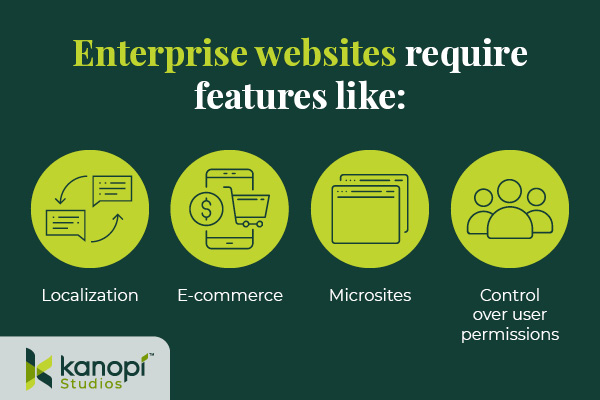
Enterprise websites require the ability to handle significant traffic and user engagement. Often, these sites will need to support features like:

Enterprise WordPress websites require features like localization, e-commerce, microsites, and control over user permissions.
  • Localization. Localization requires adjusting site content to the cultural and linguistic norms and context of different target audiences. Localization involves translating text and adjusting images and text to ensure all website elements are culturally appropriate and relevant. This is especially important for organizations that offer services for an international audience, such as airports or global health organizations.
  • E-commerce. Some enterprise websites require e-commerce functionality that allows visitors to browse products or services and complete secure transactions. This involves an online storefront and a secure payment processor with multiple payment options. 
  • Microsites. A microsite is an individual web page or site made to function as a separate entity while still being a part of your existing website. Some corporations use microsites to promote sub-brands or special events. 
  • Control over user permissions. Enterprise websites need to only allow specific users permission to access certain features. This promotes greater security across the organization. 

Enterprise websites must connect with a diverse, often global audience. These features make it easier for marketing professionals to promote their businesses while maintaining reliable security and other core features.

What’s better for an enterprise — WordPress or Drupal?

As you search for a new CMS, you might also come across Drupal as a top option. Drupal is another open-source CMS that organizations with complex needs, like enterprises and government institutions, use to create robust and secure websites. 

Drupal also offers multilingual functionality, security, and control over user permissions. In addition, Drupal has strong accessibility for both back- and front-end users. The release of Drupal 10 in 2022 unveiled the platform’s most modern, accessible editing experience yet, along with a host of additional advanced features. When choosing between Drupal and WordPress, consider your corporation’s unique needs and what CMS features you will prioritize. Explore our guide to Drupal vs. WordPress to learn more about the primary differences between these platforms and help determine which CMS is right for your enterprise. 

Common WordPress for Enterprise Misconceptions

Due to the early days when it was primarily a blogging platform, several misconceptions about WordPress’s capabilities have prevailed over time. Here are a few common misunderstandings: 

WordPress is only for blogs and is not a true CMS.

As mentioned, WordPress powers 43% of all websites (including websites for some of the biggest brands today), meaning it can do much more than just blogging.

WordPress is not great for security.

Third-party plugins may create a little bit of risk, but WordPress’s core system is incredibly safe.WordPress has also invested in fast security releases, with a team of 50 experts managing them. Even whitehouse.gov is on WordPress, showing how far the platform has come in regard to security. 

Open source is not reliable at the enterprise level. 

Enterprise-level organizations can safely use an open-source CMS. Massive sites like Facebook and Google use open-source systems to power their tech. 

WordPress doesn’t offer a lot of support.

WordPress’ extensive open-source community facilitates access to tons of contributors and developers that create new plugins, themes, and features every day. As a well-known and popularly-used CMS, WordPress has plenty of support from millions of users and experienced developers. 

12 Benefits of WordPress for Enterprise

What’s the true story about what WordPress can do for your enterprise website? Let’s take a look at the top benefits of WordPress for enterprise: 

1. High ROI

WordPress’s return on investment is very high compared to proprietary systems, especially in terms of the total cost of ownership (WordPress is free!) and implementation speed. Building and testing new features can be completed in just a few weeks because of easy access to themes and plugins. 

2. Strong security

As mentioned, WordPress offers consistent updates and security releases to protect users from common hacks. You can also look to additional security plugins to further protect your site.

3. SEO friendly

Search engine optimization (SEO) is crucial to help boost the visibility of your enterprise website across search engine results pages. WordPress offers built-in SEO-friendly features, such as optimized URL structures and category and tag options that help search engines better understand your website’s structure. Plus, using an SEO plugin like Yoast, All in One SEO, or SEOPress can make the optimization process even simpler. 

4. Access to integrations

Because WordPress is so popular, there is already a vast number of third-party tools that are ready to integrate with your system. This means your enterprise business can quickly add features and make site updates without needing to invest in expensive custom solutions. Besides the many free tools, enterprise businesses can also invest in premium paid plugins with added support!

5. Easy to use

Once your site is up and running, the WordPress platform is perfect for non-technical users. The Block Editor (also known as the Gutenberg editor) offers an intuitive backend experience that arranges content into a series of blocks for text, images, videos, and other page elements. This ensures that any of your enterprise businesses’ team members can jump in and make necessary changes.

If you need help along the way with managing your content, there are plenty of resources available—start with Kanopi’s webinar on the subject!

6. Open-source community

One of the most valuable features of WordPress is the open-source community supporting its development. These contributors create new plugins, themes, security patches, and features to help WordPress users customize their sites to their needs. This community is always growing and evolving. 

7. Accessible

WordPress is devoted to creating accessible front- and back-end user interfaces. Their Accessibility Team runs ongoing audits and tests on themes and functionality using assistive technologies. Also, any code built into the WordPress core system must meet the Web Content Accessibility Guidelines version 2.1 level AA

8. Scalable

WordPress has made great strides when it comes to improving website performance. You can ensure your website is prepared to handle a large amount of traffic by making use of these WordPress elements: 

  • Keep your code clean and only invest in high-quality, lightweight plugins and themes. 
  • Use a page caching tool to help improve page load speed. 
  • Select an enterprise WordPress host that emphasizes scalability. 

Scalability is necessary to ensure that your enterprise website can manage a large volume of traffic efficiently.

9. Streamlined media management

Enterprise businesses use many online media types such as documents, visual media like photos and videos, and audio files. With WordPress, you can upload and manage just about any media type in a streamlined and intuitive manner. Easily manage media on the backend and edit it visually on the front end.

10. User management and multisite domains

Your enterprise website may need to run a network of subdomains or microsites and give access to only a select number of team members. WordPress supports multisite usage with Super Admins, a user role that can set up networks and control user permissions.

11. International capabilities

Your enterprise website must be scalable on an international level. WordPress is available in over 100 languages, ensuring you can effectively reach your global audience.

12. Flexible and agile

This is the true differentiator between a proprietary and open-source system. Your enterprise business’ next goal is always going to be starting a new project, making processes more efficient, or releasing updates, all without compromising quality.

That’s why you need a system with high agility, like WordPress. With easy collaboration between content editors and developers, the WordPress system allows your team to build and expand website features quickly without breaking the bank.

Enterprise WordPress Development Services

Do you have a large-scale project in mind? Or do you already have a built-out enterprise-grade website and just need support

Consider working with a WordPress development expert like Kanopi. Our professionals work closely with your enterprise business to understand your unique needs and strategize how your WordPress website can best support them.

Plus, Kanopi takes a continuous improvement approach to ensure that your site is always improving over time — perfect for a quickly-growing enterprise business.

Our WordPress development services include:

  • Plugin and theme upgrades
  • Security patches
  • Performance enhancements
  • Content strategy
  • E-commerce updates

Plus, we have a dedicated enterprise support tier customized to your business needs, ensuring that your website stays updated and viable over the long term. 


WordPress is a flexible, scalable, reliable CMS that can take your enterprise website to the next level. If you’re looking to upgrade your CMS or switch to WordPress, the recent release of WordPress 6.1 and the improvements that come with it mean that it’s a great time to get on board. 

Looking for more information about what WordPress can do for your business? Start here:

Old printing press template with removable letters

Using Gutenberg to Elevate the WordPress Editing Experience

Faye
Faye Polson

“Gutenberg” is the name given to the movable block editor adopted by WordPress back in 2018, harkening back to Johannes Gutenberg who invented one of the early European movable-type printing presses. Reusable individual letters that could be moved, and reused, eventually lead to typography and fonts as we know them.

Of course, nowadays we have printing technology that Johannes could not have even imagined, let alone believe that an entire online editing experience would be named after him. 

But what exactly is Gutenberg?

Most of us are familiar with editing experiences, such as typing in an email, Microsoft Word, or Google Docs. These experiences are mostly similar; you have a blank space to type and buttons for alignment, styles, fonts, sizes, etc. This has been a common website editing interface for decades, but it is both creatively and logistically restricting. 

If you wanted to move a section from one location to another, you’d have to copy and paste it, then delete the original. Trying to completely rearrange your content would be frustrating and time consuming. Or if you wanted some snappy responsive columns, you would have to switch to view the document code and write HTML and CSS. 

Gutenberg is WordPress’s native “drag and drop” site builder. It solves those problems by allowing you to create your content in blocks designed for the specific content you’re using. There are over 90 blocks to choose from. You can play around with all of these options on the Gutenberg demo.

This flexibility allows content editors to populate their website with more complex content, and then shuffle it around within the layout. In fact, there are many themes that lean so heavily on Gutenberg that you wouldn’t need a developer at all. With the introduction of Full Site Editing, nearly anyone could put together a working website that’s beautiful too.

Why use a web developer at all?

While there are many themes that do leverage everything Gutenberg has to offer (those 90+ blocks), that’s not the case for most of them. And for existing sites with legacy themes, there is little chance that they are able to take advantage of this newer technology. Out-of-the-box websites are useful and serve a purpose but when you need custom design, structure, and functionality, you need to call in professionals.

Another struggle with drag-and-drop sites is the global element. If you have 30 headings on your website and decide you want to change them all from green to blue, you’d need to go through and edit the color settings on all 30 headings one by one. While there are some global elements, the vast majority of your page content will require manual editing. This can be incredibly time-consuming.

Native Gutenberg blocks can be unexpectedly limiting. For example, if you desire rounded borders on all media but the block you’re using doesn’t have support for a border-radius, you’d need a developer to create and apply custom classes. Keep going down that path and suddenly you can have a site full of custom classes and blocks that never look the same from one to another. This can be an editing nightmare and require excess documentation to keep it all straight. Suddenly that easy drag-and-drop editing experience requires a higher level of skill.

There’s a better way to customize.

Kanopi approaches Gutenberg blocks from the perspective of creating consistent and branded content. One of the big advantages of Gutenberg is that we can create new blocks and apply our own styles and structure. This allows us to create blocks that can hold and display any type of content within a defined set of rules. Instead of pouring budget into styling 90+ blocks (and their hundreds of combinations) that may never be needed, our team focuses on creating custom content solutions for our clients.

This “best of both worlds” approach lets site editors continue to use the ease of Gutenberg’s drag-and-drop experience, while also creating consistent, branded content. As a website moves from its initial build into support, these blocks can be expanded upon and updated globally (and thoughtfully). Even older sites without any Gutenberg usage can be configured to allow for this type of block expansion without disrupting the existing content.

Gutenberg is here to stay.

It’s clear that WordPress is leaning in on the use of Gutenberg and the Full Site Editing implemented in the past year. Meanwhile, Advanced Custom Fields Pro (the preferred and recommended plugin for enhancing WordPress’s content management) is keeping pace to ensure custom block creation works seamlessly with every stride made. Whether using an out of the box theme, or having an agency custom building according to your organization’s needs, Gutenberg is a phenomenal solution with room to grow in many directions.

Contact us to discuss how Gutenberg can work for you

Drupal for Nonprofits: Is This CMS Right For You?

Which CMS is best for your nonprofit organization?

Today’s nonprofit leaders understand the importance of a well-developed website and online presence.

To ensure your mission has as much exposure as possible and effectively inspires giving, you need a content management system (CMS) that represents your organization and meets all of your online fundraising needs. 

In this guide, we’ll be talking about the Drupal CMS, a popular system that can support organizations of all sizes and fields. 

Deciding between Drupal and WordPress? Read our guide to compare the two platforms.

What is the Drupal CMS?

The Drupal CMS currently powers 1.4% of all websites with a 2.2% share of the entire CMS market. As an open-source platform, Drupal is free to download and provides baseline functionality and features for nonprofits.

From there, you can expand Drupal’s framework thanks to its vast community of coders. With over 47,000 modules to add to your core platform and almost 3,000 themes to brand content to your mission, your website can adapt and grow with your organization’s needs.

Drupal has released multiple versions over the years, and several older versions are still in use alongside their newer counterparts. Drupal 9 was just released in June 2020, and Drupal 7’s end-of-life date extended to 2022. Take the time to research each version to understand which is best for your nonprofit (though we’d recommend Drupal 9 for the smoothest migration process).

We have a dedicated article on Drupal planning and development if you want to take a deeper dive into the versions of Drupal and future planning for a Drupal site.

What are the benefits of Drupal for Nonprofits?

At a quick glance, the Drupal CMS seems easy-to-use and set up, but its benefits don’t end there. Here are some of the top reasons why your nonprofit can thrive with the Drupal CMS:

  • Cost — Because Drupal is an open-source CMS, its software and source code are made freely available and can be redistributed or modified. That means anyone who wants to use Drupal can.
  • Scalability — Thanks to Drupal’s modules and themes, its platform is completely scalable and prepared to grow as your organization does.
  • Custom coding — Drupal can accommodate more complicated websites with its custom coding and themes. Use Drupal to customize content types, fields, and content presentations to support any of your content strategies. Drupal even allows you to apply different administrative themes to your website or use your public-facing theme as part of your site management and editing experience.
  • Multiple user permissions — If you have multiple users, Drupal has a built-in access control system where you can create new visitor and administrator groups with granular permissions. Add anywhere from a few users to hundreds of thousands.
  • Robust features — Take advantage of Drupal’s core features as well as the growing list of community-made modules. Because Drupal’s community of developers is constantly working, there are always new modules and upgrades that you can leverage.
  • Security — Drupal’s enterprise-level security and ability to provide in-depth security reports are some of its top features. This is why Drupal is used by government institutions and other large, security-conscious organizations.
  • Multilingual in Drupal core — Starting with Drupal 8, your content can be presented in multiple languages without any additional steps on your part. There are four core modules in Drupal 8+ that allow full translation of every part of your site.
  • Integrations — Along with its modules and themes, Drupal also integrates with a wide range of third-party applications including Salesforce, Marketo, Hubspot, SugarCRM, Xoom, PayPal, SAP, PHP Cart, social media platforms, and Google checkout.

3 Nonprofit Drupal Websites

Gain inspiration for your nonprofit site and see Drupal in action by exploring successful nonprofit websites! To help you better determine if Drupal is the right CMS for you, here are three examples (the first two being Kanopi clients) of real nonprofit websites created with Drupal.

1. Covenant House: Drupal Nonprofit Example

Covenant House International has helped millions of homeless, runaway, and trafficked youth for over 40 years. Their mission aims to treat all young people with respect and unconditional love, so increasing their online presence is a critical component of their fundraising efforts.

Here are some of their website’s standout features:

  • Adaption for both desktop and mobile viewing.
  • CRM integration with specialized forms to improve Covenant House’s donation submission and donor tracking, helping them reach their organizational goals faster.
  • Dedicated portal for virtual events, additional information about their initiatives, and donation forms.

Read our dedicated Covenant House case study to learn more about Kanopi’s role in building their website.

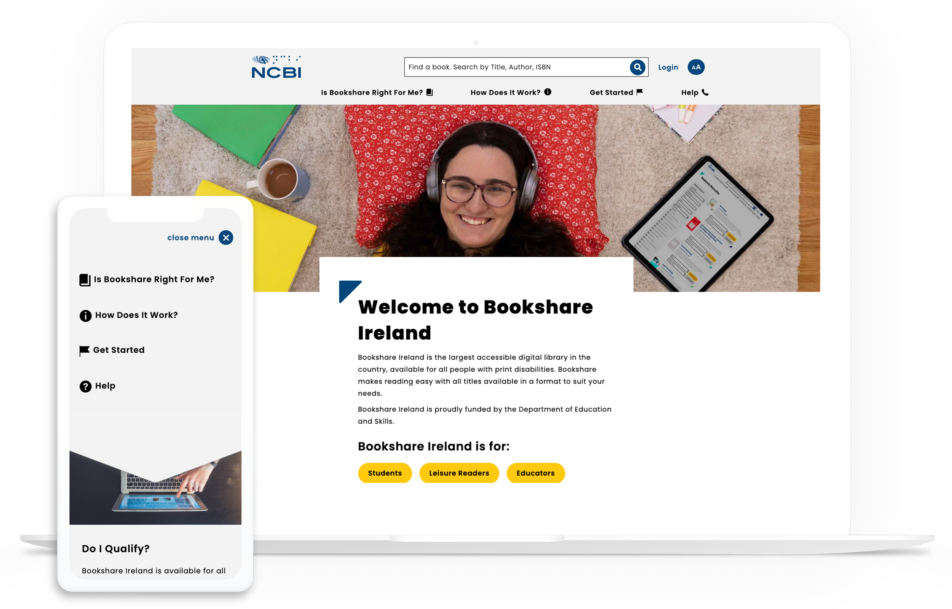
2. NCBI: Drupal Nonprofit Example

The NCBI's site is a great example of Drupal for nonprofit.

The National Council for the Blind (NCBI) aims to decrease visual impairment reading barriers across the globe and provides digital opportunities for both learning and literacy.

One of NCBI’s goals is to create accessible learning and literacy worldwide, and their website needs to support this mission. That’s why they chose Drupal for its high customizability and AAA compliance, the highest possible level of online accessibility.

Here are some of their standout website features for nonprofits:

  • AAA compliant site with considerations for users with visual impairments, including color contrast, font families, and even font size.
  • Customized search functionality to highlight book listings and make downloading easy.
  • Multimedia content to tell NCBI’s story beautifully.

Read our dedicated NCBI case study to learn more about Kanopi’s role in building their website.

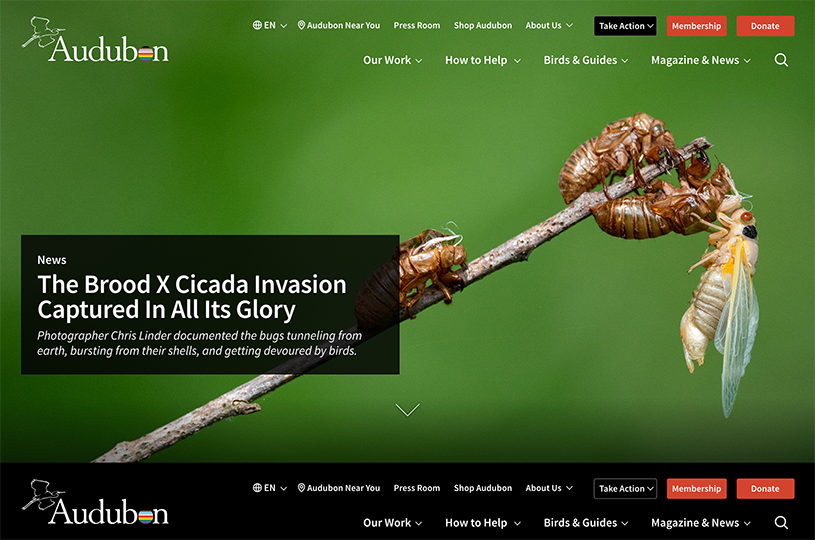
3. Audubon: Drupal Nonprofit Example

Here is an example of a Drupal for nonprofit website.

The National Audubon Society is an American nonprofit environmental organization dedicated to the conservation of birds and their habitat. Before using Drupal, the National Audubon Society had over 100 subdomains, difficulty editing and managing all of their content, and a lack of access-level restrictions.

The National Audubon Societies needed one unified system and chose to merge their sites together using Drupal’s platform. With this change, they were able to:

  • Multiple language versions of the website.
  • User permissions granted to the appropriate staff members.
  • Ample security for all modules.

Curious to learn more about this project? Check out Drupal’s dedicated case study on The National Audubon Society.

Drupal for Nonprofits: How Kanopi Can Help

What can partnering with the right nonprofit technology consultant do?

At Kanopi, we can help your nonprofit not only determine whether Drupal is right for your mission but also develop your site and set it up for long-term growth.

With Kanopi’s team, you gain support from professionals with years of working with mission-driven clients and access to their expertise in digital nonprofit strategy. We partner closely with large and sophisticated organizations like yours to outline your nonprofit’s online goals, determine how the Drupal CMS can further those goals, and create a plan to put them into action.

Not only are we fully updated on the latest nonprofit industry trends and Drupal updates, but we also take a continuous improvement approach to site development. Instead of waiting for CMS updates, we regularly recommend improvements and adjustments, like navigation strategy and SEO fixes, so that your site is always valuable and well maintained. This way your nonprofit website grows with your organization and services.

Features of Kanopi’s Drupal Maintenance Service

Here are some of our top Drupal maintenance and support services:

  • Module and plugin updates
  • Bug fixes and security patches
  • Development modifications
  • Updating content types/views
  • Third-party integrations
  • CSS/HTML changes
  • Commerce updates
  • Performance enhancements
  • Web accessibility optimization
  • Technical SEO optimization

When you partner with Kanopi, you get more than the typical Drupal support and maintenance package. Our team goes above and beyond and aims for the highest quality development work.

Whether you need monthly support, which starts at $5,000/month, or a full website rebuild, which starts at $150k, Kanopi is dedicated to taking your mission to the next level and ensuring your online presence represents your prestigious organization accurately.

Interested in working with Kanopi to help build your nonprofit's Drupal website? Contact us today to get the conversation started.

Drupal 7 to 9 Migration Planning Guide

Attention all Drupal 7 users!

This post was last updated in June 2023 to align with Drupal 7’s most recent end-of-life date of January 2025.

Kanopi is a certified Drupal migration partner and can help with your migration needs.

With Drupal 7’s end-of-life date extended to January 2025 and Drupal 8’s end-of-life coming sooner this November of 2021, it’s safe to assume that most Drupal 7 users will be skipping Drupal 8 and heading straight to Drupal 9. 

Both Drupal 8 and 9 (and likely the versions after) significantly shifted the way content and configuration are organized. Instead of the traditional route of simply applying an update to your existing Drupal 7 site, you’ll have to migrate all of your data to a brand new Drupal 9 site.

But where do you even begin? How does a data migration work? How can you effectively prepare for Drupal 7’s end-of-life date? We will answer these questions and more in our Drupal 7 to 9 migration planning guide.

Table of Contents

Learn more about Kanopi’s extensive experience with Drupal development.

Kanopi is here to help with your Drupal 7 to 9 migration. Contact us today.

Drupal 7 to 9 Migration: Step by Step Process

So, you’re ready to begin the Drupal 7 to 9 migration process. 

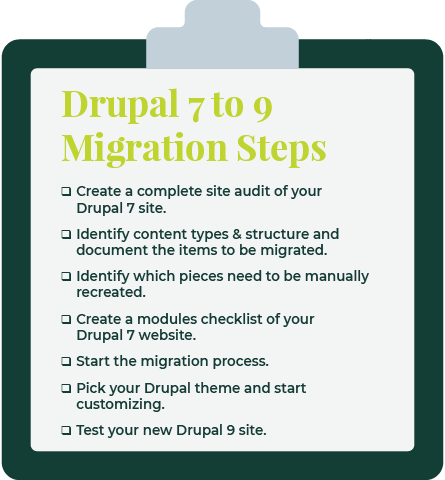
Below is a quick overview of the steps you’ll be taking:

  1. Create a complete site audit of your Drupal 7 site. A site audit is used to learn about the current state of a website and determine if you need to perform any maintenance. This complete audit should include all types of functionality and entity types (Modules, Content types, Taxonomies, Paragraphs, etc).
  2. Identify the content types and structure of the existing site and document the items to be migrated. During your audit, you should come up with a list of all the data that needs to be migrated to your new site. Get rid of anything broken or duplicated so that your Drupal 9 site is ready to go.
  3. During this time you should also identify what pieces should be manually recreated. Views, webforms, and content types with a small number of entries are much quicker to build by hand.
  4. Create a modules checklist of your Drupal 7 site to identify custom code and missing contrib functionality. Modules are the best way to customize the Drupal CMS to your specific needs. Sometimes specific modules may have been customized or are not yet compatible with a Drupal version, so this is worth noting beforehand. Also, look for any custom modules that don’t come from the community contrib space. These may have good alternatives that are contrib for Drupal 9, or they may have to be custom-built to work with the CMS.
  5. Start the migration progress. There is a suite of contrib modules that help empower developers to create the files and scripts needed for migration. A custom migration module should be made for each site, creating the fields, content types, and entities on the new Drupal site.
  6. Theme your new site and complete additional manual work. This includes choosing a theme, organizing content, and other customizations.
  7. Test your new Drupal 9 site. Now that everything is successfully migrated, it’s time to put your Drupal 9 site into action! If your team runs into issues, you should roll back and re-test.

5 Things to Consider Before Migrating Drupal 7 to 9

Don’t start the migration process just yet! There are a couple of things you can do beforehand to make the migration process much smoother and easier to implement.

We recommend the following best practices:

  • Ensure your Drupal 7 website is at the latest version — This makes upgrading much cleaner. Some of your existing modules will even have direct Drupal 7 to 9 upgrade paths.
  • Make sure you have access to both your Drupal 7 public and private website data — This is the data that you’ll be migrating, so having easy access to all of it is crucial if you want to successfully upgrade your CMS. This includes all your uploaded private and public files, too.
  • Create a backup of your Drupal 7 website — Even if you do everything perfectly, it’s worth it to take the steps to prepare in case of an accident. Make sure to create a backup of your Drupal 7 site before you start the migration process. Then, use that backup as the source of your upgrade. This way, if something happens and you lose data in some way, you still have your original site to refer to.
  • Download a fresh installation of Drupal 9 and enable the core migrate modules — The modules in the core include Migrate Module. Migrate Drupal Module, Migrate Drupal UI Module, and Migrate Tools Module.
  • Perform a thorough content audit for a smoother migration — you already know that you should perform a site audit, but in particular, a content audit is valuable. This helps you determine the content that you want to migrate and get rid of unused content and complexity that you don’t need.

Why You Shouldn’t Opt for a Drupal 7 to 8 Migration

Still not convinced that going straight to Drupal 9 is your best bet? After all, you already know that Drupal 8’s end-of-life date is coming up, much sooner than Drupal 7’s. Even if you do successfully upgrade to Drupal 8, you’re going to have to do another upgrade to Drupal 9 in November of 2021 when 8 is no longer supported.

If you’ve already made the switch to Drupal 8 before the news of 7’s end-of-life extension, don’t worry—the process from 8 to 9 is fairly simple. Updating from the most recent version of Drupal 8 to Drupal 9 is more like a minor upgrade than the massive migration effort that Drupal 7 to 8 or 7 to 9 entail.

If you are migrating from Drupal 8 to Drupal 9, ensure that your site is on the latest Drupal 8 version (8.9 as of this writing), that your hosting environment meets minimum system requirements, and that all your deprecated code is removed.

Common Challenges During the Drupal 7 to 9 Upgrade

To ensure you’re fully prepared to start this process and begin anew on a Drupal 9 site, it’s worth it to address the common challenges and obstacles you may face. Getting a good idea of the pitfalls that others have stumbled upon will only help you better avoid them.

Here are the common challenges you should be aware of:

  • Many Drupal 7 contributed modules have better versions of themselves in Drupal 8+ and some have even been deprecated. If a frequently used module has less functionality in Drupal 9, you might consider finding a different solution.
  • Some of the best practices used to build sites have changed in Drupal 8/9, with some pieces moving into the core and some pieces replaced by other modules.  Some of these are:
    • The widely used Features module in Drupal 7 is now almost obsolete after Configuration Management took over all the Features functionality and more for Drupal 8+.
    • The Field collections module has been deprecated and replaced by the widely popular Paragraphs module, for which there is a direct upgrade path.
    • Instead of panels of landing pages, Drupal 8 and 9 use the Layout builder. This may need some custom migration plugins.
    • The Media suite of contrib modules has now been moved into the core.
  • When running a Drupal 7 to 9 migration, you may exhaust your system resources, which causes your migration to stop. Thanks to “highwater marks,” a field value in Drupal Migrate, you can run the migration again and it should pick up from where it left off.

If you stumble upon any other challenges that you don’t know how to tackle, your best bet is partnering with a dedicated technology consultant.

Our professionals at Kanopi are experts in Drupal planning and development and can aid you in your migration journey. Each of our team members has, on average, 11 years of experience in Drupal Development, and several of them are Acquia-certified. We also are a supporting partner to the Drupal Association, regularly contribute to the Drupal Project, and are one of the main organizers of BADCamp.

50% Of All Big Projects Fail, including Websites. Why?

Jimmy's Photo
Jim Hoogewind

Marketing leaders have the best intentions going into an expensive and large six-figure website overhaul. However, according to the Harvard Business Review, as many as half of big projects like these are considered failures when all is said and done. And you’re left wondering…

  • Why did this take longer than I was told?
  • Why was more funding needed than was estimated?
  • Why were there so many surprises and scope changes?
  • Why do I feel so burned by the agency my team selected?

Now you find yourself facing down another big website overhaul and all the risk associated with it. How will you feel confident it will be successful this time? How will you be sure you won’t be left with heartburn and the same frustrating questions as last time?

In my 15+ years working in this industry, I’ve learned there are three key elements to ensuring a big website design and development project is successful.

Think of it like a three-legged stool…

1) Stakeholder Alignment

Performing candid and skillfully focused stakeholder exercises which tease out the goals and intentions of important leaders in your organization. These exercises force invaluable conversations, and ultimately lead to buy-in.

2) User Experience

Target audience data mitigates risk by replacing assumptions with defined needs and specific pain points. These eventually inform the site experience that’s most helpful to each audience.

3) Design & Development Planning

With stakeholders aligned and users defined, design and development planning can begin using models such as sitemaps and wireframes. Technical and functional requirements can start to be dialed in as well.

Unfortunately, most agencies focus only on one or maybe two of the legs described above, resulting in a shaky foundation to your project. But not Kanopi. We focus on and thrive at all three, and we make it fun along the way. 

We call this endeavor the Website Growth Plan (WGP). Through this proven process, we’re able to answer questions such as:

  • I know my site is not working for me, but how do I improve it? 
  • I will need to migrate from Drupal 7 to D8 or D9, but what will that budget look like?
  • How can I improve my SEO? How is my site performance now?
  • I need a new content strategy, but how can I do this properly when I am already so busy?

After taking factors (like the ones illustrated below) into account, the WGP delivers an all encompassing action plan for your website. By setting expectations early and often, this helps avoid the heartburn-inducing questions you were left with after your last website project.

Which website growth plan is right for me?

More information can be found here, but below is an overview of our various plans:

Website Reimagine

This plan is a concentration of UX research, content strategy, and a bite-sized amount of design. It helps formulate a game plan that drives clarity for the team and gets some early design thinking on the table. Plus, it is actually a wonderful use of time as it is the first step in an overall design and development project, as the deliverables include a roadmap to launch.

Usability and Design

This is a data-informed optimization plan incorporating user experience, visual design and content recommendations delivered in an actionable plan for next steps.

Content Strategy

Amplify your message through a powerful analysis of important information, including user needs, competitor analysis, personas and Customer Decision Journey mapping — from Awareness to Advocacy. This plan focuses on storytelling content, user experience, visual design recommendations, and more.

Drupal 7 Transition Plan

You should feel secure planning and budgeting for the transition from D7 to D8/9 or to WordPress. This plan removes the “unknown” and illuminates the details for your organization to make an informed decision and take action on next steps.

Technical SEO

This is a deep-dive to analyze your website’s SEO technical health and set you up for search engine optimization success.

GDPR & Compliance

The General Data Protection Regulation (GDPR) is a legal framework that sets guidelines for the collection and processing of personal information from individuals who live in the European Union (EU). This plan gets you compliant.

Accessibility

Reach your audience and meet compliance with Website Compliance Accessibility Guidelines (WCAG 2.1 AA or higher) through a skillful analysis and recommendations action plan.

Technical Review

A comprehensive technical deep-dive into your site’s code and technical health to provide foundational recommendations for optimization and stability.

And if one of those doesn’t quite fit? Don’t worry. Our nimble nature finds us creating custom packages for our clients to best meet their needs. Contact us to chat about which plan is the best fit.