






4 Simple Steps to Migrate from Drupal to WordPress

Are you thinking of migrating from Drupal to WordPress?

Drupal is one of the most popular content management systems (CMS). Many organizations and institutions, from airports to universities, use its open-source platform, which currently powers 6% of the top 10,000 websites.

Drupal’s CMS gives web developers fine-grain control over user permissions, the ability to handle complex queries, advanced configuration management, and a platform that can host large amounts of data storage.

However, not everyone needs the complex capabilities that Drupal offers. While it’s free to use and has a strong community of developers and users, that doesn’t necessarily mean it’s the best CMS for you. That’s where WordPress, another popular open-source CMS, comes in. 

WordPress is considered one of the most user-friendly CMSs. Its intuitive editing experience makes it easy for non-developers to add content. It’s also the most popular CMS by far, used by 62.5% of all websites. Plus, it’s easy and fast to get a WordPress website up and running. 

In this guide, we’ll explore the steps required to smoothly migrate your Drupal website to WordPress. Here’s what we’ll cover: 

Let’s begin by reviewing common situations that lead organizations to consider a Drupal to WordPress migration. 

Reasons to migrate from Drupal to WordPress

There are plenty of pros and cons for both Drupal and WordPress, but you might have recently begun to feel that Drupal’s drawbacks outweigh its advantages for your unique website. 

Here are some common reasons why some organizations might want to switch their CMS from Drupal to WordPress:

  • Drupal doesn’t have all the capabilities you need.
  • Drupal is too confusing to use.
  • Drupal costs too much money to maintain.
  • WordPress’s editorial process and media management are much easier than Drupal’s.
  • WordPress is more user-friendly and doesn’t require as many custom configurations.

Essentially, Drupal tends to work better for more complex web projects and large amounts of data, whereas WordPress is often considered to be more user-friendly out of the box. 
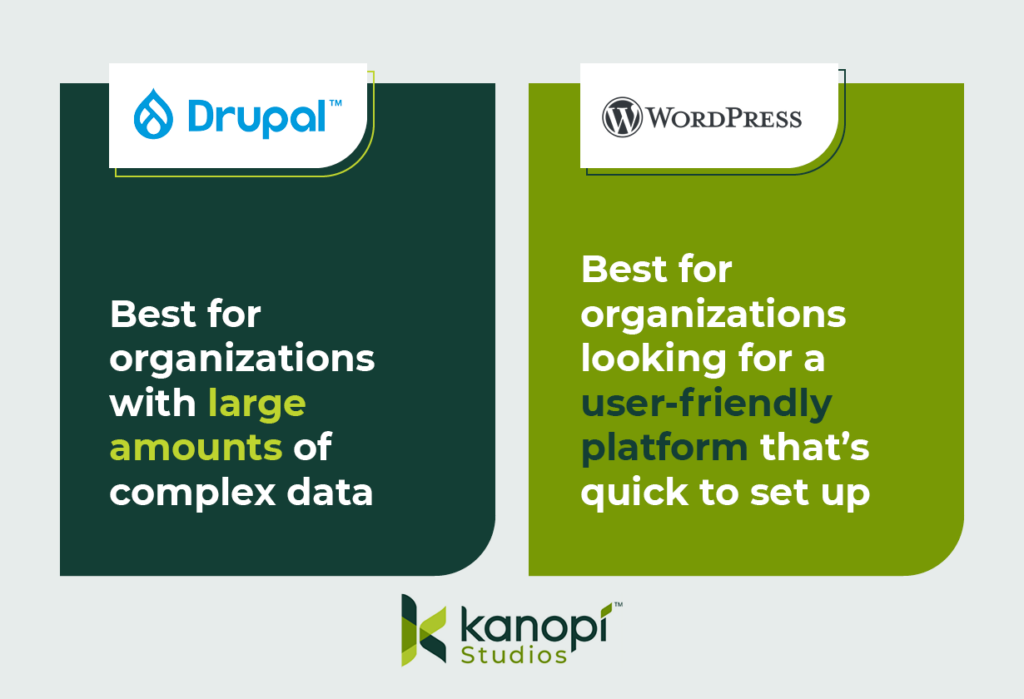
This image explains the primary benefits of Drupal and WordPress. Drupal is best for organizations with complex data, while WordPress works for organizations looking for a user-friendly, quick-start platform.

Things to consider before a Drupal to WordPress migration

A Drupal to WordPress migration may require a decent amount of work. If your original Drupal site is more complicated than you thought, you might be looking at a lengthy and budget-pushing migration. So, you shouldn’t jump into the migration process without careful thought and consideration. 

Here are two initial considerations to remember when planning your Drupal to WordPress CMS migration:

Ensure you have appropriate hosting

If the host you use for your Drupal website doesn’t support WordPress installations, you’ll have to switch to a new provider. Here are some hosts that have managed WordPress offerings and support the WordPress community: 

Assess the complexity of your data

Not every site element will transfer smoothly during the migration process, especially since the code components that make up Drupal sites differ from WordPress sites. This will likely result in more custom code and alterations during the migration. For example, your Drupal site might: 

  • Use paragraphs or panels, which you’ll need to convert to Advanced Custom Fields (ACF) content in WordPress
  • Feature a lot of metadata or redirects, which can make mapping your data more complex
  • Require custom functions if you’re migrating your data into WordPress Gutenberg blocks
  • Contain many different content or user types, which also have their own fieldsets and will affect your data mapping
  • Have relationships between nodes, referencing, and related content, which you’ll need to map on the WordPress site

You might feel confident that you can handle this migration on your own, but it’s recommended to partner with a technology consultant professional for the best results. 

For instance, the Kanopi team features professionals in Drupal and WordPress development who have insight into the best ways to tackle complex data during the migration process. We can also help you determine whether the move from Drupal to WordPress is the best next step for your organization. Our philosophy isn’t that one CMS is better than the other—just that one might have capabilities that better fit your needs.

4 steps to migrate Drupal to WordPress

Every Drupal migration is unique based on the site’s structure, but there are a few standard steps that developers take throughout the process. Even if you’re a marketing professional, it’s helpful to be aware of these steps to understand how the migration process will affect elements like your site’s branding and content. 

Here are the steps that you or a developer will take throughout the migration process: 
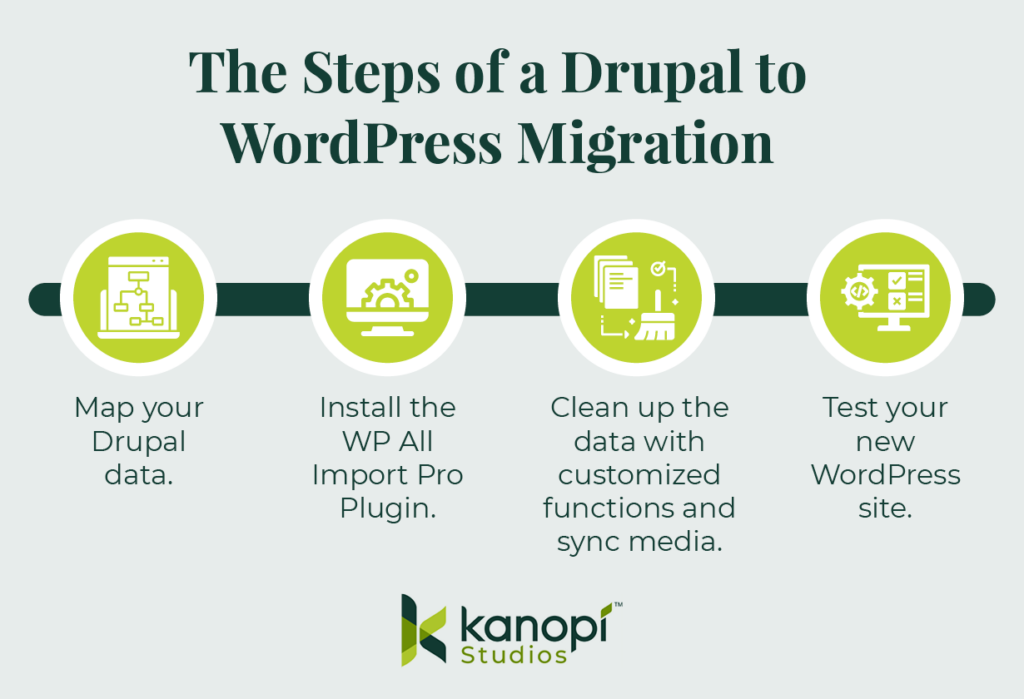
These are the steps of a Drupal to WordPress migration, outlined in the text below.

1. Map your Drupal data.

Transitioning from Drupal to WordPress requires more than just a copy and paste of a simple title and body field. Given Drupal’s complexity, your site is bound to have some custom elements and fields that need to be pulled over and converted to WordPress.

Before you begin the migration process, you’ll want to map out all of your Drupal data. This includes (but is not limited to):

  • Authoring information
  • Publishing dates
  • Images and attachments
  • SEO metadata

As you map out your data, keep in mind that you’ll want to export this on a content-type or user-type basis. This way, you can also import them into your WordPress site using the same method for each type. This is an important step because each content or user type probably also has a different field type.

Then, you’ll use Views and a Views Data Export module to output that content and create an XML, JSON, or CSV file. The type of file you use will depend on what version of Drupal you’re using.

2. Install the WP All Import Pro Plugin.

To prepare for the migration, you’ll also have to take some steps on the WordPress side. Specifically, we recommend downloading the WordPress plugin WP All Import Pro, with the ACF add-on. The add-on allows developers to map fields within Drupal to custom ACF blocks within WordPress.

After you download the WP All Import Pro plugin, you’ll then upload the XML, JSON, or CSV file you created when you mapped your Drupal data. This first step allows you to choose how you want to import your data:
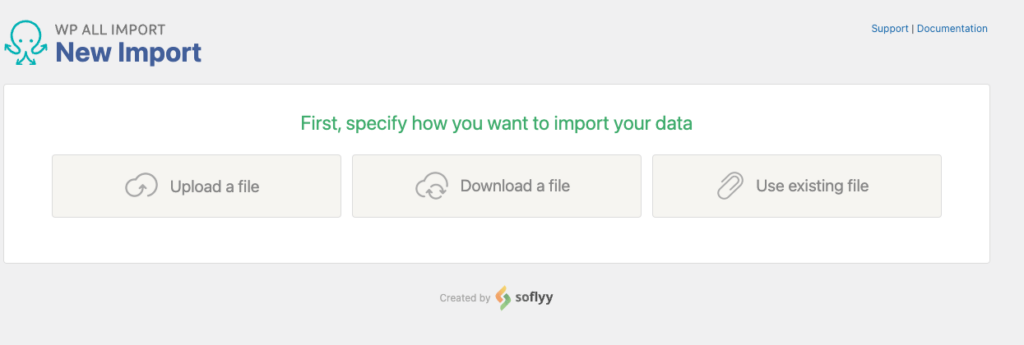
Screenshot of the All Import plugin screen asking the user how they'd like to import their data

Then, choose the data you want to import. Since you are migrating your whole site, you’ll likely import all of your data. This process can include posts, pages, taxonomies, users, or custom post types added by other themes and plugins.

3. Clean up the data with customized functions and sync media.

WP All Import Pro will process your import file and prepare the data you chose for import. This is the time when you can choose to configure your import data. You might need to write some custom fields to clean up, strip out, or map specific data.
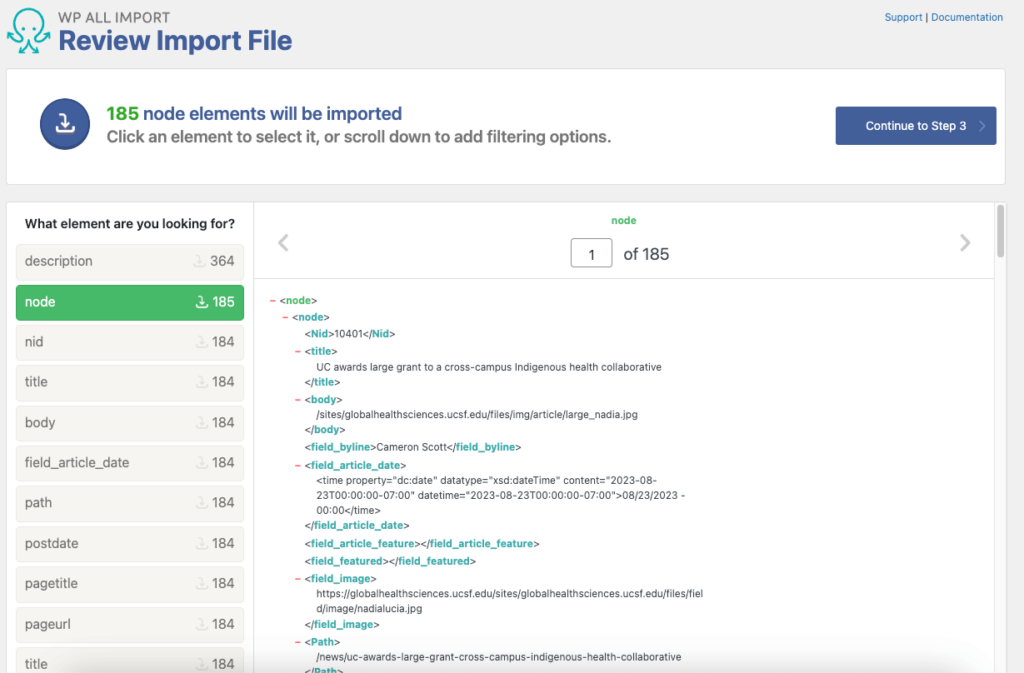
Screenshot of an example of an import file in the WP All Import plugin

This step will differ depending on your Drupal site and the data you mapped, so the exact nuances you should look for and the custom functions you might create will be unique to your situation. In some cases, you may not have to make any customizations at all (but you likely will). 

Here’s what the data will look like in the WordPress backend:
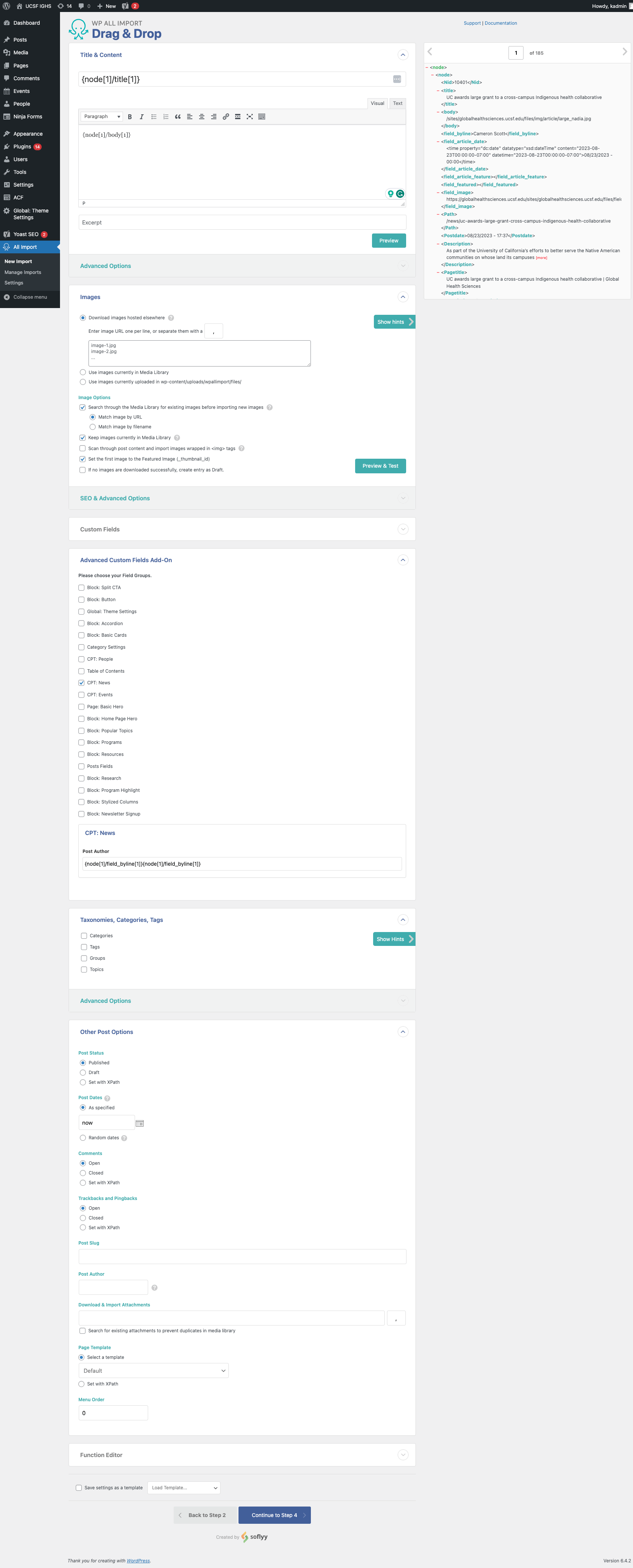
Data is shown in the WP All Import Drag & Drop editor

Additionally, sometimes images, PDFs, or other attachments don’t transfer or fail during the migration. This can lead to broken links, images that don’t load, and website issues.

The MediaSync plugin can help resolve this issue. You can initiate a Secure File Transfer Protocol (SFTP) to transfer the files that didn’t initially move over to an uploads directory within WordPress. Then, you can use the MediaSync library to sync the data and files to resolve any broken assets. Here’s a look at this plugin in action:
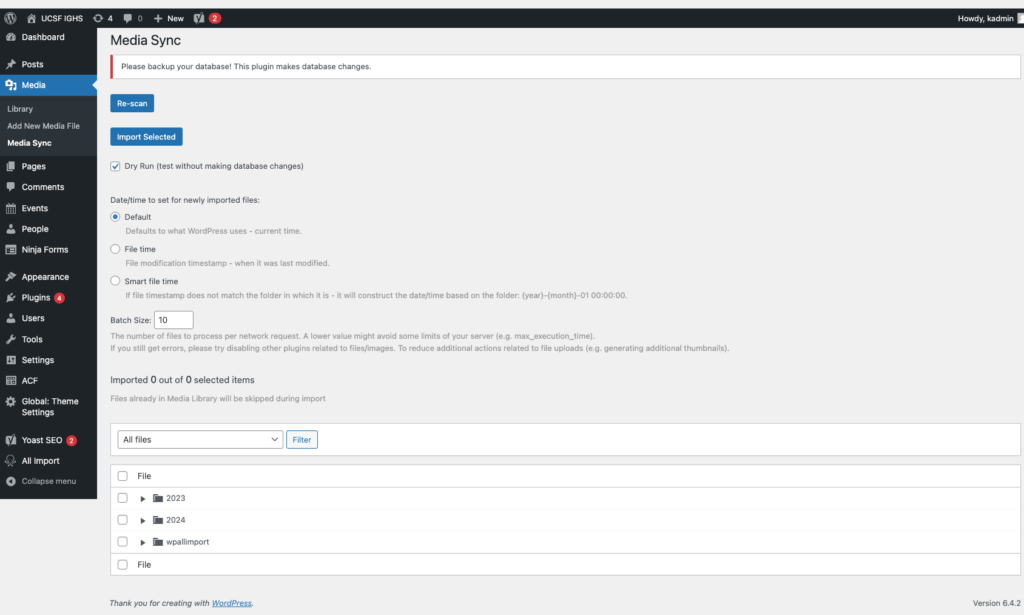
The WordPress Media Sync plugin

4. Test your new WordPress site. 

Once the migration is completed, test out your WordPress site to ensure everything is functioning properly. Browse your website manually to replicate the user experience and test various elements such as your:

  • Forms
  • Links
  • Content (images, videos, text, and other media)
  • Search functionality
  • Performance (for example, assess page load times)
  • Mobile-responsiveness
  • SEO elements (meta descriptions, titles, tags, headers, internal linking, etc.) 
  • Accessibility (image alt text, color contrast, keyboard functionality, etc.) 

Testing these elements will allow you to catch errors that might have accidentally carried over or appeared during the migration process. 

Tips for optimizing your new WordPress website

After completing the migration, you can start to optimize your WordPress website to set it up for long-term success. Follow these steps to keep your website in tip-top shape: 

  • Run performance tests regularly. Tests like PageSpeed Insights can help you identify elements that may slow down your website. Common reasons for website lag include images that are too large or unnecessarily messy or complex code. Test your site regularly to catch and correct these errors before they negatively affect your site’s usability. 
  • Install any necessary plugins. Some of the most useful WordPress plugins include those for SEO, security, or caching. Make sure to carefully vet any potential plugins before using them to ensure that they won’t slow down your site. 
  • Set up Google Analytics 4 (GA4). GA4 is the latest generation of Google Analytics. It’s an event-based tracking tool that can help you better understand your website visitors’ behaviors. Set up your GA4 configuration and Google Tag Manager as soon as possible to start tracking traffic on your new WordPress site. 

These steps will help you maintain a strong website foundation, allowing you to easily adapt to any WordPress trends or new innovations as they arise. 

For more information about how to manage your WordPress content effectively, check out Kanopi’s webinar on the subject.

Wrapping up

Even if you feel confident that you can handle the Drupal to WordPress migration on your own, it’s recommended to partner with a technology consultant professional for the best results.

Here at Kanopi, we typically recommend Drupal for clients with complex needs and large amounts of data. If you think you can do without the high-power capabilities of Drupal and would rather opt for something more user-friendly, then WordPress is the right move. But, if you think Drupal will serve your organization better in the long run, our Kanopi team can also assist with any version migrations or updates you need.

Looking for more tips to help determine the best path forward for your website? Start with these additional resources: 

Drupal 7 End of Life: A Guide to Next Steps. If you’re a Drupal 7 user, you might be weighing your options ahead of Drupal 7’s upcoming end-of-life. This guide offers tips to help determine your next steps. 

Drupal vs. WordPress: Which One is Right For You? Choosing between WordPress and Drupal comes down to weighing the pros and cons of your unique website. Assess the primary differences between the platforms with this guide. 

12 Business Benefits of Using WordPress for Enterprise. If your website needs to handle complex enterprise needs, WordPress can be a great fit. Learn about the primary benefits of WordPress for Enterprise.


Dark side of Earth with lights and electricity expanding across the surface.

Translating Your Website into Other Languages

Faye
Faye Polson

In North America, language translation on websites isn’t terribly common; most websites are in a single language representative of the large demographic of English speakers. But around the world, there is a much larger demand for website translation, and even within North America, there are regulations that businesses and organizations must follow which require translation options. Canada, for example, requires French in many cases due to its status as an official language. Fun fact: every single Canadian has spent breakfast reading both the English and French sides of the cereal box.

Up until 2019, a common method for adding easy translations to a website was to use the Google Translate Widget. It was easy, free, and automatically translated the page on the fly. But if you follow that link, you’ll notice this widget has been discontinued. But you do have other options!

Where to Get Free Website Translation

Hopefully, your primary website visitors use Chrome, Edge, or Safari as their main browsers. These browsers include native translation and will prompt the user to select their chosen language without any extra effort on your part as the website owner. Google does offer a translation extension that can be used on other browsers, such as Brave or Firefox. This means you do not need to make changes to your site to offer native translation.

At the moment, if your demographic primarily speaks a single language, this is probably the route you want to take, unless you have to meet government regulations due to the nature of your organization and the country you live in. In which case, then you want a more robust solution and a budget to match.

Where to Get Paid Website Translation

If your translation needs are greater, you will be looking at a paid service. And the cost will vary depending on the size of your site, the amount of content, and the service you use. The following are the solutions Kanopi has the most direct experience with.

Cloud Translation API

Google’s recommended alternative to their former Google Translate Widget is their cloud translation service, Cloud Translation API. It’s affordable and supported by both WordPress and Drupal with the appropriate extensions. There are a few plan options to choose from, letting you decide what’s best for your site. While a developer can help integrate this solution into your site, you will also need to create your own account for your company and work with the Cloud Translation API sales team to estimate your monthly costs.

Using a Translation Service and/or Premium Extensions

Short of having employees who can do all your translation, a translation service allows you to submit your source content with language requirements and receive translated copies in return. If you need to alter the content of your pages based on language, for example switching from imperial measurements to metric, this is likely something you want to consider. 

The modules (Drupal) and plugins (WordPress) needed to make this work can help automate some of the actual translation. Yet depending on how many languages are supported, some organizations find they need at least one dedicated role to help manage and review these translation processes.

There’s a huge array of services to choose from, and the right solution will depend on your organization’s needs. Meanwhile, here are the premium extensions Kanopi recommends for adding language translation to your website.

WordPress:

Use WPML with their Automatic Translation. This plugin will also work with various translation services if needed. Cost-wise, you are looking at $99 per year, plus the optional translation service you might use.

Drupal:

TMGT allows you to work with a variety of translation services depending on what Drupal version your site is on. Price will vary with your choice of service.

Lingotek is another integration that Kanopi has used frequently. It’s a combination of an extension and translation service. Price will vary according to your needs.

Get website translation and go global!

If language translation is right for your site, start scouting your translation service options. Start with looking at the Cloud Translation API, then move on to researching the premium plugins if you need something a little more hands-on. And as always, Kanopi would love to hear from you if you’re looking for a développeuse (that’s French for developer).

12 Business Benefits of Using WordPress for Enterprise

WordPress is the most popular content management system (CMS) by far, powering 43% of all websites. WordPress hosts sites for a wide variety of organizations, including media groups, nonprofits, higher education institutions, and corporations. But is WordPress for enterprise the right platform for your business’s complex needs? 

Enterprise-level companies require reliable and scalable websites to grow and compete with other large organizations in the digital era. Often, enterprise leaders turn to expensive and complicated customized web solutions to host their sites. 

WordPress has evolved into a powerful and flexible solution to handle complex enterprise needs. Now, well-known brands like Facebook, Microsoft, and Spotify run their websites using WordPress. 

In this guide, we’ll walk through the following sections to give you a better sense of how WordPress for Enterprise can benefit your organization:

Let’s start by answering some of the most frequently asked questions about WordPress for Enterprise. 

WordPress for Enterprise: FAQs

What does WordPress for Enterprise mean?

WordPress for Enterprise is the application of the WordPress platform to meet the needs of large businesses. These organizations are usually multinational corporations with multiple domains and thousands of users accessing their sites at once.

According to WordPress, their enterprise solutions are used “wherever there’s a requirement for flexible, cost-effective, and secure creation and distribution of content.” Media and publishing organizations, E-commerce sites, and other large-scale businesses use this solution for their online marketing, communication, and commerce needs. 

What features do enterprise websites need?

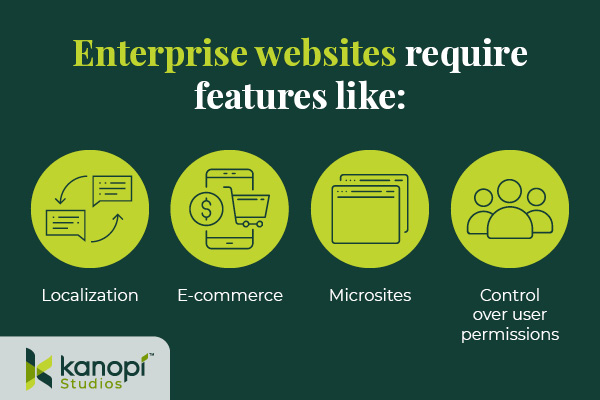
Enterprise websites require the ability to handle significant traffic and user engagement. Often, these sites will need to support features like:

Enterprise WordPress websites require features like localization, e-commerce, microsites, and control over user permissions.
  • Localization. Localization requires adjusting site content to the cultural and linguistic norms and context of different target audiences. Localization involves translating text and adjusting images and text to ensure all website elements are culturally appropriate and relevant. This is especially important for organizations that offer services for an international audience, such as airports or global health organizations.
  • E-commerce. Some enterprise websites require e-commerce functionality that allows visitors to browse products or services and complete secure transactions. This involves an online storefront and a secure payment processor with multiple payment options. 
  • Microsites. A microsite is an individual web page or site made to function as a separate entity while still being a part of your existing website. Some corporations use microsites to promote sub-brands or special events. 
  • Control over user permissions. Enterprise websites need to only allow specific users permission to access certain features. This promotes greater security across the organization. 

Enterprise websites must connect with a diverse, often global audience. These features make it easier for marketing professionals to promote their businesses while maintaining reliable security and other core features.

What’s better for an enterprise — WordPress or Drupal?

As you search for a new CMS, you might also come across Drupal as a top option. Drupal is another open-source CMS that organizations with complex needs, like enterprises and government institutions, use to create robust and secure websites. 

Drupal also offers multilingual functionality, security, and control over user permissions. In addition, Drupal has strong accessibility for both back- and front-end users. The release of Drupal 10 in 2022 unveiled the platform’s most modern, accessible editing experience yet, along with a host of additional advanced features. When choosing between Drupal and WordPress, consider your corporation’s unique needs and what CMS features you will prioritize. Explore our guide to Drupal vs. WordPress to learn more about the primary differences between these platforms and help determine which CMS is right for your enterprise. 

Common WordPress for Enterprise Misconceptions

Due to the early days when it was primarily a blogging platform, several misconceptions about WordPress’s capabilities have prevailed over time. Here are a few common misunderstandings: 

WordPress is only for blogs and is not a true CMS.

As mentioned, WordPress powers 43% of all websites (including websites for some of the biggest brands today), meaning it can do much more than just blogging.

WordPress is not great for security.

Third-party plugins may create a little bit of risk, but WordPress’s core system is incredibly safe.WordPress has also invested in fast security releases, with a team of 50 experts managing them. Even whitehouse.gov is on WordPress, showing how far the platform has come in regard to security. 

Open source is not reliable at the enterprise level. 

Enterprise-level organizations can safely use an open-source CMS. Massive sites like Facebook and Google use open-source systems to power their tech. 

WordPress doesn’t offer a lot of support.

WordPress’ extensive open-source community facilitates access to tons of contributors and developers that create new plugins, themes, and features every day. As a well-known and popularly-used CMS, WordPress has plenty of support from millions of users and experienced developers. 

12 Benefits of WordPress for Enterprise

What’s the true story about what WordPress can do for your enterprise website? Let’s take a look at the top benefits of WordPress for enterprise: 

1. High ROI

WordPress’s return on investment is very high compared to proprietary systems, especially in terms of the total cost of ownership (WordPress is free!) and implementation speed. Building and testing new features can be completed in just a few weeks because of easy access to themes and plugins. 

2. Strong security

As mentioned, WordPress offers consistent updates and security releases to protect users from common hacks. You can also look to additional security plugins to further protect your site.

3. SEO friendly

Search engine optimization (SEO) is crucial to help boost the visibility of your enterprise website across search engine results pages. WordPress offers built-in SEO-friendly features, such as optimized URL structures and category and tag options that help search engines better understand your website’s structure. Plus, using an SEO plugin like Yoast, All in One SEO, or SEOPress can make the optimization process even simpler. 

4. Access to integrations

Because WordPress is so popular, there is already a vast number of third-party tools that are ready to integrate with your system. This means your enterprise business can quickly add features and make site updates without needing to invest in expensive custom solutions. Besides the many free tools, enterprise businesses can also invest in premium paid plugins with added support!

5. Easy to use

Once your site is up and running, the WordPress platform is perfect for non-technical users. The Block Editor (also known as the Gutenberg editor) offers an intuitive backend experience that arranges content into a series of blocks for text, images, videos, and other page elements. This ensures that any of your enterprise businesses’ team members can jump in and make necessary changes.

If you need help along the way with managing your content, there are plenty of resources available—start with Kanopi’s webinar on the subject!

6. Open-source community

One of the most valuable features of WordPress is the open-source community supporting its development. These contributors create new plugins, themes, security patches, and features to help WordPress users customize their sites to their needs. This community is always growing and evolving. 

7. Accessible

WordPress is devoted to creating accessible front- and back-end user interfaces. Their Accessibility Team runs ongoing audits and tests on themes and functionality using assistive technologies. Also, any code built into the WordPress core system must meet the Web Content Accessibility Guidelines version 2.1 level AA. 

8. Scalable

WordPress has made great strides when it comes to improving website performance. You can ensure your website is prepared to handle a large amount of traffic by making use of these WordPress elements: 

  • Keep your code clean and only invest in high-quality, lightweight plugins and themes. 
  • Use a page caching tool to help improve page load speed. 
  • Select an enterprise WordPress host that emphasizes scalability. 

Scalability is necessary to ensure that your enterprise website can manage a large volume of traffic efficiently.

9. Streamlined media management

Enterprise businesses use many online media types such as documents, visual media like photos and videos, and audio files. With WordPress, you can upload and manage just about any media type in a streamlined and intuitive manner. Easily manage media on the backend and edit it visually on the front end.

10. User management and multisite domains

Your enterprise website may need to run a network of subdomains or microsites and give access to only a select number of team members. WordPress supports multisite usage with Super Admins, a user role that can set up networks and control user permissions.

11. International capabilities

Your enterprise website must be scalable on an international level. WordPress is available in over 100 languages, ensuring you can effectively reach your global audience.

12. Flexible and agile

This is the true differentiator between a proprietary and open-source system. Your enterprise business’ next goal is always going to be starting a new project, making processes more efficient, or releasing updates, all without compromising quality.

That’s why you need a system with high agility, like WordPress. With easy collaboration between content editors and developers, the WordPress system allows your team to build and expand website features quickly without breaking the bank.

Enterprise WordPress Development Services

Do you have a large-scale project in mind? Or do you already have a built-out enterprise-grade website and just need support? 

Consider working with a WordPress development expert like Kanopi. Our professionals work closely with your enterprise business to understand your unique needs and strategize how your WordPress website can best support them.

Plus, Kanopi takes a continuous improvement approach to ensure that your site is always improving over time — perfect for a quickly-growing enterprise business.

Our WordPress development services include:

  • Plugin and theme upgrades
  • Security patches
  • Performance enhancements
  • Content strategy
  • E-commerce updates

Plus, we have a dedicated enterprise support tier customized to your business needs, ensuring that your website stays updated and viable over the long term. 


WordPress is a flexible, scalable, reliable CMS that can take your enterprise website to the next level. If you’re looking to upgrade your CMS or switch to WordPress, the recent release of WordPress 6.1 and the improvements that come with it mean that it’s a great time to get on board. 

Looking for more information about what WordPress can do for your business? Start here:

Old printing press template with removable letters

Using Gutenberg to Elevate the WordPress Editing Experience

Faye
Faye Polson

“Gutenberg” is the name given to the movable block editor adopted by WordPress back in 2018, harkening back to Johannes Gutenberg who invented one of the early European movable-type printing presses. Reusable individual letters that could be moved, and reused, eventually lead to typography and fonts as we know them.

Of course, nowadays we have printing technology that Johannes could not have even imagined, let alone believe that an entire online editing experience would be named after him. 

But what exactly is Gutenberg?

Most of us are familiar with editing experiences, such as typing in an email, Microsoft Word, or Google Docs. These experiences are mostly similar; you have a blank space to type and buttons for alignment, styles, fonts, sizes, etc. This has been a common website editing interface for decades, but it is both creatively and logistically restricting. 

If you wanted to move a section from one location to another, you’d have to copy and paste it, then delete the original. Trying to completely rearrange your content would be frustrating and time consuming. Or if you wanted some snappy responsive columns, you would have to switch to view the document code and write HTML and CSS. 

Gutenberg is WordPress’s native “drag and drop” site builder. It solves those problems by allowing you to create your content in blocks designed for the specific content you’re using. There are over 90 blocks to choose from. You can play around with all of these options on the Gutenberg demo.

This flexibility allows content editors to populate their website with more complex content, and then shuffle it around within the layout. In fact, there are many themes that lean so heavily on Gutenberg that you wouldn’t need a developer at all. With the introduction of Full Site Editing, nearly anyone could put together a working website that’s beautiful too.

Why use a web developer at all?

While there are many themes that do leverage everything Gutenberg has to offer (those 90+ blocks), that’s not the case for most of them. And for existing sites with legacy themes, there is little chance that they are able to take advantage of this newer technology. Out-of-the-box websites are useful and serve a purpose but when you need custom design, structure, and functionality, you need to call in professionals.

Another struggle with drag-and-drop sites is the global element. If you have 30 headings on your website and decide you want to change them all from green to blue, you’d need to go through and edit the color settings on all 30 headings one by one. While there are some global elements, the vast majority of your page content will require manual editing. This can be incredibly time-consuming.

Native Gutenberg blocks can be unexpectedly limiting. For example, if you desire rounded borders on all media but the block you’re using doesn’t have support for a border-radius, you’d need a developer to create and apply custom classes. Keep going down that path and suddenly you can have a site full of custom classes and blocks that never look the same from one to another. This can be an editing nightmare and require excess documentation to keep it all straight. Suddenly that easy drag-and-drop editing experience requires a higher level of skill.

There’s a better way to customize.

Kanopi approaches Gutenberg blocks from the perspective of creating consistent and branded content. One of the big advantages of Gutenberg is that we can create new blocks and apply our own styles and structure. This allows us to create blocks that can hold and display any type of content within a defined set of rules. Instead of pouring budget into styling 90+ blocks (and their hundreds of combinations) that may never be needed, our team focuses on creating custom content solutions for our clients.

This “best of both worlds” approach lets site editors continue to use the ease of Gutenberg’s drag-and-drop experience, while also creating consistent, branded content. As a website moves from its initial build into support, these blocks can be expanded upon and updated globally (and thoughtfully). Even older sites without any Gutenberg usage can be configured to allow for this type of block expansion without disrupting the existing content.

Gutenberg is here to stay.

It’s clear that WordPress is leaning in on the use of Gutenberg and the Full Site Editing implemented in the past year. Meanwhile, Advanced Custom Fields Pro (the preferred and recommended plugin for enhancing WordPress’s content management) is keeping pace to ensure custom block creation works seamlessly with every stride made. Whether using an out of the box theme, or having an agency custom building according to your organization’s needs, Gutenberg is a phenomenal solution with room to grow in many directions.

Contact us to discuss how Gutenberg can work for you
Drupal logo on a blue background with a circular pattern

Drupal 7 to 9 Migration Planning Guide

Attention all Drupal 7 users!

This post was last updated in June 2023 to align with Drupal 7’s most recent end-of-life date of January 2025.

Kanopi is a certified Drupal migration partner and can help with your migration needs.

With Drupal 7’s end-of-life date extended to January 2025 and Drupal 8’s end-of-life coming sooner this November of 2021, it’s safe to assume that most Drupal 7 users will be skipping Drupal 8 and heading straight to Drupal 9. 

Both Drupal 8 and 9 (and likely the versions after) significantly shifted the way content and configuration are organized. Instead of the traditional route of simply applying an update to your existing Drupal 7 site, you’ll have to migrate all of your data to a brand new Drupal 9 site.

But where do you even begin? How does a data migration work? How can you effectively prepare for Drupal 7’s end-of-life date? We will answer these questions and more in our Drupal 7 to 9 migration planning guide.

Table of Contents

Learn more about Kanopi’s extensive experience with Drupal development.

Kanopi is here to help with your Drupal 7 to 9 migration. Contact us today.

Drupal 7 to 9 Migration: Step by Step Process

So, you’re ready to begin the Drupal 7 to 9 migration process. 

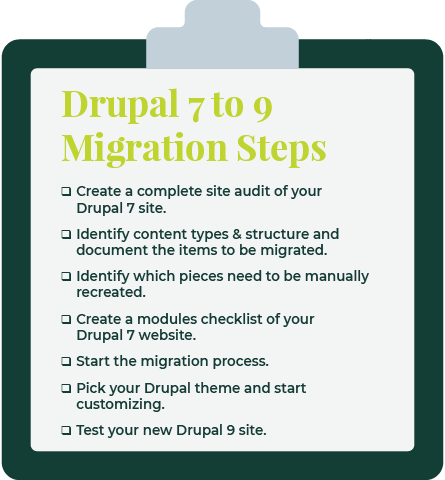
Below is a quick overview of the steps you’ll be taking:

  1. Create a complete site audit of your Drupal 7 site. A site audit is used to learn about the current state of a website and determine if you need to perform any maintenance. This complete audit should include all types of functionality and entity types (Modules, Content types, Taxonomies, Paragraphs, etc).
  2. Identify the content types and structure of the existing site and document the items to be migrated. During your audit, you should come up with a list of all the data that needs to be migrated to your new site. Get rid of anything broken or duplicated so that your Drupal 9 site is ready to go.
  3. During this time you should also identify what pieces should be manually recreated. Views, webforms, and content types with a small number of entries are much quicker to build by hand.
  4. Create a modules checklist of your Drupal 7 site to identify custom code and missing contrib functionality. Modules are the best way to customize the Drupal CMS to your specific needs. Sometimes specific modules may have been customized or are not yet compatible with a Drupal version, so this is worth noting beforehand. Also, look for any custom modules that don’t come from the community contrib space. These may have good alternatives that are contrib for Drupal 9, or they may have to be custom-built to work with the CMS.
  5. Start the migration progress. There is a suite of contrib modules that help empower developers to create the files and scripts needed for migration. A custom migration module should be made for each site, creating the fields, content types, and entities on the new Drupal site.
  6. Theme your new site and complete additional manual work. This includes choosing a theme, organizing content, and other customizations.
  7. Test your new Drupal 9 site. Now that everything is successfully migrated, it’s time to put your Drupal 9 site into action! If your team runs into issues, you should roll back and re-test.

5 Things to Consider Before Migrating Drupal 7 to 9

Don’t start the migration process just yet! There are a couple of things you can do beforehand to make the migration process much smoother and easier to implement.

We recommend the following best practices:

  • Ensure your Drupal 7 website is at the latest version — This makes upgrading much cleaner. Some of your existing modules will even have direct Drupal 7 to 9 upgrade paths.
  • Make sure you have access to both your Drupal 7 public and private website data — This is the data that you’ll be migrating, so having easy access to all of it is crucial if you want to successfully upgrade your CMS. This includes all your uploaded private and public files, too.
  • Create a backup of your Drupal 7 website — Even if you do everything perfectly, it’s worth it to take the steps to prepare in case of an accident. Make sure to create a backup of your Drupal 7 site before you start the migration process. Then, use that backup as the source of your upgrade. This way, if something happens and you lose data in some way, you still have your original site to refer to.
  • Download a fresh installation of Drupal 9 and enable the core migrate modules — The modules in the core include Migrate Module. Migrate Drupal Module, Migrate Drupal UI Module, and Migrate Tools Module.
  • Perform a thorough content audit for a smoother migration — you already know that you should perform a site audit, but in particular, a content audit is valuable. This helps you determine the content that you want to migrate and get rid of unused content and complexity that you don’t need.

Why You Shouldn’t Opt for a Drupal 7 to 8 Migration

Still not convinced that going straight to Drupal 9 is your best bet? After all, you already know that Drupal 8’s end-of-life date is coming up, much sooner than Drupal 7’s. Even if you do successfully upgrade to Drupal 8, you’re going to have to do another upgrade to Drupal 9 in November of 2021 when 8 is no longer supported.

If you’ve already made the switch to Drupal 8 before the news of 7’s end-of-life extension, don’t worry—the process from 8 to 9 is fairly simple. Updating from the most recent version of Drupal 8 to Drupal 9 is more like a minor upgrade than the massive migration effort that Drupal 7 to 8 or 7 to 9 entail.

If you are migrating from Drupal 8 to Drupal 9, ensure that your site is on the latest Drupal 8 version (8.9 as of this writing), that your hosting environment meets minimum system requirements, and that all your deprecated code is removed.

Common Challenges During the Drupal 7 to 9 Upgrade

To ensure you’re fully prepared to start this process and begin anew on a Drupal 9 site, it’s worth it to address the common challenges and obstacles you may face. Getting a good idea of the pitfalls that others have stumbled upon will only help you better avoid them.

Here are the common challenges you should be aware of:

  • Many Drupal 7 contributed modules have better versions of themselves in Drupal 8+ and some have even been deprecated. If a frequently used module has less functionality in Drupal 9, you might consider finding a different solution.
  • Some of the best practices used to build sites have changed in Drupal 8/9, with some pieces moving into the core and some pieces replaced by other modules.  Some of these are:
    • The widely used Features module in Drupal 7 is now almost obsolete after Configuration Management took over all the Features functionality and more for Drupal 8+.
    • The Field collections module has been deprecated and replaced by the widely popular Paragraphs module, for which there is a direct upgrade path.
    • Instead of panels of landing pages, Drupal 8 and 9 use the Layout builder. This may need some custom migration plugins.
    • The Media suite of contrib modules has now been moved into the core.
  • When running a Drupal 7 to 9 migration, you may exhaust your system resources, which causes your migration to stop. Thanks to “highwater marks,” a field value in Drupal Migrate, you can run the migration again and it should pick up from where it left off.

If you stumble upon any other challenges that you don’t know how to tackle, your best bet is partnering with a dedicated technology consultant.

Our professionals at Kanopi are experts in Drupal planning and development and can aid you in your migration journey. Each of our team members has, on average, 11 years of experience in Drupal Development, and several of them are Acquia-certified. We also are a supporting partner to the Drupal Association, regularly contribute to the Drupal Project, and are one of the main organizers of BADCamp.

50% Of All Big Projects Fail, including Websites. Why?

Jimmy's Photo
Jim Hoogewind

Marketing leaders have the best intentions going into an expensive and large six-figure website overhaul. However, according to the Harvard Business Review, as many as half of big projects like these are considered failures when all is said and done. And you’re left wondering…

  • Why did this take longer than I was told?
  • Why was more funding needed than was estimated?
  • Why were there so many surprises and scope changes?
  • Why do I feel so burned by the agency my team selected?

Now you find yourself facing down another big website overhaul and all the risk associated with it. How will you feel confident it will be successful this time? How will you be sure you won’t be left with heartburn and the same frustrating questions as last time?

In my 15+ years working in this industry, I’ve learned there are three key elements to ensuring a big website design and development project is successful.

Think of it like a three-legged stool…

1) Stakeholder Alignment

Performing candid and skillfully focused stakeholder exercises which tease out the goals and intentions of important leaders in your organization. These exercises force invaluable conversations, and ultimately lead to buy-in.

2) User Experience

Target audience data mitigates risk by replacing assumptions with defined needs and specific pain points. These eventually inform the site experience that’s most helpful to each audience.

3) Design & Development Planning

With stakeholders aligned and users defined, design and development planning can begin using models such as sitemaps and wireframes. Technical and functional requirements can start to be dialed in as well.

Unfortunately, most agencies focus only on one or maybe two of the legs described above, resulting in a shaky foundation to your project. But not Kanopi. We focus on and thrive at all three, and we make it fun along the way. 

We call this endeavor the Website Growth Plan (WGP). Through this proven process, we’re able to answer questions such as:

  • I know my site is not working for me, but how do I improve it? 
  • I will need to migrate from Drupal 7 to D8 or D9, but what will that budget look like?
  • How can I improve my SEO? How is my site performance now?
  • I need a new content strategy, but how can I do this properly when I am already so busy?

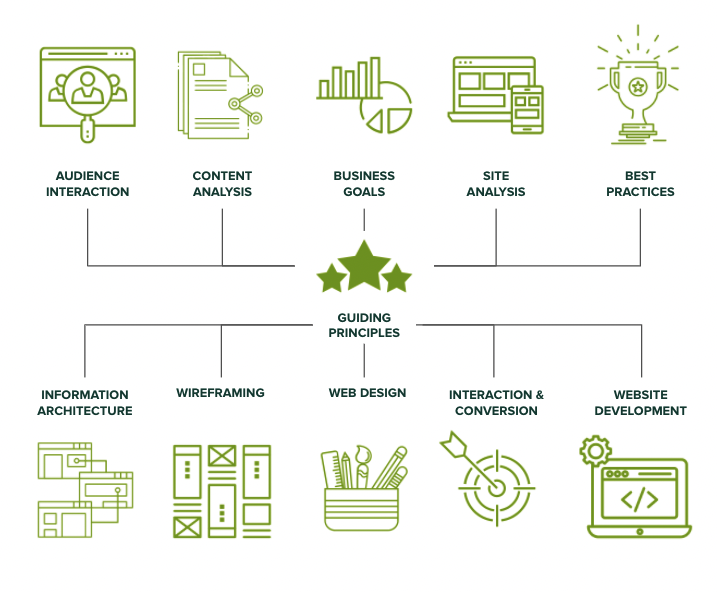
After taking factors (like the ones illustrated below) into account, the WGP delivers an all encompassing action plan for your website. By setting expectations early and often, this helps avoid the heartburn-inducing questions you were left with after your last website project.

Which website growth plan is right for me?

More information can be found here, but below is an overview of our various plans:

Website Reimagine

This plan is a concentration of UX research, content strategy, and a bite-sized amount of design. It helps formulate a game plan that drives clarity for the team and gets some early design thinking on the table. Plus, it is actually a wonderful use of time as it is the first step in an overall design and development project, as the deliverables include a roadmap to launch.

Usability and Design

This is a data-informed optimization plan incorporating user experience, visual design and content recommendations delivered in an actionable plan for next steps.

Content Strategy

Amplify your message through a powerful analysis of important information, including user needs, competitor analysis, personas and Customer Decision Journey mapping — from Awareness to Advocacy. This plan focuses on storytelling content, user experience, visual design recommendations, and more.

Drupal 7 Transition Plan

You should feel secure planning and budgeting for the transition from D7 to D8/9 or to WordPress. This plan removes the “unknown” and illuminates the details for your organization to make an informed decision and take action on next steps.

Technical SEO

This is a deep-dive to analyze your website’s SEO technical health and set you up for search engine optimization success.

GDPR & Compliance

The General Data Protection Regulation (GDPR) is a legal framework that sets guidelines for the collection and processing of personal information from individuals who live in the European Union (EU). This plan gets you compliant.

Accessibility

Reach your audience and meet compliance with Website Compliance Accessibility Guidelines (WCAG 2.1 AA or higher) through a skillful analysis and recommendations action plan.

Technical Review

A comprehensive technical deep-dive into your site’s code and technical health to provide foundational recommendations for optimization and stability.

And if one of those doesn’t quite fit? Don’t worry. Our nimble nature finds us creating custom packages for our clients to best meet their needs. Contact us to chat about which plan is the best fit.

Your Nonprofit’s Digital Transformation: Where to Start

More and more donors are finding out about nonprofit organizations online and using digital spaces to support the causes that they care about. To keep up with other modern organizations, it’s crucial that you consider a nonprofit digital transformation.

Digital transformation is a common buzzword that seems more complicated than it is. At its core, it simply describes how organizations and businesses improve their processes through technology. If your own nonprofit tech solution isn’t doing all it can to support your mission and drive you towards your goals, a digital transformation is the exact thing you need. 

But where do you start? How do you know if you need one? How does one even begin the process of a nonprofit digital transformation? 

As a trusted nonprofit partner, the Kanopi team has compiled some of our own insights here. This guide will walk you through the basics of what a nonprofit digital transformation is, how it can help your nonprofit, and the basic steps to get started.

Table of Contents

Thinking of starting your nonprofit digital transformation? Find out how Kanopi can help.

Nonprofit Digital Transformation: What Is It And Why Is It Important?

Nonprofit digital transformation is the integration of technology across all areas of the organization. The result is an improvement in how the nonprofit functions and provides value. Ultimately, a successful nonprofit digital transformation should streamline internal operations and optimize supporter relationships.

How do you know if your own organization needs a digital transformation? Ask yourself the following questions:

  • Are you and your staff members communicating with donors manually?
  • Do you often find mistakes in your donor database? Misspelled names, typos, or duplicate profiles?
  • Do you sync your CRM and CMS manually? How often do you have to conduct large scale website maintenance?
  • Is it becoming harder to track fundraising engagements as your supporter base grows?

If you answered yes to any of the above, a nonprofit digital transformation should definitely be in your future. Otherwise, you’re stuck wasting valuable time and resources on processes that can quickly be automated and streamlined with the right solution.

How Digital Transformation Can Help Nonprofits

In order to better understand how exactly a digital transformation can help your nonprofit, let’s review some common challenges organizations have when it comes to their tech solutions. Then, we’ll review how a digital transformation can help resolve them.

Common Pitfalls for Nonprofits

Without a dedicated digital strategy to guide a nonprofit’s efforts and streamline operations, your organization risks falling behind and missing key opportunities with potential supporters.

Here are the common areas of digital strategy where nonprofits fall short:

  • Missing vital donor engagement opportunities, such as online fundraising directly on your website.
  • Using outdated campaign strategies, like sending generic communications to your entire supporter base rather than personalized messaging.
  • Lacking communication between departments and fundraising tools, leading to a fragmented understanding of your overall data.

Benefits of Nonprofit Digital Transformation

What exactly can an effective and well planned nonprofit digital transformation do for your organization? Consider the following benefits:

  • Empower nonprofit leaders to make data-driven decisions. Strategies and donor outreach methods are much more successful when they’re backed by concrete data and historical insight.
  • Automate the process of tracking and recording necessary donor engagements. Your dedicated nonprofit tech solution should be collecting all key data points as each engagement happens.
  • Save on manual labor time by staff members. A nonprofit digital transformation transfers many of the manual tasks that staff members undertake to an automated solution.
  • Streamline day-to-day tasks like sending thank you emails, updating donor profiles, etc. Having tools facilitate these day-to-day activities not only frees up time for your staff members but also ensures that these necessary tasks are done on time and accurately.
  • Ensure that your nonprofit tech solutions support a growing organization. As your audience and internal team expand, your donor database, nonprofit website, and other nonprofit tech should be able to support this growth.
  • Provide a more secure, trusted experience for supporters. Your tech is only as good as how secure it is. Nonprofit solutions help you gather and use your data more effectively, but it of course has to protect that data as well. A digital transformation can ensure that your tools do just that.
  • Allow for a flexible work environment by enabling team members to work from home. A nonprofit digital transformation gives you the tools and resources to streamline how your own staff members communicate and work together. Some nonprofit tech solutions can even empower your organization to work from home.
  • Increase your online fundraising impact. By investing in the best nonprofit tools for your unique goals and mission, you’re also better able to facilitate online fundraising efforts and increase your impact.
  • Offer convenient ways for others to support and give to your organization. Your online donation tool, CMS, event management solution, text fundraising platform, and more, are all ways your nonprofit can transform its digital system. These novel tools also provide more opportunities and channels for donors to support your nonprofit.

Is your updated nonprofit website ready to launch? Check out our PreLaunch Checklist to be sure.

Getting Started with your Nonprofit Digital Transformation

If you’re interested in bringing your nonprofit digital solutions to the next level, you’re already on the right track by reading this article. Starting with research is always the best approach whenever you make any meaningful and long-lasting changes to your organization and how it operates. But what next actions should you take to get the ball officially rolling?

Nonprofit digital transformations are going to look different depending on where your organization currently stands, the solutions you already use, and your unique goals and mission. However, there are some general steps you’ll likely follow:

  • Complete a nonprofit tech audit. This reviews how your nonprofit is currently doing in the digital space. While this can be done manually, partnering with a nonprofit tech consultant or another experienced agency will be your best bet.
  • Identify current technology gaps and opportunities.  Look to your nonprofit database and take note of any engagements that have fallen behind. Turning to your tech stack, identify processes that cause more roadblocks than solve them.
  • Come up with a plan for your digital transformation. This should include a roadmap of the tools you’re going to invest in as well as how you’re going to implement them. Consider the timeframe and other constraints you may have, like budget and staff time.

While tackling a nonprofit digital transformation is possible to do on your own, it’s recommended that you partner with an experienced tech consultant to ensure you’re not missing any vital opportunities and that your solution is doing all it can for your mission.

We at Kanopi have helped numerous nonprofits take their digital strategy to the next level, especially when it comes to developing, designing, and supporting their nonprofit website.

As the centralizing factor of many of your online engagements, your nonprofit website is crucial for maximizing your donor relationships and leveraging opportunities that drive you toward your mission. It’s likely also the first place potential supporters look to find out more about your organization.

Partner with us to start your nonprofit digital transformation and ensure that your CMS and website are effectively meeting your needs and helping you towards your goals. Contact us here to learn more.

Kanopi has helped numerous nonprofits take their digital strategy to the next level. Partner with us to start your digital nonprofit transformation.

Technology Consulting for Nonprofits | Kanopi

From planning new fundraising campaigns to building donor relationships to promoting upcoming opportunities and events, nonprofit leaders have to juggle quite a lot.

While many can get by with the help of their passionate team members and volunteer base, often the expertise of a consultant is invaluable.

One of the largest areas of consulting that nonprofits seek is in technology. With the abundance of fundraising software, constituent relationship management (CRM) platforms, content management systems (CMS), and all of their capabilities, it can get overwhelming setting up the best solution and tech strategy for your nonprofit’s unique needs. 

Nonprofit technology consultants can provide a wide range of benefits for your organization, especially if you align your goals and flesh out an actionable plan. However, if you’ve never worked with a consultant before, or you’re considering finding a new one, navigating this relationship and setting realistic expectations can be challenging.

This guide will walk you through the basic offerings of a nonprofit technology consultant, explore the process of hiring the right firm, and share how our own services at Kanopi can help your nonprofit organization.

 Table of Contents

Contact us for a helping hand with your nonprofit technology strategy and boost your web presence today.

Nonprofit Technology Consulting: The Basics

Let’s imagine you are the leader of a growing nonprofit organization. You have a basic system with an online donation tool, CRM, and CMS platform— however, these solutions are not integrated. Your online fundraising has grown in the past year, and while you’re happy about the upsurge of donors, it’s getting harder to organize and manage all of the new data you have. 

While investing in the best tools can certainly make a difference, if you don’t know how to use those tools to drive your mission forward, you’re likely missing out on a couple of key opportunities. 

Nonprofit technology consultants are experts in the software solutions that power an organization’s mission. They work closely with nonprofits to review their operations and develop strategic tech improvements that can boost the organization’s efforts.

Whether your current nonprofit software no longer supports your growing operations or you want to optimize your nonprofit website, turning to a tech consultant can focus your efforts and ensure that the tools you use advance your mission.

Depending on their specialty, nonprofit tech consultants can provide guidance for the following tools:

  • Fundraising software like online donation tools, matching gift databases, prospect research tools, and more.
  • Event registration software to promote fundraising opportunities, create landing pages, and regulate supporter participation.
  • Communication and marketing software like email tools and text messaging tools.
  • CRM systems to organize donor profiles, track fundraising metrics, and compile comprehensive reports.
  • Volunteer management software to better recruit, retain, and engage volunteers.
  • CMS systems to create a beautifully branded nonprofit website and effectively market upcoming opportunities.

Nonprofit Technology Consulting Services

Nonprofit tech consultants can assist with a number of different services. For example, some of the common ones are:

  • Technology solution building. When it comes to leading a nonprofit, there are a number of engagements and processes that need to be considered, as well as what tools will facilitate them. Nonprofit tech consultants can be a guide when it comes to building the best solution for the organization. They’ll work closely with the client to gauge the current system and then make a plan for recommendations. 
  • Technology strategy development. Once a comprehensive and dependable tech solution is in place, consultants can come in to aid in strategy development. This is best done by working closely with the client and becoming familiar with their unique goals and needs. 
  • Research on nonprofit’s goals, audience, and mission. The best consultant for any sector and industry will be one that truly makes the effort to align with their client’s goals, audience, and mission. This way, the suggestions and changes they implement are working towards the common goal(s).
  • Web design, development, and support. A nonprofit’s website is the virtual face of their organization. It’s where donors can give online, where supporters can learn about the mission, and volunteers can sign up for events. Nonprofit tech consultants can help fundraising leaders determine the best CMS for their needs, as well as assist in web design, development, and support. 
  • Staff augmentation. Sometimes your nonprofit could use the help of extra hands, but can’t necessarily afford to hire new staff. Some nonprofit tech consultants can step in and provide the needed help with their own team, whether it’s in tech development or other support.

Choosing a Nonprofit Technology Consultant

So how do you find the best nonprofit tech consultant for your organization? You might be asking questions like, should the team be local? What type of experience should you look for? How can you find an agency that aligns with your organization’s values and goals?

Well, there’s more to it than just picking the first one on Google search.

In order to find the perfect technology consultant for your nonprofit, here are the common steps you might take:

1. Review your nonprofit needs. 

What are the areas in your tech solution where you need the most help? Is it in data storage or integration? 

Divide your needs into two categories, “immediate” and “long-term”. This can help you prioritize the tasks that you’d want the consultant to tackle first!

2. Meet with your nonprofit’s board and discuss guidelines. 

Of course, the rest of the nonprofit leadership team should be on the same page about hiring outside help and what the help is for. This prevents any confusion or pushback later on.

Additionally, this ensures that your team understands the exact gaps that the nonprofit tech consultant is filling. This helps you and your team better advocate for the type of consulting you’ll need to drive your mission.

From there, consider guidelines for a general budget, a target start date for the consulting service, and a general timeframe for the partnership. Remember, these guidelines are just there to do just that— guide you. It’s important to remain flexible, as not everything can be predicted before the partnership even begins.

3. Compile a list of consultants you might want to work with.

It’s now time to start researching potential nonprofit technology consultants. Here are some of the methods that organizations use to find potential partners:

  • Recommendations from colleagues at similar nonprofit organizations
  • Online lists or directories of top nonprofit technology consulting firms

From here, consider what is most important to you. If you prefer to meet in-person with a team, then look for an agency that is local. If you know that you need consulting in website development and support, make sure to review the agency’s specialties to see if they align with your goals. 

One of the most important things to consider in your nonprofit tech consultant is their experience. If their client history includes nonprofits and other organizations similar in size and mission to yours, that’s a good indication that they have the necessary skills to help with your own technology solution and strategy.

4. Consider putting out a request for proposal (RFP)

Oftentimes, nonprofits will create a request for proposal for a technology consultant. An RFP’s purpose is to communicate your nonprofit’s exact needs, your mission, the current context of your organization, and any relevant goals when working with a consultant. Asking for a proposal from a potential consultant partner is a great way for you to determine which candidate is best for you.

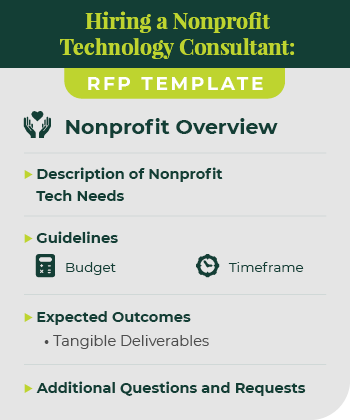
Your official RFP will be unique to your organization and dependent on a number of factors. However, there are definitely fundamental components that you should include if you want the best results. Make sure your nonprofit’s RFP has:

This is an example of a RFP when hiring a nonprofit technology consultant.
  • An overview of your organization, any relevant history, your mission, and a brief description of your donor base.
  • A description of your nonprofit tech needs.
  • The guidelines of the partnership, like the general budget and timeframe.
  • Expected outcomes for the partnership. You can even include a list of tangible deliverables.
  • Any questions or requests to the consultant team for additional information or background history.

Generally, your RFP should summarize your nonprofit’s needs in a concise way, giving the consultant the necessary information to propose a strategy to address them. The more focused your RFP is, the more effective the proposal will be!

Continue your research with our presentation on writing a winning RFP by Allison Manley:

5. Reach out to top candidates.

Next, it’s time to compile a list of top candidates based on your research. Have your team rank their favorite consultants and then compare the rankings. If there are any clear frontrunners, that’s a clear indication of who might be best.

Once you’ve narrowed down your top picks and finalized your RFP, it’s time to reach out to them. This is the perfect time to introduce your organization and provide the consultant with your RFP. Make sure they know how and when to get back in touch.

6. Ask for references and follow up

Hiring a consultant is a lot like hiring staff. You need to make sure this is someone with whom you can build a relationship and work effectively with.

You and your team should review each of the proposals that you receive from your request. Consider all of the points made in the above steps when determining the best technology consultant for your nonprofit.

Don’t be afraid to also ask for references. Having a good idea of their relationship with other clients can inform you if their approach is right for you.

Once you know who you want to work with, make sure to follow up and start discussing the next steps!

Kanopi: Top Nonprofit Technology Consultant

Now more than ever, a nonprofit website is necessary to drive your online fundraising, meaningfully engage with supporters, and push you towards your mission. As a top partner for nonprofits, we at Kanopi Studios have helped develop over 150 active sites thanks to our continuous improvement team.

Website development, maintenance, and support come naturally to us. With our wide range of website services, we aim to work with you to make the most of your organization’s online presence. Even when your site is officially launched, our work is not done. We also provide a full website growth plan to ensure that your site is sustainable for as long as possible.

This website growth plans often includes: 

  1. how to increase conversions for your organization using your website;
  2. CMS customization based on your unique situation;
  3. a three to five-year breathing window (if operating on Drupal.) 

Your own plan will be focused on your nonprofit’s unique technological needs. One of our most attractive draws is our complete approach to web design and continuous improvement. We know that small, incremental changes are more beneficial to your website’s health than large structural and system updates every couple of months.

Kanopi Nonprofit Tech Consulting Services

Our specific technology consulting services for your nonprofit include:

  • User-focused approach to strategy, design, and development.
  • Continuous improvement approach to website maintenance.
  • CMS development for Drupal, WordPress, or Mukurtu users with third-party integrations, key feature development, bug fixes, security patches, and more.
  • Extensive research to ensure that Kanopi understands the nonprofit’s goals, missions, and audience, improving your overall website UX.
  • Accessibility and compliance consulting to ensure that your website is accessible to people of all abilities and compliant with necessary laws.
  • Technical SEO optimization to keep your website high in the rankings for popular keywords.
  • Keeping up with relevant privacy laws and legislations, like whether California’s CPAA affects your organization.
  • User persona creation based on the research collected to map your supporters’ journeys once they visit your site. This also helps you attract site visitors and guide them to your targeted action.
  • Web design and content strategy development to align your website with your mission and your supporters’ needs.
  • User testing to ensure that all of the new features and tech strategy work together.
  • A full website growth plan to set your website up for success even once the partnership is over.
  • Staff augmentation by some of our most talented team members. We can provide extra hands when it comes to design or development tasks.

With our flexible and completely customized approach to tech consulting for your nonprofit, we go above and beyond for our clients. We don’t aim to just be consultants, but extensions of your team to ensure that your nonprofit website and CMS solution are doing all they can for your mission.

All of our team members are experts at what they do, with an average of 11 years of experience for both the Drupal and WordPress platforms. Explore our portfolio of nonprofit clients to see how we work and the great results we’ve helped create.

Contact us to see if our nonprofit technology consulting services meet your needs.

Kanopi Team

Creating a Digital Strategy for Nonprofits – Made Simple

Allison Manley
Allison Manley

In 2019, total online nonprofit revenue grew by 10% and is predicted to only continue rising.

The online world is rich and full of information. From watching Netflix to exploring your Instagram feed to looking up dinner recipes, there seems to be no end to the internet content available.

With such a truly saturated space, your nonprofit needs a focused and comprehensive digital strategy if you want to reach supporters in meaningful ways and increase fundraising for your mission. Otherwise, your message can get buried and you risk losing sight of your goal.

The best digital nonprofit strategy likely spans multiple tools and marketing outlets. Creating this type of strategy can seem intimidating, especially if you’re not aware of how those tools and outlets support each other. This guide will dive deep into not only exactly what a digital nonprofit strategy is, but also how to best create one for your organization and some top tips to maximize those efforts.

Table of Contents

What Is A Digital Nonprofit Strategy?

Your nonprofit organization likely already depends on a few key tools to reach and engage your supporters. Your online donation platform facilitates gifts, your content management system (CMS) helps you create a beautifully designed website, and your marketing tools promote upcoming campaigns and engage donors. 

However, it’s not enough to just have an arsenal of working tech. In fact, it takes careful planning and coordination to ensure that your tools and marketing strategies not only work together but also support each other. That’s where your digital nonprofit strategy comes in.

In simple terms, your digital nonprofit strategy is a focused plan that takes action on your fundraising and donor engagement goals through digital marketing methods.

Your overarching nonprofit goals, any budget constraints, and the technology you have all impact your digital strategy. This strategy then informs your online marketing efforts, with the two working together to maximize your nonprofit’s impact. 

The common tools and marketing channels nonprofits use for their digital strategy include:

  • Nonprofit website – Your website is an increasingly important part of your nonprofit digital strategy. Your nonprofit site centralizes your online engagement and is likely the first place supporters will look when they want to find out more about your mission and any upcoming events or campaigns. It’s also where donors give! How you design your website and the content you add to it is crucial in your digital marketing efforts.
  • Online fundraising solution – This is how you accept online gifts from your supporters. It’s important that the tools you use accurately capture donor data and protect their sensitive information.
  • Email/text communications – Sending your supporters marketing materials, whether through email or text, is a popular way to get the word of an upcoming campaign out quickly. Use your communication tools to further relationships with donors by sending them personalized messages, donor thank you letters, and other targeted content.
  • Social media content – More and more, people are finding out about exciting events and nonprofit efforts through social media content. Because of its easy shareability, it’s a great way to not only reach your current supporters but also expand your audience. Encourage your followers to repost your content and thank them publicly for it on the platform!

One of the great things about your nonprofit digital strategy is that it naturally depends on tools and is generating valuable data. You can reference this data to continually refine your digital strategy and reach your target audience in more meaningful ways.

Steps To Creating A Nonprofit Digital Strategy

Your nonprofit digital strategy is unique to your organization, goals, and audience. These are some common steps that all nonprofit leaders will generally follow:

1. Determine overarching nonprofit goals

The first step to creating a successful nonprofit digital strategy is to establish your goals. This is the foundation of your entire strategy — each engagement and decision your nonprofit makes should be with your core goals in mind.

To begin brainstorming, consider these questions. Do you want to:

  • Raise a certain amount of money?
  • Increase awareness of your mission?
  • Grow your audience or base of supporters?
  • Increase a specific audience profile?
  • Generate new leads?

Once you have a general idea of the goals you want to accomplish, it’s time to make them actionable. Start by:

  • Identifying gaps in your current nonprofit digital strategy and consider how you might tackle them for your updated strategy.
  • Analyzing data in your database to find a quantifiable target for your overarching goals. For instance, look at past successful fundraising campaigns to gauge what a realistic goal may be this time around. 
  • Brainstorming the technology that will play a role. What digital tools and marketing outlets will you be using?

Determining your goals is crucial to guide your nonprofit digital strategy and to provide insight into the choices you’ll make. Make sure your goals are specific and actionable, with clear targets and ways to measure success.

2. Define audience and web personas

If you want to make the most of your nonprofit digital strategy, you have to become familiar with the audience you’re trying to reach. 

Start with reviewing your past data to learn more about how your existing audience engages with your nonprofit. Looking to your website, Google Analytics, CRM, and email marketing metrics can give you clues into the types of supporters that engage with you online and the content that they best respond to. For instance, if past donors heavily engaged with your Instagram posts, then that’s worth noting when creating your new digital strategy.

You can use this same data to create audience or web personas. Web personas are detailed profiles of your nonprofit’s target audience. Your organization will likely use more than one web persona to account for the different types of people who support your nonprofit. With a clearly defined target customer in mind, it’s much easier to tailor your digital content to speak directly to them.

To create web personas, you need to:

  1. Research your audience. Some key audience details to take note of are age, location, income level, interests/activities, and donor behavior.
  2. Document and organize information. If there are common data points, begin grouping them together to start creating a persona. This could by interests, needs, preferences, age group, corporate match eligibility, and more. How you segment your own supporters will depend on your unique organization and goals.
  3. Bring personas to life. It’s easier to create targeted marketing content for a persona when you think of them as real people. Consider giving your audience personas a name with a visual/face that matches their general description.
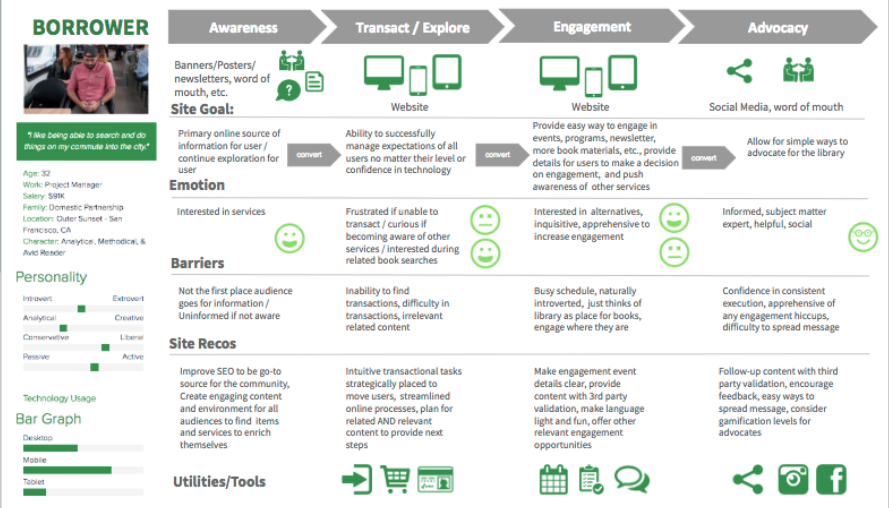
Here's an example of a web persona for a nonprofit digital strategy.

When creating web personas it’s helpful to get as detailed and specific as possible. The above image is an example of how you might organize the details in a web persona and determine the best way to connect with that audience. From there you can produce website content and other digital materials catering to each persona, creating a more engaging and personalized user experience.

3. Consider any constraints

As you develop your digital nonprofit strategy and set your goals, you also have to consider any constraints. While it’s nice to think that the sky’s the limit, it’s often unrealistic and can set your strategy up for failure.

These might not all apply to you, but here are some of the common constraints to keep in mind:

  • Financial budgets. Consider how much you can spend when it comes to developing, implementing, and executing new digital marketing and fundraising strategies. 
  • Technological constraints. What is the current state of your organization’s technological infrastructure? 
  • Timing. Is the timing of the digital strategy aimed towards a certain date, such as Giving Tuesday, or an anniversary?
  • Staffing and labor. Is your current team enough to handle everything when it comes to your digital nonprofit strategy? Remember, you can also turn to volunteers or even a tech consultant for additional staffing.

4. Invest in the necessary tools

If you’re looking to really bring your digital nonprofit strategy to the next level, you might have to invest in a new tool or platform. The internet is always changing, with new ways to engage online popping up all the time. It’s worth it to review your current processes and make sure that it’s meeting the needs of your growing nonprofit and supporters. 

Today, nonprofits see their digital engagement with supporters occur in these locations:

  • Nonprofit website
  • Online marketing campaigns
  • Social media activity
  • Email marketing campaigns

Is your current nonprofit solution doing all it can for the above channels? Consider the gaps in your toolkit or ways your tools could work better together. For example, let’s say your digital nonprofit strategy’s focus is social media and peer-to-peer engagement. Do you have all of the necessary accounts and fundraising tools you need?

Or, let’s say you’re pushing corporate giving. Does your organization have the appropriate tools in place to promote matching gifts and drive more match requests to completion? This might mean embedding an employer search tool into your donation form for donors to research their eligibility or enabling autosubmission tools to let donors automatically submit requests to employers post-donation.

Often, nonprofits seek the help of a nonprofit technology consultant at this stage. The right consultant can perform an audit of your nonprofit’s current tech solution and make suggestions. If your website no longer supports your growing organization, a consultant can help upgrade your current CMS platform or optimize it with extensions.

5. Align your messaging and content

Now that you have concrete goals and the tools to carry them out, it’s time to think about your marketing content. This is the voice of your nonprofit digital strategy and helps tell your story.

When it comes to the story you want to tell, you not only have to be true to your mission but also figure out how to tell it in easily shareable and digestible bites. Short, but emotionally investing, stories are much more likely to resonate with supporters and reach new prospects via reposting and sharing.

The content of your digital strategy should address your audience first. Remember how we defined the audience and developed personas in an earlier step? This data can now be used to personalize the messaging and content to each persona group.

For instance, consider the persona of a completely new supporter. Let’s imagine them stumbling upon your nonprofit website. To immediately connect with them through your content, consider embedding a high-quality image within your homepage of the community you help, along with some quick stats about why they are in need. This can capture the visitor’s attention and introduce them to the most immediate goals for your organization. 

6. Consider the channels you use

You already know that the most important digital channels to your nonprofit digital strategy are your website, social media accounts, email campaigns, and any other online advertising. 

But how do those channels work together?

  • Your nonprofit website is the central hub for your digital strategy. It can connect supporters to your email list, social media accounts, and is where they can give online. Your website needs to be well designed, informative, valuable, and fully integrated with your other online fundraising and CRM platforms.
  • Social media platforms are great for reaching wide audiences. Consider where your current supporters are most active online and focus on those few platforms to promote any upcoming campaigns, advertise blog posts, and share fun, but relevant, videos or viral challenges. Try to post content that encourages supporters to share it with their own network.
  • Email marketing is an essential part of your nonprofit digital strategy. Not only can you use it to reach a wide number of people at once, but you can also even create segmented email lists to cater to more of your specific audience personas. Make sure to track open and response rates to determine which email outreach tactics work best.
  • Online advertising and other digital marketing strategies are important for increasing visibility. This can include online ads on different websites or links back to your organization from other reputable charity organizations. This can also involve SEO techniques that help boost the visibility of your website and blog posts during organic internet searches.

7. Measure campaign’s success

The last thing you need to determine before you start employing your digital nonprofit strategy is how you’re going to measure success. This should have been outlined during the goal-setting stage, but you can take it to the next level with some key tools.

For instance, use your nonprofit tech solution to compile reports and compare metrics based on the combined data from all of your tools and marketing channels. What types of data points and metrics should you look at? Here are some of the top ones:

  • Completed donations
  • Volunteer applications
  • Email subscriptions
  • Pledge signatures
  • Email open rates
  • Email response rates
  • Website bounce rate
  • Online donation page bounce rate

Compile reports on these metrics prior to the campaign and after. This gives you a direct look into how your digital nonprofit strategy impacted and helped your organization.

5 Tips to Make The Most Of Your Nonprofit Digital Strategy

The best digital nonprofit strategy is data-based and audience-centric. While how you make the most of your own strategy is dependant on your organization and mission, here are the top tips that can help all nonprofit leaders:

  1. Optimize for a mobile experience. Did you know that roughly 1-in-5 American adults are “smart-phone only” users? At every touchpoint in your digital nonprofit strategy, it’s crucial that you consider how this may look on a mobile device. Otherwise, you’re missing out on some key opportunities.
  2. Use email appeals. Even as new technology and platforms arise, email is still the best way to reach your supporters online. Make sure that donors are aware of your email list and embed forms for users to opt-in on your website, social media accounts, and other relevant places. And don’t be afraid of being aggressive with your send schedule; data shows that while people may grumble about getting too much email, they still open, read, and interact with it.
  3. Personalize messaging. Whenever you can, you should make your marketing content and messaging as personalized as possible. This is most used in email marketing, but can be implemented with text messaging and even within your website. For instance, consider creating specific landing pages for each of your audience personas to better target their needs.
  4. Inbound marketing techniques. This involves all the ways you make it easy for supporters to find your nonprofit and is much more subtle than outright contacting them. For instance, creating educational blog posts, hosting events, implementing search engine optimization, and sharing social media posts are key inbound ways to build brand awareness. The more people see and recognize your nonprofit, the more likely they want to find out more and support your cause. Remember to always include a link to your nonprofit website and other specific landing pages so that supporters know how to take action if inspired.
  5. Partner with a nonprofit tech consultant. Sometimes, partnering with a nonprofit tech consultant is the best method of truly optimizing your digital strategy. The right agency should work closely with your organization to become familiar with your goals, your audience, and current technology solution. Then, they can provide their expertise when it comes to optimizing that solution for your nonprofit’s needs.

If you think a nonprofit technology consultant is what you need, explore our own services to see if Kanopi is right for you.

How Kanopi Can Optimize Your Nonprofit Digital Strategy

A crucial component of any nonprofit digital strategy is the website. It’s the centralizing factor of almost all of your online engagements and where donors can make gifts. As a top partner for nonprofits, we at Kanopi Studios have helped develop over 150 active sites.

When you partner with us, we don’t just develop, maintain, and support your nonprofit website (though we are experts at it!). We like to think of ourselves as extensions of your organization. With thorough research and data analysis, we dive deep into your unique online audience and provide specific suggestions based on carefully crafted web personas.

We take a continuous improvement approach to website maintenance, as smaller and consistent fixes tend to be more beneficial to your website health than large systematic updates that only happen once a year.

Along with this, we also provide a website growth plan to help you make the most of your online presence even when our partnership is over. We don’t just set up your website and hand over the reins — you’ll get specific and customized next steps as to how to increase conversions and further expand your online platform.

Here are some more of our top services for nonprofits:

  • User-focused approach to content strategy, design, and site development.
  • CMS development for Drupal, WordPress, or Mukurtu.
  • Extensive research on nonprofit’s goals, missions, and audience.
  • Accessibility and compliance consulting.
  • Technical SEO optimizations.
  • Updated knowledge on relevant privacy laws and legislations, like whether California’s CPAA affects your organization.
  • User persona creation to map your supporters’ journeys once they visit your site.
  • Staff augmentation to provide extra help when it comes to design or development tasks.

Don’t forget SEO! We gave a webinar about it.

Interface of the ON24 webinar platform showing Lauren Chervinski hosting her webinar about SEO.

Ready to Boost Your Website’s Performance Without the Overwhelm? A must-attend webinar for business owners, marketers, and anyone looking to make SEO work smarter, not harder. Lauren Chervinski gave a webinar focused on SEO called “SEO Survival Kit: 5 Steps to Thrive Now and in the AI Era .” (47 minutes)