






Drupal logo on a blue background with a circular pattern

How (And Why) To Set Up Drupal Maintenance And Support

If your site is already built on Drupal, or you’re considering switching to the platform, you’ve probably thought about what type of maintenance and support you’ll need to keep it up-to-date.

Whether it’s top-of-mind already, or you’re still looking for more information, this guide will help you understand why maintenance and support is an important part of your Drupal website strategy. 

Table of contents 

Why is Drupal Maintenance Important?

After a site’s been built, it still requires upkeep to ensure it operates effectively and meets your company objectives. Many businesses still take a “set it and forget it” approach when it comes to their sites, leaving them with outdated content, version issues, and vulnerable to security threats.

Whether you’re on D7 and you’re thinking about end-of-life planning, or you’ve moved to a newer Drupal version already, it’s important to factor in Drupal maintenance and support to ensure you’re keeping your site healthy. 

“A continuous improvement approach is best for sustaining your website for the long-term.”

Anne Stefanyk, Kanopi CEO/Founder 

By investing in Drupal maintenance and support you’re ensuring your site is successful in several areas, including:

  • Protecting your sensitive information from security threats
  • Ensuring compatibility with connected and underlying technologies
  • Improving performance of your site
  • Ensuring your website stays SEO optimized
  • Keeping your website updated with current information and reflecting any time-sensitive changes

Essential Drupal Maintenance and Support Tasks

To ensure you have a website that functions optimally, you need to continuously update it. All Drupal websites are made up of a main Drupal core and various modules that require occasional updates. If you don’t run these updates and patches as they come, your website can be vulnerable to security threats and may have bugs and other malfunctions. It’s important to mention, this is not a Drupal-only requirement. All website platforms have similar needs when it comes to long-term maintenance. 

Tasks that are key to a good Drupal maintenance plan include:

  • Consistent site backups
  • Drupal core updates
  • Up-to-date themes and modules 
  • Optimized caching 
  • Optimized database
  • Security updates
  • Module, theme, and library version updates
  • Third-party integration support
  • Regression testing
  • Bug resolution
  • Infrastructure maintenance
  • Uptime monitoring and abnormality alerts
  • Emergency support
  • Minor feature improvements

Some companies opt to take on their Drupal maintenance and support in-house, but it can be a time consuming process if your team lacks the skill set required to keep it working optimally. Even if you have the expertise internally, you may want to explore the option of outsourcing your Drupal maintenance and support to an agency to off load the work and allow your teams to focus on other priorities.

Shameless plug: We love Drupal at Kanopi! And, we love creating custom Drupal website maintenance and support plans for our clients. 

Drupal maintenance tips for different sectors

Maintaining your Drupal website requires slightly different considerations depending on which sector your organization belongs to. Let’s review a few of the top industries that use Drupal and ways to maintain these websites. 

Drupal Maintenance Tips by Sector

Healthcare

Healthcare websites must be accessible and usable for audiences of community members looking for accurate medical information and healthcare resources. Maintaining a healthcare website requires keeping the following considerations in mind: 

  • Compliance with relevant legislation. The Health Insurance Portability and Accountability Act (HIPAA) and the Health Information Technology for Economic and Clinical Health Act (HITECH) are U.S. laws that protect private health information. To maintain compliance with these regulations, your healthcare website should leverage security measures like data encryption, strong passwords, and access controls. 
  • Accessibility. Healthcare website users may have a variety of permanent or temporary disabilities that affect their ability to use your website. They may also be in an anxious state of mind and need a simple web experience that facilitates convenient access to information. With these considerations in mind, your healthcare website should follow the Web Content Accessibility Guidelines (WCAG) to create a streamlined experience for all users. Examples of these guidelines include adding alternative text for images, captions for videos, and using clear and consistent navigation. 
  • Content updates. Refreshing your healthcare website’s content will help show visitors that your organization is on the cutting edge of new technologies and healthcare best practices. This includes updating your user personas based on new audience information, refreshing your user journeys, and updating your blog content with new research findings or testimonials. 

Here at Kanopi, our healthcare support services go beyond the basics to ensure your site is a performant platform that continues to meet your goals over time. Review our work in the healthcare industry to get a sense of how we approach ongoing Drupal maintenance and support from a holistic perspective. 

Nonprofit

The nonprofit website maintenance process focuses on ensuring your site remains a valuable resource for beneficiaries, donors, volunteers, corporate partners, and other community members. When updating a nonprofit website, pay special attention to the following elements: 

  • User experience and pathways. Has your audience undergone any major changes to their demographics, giving motivations, or donation capacity? Update your user personas based on new information. Then, ensure your website’s pathways are tailored to each persona with clear calls to action (CTAs), navigation elements, and tailored content that speaks to their interests. 
  • Donor information and payment processing security. To maintain donor trust, your website needs to securely process and store their payment information. Do you have a secure payment processor for your online donation page that makes the most of current security technologies and best practices? If not, consider switching to a new platform that can better meet your needs. 
  • Content and messaging updates. Does your website still accurately reflect your nonprofit’s mission and scope? Does it leverage multimedia content like photos, videos, audio clips, and interactive content to tell a comprehensive, compelling story? Ensuring that your site has a cohesive message is key to recruiting new supporters and retaining existing ones.

Considering that 27% of nonprofits have experienced cyberattacks, it’s essential to continually review and update not only your payment processing system but also other security aspects of your website. This includes running Drupal core, module, and theme updates whenever new versions are ready. 

Government

Many government websites turn to Drupal because of its top-tier security, scalability, and flexibility. To make the most of Drupal for government needs and maintain a secure government site, prioritize maintenance elements such as: 

  • Compliance with federal and state regulations. Your government website must comply with relevant legislation at the state or federal level. For example, websites for federal agencies must be accessible, address consumer needs, comply with copyright laws, and follow other federal regulations. 
  • Easily accessible information. Providing high-quality, easily accessible information relevant to incidents of national significance is another core requirement for government websites. The information must be objective, conveniently accessible, and delivered without unnecessary jargon. 
  • Scalable network. Your website may have to adapt to traffic surges, especially during major national or international events when people are looking for official information. Ensure your site’s network can scale up to accommodate high traffic volumes and still deliver fast load speeds. 

To deliver need-to-know information quickly, make sure your government website is also mobile-friendly. 92.3% of internet users access the web using mobile devices, meaning it’s critical to ensure your website is mobile-responsive and that all buttons and text are easy to read and tap on a mobile device. 

Higher Education

Higher education web design trends subtly shift year after year as new generations of students seek information about colleges and universities they’re interested in attending. When refreshing your higher education website to maintain and support it over the years, optimize the following aspects: 

  • Usability. Your site should have clear user journeys for each core audience group, whether prospective students, current students, parents, alumni, or faculty and staff. Ensure your site is mobile-friendly and has clear pathways for each segment to help them get their questions answered and find the resources they need. 
  • Personalization. Website visitors increasingly seek personalized experiences tailored to their unique needs and interests. You can personalize the online experience your website provides by leveraging dynamic content that adapts to each user’s site behaviors. You can also allow visitors to create accounts on your website where they can access a personalized dashboard with relevant information, such as application deadlines. 
  • Interactivity. Interactive content generates over 50% higher engagement than passive or static content. Your higher ed website will benefit from elements like interactive tours, infographics, timelines, or quizzes.

The top college websites grow and change along with their audiences. If you need support when refreshing your Drupal college website, it can be helpful to work with an experienced web design firm (like Kanopi!) that can support you at any stage of the website lifecycle. 

Kanopi: The Best Drupal Website Maintenance and Support Service

By choosing an agency to manage your Drupal website maintenance and support, you gain a dedicated team with years of expertise. At Kanopi, we work with you closely to genuinely understand your business needs and create a plan to support it. 

We do the ongoing work to stay updated with the latest industry trends and Drupal updates so we can be your trusted partner in the process. Kanopi also takes a continuous improvement and growth-driven approach with incremental improvements like navigation strategy and SEO fixes, so your site is always improving. 

Features of Kanopi’s Drupal Maintenance Service

Here are some of our top Drupal maintenance and support services:

  • Module and plugin updates
  • Bug fixes and security patches
  • Development modifications
  • Updating content types/views
  • Third-party integrations
  • CSS/HTML changes
  • Commerce updates
  • Performance enhancements
  • Web accessibility optimization
  • Technical SEO optimization

When you work with us, we also go way beyond the typical Drupal support and maintenance package. We provide creative support and ‘design on demand’, working with you on anything from user research, persona development, and conversion optimization to wireframing, mood boards, and style guides.

We’re here to help with your Drupal maintenance and support. Reach out to get started!
Kanopi’s Drupal development services focus on creating functional, sustainable Drupal websites.

Supporting Indigenous Communities with Mukurtu CMS

Gathering, sharing, and cataloging images, film, and song is vital to the repatriation and protection of Indigenous cultural knowledge and tradition.

Mukurtu (MOOK-oo-too) is the Warumungu word meaning ‘safe keeping place.’ It is also the name of an open-source content management system (CMS) designed to help Indigenous communities conserve and archive culturally significant materials.

It’s a pivotal time for Mukurtu CMS.

This past October, they received their 3rd and largest grant from the Mellow Foundation. This award aims to help digitally return items to Indigenous communities in North America through archives as part of the Mukurtu platform expansion, called Shared.

Since its launch in 2007, more than 600 Indigenous groups have used the software to curate websites and control access while observing customs.

Here at Kanopi Studios, we believe in putting inclusivity, cultural sensitivity, and user needs at the center of web design and development to ensure that technology is a force for good. It’s an honor to have partnered with Washington State University (WSU) to contribute in the development of the open-source CMS.

Learn more about Mukurtu CMS, how it supports Indigenous communities both here in North America and worldwide, and how to get started with the platform.

Table of contents

  1. What is Mukurtu CMS?
  2. How Mukurtu CMS Supports Indigenous Communities
  3. Mukurtu CMS & Kanopi Studios
  4. Getting started with Mukurtu CMS

What is Mukurtu CMS?

Mukurtu is a free content management system built using Drupal that helps Indigenous communities manage, share, and exchange their heritage in culturally relevant and ethically-minded ways.

The name Mukurtu was chosen in 2007 when Warumungu community members collaborated with developers and scholars on the platform’s first iteration to produce the Mukurtu Wumpurrarni-kari Archive. By sharing their voices, Indigenous cultures can preserve their history and way of life, educate others, and seek support as needed. 

But by doing so, they also run the risk of losing control and ownership of the narrative. The Mukurtu project helps to solve that problem. The open-source CMS allows Indigenous cultures to share their heritage on their terms, eliminating the potential for exploitation or misrepresentation. 

The power of Mukurtu comes from its complex and layered permission system that goes far beyond the capabilities of traditional content management systems. The system is purpose-built to allow Indigenous communities to maintain control over how information is shared, who they share it with, and how they use it.

2. How Mukurtu CMS Supports Indigenous Communities 

Mukurtu is flexible enough to support diverse communities while remaining easy to use so that even your most non-technical users can add and update content and permissions.

Core features include:

  • Traditional knowledge labels allow communities to add labels to content that describe how that content can be accessed, used, and circulated, and to whom it needs to be attributed.
  • Cultural protocols allow for finely-grained content access settings that can be customized on an ongoing basis to meet each community’s needs and values, from wide open to restricted at the individual level. 
  • Community records allow multiple ways to store information about cultural heritage, so critical details and diverse perspectives are maintained. 
  • Data integrity uses file hashes to ensure that files are not tampered with, ensuring that content remains intact over time.
  • A dictionary, complete with translations, definitions, pronunciations, audio recordings, and other media, helps Indigenous communities in the teaching, learning, and the use of the language, as well as with preservation and documentation.
  • Unit plans and lessons give educators and students a platform to engage in online and field learning through the site.

Indigenous communities worldwide use the open-source CMS to record, preserve, and share their heritage, including the Plateau Peoples’ Web Portal, Passamaquoddy People, Catawba Indian Nation Archives, and many more.

Mukurtu’s Impact on the Future

The ability to access digital archives of Indigenous materials helps communities learn more about their heritage and culture. The materials can restore languages and cultural practices in schools and assist with negotiating treaty rights.

Those who use Mukurtu CMS are able to go far beyond providing a culturally sensitive way for groups to share their stories digitally — it helps correct historical inaccuracies for the benefit of the wider public.

From our relationship with the land as we experience the devastating impacts of climate change to understanding the need for connection during this time of global pandemic and political divide, we all benefit by learning from the Indigenous cultures within their communities.

3.Mukurtu CMS & Kanopi Studios

Kanopi Studios joined the Center for Digital Scholarship and Curation (CDSC) at WSU and the Center for Digital Archaeology (CoDA) as a development partner to complete a research-guided approach that included focus groups and surveys with users to inform the project’s technical strategy and development.

Kanopi has been honored to have a role in development, adding features based on user requests and ensuring that the system remains easy to use, secure, and scalable. New features include an improved mobile experience and robust collaboration capabilities with a mobile app coming soon that will allow users to browse and add content from the field, even while offline. 

Kanopi Studios also works directly with clients who want to use Mukurtu and enhance the system to meet unique needs. 

We helped the Indigenous people of Kivalina, Alaska, share 33 years of history online by creating 340 digital heritage categories and 137 digital heritage items:

“The result has been for us what we hoped for. It’s given us a platform.”

Michael Grace, Relocate Kivalina

4. Getting started with Mukurtu CMS

If you have technical support and hosting available, you can download Mukurtu on Github and begin using it for free. If you need technical assistance and additional customization, consider partnering with a development agency with insight into this particular open-source CMS and the communities it supports.

Mukurtu CMS & Mukurtu Mobile: Key Dates 

Mukurtu 3.0 is expected in early 2021 and is an extension of 2.0. The main difference between the 2 versions is mobile support. The 3.0 version will only be compatible with the mobile 3.0 application. Version 3.0 uses Drupal 7, which has an end-of-life date of Nov 2022, meaning it shares the same end-of-life date. It is possible to have a Mukurtu website that remains a powerful resource for your community beyond its end-of-life date, with the right maintenance and support.

Mukurtu Mobile

Mukurtu Mobile is a long-awaited significant upgrade to the Mukurtu experience, which lets you create, view, and edit content from a phone. There is already a much simpler mobile app, but it only allows for Digital Heritage item creation, and it is only for iOS. The new app works on Android or iOS and contains much more functionality to deliver a near desktop-like experience within the simplicity of a mobile app.

Also new is the fact that it works without an internet connection. You’ll be able to view and edit content offline, and your content will sync with your website once back on an internet connection. Users can create Digital Heritage items live from the field, even in the most remote locations, using their phone camera for field imagery. When they are within cell or wifi range again, their content will sync back to their Mukurtu site.

Kanopi would love to help you with your Mukurtu site; contact us today to ensure the safekeeping of culturally significant materials online.

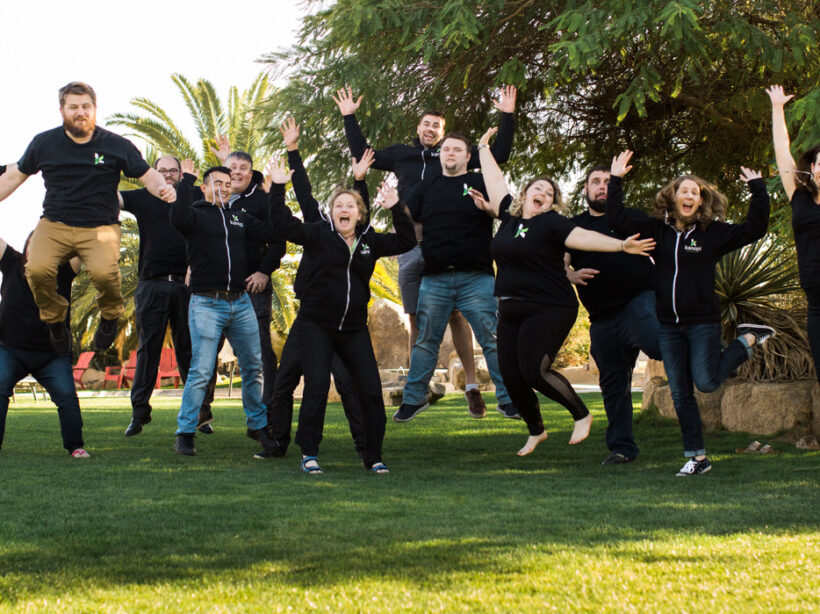
Kanopi Dev Team Jumping

Support is not a dirty word

Don’t launch a site and then walk away. Keep it strong and beautiful with long-term support.

When you build a new house, you (hopefully) don’t ignore it for years after it’s completed until the roof starts to leak and the basement floods. Ideally, you get the support of professionals to help you with regular maintenance, such as getting your gutters cleared, or draining water out of your heater. 

Similar to keeping your home in good shape, your website needs regular care and attention. And similar to leaving something minor unchecked in your house, ignoring your website after launch can turn into a much bigger problem further down the line. 

A great, ROI generating website requires continuous improvement. While some agencies don’t offer support after launch, we at Kanopi strongly believe in caring for the entire lifecycle of your website. This is why in addition to designing and building websites, we provide holistic website support after launch. 

Website support cannot be an afterthought.

The day your site goes live is really the day your project begins. As your virtual storefront, consider your website a living, breathing extension of your business. Your website build should not be a one-off business transaction, but rather a long term investment to help your business grow and meet the needs of your users today and tomorrow.

Would you go on vacation without getting a trusted friend or relative to water your much-loved plants? Website support is more or less the same, although the stakes are much higher. Put money aside for upgrades, security fixes, content reviews, and integration checks to protect your site from needing a potentially major overhaul further down the line. Otherwise you risk having your site wither away, which can be much more costly (a lot more than replacing a neglected house plant.)

Placing support in the ‘nice-to-have’ column is essentially doing only 1% of what needs to happen after launching your website. The web evolves constantly. And more critically, the most important people who use your website — your users — also will have shifting needs and behaviors. Your web presence has to adapt and adjust in real-time if it’s to keep supporting you in achieving your business goals and meeting the needs of your users. This is why support is a critical part of your business success. 

Because advancements in website technology emerge daily, it’s our job at Kanopi to stay on top of the latest trends and breakthroughs in web design and user experience. Support post-launch means you won’t miss out on opportunities to keep your site optimized through iterative improvements.

How, what, and when?

That’s entirely up to you! Don’t fret if you feel you don’t have the time or expertise to give your website the attention it deserves. You’re not alone! It can be daunting trying to keep your website up to date and relevant. Designers say only 11% of clients are able to update their sites on their own post-launch. 

What should you be keeping an eye on when it comes to supporting your website? Some common areas that benefit from ongoing attention are:

  • Security upgrades: making sure your code and software are updated keeps your site and your user’s valuable data safe.
  • Software updates: keep your site running smoothly and as fast as possible.
  • Regular backups: sites can break, but should not have to be often rebuilt. Give yourself peace of mind with regular code and content backups. 
  • UX reviews: is your site meeting the needs of your users? Customer behaviors change. Ensure you’re staying nimble enough to adapt to those changes.
  • Fresh content: engage your users and turn them into repeat customers with new, relevant information about your product or service.
  • Smart content: search engines love fresh content from sites that are speedy and free of errors. Ensure your business is visible online with content that can easily get indexed.

Kanopi is nimble and agile when it comes to maintaining the performance of our client’s websites. We offer different levels of support, which means we can help you find the right amount of assistance to fit your specific needs.

How is website support from Kanopi different? 

It can be hard to find website support with creative enhancements included. Like other agencies that offer support, we perform bug fixes, security upgrades, and integration checks. But what makes Kanopi Studios unique is our more comprehensive approach:

  • We provide deep dives into feature enhancements for your site; 
  • We review and help you improve your user experience (UX);   
  • We prioritize a great customer service experience. 

The best websites meet the needs of their users. Do you know who your users are and what their needs are? We recommend researching your users through interviews, creating user personas, and mapping your customer decision journey. And because your users’ needs and behaviors can change, we can test assumptions about your users on a regular basis.

We design beautiful, easy to use websites, but we understand that your website is only as good as its content. We can help you audit, migrate, and publish content on your site. In addition, we can help you develop smart content that gets indexed by search engines, improving the visibility of your business online.

From support with the development and design of Drupal and WordPress sites to training and help to create your content strategy, Kanopi can assist you in keeping your site optimized and up to date. Think of it as insurance to ensure your site is running at it’s very best.

We can help.

We’ve partnered with some great businesses and organizations recently, giving them a helping hand with keeping their website operating at its best. Check out our support case studies to learn more about our holistic approach to continuous website improvement. 

Contact us so we can support you in keeping your website optimized, meeting the needs of your users, and helping you achieve your business goals now and for the long-term.

As-Needed Website Design Support with Kanopi

Allison Manley
Allison Manley

Kanopi’s Support Services can evolve your website design.

Have you ever wished you could access an entire website agency’s genius on an as-needed basis? Have you worked with website support agencies that were good at keeping your site running and your software up to date, but less able to ensure its continued success? 

Web support is one of our strengths, mainly because we do it differently than other agencies. Support at Kanopi Studios is so much more than quick bug fixes and software updates; you’ll get access to an entire team of senior-level experts as needed, from user experience to design to development — all within a set monthly budget. 

Here are some examples of design services you can get in support:

  • Rethinking your navigation.
  • Incorporating new branding (logos, colors, typography, theming, etc). 
  • Reimagining your homepage, increasing conversions, while keeping your software up to date.

The Kanopi team’s ability to offer a full range of flexible services is just one of the ways we go above and beyond to support our client’s needs.

Turning concepts into masterpieces

“Many of our clients start with great ideas of their own, and may even have sketches of what they are looking for,” says Denise Beyer, Director of Support. “Bringing a designer in to hear their ideas, learn about their goals, and ask the right questions always adds an extra level of creativity and polish to the final design.”

Even a small investment in design can help you save budget in the long run. A few quick design mockups can help teams evaluate options and think through solutions before they are built, ensuring that the work gets done right the first time.

Design-thinking supports user needs

Kanopi’s designers and user experience strategists collaborate with clients to analyze the challenges your users face and find the best solution to help solve them.

“If your users repeatedly call you for help with the same issue, or have a hard time finding information on your site, our user experience team members can help,” Denise says. “We’ve worked with nonprofits to help increase their donations, helped website users find answers to common questions, increased conversions for businesses, and much more.”

Making smart look and feel updates

The Kanopi design team also offers branding support, whether you need an updated logo, a fresh look on specific pages, or a re-skin for your entire website.

“Some of our clients work with outside branding agencies and just need their websites to fit a new look, and others look to our team to help them update their brand design,” Denise shared. “We meet our clients where they are and are available to help with whatever is needed.”

See our work in action

Below, we’ve included a few examples of design projects that our support team has completed for our amazing clients. 

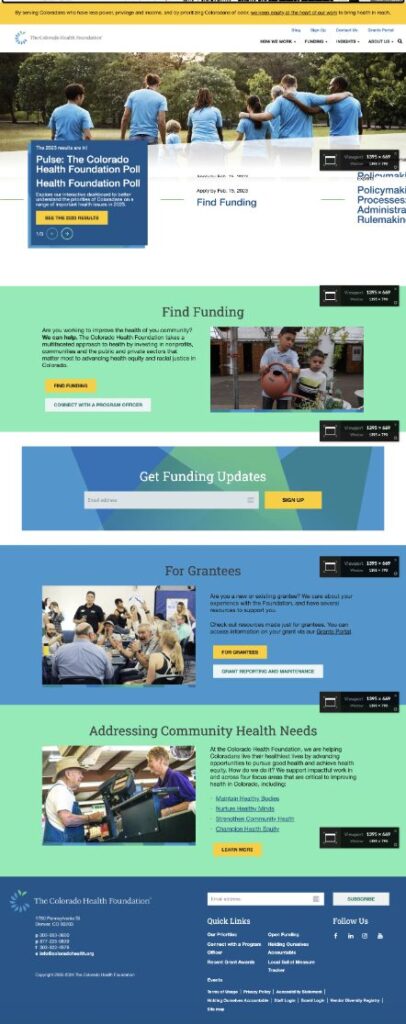
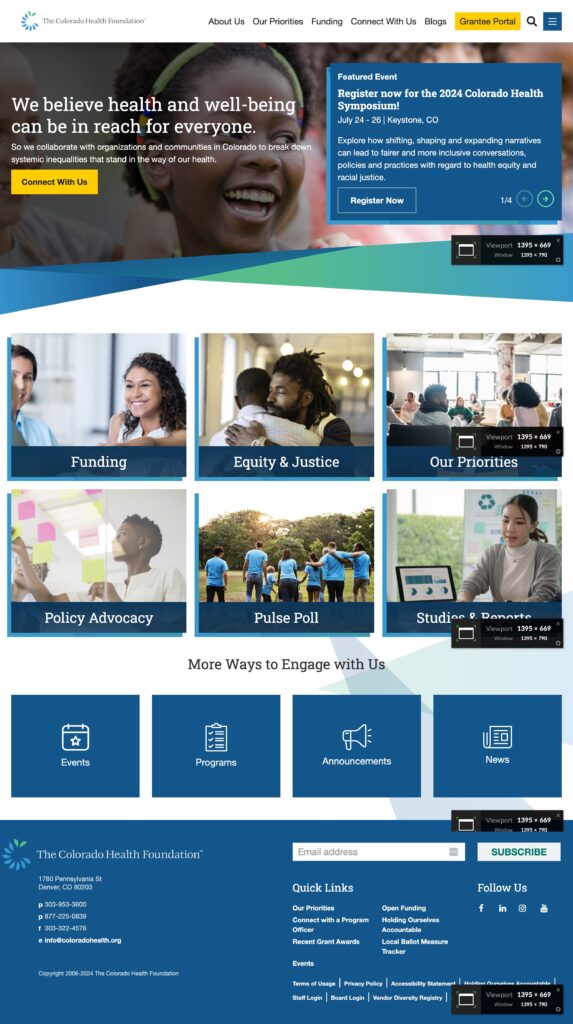
A redesigned homepage and new navigation for the Colorado Health Foundation

New, translatable page templates were designed to enhance the visibility of Colorado Health’s focus areas and priorities. This new design optimizes website real estate and standardizes design elements and components to ensure a cohesive and impactful presence. We also removed their complicated mega menu and introduced simple navigation with clear user journeys.

Colorado Health Foundation homepage before Kanopi's upgrades
BEFORE: Colorado Health Foundation’s Homepage
Colorado Health Foundation's Homepage after Knaopi's upgrades
AFTER: Colorado Health Foundation’s Homepage

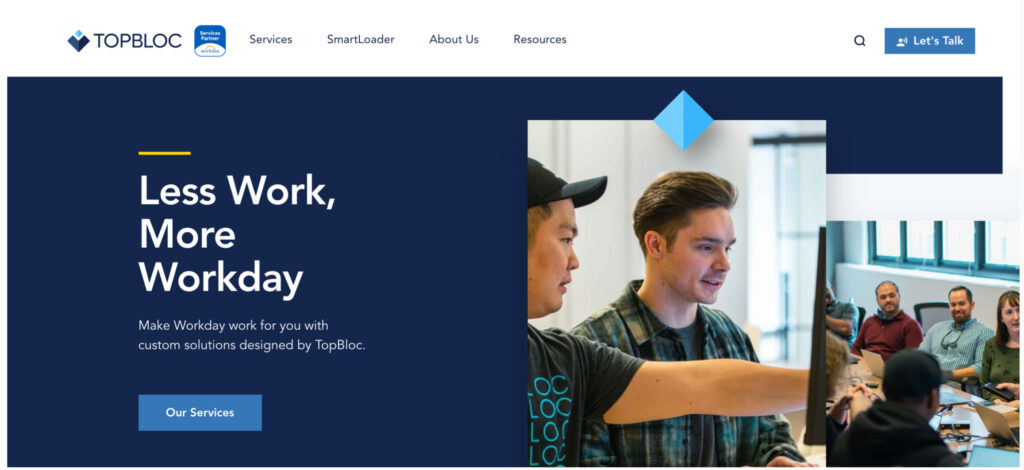
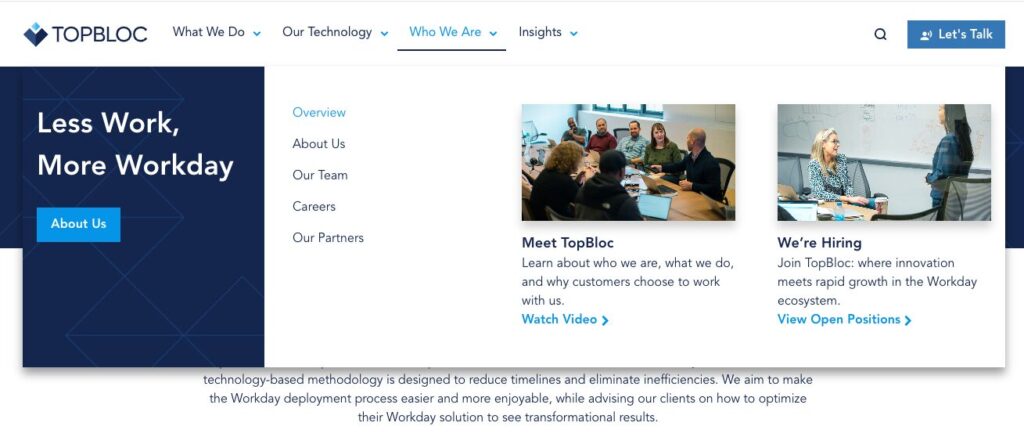
A reworked mega menu elevated TopBloc’s content and bolstered their identity

TopBloc recognized that users were getting stuck searching for content, so they came to Kanopi for a focused fix with their mega-menu. Based on user research, we crafted a revised UX strategy and meticulously reworked and renamed items in their information architecture, ultimately elevating their site’s content and bolstering their identity. Both Desktop and Mobile menus were redesigned and developed for a seamless flow and pages are accessible and clear.

TopBloc's previous menu before Kanopi's upgrades
BEFORE: TopBloc home page without the mega menu
TopBloc's menu and navigation after Kanopi's upgrades
AFTER: TopBloc’s new mega menu

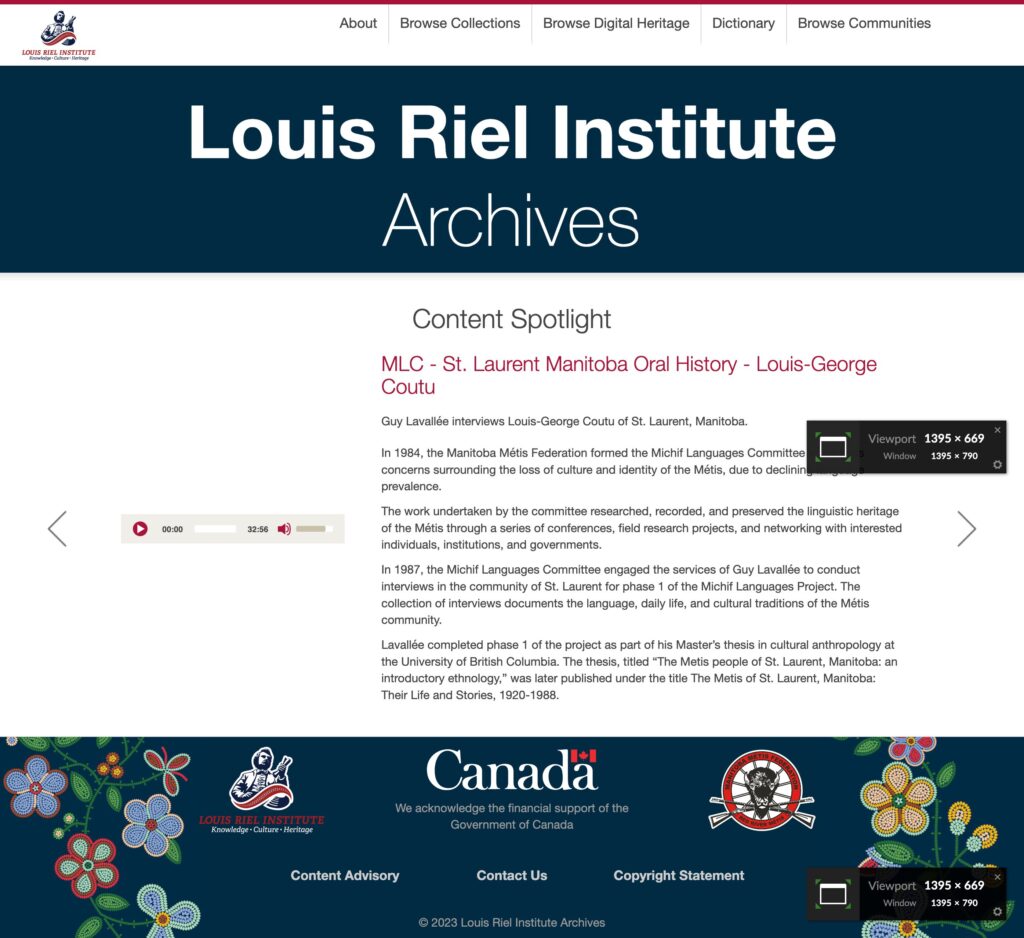
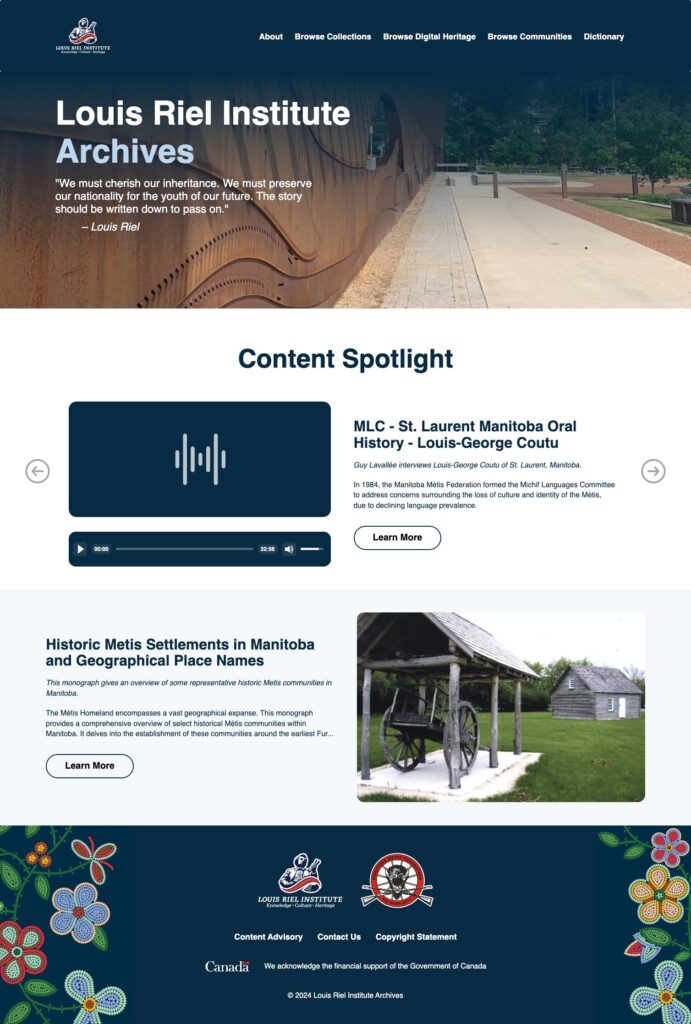
An improved user experience for The Louis Riel Institute

Our redesign for the Louis Riel Institute website’s archives gives the site a fresh, modern look, complete with an updated color scheme and an intuitive layout that enhances the user experience.

Louis Riel Institute Archives Homepage before Kanopi's upgrades
BEFORE: Louis Riel Institute Archives Homepage
Louis Riel Institute Archives Homepage after Kanopi's upgrades
AFTER: Louis Riel Institute Archives Homepage

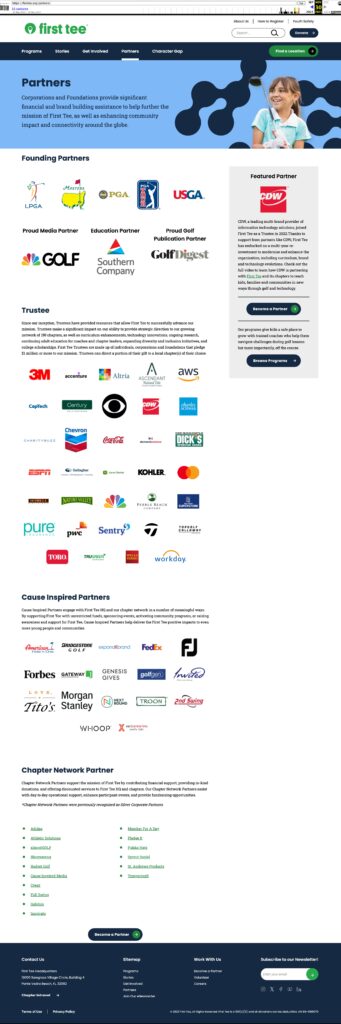
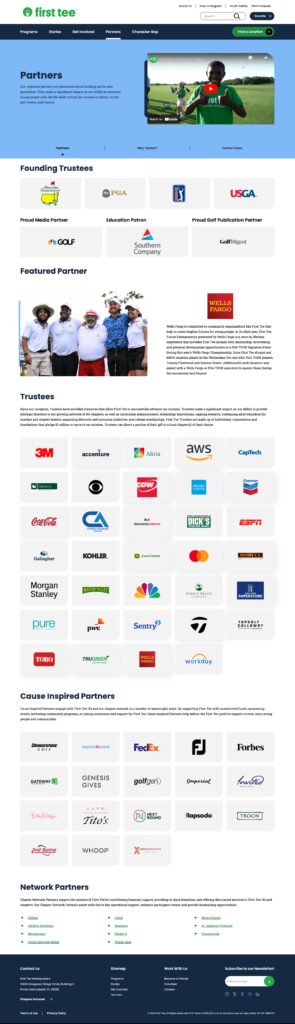
A visual refresh for First Tee’s Partner Pages

A CRO audit led to the redesign of First Tee’s partner page. The project utilized existing block patterns and introduced a couple of new ones to enhance user engagement and conversion rates.

First Tee Partner Page before Kanopi's improvements
BEFORE: First Tee Partner Page
First Tee Partner Page after Kanopi's improvements
AFTER: First Tee Partner Page

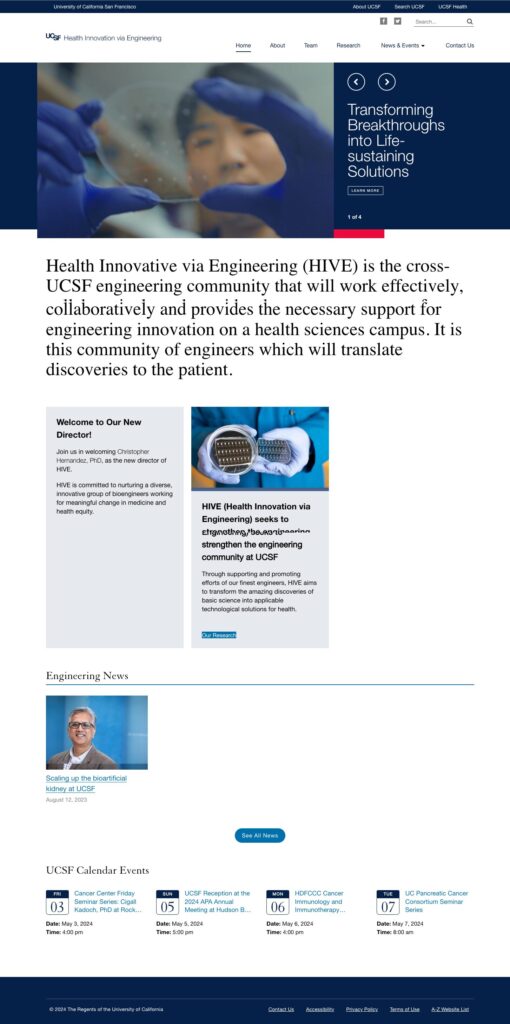
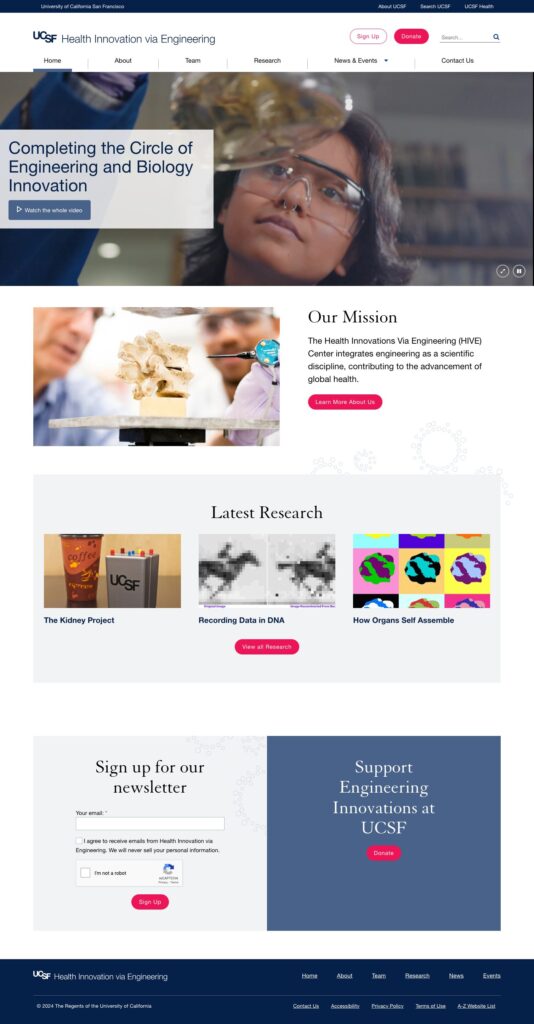
Impactful improvements to UCSF HIVE

UCSF Health Innovation via Engineering (HIVE) needed a new refresh of the homepage, navigation and people pages in order to better display and surface their content. An accessible video on the homepage adds interest while keeping the site WCAG compliant.

UCSF HIVE Homepage before Kanopi's upgrades
BEFORE: UCSF HIVE Homepage
UCSF HIVE Homepage after Kanopi's improvements
AFTER: UCSF HIVE Homepage

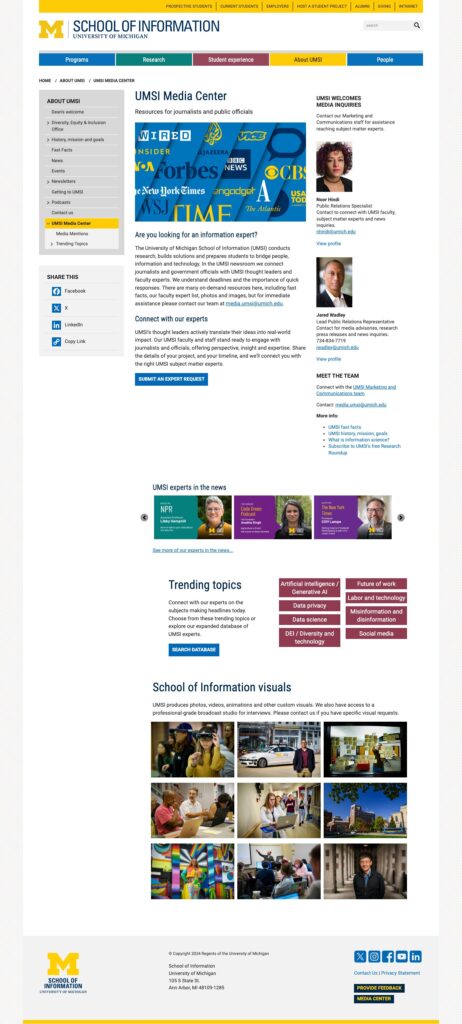
New functionality for The University of Michigan School of Information (UMSI)

Often our Support team is tasked with creating new pages using existing brand signals, and we did just that for University of Michigan. UMSI conducts research, builds solutions and prepares students to bridge people, information and technology. They needed a new section on the site that would be a centralized media center and newsroom to connect journalists and government officials with UMSI thought leaders and faculty experts. This included a section on “trending topics” which allows users to filter by topic to easily find faculty experts.

University of Michigan School of Information (UMSI)'s Media Center page
UMSI’s new Media Center page
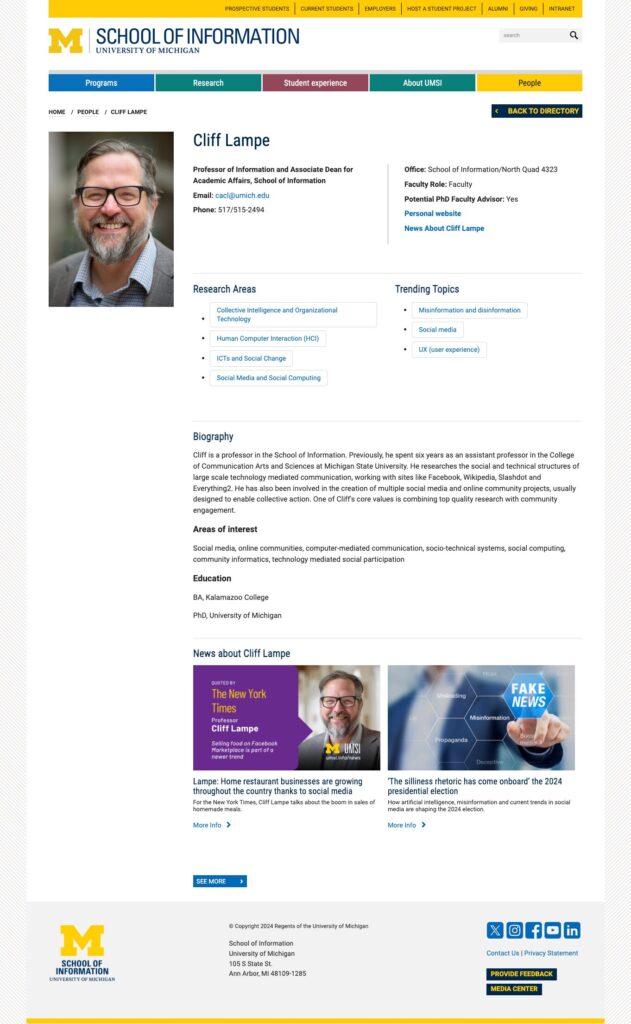
University of Michigan School of Information (UMSI) page for professor Cliff Lampe
“Trending Topics” were added to individual bio pages as well to make it easier for users to find faculty experts.

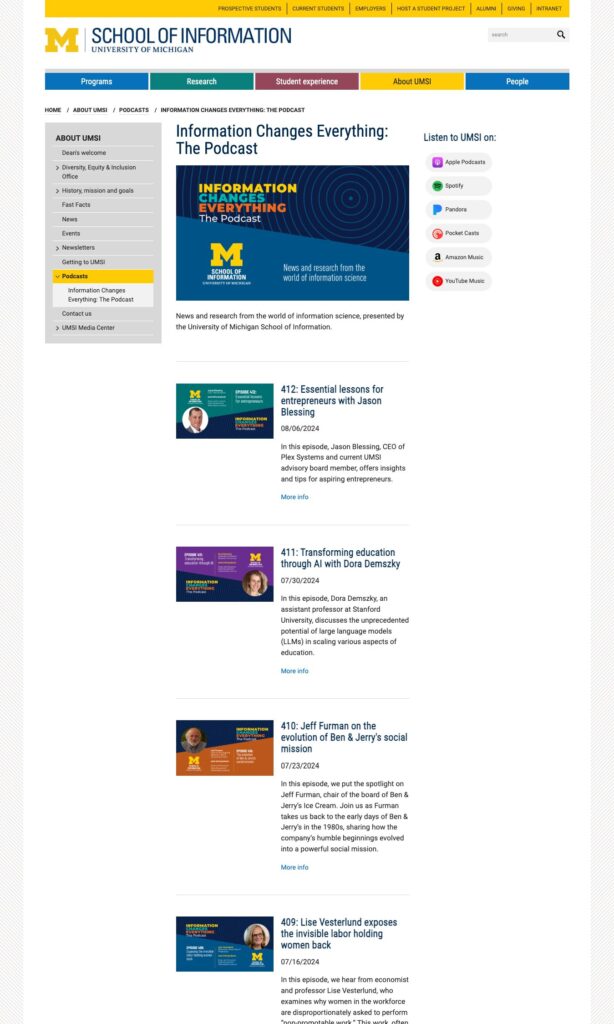
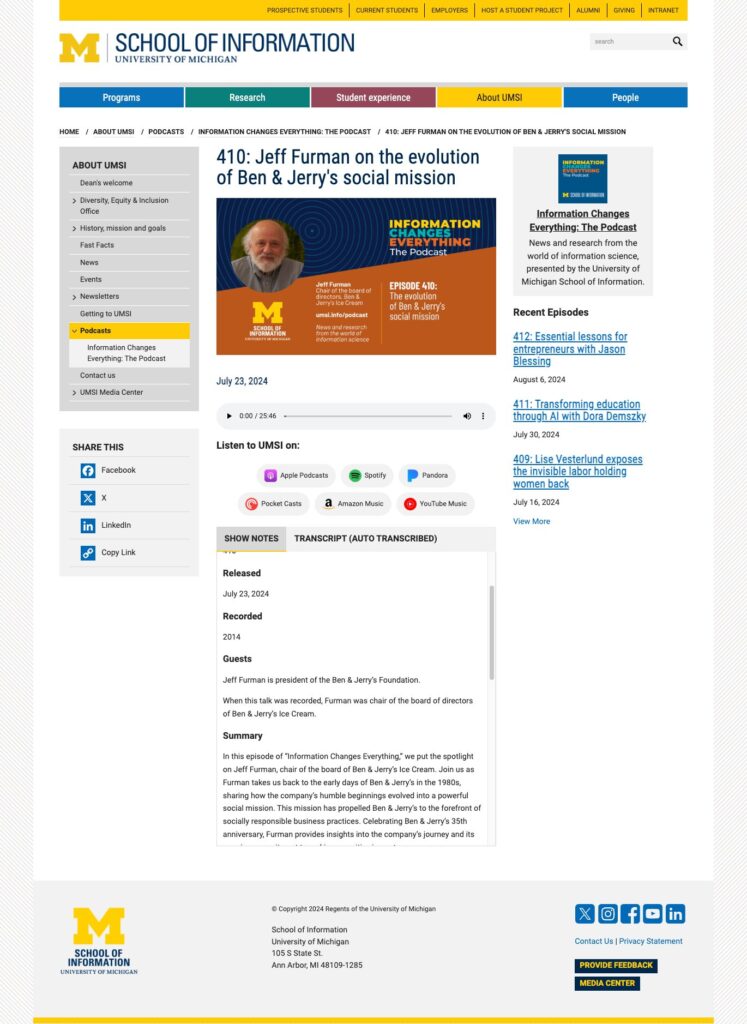
To further extend their media offerings, UMSI launched a new Podcast called, “Information Changes Everything.” For this new podcast, there needed to be website functionality to promote and share the information on each episode, as well as the written transcript following each episode.

University of Michigan School of Information (UMSI) podcast landing page
The landing page for the podcast
University of Michigan School of Information (UMSI) individual podcast page, this one for Jeff Furman of Ben & Jerrys Ice Cream.
The individual episode page

Working with Kanopi’s support team

The Kanopi team looks at your site holistically, rather than as a series of tasks. When you work with us, you’re hiring a team of senior-level experts who are available on-demand to help with all types of website updates. And no job is too big or too small.

Ready to learn more? Contact us to discuss ongoing improvements for your website. 

Kanopi Team

Expand your team’s capacity with the right partner

Staff augmentation might be the boost you need for your website project.

Do you have looming deadlines and limited resources? Or perhaps you need to be able to tap into a specialized skill set that just doesn’t exist within your current team. Either way, you need some help to make sure you stay on track, accomplish your goals, and successfully implement that website project. 

Realizing you need help is the simple part. Finding reliable expertise can be a bit trickier. Especially when you need support right away and can’t imagine where you’ll find the time to wade through a sea of freelance portfolios or create a job description and review resumes for a position you’ll only need for a short time. 

Staff augmentation from a reputable agency partner may be just what you need. Below are our tips to help you find the best partner to get the job done, plus a few examples of how helpful staff augmentation for a website can be when it’s done right. 

Finding the right fit 

To get started, think through your exact needs, including skill sets, timeline, project goals, and any other details. This will help you (and your agency partners) gain clarity around the problem that needs to be solved. 

Next, it’s time to find that perfect partner. We may be a bit biased, but this is where website agencies can truly shine. Not only do you gain access to a pool of talent that has already been vetted for you, but you also get to work with people who are adept at being flexible and useful across all sorts of teams, industries, and project types. Agencies have a diverse range of talent at every level, so your needs are sure to be covered. Looking for a technical lead? No problem! How about a UX strategist? Sure. Maybe you just need access to a developer who can move a mountain of tickets or an accessibility expert or a project manager who can keep everything on track. Check, check, and check.

Keep in mind you are looking for a true partner, not just a vendor. Talk to a few agencies to be sure you find the best fit. Ask them about their communication style and how you will be kept in the loop. Ideally, you are looking for open, transparent communication and regular touchpoints that go beyond email updates. 

Pay attention to the way the agency makes you feel. Do all of your questions get answered clearly? Did you get to meet the actual people you will be working on your project with? Do they make you feel calm, confident, and maybe even excited? These are all good signs that are likely to lead to an enjoyable working relationship on all sides. If you have any doubts, keep looking. There are plenty of agencies out there that can help. 

Ask how your project will be staffed. Ideally, you’ll want dedicated, consistent resources, which means that the same people will work on your project from beginning to end. 

Finally, we recommend taking the time to be extra clear about roles and responsibilities between teams. Some areas that can fall through the cracks or fall prey to unspoken assumptions are QA, project management, budget creation, and risk management. 

Get the help you need when you need it most

Kanopi Studios experts are ready and able to lean into your team when you are in a pinch, helping you stay ahead of schedule and exceed your goals. We’ve done staff augmentation for websites before.

Whether you need design, strategy, development, maintenance, or training ⁠— we are here for you. Get in touch to learn more about how we can help you solve the website project concerns that are keeping you up at night.

Migrating from Drupal 7 to WordPress

Faye
Faye Polson

Spock: Compute to the last digit, the value of Pi. Computer: *screams*

This was the first thing that comes to mind whenever I’m asked “how do we migrate from Drupal 7 to WordPress”. It seems like an impossible task, like trying to calculate pi to the last digit.

Apples, Oranges, and Pi, oh my

Where Drupal has modules, WordPress has plugins. Where Drupal has nodes, WordPress has posts and pages. Drupal uses blocks, WordPress uses widgets.

Functionally these pieces all accomplish the same tasks, but technically they’re built differently. It means there isn’t a one click solution that will take all your Drupal content and smash it into a WordPress CMS, like replacing the center of an orange with an apple. It just doesn’t work like that.

Ultimately it comes down to this: a Drupal 7 database and a WordPress database are just too different. Their tables have different structures and names and they just don’t understand each other. And with any amount of customization possible on both sides of the equation, computers, or one click plugin scripts, just can’t make the leap.

A Developer Can Migrate D7 to WordPress

That’s right, where a computer fails, a human can succeed. Because the best way to migrate your content from D7 to WordPress is to execute a script (an automated process) that has been designed by a person who has some basic familiarity with the content in question. A developer can compare the different sets of data, determine where it should go, and create a script that tells a computer where to put what. They can also set up the receiving database with tables and columns that match any customizations needed.

Piece by piece, developers can identify the needed tables from your Drupal 7 database and how to migrate them into a WordPress database. It’s not a fast process, but it’s a careful and deliberate one, meant to preserve essential content and data.

Content Migration, Check. What about style and function?

Even though we’ve got your core content, there’s no way to mash a Drupal 7 module or block in a WordPress plugin or widget. Those will need to be built again, using your existing site as a template for the outcome. A developer can absolutely make your site do the same things, but they will need to use a different set of tools. The good news is being able to see the existing function on your website will help them execute the same effect with clarity.

Themes and styles are a mixed bag. They don’t directly transfer, but often chunks of code can be reused, provided it’s clean, documented, and follows best practices. In some cases, it may be easier for a developer to start from scratch and merely mimic the existing theme instead of borrowing from it. Regardless, your site will still look the same at the end of the day whether it’s on Drupal 7 or WordPress.

This sounds complicated!

It is! It really is. But that’s the reason you hire an agency like Kanopi to do the hard stuff for you. Our team is experienced in both Drupal and WordPress, giving us a wide range of internal resources to rely on as we approach your project. We can also help you with choosing your hosting platform; not all hosts are created equal and some are CMS specific, like Acquia for Drupal or WP Engine for WordPress.

That said, there are things you can do in advance of your migration to make the process smoother and reduce the overall time and cost.

Curate Your Content

Go through your website, top to bottom. Are there pages that are no longer relevant? Are you keeping an archive of your blog posts back to 2001 even though your analytics show no user activity that far back? It’s time to hunker down and start cutting out the content you don’t need. Or at the very least, create an accurate list of what you do not need your developer to migrate. Cleaning up your content means there’s less to move, and what is needed is easier to consolidate.

Consolidate

Now that you’ve checked through your site, are there areas that are too similar? Do you have a support page and a content page but the only difference is the url and the title? It’s time to trim away duplicate and redundant content. Redirects can handle your url changes, and your users will appreciate a more streamlined approach to using your site.

Update Your Site / Modules

If your site is out of date, it’s a security risk, plain and simple. And out of date modules can perform in unexpected ways; you don’t want incorrect functionality being copied to your new site. Getting everything up to date and verified will ensure there’s no confusion about what’s expected.

Remove Unwanted Sections / Functions / Content

Does your site have unpublished nodes? Are you saving them for something important? If not, it’s time to purge. Clean out that unused content. Got functions you’re not really fond of? Remove that too. Styles you don’t like? DELETE. Get rid of anything you don’t want; there’s no point in paying to have it moved to WordPress. 

Clean Up Your Code

Sloppy themes and templates are bad for a lot of reasons, but specifically it’s not something you want to migrate to your new WordPress site. Cutting corners and using messy code will only cause problems later on. Getting your theme files documented at the very least will make a big difference when it’s time to rebuild them. Not to mention, Drupal and WordPress coding standards are going to differ, there’s some work that could be done ahead of time to ease the transition.

Compute to the last digit, the value of Pi

Unlike computing pi, going from D7 to WordPress is actually possible, even if it’s not easy. And that’s why Kanopi is the agency you want to partner with. We want to work with your site before it’s time to migrate. Our team will get to know your website (the good and the bad) through ongoing Drupal 7 support. We can help you with the content, the consolidation, the updates, and the code in advance of moving to WordPress. And when it’s time to start the nitty gritty migration, we’ll be ahead of the game with far much more than a basic understanding of your site; your needs and goals will already be a part of our roadmap.

Start Your Project With Kanopi

When to Move from Drupal to WordPress

Faye
Faye Polson

Drupal is an incredibly powerful Content Management System (CMS).

It’s a powerhouse tool, and incredibly robust. In fact, it can do pretty much anything you can imagine a website doing. 

And yet across the globe, out of all the websites built with a CMS, WordPress dominates with nearly 60% of the market share, while Drupal just squeaks over 4.5% and is barely knocked out of second place by Joomla!.

Why would anyone switch from Drupal to WordPress?

Because sometimes a power tool isn’t the right tool. Imagine buying a chainsaw to cut delicate flowers for an art project. I don’t doubt it would be amazing to watch, but it would ultimately be a messy, expensive endeavor with an outcome that doesn’t look anything like the result you would have gotten if you’d just used a regular pair of craft scissors.

Maybe you went with Drupal because you didn’t know there were other options. Or maybe Drupal seemed like the right CMS at the time, but now that you’ve had your site for a few years it isn’t quite what you’d been hoping for. Perhaps your needs and goals have significantly changed, and your site no longer lines up. 

Regardless of how you ended up with a Drupal site, you now wonder if you need a different tool for the job.

Drupal vs WordPress

Before you decide to move away from Drupal, it’s a good idea to take a look at what both Drupal and WordPress can do specifically for you. They’re both quality platforms that can get the job done, but they do excel in different ways.

5 Advantages of Drupal

  1. Robust User Access Control
    If you need a lot of users, or various permissions and access controls, then Drupal is going to give you more options from the start, with plenty of room to grow.
  2. Multilingual Functionality
    Drupal has multilingual functionality baked right into the core. If your audience is multilingual, or your site will be used by a variety of countries, you’ll want this out of the gate.
  3. Easier to Keep Secure
    Drupal core has a lot to offer developers, meaning they often don’t need as many third-party additions and extensions. Fewer modules means fewer potential holes in a site’s structure. If you’re storing sensitive data, you’ll want to consider this angle
  4. More Flexible Content Types, Views, and Taxonomies
    Of course other CMSs have these capabilities, but Drupal has increased flexibility and control over how your content is displayed and the relationships between data.
  5. Better for Storing Huge Amounts of Data
    Large directories, content types, products, etc., require big solutions. If you need to store hundreds of thousands of entries, you will want something made the handle that kind of bulk.

5 Advantages of WordPress

  1. Easier to Use
    Overall, WordPress is highly user friendly and non-developers have a much easier time using the administrative backend, and Gutenberg has made the content editing process even better.
  2. Larger Library of Extensions and Themes
    Because WordPress has such a high rate of use across the world wide web, it has a huge community, with a massive library of plugins and themes, both free and paid. There’s plenty to choose from and you’ll almost always find a ready-made solution.
  3. Easier to Get Developers and Support
    More usage means more developers, and more avenues for support. There’s no shortage of WordPress devs out there, nor a lack of communities and forums where you can find solutions for your site. 
  4. Lower Development Costs
    WordPress has more ‘out of the box’ solutions that require less customization and development time. Reducing costs in those areas means developers can focus their energies on other aspects of your site.
  5. Faster Builds
    Because of the ease of use, extendibility, community support, and available developers, WordPress builds tend to take less time. Your site can be up and running on a shorter timeline, and then continue to grow it as your budget allows.

How to Decide

Make a list of what you want your site to do for you. Add to that a list of things that would be nice to have, but aren’t absolutely necessary. Then make a list of barriers that you’re facing. Compare those items to the advantages listed above. At first glance, which CMS seems to address the majority of items on all three lists?

If it’s starting to look like you don’t need any of the high powered Drupal capabilities mentioned above, then maybe you’ve been using a chainsaw to cut paper flowers.

WordPress is an amazing pair of craft scissors

WordPress doesn’t own 60% of the world market share of CMS usage for no reason; it is a phenomenal platform. Developers can extend it to handle robust content needs, and can build most anything with or without third party tools. 

Security also doesn’t have to be a concern; using custom solutions reduces the security risks associated with excessive plugin use, and there are several security services and hosts that specialize in WordPress.

As your needs grow, WordPress can grow too. You don’t have to switch back to Drupal because three years down the line you suddenly find a need for tightly controlled user roles and permissions, those things can be built into your site. Same with multilingual solutions and large data storage. Over time your site might become a Swiss Army tool of sorts, with new attachments being added onto those craft scissors, but instead only adding what you need as you need it. Sometimes a precise tool is better than a power tool. 

Choose Your Tool

If a Drupal site is working for you, stick with it. We often recommend it for clients with complex needs, and who have a passionate crew of Drupal contributors. And as an agency that builds Drupal sites, we’re fans. But if it’s not working out, then maybe WordPress is the better tool for you. Whatever direction you choose, contact us if you need help. 

Chat with us about Drupal & WordPress

A pile of silver forks, knives and spoons haphazardly dumped in a pile, demonstrating the messiness of a site not using custom post types..

Custom Post Types: Using WP for Content Management

Faye
Faye Polson

Confession: I don’t separate my cutlery.

I just grab a handful of forks and spoons and knives and shove them into the tray, ignoring the divisions made to help organize your utensils, and then just hope nobody ever looks in there to realize how ridiculously lazy I am.

Of course, separating my cutlery would make it easier to find what I’m looking for, especially considering I seem to have 6 million spoons and only 5 forks. It’s completely silly that I don’t.

WordPress has the same problem as my cutlery drawer

Out of the box, WordPress websites come with Posts and Pages. Pages are what we use to build a site’s homepage, contact page, about page, landing pages, etc. Pages almost always appear in the navigation menus of your site, otherwise users would have a hard time finding them.

Posts, on the other hand, are meant to show off content in an Archive. For example, a news feed, or a blog. They also auto publish; add a new post and it magically appears at the top of your blog page (which is actually not a Page). Posts also use Categories and Tags, which can be clicked on to view Archives of posts in those Categories or Tags.

Where this gets messy is when people use their Posts as sort of a catch all for content that doesn’t fit on a page. Press releases, resources, news, blogs, announcements, videos, links, etc. I’ve clicked on the “Posts” in the WordPress dashboard and cringed to see all that content jammed into one place, knowing it must be an absolute nightmare for the site owner to navigate and sort through.

Post Formats to the rescue?

Not exactly. WordPress has something called Post Formats which allows you to choose a format for your Post. You can choose if something is a video, or a link, or a gallery, a quote, etc.. But unless your theme has templates for each one of those types, they’re useless. And considering there are 9 post formats, that’s a pretty big budget consumer for something that still won’t solve the larger issue; there’s just too much cutlery in one place.

Custom Post Types to the rescue! For realz this time.

The truth is, WordPress is made up of posts. Users are posts, Categories and Tags are posts, files and images are considered posts, even Pages are posts! The entire infrastructure of WordPress revolves around this one method of data storage. As a result, it’s really easy to make more.

While there are Custom Post Types Plugins, a developer can literally add a custom post type through their own plugin, or to a theme’s functions, with just a few short lines of code. They can add Categories and Tags to it, tell it to behave like a Page or a Post, or give it it’s own custom taxonomies. This essentially means you can separate your content by purpose, and then present it back to the user accordingly.

Cleaning up the Cutlery Drawer: A Study in Books

Let’s get practical. I like cool used bookstores, so let’s imagine you have a used bookstore and need a website that works for the type of content you want to show.

The default Posts that come with WordPress, those will be your news / blog posts. Thanks to Gutenberg, you can really design your posts as you need them, without post formats and templates. 

You’ll want an Events section, so you can brag about the upcoming J.K. Rowing book signing, or the long awaited release of Book 3 from Patrick Rothfuss. With Advanced Custom Fields (ACF), Kanopi could make a robust Custom Post Type that has event dates and times, associated authors with their social media, promotional images. We could even display this in a calendar format with integrations for Google Calendar reminders.

Next, you’ll want a rare book section. Obviously your bookstore is amazing and has some serious stock that you’re not about to upkeep online, but there’s always those special books that could bring in the collectors. Our next Custom Post Type might be Rare Books, and with the magic of ACF, we could make bibliographies and a gallery of images of the book and some of its pages. Maybe a little history blurb about the book or what makes it such a hot ticket item for collectors.

Now, you’ll also want to draw in average readers and book lovers who maybe don’t have the budget for rare books, so let’s make a Custom Post Type for Recommended Reading where you can put together a list of some highlighted books that are likely to appeal to a wider audience. It can be categorized and sortable too, so users can browse and filter. It’s going to be amazing.

Lastly, a Team Custom Post Type, because your book store has a staff of six, plus the store cat (because you’re really cool like that). Each post becomes a Team Member page, with a bio, job title, and — this is where it gets really neat — you can associate them with their favorite books from the Recommended Reading posts. In fact, let’s go one further, we can attach your staff to the blog / news posts they’ve written and show that alongside their bios. Kanopi actually does this for our own staff.

Where previously you might just jam all this content onto a single page, or into a mash up of Posts, we can take all this content and give it custom data entry and custom templating that allows for some neat cross connection and interactivity for users to better travel your site and find what’s relevant to them. Have a cat that lives at the store? You never know . . . the store cat’s blog posts might be a huge hit.

Structured Content is Mappable Content

What if simply by telling your cutlery drawer what you’re having for breakfast, it was able to select the necessary eating implements for you? Having cereal? Here’s a spoon. Pie and ice cream? No judgement, here’s a serving knife, ice cream scoop, and a fork.

The additional advantage of an intentional content structure using custom post types is that you can then apply what’s called schema data to essentially map your content. Our fictional bookstore could actually pass specific information to Google about those rare books and events to get them in front of the people most likely to be genuinely interested. Consistent data is also extremely useful for filters and searches, announcement bars, feeds, and more. It allows for a deeper level of content strategy and design to better achieve your online goals.

Are you convinced to use Custom Post Types in WordPress? Ready to start stacking your silverware? 

Get organized with Kanopi

Kanopi Team

Metadata vs Schema

Faye
Faye Polson

It’s just data about data.

As a twenty something, I thought drawing a picture of Lt. Commander Data from Star Trek the Next Generation holding a clipboard of statistics about himself was a fantastic study aid for the definition of “metadata”. Okay, as a thirty something I still think that’s pretty funny.

Metadata essentially just that — data about data. It’s context for the information you’re about to consume. Nearly everything technical has it; when you take a picture on your smartphone, it stores the date and time the photo was taken, and some kind of generic name. If you have location services installed, it can even add where the picture was taken to its internal clipboard.

Most of the time metadata happens without us even realizing it, and nobody thinks twice about it until they want to improve their website Search Engine Optimization (SEO), which has definitely popularized the term. But for most people it’s just a huge ambiguous concept without any real concrete applications. 

So how does metadata work for your site?

Whenever you hop on your search engine of choice, for the purposes of this article we’ll be talking specifically about Google, your search results often come up with a website name, url, and a short description about the page. Every site has a title and url, and if it’s missing a description a good search engine will automatically pull the first few lines of text it can get from the site. 

Metadata Sample to demonstrate the difference between metadata vs schema

There’s a lot of misconception as to what this data is for, and how the search engines are using it, but the bottom line is that this information is for the user, not the search engine. This is your opportunity, as a website owner, to connect with your potential users. If you have the content they want to consume, this is where you tell them that. You have the ability to control your title, urls, and descriptions. Yoast is a fantastic extension for those kinds of edits, available for both WordPress and Drupal sites, but there are many others if Yoast doesn’t meet your specific needs.

Try it out

For fun, google your own company or organization, and see what comes up in the listings. Is it compelling? Does it accurately convey what you do and who you are? Would it appeal to a potential customer? If not, maybe it’s time to revisit your metadata content. Consider taking a look at your titles, urls, and descriptions for your most important pages.

If that seems like a daunting task, don’t fret; we can crawl your website and provide an audit of what search engines encounter when they navigate through it. Armed with that data, you can take an iterative approach to improving your pages based on importance.

Okay but then what is Schema Data?

Where metadata is data about data, schema is the map for that data. Take an events page, for example. It would have an event title, a ticket cost, a date, and a time. All that data is on the website, but how would a search engine know that unless you actually told it where to look and for what? Schema lets you assign context to that data. So along with the page that the user sees, you can send a map to the search engine that tells it the page is about an event, when it is, where it is, how much it costs, even the type of event. Is it a fundraiser, or a concert? Who’s organizing this event? Are there any promotional offers?

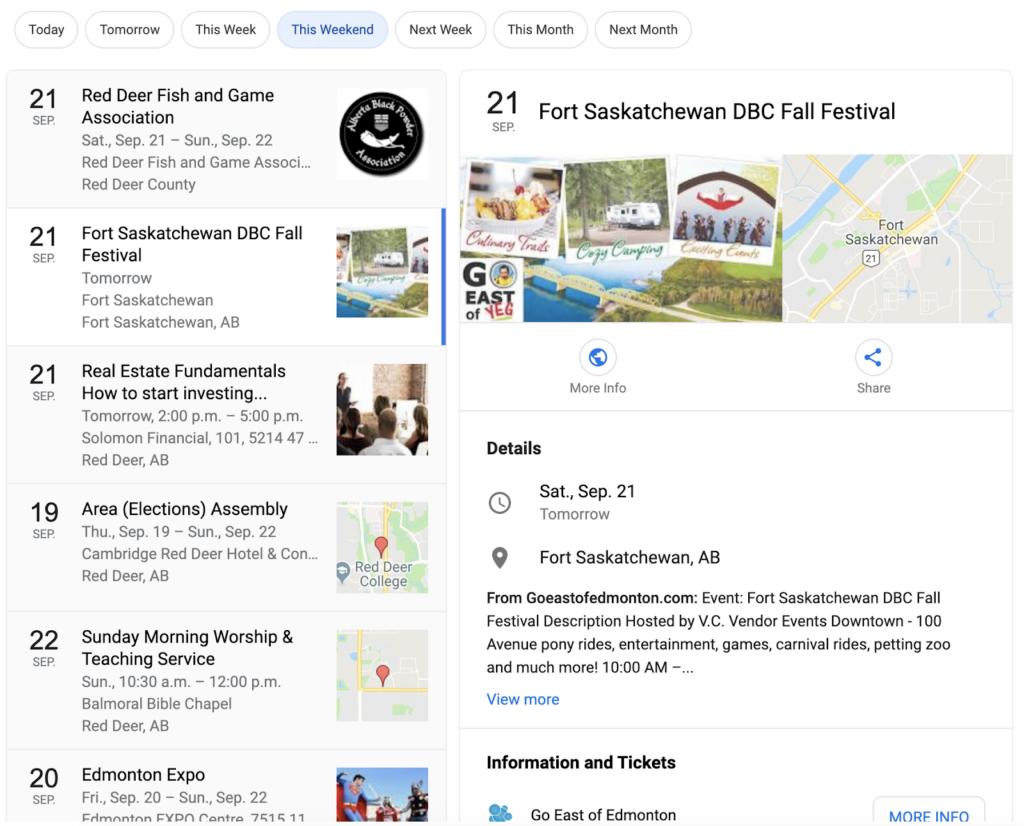
As an example, this is a Google search where I simply typed “upcoming events” and then chose “This Weekend.” Now I’m getting a list of events in the area with some relevant data.

Schema Sample that demonstrates metadata vs schema

How did it get there? Most likely those websites are utilizing schema data to map their event information. Google can find it now, understand its context, and present it in a relevant search.

How do I get schema data on my site?

Lucky for you, basic schema is possible with a plugin or module. Yoast, for example, adds some global site schema and basic page specific schema. Even just this alone can help boost your site’s content presentation to a search engine, and it’s a fairly low level of effort to integrate. If your site has an SEO plugin, you might already have some schema being applied. Head over to the Structured Data testing tool from Google and plug in your homepage to see what pops up. 

If you don’t see much, or you see a lot of errors, then you’re missing some valuable SEO leverage. But it usually takes a little more punch than third-party extensions can offer to get your specific content into schema markup; it’s time to hire a developer.

We’re not shy! Take a look at Kanopi’s schema markup.

Kanopi Homepage: Here we’ve been able to tell Google when our site was last modified, that we’re a company, all of our social media accounts, what our logo is, and what the most important image on the page is.

Staff Member Page: On Jim’s profile, we’ve got the global information included on the homepage, but we’ve also added that this specific page is about a person, with his name, his position, his picture, and all of his social accounts.

We’ve done the same for our blog pages, service pages, and case study pages. We’ve put extra care into communicating with search engines about the content of our site to better reach our audience, concentrating on the appropriate suggestions provided in the Google Search Gallery.

Schema can be applied to almost anything — in fact, the list of things you can use schema for will make your head spin. If you’re ready to move into the next stage of SEO, give us a call! The development experts at Kanopi are ready to help audit your site and develop a customized SEO plan to enhance your visibility among your target audience.