






If someone asked why your organization should pay for a website rebuild when AI can generate pages, write code, and produce content in minutes, that’s a fair question. It deserves a real answer.
Here’s the honest version. AI has changed how websites get built, and we use it every day to speed up repetitive work, organize information, draft content, and help our developers move faster. Good for us, good for our clients. What AI hasn’t changed is what makes a website actually succeed.
A successful website still has to support your goals, serve your audiences, meet accessibility and regulatory requirements, strengthen your brand, and hand your team something they can confidently manage long after launch. That’s the work your budget is paying for.
AI is making projects more efficient
The biggest gains we see are in structured, repetitive work: content migrations, data mapping, documentation, and first drafts of code. That kind of task takes far less time than it used to. In some cases, we’re seeing up to a 40% reduction in effort, savings we pass on to clients. But that doesn’t make a project 40% cheaper or faster overnight. What it buys is time: less on busywork, more on the decisions that shape the finished site. That’s the better investment.
Every rebuild is a series of decisions
Long before anyone writes a line of code, someone has to answer questions AI can’t:
Who is this website for?
What do visitors actually need?
What content earns its place, and what should go?
How should it be organized?
What does success look like six months after launch?
Those answers shape everything that comes after, and they come from your organization, your audiences, and your priorities, not from a model. Getting them right takes conversations, research, and hard-won judgment.
Your website should look like your organization
AI learns from millions of websites, which is useful. It also means it tends to produce work that feels familiar, and familiar is the last thing you want. Your site should reflect your organization, your voice, and the experience you actually want people to have. Whether someone is making a donation, applying for a program, looking up healthcare information, or weighing your services, the whole thing should feel deliberate. AI can help create that, but it still needs people steering.
Accessibility, compliance, and trust still matter
Plenty of organizations work where accessibility, privacy, and regulatory requirements aren’t optional, and getting the details wrong creates real risk. AI doesn’t know your policies, your legal obligations, or what changed last month. WordPress, Drupal, browser standards, APIs, accessibility guidance, and security recommendations all continue to evolve. Knowing when something is outdated, incomplete, or just plain wrong is part of building a website responsibly.
Technology decisions affect the next five years
Every rebuild also involves decisions visitors never see:
Which CMS is the right fit?
Which plugins or modules are worth the trouble?
How much should be custom-built?
How will the site be maintained?
How will today’s choices hold up against tomorrow’s updates?
These shape security, performance, maintenance costs, and how easily your team can grow the site over time. The right call now is often what saves you from expensive work later.
Someone still has to make sure everything works
Before anything launches, it all has to be tested:
Forms have to submit correctly
Search has to return the right results
Content has to display properly across devices
Integrations have to actually work
Editors have to know how to update the site without breaking it
Visitors don’t care whether AI wrote part of the code. They care whether the site works. So do we.
What your budget is really buying
The real value in a rebuild was never the typing. It’s in making good decisions, catching risks before launch, and delivering a site that’s easier to manage, easier to grow, and easier for people to use. AI is helping us work faster than ever, and we’re putting that time back into strategy, quality assurance, accessibility, content, user experience, and the small details that make a website work. That’s what your investment buys.
AI is useful. Your organization’s goals deserve more than something generated in a hurry. Your website is one of your most important ways to communicate, so it should look like you, support the people you serve, and keep delivering value long after launch.
That’s work worth investing in.
AI takes the repetitive work off our plate. Your investment pays for the decisions that determine whether your website succeeds.
Drupal for Nonprofits: Is This the Right CMS For You?
Allison Manley
Which CMS is best for your nonprofit organization?
Today’s nonprofit leaders understand the importance of a well-developed website and online presence. To ensure your mission has maximum exposure and effectively inspires giving, you need a content management system (CMS) that reflects your organization and meets all your online fundraising needs.
Many nonprofits find that Drupal is the right choice for their needs. Drupal is a popular platform that supports organizations of all sizes and across fields. In this guide, we’ll explore Drupal’s key features and benefits to help you decide whether to use this robust, secure CMS.
Drupal for Nonprofits: FAQs
What is Drupal?
Drupal is a free, open-source content management system used to build and manage complex websites and digital experiences. Ranking among the top 10 global CMS platforms, it offers robust baseline functionality and flexible features that make it a preferred choice for nonprofits, enterprises, and government agencies alike.
Is Drupal scalable?
Yes. Drupal is designed to grow with your organization when supported by the right technical architecture. Its API-first core and structured content model make it possible to reuse content across websites, applications, and other digital channels.
Thousands of contributed modules, along with custom development, allow your team to add functionality as its needs evolve. Drupal’s built-in caching capabilities, combined with support for CDNs, reverse proxies, and scalable hosting infrastructure, help a well-architected site accommodate increasing content, integrations, and traffic.
What is the current version of Drupal?
The current major version is Drupal 11, with Drupal 12 scheduled for December 2026. Drupal has released multiple versions over the years, and several older versions are still in use alongside their newer counterparts. Read our dedicated article on Drupal planning and development if you want to take a deeper dive into Drupal versions and future planning for a Drupal site.
Top Benefits of Drupal for Nonprofits
Here are some of the top reasons nonprofits thrive with Drupal:
Cost-effectiveness — Because Drupal is an open-source CMS, its software and source code are freely available and can be redistributed or modified. That means anyone who wants to use Drupal can.
Scalability — Thanks to Drupal’s modules and themes, its platform is completely scalable and prepared to grow as your organization does.
Custom coding — Drupal can accommodate more complicated nonprofit websites with its custom coding and themes. Use Drupal to customize content types, fields, and content presentations to support any of your content strategies. Drupal even allows you to apply different administrative themes to your website or use your public-facing theme as part of your site management and editing experience.
Multiple user permissions — If you have multiple users, Drupal has a built-in access control system that lets you create new visitor and administrator groups with granular permissions. Add anywhere from a few users to hundreds of thousands.
Robust features — Take advantage of Drupal’s core features as well as the growing list of community-made modules. Because Drupal’s community of developers is constantly working, there are always new modules and upgrades that you can leverage.
Security — Drupal’s enterprise-level security and ability to provide in-depth security reports are some of its top features. This is why Drupal is used by government institutions and other large, security-conscious organizations.
Multilingual in Drupal core — Your content can be presented in multiple languages to your site visitors. Drupal core includes Language, Interface Translation, Content Translation, and Configuration Translation. Site builders can enable and configure the relevant modules, add languages, and supply translations, or integrate with translation services.
Integrations — Along with its modules and themes, Drupal integrates with a wide range of third-party applications, including Salesforce, Marketo, HubSpot, SugarCRM, Xoom, PayPal, SAP, PHP Cart, social media platforms, and any other service that has an API.
Drupal Features that Nonprofits Love to Use
Drupal offers the following features that make connecting with supporters and collecting donations easy for nonprofit organizations:
Reusable components — Instead of relying on custom HTML fields, nonprofits can create feature-rich pages using reusable components in the Canvas editor or by using Paragraphs. This functionality acts as a component-based page builder, allowing content editors to easily self-manage layouts and insert reusable, out-of-the-box UI elements, such as accordions, tabs, slideshows, card components, and image galleries, without needing a developer.
Auto-updating media library — Your organization can use Drupal’s Media Library to centralize asset management. Functionally, this means that if an editor updates an embedded video or image in the library, it automatically updates everywhere it is referenced across the entire website. It can automatically extract specific metadata, such as a video’s duration and description, eliminating the need for manual data entry.
Custom modules and third-party API integrations — Drupal can connect to external APIs essential to nonprofit operations, integrating payment gateways, security portals, and external databases (such as collection management systems or staff directories), incorporating them directly into the Drupal ecosystem.
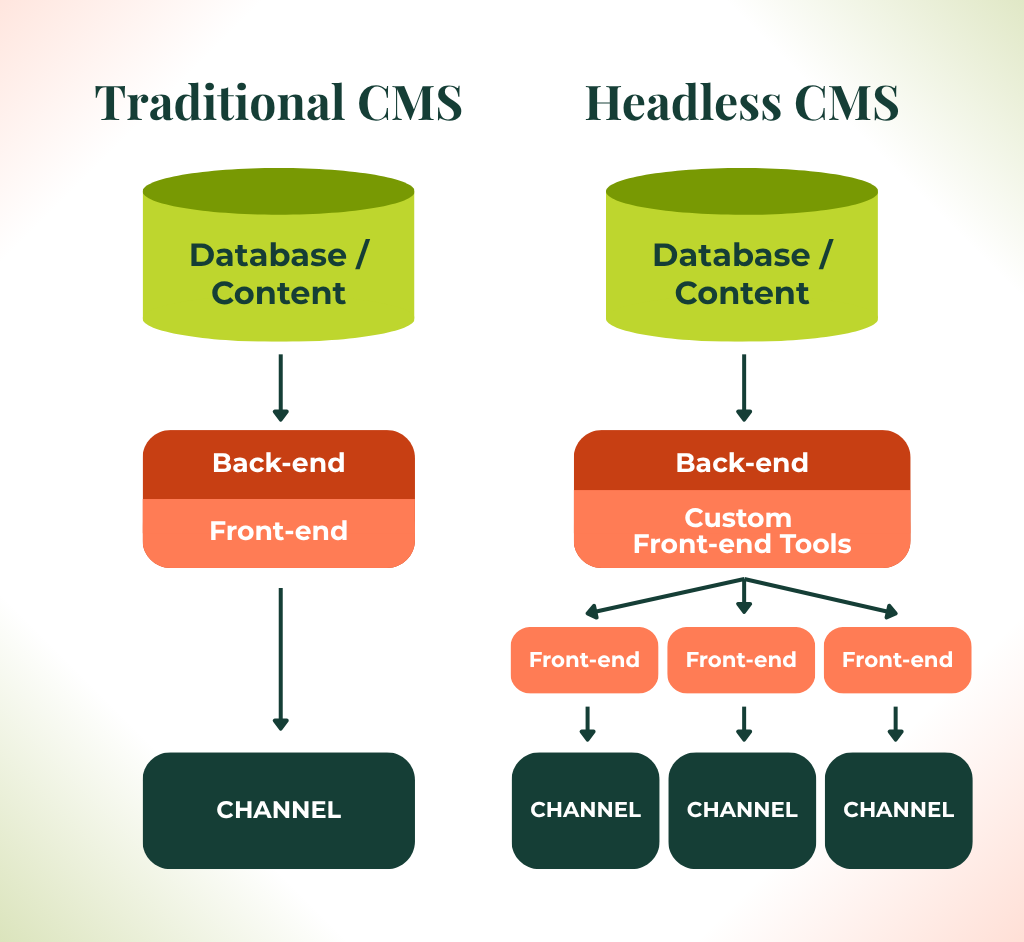
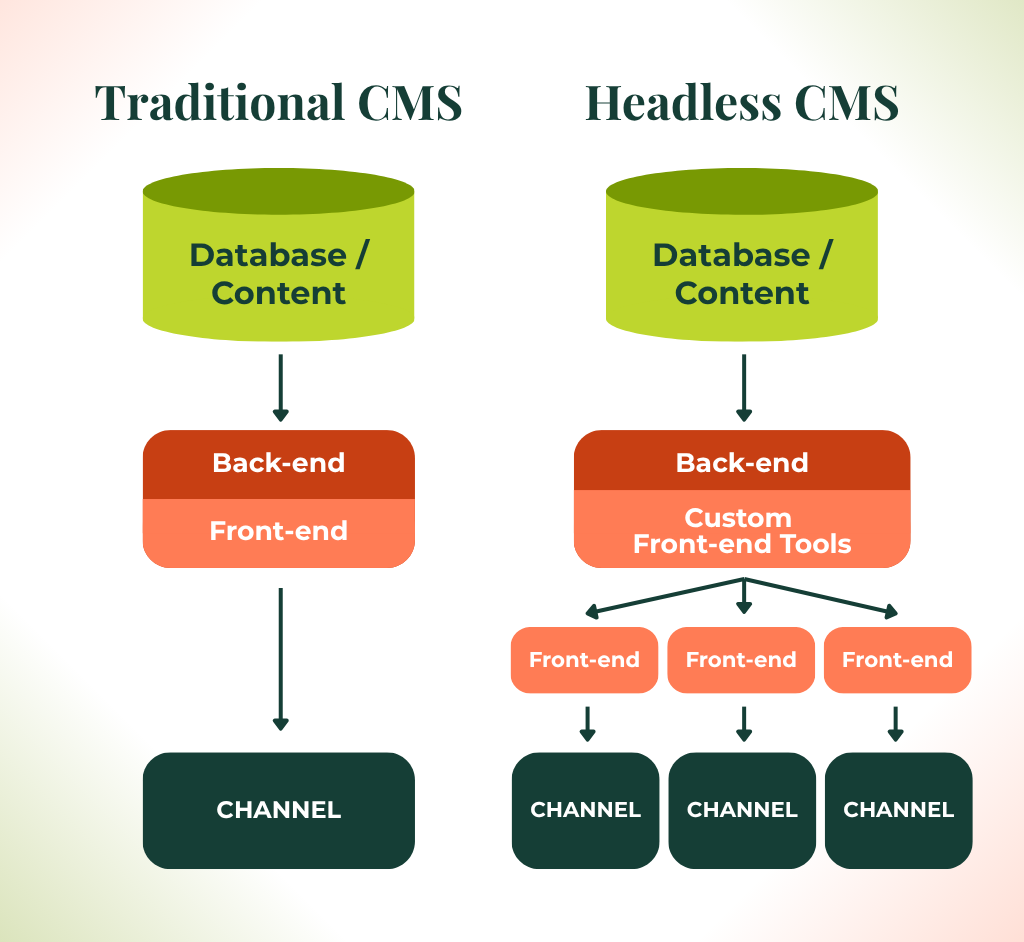
Decoupled and headless architecture —Organizations requiring API-powered digital experiences can implement headless Drupal architectures. This specifically includes using Next.js for Drupal to separate the backend CMS from the front-end presentation layer, giving developers expanded API capabilities and front-end flexibility.
WYSIWYG editors —You can configure standard what you see is what you get (WYSIWYG) text editors to allow content creators to format text, build columns, and style specific elements like buttons and quotes directly on the page.
Advanced content modeling and configuration management — Nonprofits can use Drupal’s backend content modeling tools to consolidate excessive content types and fields. This feature simplifies the backend taxonomy and user permissions, making the site’s architecture much easier for internal teams to navigate and maintain.
Structured data — Use specific HTML structures and structured data directly within the code to appeal to search engines and manage search engine optimization (SEO).
3 Nonprofit Drupal Website Examples
Gain inspiration for your nonprofit site and see Drupal in action by exploring successful nonprofit websites. To help you better determine whether Drupal is the right CMS for you, here are three examples of real nonprofit websites built with Drupal.
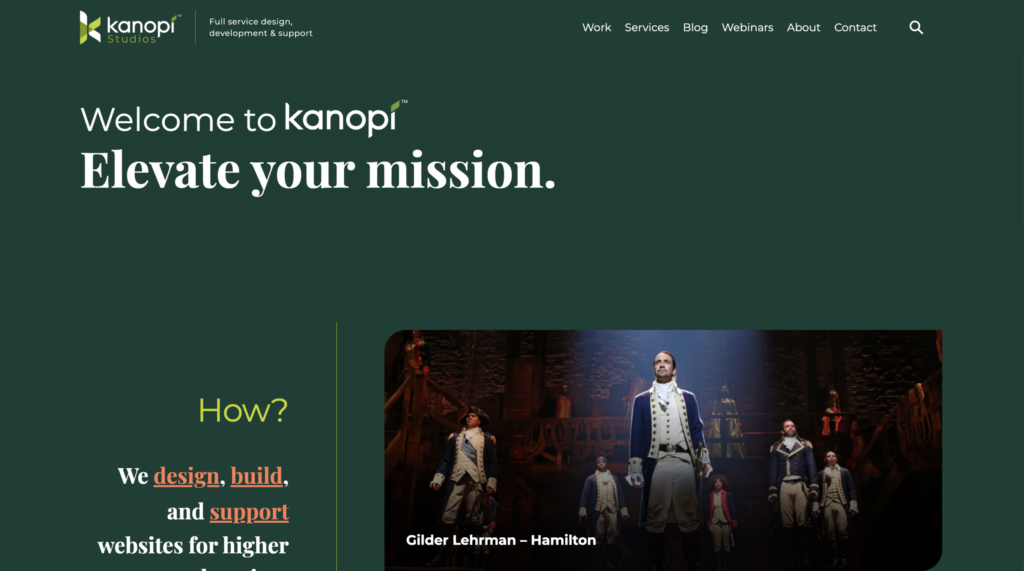
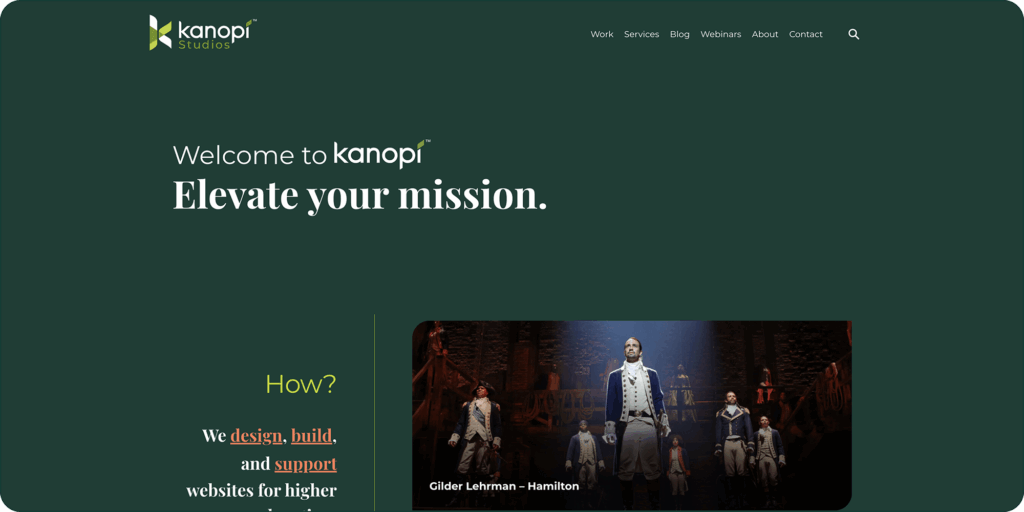
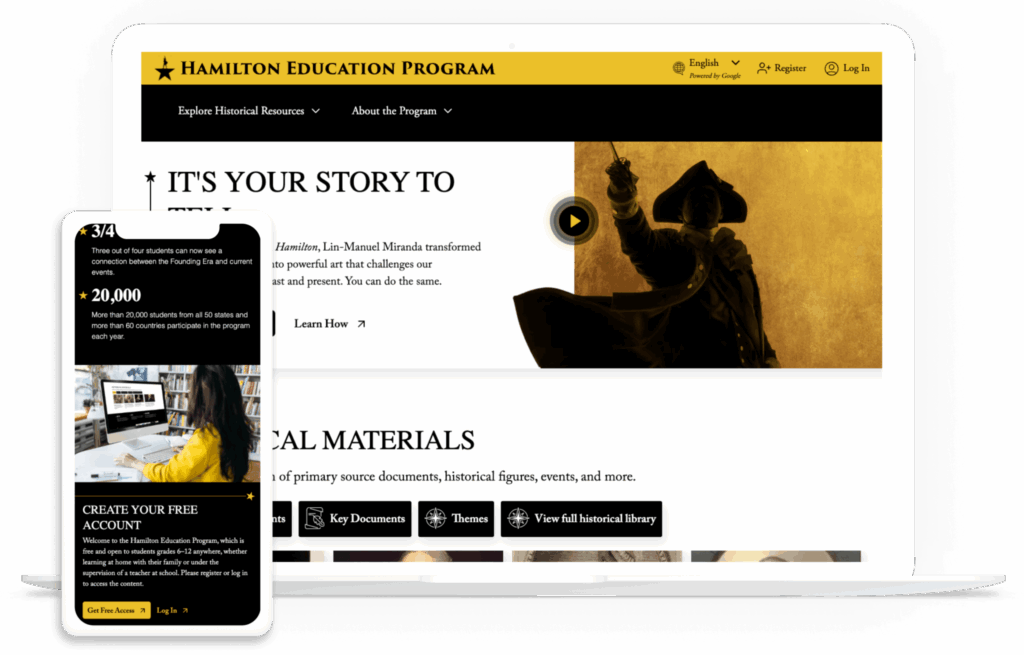
1. Gilder Lehrman — Hamilton
The Hamilton Education Program is a collaborative effort between Lin-Manuel Miranda, creator of the Hamilton musical, and the Gilder Lehrman Institute of American History. The program’s goal is to use the Hamilton musical as an educational tool to bring history to life for youth audiences.
The organization’s website plays a key role in showcasing American history to high school students, who use the site to conduct research and eventually create their own performance pieces.
Here are some of their website’s standout features:
An intuitive resource library that allows users to browse resources by themes
Single sign-on (SSO) for a simplified digital ecosystem and enhanced security
Curated content for different audiences, including parents, students, and teachers
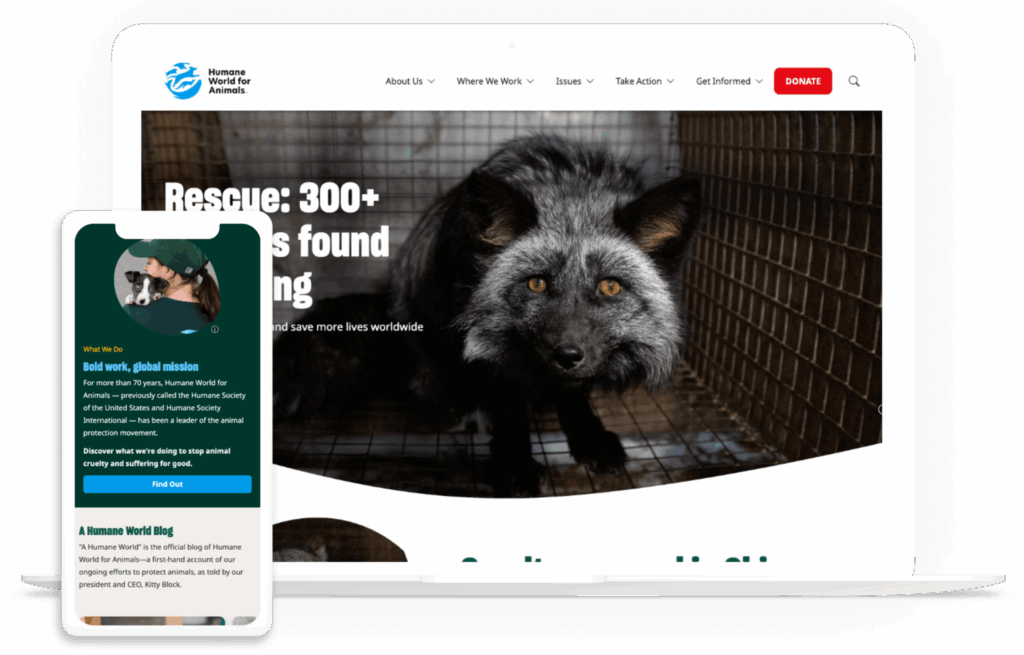
Humane World for Animals is a nonprofit focused on ending animal suffering. Their goal is to strengthen the animal protection movement through policy change and activism. The organization’s website is a vehicle for sharing information about its important work and providing ways for supporters to take action, whether through donating, volunteering, or fundraising.
Here are some standout features of this website:
Compelling imagery that brings the organization’s mission to life
Translation capabilities to reach a global audience
Geolocation features to serve different footer information based on the visitor’s country
Read our Humane World case study to learn more about Kanopi’s role in building their website.
3. The National Audubon Society
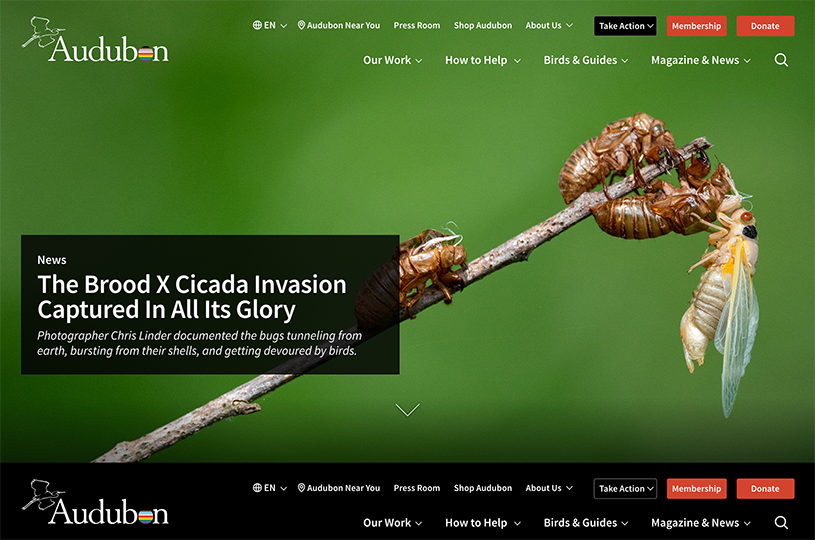
The National Audubon Society is an American nonprofit environmental organization dedicated to the conservation of birds and their habitat. Before using Drupal, the National Audubon Society had over 100 subdomains, struggled to edit and manage all its content, and lacked access-level restrictions.
The National Audubon Society needed one unified system and chose to merge its sites together using Drupal’s platform. With this change, they were able to offer:
Multiple language versions of the website
User permissions granted to the appropriate staff members
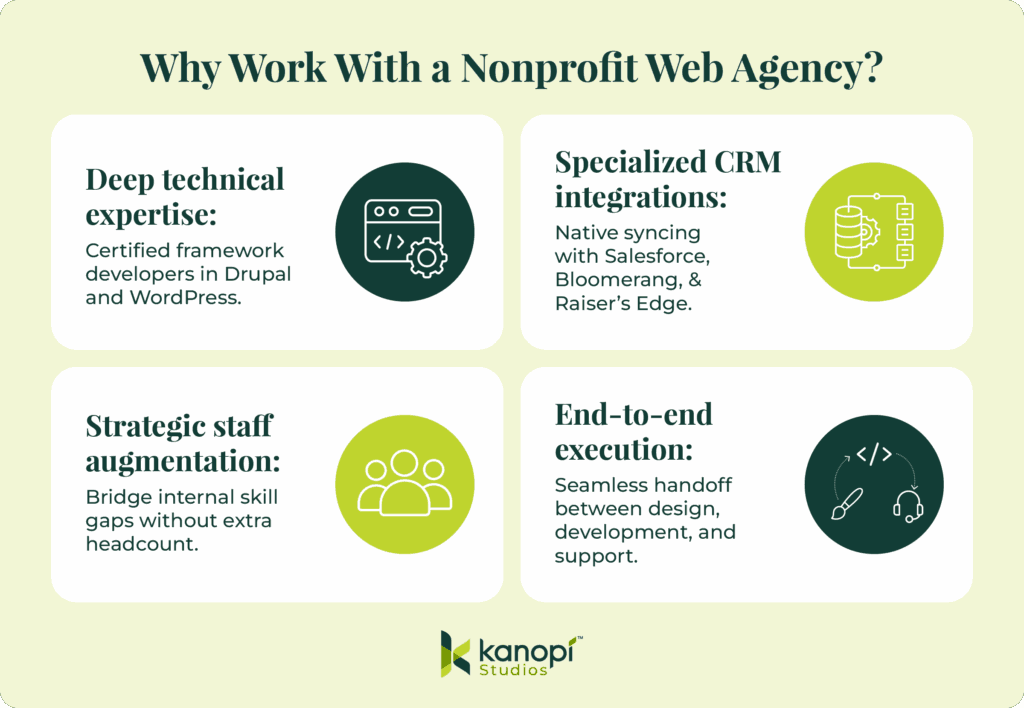
At Kanopi Studios, we can help your nonprofit not only determine whether Drupal is right for your mission but also develop your site and set it up for long-term growth.
By partnering with Kanopi’s team, you gain support from professionals with years of experience working with mission-driven clients, as well as access to our extensive expertise in digital nonprofit strategy. We partner closely with large and sophisticated organizations like yours to outline your nonprofit’s online goals, determine how Drupal can further those goals, and create a plan to put them into action.
Not only are we fully up to date on the latest nonprofit industry trends and Drupal updates, but we also take a continuous improvement approach to site development. Instead of waiting for CMS updates, we regularly recommend improvements and adjustments, such as navigation strategies and SEO fixes, so that your site remains valuable and well-maintained. This way, your nonprofit website grows with your organization and services.
Kanopi’s Drupal for Nonprofits Services
Here are some of our top Drupal maintenance and support services:
Module and plugin updates: Websites are living ecosystems that require continual care. Kanopi goes beyond basic maintenance by providing ongoing updates for modules, themes, and plugins, as well as handling complex CMS core upgrades, such as migrations from Drupal 7 to Drupal 11 and upgrades from Drupal 9 or 10 to supported modern Drupal versions, to ensure your platform remains secure and sustainable for long-term growth.
Bug fixes and security patches: Kanopi implements robust DevOps practices to safeguard your organization’s sensitive data. This includes deploying critical security patches, utilizing Git-based workflows for safe multi-environment updates, and conducting quarterly security audits to proactively mitigate system vulnerabilities and protect against attackers.
Development modifications: No project is too technical or complex for Kanopi’s engineers. Kanopi is uniquely willing to rescue, refine, and enhance complex code built by other agencies. Development modifications can range from creating custom modules to extend your site’s functionality to building out blazing-fast headless and decoupled architectures using Next.js.
Updating content types/views: We actively audit and consolidate excessive content types to simplify the backend experience for your team. By leveraging tools like Drupal’s Paragraphs and Media Library, we replace rigid fields with flexible, reusable components, empowering non-technical content editors to effortlessly build and manage layouts on their own.
Third-party integrations: Kanopi’s engineers seamlessly connect Drupal to the external APIs your organization relies on. This includes integrating database portals, collection management systems, secure user portals, and real-time staff or physician directories (like UCSF Profiles) directly into the Drupal ecosystem.
CSS/HTML changes: To ensure your site always looks and functions flawlessly across devices, we handle ongoing design and mobile-responsive theme modifications. When optimizing sites, we frequently convert legacy custom HTML and CSS into intuitive UI components to prevent formatting issues and streamline future updates.
Commerce updates: For organizations relying on online revenue and event ticketing, Kanopi integrates and maintains secure payment gateways and commerce systems. We ensure the technical transaction environment remains frictionless, safe, and aligned with your conversion goals.
Performance enhancements: Kanopi continuously monitors analytics and user behavior to deploy strategic performance enhancements. This involves optimizing caching mechanisms, compressing images, streamlining messy navigation architectures, and reducing page load times to keep users engaged and prevent visitor drop-off.
Web accessibility optimization: We treat digital inclusion as an absolute imperative. We optimize your site at the architectural code level to meet Web Content Accessibility Guidelines (WCAG) AA compliance. This includes adjusting color contrast and interaction target sizes, as well as providing specialized training so your internal writers can continue publishing accessible content long after launch.
Technical SEO optimization: Kanopi builds authority and search visibility directly into your site’s code. We apply proper HTML structure and structured data, resolve technical crawl errors, optimize metadata, and implement internal linking strategies to ensure your content is easily found by both traditional search engines and AI models.
When you partner with Kanopi, you get more than the typical Drupal support and maintenance package. Our team goes above and beyond to deliver the highest-quality development work.
Whether you need monthly support or a full website rebuild, Kanopi is dedicated to taking your mission to the next level and ensuring your online presence accurately represents your prestigious organization.
In Summary: Empowering Nonprofits with Drupal
To recap, the Drupal CMS stands out as a great choice for mission-driven organizations because it delivers:
Unparalleled flexibility
Enterprise security and accessibility
Scalable growth
Maximizing these advanced features requires more than a standard development approach. With Kanopi’s comprehensive Drupal services, you gain a dedicated technical partner equipped to handle everything from custom engineering to performance enhancement, allowing your team to focus on what matters most: your mission.
According to Momentive’s 2025 Associations Trends Research Report, almost half of association members say that job opportunities and career development are a very important part of their membership. However, only about a quarter of association professionals think these opportunities are very important to members. This disconnect demonstrates a clear member need that associations can meet via effective membership directories.
Approaching your membership directory from an expert design perspective is the true differentiator. Through high-performance web design, your association can transform a messy spreadsheet into a premium member resource that drives engagement and professional networking.
Here is everything we will cover to help you build an engaging, secure, and user-friendly digital membership directory:
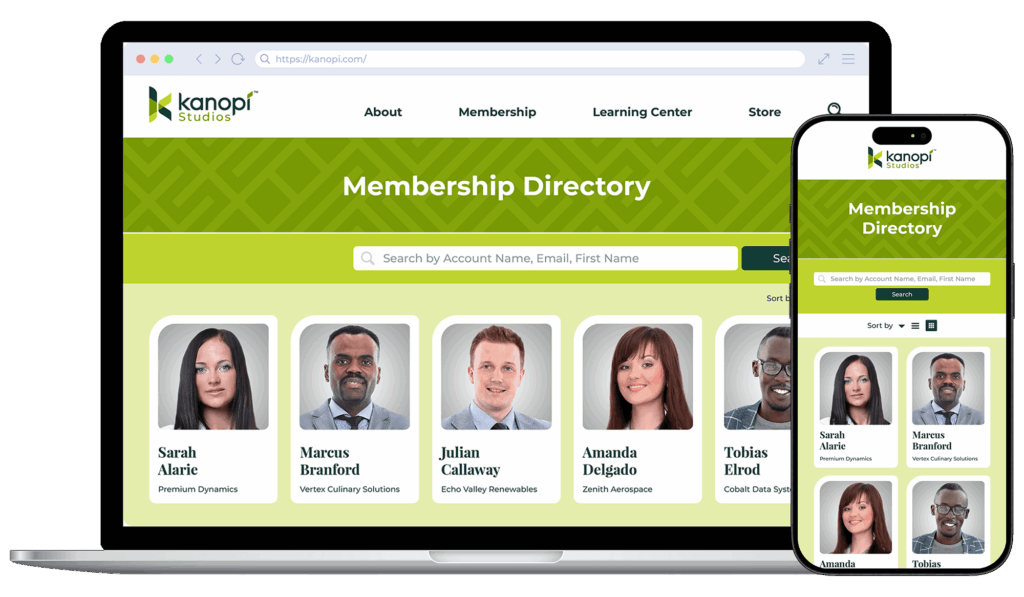
A membership directory is a searchable, digital database that organizes and displays information about the individuals or organizations within a specific group. It functions as a dynamic networking hub, allowing users to easily find, filter, and connect with peers based on professional criteria, geography, or expertise.
The benefits of creating a membership directory for your organization include:
Streamlining professional connections: Advanced filtering lets users avoid long lists and find the exact person or service they need in seconds.
Driving member value: A well-designed directory facilitates peer-to-peer networking, a top-rated benefit for association members seeking professional growth.
Enhancing organizational visibility: Public-facing directories can improve your SEO by creating indexable pages for member profiles, increasing the digital footprint of your member community.
How to create a membership directory in 4 steps
When creating a member directory, prioritize optimizing how data is consumed by end users. Your organization must align its technical infrastructure, specifically your CMS, with your community’s networking needs to ensure a frictionless experience.
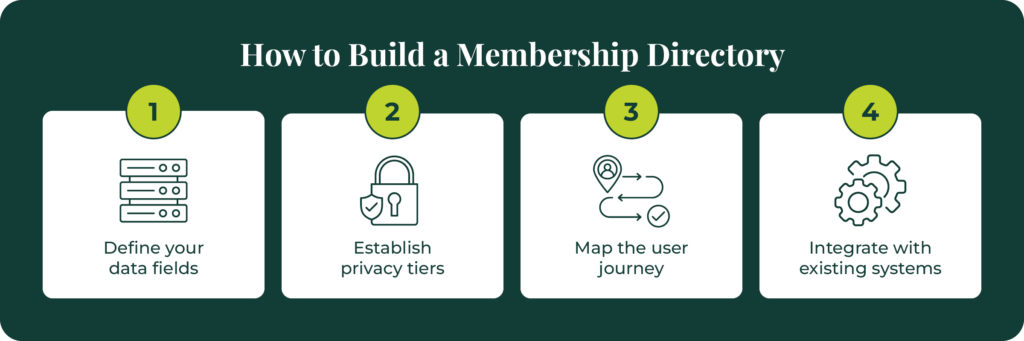
Follow these four steps to build your membership directory:
Define your data fields. Identify the essential information your members should share, including professional titles, company names, certifications, and contact methods.
Establish privacy tiers. Set clear rules for which data is public and which is restricted to logged-in members to protect user privacy and comply with data regulations. For example, names, job titles, and workplaces may be publicly shared, while emails and phone numbers are only available to logged-in members.
Map the user journey. Design a search-and-filter interface that lets users find information quickly without scrolling through alphabetical lists. Users should be able to filter by job title, workplace, geographic location, and other relevant fields.
Integrate with existing systems. Ensure your directory syncs with your CRM or member database to automate updates and prevent manual data entry errors.
Best practices for membership directory design and UX
High-performance directories prioritize the front-end user experience (UX) to ensure the tool is intuitive on both desktop and mobile devices. A directory that is difficult to navigate or loads slowly will lead to low adoption rates and frustrated members who eventually abandon the resource.
To build a high-performing directory that offers a streamlined user experience, keep these best practices in mind:
Implement filtered search. Use advanced filtering, such as checkboxes for industry or location, so users can dynamically narrow results without reloading the page. Integrating predictive search text anticipates user needs and instantly corrects common spelling errors.
Optimize for speed. Directories with thousands of entries require optimized database queries to ensure search results appear instantly. This involves techniques such as caching frequently accessed data, using efficient database indexing, and minimizing the amount of data transferred to the client during initial load. Large directories should also use lazy loading to fetch member profiles only as the user scrolls or searches.
Use a clear visual hierarchy. Design member profile cards with a consistent layout that highlights the most important information first. The typography hierarchy should position the member’s full name as the dominant visual element.
Incorporate accessibility at every stage of the design process. Because directories are highly interactive databases, they require specific attention to how users navigate and consume data. Design and develop your directory in accordance with the Web Content Accessibility Guidelines (WCAG). For example, use ARIA labels for dynamic content, like faceted search filters that update results without refreshing the page.
Prioritize mobile responsiveness. Ensure the directory layout adapts to smaller screens, as many members will access the list on mobile devices while at conferences or on the go. Key elements of mobile-friendly member directories include large, touch-friendly buttons, easily accessible filters, and minimal horizontal scrolling.
Regularly assess your directory analytics to identify the most popular search queries. Identifying exactly what members look for reveals areas to focus on in your overarching membership directory strategy, enabling you to fine-tune features to emphasize the content your audience values most.
What you should include in your membership directory
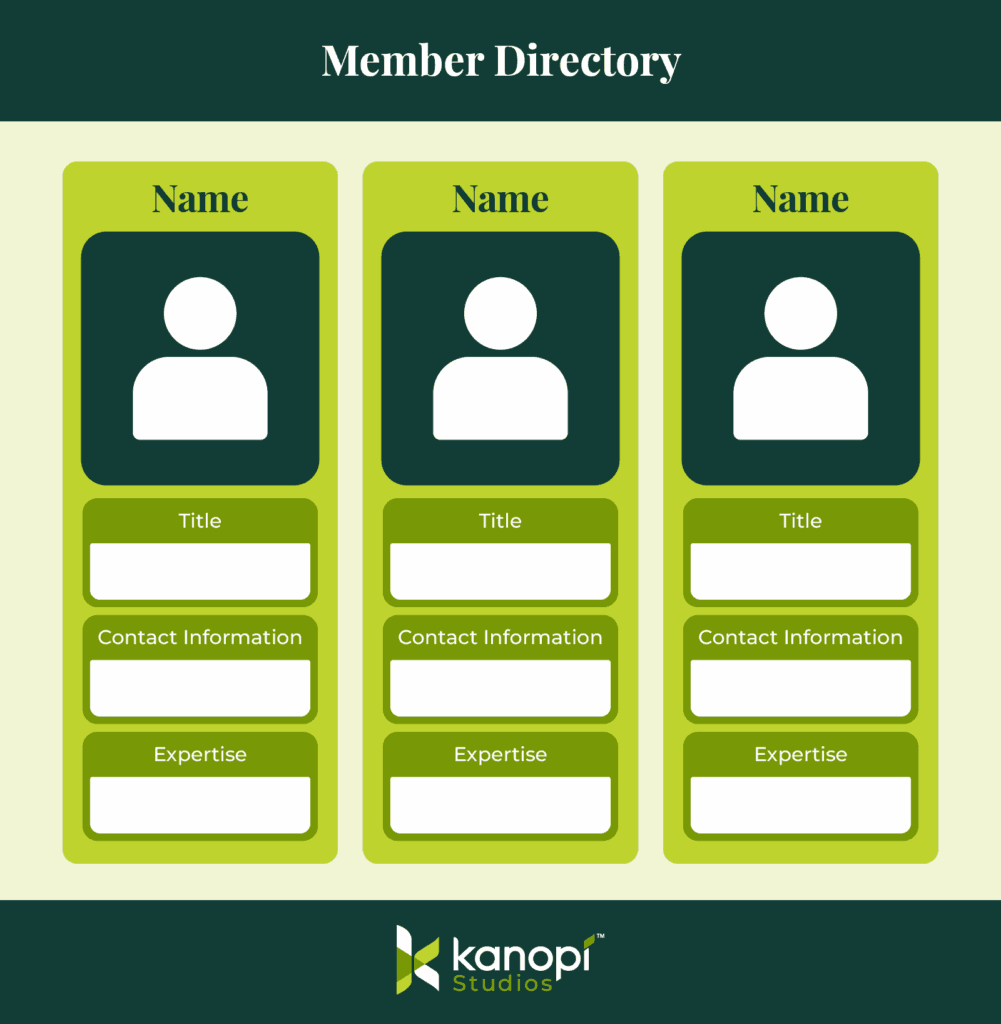
While custom directory development offers the most flexibility, starting with a structured template can help your association organize its data before the build phase. A successful template acts as a blueprint for the user interface, ensuring that data is presented in a logical, scannable format for the end user.
Your membership directory should feature the following information from members:
Name and title: These are the primary identifiers for each entry in your database. Use bold font weights to immediately draw the eye and anchor the individual profile view.
Organization and industry: This context is essential for B2B associations or professional trade groups. Create a filter that, when the company name is clicked, organizes the directory to show all relevant coworkers.
Contact information: Include direct links to email, phone, or professional social media profiles.
Expertise and tags: Implement keywords that make the directory searchable by specific skill sets or interests.
Implement progressive profiling techniques to populate this template over a long timeframe. For example, create a three-form architecture in which subsequent forms ask new, higher-value questions on return visits. The goal is to move beyond basic information (such as name and email) to collect more critical data points without overwhelming the user in a single interaction.
FAQs about online member directories
How often should I update the UX of my membership directory?
View your membership directory as a living resource rather than a set-it-and-forget-it project, so that the platform remains relevant, secure, and engaging. Here is a recommended schedule for updating your directory’s user experience:
Continuous optimization (monthly or quarterly): Assign a platform manager to review site analytics regularly. Look closely at popular search queries, filter usage, and mobile drop-off rates. If users constantly type a specific skill into the open search bar, you should immediately convert that term into a standard faceted filter.
Routine UX audits (every 6 to 12 months): Conduct a formal, documented review of the interface. This audit should include testing mobile responsiveness on the latest device sizes and verifying strict WCAG accessibility compliance against any updated legal standards. You should also solicit direct feedback from your active members through targeted usability surveys.
Major overhauls (every 3 to 5 years): Web design standards evolve incredibly fast. After a few years, the underlying database technology, predictive search algorithms, and general visual expectations will have shifted dramatically. A comprehensive structural redesign ensures your directory continues to look and function like a premium, modern asset.
How can associations maintain the security of their membership directories?
Your association must proactively protect members from external threats to avoid data breaches and maintain trust. Take the following steps to ensure member data security:
Implement role-based access control to restrict sensitive information to verified individuals. You can ensure that only active, dues-paying members can access member-only content.
Use single sign-on authentication to drastically reduce the risk of compromised passwords. Members log in through a centralized, highly secure portal. This eliminates access vulnerabilities.
Conduct quarterly security audits to evaluate your firewalls, active plugins, and underlying server architecture.
Build a high-performance directory with Kanopi Studios
Kanopi Studios specializes in moving associations away from clunky, outdated lists toward modern, mobile-optimized directory experiences. By focusing on superior UX and advanced CMS architecture, we help organizations turn their member data into a strategic asset.
We are experts in Drupal and WordPress, platforms that provide the flexibility needed to build a feature-filled directory. These platforms allow for deep customization of search logic, private member portals, and complex data relationships that generic software cannot handle.
Custom post types: Treat each member profile as a unique data object that can be categorized and displayed across different sections of your site. This architectural approach prevents your database from becoming rigid over time.
Granular access control: Build sophisticated permissions that allow different membership tiers to see varying levels of detail within the directory.
Interactive maps: Integrate geographic data to display member locations (particularly useful for regional associations) and enable regional subgroups to organize localized meetups without administrative overhead.
Automated profile management: Empower members to update their own information through a front-end dashboard, reducing the administrative burden on your staff.
Beyond directories, Kanopi offers a full suite of services, including content strategy, personalized resource libraries, and website accessibility.
Membership directory case study
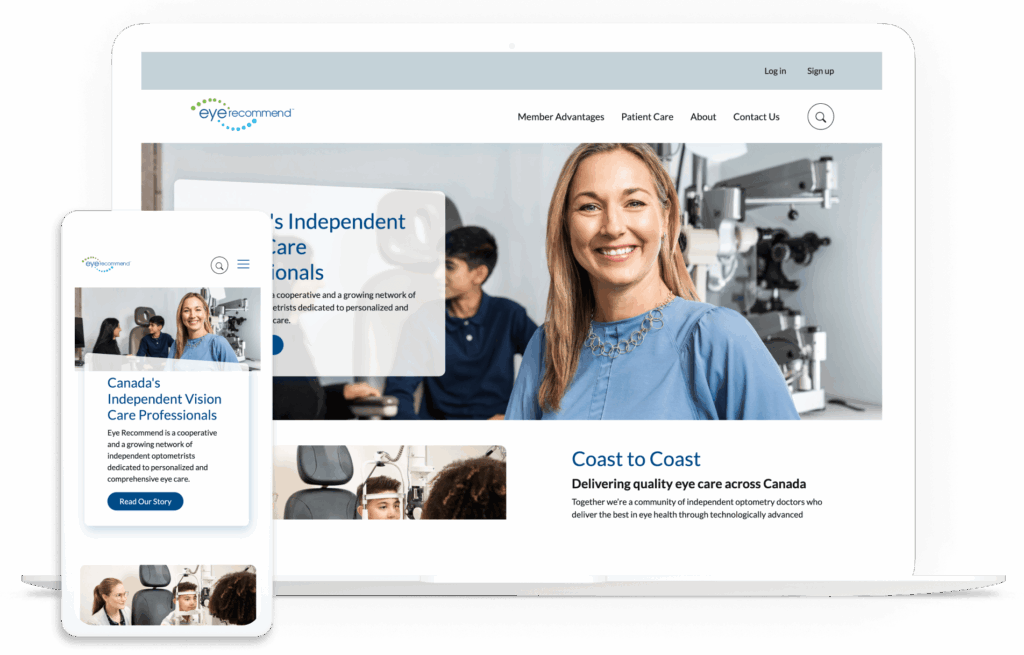
Our team implemented sophisticated filtering and single sign-on integration for Eye Recommend, a cooperative of independent optometrists. This ensured easy access to critical data for their busy members. As a result, their site saw a significant improvement in load times and a 10% increase in mobile users.
Elevate your member connections with your directory
A membership directory is a gateway to the community your association has built. By prioritizing professional web design, mobile accessibility, and advanced filtering, you provide a resource that members return to time and again.
The Ultimate Guide to WordPress Maintenance. If your association’s website runs on WordPress, this guide is an essential resource for maintaining and improving your site over time.
Data from Forrester Research shows that a frictionless user experience can increase digital engagement and conversion rates by up to 400%. This research highlights the importance of a streamlined layout for your association’s membership site dashboard page.
A high-performance dashboard must balance intuitive visual hierarchies with robust engineering to keep users engaged, supported, and continuously deriving value from their subscriptions. This guide walks through that framework. We’ll cover:
A membership site dashboard page is the secure, private home screen members see immediately after logging in to a gated platform. This central hub consolidates personalized resources, exclusive benefits, subscription details, and profile configurations into a single accessible interface designed to drive ongoing member engagement.
What are the benefits of creating a membership dashboard page?
The benefits of creating a membership dashboard page are that it:
Serves as the primary driver of member relationships: Your dashboard is the single most critical digital touchpoint for delivering long-term value to your association’s audience. When built correctly, it transforms passive site visitors into active, lifelong community participants who value their membership. It shifts the dynamic from a transactional subscription into an indispensable professional resource.
Maps directly to user behavioral data: Effective dashboard layouts organize components to ensure members find immediate value without having to search. This strategy is based on quantitative research, such as tracking clear user click paths to reveal exactly which features matter most to your distinct audience cohorts. It eliminates cluttered interfaces, reduces cognitive load, and surfaces high-demand assets based on real-world patterns.
Streamlines structural user pathways: Aligning portal architecture with intuitive navigation principles reduces confusion and keeps members connected to core benefits. A clean navigational framework ensures that essential actions remain accessible in under two clicks, maximizing overall portal efficacy. That way, users never feel lost while exploring gated resources.
To secure engagement right from the start, try dropping a simple profile tracker directly onto members’ main dashboard. Instead of requiring people to fill out a massive form when they sign up, this helpful feature gently asks for just a few details over separate visits. Gathering info bit by bit lets your marketing team customize outreach without slowing down your users.
Why associations should avoid standard dashboard templates
To build a member portal that actually grows with your community, skip the standard out-of-the-box templates. Mass-market themes box you into stiff layouts that probably can’t handle your unique member tiers or complex user journeys.
It can get messy fast. Over time, rigid setups create costly technical debt, block your essential software integrations, and frustrate the very people you want to support, ultimately hurting your renewal rates.
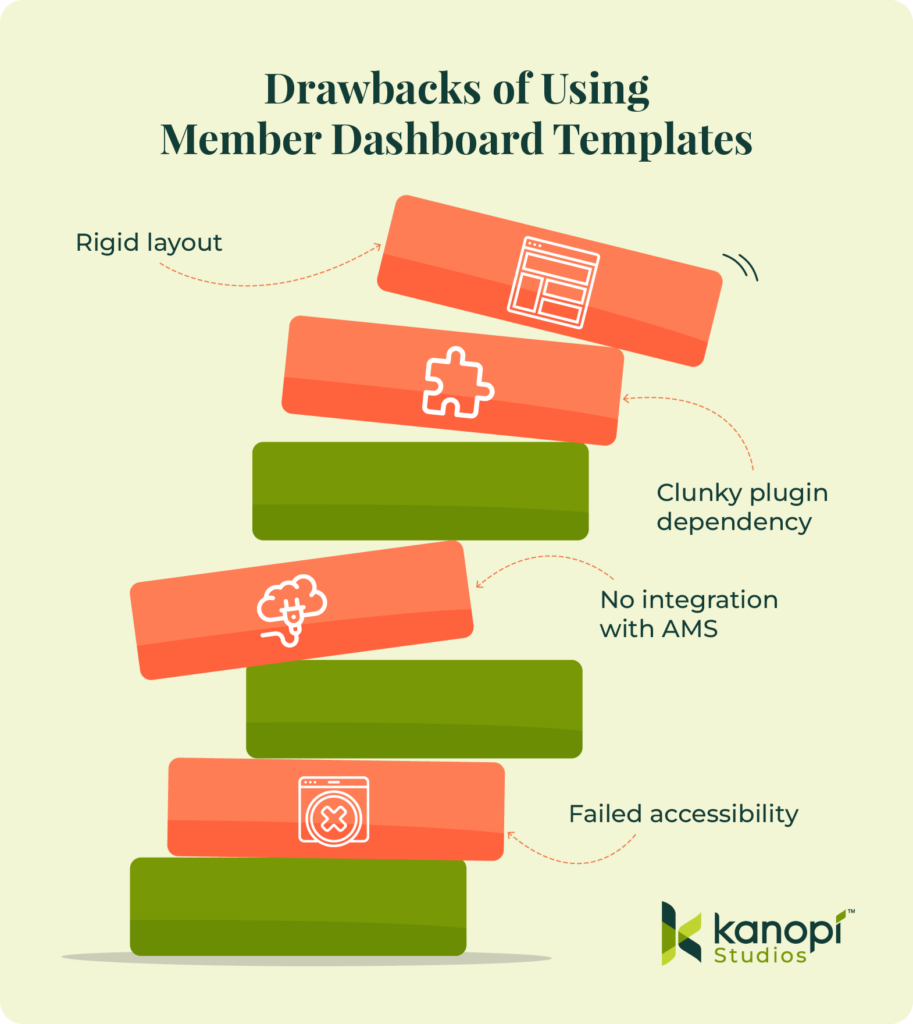
The disadvantages of dashboard templates include:
Failing to meet digital inclusion requirements: Compliance is non-negotiable for membership dashboards. Generic platforms like Wix often lack the infrastructure needed to implement enterprise-grade WCAG accessibility standards. Additionally, they use closed ecosystems that prevent developers from altering fundamental semantic code or managing deep screen-reader optimization requirements, leaving your association exposed to significant regulatory risks.
Creating operational bottlenecks for staff: Plugin-centric systems lock marketing teams into rigid layouts that require developer assistance for minor visual updates. Your staff becomes dependent on external technical help to make even small changes. This configuration can stifle organizational agility, delay time-sensitive communications, and require you to spend more of your marketing budget on minor code repairs.
Restricting mobile-first responsive refinements: True responsiveness requires precision. Default layouts from basic tools lack polished, responsive UX frameworks across mobile screen sizes. They often break on smaller tablets or modern smartphone screens. This structural failure can cause accessibility barriers for on-the-go professionals who need rapid access to portal tools during events, travel, or daily commutes.
Ignoring practical engineering blueprints: Industry advice often focuses on big-picture strategy but lacks practical, technical steps for building the user interface. It rarely explains how to create reliable data requests, handle many users at once, or style custom page sections efficiently.
Investing in custom architecture upfront keeps your money safe and your portal running smoothly. Plus, it frees your marketing team from serving as tech support, giving them time to focus entirely on keeping your members happy.
The six-step framework for high-performance dashboards
Building a custom member dashboard page requires a human-centered plan. Focus on deeply understanding your audience, making the interface completely frictionless, ensuring it works flawlessly on mobile, and connecting your systems smoothly. Taking this step-by-step approach cuts out fragile shortcuts, leaving you with a secure digital home that grows along with your community.
1. Conduct research and persona development.
Ground all visual choices in qualitative user research and structured content audits instead of chasing passing aesthetic trends. This makes your web environment more engaging, actionable, and friendly for everyone. Before sketching any layout concepts, your design team must:
Map out exact user behavior patterns: For instance, if your website analytics show that most members log in just to check their continuing education credits, that tracker needs to live right at the top of the page. Keep it prominent.
Survey existing member challenges: Ask members where they struggle. You might find that executive-tier members are frustrated by complex navigation menus, while younger professionals can’t find your job board on their smartphones. Listen to them and incorporate their feedback.
Catalog every digital asset: Gather every PDF guide, webinar recording, and exclusive tool package so you can see exactly how much on-screen real estate your gated assets will need.
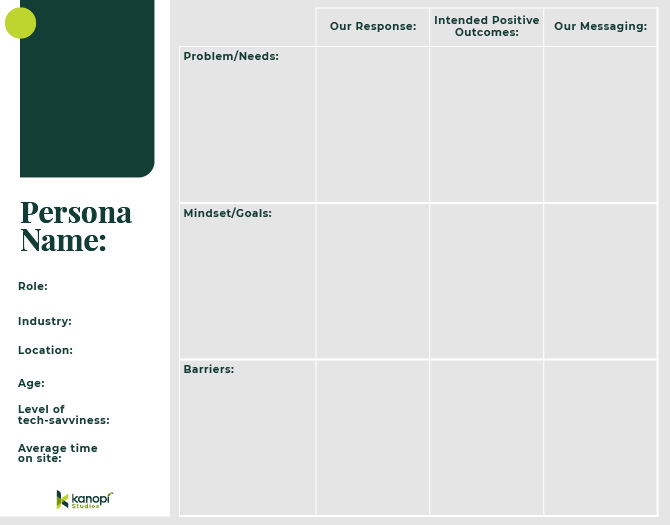
Use this research to create 3-5 distinct audience personas. Identify your audience’s needs, goals, and barriers to access. At the same time, plan your strategy for responding to members’ needs with clear messaging and positive interactions. Use this template to help get started building personas:
This comprehensive research phase uncovers the precise strategies required to serve diverse membership tiers effectively.
2. Bake in accessibility from the start.
True responsive design means writing clean, flexible code that adapts beautifully to any screen size while remaining fully optimized for assistive devices (like screen readers). Taking this proactive approach ensures a high-quality, seamless experience for everyone, no matter how they access your platform.
Here is how to make that happen naturally:
Fix common web design mistakes. Build with clean semantic markup so your private portal never accidentally alienates people who use assistive tools.
Take down low-contrast barriers. Poor color contrast is the single most common web accessibility issue, affecting over 83% of web layouts. Using sharp, clear contrast ratios ensures older professionals or visually impaired members can enjoy your resources effortlessly without eye strain.
Move past basic automated checkers. Data assessments show that just 2% of standard public and gated web pages meet more than 70% of testable WCAG requirements. Simple software scanners only catch a small fraction of issues, which is why real human testing matters so much.
3. Prioritize mobile-friendliness.
Your members are busy and constantly on the move. That’s why a great member portal has to look and work seamlessly on a smartphone. When you build a clean, flexible layout for smaller screens, you make it incredibly easy for your community to log in, explore resources, and get things done cleanly from anywhere.
Here is how to design a mobile experience your members will love:
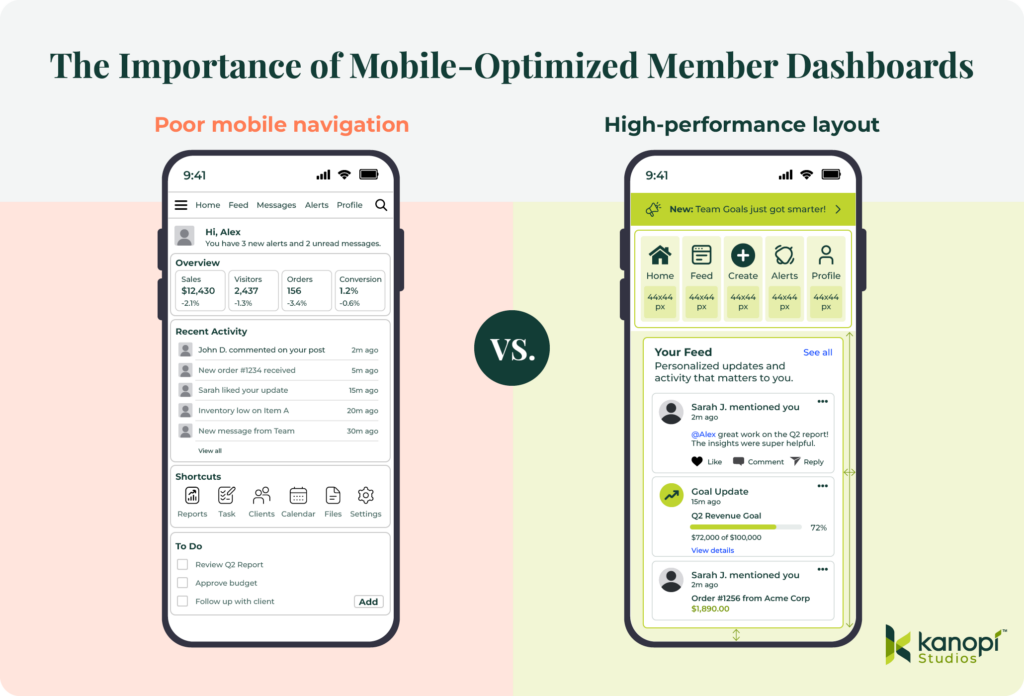
Prioritize visual layout hierarchy. When someone logs in from their phone, they’re usually looking for quick info, like an event check-in QR code or a quick profile update. Give these high-demand features prime real estate to save your users from scrolling through endless rows of text.
Size for touch target accuracy. Tiny buttons frustrate everyone. Make sure your buttons, links, and navigation tabs are at least 44×44 pixels, so they are easy to tap with a thumb. Additionally, space things out nicely. Give your interactive elements plenty of breathing room to prevent accidental misclicks and simplify actions for members who are navigating your portal while multitasking on the go.
Surfacing exclusive membership benefits. Remind people why they love being a part of your association. Drop in welcoming content blocks that highlight active perks right on the mobile screen to naturally encourage deeper platform engagement. Visually calling out member-only resources turns casual daily check-ins into regular reminders of the concrete return on their membership investment.
Take a look at the difference that true mobile optimization can have on your online presence:
4. Develop scalable architecture and seamless integrations.
Give your marketing team the power to manage your portal without waiting on a developer. Building a flexible backend with modular component blocks lets your staff update text, swap banners, and change layouts on the fly.
Plus, your underlying technical foundation must play well with all your critical systems, such as your association management system (AMS), payment gateway, and learning platform. Using clean, decoupled code ensures that member data updates flow seamlessly to the screen without causing unexpected crashes or slowing page load times. Your portal stays lightning fast and totally reliable.
5. Invest in holistic, ongoing platform support.
Think of launch day as the true beginning of your dashboard-building process, not the finish line. Keeping a close eye on user heatmaps and behavioral analytics highlights exactly where people get stuck or lose interest. These real-time insights let your team refine layout choices on the fly to meet evolving community demands, ensuring your platform stays useful for years to come.
Also, keep your connected systems happy. Scheduling automated stress tests quarterly catches sneaky API glitches before they affect your member portal experience. Data feeds fluctuate often. Building proactive error handling directly into your custom framework shields your front-end layout from external technical hiccups, giving your community a smooth ride every time they log in.
Essential web design best practices for member portals
When you focus on data-informed best practices, you build a secure member portal that performs well, is easy for your internal team to run, and is highly personalized for every member who logs in to your ecosystem.
Let’s look at the essential design rules we use to keep portals running cleanly:
Empower your internal team. Give your staff the freedom to work fast. Moving to a component-based editing setup cuts out your dependency on developers and makes daily content management a breeze for your marketing team. When non-technical staff can tweak layouts on their own, your association stays agile while saving on maintenance costs.
Deploy flexible modular components. Think of your site elements as digital building blocks. Using smart content structures like Drupal Paragraphs lets your staff rearrange dashboard sections without touching a single line of code. Content managers can easily drag, drop, and tweak promotional blocks to match your shifting campaign goals all year long.
Eliminate code dependencies for updates. Making fast updates shouldn’t require a technical ticket. Your marketing managers should be able to swap out alert banners, feature new resources, and edit copy seamlessly on the fly. This creative autonomy speeds up your internal production cycles and removes stressful workflow bottlenecks.
Ensure brand continuity. Let automation protect your design standards. A solid component-based system automatically locks in your typography, official colors, and button margins, so your staff can’t accidentally break the layout. This systemic safety net ensures that no matter how many content updates your team makes, your public-facing dashboard always looks polished and professional.
Design welcoming empty states. First impressions matter. When a brand-new member logs in for the first time, they won’t have any personal activity history yet. Staring at a blank screen can cause instant confusion. Instead of leaving dashboard sections empty, guide new users with friendly welcome videos, curated starter kits, or simple setup checklists to get them engaged right away.
Implement smart notification systems. Separate critical operational announcements or membership renewal notices from your regular content feed so your community never misses a time-sensitive update. Use prominent, highly accessible header banners. Isolating high-priority warnings from general reading materials ensures instant visibility, which directly boosts your renewal actions.
Want to take your portal personalization a step further? Try adding a smart visibility layer to your modular components to share hyper-targeted content. This rule-based setup allows your marketing team to display specific dashboard blocks only to members whose subscriptions expire in the next sixty days. Reaching out based on real-time account status drives renewals up without cluttering the screen for your secure, long-term subscribers.
Elevate your member experience with Kanopi Studios
At Kanopi Studios, we design custom, accessible, and high-performance digital solutions tailored to real member behavior data. We believe in crafting sustainable web environments that empower internal marketing teams while creating deeply inclusive user experiences. We build trust, not just websites.
Human-centered UX layout strategies and thorough persona exploration: We conduct extensive audience interviews, map behavioral click paths, and analyze exactly how your distinct member tiers interact with your gated assets. This thorough examination ensures your new layout automatically highlights the most critical tools, reducing user onboarding friction and immediately demonstrating the ROI of membership in the very first session.
Fully accessible, WCAG 2.0 AA-compliant interface design: Our engineering teams integrate digital inclusion parameters into the wireframing phase, ensuring your secure portal provides high-contrast typography and comprehensive screen-reader compatibility. By resolving common semantic regressions early, we protect your organization from legal vulnerabilities and deliver a seamless digital environment for all professionals.
Component-based backend management configurations for non-technical agility: We configure intuitive administrative workspaces using modular building platforms like Drupal Paragraphs, allowing marketing managers to update promotional components instantly without writing custom code. This structural autonomy eliminates external development bottlenecks, allowing your team to deploy real-time notifications or highlight time-sensitive resources efficiently.
Continuous post-launch optimization and data-driven design enhancements: We monitor click distributions, scroll depths, and user drop-off points long after your launch day. Based on this data, our team will implement iterative layout enhancements that continually respond to changing user demands, protecting your digital investment and driving sustained subscription renewals.
Wrapping up
Prioritizing the user experience will turn your membership portal into a growth engine. Review your current dashboard analytics this week to identify exactly where your members encounter navigation roadblocks. Taking immediate action to remove these friction points guarantees a measurable drop in user churn.
Optimize your association’s digital ecosystem further with these expert resources:
How the 9 Best Association Websites Drive Engagement in 2026. Discover how leading associations arrange their webpages and secure login portals to capture member attention, streamline complex navigation paths, and significantly boost annual renewal metrics.
How to create a membership directory: Key elements + tips. A membership directory is another essential tool you should offer your members so they can connect with one another and make the most of their involvement with your organization. Learn how to build an effective directory with this guide.
Over the past several years, higher education institutions have had no choice but to reckon with the monumental changes posed by artificial intelligence (AI) tools. But even though these tools present challenges, they also open the door to a wide range of new opportunities, especially when it comes to getting your university’s website the attention it deserves.
According to the 2025 AI Search in Higher Education Research Study, half of prospective students use AI-powered search tools at least weekly. Plus, 79% read Google’s AI-generated overviews, and 56% are more likely to trust institutions cited in them. These statistics offer an opportunity to fully embrace AI’s potential to drive online engagement with your university.
We want to help prepare you for the next iteration of AI in higher education and website design, ensuring your university can continue to engage current and future students, disseminate essential information, and raise funds for your educational needs. This guide explores the benefits and opportunities of AI in higher education and outlines the essential steps to get started.
Benefits of AI for Higher Education
Higher education marketing and administrative teams are finding that AI doesn’t replace human effort. Instead, it expands their capacity and creates audience interactions that feel more responsive and more personal.
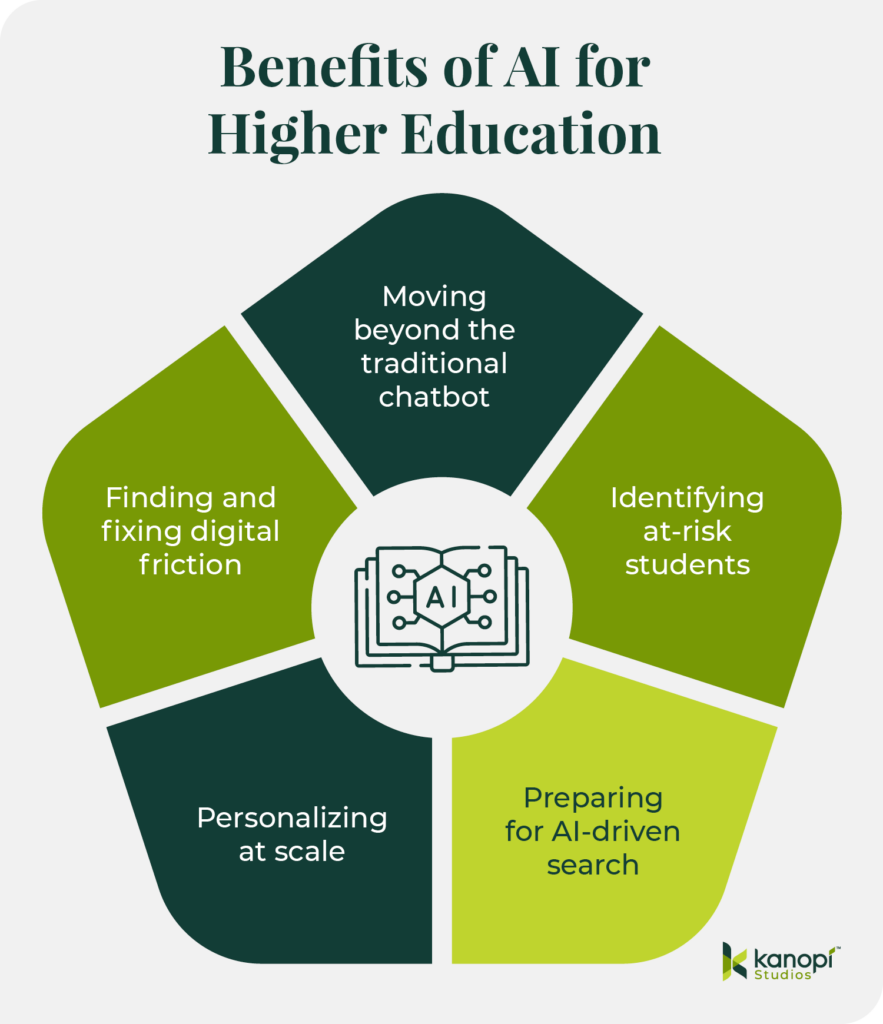
AI for higher education offers specific benefits such as:
Moving beyond the traditional chatbot: Instead of waiting for students to search for information, AI can guide them through the moments that often determine whether they apply or stay engaged. Georgia State’s Pounce system is a strong example. It sends text reminders at the right time and answers questions through intelligent messaging. This steady support lowered “Summer Melt” and helped more students arrive prepared for the fall.
Identifying at-risk students: Data shows that 26% of colleges use predictive analytics to identify students at risk of dropping out. Course Signals was among the first to demonstrate this idea. It combined analytics with behavioral and demographic indicators and drew on engagement patterns on the Blackboard platform. The system identified students who might be at risk so instructors could step in sooner and offer support. Institutions that used it saw improved outcomes and stronger retention, confirming the value of early insight.
Increasing search visibility: As conversational search becomes normalized, students expect tools that understand intent and provide immediate information. To appear accurately in platforms like ChatGPT, institutions need public information that AI can interpret without confusion. Program pages that follow a clear structure, admissions details that are easy to understand, and language that remains consistent across departments all help AI represent your institution accurately and with nuance.
Personalizing at scale: Personalization is becoming a baseline expectation. AI makes this far more feasible for teams that can’t expand their staff. Institutions can align content with a student’s goals and connect them with resources that match their interests. Tools like UCF’s Knightbot reveal how AI can reduce friction by responding to real interaction data rather than guesswork.

Finding and fixing digital friction: AI also exposes friction within the digital journey. Click patterns and content engagement show where prospective students pause or continue exploring your website. This visibility makes it easier to strengthen the moments that influence decisions.
When UX, content strategy, and discovery data function together, institutions can create more effective experiences without adding staff. The digital space becomes a partner in recruitment and retention, freeing human teams to focus on meaningful work.
Practical Applications of AI in Higher Ed Web Design
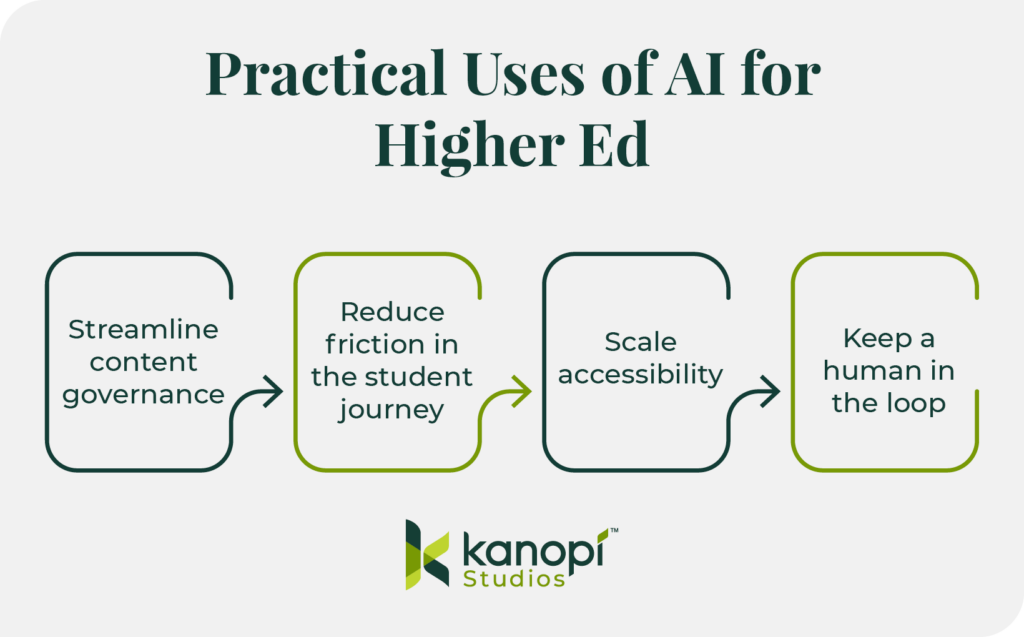
The top college websites deploy AI strategically while avoiding overreliance on automated tools. Consider these AI use cases and how your institution can leverage them to drive greater audience engagement and trust.
Streamline content governance
Use AI for automated taxonomy and tagging.
Many university websites host 10,000+ pages of dated legacy content. This backlog, known as content debt, can confuse users and feed outdated data into AI models. With AI tools, you can organize the mess quickly so your team can focus on strategy.
Automated taxonomy and tagging replace the error-prone process of manually sorting legacy content by using AI models to “read” every page on a university site and automatically assign categories from a pre-approved list. Instead of an editor manually tagging thousands of articles over several months, a developer can implement a Drupal module or script that crawls the content, identifies core themes (such as “undergraduate research” or “FAFSA deadlines”), and applies the correct metadata in bulk.
This transforms your fragmented site into a structured data powerhouse, ensuring that your site search provides direct answers and “Related Content” blocks are actually relevant. Plus, you can boost SEO through consistent, high-quality tagging across your entire digital footprint.
Follow the 80/20 Rule.
Let AI generate the first draft of meta descriptions or alt text. Then, let a human editor do the final 20% of “brand voice” polish. This can help you scale up your content optimization efforts without losing the human touch that ensures brand consistency.
Reduce friction in the student journey
Move from keyword search to conversational search.
Today’s students expect a much more conversational search experience than in years past. Instead of Googling generic terms like “nursing programs near me,” they’re getting much more detailed with their queries, asking, “What are the top ten nursing school programs in the southeast?”
To ensure your university appears in these highly targeted searches, provide specific information on your website that highlights your unique credentials and offerings. You’ll start to see more qualified visitors who are genuinely interested in applying to your school.
For example, if a prospect asks an AI agent, “Which nursing schools in Georgia offer clinical rotations at Level 1 trauma centers?” the AI will crawl university sites for those specific keywords. To answer this search query, your program page should replace generic ‘Clinical Experience’ paragraphs with a structured data table or a dedicated ‘Quick Facts’ section listing your hospital partnerships by name and trauma level.
By providing this granular data, you transition from being a ‘maybe’ in a broad search to the definitive ‘top result’ for a highly motivated applicant.
Integrate AI search directly into your website.
Traditional site search fails when a student types “How do I pay my room and board bill?” into your site’s internal search bar and gets 400 PDF results. AI-powered search tools like Algolia or Elasticsearch, on the other hand, provide direct answers. These platforms enable AI-powered internal search functionality directly within your website.
To audit your site’s search process, start by identifying your top five most-searched “How-To” phrases. Test if your current site search provides a direct answer or a list of links. If you can’t get a direct answer, consider implementing a new AI search tool.
Scale accessibility
Conduct AI-driven accessibility audits.
Run a site-wide scan with an accessibility tool like Lighthouse or Siteimprove to identify where AI automation can fill gaps. For example, you can use AI to scan thousands of images for missing alt text or to check color contrast in real-time as editors build pages.
Avoid AI accessibility overlays.
AI overlays are presented as a quick fix, but they’re often incompatible with screen readers. Instead, use AI in the authoring environment to prompt editors to fix issues before they go live. For example, you could implement Drupal’s AI accessibility module in your CMS to scan your content during the creation process and receive automatic suggestions to enhance its inclusiveness.
Keep a human in the loop
Privacy
Higher education institutions have a duty and responsibility to protect students’ privacy under FERPA regulations. When integrating AI into your web strategy, especially via chatbots or personalized portals, you must ensure student data isn’t being used to “train” public models. Your AI tools should be carefully vetted and monitored by your team to maintain student privacy and uphold your university’s reputation.

Most free or off-the-shelf AI tools retain data to improve their models, presenting a direct FERPA risk. Only use Enterprise-grade AI APIs with Zero Data Retention (ZDR) policies. Always vet third-party AI vendors for SOC2 compliance and explicit data-processing agreements that keep student PII (Personally Identifiable Information) siloed.
Data bias in admissions algorithms
AI models are trained on historical data. If your institution’s past data reflects systemic biases (e.g., favoring specific ZIP codes or demographics), an unchecked AI will amplify those biases in the name of “efficiency.” For example, in 2020, UT Austin discontinued an AI-driven PhD screening tool because it threatened to limit the diversity of the candidate pool.
As a best practice, you should never use AI as the sole decision-maker for high-stakes outcomes like admissions or scholarship eligibility. Use AI to flag potential candidates, but require a human admissions officer to conduct the final review using a blind evaluation process.
Vetting AI-generated code
AI tools have greatly democratized web development, enabling inexperienced developers to generate complex scripts with “vibe-coding.” However, this coding method can lead to hallucinated code that looks correct, but creates security vulnerabilities or breaks accessibility.
AI code often lacks determinism, meaning that the same prompt might yield different results, making it difficult to debug or document for future university staff.
Therefore, you should treat AI-generated code as a junior developer’s first draft. Every line must go through a human peer review process. AI can suggest the syntax, but a human must validate the security, performance, and accessibility compliance before it hits your production server.
3 Steps to Get Started with AI for Higher Ed Web Design
Start small. Instead of overhauling your entire digital ecosystem at once, take a holistic, adaptive approach by breaking the initiative into manageable pieces. Start with a small pilot, such as a specific department or a single content type like “News,” which allows your team to make incremental, steady progress and pivot quickly as organizational priorities change.
Run a security check. Heightened security for sensitive student data is a non-negotiable best practice. Ensure every AI tool you use meets FERPA requirements to build trust and establish your institution as a credible and knowledgeable source for your community.
Assign the “Human-in-the-Loop.” Because design matters and supports real humans on both sides of the screen, you must assign a “Digital Shepherd” to vet AI outputs for accuracy and accountability. This person could be a content team manager or senior-level team member. This human connection ensures your AI-enhanced content remains purposeful, engaging, and easy to comprehend for your unique audience.
How Kanopi Brings AI Solutions to Higher Ed Clients
Here at Kanopi Studios, we’ve been deploying AI solutions creatively to help our clients see meaningful website improvements. We help higher ed clients see beyond the hype to identify practical ways they can use AI to deepen student engagement.
We prioritize ethics, trust, and human oversight. We believe in always keeping humans in the loop, avoiding the use of AI with sensitive data, and ensuring accessibility at all times.
We can support your higher education institution by implementing AI use cases such as:
Multilingual translation and summarization for tuition pages or course content
Lecture transcription to enhance accessibility and content searchability
Auto-generating image alt text to scale up accessibility
The Kanopi team is ready to help prepare your university’s website for the age of AI-driven search. Here’s an overview of our process:
Strengthen your technical foundation with a comprehensive audit, strategic enhancements, including fixing broken links and redirect gaps, and ensuring that your site’s templates and content modules support consistent indexing and interpretation.
Make your content “answer-ready” for AI search by leveraging clear headings and scannable structures and reducing ambiguity between concepts.
Strategically add “machine-readable” signals such as structured data and standardized on-page elements like titles and meta descriptions.
Manage bot traffic and stabilize performance by applying bot controls and maintaining a robots.txt strategy that supports SEO and limits unnecessary crawling.
Measure and improve over time through strategic analysis and incremental improvements.
We can help your team take the first steps with AI web design and development, giving you the strong foundation you need to build an ethical and effective AI strategy.
Wrapping Up
When used with care, AI can strengthen relationships, remove hidden barriers, and support students from their first inquiry through graduation in ways that align with your institution’s mission. Keep these tips in mind and reach out to Kanopi for support—we’re here to help you navigate this new normal.

Agentic Journeys: AI agents (like Gemini and GPT) are now bypassing traditional website funnels to complete transactions directly.
Semantic HTML as “SEO 2.0”: Clean, machine-readable code is no longer optional; it’s how AI discovers and recommends your site.
Calmer UX: Design is shifting toward minimalist, “distraction-free” interfaces that prioritize speed and accessibility.
Trust UX: Privacy and consent are now core architectural requirements, not just legal checkboxes.
Component-Driven Development: Using unified design systems to scale content rapidly without technical debt.
It’s that time of year again when we look ahead to what’s coming. We admittedly don’t love the word “trends” because it implies something fleeting, while our entire philosophy here at Kanopi is about building sustainably and intelligently, so websites will last. The word “trends” works great for a short headline, but this article is more about outlining what we see coming in all aspects of website design and development, so you can be prepared to decide what could work for your business.
We’ll warn you: artificial intelligence is covered a lot in this article. Love it or hate it, it’s here. While we are all learning to find ways to allow AI into our workflows in order to create efficiencies, it’s critical to use it in a way that keeps humanity strong! (If you’re curious, here’s how Kanopi uses AI for clients).
What are the top strategy trends for 2026?
1. Let the bots organize large datasets
One thing that AI is very skilled with is helping aggregate large, disparate datasets. Think competitor research, user behavior data, or analytics reports.
Our content and UX strategy teams use a combination of ChatGPT and Claude to analyze large datasets, identify patterns, and turn complex information into clear, human-readable insights. AI can be used here to reduce the manual lift required for time-intensive activities; work that once took weeks can now be completed in just a few days, freeing our strategists to focus on the high-impact thinking that drives meaningful results for our clients.
As always, human guidance is key. A human needs to review the outputs as they come. It helps maintain accuracy, minimize bias, and ensure that AI outputs stay closely aligned with the project’s goals and broader strategic direction.
2. Agentic journeys & funnel flattening
AI agents (ChatGPT, Gemini, custom enterprise agents, etc.) will increasingly handle research, booking, donations, and transactions end-to-end, collapsing multi-step funnels into single-intent, conversational flows. Early adoption in 2026 will raise new questions about attribution, fraud, consent, and regulation.
What about website design, UX and content?
3. Make your content speak AI
AI isn’t just reading your content anymore. It’s deciding whether to recommend you at all. If your site isn’t structured in a way that ChatGPT, Gemini, and other AI agents can understand, you’re basically invisible to a growing chunk of how people discover things online. We’re talking semantic HTML, well-structured and agent-friendly APIs, stable URLs, and clean information hierarchies, and structured data … all the stuff that makes your content machine-readable. This is no longer optional. Think of it as SEO 2.0, except now you’re optimizing for robots that are way smarter than the old-school web crawlers. Otherwise, expect degraded representation in AI-driven search and assistants.
What Kanopi is doing: We start with AI-led content audits that reveal exactly where your content stands. What’s discoverable, what’s buried, what’s redundant, and what’s completely invisible to AI systems. These audits don’t just identify problems, they inform strategy, helping you prioritize what to fix first based on actual impact.
4. Scale your content without sacrificing your voice
One of the biggest challenges teams face is keeping content fresh and consistent across dozens (or hundreds) of pages. You’ve got style guides gathering dust, content editors struggling to match tone, and updates that take forever because every piece needs multiple rounds of review. AI changes that equation completely. But only if it’s trained on your voice, not generic internet speak.
What Kanopi is doing: We’re building custom AI workflows that learn your brand’s style guide, tone, and content patterns, then generate copy variations that actually sound like you. But we’re not just handing you a robot and wishing you luck. We’re creating prompt libraries and content templates tailored to your team’s specific needs. Need 10 variations of a CTA? Done. Want to update product descriptions across your catalog while maintaining consistency? Easy. We’re giving your content editors AI tools that work with them, not against them, so they can keep sites current without burning out. It’s like having a writing assistant who’s read every piece of content you’ve ever published and knows exactly how you like things done.
5. Design for speed and intuition
Nobody wants to click through five pages to do something an AI can handle in one conversation. We’re witnessing a significant shift toward interfaces that anticipate users’ needs and deliver them faster. Think calmer designs, less clutter, smarter personalization that doesn’t feel intrusive. Multi-step funnels are collapsing into simple, conversational flows because that’s what AI agents are built for and what users now expect. The best interfaces in 2026 will feel less like navigating a website and more like having a helpful assistant who intuitively understands your needs.
What Kanopi is doing: We’re using AI-powered tools to streamline our design workflows that create meaningful efficiencies for our downstream development teams. Our Figma to Claude process enables rapid component prototyping. This means we can create more, iterate faster and refine work, without putting timelines or budgets at risk.
6. Unifying theme and atomic/component-driven design
A major trend shaping 2026 web design is the continued move toward unified, component-based systems. Instead of designing every page from scratch, we create a consistent library of reusable interface elements, buttons, cards, forms, navigation patterns, that work together seamlessly across your entire site. This ensures visual cohesion, faster development, and a smoother user experience.
What Kanopi is doing: We take this further by pairing modern design tools with cutting-edge AI development workflows. Using Figma’s Model Context Protocol (MCP), our design files connect directly to advanced AI coding tools like OpenAI Codex and Anthropic’s Claude. This means our designs are translated into high-quality, production-ready code with exceptional accuracy.
Once components are built, we use Google Chrome DevTools MCP to let AI validate how each piece actually renders in a real browser, catching visual issues early and ensuring the final experience matches the design vision.
From there, our developers ensure each component can be easily managed in your CMS. Finally, we build end-to-end functional tests that automatically watch for regressions, ensuring that as your site evolves, nothing breaks along the way.
The result is a unified design system powered by intelligent workflows that keeps your site visually consistent, easy to maintain, and ready to scale.
Other things we see coming
AI can serve as a valuable design research partner, helping designers quickly surface trends, industry-specific design patterns and assessing the accessibility of design components as they are being designed.
Aesthetically speaking, we’re noticing a shift to calmer user experiences; minimalist interfaces, fewer distractions, more clarity, and clearer information hierarchies.
Lastly, compliance for WCAG and “Consent UX” or “Trust UX” — the design of user interfaces and flows that ethically obtain user permission for data collection and use — is becoming mandatory. See the “Trust, Privacy, Consent & compliance in the next section for more information on this.
There’s even more happening in website development (whether it’s Drupal, WordPress, or custom code)
Just like in strategy, content, and design, development is also undergoing a meaningful shift. These aren’t fads. They’re structural changes in how teams build, maintain, and future-proof websites. Here’s what we see shaping 2026:
7. Server-side rendering & resilient delivery
We’re watching teams swing back toward server-side rendering (SSR), static site generation (SSG), and progressive enhancement. This isn’t nostalgia, instead it’s a response to what users (and AI systems) now expect: fast initial loads, predictability, resilience, and content that’s easily discoverable by both humans and machines.
Modern frameworks absolutely still have a place, especially when rich interactivity is required, but we’re seeing a clearer separation between where complexity adds value and where it gets in the way.
8. Rethinking architecture: agents vs. complex frontends
As AI agents begin handling more of the “consumption layer” — surfacing answers, facilitating transactions, navigating information — the value of extremely complex, client-heavy architectures is being reconsidered.
For informational sites and straightforward user journeys, well-structured, semantic content often wins over front-end flexibility. Complex frontends will continue to power robust applications, but many marketing and discovery-focused sites are trending back toward hybrid or server-first models.
Agents are already consuming AI-friendly APIs, and with evolving authentication, they’ll get even better at interpreting content over time. With the current pace of innovation, we predict this will be a delicate dance throughout 2026.
9. AI-accelerated technical debt
AI coding tools are incredible accelerators, but they’re accelerators in both directions. Yes, they speed up delivery. They also multiply code volume, inconsistency, and architectural drift if teams don’t stay vigilant.
This is where strong standards, clean patterns, and senior oversight matter more than ever. Without them, organizations end up with AI-generated technical debt and fragmented prompt/model sprawl — problems that cost significantly more to untangle later. Kanopi builds governance into our workflows so speed never comes at the expense of long-term stability.
10. Trust, privacy, consent & compliance
As AI becomes embedded in websites and applications, the way we communicate trust changes too. Users need clarity around how their data is used, how permissions work, and what AI agents are doing on their behalf.
“Trust UX” is becoming its own discipline. Transparent consent flows, auditable agent actions, and understandable data policies are now core engineering requirements, not afterthoughts. And with legal scrutiny around consent management on the rise, we expect this to intensify in the coming year.
Users increasingly expect experiences that adapt to them, including personalized recommendations, context-aware content, and layouts that respond to user intent. Achieving this requires real AI infrastructure: data pipelines, model governance, and ethical frameworks.
Basic rules-based personalization won’t cut it anymore. Organizations that want to deliver anticipatory digital experiences will need to invest in more holistic, AI-driven systems.
12. Accessibility & inclusion as architectural foundations
Accessibility is no longer something you “add on” during QA. It’s becoming a structural requirement. Semantic HTML, non-JavaScript critical paths, and robust WCAG compliance are essential for AI discoverability and multimodal search (and are just good practice regardless).
As agents rely more on clean, machine-readable content, inaccessible markup and JS-gated experiences will carry increasing penalties. Building inclusively from the start is now both an ethical responsibility and a competitive advantage.
Curious about what Kanopi’s doing specifically? Here are a few exciting projects keeping us engaged:
Drupal CMS, Drupal Canvas, and Site Templates!
We’re hard at work in the Drupal community, helping Drupal CMS development continue. Drupal CMS 2.0 was released in January 2026, complete with a working Site template example building on top of Drupal Canvas, the new editor coming to Drupal.
There are AI integrations, theming in the browser, and instant component creation. This all will minimize development cycles and empower content creators to prototype and publish as they see fit.
We will be working to release a Site Template in the initial launch of the Drupal.org marketplace, so check back with us in the spring at DrupalCon Chicago.
AI Tooling to increase content editor and developer efficiency
We’re working to build AI workflows and tools into our tech stack and into Drupal and WordPress sites to help all of us be more productive in our day to day tasks. We’re connecting Figma to coding agents, as well as connecting automated audits to ticketing systems, content, image, and audio generation in content management systems. Basically, we are working in a way that we can do more with less.
Things are moving quickly, but the basics are still critical.
It’s a lot to absorb when technology moves ever faster, but it’s important to remember that the basics still hold true: your website needs to work for the humans that use it. Your visitors need the information they came looking for, and your editors on the back end need to be able to make updates that keep the website performant, accessible, and fresh.
There’s always going to be more we can do to make websites better, so it’s easy to get overwhelmed with everything that’s coming. But remember this: you don’t need to know everything, you only need to know the things that will make your website meet the goals you’ve defined for it.
We hope this post helps inspires you with ideas on how to make your website stronger in 2026!
Search optimization has changed. Traditional SEO still matters, but it’s no longer enough on its own. Today, your site also needs to perform well in generative search engines and AI-driven tools like ChatGPT, Perplexity and Google’s AI Overviews. That’s where GEO (Generative Engine Optimization) and AEO (Answer Engine Optimization) come in.
At Kanopi, we don’t treat SEO, GEO and AEO as separate strategies. They all depend on the same foundation: a fast and crawlable site with a clear and accessible structure for people and machines. When you build that foundation well, your content can perform in traditional search and AI tools. It can also adapt to what comes next.
Many of our clients already think this way. They want Drupal AI consulting and ongoing optimization, not one-time fixes.
Here’s how we approach this in practice, with real examples from our work.
Start with the Technical Foundation
Strong optimization always begins with the basics. If search engines or AI systems can’t reliably crawl and understand your site, everything else is harder.
At this stage, our work typically includes:
Auditing the site’s search foundation
Crawlability
Performance
Templates
Metadata
Internal linking
Accessibility
Finding and fixing issues that suppress search performance
Broken links
Orphaned pages
Duplicate content patterns
Redirect gaps
Low-value pages that dilute crawl budget
Reviewing CMS structure
Drupal templates
WordPress templates
Content models that support consistent indexing and interpretation
This work isn’t flashy, but it is essential. It creates the conditions for SEO, GEO and AEO to work together instead of competing with each other.
Make Content “Answer-Ready” for GEO and AEO
AI tools tend to reward content that answers questions clearly and quickly. However, that doesn’t mean dumbing content down. It means structuring it so the core message is easy to extract, which starts with strong brand and entity signals that reinforce credibility. Key pages need to stay fresh and consistent and the format has to work for both crawlers and AI systems.
To support this, we focus on practical changes that make content easier to understand and easier to trust. This includes:
Restructuring key pages so they answer the primary question early; we use clear headings and short sections that readers can scan
Strengthening entity clarity and relationships (for example: between people, departments, research areas, programs and initiatives)
Reducing ambiguity so AI systems can connect concepts accurately and return answers with proper context and attribution
This helps content perform better in AI-generated answers, featured snippets and zero-click results while still encouraging users to visit the site for deeper information.
Add Machine-Readable Signals Without Overdoing It
Search engines and AI systems rely on structured signals to understand what your content represents. We add these carefully and intentionally.
This usually includes:
Implementing or refining structured data where it provides real value, such as:
Organization
Person
Article or news
Events
Standardizing key on-page signals:
Titles
Descriptions
Canonical patterns
Open Graph metadata
Reducing conflicting signals so platforms interpret your content consistently
The goal is clarity, not complexity. More markup isn’t always better.
Manage Bot Traffic So Performance Stays Stable
AI crawlers and aggressive bots can put real strain on sites, especially on search results and listing pages. We treat bot management as part of optimization, not just security.
Here’s how we manage bot traffic:
Blocking malicious bots as early as possible, ideally at the CDN or WAF layer before requests reach your Drupal, WordPress or the database
Applying rate limiting and bot controls to reduce resource strain from aggressive crawlers
Maintaining a robots.txt strategy that supports SEO while limiting unnecessary crawling
When appropriate, implementing an llms.txt (proposal-level, community-led) approach to guide some AI crawlers towards key pages to also reduce unnecessary crawling
We also review bot patterns regularly and adjust controls as new crawlers emerge.
Measure, Iterate, and Improve Over Time
SEO, GEO and AEO aren’t one-time projects. They improve through iteration.
Ongoing work often includes:
Using analytics and search data to identify high-value queries, zero-result patterns and content gaps
Maintaining an optimization backlog and delivering improvements incrementally
Folding this work into ongoing support, alongside performance, accessibility and analytics improvements
This avoids disruptive overhauls and keeps progress steady.
Real Examples from Our Work
Kanopi Studios We’ve applied this same approach to our own site. We clarified service language, improved content structure and added machine-readable signals for AI discovery.
Today, roughly one-third of our new inbound leads originate from ChatGPT and similar tools. GEO and AEO are definitely driving real business outcomes.
COIT For COIT, we focused on structuring service pages and how-to content to answer common user questions directly. This increased visibility in AI-generated answers and featured snippets, while still guiding users back to the site. We also supported franchise-related content so it was easy to discover and accurate across both traditional search and AI platforms.
San Francisco International Airport For SFO, we supported SEO and emerging AEO strategies on a large, high-traffic site. Our work focused on performance, content clarity and structured data so users could quickly find authoritative answers about services and operations.
Centre for Digital Media For the Centre for Digital Media, we improved the sitemap and clarified user pathways, strengthening information architecture and internal linking. This improved discoverability and reinforced SEO fundamentals that also support AI interpretation.
Ongoing Support Clients Technical SEO is a recurring part of many support engagements. It often works alongside performance tuning and continuous improvement.
This is where SEO, GEO and AEO work tends to live and mature over time.
How clients are using AI on their websites today
AI tools are still emerging for many organizations, but early adopters are already seeing practical benefits.
PEN America PEN America publishes a high volume of image-based content. Manual alt text creation was slow and inconsistent. We implemented AI-powered alt text generation directly into the editorial workflow. Editors can review and refine suggestions, reducing manual effort while improving accessibility compliance. It also speeds up publishing.
Settle In US Settle In US serves people navigating complex immigration information. Long, text-heavy pages were difficult for some users. We implemented text-to-speech using Eleven Labs, improving accessibility and making critical content easier to consume.
Exploratorium Exploratorium manages a large and diverse content library. The keyword search made discovery difficult. We implemented Algolia with AI-based semantic search, allowing users to find relevant content even when their terms didn’t match exact keywords. This improved discovery and engagement across the site.
A solid foundation helps your content be found.
SEO, GEO and AEO aren’t separate checklists. They’re different expressions of the same goal: making your site easy to understand, easy to access and genuinely helpful.
With a solid foundation, you can expand your content strategy so it performs across search engines, AI tools and future platforms without constant reinvention. Visibility also comes from getting your best content cited and discussed beyond your site. That can include digital PR, partnerships, guest contributions and community-first participation where your audiences already ask questions. Generative tools often draw from both trusted publishers and community platforms, such as YouTube or Reddit. A strong off-site strategy can build your credibility and increase how often your content gets referenced.
If you’re moving in that direction, ongoing optimization and AI-aware strategy can help you gain more value.
Want more? We held a webinar that’s related to this.
Strategic growth is the best kind of growth. And as we roll into 2026, Kanopi is growing in an exciting way. Kanopi has acquired Chapter Three, a San Francisco-based Drupal agency with a 20-year history of innovation and leadership in the Drupal community.
Why This Matters: Strengthening Our Drupal Effectiveness
The acquisition expands our digital experience services, including Drupal services, and strengthens our presence in the Bay Area. It also supports continued growth with municipal and corporate clients while building on our existing work in nonprofit, education and healthcare.
Expanding Our Full-Service Digital Capabilities
The addition of the Chapter Three team brings elite expertise in:
Decoupled & headless Drupal: Extending our technical stack for faster, more flexible web implementations. Speaking of headless …
Next.js expertise: With the first stable release of Next-Drupal 2.0 — a modern headless Drupal architecture — we can deliver performance improvements, expanded API capabilities, and a smoother developer experience powered by Drupal’s robust back-end.
Community leadership: Integrating 20 years of Drupal contributions to stay at the forefront of the platform’s evolution.
For Kanopi’s CEO, Anne Stefanyk, this is a serendipitous change: Anne’s first job in the Drupal community was with Chapter Three.
“We’re thrilled to welcome the Chapter Three team and expand Kanopi’s ability to take on more complex and impactful work. It’s gratifying to bring even more robust website services to our clients. For me personally, it’s meaningful to reconnect with the roots of my career.” — CEO Anne Stefanyk
What This Means for Existing Clients
Chapter Three clients will continue working with their existing teams and will have access to Kanopi’s additional services and support during the transition.
We look forward to serving our clients with even greater talent and expertise as our teams unite around shared values and a long-standing history in the Drupal community.
The next major Drupal version is now available, laying the foundation for the platform’s future and providing greater flexibility and functionality for developers and marketers alike.
Unlike previous major versions, which needed to accommodate the end of life of underlying technologies like Symfony, Drupal 11 was released at the right time to solidify new features. This timing frees developers from deprecated code, allowing them to continue improving website functionality and performance.
According to data from BuiltWith, over 30,000 websites are currently using Drupal 11. If you’re considering joining the ranks, you’ve come to the right place. I’ve put together this guide to explain everything you need to know about Drupal 11:
As a leader of the Kanopi Studios Drupal development team, I’ve helped dozens of organizations successfully migrate their websites to newer Drupal versions. I’m particularly excited about the latest developments available in Drupal 11 and what they mean for the future of Drupal and your Drupal website. Let’s get started by clarifying a few common questions about Drupal 11.
What are the primary differences between Drupal 10 and 11?
The initial Drupal 11 release has the same functionality as Drupal 10.3, to which most Drupal sites should have been upgraded in spring 2024—although Drupal 11 does have a few key differences. For example:
Instead of having deprecated code and modules identified, they are now removed.
Dependencies and dependency requirements were upgraded. The minimum PHP version for Drupal 11 is 8.3, which provides impressive performance and an enhanced developer experience. jQuery, Symfony, and PHPUnit were also upgraded to facilitate code modernization and testing, as well as improve performance.
As Drupal works to become more performant and valuable as a framework, overly specialized or underutilized modules are continually being removed from core. This includes the Actions UI, Book, Tracker, Forum, Statistics, and Tour modules.
However, these modules haven’t disappeared entirely! Instead, they have been relocated to the Drupal contributed space. If your website depends on any of these modules, you can easily switch versions with a simple command. The good news is that with new maintainers in the contrib community, developers will continue to enhance these modules.
For example, the Tour module, which I discussed at DrupalCon Europe, has already seen several improvements and bug fixes. It has combined my Tour Enhancements module and the Tour UI module in its 2.x release.
What new features are available in Drupal 11?
Drupal 10.3 and 11 include several significant new features and improvements, including:
The Drupal core Workspace module has been moved from experimental to stable status. You can now create multiple workspaces for development, testing, and staging. Each workspace can have its own set of configurations and content, allowing you to test changes without affecting the live site. Developers have had multidev environments for a while. This is now the content editor’s version!
Drupal now supports Single-Directory Components in core. SDCs provide a simplified front-end development workflow based on components, where all the files required for a component are stored in the same directory. This increases developer productivity and makes components more shareable.
The new Navigation module rewrites the admin toolbar using modern tools. This Navigation toolbar adds a collapsible, left-aligned sidebar that organizes the administration menu and allows customization by including other blocks or menus.
One of the most significant additions is the experimental Recipes API, for which I am a core subsystem maintainer. Recipes enable the easy sharing of module configuration changes and additions, allowing you to add functionality without rebuilding it each time. An example recipe would add an Event system that encompasses everything you need, including a content type, taxonomies, a calendar view, meta tags, and more. Recipes are the backbone of the Drupal Starshot initiative, which created Drupal CMS, a preconfigured install of Drupal with over a dozen recipes to help jumpstart development.
The new Access policy API allows developers to create access verification and granting that extend well beyond Drupal’s already robust roles and permissions systems. Imagine you want to limit the number of pages a person can create or restrict access to a site to only certain hours. You can now build custom policies to suit an ever-increasing number of options.
How does Drupal 11 improve the user experience for content creators and marketers?
Thanks to the new Recipes API, Drupal 11 helps content managers and marketers speed up feature implementation. Plus, content teams benefit from streamlined Workspaces that allow marketers to work more efficiently and independently.
When should you upgrade to Drupal 11?
If you use Drupal 7, 8, or 9, you should upgrade to Drupal 11 as soon as possible. These three older models are no longer supported, meaning that no new features or security fixes will be introduced to the platform.
If you use Drupal 10, you have some wiggle room, as it will be supported until mid- to late 2026. This gives you plenty of time to prepare your site if you have custom code or contributed modules that need to be upgraded to PHP 8.3.
However, if your site can run on Drupal 10.3 and PHP 8.3, upgrading to 11 should be part of your short-term development plan to stay current and take advantage of the additional performance enhancements and new tools available.
If you use a different CMS (like WordPress) and are considering switching to Drupal, you should read our dedicated article exploring the key features and benefits of WordPress and Drupal. Reach out to the Kanopi Studios team directly with any questions—we’re here to help you make informed decisions tailored to your specific needs.
How to Upgrade to Drupal 11
If you’re starting a new project today, there isn’t much holding you back from starting on Drupal 11. You may need to patch a couple of contrib modules’ core_version_requirements, but more and more updates are happening daily.
Follow this simple process to get started:
Update to the latest version of Drupal 10. All sites upgrading from version 10 to 11 must be on the latest version; therefore, be sure to update to the newest version of Drupal 10 first.
Update to PHP 8.3. Verify that your host, local development environment, and custom code all work with PHP 8.3, which is required for Drupal 11.
Run Upgrade Status and Drupal Rector. This will identify and update any modules that require updates and remove deprecated code.
If you’re a Kanopi client, we run Drupal Rector on every pull request to ensure we catch and fix deprecations early, as most deprecations for Drupal 11 were documented in Drupal 10.2. To learn more about our continuous website improvement services, please don’t hesitate to contact us.
Start Your Drupal 11 Project with Kanopi Studios
If you’re looking for an experienced, dedicated partner to lead you through a successful Drupal 11 update or migration, look no further than the expert team at Kanopi.
Each of our Drupal team members has an average of 11 years of experience in Drupal development, and most are certified in Acquia and Pantheon WebOps. Additionally, we are a Platinum Drupal Certified Partner, a founding sponsor of Discover Drupal, and a regular contributor to the Drupal Project.
We leverage our expertise to understand your organization’s needs on a deeper level and implement a Drupal migration process that supports your current and long-term goals. Our Drupal development services include:
Simple, stress-free upgrades and migrations: We ensure your website and content are maintained throughout updates and migrations, making it seamless and painless.
Custom module development: We create customized modules that add innovative features and functionality to your Drupal site, ensuring your audience can receive maximum value from your online resources.
Third-party and custom API integrations: Whether your site needs a payment gateway, social media widget, or mapping services, we can integrate custom solutions to make it happen.
Accessibility: We create Drupal websites that are accessible to everyone, using the WCAG 2.0 as a guiding framework.
Mobile-responsive themes: All of our themes are mobile-responsive by default, ensuring your website looks great on every device.
Search engine optimization (SEO): We leverage keyword optimization, structured data, and other SEO best practices to increase your site’s visibility across search engines.
Holistic, ongoing support: Once your site launches, you won’t be left to fend for yourself. Our team offers long-term support through module upgrades, security fixes, and content optimizations.
If you are looking for a partner to support your Drupal project, contact us today to discuss your goals.