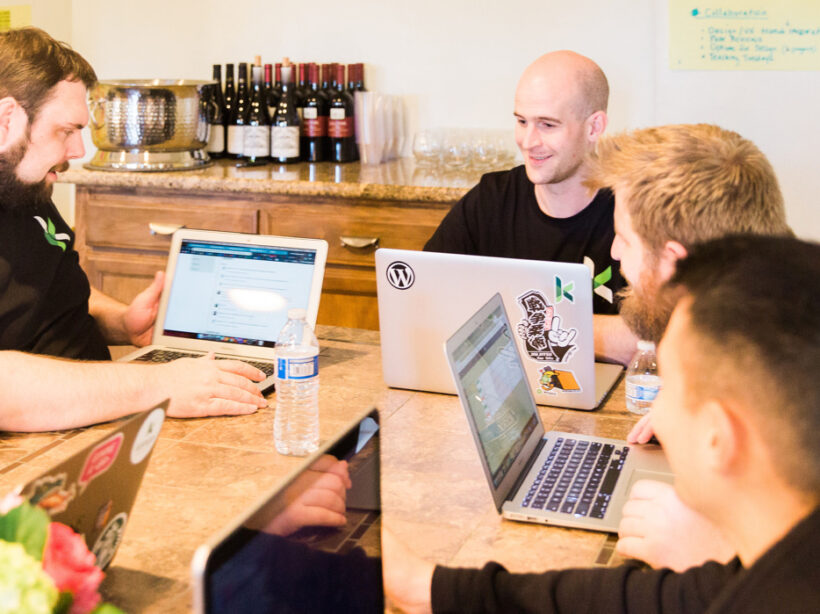
Team meeting

Accelerating Projects with Staff Augmentation

Jessica Skewes, Director of Strategy
Jessica Skewes

The are times the adage “less is more” applies to web projects. It can make a project a joy. Aligned stakeholder priorities. A single decision maker. Structural consistency. Design consistency. Simple, easy to understand requirements. Fewer, clearer calls to action to maximize conversions. Sounds great doesn’t it?

But sometimes you need staff augmentation when, “less is more” doesn’t work to our advantage. Places like timelines, budget and resources. When these are scarce, it creates a challenging environment for project success.

If this strikes home for you, you may be a team lead for web projects. You may be an expert in one or two disciplines in the project life cycle. And you may be way too familiar with the pain of projects that have gaps. You may need to extend or enhance the skills of your team to meet a deadline or budget.

The good news is, if resource constraints are your challenge, there are options!

Staff augmentation can help.

Expanding your team with outside experts is a time-tested way to accelerate your project life cycle or build the skills of your internal team. You can get fresh perspectives on the latest industry trends. You can avoid groupthink by bringing more diverse and varied experience and skill sets to a web development project.

At Kanopi, we understand the stress created by aggressive timelines, resource constraints, and knowledge gaps. “Nimble” is a core value, and offering seamless staff augmentation is one of the many ways we bring it to life: we have successfully partnered with clients and other agencies in a variety of ways to help them achieve their goals. We love the challenge of blending our skills with client teams to help your internal staff perform heroic feats for your end clients.

Jumping in to lend a helping hand 

Here are a few recent examples that demonstrate our team’s nimble agility in helping to save the day on a variety of projects across varied industries. 

The Berkeley School of Information 

The Kanopi team helped Berkeley’s School of Information by building out their new website on Drupal 8, all while training their internal team along the way. The Berkeley team is now well versed in Drupal 8 and needs only minimal support to maintain their highly-customized site. Berkeley’s Senior Director of Information Technology was thrilled with the results of our partnership, sharing that “The Kanopi team’s expertise and enthusiasm were critical to the success of our project. We couldn’t have done it without them.” 

Benetech Bookshare

Kanopi partnered with Benetech’s team to establish a rapid and repeatable process to translate the organization’s Bookshare websites into any language, making thousands of books accessible for people with visual impairment or other print disabilities around the globe. The Benetech team built the API, working with the Kanopi team to build out the websites. 

BC Services 

BC Services was racing toward the finish on a tight timeline to launch its Intranet. They needed help building out search and a complex custom homepage. In addition to jumping in to build out features, the Kanopi team was able to find ways to improve the site’s user experience while reducing technical complexity on the site. And the best part of all was that the project gained momentum and came in ahead of schedule with Kanopi’s extra help. Our main contact was so excited about this that he waited to tell his director that the project was ahead of schedule until the Kanopi team could be there to see the excitement on her face!

International Rescue Committee (IRC)

The Kanopi team is currently hard at work to help IRC meet website deadlines after their technical architect left the organization. Kanopi’s developers took the lead, writing user stories to ensure clarity, creating tickets, coaching and training development staff, and keeping all work on track. 

Need a hand? We can help.

Even with a fantastic internal team of seasoned experts, there are times when staff augmentation can assist with an extra hand or a niche skillset. Contact us if your latest project could use consulting services or helping hands within our full spectrum of web project services.

Kanopi’s Drupal development services focus on creating functional, sustainable Drupal websites.

How to Prevent Scope Creep

Tim Tufts
Tim Tufts

Managing the risks of scope creep will keep your website project running smoothly.

Your project is off to a good start; progress is being made, the timeline is being honored, and the budget is on track. Then one day you check your email and learn that a key stakeholder has left the project. You hear the suspenseful theme from Jaws in the back of your mind; this is the perfect scenario for that dreaded fiend scope creep to show up. 

I say fear not!  

Like a robocall in the middle of the night, scope creep is something nobody wants to encounter, especially during a project. That being said, it is also a natural part of any project and is bound to happen. The good news is that you can be proactive about heading it off at the pass, or preventing it from happening in the first place.     

Common Contributors to Scope Creep

Scope creep is the introduction of anything that can cause the focus or goals of a project to expand, and go beyond the original scope of the project. It’s not necessarily a bad thing when handled properly, but it can put the success of a project in jeopardy when handled poorly. 

Many factors can contribute to scope creep but most commonly it’s the humans that do the creeping. Any individual could knowingly or unknowingly contribute to creep; personal needs, internal politics, or the inability to make decisions are just some reasons that an individual or group can cause a project’s scope to expand. Other contributors to creep are:

  • A change in stakeholders
  • Revisions to the project goals
  • Introduction of new features or functionality
  • Additional rounds of revision to deliverables

With so many areas for creep to originate, how do you prevent it?

Preventing Scope Creep

The sad news is that you can’t prevent it from growing; humans are curious, and it’s natural that there will be questions and requests that will prod scope. So while you can make sure the team is educated in what the scope of the project is, there will always be some level of curiosity as to what additional is possible. 

You can, however, prevent it from affecting your project. I’ll go into greater detail as to specific approaches you can use for preventing creep, but it’s important to note that prevention starts with being engaged, and being a defender of the scope. 

It’s easy to be so caught up in the day to day running of a project that requests may be made or requirements added  that will push the boundaries. Consider yourself standing guard preventing those requests from making their way into the project. If you fall asleep at your post, you may find yourself clambering to remove the creep.     

Know What’s in Scope

Kind of a duh, I know, but this is so often overlooked. It’s not uncommon for project participants to come and go throughout the course of a project’s life cycle. Therefore every consideration should be given to making sure every person has reviewed the project scope; which should be provided in clear documentation that outlines the roadmap for the project. This may be in the form of a contract, proposal, or a project outline. If you don’t have one, define the scope before the project even begins.

The most effective documentation not only goes into detail as to what is IN scope, but also what is OUT of scope. This helps to clearly define where the focus will be for the project. Having participants review this documentation stops scope creep in the minds of those who might introduce it, and makes everyone a guardian of the scope.  

The project manager is the core individual monitoring the pulse of the project, and it is a big responsibility to act as the sole protector of scope. By imbuing this mission in others you build a team that can move together toward a single destination, rather than spending time keeping everyone on the same path. 

Establish an MLP

MLP stands for minimum loveable product; essentially the simplest version of your completed project that you can live with. An MLP can make a huge difference in ensuring that everyone on your project is rowing in the same direction. By clearly defining what makes up the MLP, you’ll have a goal in mind where the team can place their focus before working on lower priority, or scope creep items. This isn’t to say you can’t iterate and improve on the MLP once complete; by working on what’s most important you’ll at least have something that you’re happy with. Everything else is just icing on the cake.

Document the Changes

There will always be changes during the course of a project, it’s unavoidable and that’s fine. What’s important is how those changes are adapted to the existing scope. “Change Requests” turn new requirements or requests into official scope. They’re crucial especially when additional work is going to push the boundaries of a budget, and additional funding is needed. And if additional funding isn’t possible? A change request can clearly outline how existing scope items may change or be removed to make room. Without a change request, scope is not only going to creep but expectations are going to be misaligned.

Document the Risks  

We’ve talked about making everyone a guardian of scope, but because the team can’t be on alert 24/7, how do you focus everyone’s efforts so you know what to guard against?  Documenting risks is another way to reinforce the team’s focus. Risks are those items that you know could potentially impact the success of the project or cause the scope to balloon. You may already know what they are, or they could arise organically throughout the course of the project. Regardless, what is important is to document the risks and make sure the team has transparency into those items. Include a detailed description of the item, if known, a plan to address it, and better yet; assign someone to keep an eye on it.  

Scope creep also provides opportunities!

Hopefully I haven’t made scope creep out to be the villain; as much as it is something to be on the lookout for, it’s also an important opportunity to start planning for the future. Document, and track them; those items that may be scope creep now could also be the next positive expansion for your project. 

Hands on a keyboard

Continuous Website Improvement for Long-Term Growth

If you’ve spent time looking for a website support partner, you’ll quickly realize that while there are a lot of options out there, they’re not all created equal. Keeping your goals in mind will help you find a continuous improvement team with an approach that best meets your needs.

If you’re simply looking for software updates and security patches, there are a lot of options out there. But if you’re looking for a strategic partner to support your site, the search for the right fit can be a bit more challenging.

At Kanopi Studios, we cover the basics, but that’s just the beginning. Our continuous improvement team focuses on adaptive execution and growth-driven design, ensuring long-term growth for your website. We can jump in at any stage of your site’s lifecycle to make sure you’re meeting your goals and getting the most out of your investment. And when it’s finally time for an upgrade, we can help with that too!

Here are a few details that set Kanopi’s support services apart:

Customer service is our #1 priority.

Our team goes the extra mile to provide stellar customer service. We’re here to make your life easier, regardless of the size of your account.  

Added value and strategic guidance

As part of your monthly support budget, you’ll gain access to experienced designers, user experience strategists, developers and more. When it’s time to go beyond bug fixes, you’ll have experts in your corner to help your site respond to changes in the market or shifts in your business priorities.

You’ll work with real humans!

Our full-time support team manages every detail of your account. We analyze incoming requests, make sure we have the details needed to get the job done right, and respond within an hour, all without a single bot in sight.

A dedicated, senior-level continuous improvement team

Our continuous improvement team focuses on support. We know that it takes a different set of skills, energy, and dedication to handle rapidly changing priorities and keep the issue queue clear. Our experienced team has identified and resolved nearly every issue imaginable. We encourage you to check out their bios so you can see their qualifications for yourself!

A continuous improvement team — and partner — you can trust

Kanopi Studios supports more than 135 active websites. Due to the great relationships we’ve built, we’re still working with some of the very first clients that signed on for our services. In fact, most of our work comes through referrals from happy customers. We welcome you to check out our five-star reviews on Clutch and get in touch to learn more about ensuring long-term growth for your website.

Devs Collaborating

Top 5 Things to Look For in a Website Support Agency

Allison Manley
Allison Manley

Whether you’ve just recently built a new site, or you are in charge of maintaining an existing one, it’s critical to leverage the most you can out of that site on an ongoing basis. As the internet grows and audience needs change, your site needs to be maintained and adapted over time. Sites can also be expensive to upgrade if not properly cared for (think of not performing regular maintenance on your car for several years until finally it breaks in an expensive way).

And yet, most organizations don’t have the money to redo a site more than once every three or four years. Sometimes they often don’t have the money to hire someone in-house to maintain the site beyond content updates. Who takes care of your security updates, or changes to modules or plugins so that your site doesn’t break?

That’s where quality website support and maintenance comes in. A good website support agency can make your site last a long time past its creation date and keep it fresh until it’s time for the next rebuild and redesign.

Here’s are the top five things to look for when hiring for an outside website support agency:

  1. Make sure they have a dedicated support team or department. Don’t go with an agency that simply pulls people off of regular design or development build projects to do support tickets on the side. Your site won’t get the same attention or care, since they consider support more of a side gig rather than an important part of their business model. Make sure the agency has a dedicated team that is committed to and organized around supporting sites.
  2. Look for transparency in billing. Make sure you understand the billing options. Most companies will offer different levels of packages, each with a set number of hours. If you have a site with a lot of traffic and ecommerce for selling items to customers, you’re going to want immediate service if something goes wrong vs. a site that’s more informational and can wait a few hours before a fix is implemented. Understand the levels of service you’re getting and the differences in costs for the timeliness of the response. Also ask what happens with any unused hours paid for in advance: do they rollover to the next month, or are they “use it or lose it?”
  3. Ask if you can talk to a human if needed. All agencies use (or should use) a ticketing system in order to track support requests. Ticketing systems allow for transparency, accountability, and clarity on what is being addressed and when. While these systems are tremendous for tracking the progress of an issue as it gets fixed, using them exclusively can be frustrating if something is hard to explain via text. Ask the agency if you’re allowed to hop on a call with one of their support staff, or the Project Manager, for advice and guidance. Often you can save time and increase clarity to simply have a conversation with a human. Plus it’s nice to establish a relationship with the person in charge of keeping your site running smoothly.
  4. Check that there’s a diverse range of talent within the team. Most developers can do module, plug in and security updates. But can they do any front-end work? What if the theme breaks, or you need a new page design? You might need more than code updates. Go for a more diverse and creative team that has experience with feature development as well as creative enhancements to cover all the range of items you might need.
  5. Determine how important it is if they work in your time zone. Talented designers and developers are all over the globe, but it can be tough to get fast responses from people in time zones very far off from yours. What happens if you need something right away, but it’s the middle of the night for them? If you’re in Hawaii, for example, you may not want to have an east coast agency handle your support. Ask the agency what their hours are, and try to get serviced in as close to your time zone as possible.

Following these tips will help give you confidence that you are asking the right questions and finding the right website support agency and services to fit your organization.

If you’re interested in learning more about Kanopi’s support offerings, contact us. We have dedicated support teams for both Drupal and WordPress, with a diverse staff who can cover anything you need. We also do it very well. Our hours are 9:00 am to 5:00 pm your local time in North America . . . and that counts for Hawaii!

Kanopi Studios is a Top Provider on Clutch

Allison Manley
Allison Manley
Screen grab of the Clutch website home page

It’s not easy to find a development partner you can trust. Particularly if you’ve never been immersed in the world of web development, it may take you some time to learn the language. That can make it even more difficult to know whether your partner is really staying on track with what you want to accomplish.

Luckily, knowing what to look for in a business partner can save you from all of the potential troubles later on. Ratings and reviews sites like Clutch can help you get there. This platform focuses on collecting and verifying detailed client feedback and then using a proprietary research algorithm to rank thousands of firms across their platform. Ultimately, Clutch is a resource for business buyers to find the top-ranked service providers that match their business needs.

Luckily for us, users on Clutch will also find Kanopi Studios at the top of the list to do just that. Kanopi has been working with Clutch for a few months to collect and utilize client feedback to find out what we should focus on in the coming year. Through the process, we’ve coincidentally been named among the firm’s top digital design agencies in San Francisco.

Here are some of the leading client reviews that led us to this recognition:

“They were fantastic overall. We had great success communicating to their team via video conferencing, and they were able to answer every question we had. They also worked quickly and were very efficient with their time, so we got a great value overall.”

“Kanopi Studios’ staff members are their most impressive assets — extremely intelligent, experienced, and personable. Building a website is never easy, but working with people you both respect and like makes a huge difference.”

“Kanopi Studios successfully migrated our Drupal platform while preserving all the content that we’ve built up over the years. They worked hard to achieve a responsive design that works well on both mobile and large desktop displays.”

Not only have these kind words earned us recognition on Clutch, but we’ve also gained the attention of the how-to focused platform, The Manifest (where we are listed among top Drupal developers in San Francisco), and the portfolio-focused site, Visual Objects (where we are gaining ground among top web design agencies site-wide).

Thank you, as always, to our amazing clients for the reviews and the support.

Contact us if you’d like us to do amazing 5-star review work for you.

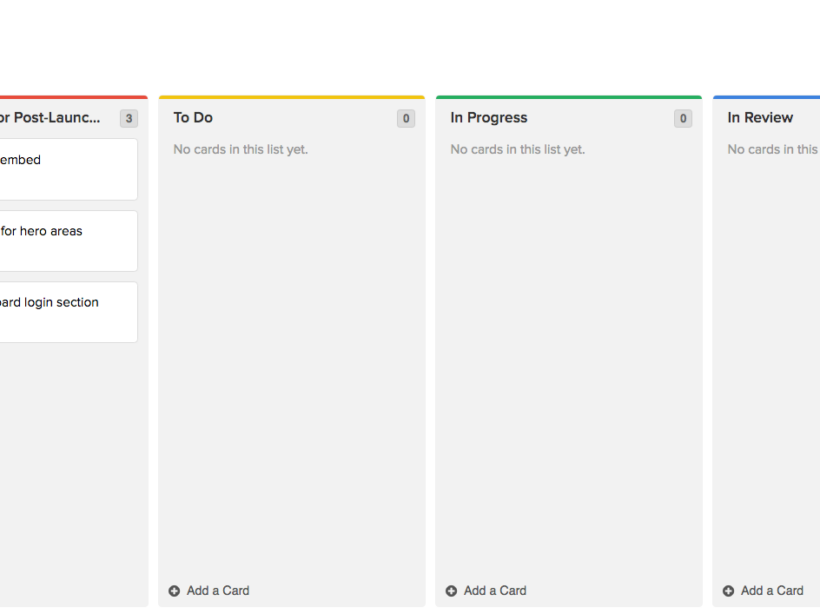
Image of MVP in task board

Defining a Minimum Lovable Product

Tim Tufts
Tim Tufts

Congratulations! Your Boss just gave you approval to build the website you’ve been pitching to them for the past year. A budget has been approved, and you have an enthusiastic team eager to get started. Nothing can stop you… until you receive the deadline for when the website has to go live. It’s much earlier than you planned and there just simply isn’t enough hours in the day, or resources available to make it happen. Whatever will you do?

Let me introduce you to the minimum lovable product, or MLP.

What is a minimum lovable product (MLP)?

You may have heard of a minimum viable product (MVP). Where a minimum viable product is a bare-bones, meets your needs solution; the minimum lovable product can be described as the simplest solution that meets your needs and is a positive step toward achieving your goals. It’s easy to view every aspect, every deliverable, as being fundamental to a project’s success. But when you actually look at each nut and bolt with a more discerning eye, you begin to realize that each component is not fundamental to the overall product’s success.

So basically the MLP is the sufficient amount of features your site needs to be satisfactory to your business goals for launch.

It’s important to note that an MLP is not necessarily a reduction in scope. It’s more a prioritization in the order for which things are addressed. The project team can circle back on anything that wasn’t part of the MLP. The goal behind an MLP is to deliver a functional product that you’re excited about, within the confines of the project.

When should you consider a minimum lovable product?

An MLP isn’t for every project, but is usually best leveraged when there is a restraint of some sort. I used timeline as an example in my opening, but as you know restraints can take many forms:

  1. Timeline: Maybe the deadline you need to hit, simply won’t provide enough time to complete all the work you have queued.
  2. Resource Availability: Perhaps there are scheduling conflicts, or limited resource availability during your project.
  3. Budget Constraints: Another possibility is that the budget just isn’t sufficient to get to everything you have on your list.

Regardless of the restraint you’re facing, an MLP can help you realign priorities, and expectations to compensate. But how do you go about evaluating your project for an MLP?

Need help with defining your MLP? Contact us.

How do you create a minimum lovable product?

When you’re able to parse the individual elements that are crucial to your website’s success into user stories and features, you’ll have effectively identified your project. But how do you actually go about separating the core building blocks that will comprise your MLP from the bells and whistles?  It all starts with goals.

Goals

Chances are that you already have a set of goals describing  what you’re hoping to achieve with the project. These ideally should be as specific as possible (ie. increase traffic) and ideally measurable (analytics). Without realistic, concrete goals you set the project up for failure. For example if your goal is to make people happy; chances are you’re going to have a hard time measuring whether you were successful. Establishing measurable goals will set the project up for success.

It’s not enough to know your goals, you have to be able to prioritize them. It’s simply not realistic that every goal be top priority. Try to narrow your priorities down to no more than three goals. Goals in hand where do we go from here in our quest to define an MLP?

Definition

Begin by thinking of all the factors that are needed for a User to accomplish a given goal. These could include anything from Layouts, to Features, to Content. Start a list of these factors:

  1. What are the things a User sees?
  2. What copy does a User read?
  3. What actions is a User taking while they navigate through the site?

Everything you write down while asking these questions should be in the interest of one of your priority goals. If an item isn’t directly contributing to accomplishing the goal, then it should not be on the list. If you’re not a subject matter expert that will be directly contributing to the work, you should connect with your team to determine the specific work that needs to be carried out for each of the items you’ve identified. Additional refinement, and further simplification may be needed to compensate for the restraint you’re up against.

By this point, you’ve probably realized that defining the MLP is a difficult task. The choices will be tough, and ultimately everyone is not going to get their way. What’s important is that the work you do strives to meet the goals you’ve set. This sometimes means detaching personal wants from the needs of the company. If you can tie the work back to this core philosophy, you’ll always have a strong direction for your product.

Time to get to work!

All done? Congratulations! You’ve now defined your MLP. Now you’re off to the races. Best of luck on the journey of building out your minimum lovable product.

Need help defining your MLP? Contact us. We’re happy to help.

Hand writing in a notebook

Quiz: Is it time for a full rebuild or a focused fix?

There are a number of realities out there when it comes to your website.

Reality #1: You have to have one!

In today’s world, it is difficult if not impossible to be successful without a website for your business or organization. 

Reality #2: Technology moves quickly.

It is difficult to keep up with the pace of change, but it can also be costly to your reputation and results to fall behind. 

Reality #3: Your website will always need attention.

The days when you could launch a website and call it done are long over. The most successful organizations are continuously evolving their sites based on changing technology, customer insights and industry trends.  Knowing all of this, it’s likely that your website could use some love. But do you know whether it could benefit most from a focused fix or a full rebuild? What if you could meet your goals and continue to make progress on your site without the major expense and time commitment of a full rebuild? 

Take our quiz to diagnose the next steps for your website.

Do you understand your audience and their decision-making journey? 

1. Super clear
2. Clear
2. Mostly clear
3. Unclear

How hard or convoluted is it for your organization to make decisions?

1. Super easy
2. Smooth, but slow
3. Tricky
4. Super challenging

Do you have pressing events, deadlines or organizational goals that require a refreshed site as soon as possible?

1. Nothing immediate
2. Yes, but it can wait
3. Yes!
4. Serious crunch time!!

Do you currently have the capacity for a rebuild (including funds, staff time and opportunity costs)?

1. Yes!
2. Very soon
3. Within the next 1-2 years
4. Unclear

How old is your website technology?

1. Ancient and crusty
2. Old
3. Recent within the last 3-4 years
4. Modern, updated within the last 1-2 years

Is your site WCAG 2.0 AA compliant?
(WCAG 2.0 AA is an accessibility standard that is rapidly becoming the expected norm and is required of some organizations)

1. We need to be, but I’m not sure how to make it happen
2. We need to be, and we have a plan
3. We should be, but it’s not required 
4.  Yes!

Is your site responsive? 

1. No
2. We’re ready for that, but haven’t started
3. Yes, but we have no mobile strategy
4. We are fast and mobile-focused

How is the quiz going? Contact us if you need help with your project.  

Is your site working to help you hit your goals and improve your audience engagement?

1. Ha, no
2. I’m not really sure
3. I think so, but I’m not sure how to tell
4. Yes!

What’s your score?

Give yourself:
1 point for each 1 answer
2 points for each 2 answer
3 points for each 3 answer 
4 points for each 4 answer

What does it mean? 

If you scored: 

8 – 15 points: It’s time to get going on a full rebuild and redesign of your site. What are you waiting for? 
16 – 24 points: You are in the middle ground and need more analysis.
25 – 32 points: We recommend a focused fix to extend the life of your current site, continue to evolve it and get the most out of your existing investment  

Want Kanopi to help you with any of this? Contact us.

Project managers looking at a whiteboard

Keeping things on track: Website project management tips for clients

Amber
Amber Young

So your company is redesigning its website and you are going to be the project manager. You will be the one responsible for making sure that everything goes according to plan. You are probably excited! And maybe a bit overwhelmed as well. Good project management will make all the difference.

The more you know going into this process the better. Since we have managed thousands of digital projects at Kanopi Studios, we wanted to share our expertise to help you hit the ground running with solid project management.

Set clear and measurable goals

This is a critical step before getting started. Since your organization is investing time and money into its website, you’ll want to be able to prove it’s effectiveness and value. Think of all of the ways that a new website can support your organization’s goals and give some thought to how you could measure its impact. Having clear goals determined in advance will help your website vendors understand where to focus to deliver the most targeted solutions. It will also help you prioritize scope and features and prove the value of the site after it launches.

Find the right vendor

First, you need to write a strong RFP. Then, it’s on to selecting the right vendor for your project. You want to find a partner who you can communicate easily with, who has the expertise to do the job right and also meets your budget needs. To make things even more complicated, when you review the set of RFP responses, it is rarely apples to apples. The pricing and information represented in them will likely differ wildly. Be sure to ask each vendor what is included in their price. Some agencies will bid low to win your business, expecting that they will be able to issue change orders for more funds throughout the process. In general, you do get what you pay for, in websites as in other areas of life, so beware of the lowest bidder. And since your digital projects are probably only one part of your busy job, finding a vendor who is flexible, experienced, and trusted will help make things easier on you, leading the way to a successful outcome.

Gather (and wrangle) your stakeholders

Before your project ever starts, there is expectation setting to be done with your internal teams. We encourage you to establish a core team of approvers who will stay engaged throughout the project and understand the progression as decisions are made. Then, you’ll need to decide on the cadence for how you will share progress with the rest of your organization. Make sure everyone knows and agrees to their role in order to avoid last minute changes or requests that can throw off the process you have put in place. Consider documenting roles in a RACI chart for additional clarity. It can be to your advantage to use the project budget and timeline as a defense mechanism against new and last minute requests, as these things will have an effect on deadlines and dollars.

Keep vendors accountable

Work with your vendors to establish a cadence of check-ins and regular reporting on budget, percent complete, next steps, and risks. Ensure that you know what to expect from deliverables and when to expect them so that you can schedule time with the right people for reviews and approvals. Find out if your vendor uses a shared project management software platform that will allow you the ability to track progress, add tasks and keep all messages and files in a single, organized location. At Kanopi, we use TeamWork and have had strong success using it to increase transparency on projects.

Understand the creative process

During the UX and design process, your vendor will be establishing guiding principles that will carry through the project. The further the process goes, the harder it will be to change course. So if you aren’t sure about something, ask! It is always easier to adjust a strategy document or tweak a design than it is to rebuild something once it is in code. This should be a collaborative process, so we recommend frequent discussions and reviews to stay in touch on progress and get buy-in from your team.

Think about content early. Check in about content often.

Pay attention during the design phase to how content will be presented on the new site. Always be thinking: Do we have existing content to fill those boxes in the designs? Or will we need to create it? If there is new content to be created (as there most often is), do you have dedicated in-house resources to make this happen? Are your subject matter experts prepared to share details to help your writers deliver? Don’t forget that content also means images! We recommend making an internal content timeline that includes milestones and due dates to ensure that content delays don’t throw a wrench in your plans. If you don’t have the resources you need and are planning to hire, do this early on in the project so that your writers can be in aware of the strategy and design for the site. This will help speed their process, reduce rewrites and ensure that the copy is on target.

Requirements

While it can be hard to understand requirements documentation, it is important, because it serves as the blueprint for how your site will be built. Requirements should be presented in the form of user stories for the technical build to help put things in simpler terms and define expectations. A user story puts requirements into simple language and follows a common structure: As a (type of user), I need to (do something) so that I can (experience a result). While these may seem theoretical, they will impact the day to day reality for your content authors and site users. This is another area where you shouldn’t be afraid to ask questions to ensure that you know what you are approving and that you understand what it will mean once the site is launched.

Search Engine Optimization

With all of the activity prior to launch, SEO can fall through the cracks. It’s also a responsibility that may be split between your vendor and your internal team. With a little planning and coordination, you can ensure that SEO is in place prior to launch. Check in with your vendor about SEO, establish who is doing what and double check it all before launch. Moz has a handy pre-launch SEO checklist that lists SEO actions in priority order.

Need help with project management? Contact us.

User acceptance testing (UAT)

During this stage, your team will be reviewing the website and entering feedback prior to launch. Ideally, your team will have plenty of time to check the site thoroughly on all devices and browsers, clicking every link and paying special attention to more complex functionality including forms, transactions and interactive features. It is also ideal for your vendor to have enough time to address the issues that your team finds prior to launch. However, in reality, this process can be constrained by launch deadlines, making clarity and communication essential. Be sure to prioritize issues, making it clear which are launch blockers and which are nice to have fixes. Include the URL the issue was discovered on, the browser, device and version being used, details describing the issue and the desired fix.

Preparing for launch day

Talk with your vendor to make sure that there is a plan in place for launch day. Line up your core group up to test the site as soon as it is live and make sure your vendor will be available in case anything unexpected needs to be addressed. It’s best to delay announcing that the site is live until these final checks can be completed. We’ve even made a pre-launch checklist you can reference! If you need to announce the site launch in advance, plan the timing with your vendor and make sure there is enough buffer time to allow for a site review and bug fixes.

Don’t forget about support

Your project management has gotten you to launch. And yet, launch day in many ways is just the beginning! Inevitably your site will need something … whether it’s small bug fixes you discover after launch or some of those new feature ideas that came up in discovery but got put in the phase two bucket. In addition, keeping your CMS up to date and ensuring site security updates are in place is an ongoing and critical process. Website support is the answer. Having a support contract in place before launch ensures that you will not miss a beat and that you can evolve your site as you learn from using it, receiving feedback on it and examining analytics.

If you’ve followed these steps, your project management has gotten you far. If you need a little help getting farther, contact us.

Design meeting

If it ain’t broke …

How to know if your site needs a total rebuild or a focused fix

Designers mapping out a website.

So your site isn’t working the way you want it to. Maybe it’s sluggish, or you’re not seeing the conversions you want, or customers are complaining. Before you drop a huge chunk of your budget on a complete rebuild, consider that there might be a simpler (and more affordable) solution to your website woes.

We see a lot of Drupal 7 and WordPress websites here at Kanopi Studios, and we often discover that it’s more cost-effective for our clients to simply update their sites rather than rebuilding them. Making targeted updates can allow you to focus on addressing a few key issues, while still leveraging the investment of time, energy and funds that went into your site’s foundation.

Here are three key topics to consider:

1. How do you know when it’s time for a change?
2. Is your website optimally organized and designed to be user-friendly?
3. How strong is your technical foundation?

How do I know it’s time for a change?

Do any of these problems sound familiar?

  • Low conversion rates
  • Site pages take more than 3 seconds to load
  • Site doesn’t work well on mobile or other devices
  • Updating content is a difficult and frustrating process
  • Users struggle to find what they need on the site or have shared negative feedback
  • Site crashes when updating
  • Too many bugs
  • Building new features is difficult or may not even be possible
  • Site is not loading on https and triggers security warnings

If your answer to any of these is yes, it’s time to take action.

But first … is it really that important for me to address these issues?

Yes! A website that isn’t working optimally can dramatically affect your bottom line. An out-of-date or poorly designed website can:

  • Damage your credibility. If your website loads slowly, is crowded with clutter or is just plain not working, you are sending the message that your company is unprofessional.
  • Make you appear out of touch. A dated website tells your customers you are behind the technological times, or worse – you don’t care enough to stay up-to-date.
  • Cost you customers. Every customer who leaves your site in frustration due to broken links, complex forms, slow pages or confusing navigation is a customer you won’t get back. If your competitors offer similar services and have a stronger website experience, your loss will be their gain.

Decision time. If you want to avoid the damage that a dated website can cause, you’ll need to either rebuild your site or update it. If you’re ready to take action, we can help you find the best and most cost-effective approach.

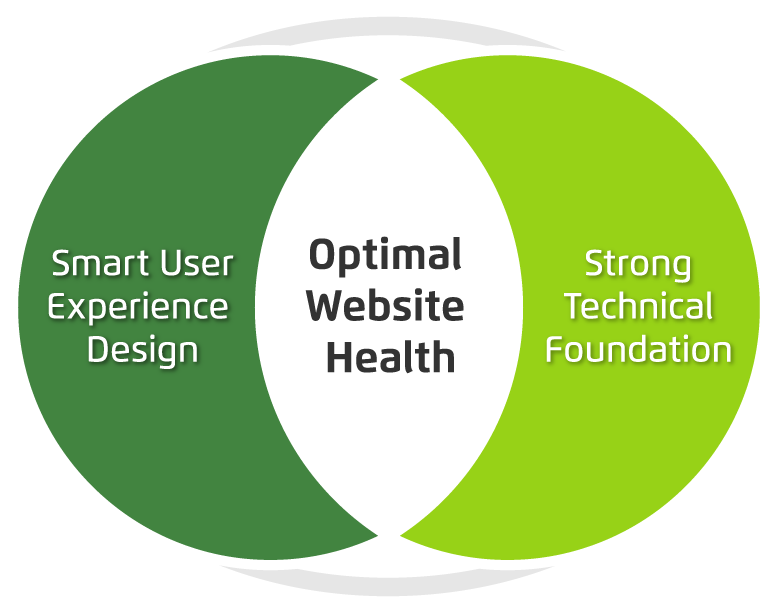
There are two primary things to consider when maximizing your site’s ROI: your user’s needs and the technology that drives your site. If you can identify and fix problems in both of these categories, you can most likely avoid a costly rebuild.

Venn diagram showing optimum website health at the intersection of smart user experience and strong tech foundation.

Next, we’ll dive a bit deeper into tips to help you level up your user experience and update your website technology without starting over from scratch. Consider it the non-surgical, diagnostic approach to improving your website experience right where it needs it the most.