
Kanopi's Jen Hill, Tim Tufts, and Joe Tuen giving high fives and thumbs up.

12 Website Design & Development Trends for 2026

Key Takeaways

  • Agentic Journeys: AI agents (like Gemini and GPT) are now bypassing traditional website funnels to complete transactions directly.
  • Semantic HTML as “SEO 2.0”: Clean, machine-readable code is no longer optional; it’s how AI discovers and recommends your site.
  • Calmer UX: Design is shifting toward minimalist, “distraction-free” interfaces that prioritize speed and accessibility.
  • Trust UX: Privacy and consent are now core architectural requirements, not just legal checkboxes.
  • Component-Driven Development: Using unified design systems to scale content rapidly without technical debt.

It’s that time of year again when we look ahead to what’s coming. We admittedly don’t love the word “trends” because it implies something fleeting, while our entire philosophy here at Kanopi is about building sustainably and intelligently, so websites will last. The word “trends” works great for a short headline, but this article is more about outlining what we see coming in all aspects of website design and development, so you can be prepared to decide what could work for your business. 

We’ll warn you: artificial intelligence is covered a lot in this article. Love it or hate it, it’s here. While we are all learning to find ways to allow AI into our workflows in order to create efficiencies, it’s critical to use it in a way that keeps humanity strong! (If you’re curious, here’s how Kanopi uses AI for clients).

1. Let the bots organize large datasets

One thing that AI is very skilled with is helping aggregate large, disparate datasets. Think competitor research, user behavior data, or analytics reports.

Our content and UX strategy teams use a combination of ChatGPT and Claude to analyze large datasets, identify patterns, and turn complex information into clear, human-readable insights. AI can be used here to reduce the manual lift required for time-intensive activities; work that once took weeks can now be completed in just a few days, freeing our strategists to focus on the high-impact thinking that drives meaningful results for our clients. 

As always, human guidance is key. A human needs to review the outputs as they come. It helps maintain accuracy, minimize bias, and ensure that AI outputs stay closely aligned with the project’s goals and broader strategic direction. 

2. Agentic journeys & funnel flattening

AI agents (ChatGPT, Gemini, custom enterprise agents, etc.) will increasingly handle research, booking, donations, and transactions end-to-end, collapsing multi-step funnels into single-intent, conversational flows. Early adoption in 2026 will raise new questions about attribution, fraud, consent, and regulation. 

What about website design, UX and content?

3. Make your content speak AI

AI isn’t just reading your content anymore. It’s deciding whether to recommend you at all. If your site isn’t structured in a way that ChatGPT, Gemini, and other AI agents can understand, you’re basically invisible to a growing chunk of how people discover things online. We’re talking semantic HTML, well-structured and agent-friendly APIs, stable URLs, and clean information hierarchies, and structured data … all the stuff that makes your content machine-readable. This is no longer optional. Think of it as SEO 2.0, except now you’re optimizing for robots that are way smarter than the old-school web crawlers. Otherwise, expect degraded representation in AI-driven search and assistants.

What Kanopi is doing: We start with AI-led content audits that reveal exactly where your content stands. What’s discoverable, what’s buried, what’s redundant, and what’s completely invisible to AI systems. These audits don’t just identify problems, they inform strategy, helping you prioritize what to fix first based on actual impact.

4. Scale your content without sacrificing your voice

One of the biggest challenges teams face is keeping content fresh and consistent across dozens (or hundreds) of pages. You’ve got style guides gathering dust, content editors struggling to match tone, and updates that take forever because every piece needs multiple rounds of review. AI changes that equation completely. But only if it’s trained on your voice, not generic internet speak.

What Kanopi is doing: We’re building custom AI workflows that learn your brand’s style guide, tone, and content patterns, then generate copy variations that actually sound like you. But we’re not just handing you a robot and wishing you luck. We’re creating prompt libraries and content templates tailored to your team’s specific needs. Need 10 variations of a CTA? Done. Want to update product descriptions across your catalog while maintaining consistency? Easy. We’re giving your content editors AI tools that work with them, not against them, so they can keep sites current without burning out. It’s like having a writing assistant who’s read every piece of content you’ve ever published and knows exactly how you like things done.

5. Design for speed and intuition

Nobody wants to click through five pages to do something an AI can handle in one conversation. We’re witnessing a significant shift toward interfaces that anticipate users’ needs and deliver them faster. Think calmer designs, less clutter, smarter personalization that doesn’t feel intrusive. Multi-step funnels are collapsing into simple, conversational flows because that’s what AI agents are built for and what users now expect. The best interfaces in 2026 will feel less like navigating a website and more like having a helpful assistant who intuitively understands your needs.

What Kanopi is doing: We’re using AI-powered tools to streamline our design workflows that create meaningful efficiencies for our downstream development teams. Our Figma to Claude process enables rapid component prototyping. This means we can create more, iterate faster and refine work, without putting timelines or budgets at risk. 

6. Unifying theme and atomic/component-driven design

A major trend shaping 2026 web design is the continued move toward unified, component-based systems. Instead of designing every page from scratch, we create a consistent library of reusable interface elements, buttons, cards, forms, navigation patterns, that work together seamlessly across your entire site. This ensures visual cohesion, faster development, and a smoother user experience.

What Kanopi is doing: We take this further by pairing modern design tools with cutting-edge AI development workflows. Using Figma’s Model Context Protocol (MCP), our design files connect directly to advanced AI coding tools like OpenAI Codex and Anthropic’s Claude. This means our designs are translated into high-quality, production-ready code with exceptional accuracy.

Once components are built, we use Google Chrome DevTools MCP to let AI validate how each piece actually renders in a real browser, catching visual issues early and ensuring the final experience matches the design vision.

From there, our developers ensure each component can be easily managed in your CMS. Finally, we build end-to-end functional tests that automatically watch for regressions, ensuring that as your site evolves, nothing breaks along the way.

The result is a unified design system powered by intelligent workflows that keeps your site visually consistent, easy to maintain, and ready to scale.

Other things we see coming

  • AI can serve as a valuable design research partner, helping designers quickly surface trends, industry-specific design patterns and assessing the accessibility of design components as they are being designed. 
  • Aesthetically speaking, we’re noticing a shift to calmer user experiences; minimalist interfaces, fewer distractions, more clarity, and clearer information hierarchies. 
  • Lastly, compliance for WCAG and “Consent UX” or “Trust UX” — the design of user interfaces and flows that ethically obtain user permission for data collection and use — is becoming mandatory. See the “Trust, Privacy, Consent & compliance in the next section for more information on this.  

There’s even more happening in website development (whether it’s Drupal, WordPress, or custom code)

Just like in strategy, content, and design, development is also undergoing a meaningful shift. These aren’t fads. They’re structural changes in how teams build, maintain, and future-proof websites. Here’s what we see shaping 2026:

7. Server-side rendering & resilient delivery

We’re watching teams swing back toward server-side rendering (SSR), static site generation (SSG), and progressive enhancement. This isn’t nostalgia, instead it’s a response to what users (and AI systems) now expect: fast initial loads, predictability, resilience, and content that’s easily discoverable by both humans and machines.

Modern frameworks absolutely still have a place, especially when rich interactivity is required, but we’re seeing a clearer separation between where complexity adds value and where it gets in the way.

8. Rethinking architecture: agents vs. complex frontends

As AI agents begin handling more of the “consumption layer” — surfacing answers, facilitating transactions, navigating information — the value of extremely complex, client-heavy architectures is being reconsidered.

 For informational sites and straightforward user journeys, well-structured, semantic content often wins over front-end flexibility. Complex frontends will continue to power robust applications, but many marketing and discovery-focused sites are trending back toward hybrid or server-first models.

Agents are already consuming AI-friendly APIs, and with evolving authentication, they’ll get even better at interpreting content over time. With the current pace of innovation, we predict this will be a delicate dance throughout 2026.

9. AI-accelerated technical debt

AI coding tools are incredible accelerators, but they’re accelerators in both directions. Yes, they speed up delivery. They also multiply code volume, inconsistency, and architectural drift if teams don’t stay vigilant.

This is where strong standards, clean patterns, and senior oversight matter more than ever. Without them, organizations end up with AI-generated technical debt and fragmented prompt/model sprawl — problems that cost significantly more to untangle later. Kanopi builds governance into our workflows so speed never comes at the expense of long-term stability.

As AI becomes embedded in websites and applications, the way we communicate trust changes too. Users need clarity around how their data is used, how permissions work, and what AI agents are doing on their behalf.

“Trust UX” is becoming its own discipline. Transparent consent flows, auditable agent actions, and understandable data policies are now core engineering requirements, not afterthoughts. And with legal scrutiny around consent management on the rise, we expect this to intensify in the coming year.

11. Predictive personalization & AI-driven adaptation

Users increasingly expect experiences that adapt to them, including personalized recommendations, context-aware content, and layouts that respond to user intent. Achieving this requires real AI infrastructure: data pipelines, model governance, and ethical frameworks.

Basic rules-based personalization won’t cut it anymore. Organizations that want to deliver anticipatory digital experiences will need to invest in more holistic, AI-driven systems.

12. Accessibility & inclusion as architectural foundations

Accessibility is no longer something you “add on” during QA. It’s becoming a structural requirement. Semantic HTML, non-JavaScript critical paths, and robust WCAG compliance are essential for AI discoverability and multimodal search (and are just good practice regardless).

As agents rely more on clean, machine-readable content, inaccessible markup and JS-gated experiences will carry increasing penalties. Building inclusively from the start is now both an ethical responsibility and a competitive advantage.

Curious about what Kanopi’s doing specifically? Here are a few exciting projects keeping us engaged:

Drupal CMS, Drupal Canvas, and Site Templates!

We’re hard at work in the Drupal community, helping Drupal CMS development continue. Drupal CMS 2.0 was released in January 2026, complete with a working Site template example building on top of Drupal Canvas, the new editor coming to Drupal.

There are AI integrations, theming in the browser, and instant component creation. This all will minimize development cycles and empower content creators to prototype and publish as they see fit.

We will be working to release a Site Template in the initial launch of the Drupal.org marketplace, so check back with us in the spring at DrupalCon Chicago.

AI Tooling to increase content editor and developer efficiency

We’re working to build AI workflows and tools into our tech stack and into Drupal and WordPress sites to help all of us be more productive in our day to day tasks. We’re connecting Figma to coding agents, as well as connecting automated audits to ticketing systems, content, image, and audio generation in content management systems. Basically, we are working in a way that we can do more with less.

Things are moving quickly, but the basics are still critical.

It’s a lot to absorb when technology moves ever faster, but it’s important to remember that the basics still hold true: your website needs to work for the humans that use it. Your visitors need the information they came looking for, and your editors on the back end need to be able to make updates that keep the website performant, accessible, and fresh. 

There’s always going to be more we can do to make websites better, so it’s easy to get overwhelmed with everything that’s coming. But remember this: you don’t need to know everything, you only need to know the things that will make your website meet the goals you’ve defined for it. 

We hope this post helps inspires you with ideas on how to make your website stronger in 2026!

The front entrance of UCSF Medical Center

How better web experiences support UCSF’s mission

For more than ten years, our team has worked with UCSF across many departments. We support clinical goals, academic progress, and research efforts. Projects range from merging platforms to updating individual websites, with the goal for each being to improve clarity and accessibility while creating lasting value. (Check out our decade of UCSF collaboration here.) 

A platform built to grow

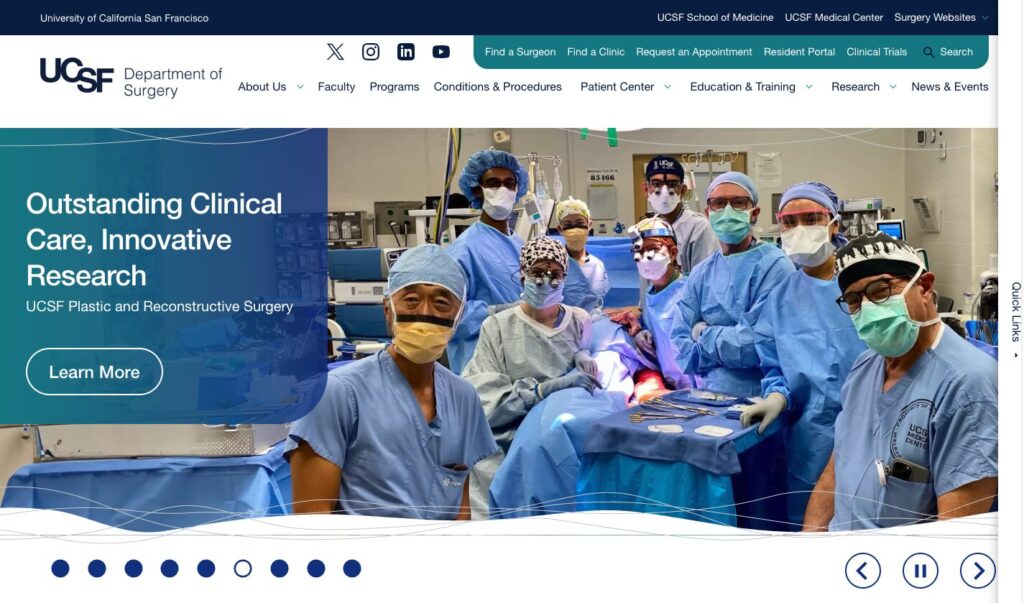
Our most ambitious collaboration involved the UCSF Department of Surgery website. This initiative consolidated more than 80 independent domains into a unified Drupal ecosystem.

We began by studying what different audiences needed. Patients had one set of needs. Researchers had another. Prospective residents required clear guidance while faculty needed direct support. We developed a template system that enabled each sub-site to retain its identity while maintaining overall brand consistency and navigation.

The result: an award-winning user experience that improved both visitor confidence and editorial manageability.

The UCSF Department of Surgery websitehome page

Refreshes that drive engagement

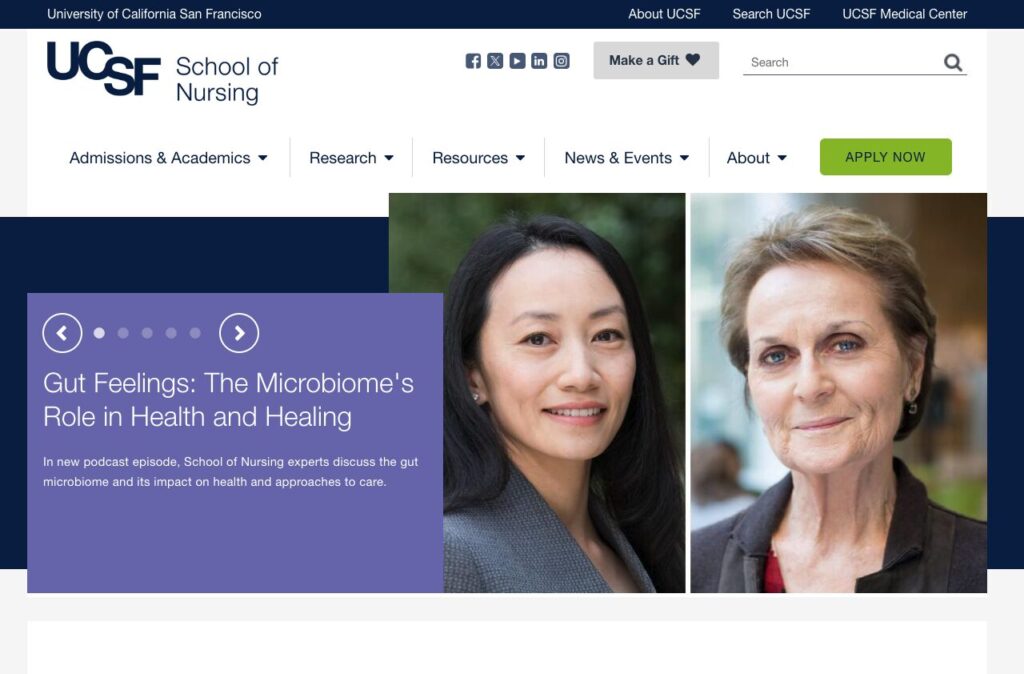
Not every project needs a ground-up rebuild. We worked on the UCSF School of Nursing site with a focus on the homepage. The team reorganized navigation and improved visual design. It also made the Apply path more visible. 

The result: application page views rose 9.3% in the first three months. It’s a reminder that smart, targeted updates drive real results.

The UCSF Nursing website homepage

Ongoing support, long-term value

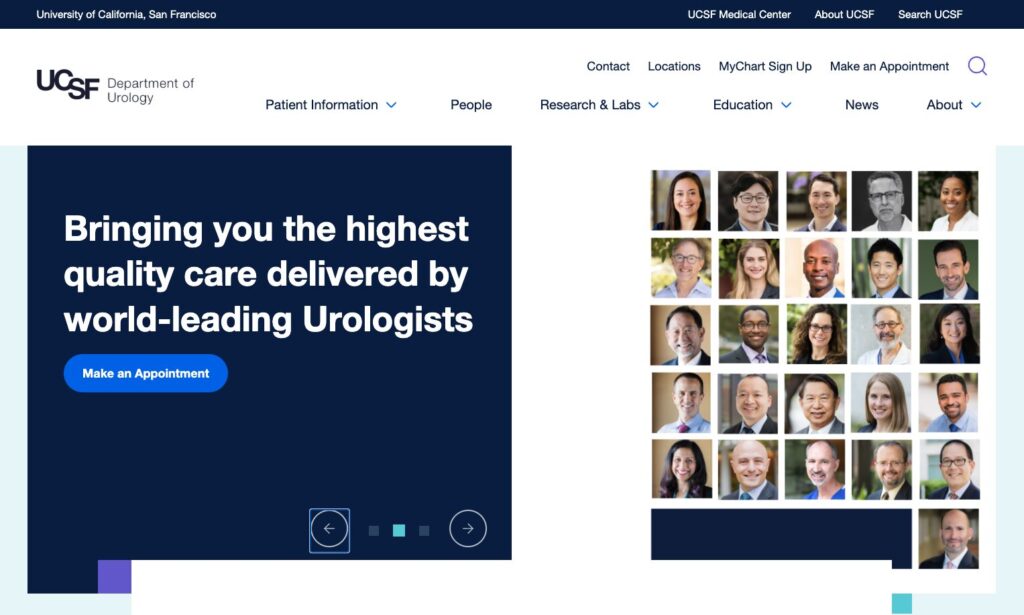
Our partnerships continue after launch. One example is the UCSF Department of Urology site. We migrated the site from Drupal 7 to a new system. We also removed unnecessary pages and improved access for all users. 

The result: their Lighthouse accessibility score rose from seventy to one hundred. Our update also included new tools that make editing easier.

Effective websites need to evolve over time, which is why we stay involved to help yours keep improving.

The UCSf Urology website home page

A modern experience for patients and providers 

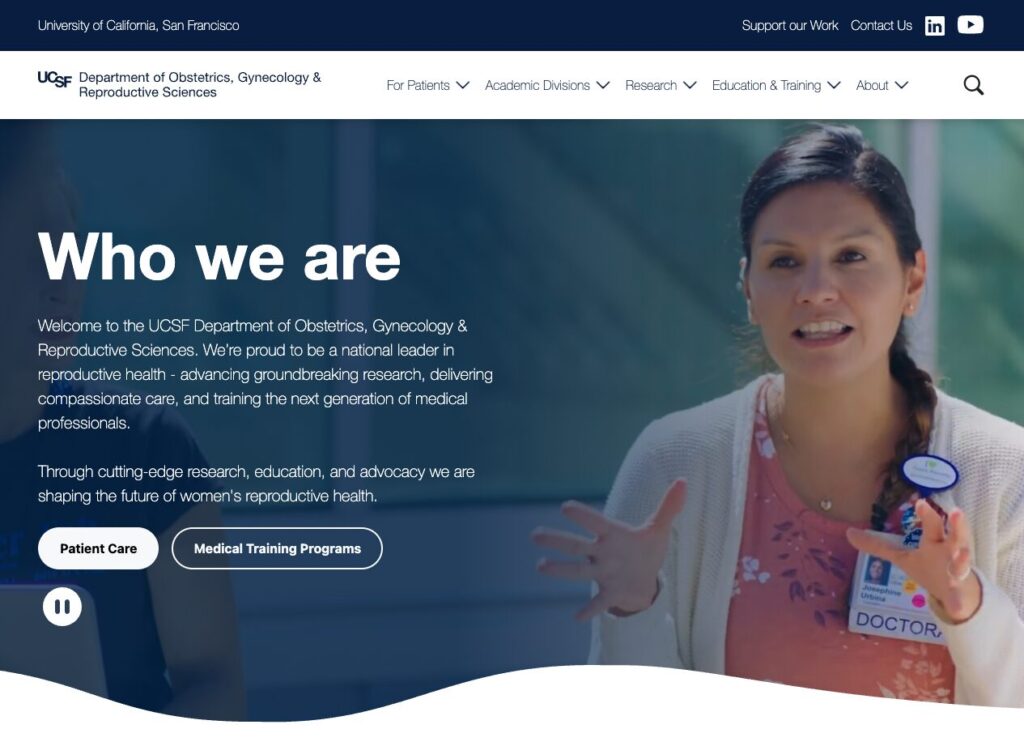
For the UCSF Department of OB/GYN, we led a full redesign that made the site easier to navigate for patients seeking care and faculty looking for clinical or research resources. The new structure makes each pathway easier to use. It also brings important services forward and improves access for every user.

The result: a modernized experience that can support both clinical needs and everyday content management.

The UCSF OBGYN website home page

Clarity in a fast-moving environment 

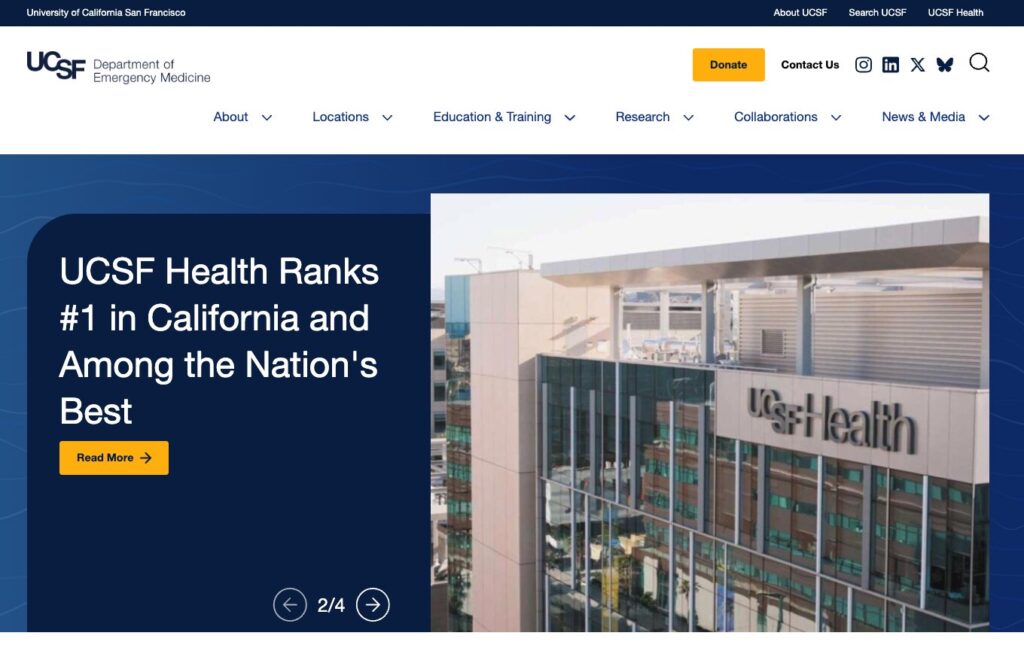
The Department of Emergency Medicine needed a site that could serve multiple audiences without overwhelming any of them. We delivered a refreshed experience that organizes clinical content into clear pathways. It also arranges academic and research material in the same way to help users find what they need. Visitors can now move quickly from high-level overviews to detailed information with far less effort.

The result: this project demonstrates how thoughtful restructuring can bring order to even the most complex content ecosystems.

The UCSF Department of Emergency Medicine website home page

So, what makes the partnership work?

UCSF operates a complex web ecosystem with many departments and platforms. They need a partner who can cover their full range of needs, including:

  • Extensive experience in higher education and healthcare web environments
  • Proven track record across dozens of UCSF departmental sites
  • The flexibility to handle website projects of any scale or scope; from full redesigns, to mid-life refreshes, to ongoing support

Sustaining a digital environment this broad requires a partner who can think beyond individual projects and focus on continuity.

Here’s what you need in a strategic partner

Higher ed and healthcare often serve wildly different audiences simultaneously. Find a partner who understands that complexity and delivers results that address it.

And as we always say, launch day is only the beginning. Ask about long-term stability and how they handle evolving needs.

Demand concrete outcomes like better engagement metrics and clearer user paths. Look for editing workflows that don’t need developer support.

Ideally, your team should control messaging and content while your partner looks after platform health, performance optimization, and accessibility compliance. This arrangement lets each side focus on core work and move forward without delay or dependence on the other.

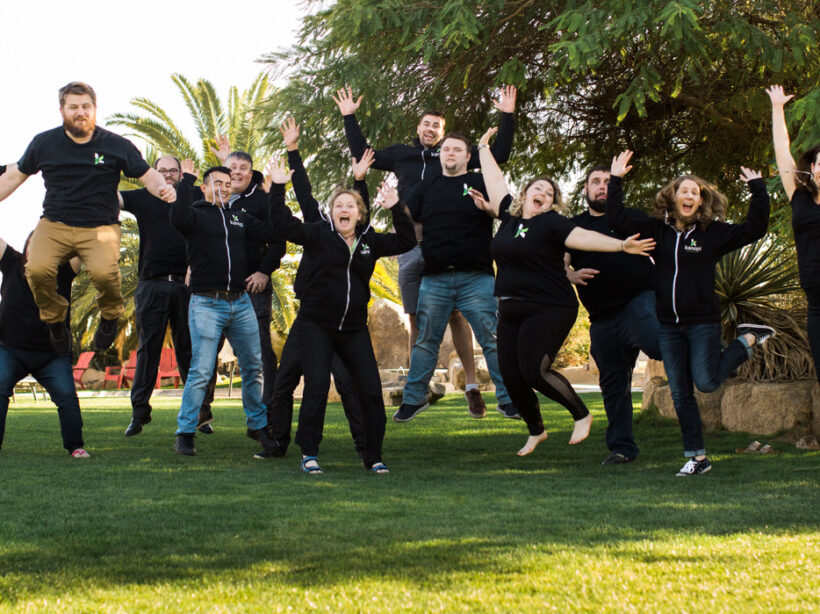
Kanopi Dev Team Jumping

How to Future-Proof Your SEO With Links in an AI-First World

Search is getting chatty. Around 35% of desktop queries now surface a Google AI Overview before the blue links even show up, and when that happens, click-through rates drop by 56%. To stay visible, we need to shift our mindset from “collect more links” to “earn more citations.” That means:

  1. Quality-first backlinks that AI trusts.
  2. Smart internal linking so bots understand your expertise.
  3. Brand mentions on Reddit, LinkedIn, and niche forums that prove real-world authority.

AI Has Rewritten the SEO Playbook

What changed?

  • Conversational results: Large Language Models (LLMs, which is software that predicts the next best word, like ChatGPT or Gemini) answer questions in a chat box instead of a list of pages.
  • Zero-click reality: 65% of searches already end without a website visit, and projections hit 70% by mid to late 2025.
  • Visibility > traffic: If an AI cites you, you win impressions and brand recall, even when no one taps a link.

Why it matters to marketers

Traditional SEO measures success by ranking and clicks. In an AI-first world, the real KPI is how often the robots say your name. Authority signals, like links, mentions, structured content, feed those answers.

How LLM’s Surface Data For a Query

Fan-out queries are the extra searches that an AI (like ChatGPT, Gemini, or Google’s AI Overviews) launches behind the scenes to build a rich, well-rounded answer. Think of them as the follow-up questions a savvy researcher would type into Google after hearing your main question.

How Fan-Out Queries Work in 3 Steps

1. Intent Mapping

The AI model reads the user’s original prompt and breaks it into the underlying “jobs to be done.” 

Example: A user asks, “What’s the healthiest plant-based protein for muscle gain?” The AI decides on sub-topics like: “protein quality,” “amino-acid profile,” “digestibility,” “protein cost.”

2. Query Generation (the “fan-out”)

For each sub-topic, the AI spins up more specific searches, often 5–20 at a time.

  • “best complete plant protein source”
  • “digestibility score of pea protein vs soy”
  • “price per gram plant protein 2025”
  • “clinical studies plant protein muscle hypertrophy”

3. Aggregation & Synthesis

The engine scrapes results, scores credibility, and stitches the findings into a single conversational answer. Only the polished summary appears to the user; the fan-out queries stay under the hood.

Quick Optimization Tips

  • Cover related sub-topics in one hub post (you can then write more in-depth articles separately, and link to those from your hub post – continue to read for more details on this)
  • Use descriptive sub-headings (H2/H3)
  • Include data points (especially our own data), definitions, and mini-FAQs
  • Refresh supporting stats annually

Fan-out queries are the AI’s way of triple-checking its work. By anticipating these spin-off questions and addressing them clearly on your website, you position your content to be the source the bots (and your future customers!) keep coming back to.

Yep, backlinks still move the needle, but only the right ones. Think quality over quantity, context over random link swaps. Long gone are the days when any old link could bump you up the rankings. 

In 2025, Google’s AI Overviews and chat-based engines like ChatGPT weigh backlinks more like reputation votes. They look at who is linking to you, why they’re doing it, and whether the surrounding content makes sense for your topic. 

If a respected publication, niche podcast site, or university blog points to your guide, that’s gold. Ten spammy directory links? Dead weight.

What still works

Links aren’t dead; they’re pickier. AI assesses:

  • Source authority (Is the site trustworthy?)
  • Topical relevance (Does the surrounding content match your niche?)
  • Anchor context (Natural language > exact-match keyword stuffing).
  1. Create genuinely linkable assets: original research, interactive tools, or deep guides others want to reference.
  2. Upgrade anchor text: Mix branded mentions with partial-match phrases so it reads like real prose. (i.e. “Check out Kanopi Studio’s AI-SEO checklist” instead of “Click here.”)
  3. Partner up: Cooperate with trade groups, podcasts, or complementary SaaS platforms for joint studies and co-branded webinars.
  4. Think digital PR, not link exchange: Pitch journalists with newsworthy data; the story earns you natural links and brand buzz.

Anchor text is the clickable words in a hyperlink. It tells both readers and search engines what they’ll get on the other side.


Internal Linking: Your Secret Weapon for AI Understanding

Internal links are the signposts that tell AI, “Here’s how all our content connects.” As Google’s AI Overviews roll out, internal links help “AI algorithms better recognize the relevance and authority of your site,” increasing the chance your page is chosen for the summary box.

Google calls solid link architecture “crucial” for getting a site fully indexed because it signals which topics are broad pillars and which are supporting details.

Let’s pretend we’re working on a boat repair brand.  

1. Pillar-cluster model (quick refresher)

  • Pillar page: A broad, authoritative hub (i.e. “Your Ultimate Guide to Boat Maintenance”).
  • Cluster pages: Deeper articles that cover subtopics (i.e., “Winterizing Your Engine,” “Cleaning Fiberglass Hulls”).
  • Links both ways: Every cluster links back to the pillar and to each related cluster.

2. Semantic anchor text strategy

Instead of repeating the exact same anchor text “boat maintenance guide” 10+ times, vary with natural phrases: “seasonal service tips,” “engine tune-up checklist.” This diversity feels more “human” and also helps AI map related ideas.

3. Implementation checklist

  1. Audit: Use tools like Screaming Frog or Ahrefs to spot orphan pages (a webpage with no internal links pointing to it, making it hard for users and bots to find) or pages with low internal links.
  2. Map clusters: Use a Google Sheet to group URLs and note missing links.
  3. Add context links: Place them inside sentences, not sidebars. Contextual placement carries more weight with AI and readers alike.

Google and OpenAI both license Reddit data – so having a presence on forums (Reddit and Quora) is definitely recommended! 

LinkedIn pulses also tend to show up in business queries.All of these unlinked brand shout-outs train AI on who you are and whether you’re trusted.

Why mentions matter

AI tries to mimic real-world consensus (which is why they love crawling forums like Reddit, or review sites). When your brand name pops up across different credible conversations, it acts like digital word-of-mouth. That familiarity makes an AI citation more likely

How to spark the right chatter

Use social listening tools (Brandwatch, Mention) to track new discussions, then jump in to clarify facts or offer resources. Every helpful reply is a brand mention in the making!

Three Tactical Wins You Can Deploy Today

  1. See what AI already says about you

    Open ChatGPT or Gemini and ask, “What is [Brand]?” Note missing or incorrect points, then update your About page and top-traffic posts to make these facts easy for AI to pull.
  2. Mine AI for unanswered questions

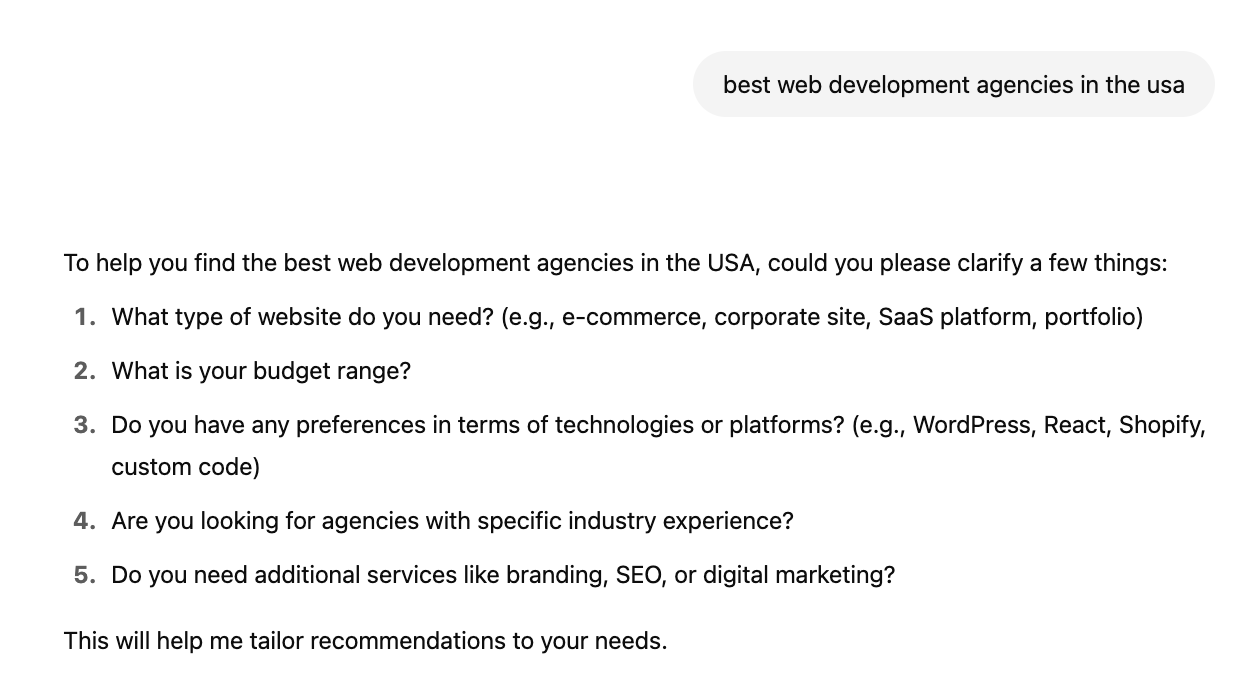
    This is a fun trick I love to use. Run a Deep Research prompt (if you have a paid ChatGPT subscription, which I highly recommend!) on your main keyword. The model spits out common sub-queries (see below). Turn each gap into a quick FAQ or blog update, or include them on your service or product pages! 
A ChatGPT response for best web development agencies in the USA
  1. Track citations over time

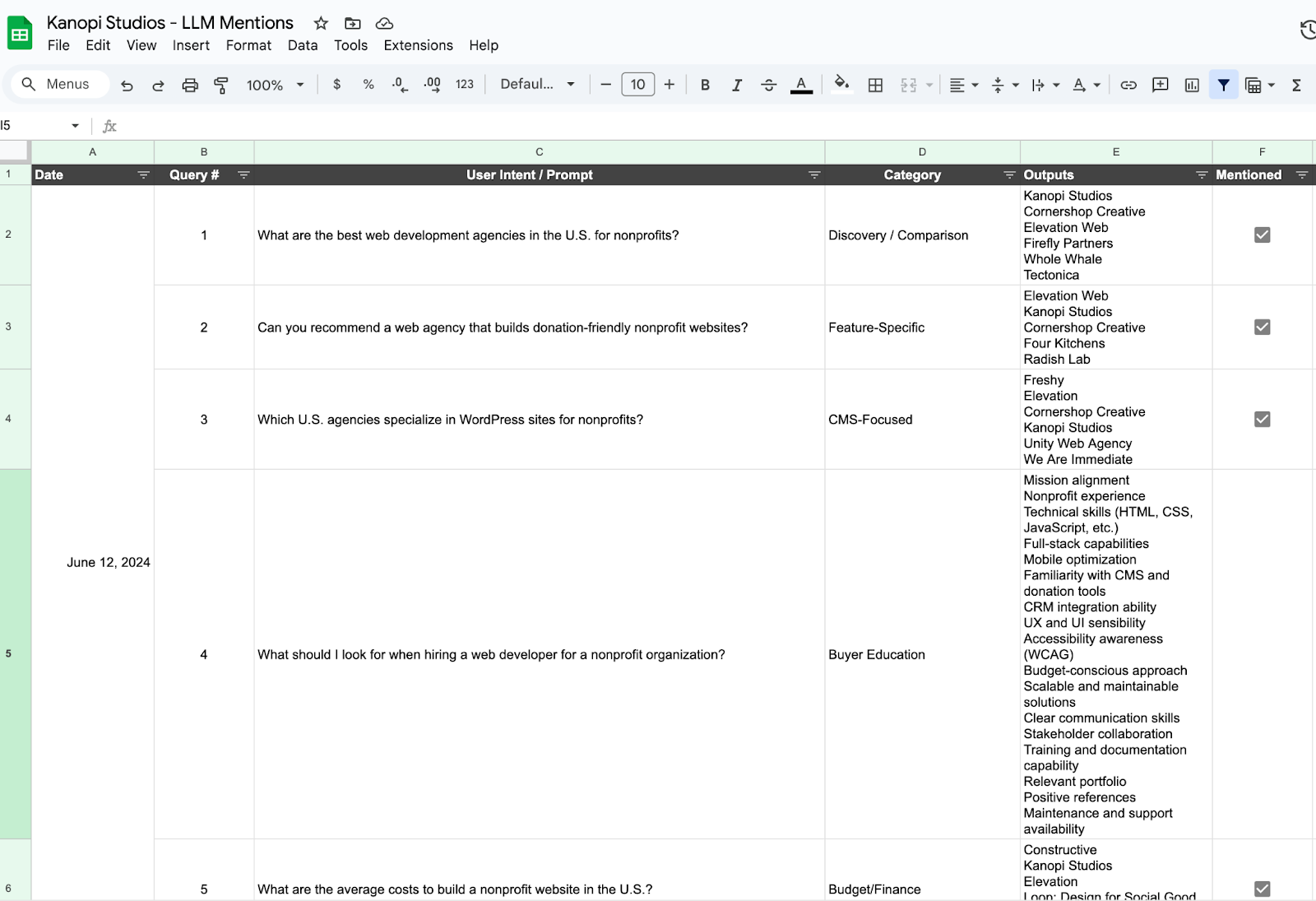
    Pick 5 to 10 queries that are relevant to your brand (ex. “best virtual golf simulators,” or “best web development agency”) and record which brands AI lists every 2-4 weeks. Find an LLM Mention template and example for this here. There are also tools like XFunnel.AI that help to automate this task but typically cost a subscription fee.

So that’s the game plan! Ditch the “collect-all-the-links” mindset, double-down on quality signals that AIs actually trust, and give those fan-out queries everything they need to pick your brand first. 

If we tighten up our internal links, spark real chatter out in the wild, and watch our citation share like a hawk, we won’t just survive the AI shake-up, we’ll ride it. Let’s get out there and make sure the next time someone asks a smart bot a question, your name pops up in the answer.

Quick Glossary

  • LLM (Large Language Model): A type of AI that predicts words to generate human-like text.
  • AI Overview: Google’s summary box powered by generative AI, they appear above organic links.
  • Anchor text: The words you click in a hyperlink.
  • Internal link: A link that points to another page on the same website.
  • Orphan page: A page with no internal links linking to it, making it hard to find.

Want more? We held a webinar about it.

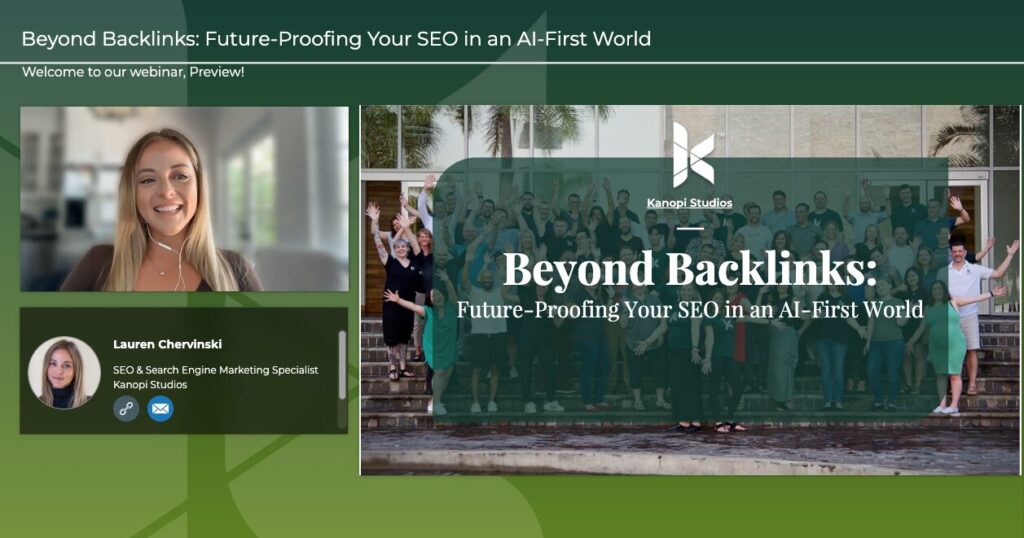
Interface of ON24's webinar platform with Lauren CHervinski giving a webinar on SEO usage with AI.

How is AI transforming the SEO game? Kanopi’s Lauren Chervinski breaks it all down in this webinar, “Beyond Backlinks: Future-Proofing Your SEO in an AI-First World” (48 minutes)

Drupal has always been a huge part of the Open Web, empowering its users to create ambitious websites. The Drupal community continues to make the platform more accessible and feature-rich. One of the most exciting advancements in this space is the introduction of Drupal CMS, which is designed to provide an easy-to-use, out-of-the-box experience.

What is Drupal CMS?

Drupal CMS aims to make Drupal more accessible to a broader, less technical audience. This project joins the best of Drupal’s contributed project ecosystem to create a streamlined experience. Building on top of Drupal core, Drupal CMS takes advantage of recent core initiatives like Recipes, Project Browser, and Automatic Updates.

The goal? To make it easier than ever for users to go from installation to a fully functional website, even if they have little to no prior Drupal experience. Drupal CMS comes pre-packaged with carefully curated “recipes” that cater to everyday use cases. By guiding site builders through a smoother, faster setup process, Drupal CMS aims to reduce barriers to entry and attract new users to Drupal.

Drupal CMS is designed to compete directly with Wix, WordPress, Squarespace, and other out-of-the-box solutions so users can spin up a site quickly and effectively, but with the bonus of getting the most commonly used components of Drupal — and the power of Drupal — built in!

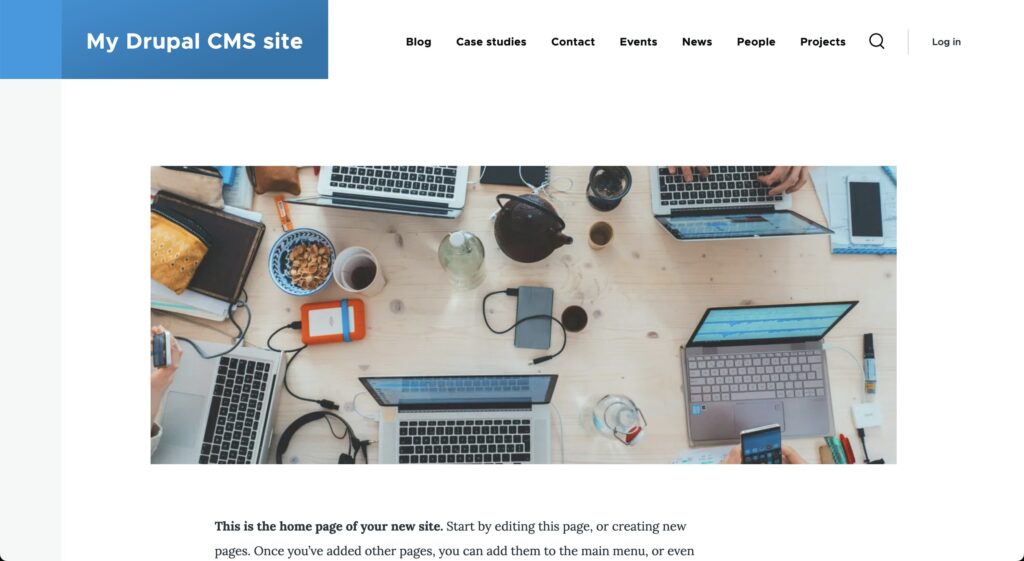
The Drupal CMS interface when you first download it.

What’s in Drupal CMS?

Administration experience

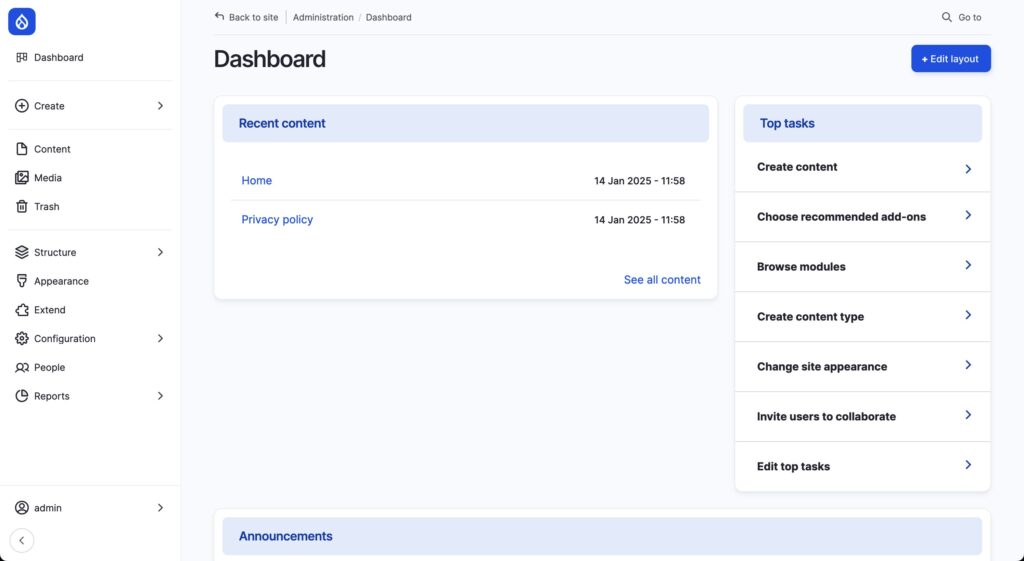
Drupal CMS has a stunning admin experience out of the box, using Gin for the admin theme to give the user interface (UI) a gorgeous, airy look. Users can log in with a username or password. Once they do, they will land on a brand-new Dashboard.

Drupal core’s Navigation module adds a new left-hand navigation bar. Together with the search in the top bar provided by the Coffee module, this makes navigating the Drupal admin screens much faster.

The Drupal CMS dashboard, showing all the navigation.

The Page

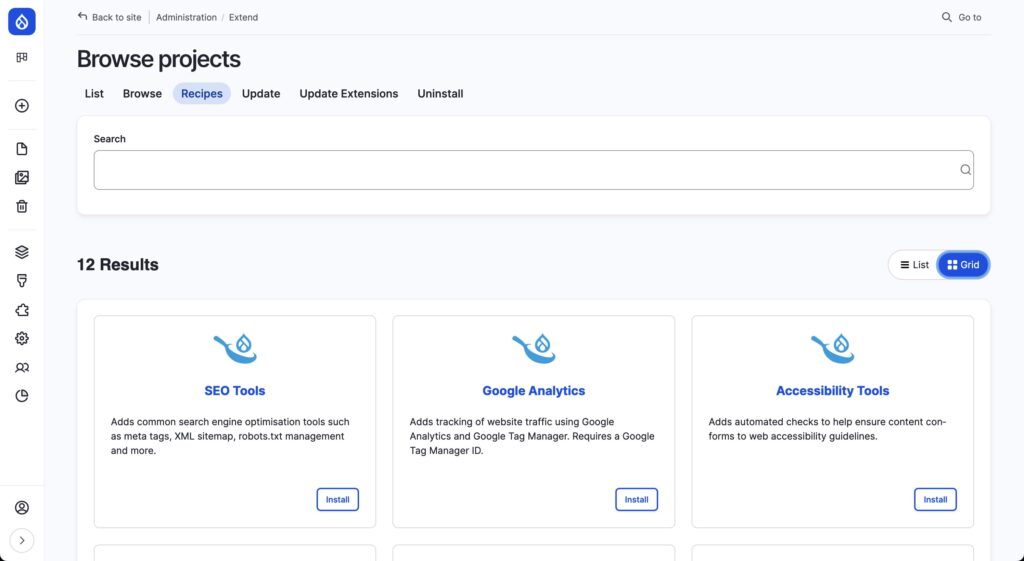
The base Drupal recipe comes with a Page content type and many niceties, such as a Trash bin, auto-saving of edit forms, page duplication thanks to Quick Node Clone, core Media enhancements like Focal Point, and, of course, Project Browser to find new recipes, modules, and automatic updates.

Drupal CMS's page for Project Browser, where you can search for various components.

Content types

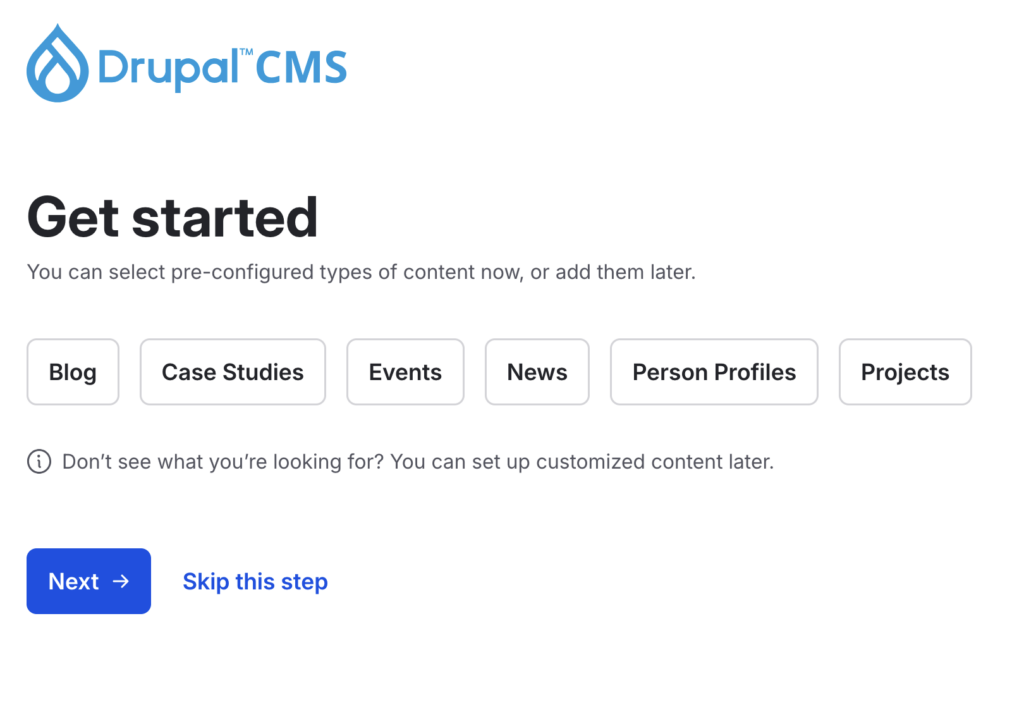
Additional content types can be added in the installer or later in Project Browser.

The Blog, Case Studies, Events, News, Person profiles, and Project recipes all have their respective content types, dependent entities like taxonomies to categorize themselves or locations for events. They also have a listing page and a Drupal view that lists individual news, events, and other content types.

Content types in Drupal CMS

Additional Recipes

Not only are there content-type recipes, but you can also add functionality to Drupal CMS’ using prebuilt add-ons provided by recipes. The application is fast, and what would take a developer hours or days to configure is now done in the blink of an eye. These recipes include:

SEO Tools

It adds standard search engine optimization tools such as meta tags, XML sitemap, robots.txt management, and more.

Google Analytics

This recipe adds tracking of website traffic using Google Analytics and Google Tag Manager. Requires a Google Tag Manager ID.

Accessibility Tools

Adds automated checks to help ensure content conforms to web accessibility guidelines.

AI Assistant

Adds integration with AI services, such as alt text generation and a chatbot to assist with site-building. Requires an API key from Open AI or Anthropic.

Search

Adds a search to help visitors find content.

Forms

This recipe adds a simple contact form and tools for building forms.

Where can I try Drupal CMS?

There is a Drupal CMS Trial at https://new.drupal.org/drupal-cms/trial, where you can spin up a temporary instance of Drupal CMS and test all the features.

You can also download the Drupal CMS code directly from https://www.drupal.org/project/cms

What if my site gets too robust for Drupal CMS?

This is one of the advantages of Drupal CMS: If a marketer wanted to expand their Drupal CMS site into a more complex one as their needs grow, it would be easy to do! Drupal CMS installs the latest version of Drupal 11. So the goal is one spins up a Drupal CMS site, grows it over time, and when additional support is needed to expand the site, it can be seamlessly expanded to take advantage of all the flexibility and complexity that Drupal offers. 

The Future of Drupal CMS

Drupal CMS 1.1 will be released in the short term in early 2025. This release will contain not only bug fixes but also minor enhancements. Still, it will also include a demo of Experience Builder (XB), then a new page builder that will empower site builders to construct and theme their entire website solely within their browser using basic HTML, CSS, and templating markup, eliminating the need for extensive coding experience and Drupal expertise. A full release of XB is expected in the fall of 2025 and will be the main feature in Drupal CMS 2.0.

2025 will also bring new tracks to Drupal CMS as work wraps up on existing tracks.

Project Browser

Work will continue on the Project Browser initiative as an official Drupal CMS track. The tool continues to evolve to support recipe application and re-application, module discovery, and as a gateway to automatic updates with the eventual goal of adding Project Browser to the core.

Workspaces as content moderation

Workspaces is a module in Drupal core that allows for staging content changes beyond simple Draft <> Published workflows. As page creation evolves with Experience Builder, making changes to any number of different components and pages at once will be possible, and those changes will be able to be published en masse, providing next-level content staging.

Telemetry

Telemetry is a process of collecting information about how software acts in the real world and how users interact with it. Besides collecting module usage information, Drupal has never previously collected data about how users interact with Drupal. This is a new initiative where we aim to improve the product with actual data from users.

Migration

Migrating into Drupal’s structured data architecture has always been a developer-centric task. As more folks adopt Drupal and may want to migrate off their existing platforms, the track aims to simplify content importing into Drupal. AI-assisted migration demos have already been demonstrated using existing websites and even PDFs. Still, this track will look at all options for making migration to Drupal easier.

Tours

The Drupal Tour module, powered by the open-source Shepherd JavaScript library, provides users with tours through web content using tooltips. This track aims to provide user-facing documentation of the Drupal CMS administration area in an instructive and seamless manner to educate users about all the tools and possibilities.

Translation

Initially slated for the initial release of Drupal CMS, extending Drupal core’s multilingual capabilities to recipes and Drupal CMS is a big task that will expand its global audience. Since Drupal CMS is built on top of Drupal, users can manually configure all of Drupal’s multilingual tools. Having them preconfigured with improvements in translation tools and workflows will make Drupal CMS much easier to use.

Single Sign On (SSO)

Single sign-on, managing who can log into your CMS and what permissions they have in an external system, is a popular request for sites we build. Numerous platforms and services can be used, each with nuances and requirements. This track will aim to create easy-to-use solutions to aid organizations in user management.

A New Design System

Experience Builder will require a design system of easy-to-use components that site builders can adapt to their own organization’s styles and one that designers can adapt to their visions. Mediacurrent, an open-source product agency, has been selected to lead that track. Look for a preview at DrupalCon Atlanta 2025.

Contribution in Drupal CMS

Kanopi Studios is playing a key role in the development of Drupal CMS, sponsoring contributions first on the Recipes Initiative going back to 2022, and now being a top-tier agency committing time and resources to the development of Drupal CMS 1.0.

Engineering Manager Jim Birch serves as a Drupal Recipes Initiative Coordinator and a Drupal Core Subsystem Maintainer for Recipes and Default Content. These roles are vital because Recipes form the foundation of Drupal CMS, ensuring that preconfigured solutions are available for various website use cases. Recipes simplify the site-building process by providing modular, ready-to-use solutions that are easily customized to meet specific needs.

In addition to his work with Recipes, Jim is a Drupal CMS Lead for the SEO Track alongside John Doyle from Digital Polygon. Together, they oversee the integration of SEO best practices into Drupal CMS. This ensures that websites built using Drupal CMS are optimized for search engines out of the box.

Kanopi Studio’s involvement doesn’t stop there. Jim Birch is also a member of the Drupal CMS Advisory Council, which helps guide Drupal CMS’s strategic direction. The council bridges the Drupal CMS team, the Drupal Association, Drupal core, and the wider community.

Drupal CMS is a bold new chapter for Drupal!

This is an exciting development in the Drupal project that really speaks to those marketers and content creators who are looking for easier and better ways to share their content online. By combining Drupal core with pre-packaged recipes, Drupal CMS aims to make the web a nicer place.

Screengrab of the on-demand webinar from Jim Birch about Drupal Recipes and Starshot

Want to dig deeper into Recipes and Starshot? Check out this webinar by Kanopi’s Jim Birch called “Recipes. Starshot, and the Future of Drupal.” (47 minutes)

Hands holding credit card and using laptop. Online shopping

Improve Conversions with Better CTAs: a Quick Guide

Your organization has just rebranded its website. It’s got a beautiful, modern design full of updated visuals and tons of ways for supporters to engage with your mission—great!

Weeks and months go by. You’re still promoting your campaigns, programs, and newsletter sign-up options like normal, but you don’t notice any changes in your performance. Your online fundraising results seem roughly the same as before.

Was the website investment a mistake? Did it make a difference? 

Unfortunately, major website updates might not make a difference for your digital bottom line if your online marketing foundation is shaky to begin with. The purpose of your organization’s website is to communicate and inspire action. Rebrands and design updates can help you excel at the former, but if you’re neglecting the latter, you’re facing an uphill battle.

The calls to action, or CTAs, on your website (as well as your emails and social media posts) convert online engagement into a tangible impact for your organization. With poor CTAs, even the most well-designed nonprofit or higher education websites can struggle to generate value and on-the-ground engagement. 

Even experienced marketers can benefit from revisiting the basics of conversions and CTAs to ensure your website is making the most of current best practices. Improving your website’s ROI is easily approachable once you get a refresher on the basic concepts at play. Let’s take a look.

What’s a conversion?

In the marketing world, a conversion occurs whenever a reader or web visitor completes a specific target action. For nonprofit organizations, for example, these target actions typically include:

  • Donating online
  • Donating via text-to-give
  • Signing up to receive emails
  • Signing up to volunteer
  • Signing up to receive SMS messages

Other organizations might have target actions such as:

  • Downloading a white paper
  • Registering for a webinar or event
  • Signing up to receive emails
  • Purchasing an item

Conversions generally revolve around a specific endpoint in a user journey like the examples listed above. 

Your website and other marketing materials will have already stewarded and encouraged web visitors to reach that point and feel ready to take the target action. You can drill down and track intermediary steps like clickthroughs to your website from an email as distinct, unique conversions as part of the process to reach the ultimate desired action.

Essentially, you can think of a conversion as the final step a visitor takes that gets you closer to a concrete goal like increasing campaign revenue or your donor acquisition rate. In other words, it’s the point when an interested visitor is officially “converted” into a secured donor, volunteer, email recipient, etc.

What’s a call to action (CTA)?

A call to action is the explicit way in which you ask readers or site visitors to take a target action. 

Calls to action usually include buttons or graphics and include text and visuals that entice users to take action. All CTAs should direct users straight to a target landing page, the web page that includes the form or instructions for how to take the target action. 

For nonprofits, a blanket “donate now” button in your website’s header is considered best practice. You’ll also need to include more targeted asks throughout your website depending on each page’s purpose in order to support your organization’s more specific goals, like email, volunteer, recurring gift, or membership sign-ups.

Essential elements of effective CTAs

So what makes an effective call to action? Each CTA will look different depending on its unique context and the goal it’s supporting, but these are some essential elements that all CTAs should include:

1) Relevance

Simply put, what you’re asking readers to do must make sense. What can you assume users are looking for or seeking to accomplish when they visit specific pages of your website? Consider these factors:

  • A user’s intent and goals when visiting a specific web page. Are they looking to learn more about something? Are they looking to take a specific action? Depending on the purpose of the page, determine what would make the most sense to ask this user to do.
  • The specific context of the message. For instance, if it’s part of an email stream for previous volunteers, ask them to learn more about your new opportunities and join your next event rather than sign up for an orientation session.
  • A user’s readiness. Do they need more information before being likely to take your target action? For example, a brief section of your “ways to give page” about planned gifts will be more successful if it asks readers to click through to a more detailed page about how bequests work. That page is where a more specific request to set up a bequest will make the most sense contextually in the user’s journey. 

Ensuring relevance requires putting yourself in a visitor’s shoes. When adding or updating your CTAs, look at the page in question and think about who lands on it and why. Putting thought into the page’s context will allow you to add truly relevant additional CTAs to it that will boost its conversion-generating power. 

For some organizations that offer direct services to large audiences, like healthcare institutions, there could be much more complex user intents and goals at play. Their web designs and CTA strategies need to be more carefully plotted out to ensure each page’s CTAs are relevant to visitors’ goals and journeys. Check out Kanopi’s healthcare web design guide for an overview of what these strategies look like in action.

2) Compelling language

Your CTAs, whether they’re on a web page, email, marketing text message, social post, or even a printed mailer, need to stand out. What would you be more likely to click—“click here to donate” or “give a lifesaving gift today”?

To encourage clicks and engagement, use compelling and engaging language. Consider these best practices:

  • Use active voice and action verbs.
  • Avoid industry jargon.
  • Use “power words” that help tap into supporters’ emotions, curiosity, or concern.
  • Avoid using “we” and centering your organization—the focus should be on your supporters.
  • Evoke a sense of urgency or time sensitivity when appropriate.

Take a look at the donate and sign-up buttons on your website and email drafts and quickly review their language. Are there any immediate improvements you can identify? These are fast, easy changes you can make, and while they might seem small, they add up. If just 10 more supporters are encouraged to click through, learn about your mission, and give a gift for the first time, those are 10 more donors and gifts you wouldn’t have otherwise acquired!

3) Specificity 

Similarly to the importance of compelling language, your CTAs should also be very clear. Readers should immediately understand what you’re asking of them and where you’ll direct them if they click through.

When drafting the language for your CTA buttons, links, and graphics, double-check that you’re being as clear as possible. A good rule of thumb is to keep your text short and direct, balancing conciseness with the compelling action tips listed above. 

For most organizations, this will be fairly easy since most of your asks are quite straightforward—donate, sign up, learn more, contact us, etc.

More complex institutions should put extra consideration into the clarity of their CTAs. For example, college websites have to house a lot of diverse material that will be used by a wide range of audiences—students, alumni and families, staff, donors, community partners, and more. Understanding your audiences, making asks that are relevant to their goals, and using compelling but specific language will make a smoother experience for everyone who arrives on the website.

4) Prominent design and placement

You also need to consider the visual look and placement of your CTAs. Follow these best practices:

  • Visuals
    • For buttons, use bold colors that complement your website’s color scheme and stand out against the background. Ensure that the text color has sufficient contrast to be easily seen.
    • For graphics, also use bold colors that complement your main color scheme, but consider the additional visual elements. Your logo and well-designed illustrations will work, but photos of people tend to best catch users’ attention.
  • Placement
    • If you want readers to see something, make it easy to find! Bold buttons at the end of paragraphs and banner graphics at the tops and bottoms of pages are natural placements for CTAs.
    • Charitable organizations should include a “donate now” button on their website’s running header.
    • Including multiple CTAs is fine and often recommended, but don’t overdo it—keep each page focused on its core purpose.
    • If you have embeddable email sign-up forms, calendars, and donation tools, make use of them! These elements streamline the user experience and can boost engagement.

CTAs should be prominent but shouldn’t feel haphazardly placed. Each of the essential elements discussed in this guide involves considering the user experience and the context in which you ask visitors to take target actions. If you take a moment to think through the CTA from the user’s perspective, it becomes much easier to identify the right placements that will ensure it’s seen and acted upon.

Getting started and measuring your performance

Once you’ve got a solid grasp on call-to-action best practices and implement updates to your strategy, how do you ensure they actually make a difference? Follow these steps on an ongoing basis:

  1. Set clear goals. What are the specific outcomes you want to see as a result of updating your approach to CTAs? For example, you might aim to increase online fundraising conversions by 25% overall in the next 6 months, or you might set channel-specific goals, like increasing email clickthroughs by 15%.
  1. Create dedicated landing pages to support your goals. It’ll be easiest to track your progress when all the CTAs that are part of a campaign all point users to the same place. This allows you to review incoming traffic to a single landing page and its specific sources without wading through unnecessary amounts of irrelevant data. The landing pages should include the forms or instructions that will allow users to complete the final target action that you’re asking of them.
  1. Actively track your conversion rates. By funneling traffic to a dedicated landing page and tracking the number of form completions, you can calculate your conversion rates for the different CTAs that send users there. Web analytics tools and website plugins can greatly simplify this task. However you collect the data, make sure to intentionally track it so that you can measure your progress over time.
  1. Correlate performance to specific strategies. With conversion data in hand, you can take a closer look at your highest- and lowest-performing calls to action. What strategies do they employ? What audiences are they targeting? These are the insights that will help you continually improve your conversion rates and better understand your audience’s motivations for engaging with your organization.
  1. Test and refine your CTAs. With everything you’ve learned, make targeted changes to your CTAs and track the results. For a more systematic approach, try an A/B test in which you present two similar audiences with slightly different variations on the same CTA. Keep the process running with fine-tuned updates, testing, and analysis.

The data collection and analysis aspects of an effective CTA strategy are often harder for small shops to handle, which is why third-party help can be so valuable. Web designers and consultants can help with your CTA strategy, develop custom landing pages, and provide analytics solutions to help you roll out a professional-grade conversion strategy.


The bottom line is that conversions (and the calls to action that create them) must be approached intentionally. A beautiful website is only a true asset for your organization when it can make an impact, and that’s accomplished by understanding and adapting the strategies discussed here. Best of luck!

A nonprofit-specific version of this blog post was originally published on Mogli. 

Kanopi’s Drupal development services focus on creating functional, sustainable Drupal websites.

The Ultimate Website Maintenance for Nonprofits Checklist

When you first designed your nonprofit’s website, you probably thought it was made to last. You chose an evergreen design, incorporated uniform branding, and optimized your donation page to drive conversions. In the excitement of getting your site up and running, you may have let nonprofit website maintenance concerns fall by the wayside. 

You might be surprised to learn that the average website lifespan is just two years and one month! After this time, your design could become outdated, your messaging could use a refresh, and your CMS may need a core update. 

This guide offers best practices for keeping your nonprofit website in top shape and outlines the benefits of regular website maintenance. Here’s what we’ll cover: 

Nonprofit website maintenance is so critical because even minor tweaks to your layout, content, text, and imagery can make all the difference in encouraging someone to donate. Let’s start by reviewing a checklist of maintenance tasks. 

Nonprofit Website Maintenance Checklist

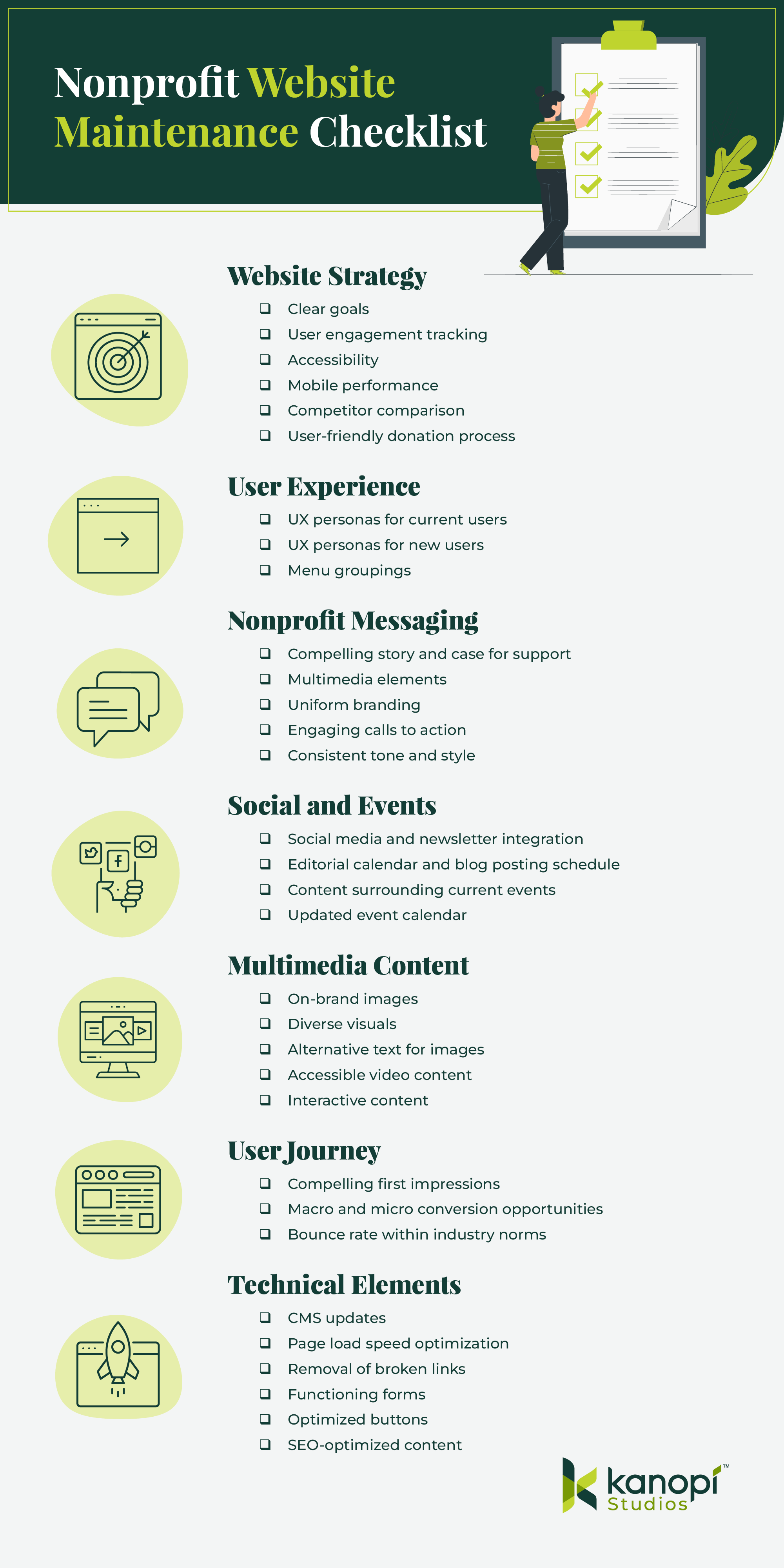
What should you check for when performing website maintenance? Use this checklist to ensure you don’t forget anything when refreshing your site:

Condensed version of the nonprofit website maintenance checklist, full version in the sections below

Website Strategy

  • Do you have clear goals for your site?
  • Do you have effective ways to track user engagement, both at the macro and micro level? (i.e. analytics tools, heatmaps, surveys, etc.) 
  • Is your site accessible? What is your current WCAG conformance level and your goal level?
  • How does your site perform on mobile?
  • How does your site compare to your competitors’ sites? Are there opportunities to learn or go beyond what they’re doing?
  • Does your site include a user-friendly, mobile-optimized donation process that makes it easy to give?

User Experience

  • Do you know who your current users are and their needs? Are your UX personas up to date and relevant to your current audience’s characteristics? 
  • Are there additional user types you need to target? Do they utilize different pathways?
  • Does your site’s menu and its groupings make sense to your users?

Nonprofit Messaging

  • Is your nonprofit’s story and case for support clear and compelling?
  • Does your site tell your nonprofit’s story through more than just words, using multimedia elements like images, videos, and audio clips? 
  • Do all website pages reflect your nonprofit’s unique branding, with your logo, brand colors, and fonts? 
  • Are your calls to action (CTAs) engaging, with action-oriented language such as “Give Now” or “Join the Fight”? Do they tell people what to do and why in the most direct way possible? 
  • Do you have a consistent tone of voice and style? Does all of the content on your site reflect this? 

Social and Events

  • Have you incorporated social media or newsletters to enhance the omnichannel experience?
  • Do you have a clear editorial calendar and a consistent blog posting schedule? 
  • Are you staying on top of relevant current events and reflecting this in your site’s content? 
  • Is your event calendar easy to find and updated with accurate logistical information? Do events have a ‘save to calendar’ option? 

Multimedia Content

  • Do your image choices represent your brand? 
  • Do your images reflect the diversity of your nonprofit’s community?
  • Does every image have accurate and descriptive alternative text? 
  • Are you taking advantage of video content and providing opportunities for supporters to share your videos?
  • Do your videos have accessibility necessities such as pause buttons and captions? 
  • Are you making use of other media types, such as interactive quizzes or infographics, that drive engagement and increase time spent on the page? 

User Journey

  • Is it clear to a new user why they should want to engage with your nonprofit, from whichever page they enter your site on? 
  • Do your top landing pages have clear user pathways for both macro and micro conversions? For example, macro conversions could include donating, while micro conversions might involve signing up for your email newsletter or following your nonprofit on social media. 
  • Is your bounce rate within industry norms? Nonprofit websites have a 60-70% bounce rate on average (for context, 40% or lower is typically considered a good bounce rate). 

Technical Elements

  • Is your CMS up to date and secure?
  • How fast is your page load speed?
  • Do you have any broken links?
  • Are all of your forms working and formatted correctly?
  • Are buttons easily clickable from laptops, tablets, and mobile devices?
  • How is your site performing for SEO? Are you receiving high-quality backlinks from reputable websites?

Your answers to these questions can clue you into whether it might be time to update your website and which areas have the greatest opportunity for enhancement. 

Website Maintenance Best Practices for Nonprofits

From assessing growth metrics to ensuring your site complies with new regulations, we’ve rounded up some best practices to follow for effective and sustainable nonprofit site maintenance. 

Take a continuous improvement approach

Similarly to taking your car in for maintenance checks to keep it safe to drive and in good condition, your nonprofit website needs regular maintenance to ensure it’s meeting users’ needs and helping you advance your mission.

However, this process entails more than just security updates and updating plugins or modules. We recommend taking a continuous improvement approach to maintaining your nonprofit site, with design and development improvements that allow for growth and flexibility beyond basic fixes. 

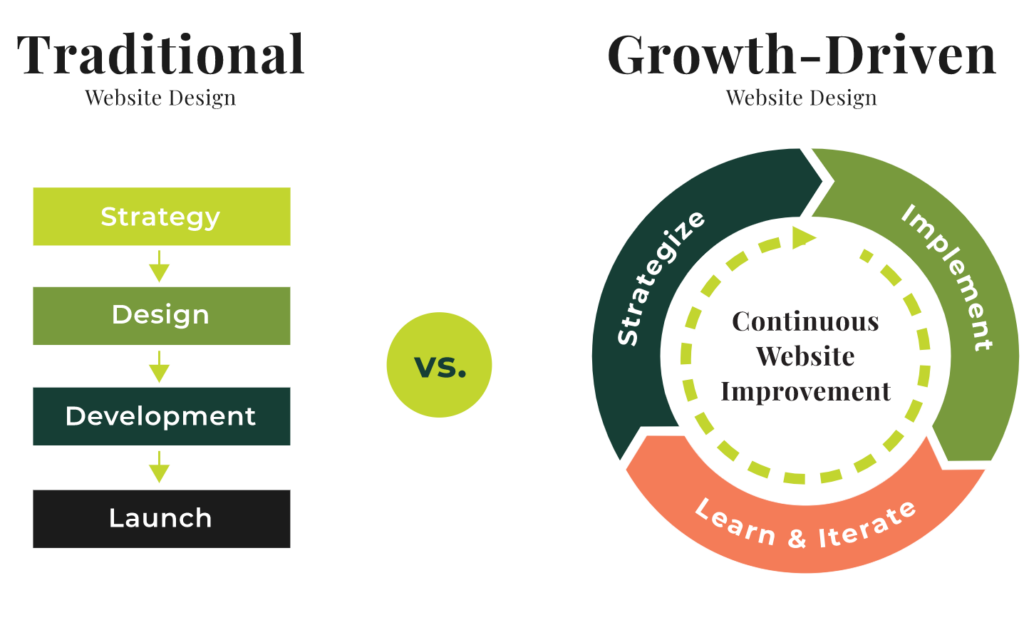
While traditional website design follows a linear approach from strategy to implementation, continuous improvement allows for a circular, iterative process.

Traditional vs continuous improvement website maintenance approach

This method allows nonprofits to create flexible websites that are constantly tested and optimized over time. With this approach, your organization can continually accept and assess feedback from analytics, heatmaps, and user surveys. Then, you can immediately implement new strategies based on this feedback without having to wait for a major refresh project. 

A continuous improvement approach helps avoid enormous update projects that can take months and cost your organization hundreds or thousands of dollars to complete. Instead, you’ll make small improvements over time that keep your site healthy and current, saving you time, money, and major headaches down the line. 

Measure growth using KPIs

You can’t celebrate your successes or mark major milestones without having a clear picture of how your site is performing. To stay up to date on your site’s performance, monitor key performance indicator (KPI) metrics such as:

  • Time on site
  • Bounce rate
  • Number of pages visited
  • New vs. returning users
  • Traffic sources

You may also want to review data from your CRM to answer the following questions:

  • Who is donating? 
  • How often are they donating? 
  • Are repeat or “lifetime” donors on the rise or fall? 
  • What are donors’ preferred donation and communication methods?

Assessing CRM data alongside website analytics will help paint a complete picture of who your donors are and how your site is currently meeting their needs. For example, when you know donors’ preferred donation methods (such as credit cards, digital wallets like Venmo or PayPal, or ACH payments) you can make sure to include those payment types on your online giving page. 

In addition, if you discover that donors’ preferred communication platforms are social media and email, you can focus your marketing efforts more heavily on those platforms to help drive site traffic. 

Keep timely elements updated

Regularly update your event calendar and sync your news and social media feeds to ensure your site remains engaging and relevant. This way, you provide up-to-date information to your users across all of your online channels. Create an editorial calendar to help stay on track, and use automated social media and email marketing tools to schedule your posts in advance.

Regularly update your CMS

Whether you’re using Drupal, WordPress, or another CMS, you’ll need to follow certain steps to keep your site updated, optimized, and secure. If you don’t regularly update your CMS, you could face risks like hacking or loss of functionality. 

Kanopi offers services for both Drupal and WordPress updates. Here’s what maintenance looks like on these platforms: 

  • Drupal maintenance involves running Drupal core updates, consistently backing up your site, running module and theme updates, optimizing caching, and fixing bugs.
  • WordPress maintenance requires backing up your site, updating WordPress core, running theme and plugin updates, and optimizing your website’s database. 

Keeping your CMS platform up to date is essential to maintaining supporters’ trust and offering a seamless website experience. Work with a web design professional who can help create a regular schedule for updating your CMS and migrating your site to a new version as needed, like if you need to migrate to Drupal 10

Stay up to date with relevant laws

Data privacy laws are becoming more and more common as states seek to protect consumers from data misuse. New legislation for states like Texas, Oregon, and Florida is set to take effect this year. In addition, the California Consumer Privacy Act (CCPA), one of the first comprehensive consumer privacy laws in the U.S., has been on the books since 2018.

These laws all have similar provisions, such as: 

  • Consumers must be able to know what data is being collected from them. 
  • Consumers must be able to opt out of data collection. 
  • Businesses must delete data they’ve collected about consumers upon request. 

Staying up to date with new legislation can be tricky and time-consuming, so it’s helpful to partner with a trusted web design agency whose business it is to know the latest regulations and law changes affecting nonprofit sites. 

Reinforce trust with your audience by offering a clear privacy policy on your nonprofit’s website to let supporters know how you use data and how they can opt out of the collection process. Review examples from top nonprofit websites like the Leukemia and Lymphoma Society or Habitat for Humanity to get an idea of what these policies look like. 

Ensure your site is mobile-friendly

57% of nonprofit website traffic comes from mobile devices, making it critical to refresh your site’s mobile version during the maintenance process. Ensure your buttons are large and easy to touch from a phone screen, your mobile site menu is easy to navigate, and your forms are simple to complete from a mobile device. 

Continually test website forms

Users should be able to easily complete any forms on your website, whether they’re using a mobile device, tablet, or computer. Test the following forms and buttons on different devices: 

  • Donation page
  • Volunteer registration form
  • Quizzes and polls
  • Feedback surveys
  • Call to action buttons

Your forms should also be accessible, with sufficient color contrast and descriptive text that appears outside the form fields. We’ll spotlight additional accessibility best practices in the next section. 

Keep accessibility best practices in mind

Accessibility best practices constantly evolve as new assistive technologies become available. We recommend using a combination of manual and automated accessibility tests to keep your website updated. Some of our favorite accessibility tools include:

These tools help catch issues related to ARIA attributes, color contrast, headings, and other technical elements. However, we also recommend testing your site manually to catch any issues that testing tools may miss. To ensure you don’t miss anything, work with a web design agency experienced in accessibility best practices to run manual tests. 

Work with Kanopi to Maintain Your Nonprofit Site

If you’re looking for an experienced web design partner to keep your website fresh and up-to-date, Kanopi is a great choice. We currently support more than 175+ websites, and around half of those are nonprofit sites. 

We offer continuous support through every phase of website development, from research and content strategy to long-term support. Our website maintenance services include:

  • User persona development and journey mapping to better understand visitors’ goals and how your website can help to achieve them
  • User testing to ensure new features work and gather feedback from audience members
  • A full website growth plan customized to your unique needs and goals
  • Module and plugin updates to keep your site running smoothly
  • Bug fixes to maintain your website’s security
  • Conversion optimization to ensure your landing pages are effective for driving deeper audience engagement and donations
  • Performance enhancement focused on technical elements to maintain fast load speeds and optimal user experience

From researching who uses your site to developing a content strategy that serves both your organizational goals and the needs of your users, our clients value our flexible and nimble approach

“From the start, we have been very impressed with Kanopi’s creativity… They’ve been flexible and understanding as we hit roadblocks in our internal processes and decision-making. Another key element was how thorough and inclusive they were during our Discovery Process, which led to other departments in our organization feeling connected from day one. Overall, this has been a fantastic experience!”

Anthony Guido, Vice President, Communications & Public Relations, Cohen Veterans Network

For many clients, support means we act as an extension of their team and help them enhance their site. We do this through incremental improvements to strategy, design and UX, key feature development, third-party integration, and more.

Nonprofit Website Maintenance Client Study

Don’t just take our word for it—explore our website support case studies, including our work with First Tee

First Tee is a nonprofit dedicated to empowering kids and teens through golf programs. Their website is a resource to connect audiences to their services, and it also acts as the host for their regional chapters and member sites. 

First Tee’s homepage, representing the results of a nonprofit website maintenance project they undertook with Kanopi’s help

They came to Kanopi with several problems: their website was growing outdated, and it had originally been created using a restrictive template, which made it challenging to make ongoing updates. In addition, their site lacked cohesion, leading to brand confusion. 

We helped by designing a brand-new multi-site solution for First Tee that allows for seamless updates and consistent branding across chapter sites. We also provided ongoing website support to help launch and personalize chapter sites. As a result, First Tee’s website tells a cohesive story, with uniform branding and seamless donation opportunities. Explore the full case study here

Wrapping Up

To keep your site fresh and engaging and ensure it meets users’ needs, make website maintenance a top priority. Work with your marketing team and a web design consultant as needed to create a plan for continually improving your site so that it stands the test of time. 

Want to continue learning about different aspects of website maintenance? Start with these additional free resources from Kanopi: 

Three people with their hands on their chins as if they are thinking

Beyond Analytics: enhancing your website’s UX through qualitative testing

Analytical data is a valuable tool for understanding user behavior on our websites. However, it’s the users’ emotional experience with your website — the ‘why’ behind their behavior — that reveals the truly valuable insights for marketers. This post will address why relying solely on analytics has its limitations, and show how qualitative research can help you bridge those gaps and create a personal connection with your users.

“Don’t make me think.”

Let’s start here, with this simple mantra. Or, more specifically: 

Don’t make users think.

We want to create experiences that are intuitive for users, not just performative. This is where qualitative data can play a crucial role. It can help reduce friction points, and lower the cognitive load for users (i.e. the amount of information our brain’s working memory needs to process). 

Both independent studies and the user testing we’ve undertaken at Kanopi have shown that when websites are intuitive, users actually perceive them to be faster. The reverse is true, also — when users are having a tough time navigating a website, they perceive it to be about 15% slower than it actually is. 

As a website owner, this is where these stats can really nail you: when users have a bad experience using a website, they tend to talk about it with friends and colleagues — and they recall it as 35% less performative than it actually was. 

Using qualitative data to create intuitive, non-friction web experiences are a great way to reduce user frustration across your entire website.

Quantitative Data vs. Quantitative Data

Data drives decision-making. At Kanopi, it helps us allocate budgets and resources towards our client projects. And it helps to think of these two distinct types of information as opposite ends of the data spectrum.

Quantitative Data

This is one end of the data spectrum. As a marketer, this is what you’re no doubt most familiar with — numerical or statistical data. Quantitative data like analytics: 

  • Tells you what, where, when and how.
  • Provides insights into performance and usage

It also provides a statistical foundation to track certain aspects of your website over time, such as:

  • measuring clicks
  • time on site
  • tracking each user’s journey through the site
  • where usage is improving/increasing, so we can amplify those features even more.

In certain cases, we can actually use analytical data to make assumptions about user behavior. For example, it shows us when users are spending a significant amount of time on a given webpage. It shows us exactly how much time users are spending on that page, but doesn’t tell us why — are they engaging more deeply with the page content, or are they frustrated because they can’t find the info they need?

To learn why, we’ll need to use data from the other side of the data spectrum — qualitative data.

Qualitative Data

Qualitative data helps us understand the ‘why’ behind user actions, and how users actually feel about your product. By incorporating qualitative data into your website analytics, you convert your users into advocates for your brand, organization, and mission. It also helps you discover ways to tell your story more effectively. 

Qualitative insights involve acquiring data from things like:

  • Moderated or unmoderated testing of website components
  • User surveys and interviews
  • Examining interactions using real-time recordings.

Click-through rates (CTR) are a great example. If we notice that a button is frequently clicked, we might consider it a positive thing. However, this is where qualitative analysis comes into play. We need to dig deeper to understand the user’s intent behind their actions. It could be that users are clicking away because they’re frustrated. They can’t find the information they’re actually looking for — so they’re just clicking at the most visually prominent item on the page, hoping it will somehow take them to the info they seek. (This is sometimes referred to as ‘rage clicking’.) 

Qualitative insights allow you to put user needs first,  and align them better with your organization’s goals. They also provide a deeper understanding of how your product solves a problem for your users — and just as importantly, where your product might be putting up barriers that prevent users from solving problems for themselves. 

So, which is best for your organization? 

You guessed it. The answer is, both. 

Again, we’re talking about a spectrum, and the goal is to try and bring its opposite ends together. At Kanopi, we suggest our clients allow room in their budgets for a blend of qualitative and quantitative research. By looking at both types of data together, we can align analytical, business goals with user needs to create some really powerful experiences.

Types of qualitative testing

From a high-level testing perspective, we split qualitative testing into two main categories: 

  1. Discovery-based testing, including interviews, focus groups, etc. Primarily done through observation, its goal is to understand the user’s reaction to a product, service or feature. This is where we gain a more emotional understanding about how users feel about the experience as they navigate your website.

    Discovery based testing allows us to better understand user motivations so we can create content that resonates and converts more effectively. This means using powerful techniques like storytelling, built on a foundation of research that includes focus groups, interviews and/or card sort testing.
  2. Evaluative testing, which tends to be more task-based. We assign the test subject a particular goal, and then we ask them to accomplish that goal. We then observe how they accomplish it and record their feedback. This type of testing allows us to surface practical friction points and inefficiencies. During our observations, if we see users experience a moment of hesitation, we can immediately examine possible reasons why. Is the language not clear enough? Does the information architecture need to be revised?

    So while discovery-based testing helps provide content and design solutions that are more emotionally-driven, evaluative testing leads to more intuitive interfaces and more performative types of content — solutions that help users  move through your site more effectively.

How qualitative data can enhance quantitative data

Let’s look at a couple different ways to combine both types of data together to create a holistic picture of your users and your website’s functionality. 

Combining interviews with analytics

User interviews are a powerful way to understand how users are interacting with your product — and also how they feel about your product. A great example of this is bounce rate. 

Looking at bounce rate alone allows us to infer certain things. An abnormally high one suggests that something about a page or feature isn’t working for users. However, user interviews can provide clarity and context you’d never get from quantitative bounce rates alone. Sometimes, they reveal a solution that’s much simpler than you might expect — moving contact info up to the top of the page, for example.

Interviews help us map user goals and spot the barriers to those goals. But they also allow us to create targeted, phased improvements. We’re not trying to redesign the entire page or entire section of the site; we’re only looking to find the thing(s) that are actually needed to improve performance. You can make incremental changes over time, and test the results without having to do complete redesigns. 

Another reason we highly recommend combining user interviews with analytics is to help us choose where to place content and optimize key points along the user journey. They help us define content mapping, so we can prioritize certain content. They also help us spot gaps in our content — things that users are looking for but can’t easily find, or may not even exist. Similarly, they can help us identify content that should be archived.

Combining usability testing and traversal (treejack) testing

This is one of my personal favorite combinations of quantitative and qualitative testing. Traversal testing (frequently referred to as treejack testing) lets us observe how users navigate their way through your site.  It shows us which areas are ripe for optimizing conversions, which areas are being abandoned, and more.

Combining usability testing and treejack testing is a great way to determine if your website’s navigation is delivering optimal results. Over time, the art/science of website navigation has grown increasingly complex — and it’s become more challenging than ever to prioritize items in your navigation menu. Combined usability/treejack testing can provide valuable insights to help us structure our menus more effectively.

It also helps us create a more perfect balance between search engine optimization and usability, by including enough information that search engines are happy without adding so much that we overwhelm users with too many options.

Treejack testing consists of four main steps:

  1. Defining our navigation structure
  2. Establishing a set of user goals
  3. Finding and enlisting real-world users to test
  4. Observing their journey as they try and achieve those goals, making note of:
    • Points of frustration/confusion
    • Where things go smoothly
    • Opportunities to optimize their journey.

It also helps us better define horizontal pathways to content within web pages themselves, thereby eliminating the need to cram everything plus the kitchen sink into your navigation menu.

Lastly, usability/treejack testing helps us refine language, which is especially important when it comes to navigation. It gives us the opportunity to add clarity and focus, making the nav process more intuitive and helping us achieve our ultimate goal: Don’t Make Users Think.

Session recordings and heat maps

Heat maps are colored overlays that show high interaction points and user scroll behavior  helping us determine how effective our calls-to-action and content are. 

Using heat/click maps combined with session recording allows us to analyze data not just holistically but also at a granular level, and then modify our designs to provide a more seamless, intuitive experience. 

User surveys and A/B testing

As the name implies, A/B testing involves presenting users with a choice of two options and having them choose their preference. It can be used to test  content, functionality, visual design/user experience, and more.

At Kanopi, we mostly use A/B testing as a comparative test to validate a design direction; then we layer in additional context by conducting user surveys to gain some insight into the reasons behind their choices. 

We do this by separating users into two cohorts: we’ll do A/B testing with one, and user surveys with the other. We prefer this method since A/B is a comparative test between two options, and users are simply choosing what they feel is the better of the two. However, the option they’ve chosen still might not be the perfect solution — hence the need for a second cohort. User surveys offer a fresh set of eyes, to identify unforeseen problems that a straight-up A/B choice won’t tell you.

By combining the quantitative and qualitative testing, we get two levels of refinement. 

Qualitative user testing on a budget

Clients often have a perception that qualitative testing is expensive. So, let’s dive into this in a few ways:

ON24 webinar interface as Derek Bermingham gives his webinar on user testing.

If you prefer a webinar, Derek Bermingham gave a webinar called “User Testing on a Budget” and outlined both how to conduct affordable user testing and how to recruit the ideal user base to deliver meaningful, budget-friendly insights. (44 minutes)

If you prefer to read on, we outline below to learn how to perform qualitative testing on a budget: 

In some ways, the notion that qualitative testing is expensive is true; analyzing data can be time-consuming. Finding users to participate in testing is one of the areas where clients express a lot of trepidation, so let’s list some of the ways that you can leverage the resources that you already have within your organization: 

Leverage your email lists and/or direct relationships. Start with your marketing email list. And/or, if you’ve got boosters such as donors or volunteers, reach out to them (and their network of people). 

Incentives are also a great way to encourage participation. It’s funny how a simple $5 Starbucks gift card can motivate someone to complete a five-minute test. (This is another thing to keep in mind: qualitative testing doesn’t need to be a lengthy undertaking. It can often take only 5-10 minutes.)

Don’t forget your internal stakeholders! The great thing about leveraging folks for internal testing is that they most likely already interact with your website fairly regularly, so they’re aware of  its ups and downs. The not-so-great thing is that there may be some internal bias you’ll need to mitigate. The way we handle this is by phrasing our language with the user in mind. For example, instead of saying “what color do you prefer?”, we’ll ask “which color do you think will resonate more with users?” This helps shift their focus from an internal bias to a more user-centric mindset.

The magic number

Another thing we find is that marketers tend to be more familiar with analytical data sets, where getting the best data requires a large pool to draw from. However, with qualitative data you don’t need a huge amount of user testing. Here’s the magic number to keep in mind:

Seven.

If you can get seven people to test a feature, product, or functionality on your site, they’ll provide you with all the actionable insights you’ll need.

Doesn’t seem like seven would be enough people, does it? But here’s the thing: we’ve done qualitative tests using literally hundreds of people. And we’ve learned that once you get over seven testers, all you’re doing is hearing basically the same seven responses over and over. So, if you’re concerned about your budget, or finding enough users, or any other scope-related issues, just keep that magic number seven in mind. It’s all you need to gain meaningful qualitative insights. 

DIY data analysis with AI

AI tools for data analysis are starting to come online. At Kanopi, we’ve started using a combination of some of these tools.

ChatGPT helps us develop prompts that we can then plug into other AI platforms like harpa.ai. We’ve found that ChatGPT is a great way to develop language we can use to speak to other programs. (And yes, at the same time we also find the prospect of robots talking to robots to be a tad unsettling. But, good data is good data.) Anyway, we find that combining AI tools in this manner really cuts down on analysis time as well. 

Also it should be said that online platforms are not only incredibly price competitive, they also provide you with a suite of tools. In some cases, for things like user testing, these platforms will actually go out and recruit users to test your site for you. So if you’re trying to work within a tight budget, look into online platforms like UserTesting, UserZoom, Userlytics and Trymata

Go forth and be iterative

You can apply the insights gained from qualitative  research using a phased or iterative approach — you can try it on something small and then iterate upon that if it’s successful. 

When DIY is not enough

I’ll leave you with some handy resources you can use for your qualitative research journey. 

Of course, we realize that for any number of reasons, DIY is not for everyone. And there are definite benefits to working with a team of experienced professionals who can seamlessly turn both qualitative and quantitative research insights into engaging content and design, that will help forge a stronger connection between your organization and your donors, supporters, and users in general. And if we were networking face-to-face at a conference, this would be the point where we’d politely present you with our business card, and mention that in addition to strategy and design we also provide full-service development and ongoing support. 

Support Tools

Survey Tools

Usability Testing Tools

Session Recording Tools

Card Sort Tool

The Donor Journey: Creating Smarter Digital Experiences

We’ve all heard the phrase: “Life is a journey, not a destination.”

Similar to the choices in our everyday lives, the decisions your donors make can impact how and if they decide to give to your organization. This is known as the donor journey.

Regardless of whether you’re a long term fundraising professional or you’ve just established your organization, “donor journey” shouldn’t be an unfamiliar term. It’s pretty self-explanatory—it describes how a potential prospect makes their way to becoming an official donor and an advocate for your mission. It includes everything from conducting research on your nonprofit’s website to promising continued support.

Understanding and refining your donors’ experiences enables greater mission outcomes. We’re here to tell you exactly what the donor journey entails and how you can create the most enjoyable experience possible for your supporters.

Table of Contents

What is the Donor Journey?

The donor journey is a framework that fundraising professionals in nonprofits, higher education institutions, and other organizations use to better understand and engage with their supporters. It encompasses each stage of a donor’s relationship with your organization, from their first interaction to their continued support.

By mapping the donor journey, you can better track how and when your supporters engage with your organization, allowing you to uncover opportunities to strengthen those relationships.

Remember, your donors are one of your organization’s most important assets. They provide you with the essential funding needed to continue your meaningful work and serve your community. It makes sense that you do everything you can to recruit and retain them, and that starts with understanding their journey with your nonprofit.

Why Is Donor Journey Mapping Important?

Understanding the donor journey will not only help you track how and when your supporters give, but it’ll also provide some basis for why they donate. The more familiar you are with your average donor’s journey, the better you can engage with them and garner more support down the line.

Some of the key benefits of mapping the donor journey include:

The benefits of donor journey mapping, which are written below
  • Improved Donor Retention: Mapping out the donor journey helps identify key touchpoints where donors may lose interest or disengage, allowing you to address these issues and improve retention.
  • Enhanced Understanding of Donor Motivations: Mapping out the donor journey tells you what motivates your donors to give, helping you adjust your outreach to align with their motivations and values.
  • Better Groundwork for Predictable Revenue: By understanding the typical pathways supporters take, your nonprofit can anticipate giving and forecast revenue streams more accurately.
  • Clearer Pathways to Major Gifts: Donor journey mapping can pinpoint engagement patterns and touchpoints that often lead to larger gifts over time.
  • Optimized Fundraising Campaigns: You can identify what marketing messages and campaigns resonate most with donors, allowing you to pick the best types of campaigns and craft meaningful appeals.

Whether you leverage this strategy for its fundraising benefits or impact on your reputation, donor journey mapping is an essential part of your nonprofit digital strategy.

The Elements of the Donor Journey

What makes up the donor journey? Each stage may differ slightly depending on your organization and your supporters, but the donor journey will likely follow these elements regardless of your unique situation: Awareness, research, decision, appreciation, and repetition.

The basic steps of the donor journey that are written above

Donor Journey Step 1: Awareness

This is the very first step of the donor journey. Whether it’s through your website, a post from a friend on social media, or word of mouth, this is the moment that the prospect becomes aware of your organization and mission.

Without awareness, the donor journey never begins. To raise awareness and increase the likelihood of new supporters, follow these tips:

  • Optimize your nonprofit website for SEO to improve your presence on search engines.
  • Create supporter personas to better understand the type of audiences that engage with your organization.
  • Actively use your social media channels to give updates on your mission.
  • Update your website with recent accomplishments and major changes.
  • Keep your content human-centric to appeal to new supporters.
  • Get involved in local events, fairs, or speaking opportunities.
  • Collaborate with influencers, companies, or other nonprofits that align with your mission and have influence within your target audience.
  • Encourage existing supporters to fundraise on your behalf, leveraging their personal networks to spread awareness.
  • Consider paid advertising to promote your mission and tap into advanced targeting features, like how the World Wildlife Fund uses Google Ads to target mission-related terms:

Donor Journey Step 2: Research

Once someone is aware of the need for your mission, they’ll likely do further research to determine whether they want to support the cause and how they can do so.

This entire stage is about building trust. You need to give potential donors a reason to give to your organization and support your efforts.

First off, ensure your nonprofit website is optimized. This is likely the first place a prospect is going to look when researching your cause. Your website should be regularly maintained and updated to promote valuable content about your mission and organization. You can:

  • Use success stories and infographics to relay accomplishments and important metrics quickly.
  • Provide concrete metrics and data to back up your claims.
  • Practice transparency by being honest about where your funds go and by being open to answering questions.
  • Compile and share an annual report that summarizes your yearly accomplishments and progress.
  • Include testimonials from other donors or from specific community members you help.
  • Post compelling content like news stories and blog posts related to your mission online (content marketing costs 62% less than traditional marketing strategies, making this both a cost-effective and engaging strategy).

While you should always prioritize transparency, try to focus on the value you bring to the community and avoid being overly pessimistic. Too much negativity can make users less likely to donate.

Donor Journey Step 3: Decision

Now that your prospect is familiar with your organization’s work, they’ll show their intent in some way. This can be opting into email newsletters or following your social media accounts. They might even decide to make their first gift.

To encourage prospects to take the leap and donate, consider the following:

  • Make your donation form easy to find on your website. The average person’s attention span is a mere 8.25 seconds, so it’s key to include a link to your donation page within your menu or with a bright, eye-catching button.
  • Ensure the target action is prominently displayed in all marketing content, including social media and email. Incorporate CTAs like large buttons and easy-to-find links that send prospects to your donation form.
  • Make recurring donations a primary option. Within your donation form, add a simple box that supporters can check off if they want to give regularly. Alternatively, create an inspiring monthly giving page like the International Rescue Committee did. Either way, making recurring donations a primary option encourages your donors to become consistent givers:
Screenshots of the International Rescue Committee’s monthly giving page
  • Show the value of suggested donation amounts. Sometimes it can be hard to contextualize how a gift will help an organization. List a couple of suggested amounts as well as the direct impact they have. For example, tell supporters that a $100 gift will pay for 10 meals at your community homeless shelter.
  • Design your website with an accessible user experience (UX) in mind. Ensure that your nonprofit website is accessible to everyone, regardless of their location, language, ability, or device. This enhances the user experience and expands your supporter base. Learn more about this topic with our article on demystifying website accessibility compliance.
  • Feature matching gifts across your site. Donors often need a nudge, and matching gift research shows that 84% of donors are more likely to donate if they know that their employer will match their donation. Add a corporate giving page to your navigation menu and embed an employer search tool into your donation page to highlight this opportunity at a key point in the donor journey.

Donor Journey Step 4: Appreciation

Once the gift is made, this doesn’t mean the journey is over. In fact, this is the perfect opportunity to set the foundation for future engagement with a thank you letter and a summary of impact.

Showing donor appreciation is an integral part of the donor journey. Your supporters need to know how much their contribution has impacted your mission. Many donors stop giving because they simply don’t know what their previous gift did. Even so, more than 60% of nonprofits don’t thank donors properly.

Here’s what you can do to thank donors in ways that resonate:

  • Use your email solution to automate thank you messages to send as soon as a gift is made.
  • Take advantage of data automation to personalize each message with name and gift size.
  • If known, describe the specific impact the gift has made.
  • Include a “next step” in your letter, such as signing up for newsletters, reading a success story, or checking their matching gift eligibility to take their support further.
  • Follow up once the campaign is complete, and use data metrics to report on their gift’s full impact.
  • Add an option for donors to share their contributions on social media, further spreading awareness of your mission.
  • Create a thank-you video that features heartfelt messages of appreciation from staff or beneficiaries.
  • Use engaging formats for thank-yous, such as a digital greeting card with a mission-related illustration or a compelling image of a beneficiary, to demonstrate genuine gratitude:
An example of a donor thank-you eCard that says, “Thanks for your generous donation!”

Donor Journey Step 5: Repeatable

Ultimately, the final goal of recruiting new donors isn’t the gift itself. It’s the meaningful relationship you cultivate and its foundation for long-term support.

With the donor journey, you’ll be repeating the same cycle over and over again. However, that doesn’t mean you have to overhaul your website or marketing materials—but it is a good idea to review them to ensure they are fully up-to-date.

To keep donors on this journey, you’ll have to continue inspiring them with valuable messaging, update your website with the most recent accomplishments, and continue to build these important relationships. This is vital since a 10% reduction in donor attrition can yield up to a 200% increase in projected value. In other words, the higher your donor retention rate, the better!

Remember, your relationship should be built on open communication, not a marketing initiative. Welcome feedback, share successes, alert people to upcoming events, and show appreciation at each stage.

How to Map Donor Journeys for Your Nonprofit

The donor journey for your nonprofit will follow the basic elements above. But understanding the specifics requires some careful planning:

Define your key performance indicators (KPIs).

Make sure you’re tracking organizational success beyond fundraising dollars. Website visits, email opens, and more can all be helpful KPIs to track. Also, review benchmark data to see how similar organizations measure success and how your nonprofit compares.

Create audience personas.

Many marketing leaders use audience personas to understand their supporters and create targeted outreach strategies. Think of a persona as your hypothetical ideal supporter. Each persona should include demographics, personality traits, interests, goals of supporting your work, and barriers your organization can help them overcome.

Also, consider how they engage with your organization. Do they often check out your website for new updates? Do you interact with them on social media? Use this persona template below to help get started:

A template for a donor persona

Isolate aspects of your digital user journeys that apply to the donor journey.

In an increasingly digital world, people primarily find out about your mission online. Make sure their digital journey on your website and across your online marketing channels guides their decision to give.

By understanding your nonprofit’s digital touchpoints, you can ensure a seamless experience and adapt to the fast-paced digital landscape. If you notice areas in which your technology doesn’t meet expectations, you might need a tech upgrade. That might mean purchasing new donation software, investing in a more robust CRM system, or enhancing your website’s functionality to better support user engagement.

Review the elements of an effective donor journey.

This enables you to note any improvement opportunities. Do you need more educational content on your website to support the research stage? Do you have a lot of supporter engagement but insufficient gifts? There may be a problem in the “decision” stage of your donor journey. Noting these elements will clue you into the touchpoints you need to work on.

You can also look for trends and metrics in your nonprofit database to find where donors fall off. This can indicate what improvements to make to your recruitment and retention strategies. For instance, you might notice your online donation form’s conversion rate or website’s bounce rate is low, signifying that you need to improve those pages to better support the research and decision stages.

Revisit, refine, and retest often!

Don’t stop after you outline your donor journey. Instead, continue reviewing how your supporters engage with your offerings and donate. Whether it’s due to new technology or the economic climate, the donor journey will change over time.

Pro Tip: To accurately flesh out the donor journey and apply its insights to your own organization, turn to a nonprofit technology consultant like Kanopi. By working closely with a professional, you’ll gain a better sense of not only how your supporters engage with your organization but also how you can use those findings to improve outreach and retention.

How Kanopi Can Help

At Kanopi, our expert web developers and designers are top partners for nonprofits. We’ve helped to develop over 150 active sites and launch their digital transformation.

Our continuous improvement team works closely with your organization to become familiar with your goals and supporter base. With thorough research and insights into the larger nonprofit and web industry, Kanopi can help you map out a donor journey and:

  • Create user personas to determine your nonprofit audience and come up with an outreach strategy that best targets their needs.
  • Design your website with the donor journey in mind to ensure it funnels prospects to your online donation page and is SEO-optimized.
  • Analyze your content strategy to enhance donors’ experiences when researching your cause.
  • Offer insight into the best ways your website can aid your donor journey.
  • Ensure your website follows accessibility and compliance guidelines.

For an example of our work in action, check out our project for Covenant House. As part of our work, we updated their donation processes, improved donor tracking, and created a detailed roadmap to guide their digital transformation. They experienced a 42% increase in transactions, 178% increase in new users, and 123% increase in sessions per user—just to name a few of the site’s notable improvements.

A screenshot of Covenant House’s homepage that inspires people to donate to help fight youth homelessness

Partner with us to start leveraging the donor journey for your own organization. We can help ensure your nonprofit marketing methods and website meet your needs and help you with your goals. Contact us here to learn more.

Wrapping Up

Mapping the donor journey empowers your nonprofit to refine every step of the giving experience. Knowing where supporters fall off allows you to proactively improve those steps and inspire supporters to stick around long-term.

With so many donors giving online, improving your organization’s donor journey all starts with a strong website. Make it easy to learn about your cause, find involvement opportunities, and ultimately donate. Remember, our team can step in to improve your website, whether you need technical assistance, design help, or a complete relaunch.

As you touch up your website, check out these helpful resources:

Person using their credit card on a laptop to make a donation

5 Ways to Improve Donation Conversions for Online Campaigns

Nonprofits are constantly seeking ways to build more successful fundraising strategies

According to the M+R Benchmarks 2023 report, the average conversion rate for nonprofit donation pages is just 19%. Increasing your conversion rate can be challenging, but it is possible. 

In this guide, we’ll explore five ways to optimize your approach and increase donation conversions for your digital fundraising campaigns:

  • Make your giving form as simple as possible.
  • Remind supporters to give. 
  • Ensure your donation page is accessible.
  • Include compelling content.
  • Make your donate buttons pop.

The best nonprofit websites know who their users are and what motivates them. When you figure out what motivates your supporters, you can design your donation form to appeal to their needs, increasing the likelihood that they’ll give online.

1. Make your giving form as simple as possible.

Often, a supporter’s decision to give comes down to the appearance of the donation form itself. They may feel passionate about your mission, but if your donation form is too complex, cluttered, or not mobile-optimized, they could change their minds about giving. 

Bloomerang’s guide to donation page design offers a few tips for simplifying your donation page, including: 

  • Only ask for necessary information. Ask for names, contact information, payment details, and donation amount. That should be all the information you need to process donations and add new donors to your database. Asking for more information may scare off donors.
  • Offer suggested donation amounts. Suggested giving amounts make it easy for donors to decide how much to give. It also leverages social proof by highlighting your most common donation amounts. Check out how the CARE online donation page spotlights their most popular giving amount:
A screenshot showing a portion of the CARE online donation page. It shows several donation amount options and highlights the $300 option with a note that says “Most people are donating $300 right now.”
  • Enable multiple payment options. Ensure donors can pay with whatever payment method is most convenient for them by providing multiple options on your donation form. This includes credit and debit cards, ACH transfers, Venmo, PayPal, Apple Pay, and Google Pay. 
  • Ensure the page is mobile-friendly. Mobile-friendly donation pages have large touchable buttons and form fields, fast load speeds, and clear images. 
  • Make it easy to share donations. Let donors immediately spread the word about their gifts using social share buttons or eCards.
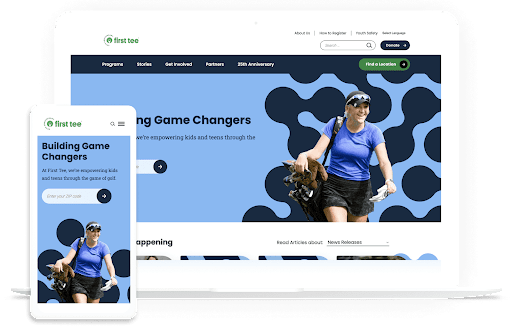
When it comes to increasing donation page conversions, less is more. Keep the form’s design simple, with just one hero image and plenty of white space. This makes it less likely that supporters will get distracted when filling out the form. 

2. Remind supporters to give. 

Just because someone leaves your donation page without giving doesn’t mean they can’t be convinced to donate in the future. There are a few strategies for reminding supporters of their devotion to your mission and encouraging them to give, such as: 

  • Send an automated email or text. With a tool like Impactive, you can create custom donation forms that automatically trigger donation reminders to visitors who leave your form without completing it. 
  • Engage your peer-to-peer network. Leverage peer-to-peer texting to get the word out about your donation opportunities. Identify current donors who have yet to give to your current campaign and recruit your volunteer peer-to-peer fundraisers to personally message these individuals with a link to your giving form. 
  • Post your donation page link frequently during your campaign. Share your giving page on social media repeatedly throughout your online campaign. Include progress updates so supporters know how much further you have to go to reach your goal. 

Your nonprofit’s supporters are busy people, and giving to your organization probably isn’t the first thing on their minds. A few gentle reminders might be the push they need to complete their donations. 


3. Ensure your donation page is accessible.

Accessible forms are usable by everyone, regardless of any disabilities or access issues a user may face. 

An accessible donation page fosters a positive user experience for everyone. Make your donation page more accessible with the following tips: 

  • Provide clear instructions. Ensure users understand what is needed from them every step of the way. Use clear directions to guide users through your giving process and let them know how you’ll use their data. For example, tell supporters you need their email address to send them a donation receipt. 
  • Clearly label form fields. Each form field should include a clear description that appears outside the field itself. This ensures they’re easy to read for those with visual impairments who may be using a screen reader. 
  • Use strong color contrast. The form’s text color should have sufficient contrast with the background. For example, white letters on a black or dark navy background offer a strong contrast that ensures the text is readable. 
  • Ensure the page can be navigated with a keyboard. Users should be able to navigate and fill out form fields using keyboard navigation. This makes it easier for those using assistive technology to complete the form.

Test your form using assistive technology or keyboard navigation to ensure that it meets accessibility standards. This helps ensure that accessibility issues don’t fall through the cracks. 

4. Include compelling content.

Remind supporters of what their gifts will support to increase the chances that they’ll give to your fundraising campaign

Incorporate compelling content into your donation page, such as: 

  • The specific impact of each donation amount. Let supporters know the impact of different donation amounts. For example, check out how the charity: water online donation page emphasizes the impact of a $40 donation:
A screenshot showing a portion of the charity: water online donation form. The bottom of the form says “It only takes $40 to bring 1 person reliable access to the clean water they deserve.”
  • A photo of the people or animals you help. Images can be particularly compelling, especially photos that show faces. Choose one striking feature or hero image for your donation page to remind donors who they will be supporting. 
  • Direct quotes and testimonials from beneficiaries. A direct quote from someone your nonprofit has helped can also make a big difference in inspiring supporters to donate. For example, if you’re a healthcare nonprofit, you might include a quote from someone who has benefited from your healthcare resources and services. If you’re an environmentally-focused nonprofit, you might include a testimonial from a community member who has seen the positive impact of your work on the local environment. 

Use these page elements to remind supporters at every turn that their donations help real people who face the challenges your nonprofit fights to overcome. 

5. Make your donate buttons pop.

Your donate form button is the most important call to action within the fundraising process. It’s the button at the end of your donation form that supporters press to submit their gifts. Make it stand out on your giving page with the following strategies: 

  • Use strong contrasting colors, such as white text on a red or dark blue background. 
  • Make the button bold, with a succinct and direct message such as “DONATE NOW.” 
  • Ensure the button is touchable on a mobile device by making it large and in a prominent location, such as at the very bottom of the form.

The rest of your donation buttons across your website should also be bold and stand out. For example, check out this prominent donation button on the ASPCA homepage:

A screenshot showing a CTA on the ASPCA homepage. It says “Protect Animals Left In Harm’s Way. Please help now. DONATE.”

This button stands out using white text on an orange background, further contrasted with the page’s black background. Plus, the compelling CTA lets donors know exactly what their gifts will support. 


With these tips, you can transform your nonprofit’s website into a vital fundraising tool for successful campaigns. And if you need help, you can always contact us