








Having a streamlined, user-friendly association website is a non-negotiable in 2026. A Clutch survey of 500 internet users found that half believe a company’s website design is important to their overall brand, and 31% think an engaging user experience is a top priority for website design. A professional, clean, modern digital presence establishes the immediate credibility necessary for long-term audience engagement.
But association website design is about more than aesthetics—high-quality, engaging design can also directly impact your revenue. The 2025 Association Member Experience Report from Higher Logic found a five-year renewal rate of 93% among members who describe their digital involvement as “very easy,” while those who struggled with online navigation or portals reported lower engagement.
With that in mind, we created this comprehensive guide to website design for associations, including 501(c)(6) organizations like business leagues, trade associations, and chambers of commerce. We’ll focus on these key topics:
- What makes for an engaging association website design in 2026?
- Best association website design examples
- Expert website design for associations tips
- Association website design: FAQs
- How Kanopi can help you create a member-centric website
Web design considerations for 501(c)(6) organizations differ from those of other organizations, like 501(c)(3)s, which are nonprofits and other charitable organizations. This guide will help you navigate the specific requirements for your industry to reach members more effectively through web design.
What makes for an engaging association website design in 2026?
Engaging association websites prioritize streamlined functionality, with biometric authentication capabilities, WCAG 2.1 AA accessibility compliance, and AI-driven content personalization. High-performing sites function as member retention engines, reducing administrative friction and delivering immediate value through self-service portals and intuitive, mobile-first navigation.
Essential elements of a high-performing association site
Associations can transition from “information overload” to “engagement-first” design by focusing on these essential elements:
- Streamlined, member-first navigation: Effective navigation includes clear, action-oriented labels for menu items that prioritize the top 5–7 areas members actually visit. By reducing the number of top-level menu items and utilizing mega-menus for deeper discovery, you can help members find what they’re looking for in seconds, not minutes.
- Comprehensive member portals: Your membership portal is the online home of your member experience. High-performing portals include self-service tools for everything from tracking certification credits to managing group memberships or medical expenses. Additionally, centralized membership dashboards with reminders, upcoming events, and resources reduce your staff’s administrative burden while empowering your members.
- Mobile-friendly design: With more than 60% of web traffic coming from mobile devices as of Q1 2025, mobile-friendliness is crucial. This means thumb-friendly navigational elements, such as properly-spaced buttons and hamburger-style menus. Additionally, prioritize rapid load times (targeting under 2 seconds) and simplified mobile forms. If a member can’t register for your annual conference while standing in line for coffee, your design is a barrier to your revenue.
- Accessibility as a default: Accessibility is a requirement for equitable membership. This means building to WCAG 2.1 AA standards from day one. Proper color contrast, screen-reader compatibility, and keyboard navigation ensure that your association’s mission is available to everyone, regardless of ability or device.
- AI-driven personalization: Personalized web experiences can increase new-member sign-up conversion rates by up to 202%. AI tools are the gateway to developing tailored member experiences that suit each individual’s needs. By analyzing past behavior, like webinar attendance or white paper downloads, your website can dynamically surface the most relevant resources for each individual, ensuring they see exactly what they need without having to dig through your archives.
- Bento grid layouts: Inspired by the organized compartments of a Japanese bento box, this layout style uses modular, rectangular tiles to display diverse types of content simultaneously without feeling cluttered. It’s the perfect solution for associations that need to highlight multiple resources, such as news, upcoming events, and a Join CTA, on a single screen. Take a look at an example of what this layout style looks like:
Join Our Community
Elevate your craft with exclusive resources and a global network of peers.
Become a MemberAnnual Summit 2026
Workshops and visionary keynotes from industry titans.
Latest Updates
- Clear member benefits: Engaging membership sites feature a dedicated, high-visibility page or section that clearly outlines the value proposition of each membership tier. For 501(c)(6) professional organizations and trade groups, this means clearly defining the business ROI, networking access, and corporate member benefits that justify the cost of dues. Use concise language, an ROI calculator, and social proof (such as member testimonials) to highlight the benefits of joining your membership program. Your website should also make it easy for existing members to access benefits online, such as event registrations, courses, and job boards.
Research from Association Adviser’s 2025 Association Benchmarking Report determined that even though associations increased member touchpoints to an average of 30.4 times per month last year, many are running into the challenge of “information overload,” where more content is actually leading to less engagement.
As a result, your website communications goal isn’t to increase the number of touchpoints, but to increase their relevance. By focusing on these essentials, you ensure that every digital interaction reinforces your association’s value rather than contributing to the clutter.
Best association website design examples
The best way to gather ideas for optimizing your association’s website is to review examples of successful sites and note how they effectively incorporate key features and functionality that support the member experience. Here are nine top association websites and the key features and functionality that enable them to engage prospective and existing members:
1. Eye Recommend

Eye Recommend’s website is both a powerful recruitment tool for their optometric cooperative and a functional search engine for patients.
Three stand-out features of the Eye Recommend website:
- Consolidated benchmarking single sign-on (SSO): Kanopi simplified the user experience for the Eye Recommend website by building a single sign-on solution. Members can now access critical Clinic Benchmarking data, including gross profits and patient metrics, with a single set of credentials, which eliminated the need to juggle multiple logins across different domains.
- Localized marketplace with Solr Search: To help independent clinics scale, Kanopi implemented a powerful Solr Search and an expanded Marketplace. Members can filter listings by location to find equipment, inventory, and practices for sale that are specifically relevant to their region, reducing search friction.
- Visual consistency and accessibility-first design: Recognizing that a vision care organization must lead by example, Kanopi overhauled the site’s typography and color contrast. The result was a design refresh that provided a welcoming brand presentation while ensuring the site met high accessibility standards for all users.
Learn more about how Kanopi improved page load times and mobile usage for Eye Recommend
2. International Association of Business Communicators (IABC)

The IABC website leverages clear brand storytelling and a high-performance search function that makes decades of communication archives accessible.
Three stand-out features of the IABC website:
- Unified domain architecture: IABC worked with Kanopi Studios to merge three disparate sites into one cohesive WordPress home, reducing maintenance while strengthening brand authority.
- High-performance archive search: A robust filtering system allows members to instantly surface decades of communication research and case studies.
- Dynamic component-based layouts: Flexible design blocks empower the IABC team to create consistent, professional pages without needing a developer.
Read more about how Kanopi successfully merged three sites to tell IABC’s compelling story
3. American Association of Retired Persons (AARP)
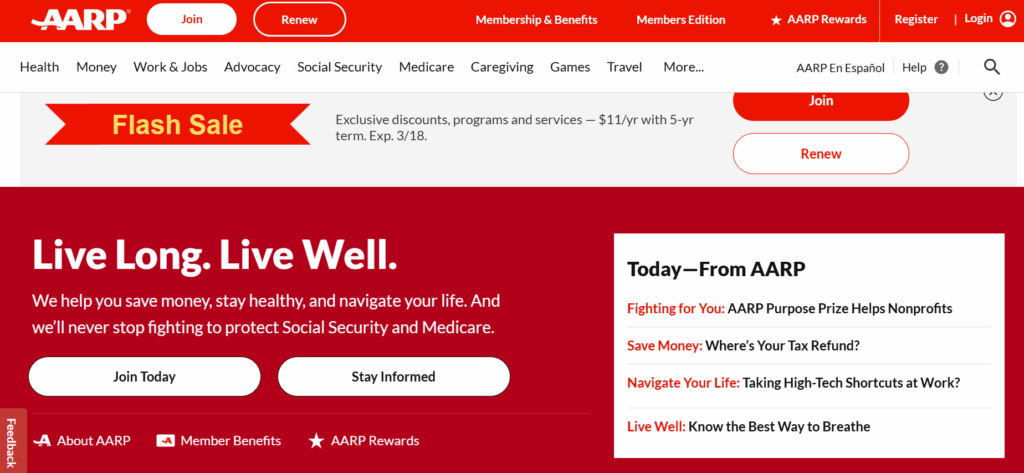
The AARP website provides a masterclass in accessible design. The site boasts a 99/100 accessibility score on Lighthouse, an automated website auditing tool, demonstrating a high level of commitment to design legibility and inclusivity.
Three stand-out features of the AARP website:
- Inclusive typography and high color contrast: The high-legibility design features larger touch targets and high color contrast ratios tailored for older demographics.
- Cognitive load management: The clean, distraction-free layout uses clear iconography and simple language to prevent information overload.
- Voice search optimization: Advanced SEO and technical architecture make the site easily navigable via voice-assistive technologies.
4. National Association of Realtors (NAR)
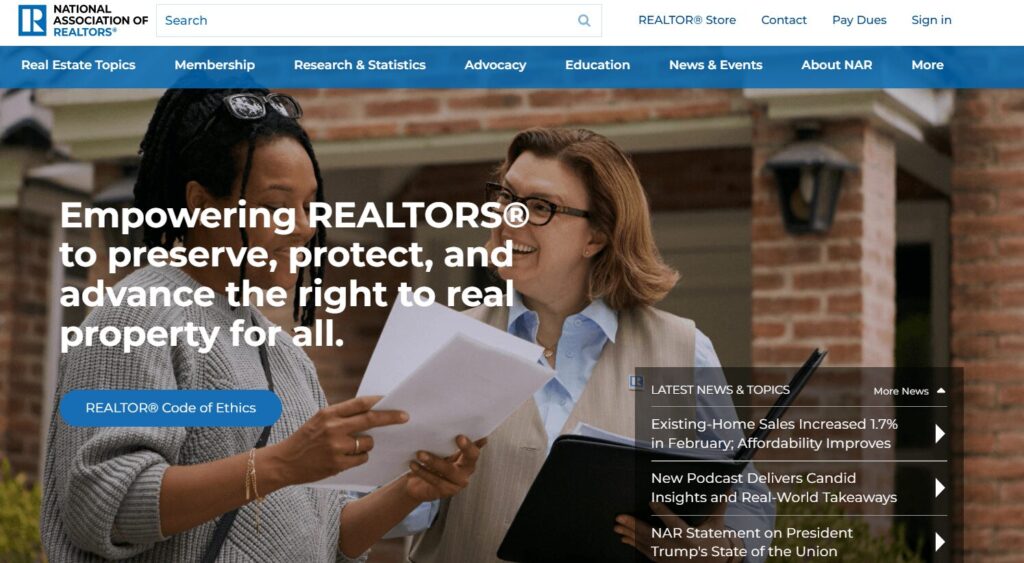
As one of the largest 501(c)(6) professional organizations in the world, the NAR website is a benchmark for managing massive volumes of data while providing a personalized experience for over 1.5 million members. Their site excels at translating complex legislative and market data into actionable insights.
Three stand-out features of the NAR website:
- Dynamic member center with SSO integration: This setup enables real-time access to education credits, membership status, and personalized benefits tailored to the user’s specific real estate board.
- Robust research and statistics hub: The site features interactive data visualizations and proprietary market reports, positioning the NAR as the definitive authority on housing data.
- A geographically targeted advocacy platform: Members can connect with local and national legislative alerts, making it simple for realtors to engage in “call to action” campaigns that impact their specific markets.
5. Project Management Institute (PMI)
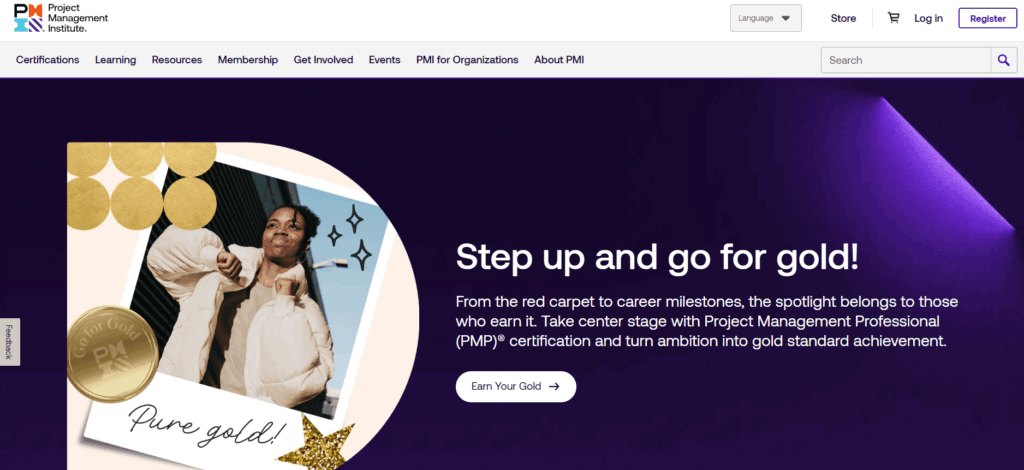
PMI manages a massive global audience with highly technical needs. Their site handles a diverse array of certifications (PMP, CAPM, etc.) within a unified ecosystem.
Three stand-out features of the PMI website:
- Global chapter geo-locator: An interactive map tool uses browser geolocation to instantly connect members with their local chapter and upcoming regional networking events.
- Gamified certification progress: A visual “Roadmap to Certification” uses progress bars and milestones to help members navigate the complex requirements of professional credentialing.
- Standards+™ digital resource library: A searchable, high-speed digital platform provides “just-in-time” access to the PMBOK® Guide and other technical standards via mobile-optimized snippets rather than long PDFs.
6. Alberta Teachers Association
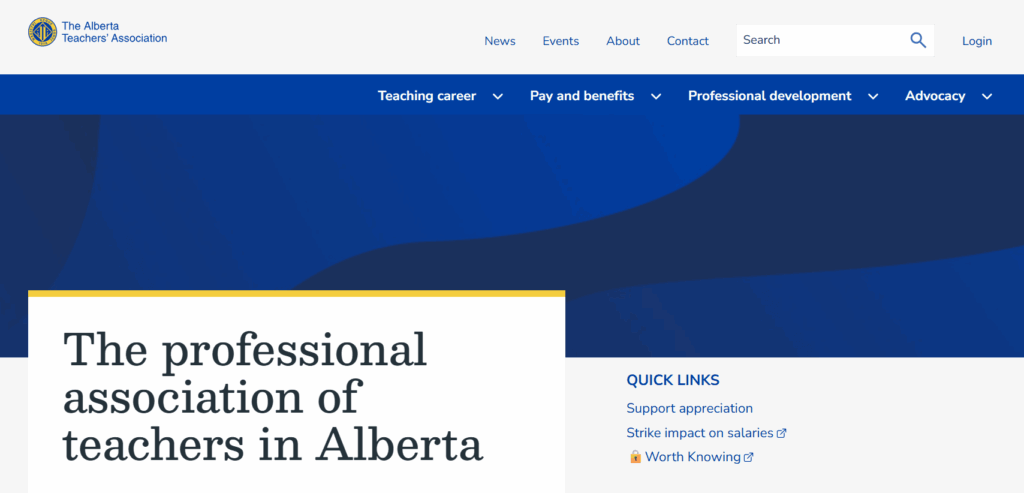
The ATA offers a great example of an association using web design to reduce administrative costs while improving member convenience. The organization moved from mailing physical plastic cards to a self-serve digital card service and embraced several additional modern web design features to improve the user experience.
Three stand-out features of the ATA website:
- Complex permissions logic: A robust backend handles varied access levels for over 40,000 members, ensuring the right resources reach the right teachers.
- Simplified dues management: Integrated payment systems make it easy for members to manage their professional standing and renewals online.
- Member-centric news feed: A customized content engine surfaces local chapter news alongside province-wide educational updates.
7. IEEE Communications Society
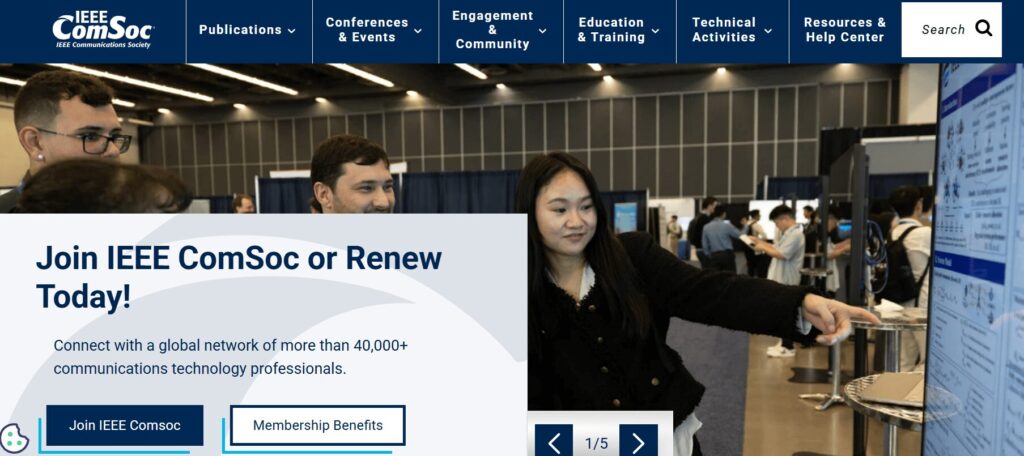
IEEE ComSoc is a global network of over 40,000 communications technology professionals. The website provides a streamlined user experience, highlighting resources such as publications, events, community engagement opportunities, and skill development training.
Three stand-out features of the IEEE ComSoc website:
- Technical publication integration: Direct API connections to IEEE Xplore allow members to access high-level technical papers without leaving the ComSoc site.
- Global event calendars: A centralized, timezone-aware calendar features dozens of international conferences and local chapter meetups.
- Expert directories: A searchable “Find an Expert” database facilitates global networking among telecommunications professionals.
8. American Nurses Association (ANA)
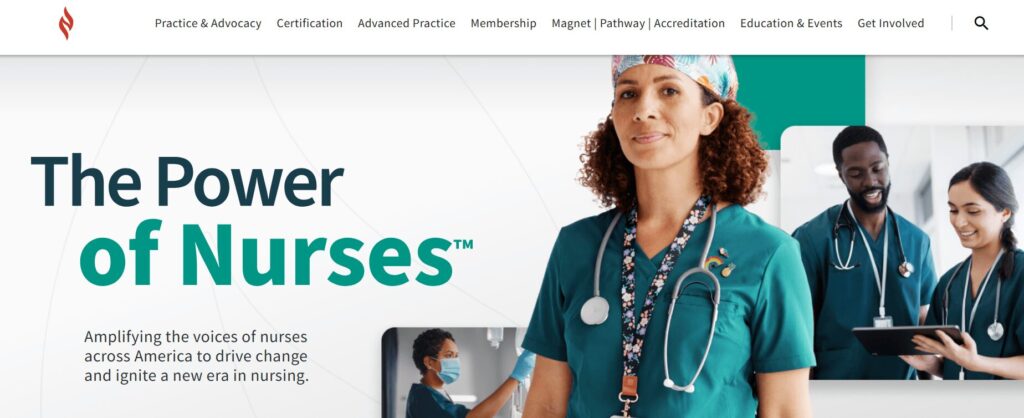
As the online hub for the premier professional association for RNs, the ANA website goes above and beyond in facilitating the member journey. It successfully balances advocacy and professional development with a highly personal feel.
Three stand-out features of the ANA website:
- Integrated certification tracker: A seamless connection to the ANCC (American Nurses Credentialing Center) allows nurses to track continuing education credits and certification status directly through their profile.
- Action-oriented advocacy center: This tool reduces the friction of political engagement by enabling members to contact their representatives with pre-filled templates based on their zip code.
- Custom job alerts: Members can set alerts that notify them only of roles matching their specific nursing sector and geographic preferences, effectively filtering out irrelevant postings.
9. New England Association of Schools & Colleges (NEASC)
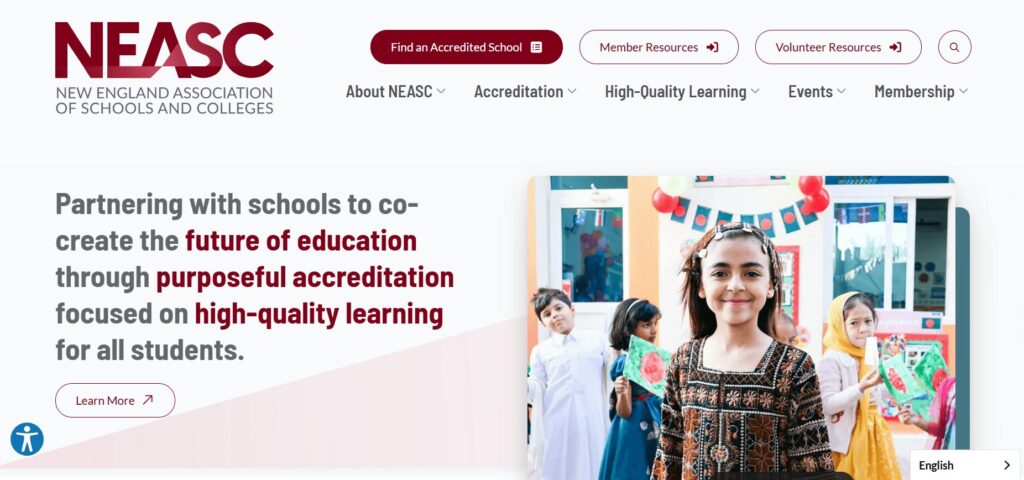
The NEASC website is a top-tier example of how an accrediting body can use digital tools to manage complex professional workflows. The site serves as a vital bridge between educational institutions and rigorous accreditation standards.
Three stand-out features of the NEASC website:
- Searchable institution directory with advanced filtering: The public and educational professionals can verify the accreditation status of thousands of schools across multiple membership cycles and regions.
- Resource-heavy accreditation toolkits: Designed with a clear content hierarchy, these kits enable school administrators to easily navigate the extensive documentation and self-reflection forms required for accreditation.
- Streamlined event and workshop registration system: This tool handles high-volume sign-ups for professional development sessions, specifically tailored to different educational sectors from early childhood through higher education.
Expert website design tips for associations
1. Design for frictionless renewals.
Renewals provide your association with reliable recurring revenue, but a poorly designed website can become a barrier to member retention. A Higher Logic report found that almost half of associations report first-year renewal rates below 60%, often due to “unclear onboarding” on their websites.
Action steps to take today:
- Implement biometric login options (FaceID/TouchID) for member portals, making it easier for members to access their membership status information on supported devices.
- Provide an auto-renewal opt-in checkbox at the point of initial sign-up or renewal that allows members to keep a payment method on file for automatic annual billing.
- Offer secure tokenization through gateways like Stripe or Authorize.net so members can pay with “the card on file” in a single click.
2. Optimize for answer engine visibility.
While you may be familiar with search engine optimization (SEO), your site must also be optimized for generative or answer engines like ChatGPT and Gemini to succeed in today’s online landscape. People interact with generative search engines much less formally than traditional search platforms, asking questions in a conversational style and expecting immediate, personalized responses.
Action steps to take today:
- Structure your content with clear H2 and H3 headings so AI engines can easily pull your information into their summaries.
- Implement structured data, otherwise known as schema, to help engines understand the context of each page on your site. This could include Person, Organization, FAQPage, BlogPosting, and Product schema.
- A note for industry-specific groups: AI engines look for explicit entity definitions. Mentioning your specific type of organization in your Schema markup (for example: “[Name of organization] is a 501(c)(6) trade association for [Industry]”) helps search engines accurately categorize your site and serve it to prospective members.
- Identify and resolve technical issues that can affect traditional and AI search results, such as broken links or slow page load times.
3. Use dynamic social proof.
Members want to see authentic, real-time validation from their peers. Dynamic social proof transforms your website from a one-way sales pitch into a living community, leveraging FOMO (the fear of missing out) and transparency to demonstrate your association’s value.
Action steps to take today:
- Record member video stories to share in recruitment emails and blog posts.
- Display real-time counters (e.g., “452 members are attending our next webinar”) to encourage engagement and build community.
- Incorporate a live social media feed displaying posts from both your organization’s page and member posts that tag your organization or use one of your hashtags.
4. Maintain brand consistency.
If a member clicks from your main homepage to a legacy “Resources” subdomain or a third-party “Career Center” and the design suddenly changes, it erodes trust and creates friction in the user experience. Maintaining a unified visual and tonal language across all platforms ensures your association comes across as professional, reliable, and secure.
Action steps to take today:
- Create a digital style guide for your staff to use when making any website updates or changes. Include logo usage instructions, typography, hex codes, standardized writing conventions, and other visual and tonal guidelines.
- Audit your third-party integrations (like your AMS portal or job board) to ensure they use “header/footer” wrapping that matches your primary site’s navigation.
- Standardize your component library so that every button, form, and “Call to Action” looks and behaves the same way, regardless of which page the member is visiting.
Curious whether your association’s website is currently hitting the mark when it comes to implementing best practices? Complete our free UX assessment scorecard to help evaluate your current performance and identify areas for improvement:
UX Scorecard
Rate your website to uncover member experience opportunities.
/ 65
Ready to Elevate Your Member Experience?
Our team specializes in association website optimization that drives engagement and retention.
Contact KanopiAssociation website design: FAQs
How often should our association redesign its website?
Associations should conduct recurring UX audits every six months. During this process, you should make small adjustments and improvements to your site based on metrics like time on page and conversion rates. This continuous improvement process ensures that your site won’t become outdated too quickly and that you can easily respond to fluctuations in your engagement metrics.
How do we integrate our AMS (Association Management System) without slowing down the site?
Adopt headless CMS architectures or prioritize API-first integrations to maintain peak front-end performance. A “headless” approach enables developers to deliver content via APIs seamlessly across any platform by decoupling the backend (i.e., your content management system, such as WordPress or Drupal) from the user interface. With a headless website architecture, you can create content once and seamlessly distribute it across both your website and your AMS.
What is the average cost of a custom association website in 2026?
The cost of a custom association website depends heavily on the complexity of features such as member portal integrations. For mid-to-large associations, the investment covers deep AMS synchronization, custom single-sign-on (SSO) configurations, and rigorous accessibility auditing to meet inclusive design standards.
How can AI improve our member experience?
AI tools can enhance members’ experiences through personalized content recommendations and support. Generative AI can now provide “predictive search,” which anticipates a member’s needs based on their career stage or past renewal behavior. Plus, 24/7 AI-driven member support chats help streamline the member experience by delivering immediate answers to common questions.
How does 501(c)(6) tax status impact our website’s design and functionality?
Unlike 501(c)(3) charities that design their sites heavily around public donations and fundraising, a 501(c)(6) business league or trade association must design for member value and industry advocacy. Your website needs to prioritize seamless member portals, tiered corporate/individual membership checkouts, and public directories that promote your members’ businesses.
Additionally, because 501(c)(6) dues are generally deductible as a business expense rather than a charitable contribution, your website’s checkout forms and receipt templates must clearly state tax deductibility rules to maintain legal compliance.
What website features are essential for a 501(c)(6) advocacy or lobbying wing?
Because 501(c)(6) organizations are legally permitted to engage in political lobbying to advance their members’ common business interests, you may want to feature an action-oriented advocacy center or hub on your website.
This involves integrating tools that allow members to easily look up and contact their local representatives via pre-filled email templates (as seen in the American Nurses Association example). It also means implementing member dashboards with restricted access, where sensitive legislative updates, PAC information, and industry-specific compliance reports can be securely shared.
How Kanopi can help you create a member-centric website
The Kanopi team is well-versed in crafting member retention engines out of legacy association websites. We’ve helped dozens of associations transform their fragmented digital footprints into unified, high-performance platforms. Our website design services for associations include:
- Strategic discovery: Our team conducts comprehensive audience research to understand your current online presence and develop a strategy tailored to your community, whether you are a 501(c)(3) nonprofit organization or a 501(c)(6) trade association.
- AMS & SSO integration: We specialize in connecting complex back-end systems (iMIS, Fonteva, NetForum, etc.) to websites and implementing straightforward SSO for member-only portals.
- Unified digital ecosystems: We consolidate fragmented domains and multi-site architectures into one high-performance, easy-to-manage platform.
- High-performance dashboards: We build enhanced member areas featuring responsive, fully customizable charts and personalized resource libraries.
- Inclusive design focus: We ensure your site meets all of the highest AA/AAA accessibility standards, providing equitable access for your entire global audience.
- Continuous improvement: Through dedicated web support, we partner with you long-term to keep your site healthy and responsive to new trends.
From streamlining complex workflows to creating modern, accessible designs, see how we’ve helped organizations like yours thrive.
Wrapping Up
By prioritizing intuitive navigation, AI-driven personalization, and mobile-first accessibility, you can move beyond 'information overload' and start delivering true value via your association website design. Whether you’re looking for a full redesign or a targeted UX audit, the goal remains the same: making your members' digital involvement seamless.