Why a website transition plan is crucial, and how to get the most out of it.
At some point in your website’s lifespan, it’s time to do an update. Every few years, your site’s code gets outdated, old features may not be available, and security and performance improvements are released. The average website lifecycle is around 2 years, but many companies go well beyond that, leaving them with a site that’s in dire need of a refresh.
Also, new CMS versions tend to be released on a regular cycle, making it necessary to upgrade. You might be facing that if, say, your current site is built on Drupal 7 (D7). As D7 reaches end-of-life, you’ll need to decide how and when to move to Drupal 9.
Whatever the reason, this is an excellent time to create a comprehensive website transition plan, rather than simply doing a barebones update to your site.
A website transition plan looks at the site update process from a strategic standpoint and with a holistic view, covering the following aspects:
Reviewing design and user experience. Can visitors interact with your website effectively to find the information they’re looking for? During your website transition, you can take the time to review and enhance your user experience.
Determining how/why things are built the way they are on your site. Which design or functionality elements need to remain the same, and which can be updated to improve efficiency or user experience? A website transition plan can illuminate opportunities for improvement.
Let’s think about your website like a house…
Imagine you’ve been in that house for several years. Over the years you’ve added additions, done some small renos, maybe updated the paint job. Perhaps you ambitiously added a second story and a suite for the in-laws. And, you most definitely have accumulated a lot of “stuff” you’re storing there.
Okay, we’re still talking about websites here, I promise…
Like a house you’ve been in for years, an old website can become cluttered. As your business has expanded, you may have made additions quickly, without taking a step back and looking at it from a bird’s-eye view.
When it’s time to upgrade your site (just like if you were updating your home), you need a blueprint to help make decisions that consider every site element, your goals, and how you can give your site as much longevity as possible.
A website transition plan is like the blueprint for the “house.” It can include key elements like:
A deep-dive review of your website’s current infrastructure and design
An assessment of your site’s URLs, using a visual representation or sitemap
An analysis of why visitors are using your site and how you can better appeal to their needs and preferences
High-level design and user experience recommendations
Recommendations for how to rebuild your site better
When you’re armed with your blueprints and recommendations for your future build, you can use them to decide what you’re going to do to build the best version of your new “house.”
Are you going to knock the entire old house down and start from scratch? Or, are there strategic changes you can make that will be impactful without needing to do an entire rebuild?
We like to call these “small bites for big wins,” and there are a couple of ways you can approach this:
1. The Lift-and-Shift
You can leave your design and UX as is and do a lift-and-shift. With this approach, you keep the same look and feel of your current site but perform a replatform.
This is a good option if your design is good overall and you only need to make minor tweaks. It’s a chance to improve your accessibility, performance, and design best practices without starting from scratch.
PROS:
This approach can save time. You likely won’t need a lot of internal stakeholder engagement, so you can move fairly quickly.
You can adjust portions of your site with partial migrations of different sections rather than a massive overhaul. This can help spread the cost of your redesigns out over time and avoid surprising site visitors with a major and unexpected rebrand.
CONS:
If you have to rebuild your entire house anyway, why would you only paint the walls? If your site is in need of a major upgrade, this piecemeal approach may end up being more costly over time.
After you conduct a lift-and-shift, your site might look similar or exactly the same as when you started. This approach might not offer the visible improvements you (and your stakeholders) are looking to implement.
2. The Reimagine
A website reimagine is a full rebuild, taking a fresh look at your design, user experience, content, and conversion strategy.
Websites are the #1 marketing tool an organization has. If you go this route, take this opportunity to design a visually stunning website design that gives your audiences the information they want in a way that positively enhances their interaction with your brand.
To execute this successfully you’ll need stakeholder buy-in, end-user data, and a clear creative vision, paired with technical mapping.
PROS:
You’ll get the heavier lifting over with upfront, rather than just applying a coat of paint.
You’ll be able to incorporate the most modern components available.
Your site will have a longer shelf life since design and development is fresh.
CONS:
You might spend more.
Since this is a more major overhaul, there will be more stakeholders involved.
This approach will take more time.
We recently created a website transition plan for one of our clients, the Centre for Digital Media (CDM), whose goal is to move from a Drupal 7 site to Drupal 9. Rather than simply planning for that upgrade, we dug deeper into their website to create a plan that includes improvements to the site and will future-proof the site long after the update.
We did a deep dive into the technical side of how the site was built and why the site was built that way (The “why” is just as important as the “how”). We met with CDM bi-weekly, shared our findings, and ultimately came up with a technical plan as well as suggestions on how to move forward with content restructuring, migration, performance, design, and security improvements. Ultimately, they were able to determine that they needed a “Reimagine” of the site. By going through the process of creating a website transition plan, they were empowered with the information they needed to make decisions with confidence and buy-in from the right people.
A good website transition plan should be customized to support the goals of your specific site. Your website and business are unique, and a successful transition plan will keep this in mind. Ultimately, the plan acts as a blueprint that allows you to understand the scope of your build, so you can make the best decisions for your site’s update.
We’d love to help create the blueprint for your site and map your next steps! Contact us to get started on your website transition plan.
Drupal, one of the world’s most popular open-source content management systems (CMS), has continuously released new versions of its platform since its launch 20 years ago. Website developers were thrilled when Drupal 8 hit the scene in 2015, bringing with it a plethora of improvements and bug fixes. However, the system has now run its course and reached its end of life on November 2, 2021.
This leaves groups like nonprofits, businesses, associations, and other organizations that rely on Drupal 8 at a crossroads. As an organizational leader or staff web developer, you may be wondering what Drupal 8’s end of life means for your organization, and how you should tackle upgrading your site to Drupal 11 (the latest version).
In this guide, we’ll review what Drupal 8’s end of life means for organizations like yours and how you can best approach the migration to Drupal 11 if you haven’t already done so.
Several different versions of Drupal are currently active and supported: Drupal 7, 10, and 11. Drupal 11 is the most recent version, launched in August 2024.
If your site is currently running Drupal 8, it is built upon the Symfony 3 framework, which reached its end-of-life on November 2, 2021. This means that after November 2021, security issues in Symfony 3 (and therefore Drupal 8) will no longer be fixed, resulting in:
No new features added to Drupal 8 after this time.
No minor releases or security updates.
No long-term support for the platform.
We can’t emphasize the last point enough—failing to migrate to a currently supported Drupal version will result in losing access to Symfony support, meaning your site’s code will no longer be updated by Symfony or Drupal. This could leave you exposed to a variety of security threats and vulnerabilities.
To ensure that your Drupal 8 website remains secure, it should be upgraded to Drupal 11.
What Does This Mean for Drupal 7 End-of-Life?
Drupal 7, which was released a decade ago, does not use Symfony. Instead, it is built upon a PHP framework developed by the Drupal community. Drupal 7’s end of life was extended to January 2025 due to the impacts of the COVID-19 pandemic, meaning it will live on past Drupal 8’s EOL. So, if you’re a Drupal 7 user, there is still time to come up with a strategic plan for upgrading your website.
What Happens if Drupal 8 Users Don’t Upgrade?
Because Drupal 8 reached its end of life, no more security updates or bug fixes/improvements will be released for that version.
Remaining on an unsupported version of Drupal leaves your website vulnerable to cyber attacks and lacking in new features. In addition, the plugins and tools you’ve added to your site over the years may not be compatible with your system anymore, causing you to lose functionality.
For all of these reasons, it’s best practice to update your Drupal version before its end-of-life date.
What is the Drupal 8 End of Life Process for Upgrading to Drupal 11?
To upgrade your website to the latest version of Drupal, D11, you must first migrate to Drupal 10.3. According to Drupal, “sites running 10.2.x or earlier versions must first update to 10.3.0 or later prior to updating to Drupal 11, because all core updates added prior to 10.3.0 have been removed. If any modules or themes have been removed you may use the respective contributed project instead.”
Fortunately, the upgrade from Drupal 8 to later versions is much easier than other migrations because later versions are backward compatible with Drupal 8. If you were to switch from Drupal 7 to 10, for instance, it would require all of your site’s data to be transferred to a brand new Drupal website. In contrast, since you’re already a Drupal 8 user, you won’t have to take as big of a leap to transition to Drupal 10.
To get your site ready for the upgrade, follow these steps:
Update your site to the latest version of Drupal 8.
Update any outdated modules and dependencies.
Update your PHP and database versions on your hosting environment.
Check if you have any deprecated code on your site and fix/remove it.
After completing these tasks, your site can be upgraded to Drupal version 10.3, and then to Drupal 11.
Even though the migration from Drupal 8 to later versions is relatively straightforward, you may still encounter roadblocks or obstacles that slow down the process. Our website professionals at Kanopi are experts in Drupal planning and development and can aid you in your migration journey.
Each of our team members has, on average, 11 years of experience in Drupal Development, and several of them are Acquia-certified. We are also a supporting partner of the Drupal Association, regularly contribute to the Drupal Project, and are one of the main organizers of BADCamp, a Drupal-focused community event.
Improving Collaboration Between Web Designers & Copywriters
If you’re a marketer, you know that working on a cohesive team is the foundation of any marketing campaign. Stellar work can’t happen if you don’t have strong collaboration and clear communication.
Still, fostering seamless collaboration between teams can be a struggle. When communication breaks down or systems don’t work properly, people become frustrated and relationships begin to fray.
As a copywriter myself, I know how crucial it is to develop a strong and stable working relationship with the web designers on my team. They are the ones who take my writing from black font on a page to a seemingly living and breathing page design. The better we work together, the better the final deliverables will be across any marketing project we tackle.
Here are four tips I’ve picked up over the years that can help improve collaboration between web designers and copywriters.
Find Ways to Automate Processes
Nobody enjoys tedious, time consuming tasks. Manual work can add stress to an already taxing marketing job. One way to create better collaboration across web designers and copywriters is through automating processes performed across the roles on a daily basis.
For instance, I’ve set up multiple automations within Formstack’s Monday board that automatically communicate project status with my web designer, Jason. When copy is done being reviewed by my editor, Jason is automatically alerted so he knows he can proceed with developing imagery and web designs.
Adding in automations like this smooths processes, eliminates time-consuming manual work, and ensures everyone is on the same page. I don’t have to worry about remembering to tell him something is ready for development, and he doesn’t have to rely on me for constant status updates. This way, we can focus our time on important conversations that propel strategy forward and help us reach big milestones.
Leave Clear Notes
It’s frustrating when someone doesn’t understand your vision. This pitfall has doomed many working relationships across the world. Whether you’re the copywriter sending copy to a designer or the designer showing a comp to a copywriter, it’s important to have clear notes available for review.
For copywriters, it’s important to provide context on how you see your words compiled on a page. Be clear on headlines, subheads, and sections. Want something to feature an image or video? Make a note. Want a blog post to be highlighted or a stat pulled out of the copy? Make a note. The clearer you can communicate your vision to the designer, the more likely they can execute correctly.
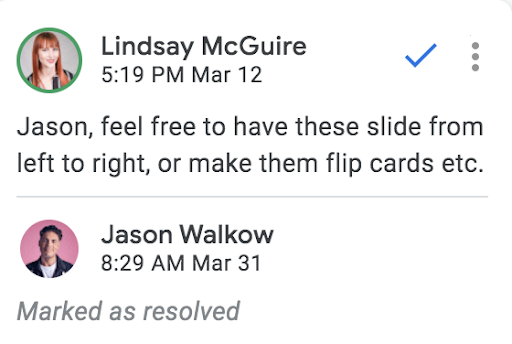
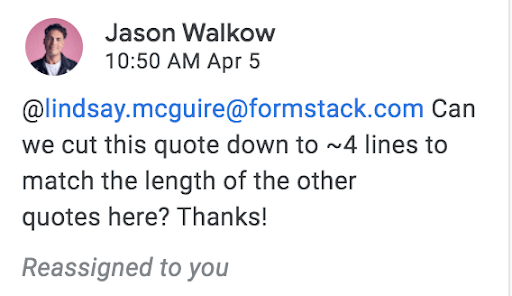
But don’t go overboard. Your designer should be able to make most of the design decisions and have full control of the design direction. Consider your notes as suggestions, not set-in-stone instructions. My comment example here is from our most recent report, The Rise of the No-Code Economy, to provide some guidance on a special section of copy.
For web designers, if something will look different between comp and final design, make that clear. If something is a working draft, be sure everyone knows this before asking for feedback. If something needs to be cut, adapted, or edited between copy and final design, make the change clear and provide the reasoning to ensure everyone understands why a change is necessary.
Get Personal
You spend a lot of time with your coworkers, even if you’re in a completely virtual environment, like Jason and I are. We are constantly slacking each other, in Zoom meetings, and commenting back and forth on drafts. If we didn’t enjoy working together, my job would suck.
One way to ensure interactions go well is by developing a personal relationship with the people you work with. This tip works for anyone, not just copywriters and designers. The more you know someone, the better you will be at interpreting their comments, actions, and reactions. Getting to know someone better helps improve communication and can even improve productivity.
Meet Before Copywriting Begins
If you’re working on a big project, like a report, it is very important for the designer and copywriter to discuss the project before copy begins. The last thing you want to do is go into a large project with the wrong expectations of what the final product will be.
When I began writing Formstack’s The New Digital (Transformation) Divide, I made sure to touch base with Jason and the rest of our digital and design team to ensure we all went into the project with the same expectations. This helps avoid bottlenecks, miscommunications, and misunderstandings further down the road.
By aligning the copywriter’s and designer’s visions before a project begins, you can set yourself up for success knowing that each party understands—and agrees upon—the final outcome.
As with almost all working relationships, the key to sustaining great collaboration between a copywriter and designer all comes down to communication. Many of the most common workplace frustrations, delays, and mishaps can be avoided by ensuring open, clear, and consistent communication. I hope the tips above help you!
Lindsay is the Content Marketing Manager at Formstack, splitting her time between creating blog content and producing Formstack’s Ripple Effect podcast. She is a graduate of the University of Missouri School of Journalism and enjoys all facets of marketing.
As we grow more and more dependent on technology, the tools we use can either catapult our efforts further or hinder them completely.
How is your current tech solution serving your organization and mission? For nonprofits like yours, the online donation solution, content management system (CMS), and other essential tools you use all contribute to the overall success of your fundraising and supporter engagements.
If you’ve noticed your efforts aren’t quite yielding the expected results, or you’re just not sure if your tech investments are bringing genuine value, this is where a nonprofit technology assessment can help.
A nonprofit tech assessment takes a top-down view of your entire organization and the tools you depend on. It reveals what resources you currently utilize, which solutions are actively helping complete your mission, and which tech you might not need.
With the assessment results, you can better revitalize your digital nonprofit strategy and ensure you take advantage of every fundraising and engagement opportunity.
If this is something that interests you, you’ve come to the right place. Continue reading to learn more about the basic components of a nonprofit tech assessment and how you can conduct one.
A nonprofit technology assessment is the key to getting a comprehensive outlook on your current digital solution. The assessment showcases your nonprofit staff, their skills, your budget, donor relationships, and all internal procedures in terms of the tech solution you have.
In particular, a nonprofit tech assessment can bring the following benefits:
Ensures you avoid duplicated efforts or investing in something that your organization already has
Lets you know if your organization is missing out on any critical procedures, policies, or tools
Gives you insight into where you should be spending your tech revenue
If your own organization is undergoing a digital transformation, a tech assessment is a critical step to help guide that journey. On top of that, it’s recommended that you consistently conduct these assessments as your organization and tech solutions continue to expand.
With modern solutions popping up every day and the volatility of the internet, assessing your nonprofit solutions on a regular basis is an extremely beneficial practice. Doing so can ensure that you’re aware of current solutions and any gaps in your existing infrastructure. Plus, you’ll be more prepared for future opportunities and sustainable growth.
Basic Components of a Nonprofit Technology Assessment
So, how can you conduct a nonprofit technology assessment? The process may differ depending on your situation and the resources you have, but these are some of the common steps you’ll likely follow:
Create an asset/technology inventory. This is a working inventory of the tech that your nonprofit currently has and uses on a daily basis. Make sure to also note the age, name, manufacturer, and other key details within the inventory. You might even get an official tech audit from an experienced nonprofit tech service.
Determine future needs. With your organization’s other leaders and stakeholders, brainstorm some short-term and long-term goals. These goals should actively drive your mission forward. Then, rank each goal based on priority and end date to get a sense of your future needs and to develop a timeline for what needs to be accomplished.
Consider your financial budget. How much does your organization invest in tech annually? How much additional revenue can you and are you willing to put in? As you’re figuring this out, make sure that your budget accounts for upgrades and fixes, like if you undergo nonprofit website maintenance.
Along with the above, it’s a good idea to ask yourself several self-assessment questions. These will further help you determine where your organization stands and if your current solution is working for your needs.
Questions to Ask During Your Nonprofit Tech Assessment
What technology skills do your staff possess? This will vary depending on the size of your organization, but if you have an expert coder on staff, this is worth noting. How much your staff knows about the tools and software you use is also important.
What are your policies for data backup, computer security, tech support, and so on? If there’s an area that you feel is lacking or could use a refresh, this is crucial to take note of. Upgrading your tech processes to be more secure is always your best bet.
What’s the current state of your website? If you haven’t updated your website in the past 6 months, it’s likely due for some maintenance.
What are the roles and responsibilities in your organization that relate to technology? Documenting this can be helpful for when you’ve completed the assessment and are working on incorporating its insights.
Who are your technology vendors? If you pay any monthly fees to a vendor, both the name and the price should be jotted down.
What are the major technology services you provide to your staff, volunteers, donors, and other constituents? Consider every online or technological process you offer. This can include online donation tools, event registration, payment processing, email or texting, and more. Have there been any instances where a tool has malfunctioned?
Do you provide training opportunities for your staff, volunteers, and others who use your technology resources? While this may be something you have to account for in your budget, ensuring that your entire team has the proper training and knowledge to use the tools you’ve invested in is more than just advice. It will prevent any confusion down the line and make sure that each process is as efficient as possible.
Who do you turn to for advice on technology? Often, nonprofit organizations will have tech consultants or other services that can help them with tech support and audits.
With your tech inventory, a list of needs, and your current budget, you can gain a better sense of where your organization currently stands. The above questions can further ensure that you’re not missing out on any critical gaps.
How Kanopi Can Help With Your Nonprofit Technology Assessment
We at Kanopi Studios know just how important your tech stack is to your organization’s fundraising efforts and overall success. As a top partner for nonprofits like yours, we’ve helped our clients develop over 150 active sites and optimize their digital strategy.
Here are some of the services we offer that can help when it comes to conducting a nonprofit technology assessment:
Perform tech audits for new clients across the board. Our expert team can evaluate public-facing websites and any connected services, like donation platforms and CRMs.
Provide support and advice on how your nonprofit website fits into your tech assessment. Is your current CMS helping or hindering your online efforts? We can also make recommendations and suggestions on how to improve your website and ensure it’s doing all it can for your mission.
Conduct research on your nonprofit’s online audience and develop user personas. This can clue you into the best ways to engage and reach out to your supporters with the tools at your disposal.
On top of these services, the Kanopi team will put together a Website Growth Plan (WGP) using the insights from your nonprofit tech assessment. This WGP will outline an actionable roadmap of content, features, and tactics that nonprofit leaders can implement.
The plan covers the overarching web strategy, as well as includes all brands across all channels. We’ll review your nonprofit’s current state, update audience personas as their journey relates to the website, and come up with a list of recommendations to set you up for continuous improvement and growth.
The Kanopi team knows that each nonprofit is unique, so this process is completely customized. We have different types and levels of WGPs depending on the customer’s needs.
Contact us for your own personalized Website Growth Plan.
Imagine a scenario: You’re planning for your annual fundraising event. This is your biggest event of the year, helping you raise the bulk of your revenue in order to reach your goals. As you’re planning your marketing campaign and outreach strategy, you hear that creating a charity microsite, a separate website still associated with your core organization, might be your best bet.
Even if you haven’t created a microsite before, you’ve probably already encountered numerous ones without realizing it. Many businesses (and increasingly more nonprofits) are using microsites as a creative and engaging marketing strategy.
Take Adobe’s Creative Types microsite as an example. This microsite is a “What Creative Type Are You?” quiz, which encourages visitors to figure out the type of creator they are and provides specific advice on how to flourish with the Adobe Creative platform. It exists as its own site but ultimately stems from Adobe and promotes its services.
So, how can you leverage microsites as a charitable nonprofit organization? At Kanopi, we often help nonprofits with developing, designing, and supporting their websites. Drawing on our experiences, we’ve written this dedicated guide to help you answer this question and many more.
Contact Kanopi to see if a charity microsite would benefit your organization!
What Is A Charity Microsite?
In the simplest terms, a charity microsite is an individual web page or a small cluster of pages that function as a separate site either within or to complement an existing nonprofit’s website.
What Is A Charity Microsite Used For?
Microsites are often used as a focused marketing strategy to reach a specific audience or meet a specific need. Having the power to design and customize a separate site enables nonprofit leaders to:
Target specific audiences and individuals who require specific messaging
Experiment with different media formats (e.g. blogs, video, audio)
Create another platform to gain online visibility
Bring attention to a new event or program they are launching
Create an alternative way to grow their email lists or gain social media followers
Show another side of the nonprofit organization (this can include a change in tone of voice)
Provide a platform that functions as one part of a whole service they provide (e.g. specific nonprofit campaigns, webinars)
But a microsite won’t perform all of these functions unless you develop it with a few key qualities and factors in mind.
What Makes A Good Charity Microsite?
While you can probably quickly create a microsite using your dedicated content management system (CMS), that doesn’t necessarily mean it’s actually contributing to your organization. Without upkeep and careful planning, a microsite can end up being pushed to the wayside.
To ensure that your charity microsite will effectively reach your target audience, it needs the following qualities:
Flexibility. Once you create your charity microsite, that doesn’t mean your work is done. As people interact and engage with your site, you’ll learn a little more about how to best reach them and meet their needs. Your site should be flexible, and able to pivot if circumstances or your focus changes.
Unique content. The microsite should have content that’s as unique as possible, standing alone and distinguishing itself from your regular website. Since it is independent of your core site, your content should be more focused and direct, focusing on what furthers the purpose and mission of the microsite. For example, if your microsite is dedicated to a blog roll, don’t repeat the same content from your core site. Your microsite’s audience doesn’t necessarily need to know about your fundraising initiatives or your organization’s history.
Intuitive navigation. If a microsite has more than one page, it should be easy and intuitive to navigate, directing users to key areas. This is the same as your regular organization’s website. The more you streamline your navigation, the better your user experience (UX) will be and the more likely supporters will continue engaging with the microsite.
Shareability. Because of its unique nature, your microsite should be easy to share on social media, mobile apps, email, and more. As a key marketing tool, this shareability is key if you want to expand your target audience. This is especially critical if the charity microsite is for a nonprofit campaign/event.
Clear and actionable CTA. Microsites don’t exist for no reason — there is always a purpose. Ensure that your microsite has a clear call-to-action so that as soon as users land on it, they immediately know what they should do. If your microsite is for an event, display your event registration button and form clearly.
Analytic capabilities. A huge benefit of microsites is the ability to develop very specific reports targeted to specific campaigns and projects. Ensure your microsite is integrated with your nonprofit CRM and performance analysis tool to track any key performance indicators (KPIs). This way, you can have an accurate and comprehensive view of who accesses your site, what pages are most popular, and more.
Optimized URL name. Since you want your microsite to stand on its own, it definitely needs an optimized URL name. The URL should be a direct reflection of the mission and purpose of the microsite, whether it’s the slogan, campaign name, or target keyword.
Why Are Charity Microsites Beneficial?
Oftentimes, nonprofit leaders grapple with whether making a charity microsite is truly worth it. After all, it’s going to take a bit of time to plan out its purpose, develop, and design it.
However, adding a charity microsite to your digital nonprofit strategy brings multiple benefits that other marketing efforts might struggle more to achieve.
Here are a couple of unique benefits to keep in mind:
Increased brand visibility. Because there’s another whole site representing your nonprofit brand, this means more opportunities for people to find and engage with you.
New lead generation. Your charity microsite can often be one of your largest lead drivers. Because of its unique quality to target a key audience, there’s a good chance that many of your new supporters will find out about your organization through the microsite.
Seamless part of the donor journey. The donor journey describes how a supporter engages with your organization before they ultimately make a gift. Your microsite can be an intuitive step in this journey. Prospects can learn about your organization through the microsite, and then with key CTAs become introduced to your other online offerings.
Boosted supporter engagement. Because you can host unique content that strays from your normal brand on your charity microsite, there’s a huge opportunity to increase supporter engagement. Elements like interactive slides, videos, or even a fun quiz can engage your audience in a fun and interesting way, while still introducing them to your brand.
Improved SEO performance. If your microsite has genuinely valuable content that differs from your main site, it can potentially drive your SEO ranking with carefully chosen and placed backlinks. However, that doesn’t mean you should be creating microsites for the sole purpose of SEO. Search engines favor sites with high-quality content, and if that is spread thinly between too many microsites, you won’t be driving as much value to your core website.
Help with measuring success. As mentioned earlier, a microsite is great for analysis reasons. Because it is dedicated to a specific project or purpose, you can easily determine its success with KPIs. Get a better sense of the number of leads you’re getting and how people are finding out about the microsite.
Further, microsites are generally pretty affordable to create. You don’t have to break your budget; all you need is your capable CMS. You can even use the one you already depend on for your main site. And, the time and effort you put into your charity microsite will surely pay off once you meet your fundraising targets and notice an increase in conversions.
Where Are Charity Microsites?
As you already know by now, a charity microsite exists outside your main nonprofit website. It is not a landing page on your website or in any way a part of your page structure and navigation. However, it is still branded to your organization.
When you think about where to find your charity microsite, you’ll have to understand the key differences between a microsite and your regular one:
Different domain or subdomain name. Your microsite shouldn’t just be your regular domain name and a page title. Make sure your domain or subdomain is different so that it stands out.
Microsites are usually temporary. Once that is over, the microsite no longer needs to exist. It’s common for microsites to only be temporary. However, in special cases like a microsite for a blogroll, you might keep the site around and regularly update it so that it is continuously having a purpose.
Microsites hold different content. You already know this, but it’s crucial that your microsite doesn’t host the same content as your regular site. It should be able to stand alone as an entity, without visitors needing to be familiar with your original brand to meaningfully engage.
Microsites require their own strategy. Your website marketing and outreach strategy should not be the same as your microsite. After all, they are serving very different purposes. Your microsite strategy should be much more targeted to meet the needs of a very specific audience.
Where you might find a charity microsite will depend on its purpose and role in your digital strategy. If you want to make it easier for supporters to find, add clear links to it within your regular site.
When Should You Develop A Charity Microsite?
Now that you know the purpose and benefits of a charity microsite, it’s time to consider why and when you might create one.
Here are some of the common scenarios in which nonprofits will develop a charity microsite:
Campaign-based microsite.
Large events or conferences microsite.
Published media (blog or webinar) microsite.
Online donation microsite.
However, just because these are great opportunities for a charity microsite, doesn’t necessarily mean it’s worth creating one. Remember, only a good and valuable microsite will bring any of the benefits you’d want. Before creating a microsite, ask yourself the following questions:
Will you be reusing content from your main website?
How long will you have the microsite up? Is it worth the time and resources to maintain it?
Do you struggle to support your existing site?
Does the microsite’s purpose stray from your nonprofit’s brand?
Is your microsite audience different from your primary audience?
Do you have enough content to create a microsite?
If you answered yes to the first three questions, you might want to rethink creating a charity microsite. You might be better off developing a new page within your regular site. If you answered yes to the last three, then a microsite is something you should seriously consider.
If you’ve decided that a charity microsite is in your future, it’s time to start planning and developing. A microsite will require some thoughtful consideration, especially if you want it to be genuinely successful and valuable to your organization.
Here are the general steps you might follow:
Set the purpose of your microsite. Are you promoting a fundraising campaign or hosting another nonprofit project? What do you want your microsite to accomplish?
Research your target audience. This way you have a clear understanding of how to best reach them and meet their needs.
Decide on a domain or subdomain name and take the necessary steps to own it. This might require purchasing a domain.
Implement an SEO strategy with keyword research. This ensures that your microsite will show up on relevant internet searches and increase accessibility.
Think about microsite design and structure. What do you want your microsite to look like? Should it have multiple pages?
Use a CMS to start creating content. Popular CMS platforms that you might use are WordPress and Drupal. WordPress is great for smaller builds with more compressed timelines, while Drupal might be better for more complex microsites that plan to grow over time.
Creating a microsite is similar to your regular website. It just requires a much more specific and targeted marketing strategy, especially if you want it to accomplish the goals you set in place.
To ensure that your charity microsite is leveraging all opportunities and reaching your target audience, consider partnering with a nonprofit tech consultant like Kanopi.
Partner With Kanopi For Your Charity Microsite
We at Kanopi Studios are passionate about taking websites to the next level. As a top partner for nonprofits, we’ve developed more than 150 sites with our thorough research and a continuous improvement approach.
If you’re looking for help in development, maintenance, and support for your microsite, Kanopi has the perfect services to meet those needs:
Research to evaluate your nonprofit’s internal needs and ensure your charity microsite is helping reach major goals, improving your overall website UX.
User persona discovery to become familiar with your target audience and design your microsite in a way that invites them in and leads them to the target action in an intuitive manner.
Microsite design, development, and support. Kanopi even offers a website growth plan to ensure that your site is sustainable for as long as possible.
Staff augmentation thanks to our talented team members. If you need additional help when it comes to designing or developing your microsite, we’re here to help.
The Kanopi Studio team has an average of 11 years of experience for both the Drupal and WordPress platforms and is ready to help you begin your microsite journey. Explore our portfolio of nonprofit clients to see the great work we’ve done and the results we’ve helped to create.
Contact Kanopi to get started with your microsite today!
More and more donors are finding out about nonprofit organizations online and using digital spaces to support the causes that they care about. To keep up with other modern organizations, it’s crucial that you consider a nonprofit digital transformation.
Digital transformation is a common buzzword that seems more complicated than it is. At its core, it simply describes how organizations and businesses improve their processes through technology. If your own nonprofit tech solution isn’t doing all it can to support your mission and drive you towards your goals, a digital transformation is the exact thing you need.
But where do you start? How do you know if you need one? How does one even begin the process of a nonprofit digital transformation?
As a trusted nonprofit partner, the Kanopi team has compiled some of our own insights here. This guide will walk you through the basics of what a nonprofit digital transformation is, how it can help your nonprofit, and the basic steps to get started.
Nonprofit Digital Transformation: What Is It And Why Is It Important?
Nonprofit digital transformation is the integration of technology across all areas of the organization. The result is an improvement in how the nonprofit functions and provides value. Ultimately, a successful nonprofit digital transformation should streamline internal operations and optimize supporter relationships.
How do you know if your own organization needs a digital transformation? Ask yourself the following questions:
Are you and your staff members communicating with donors manually?
Do you often find mistakes in your donor database? Misspelled names, typos, or duplicate profiles?
Do you sync your CRM and CMS manually? How often do you have to conduct large scale website maintenance?
Is it becoming harder to track fundraising engagements as your supporter base grows?
If you answered yes to any of the above, a nonprofit digital transformation should definitely be in your future. Otherwise, you’re stuck wasting valuable time and resources on processes that can quickly be automated and streamlined with the right solution.
How Digital Transformation Can Help Nonprofits
In order to better understand how exactly a digital transformation can help your nonprofit, let’s review some common challenges organizations have when it comes to their tech solutions. Then, we’ll review how a digital transformation can help resolve them.
Common Pitfalls for Nonprofits
Without a dedicated digital strategy to guide a nonprofit’s efforts and streamline operations, your organization risks falling behind and missing key opportunities with potential supporters.
Here are the common areas of digital strategy where nonprofits fall short:
Missing vital donor engagement opportunities, such as online fundraising directly on your website.
Using outdated campaign strategies, like sending generic communications to your entire supporter base rather than personalized messaging.
Lacking communication between departments and fundraising tools, leading to a fragmented understanding of your overall data.
Benefits of Nonprofit Digital Transformation
What exactly can an effective and well planned nonprofit digital transformation do for your organization? Consider the following benefits:
Empower nonprofit leaders to make data-driven decisions. Strategies and donor outreach methods are much more successful when they’re backed by concrete data and historical insight.
Automate the process of tracking and recording necessary donor engagements. Your dedicated nonprofit tech solution should be collecting all key data points as each engagement happens.
Save on manual labor time by staff members. A nonprofit digital transformation transfers many of the manual tasks that staff members undertake to an automated solution.
Streamline day-to-day tasks like sending thank you emails, updating donor profiles, etc. Having tools facilitate these day-to-day activities not only frees up time for your staff members but also ensures that these necessary tasks are done on time and accurately.
Ensure that your nonprofit tech solutions support a growing organization. As your audience and internal team expand, your donor database, nonprofit website, and other nonprofit tech should be able to support this growth.
Provide a more secure, trusted experience for supporters. Your tech is only as good as how secure it is. Nonprofit solutions help you gather and use your data more effectively, but it of course has to protect that data as well. A digital transformation can ensure that your tools do just that.
Allow for a flexible work environment by enabling team members to work from home. A nonprofit digital transformation gives you the tools and resources to streamline how your own staff members communicate and work together. Some nonprofit tech solutions can even empower your organization to work from home.
Increase your online fundraising impact. By investing in the best nonprofit tools for your unique goals and mission, you’re also better able to facilitate online fundraising efforts and increase your impact.
Offer convenient ways for others to support and give to your organization. Your online donation tool, CMS, event management solution, text fundraising platform, and more, are all ways your nonprofit can transform its digital system. These novel tools also provide more opportunities and channels for donors to support your nonprofit.
Getting Started with your Nonprofit Digital Transformation
If you’re interested in bringing your nonprofit digital solutions to the next level, you’re already on the right track by reading this article. Starting with research is always the best approach whenever you make any meaningful and long-lasting changes to your organization and how it operates. But what next actions should you take to get the ball officially rolling?
Nonprofit digital transformations are going to look different depending on where your organization currently stands, the solutions you already use, and your unique goals and mission. However, there are some general steps you’ll likely follow:
Complete a nonprofit tech audit. This reviews how your nonprofit is currently doing in the digital space. While this can be done manually, partnering with a nonprofit tech consultant or another experienced agency will be your best bet.
Identify current technology gaps and opportunities.Look to your nonprofit database and take note of any engagements that have fallen behind. Turning to your tech stack, identify processes that cause more roadblocks than solve them.
Come up with a plan for your digital transformation. This should include a roadmap of the tools you’re going to invest in as well as how you’re going to implement them. Consider the timeframe and other constraints you may have, like budget and staff time.
While tackling a nonprofit digital transformation is possible to do on your own, it’s recommended that you partner with an experienced tech consultant to ensure you’re not missing any vital opportunities and that your solution is doing all it can for your mission.
As the centralizing factor of many of your online engagements, your nonprofit website is crucial for maximizing your donor relationships and leveraging opportunities that drive you toward your mission. It’s likely also the first place potential supporters look to find out more about your organization.
Partner with us to start your nonprofit digital transformation and ensure that your CMS and website are effectively meeting your needs and helping you towards your goals. Contact us here to learn more.
From planning new fundraising campaigns to building donor relationships to promoting upcoming opportunities and events, nonprofit leaders have to juggle quite a lot.
While many can get by with the help of their passionate team members and volunteer base, often the expertise of a consultant is invaluable.
One of the largest areas of consulting that nonprofits seek is in technology. With the abundance of fundraising software, constituent relationship management (CRM) platforms, content management systems (CMS), and all of their capabilities, it can get overwhelming setting up the best solution and tech strategy for your nonprofit’s unique needs.
Nonprofit technology consultants can provide a wide range of benefits for your organization, especially if you align your goals and flesh out an actionable plan. However, if you’ve never worked with a consultant before, or you’re considering finding a new one, navigating this relationship and setting realistic expectations can be challenging.
This guide will walk you through the basic offerings of a nonprofit technology consultant, explore the process of hiring the right firm, and share how our own services at Kanopi can help your nonprofit organization.
Contact us for a helping hand with your nonprofit technology strategy and boost your web presence today.
Nonprofit Technology Consulting: The Basics
Let’s imagine you are the leader of a growing nonprofit organization. You have a basic system with an online donation tool, CRM, and CMS platform— however, these solutions are not integrated. Your online fundraising has grown in the past year, and while you’re happy about the upsurge of donors, it’s getting harder to organize and manage all of the new data you have.
While investing in the best tools can certainly make a difference, if you don’t know how to use those tools to drive your mission forward, you’re likely missing out on a couple of key opportunities.
Nonprofit technology consultants are experts in the software solutions that power an organization’s mission. They work closely with nonprofits to review their operations and develop strategic tech improvements that can boost the organization’s efforts.
Whether your current nonprofit software no longer supports your growing operations or you want to optimize your nonprofit website, turning to a tech consultant can focus your efforts and ensure that the tools you use advance your mission.
Depending on their specialty, nonprofit tech consultants can provide guidance for the following tools:
Fundraising software like online donation tools, matching gift databases, prospect research tools, and more.
Event registration software to promote fundraising opportunities, create landing pages, and regulate supporter participation.
Communication and marketing software like email tools and text messaging tools.
CRM systems to organize donor profiles, track fundraising metrics, and compile comprehensive reports.
Volunteer management software to better recruit, retain, and engage volunteers.
CMS systems to create a beautifully branded nonprofit website and effectively market upcoming opportunities.
Nonprofit Technology Consulting Services
Nonprofit tech consultants can assist with a number of different services. For example, some of the common ones are:
Technology solution building. When it comes to leading a nonprofit, there are a number of engagements and processes that need to be considered, as well as what tools will facilitate them. Nonprofit tech consultants can be a guide when it comes to building the best solution for the organization. They’ll work closely with the client to gauge the current system and then make a plan for recommendations.
Technology strategy development. Once a comprehensive and dependable tech solution is in place, consultants can come in to aid in strategy development. This is best done by working closely with the client and becoming familiar with their unique goals and needs.
Research on nonprofit’s goals, audience, and mission. The best consultant for any sector and industry will be one that truly makes the effort to align with their client’s goals, audience, and mission. This way, the suggestions and changes they implement are working towards the common goal(s).
Web design, development, and support. A nonprofit’s website is the virtual face of their organization. It’s where donors can give online, where supporters can learn about the mission, and volunteers can sign up for events. Nonprofit tech consultants can help fundraising leaders determine the best CMS for their needs, as well as assist in web design, development, and support.
Staff augmentation. Sometimes your nonprofit could use the help of extra hands, but can’t necessarily afford to hire new staff. Some nonprofit tech consultants can step in and provide the needed help with their own team, whether it’s in tech development or other support.
Choosing a Nonprofit Technology Consultant
So how do you find the best nonprofit tech consultant for your organization? You might be asking questions like, should the team be local? What type of experience should you look for? How can you find an agency that aligns with your organization’s values and goals?
Well, there’s more to it than just picking the first one on Google search.
In order to find the perfect technology consultant for your nonprofit, here are the common steps you might take:
1. Review your nonprofit needs.
What are the areas in your tech solution where you need the most help? Is it in data storage or integration?
Divide your needs into two categories, “immediate” and “long-term”. This can help you prioritize the tasks that you’d want the consultant to tackle first!
2. Meet with your nonprofit’s board and discuss guidelines.
Of course, the rest of the nonprofit leadership team should be on the same page about hiring outside help and what the help is for. This prevents any confusion or pushback later on.
Additionally, this ensures that your team understands the exact gaps that the nonprofit tech consultant is filling. This helps you and your team better advocate for the type of consulting you’ll need to drive your mission.
From there, consider guidelines for a general budget, a target start date for the consulting service, and a general timeframe for the partnership. Remember, these guidelines are just there to do just that— guide you. It’s important to remain flexible, as not everything can be predicted before the partnership even begins.
3. Compile a list of consultants you might want to work with.
It’s now time to start researching potential nonprofit technology consultants. Here are some of the methods that organizations use to find potential partners:
Recommendations from colleagues at similar nonprofit organizations
Online lists or directories of top nonprofit technology consulting firms
From here, consider what is most important to you. If you prefer to meet in-person with a team, then look for an agency that is local. If you know that you need consulting in website development and support, make sure to review the agency’s specialties to see if they align with your goals.
One of the most important things to consider in your nonprofit tech consultant is their experience. If their client history includes nonprofits and other organizations similar in size and mission to yours, that’s a good indication that they have the necessary skills to help with your own technology solution and strategy.
4. Consider putting out a request for proposal (RFP)
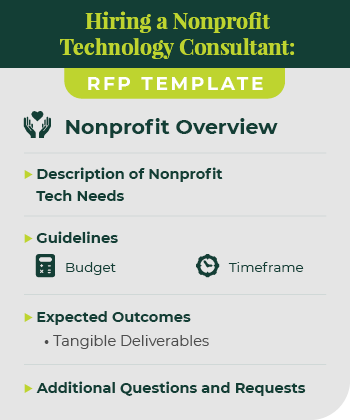
Oftentimes, nonprofits will create a request for proposal for a technology consultant. An RFP’s purpose is to communicate your nonprofit’s exact needs, your mission, the current context of your organization, and any relevant goals when working with a consultant. Asking for a proposal from a potential consultant partner is a great way for you to determine which candidate is best for you.
Your official RFP will be unique to your organization and dependent on a number of factors. However, there are definitely fundamental components that you should include if you want the best results. Make sure your nonprofit’s RFP has:
An overview of your organization, any relevant history, your mission, and a brief description of your donor base.
A description of your nonprofit tech needs.
The guidelines of the partnership, like the general budget and timeframe.
Expected outcomes for the partnership. You can even include a list of tangible deliverables.
Any questions or requests to the consultant team for additional information or background history.
Generally, your RFP should summarize your nonprofit’s needs in a concise way, giving the consultant the necessary information to propose a strategy to address them. The more focused your RFP is, the more effective the proposal will be!
Next, it’s time to compile a list of top candidates based on your research. Have your team rank their favorite consultants and then compare the rankings. If there are any clear frontrunners, that’s a clear indication of who might be best.
Once you’ve narrowed down your top picks and finalized your RFP, it’s time to reach out to them. This is the perfect time to introduce your organization and provide the consultant with your RFP. Make sure they know how and when to get back in touch.
6. Ask for references and follow up
Hiring a consultant is a lot like hiring staff. You need to make sure this is someone with whom you can build a relationship and work effectively with.
You and your team should review each of the proposals that you receive from your request. Consider all of the points made in the above steps when determining the best technology consultant for your nonprofit.
Don’t be afraid to also ask for references. Having a good idea of their relationship with other clients can inform you if their approach is right for you.
Once you know who you want to work with, make sure to follow up and start discussing the next steps!
Kanopi: Top Nonprofit Technology Consultant
Now more than ever, a nonprofit website is necessary to drive your online fundraising, meaningfully engage with supporters, and push you towards your mission. As a top partner for nonprofits, we at Kanopi Studios have helped develop over 150 active sites thanks to our continuous improvement team.
Website development, maintenance, and support come naturally to us. With our wide range of website services, we aim to work with you to make the most of your organization’s online presence. Even when your site is officially launched, our work is not done. We also provide a full website growth plan to ensure that your site is sustainable for as long as possible.
This website growth plans often includes:
how to increase conversions for your organization using your website;
CMS customization based on your unique situation;
a three to five-year breathing window (if operating on Drupal.)
Your own plan will be focused on your nonprofit’s unique technological needs. One of our most attractive draws is our complete approach to web design and continuous improvement. We know that small, incremental changes are more beneficial to your website’s health than large structural and system updates every couple of months.
Kanopi Nonprofit Tech Consulting Services
Our specific technology consulting services for your nonprofit include:
User-focused approach to strategy, design, and development.
Continuous improvement approach to website maintenance.
CMS development for Drupal, WordPress, or Mukurtu users with third-party integrations, key feature development, bug fixes, security patches, and more.
Extensive research to ensure that Kanopi understands the nonprofit’s goals, missions, and audience, improving your overall website UX.
Technical SEO optimization to keep your website high in the rankings for popular keywords.
Keeping up with relevant privacy laws and legislations, like whether California’s CPAA affects your organization.
User persona creation based on the research collected to map your supporters’ journeys once they visit your site. This also helps you attract site visitors and guide them to your targeted action.
Web design and content strategy development to align your website with your mission and your supporters’ needs.
User testing to ensure that all of the new features and tech strategy work together.
A full website growth plan to set your website up for success even once the partnership is over.
Staff augmentation by some of our most talented team members. We can provide extra hands when it comes to design or development tasks.
With our flexible and completely customized approach to tech consulting for your nonprofit, we go above and beyond for our clients. We don’t aim to just be consultants, but extensions of your team to ensure that your nonprofit website and CMS solution are doing all they can for your mission.
All of our team members are experts at what they do, with an average of 11 years of experience for both the Drupal and WordPress platforms. Explore our portfolio of nonprofit clients to see how we work and the great results we’ve helped create.
Contact us to see if our nonprofit technology consulting services meet your needs.
In 2019, total online nonprofit revenue grew by 10% and is predicted to only continue rising.
The online world is rich and full of information. From watching Netflix to exploring your Instagram feed to looking up dinner recipes, there seems to be no end to the internet content available.
With such a truly saturated space, your nonprofit needs a focused and comprehensive digital strategy if you want to reach supporters in meaningful ways and increase fundraising for your mission. Otherwise, your message can get buried and you risk losing sight of your goal.
The best digital nonprofit strategy likely spans multiple tools and marketing outlets. Creating this type of strategy can seem intimidating, especially if you’re not aware of how those tools and outlets support each other. This guide will dive deep into not only exactly what a digital nonprofit strategy is, but also how to best create one for your organization and some top tips to maximize those efforts.
Your nonprofit organization likely already depends on a few key tools to reach and engage your supporters. Your online donation platform facilitates gifts, your content management system (CMS) helps you create a beautifully designed website, and your marketing tools promote upcoming campaigns and engage donors.
However, it’s not enough to just have an arsenal of working tech. In fact, it takes careful planning and coordination to ensure that your tools and marketing strategies not only work together but also support each other. That’s where your digital nonprofit strategy comes in.
In simple terms, your digital nonprofit strategy is a focused plan that takes action on your fundraising and donor engagement goals through digital marketing methods.
Your overarching nonprofit goals, any budget constraints, and the technology you have all impact your digital strategy. This strategy then informs your online marketing efforts, with the two working together to maximize your nonprofit’s impact.
The common tools and marketing channels nonprofits use for their digital strategy include:
Nonprofit website – Your website is an increasingly important part of your nonprofit digital strategy. Your nonprofit site centralizes your online engagement and is likely the first place supporters will look when they want to find out more about your mission and any upcoming events or campaigns. It’s also where donors give! How you design your website and the content you add to it is crucial in your digital marketing efforts.
Online fundraising solution – This is how you accept online gifts from your supporters. It’s important that the tools you use accurately capture donor data and protect their sensitive information.
Email/text communications – Sending your supporters marketing materials, whether through email or text, is a popular way to get the word of an upcoming campaign out quickly. Use your communication tools to further relationships with donors by sending them personalized messages, donor thank you letters, and other targeted content.
Social media content – More and more, people are finding out about exciting events and nonprofit efforts through social media content. Because of its easy shareability, it’s a great way to not only reach your current supporters but also expand your audience. Encourage your followers to repost your content and thank them publicly for it on the platform!
One of the great things about your nonprofit digital strategy is that it naturally depends on tools and is generating valuable data. You can reference this data to continually refine your digital strategy and reach your target audience in more meaningful ways.
Steps To Creating A Nonprofit Digital Strategy
Your nonprofit digital strategy is unique to your organization, goals, and audience. These are some common steps that all nonprofit leaders will generally follow:
1. Determine overarching nonprofit goals
The first step to creating a successful nonprofit digital strategy is to establish your goals. This is the foundation of your entire strategy — each engagement and decision your nonprofit makes should be with your core goals in mind.
To begin brainstorming, consider these questions. Do you want to:
Raise a certain amount of money?
Increase awareness of your mission?
Grow your audience or base of supporters?
Increase a specific audience profile?
Generate new leads?
Once you have a general idea of the goals you want to accomplish, it’s time to make them actionable. Start by:
Identifying gaps in your current nonprofit digital strategy and consider how you might tackle them for your updated strategy.
Analyzing data in your database to find a quantifiable target for your overarching goals. For instance, look at past successful fundraising campaigns to gauge what a realistic goal may be this time around.
Brainstorming the technology that will play a role. What digital tools and marketing outlets will you be using?
Determining your goals is crucial to guide your nonprofit digital strategy and to provide insight into the choices you’ll make. Make sure your goals are specific and actionable, with clear targets and ways to measure success.
2. Define audience and web personas
If you want to make the most of your nonprofit digital strategy, you have to become familiar with the audience you’re trying to reach.
Start with reviewing your past data to learn more about how your existing audience engages with your nonprofit. Looking to your website, Google Analytics, CRM, and email marketing metrics can give you clues into the types of supporters that engage with you online and the content that they best respond to. For instance, if past donors heavily engaged with your Instagram posts, then that’s worth noting when creating your new digital strategy.
You can use this same data to create audience or web personas. Web personas are detailed profiles of your nonprofit’s target audience. Your organization will likely use more than one web persona to account for the different types of people who support your nonprofit. With a clearly defined target customer in mind, it’s much easier to tailor your digital content to speak directly to them.
To create web personas, you need to:
Research your audience. Some key audience details to take note of are age, location, income level, interests/activities, and donor behavior.
Document and organize information. If there are common data points, begin grouping them together to start creating a persona. This could by interests, needs, preferences, age group, corporate match eligibility, and more. How you segment your own supporters will depend on your unique organization and goals.
Bring personas to life. It’s easier to create targeted marketing content for a persona when you think of them as real people. Consider giving your audience personas a name with a visual/face that matches their general description.
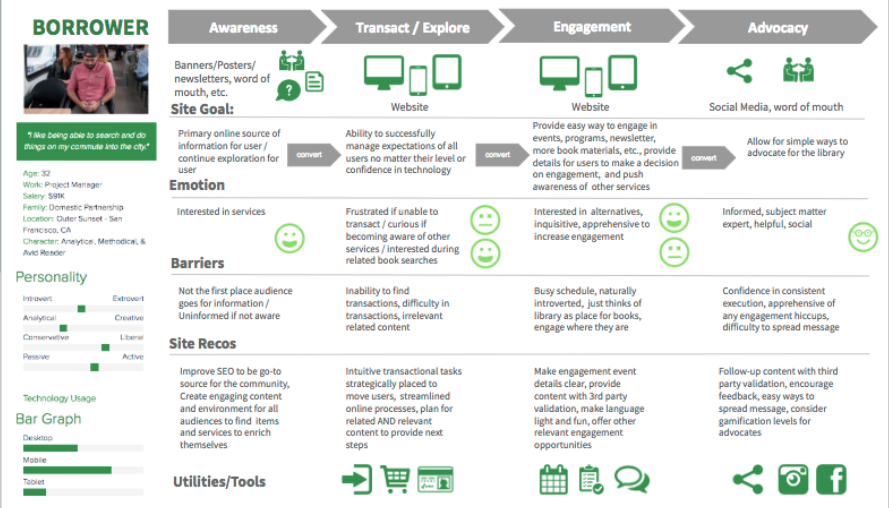
When creating web personas it’s helpful to get as detailed and specific as possible. The above image is an example of how you might organize the details in a web persona and determine the best way to connect with that audience. From there you can produce website content and other digital materials catering to each persona, creating a more engaging and personalized user experience.
3. Consider any constraints
As you develop your digital nonprofit strategy and set your goals, you also have to consider any constraints. While it’s nice to think that the sky’s the limit, it’s often unrealistic and can set your strategy up for failure.
These might not all apply to you, but here are some of the common constraints to keep in mind:
Financial budgets. Consider how much you can spend when it comes to developing, implementing, and executing new digital marketing and fundraising strategies.
Technological constraints. What is the current state of your organization’s technological infrastructure?
Timing. Is the timing of the digital strategy aimed towards a certain date, such as Giving Tuesday, or an anniversary?
Staffing and labor. Is your current team enough to handle everything when it comes to your digital nonprofit strategy? Remember, you can also turn to volunteers or even a tech consultant for additional staffing.
4. Invest in the necessary tools
If you’re looking to really bring your digital nonprofit strategy to the next level, you might have to invest in a new tool or platform. The internet is always changing, with new ways to engage online popping up all the time. It’s worth it to review your current processes and make sure that it’s meeting the needs of your growing nonprofit and supporters.
Today, nonprofits see their digital engagement with supporters occur in these locations:
Nonprofit website
Online marketing campaigns
Social media activity
Email marketing campaigns
Is your current nonprofit solution doing all it can for the above channels? Consider the gaps in your toolkit or ways your tools could work better together. For example, let’s say your digital nonprofit strategy’s focus is social media and peer-to-peer engagement. Do you have all of the necessary accounts and fundraising tools you need?
Or, let’s say you’re pushing corporate giving. Does your organization have the appropriate tools in place to promote matching gifts and drive more match requests to completion? This might mean embedding an employer search tool into your donation form for donors to research their eligibility or enabling autosubmission tools to let donors automatically submit requests to employers post-donation.
Often, nonprofits seek the help of a nonprofit technology consultant at this stage. The right consultant can perform an audit of your nonprofit’s current tech solution and make suggestions. If your website no longer supports your growing organization, a consultant can help upgrade your current CMS platform or optimize it with extensions.
5. Align your messaging and content
Now that you have concrete goals and the tools to carry them out, it’s time to think about your marketing content. This is the voice of your nonprofit digital strategy and helps tell your story.
When it comes to the story you want to tell, you not only have to be true to your mission but also figure out how to tell it in easily shareable and digestible bites. Short, but emotionally investing, stories are much more likely to resonate with supporters and reach new prospects via reposting and sharing.
The content of your digital strategy should address your audience first. Remember how we defined the audience and developed personas in an earlier step? This data can now be used to personalize the messaging and content to each persona group.
For instance, consider the persona of a completely new supporter. Let’s imagine them stumbling upon your nonprofit website. To immediately connect with them through your content, consider embedding a high-quality image within your homepage of the community you help, along with some quick stats about why they are in need. This can capture the visitor’s attention and introduce them to the most immediate goals for your organization.
6. Consider the channels you use
You already know that the most important digital channels to your nonprofit digital strategy are your website, social media accounts, email campaigns, and any other online advertising.
But how do those channels work together?
Your nonprofit website is the central hub for your digital strategy. It can connect supporters to your email list, social media accounts, and is where they can give online. Your website needs to be well designed, informative, valuable, and fully integrated with your other online fundraising and CRM platforms.
Social media platforms are great for reaching wide audiences. Consider where your current supporters are most active online and focus on those few platforms to promote any upcoming campaigns, advertise blog posts, and share fun, but relevant, videos or viral challenges. Try to post content that encourages supporters to share it with their own network.
Email marketing is an essential part of your nonprofit digital strategy. Not only can you use it to reach a wide number of people at once, but you can also even create segmented email lists to cater to more of your specific audience personas. Make sure to track open and response rates to determine which email outreach tactics work best.
Online advertising and other digital marketing strategies are important for increasing visibility. This can include online ads on different websites or links back to your organization from other reputable charity organizations. This can also involve SEO techniques that help boost the visibility of your website and blog posts during organic internet searches.
7. Measure campaign’s success
The last thing you need to determine before you start employing your digital nonprofit strategy is how you’re going to measure success. This should have been outlined during the goal-setting stage, but you can take it to the next level with some key tools.
For instance, use your nonprofit tech solution to compile reports and compare metrics based on the combined data from all of your tools and marketing channels. What types of data points and metrics should you look at? Here are some of the top ones:
Completed donations
Volunteer applications
Email subscriptions
Pledge signatures
Email open rates
Email response rates
Website bounce rate
Online donation page bounce rate
Compile reports on these metrics prior to the campaign and after. This gives you a direct look into how your digital nonprofit strategy impacted and helped your organization.
5 Tips to Make The Most Of Your Nonprofit Digital Strategy
The best digital nonprofit strategy is data-based and audience-centric. While how you make the most of your own strategy is dependant on your organization and mission, here are the top tips that can help all nonprofit leaders:
Optimize for a mobile experience. Did you know that roughly 1-in-5 American adults are “smart-phone only” users? At every touchpoint in your digital nonprofit strategy, it’s crucial that you consider how this may look on a mobile device. Otherwise, you’re missing out on some key opportunities.
Use email appeals. Even as new technology and platforms arise, email is still the best way to reach your supporters online. Make sure that donors are aware of your email list and embed forms for users to opt-in on your website, social media accounts, and other relevant places. And don’t be afraid of being aggressive with your send schedule; data shows that while people may grumble about getting too much email, they still open, read, and interact with it.
Personalize messaging. Whenever you can, you should make your marketing content and messaging as personalized as possible. This is most used in email marketing, but can be implemented with text messaging and even within your website. For instance, consider creating specific landing pages for each of your audience personas to better target their needs.
Inbound marketing techniques. This involves all the ways you make it easy for supporters to find your nonprofit and is much more subtle than outright contacting them. For instance, creating educational blog posts, hosting events, implementing search engine optimization, and sharing social media posts are key inbound ways to build brand awareness. The more people see and recognize your nonprofit, the more likely they want to find out more and support your cause. Remember to always include a link to your nonprofit website and other specific landing pages so that supporters know how to take action if inspired.
Partner with a nonprofit tech consultant. Sometimes, partnering with a nonprofit tech consultant is the best method of truly optimizing your digital strategy. The right agency should work closely with your organization to become familiar with your goals, your audience, and current technology solution. Then, they can provide their expertise when it comes to optimizing that solution for your nonprofit’s needs.
If you think a nonprofit technology consultant is what you need, explore our own services to see if Kanopi is right for you.
How Kanopi Can Optimize Your Nonprofit Digital Strategy
A crucial component of any nonprofit digital strategy is the website. It’s the centralizing factor of almost all of your online engagements and where donors can make gifts. As a top partner for nonprofits, we at Kanopi Studios have helped develop over 150 active sites.
When you partner with us, we don’t just develop, maintain, and support your nonprofit website (though we are experts at it!). We like to think of ourselves as extensions of your organization. With thorough research and data analysis, we dive deep into your unique online audience and provide specific suggestions based on carefully crafted web personas.
We take a continuous improvement approach to website maintenance, as smaller and consistent fixes tend to be more beneficial to your website health than large systematic updates that only happen once a year.
Along with this, we also provide a website growth plan to help you make the most of your online presence even when our partnership is over. We don’t just set up your website and hand over the reins — you’ll get specific and customized next steps as to how to increase conversions and further expand your online platform.
User persona creation to map your supporters’ journeys once they visit your site.
Staff augmentation to provide extra help when it comes to design or development tasks.
Don’t forget SEO! We gave a webinar about it.
Ready to Boost Your Website’s Performance Without the Overwhelm? A must-attend webinar for business owners, marketers, and anyone looking to make SEO work smarter, not harder. Lauren Chervinski gave a webinar focused on SEO called “SEO Survival Kit: 5 Steps to Thrive Now and in the AI Era .” (47 minutes)
If your site is already built on Drupal, or you’re considering switching to the platform, you’ve probably thought about what type of maintenance and support you’ll need to keep it up-to-date.
Whether it’s top-of-mind already, or you’re still looking for more information, this guide will help you understand why maintenance and support is an important part of your Drupal website strategy.
After a site’s been built, it still requires upkeep to ensure it operates effectively and meets your company objectives. Many businesses still take a “set it and forget it” approach when it comes to their sites, leaving them with outdated content, version issues, and vulnerable to security threats.
Whether you’re on D7 and you’re thinking about end-of-life planning, or you’ve moved to a newer Drupal version already, it’s important to factor in Drupal maintenance and support to ensure you’re keeping your site healthy.
Keeping your website updated with current information and reflecting any time-sensitive changes
Essential Drupal Maintenance and Support Tasks
To ensure you have a website that functions optimally, you need to continuously update it. All Drupal websites are made up of a main Drupal core and various modules that require occasional updates. If you don’t run these updates and patches as they come, your website can be vulnerable to security threats and may have bugs and other malfunctions. It’s important to mention, this is not a Drupal-only requirement. All website platforms have similar needs when it comes to long-term maintenance.
Tasks that are key to a good Drupal maintenance plan include:
Consistent site backups
Drupal core updates
Up-to-date themes and modules
Optimized caching
Optimized database
Security updates
Module, theme, and library version updates
Third-party integration support
Regression testing
Bug resolution
Infrastructure maintenance
Uptime monitoring and abnormality alerts
Emergency support
Minor feature improvements
Some companies opt to take on their Drupal maintenance and support in-house, but it can be a time consuming process if your team lacks the skill set required to keep it working optimally. Even if you have the expertise internally, you may want to explore the option of outsourcing your Drupal maintenance and support to an agency to off load the work and allow your teams to focus on other priorities.
Shameless plug: We love Drupal at Kanopi! And, we love creating custom Drupal website maintenance and support plans for our clients.
Drupal maintenance tips for different sectors
Maintaining your Drupal website requires slightly different considerations depending on which sector your organization belongs to. Let’s review a few of the top industries that use Drupal and ways to maintain these websites.
Healthcare
Healthcare websites must be accessible and usable for audiences of community members looking for accurate medical information and healthcare resources. Maintaining a healthcare website requires keeping the following considerations in mind:
Compliance with relevant legislation. The Health Insurance Portability and Accountability Act (HIPAA) and the Health Information Technology for Economic and Clinical Health Act (HITECH) are U.S. laws that protect private health information. To maintain compliance with these regulations, your healthcare website should leverage security measures like data encryption, strong passwords, and access controls.
Accessibility. Healthcare website users may have a variety of permanent or temporary disabilities that affect their ability to use your website. They may also be in an anxious state of mind and need a simple web experience that facilitates convenient access to information. With these considerations in mind, your healthcare website should follow the Web Content Accessibility Guidelines (WCAG) to create a streamlined experience for all users. Examples of these guidelines include adding alternative text for images, captions for videos, and using clear and consistent navigation.
Content updates. Refreshing your healthcare website’s content will help show visitors that your organization is on the cutting edge of new technologies and healthcare best practices. This includes updating your user personas based on new audience information, refreshing your user journeys, and updating your blog content with new research findings or testimonials.
Here at Kanopi, our healthcare support services go beyond the basics to ensure your site is a performant platform that continues to meet your goals over time. Review our work in the healthcare industry to get a sense of how we approach ongoing Drupal maintenance and support from a holistic perspective.
Nonprofit
The nonprofit website maintenance process focuses on ensuring your site remains a valuable resource for beneficiaries, donors, volunteers, corporate partners, and other community members. When updating a nonprofit website, pay special attention to the following elements:
User experience and pathways. Has your audience undergone any major changes to their demographics, giving motivations, or donation capacity? Update your user personas based on new information. Then, ensure your website’s pathways are tailored to each persona with clear calls to action (CTAs), navigation elements, and tailored content that speaks to their interests.
Donor information and payment processing security. To maintain donor trust, your website needs to securely process and store their payment information. Do you have a secure payment processor for your online donation page that makes the most of current security technologies and best practices? If not, consider switching to a new platform that can better meet your needs.
Content and messaging updates. Does your website still accurately reflect your nonprofit’s mission and scope? Does it leverage multimedia content like photos, videos, audio clips, and interactive content to tell a comprehensive, compelling story? Ensuring that your site has a cohesive message is key to recruiting new supporters and retaining existing ones.
Considering that 27% of nonprofits have experienced cyberattacks, it’s essential to continually review and update not only your payment processing system but also other security aspects of your website. This includes running Drupal core, module, and theme updates whenever new versions are ready.
Government
Many government websites turn to Drupal because of its top-tier security, scalability, and flexibility. To make the most of Drupal for government needs and maintain a secure government site, prioritize maintenance elements such as:
Compliance with federal and state regulations. Your government website must comply with relevant legislation at the state or federal level. For example,websites for federal agencies must be accessible, address consumer needs, comply with copyright laws, and follow other federal regulations.
Easily accessible information. Providing high-quality, easily accessible information relevant to incidents of national significance is another core requirement for government websites. The information must be objective, conveniently accessible, and delivered without unnecessary jargon.
Scalable network. Your website may have to adapt to traffic surges, especially during major national or international events when people are looking for official information. Ensure your site’s network can scale up to accommodate high traffic volumes and still deliver fast load speeds.
To deliver need-to-know information quickly, make sure your government website is also mobile-friendly. 92.3% of internet users access the web using mobile devices, meaning it’s critical to ensure your website is mobile-responsive and that all buttons and text are easy to read and tap on a mobile device.
Higher Education
Higher education web design trends subtly shift year after year as new generations of students seek information about colleges and universities they’re interested in attending. When refreshing your higher education website to maintain and support it over the years, optimize the following aspects:
Usability. Your site should have clear user journeys for each core audience group, whether prospective students, current students, parents, alumni, or faculty and staff. Ensure your site is mobile-friendly and has clear pathways for each segment to help them get their questions answered and find the resources they need.
Personalization. Website visitors increasingly seek personalized experiences tailored to their unique needs and interests. You can personalize the online experience your website provides by leveraging dynamic content that adapts to each user’s site behaviors. You can also allow visitors to create accounts on your website where they can access a personalized dashboard with relevant information, such as application deadlines.
Interactivity. Interactive content generates over 50% higher engagement than passive or static content. Your higher ed website will benefit from elements like interactive tours, infographics, timelines, or quizzes.
The top college websites grow and change along with their audiences. If you need support when refreshing your Drupal college website, it can be helpful to work with an experienced web design firm (like Kanopi!) that can support you at any stage of the website lifecycle.
Kanopi: The Best Drupal Website Maintenance and Support Service
By choosing an agency to manage your Drupal website maintenance and support, you gain a dedicated team with years of expertise. At Kanopi, we work with you closely to genuinely understand your business needs and create a plan to support it.
We do the ongoing work to stay updated with the latest industry trends and Drupal updates so we can be your trusted partner in the process. Kanopi also takes a continuous improvement and growth-driven approach with incremental improvements like navigation strategy and SEO fixes, so your site is always improving.
Features of Kanopi’s Drupal Maintenance Service
Here are some of our top Drupal maintenance and support services:
When you work with us, we also go way beyond the typical Drupal support and maintenance package. We provide creative support and ‘design on demand’, working with you on anything from user research, persona development, and conversion optimization to wireframing, mood boards, and style guides.