In North America, language translation on websites isn’t terribly common; most websites are in a single language representative of the large demographic of English speakers. But around the world, there is a much larger demand for website translation, and even within North America, there are regulations that businesses and organizations must follow which require translation options. Canada, for example, requires French in many cases due to its status as an official language. Fun fact: every single Canadian has spent breakfast reading both the English and French sides of the cereal box.
Up until 2019, a common method for adding easy translations to a website was to use the Google Translate Widget. It was easy, free, and automatically translated the page on the fly. But if you follow that link, you’ll notice this widget has been discontinued. But you do have other options!
Where to Get Free Website Translation
Hopefully, your primary website visitors use Chrome, Edge, or Safari as their main browsers. These browsers include native translation and will prompt the user to select their chosen language without any extra effort on your part as the website owner. Google does offer a translation extension that can be used on other browsers, such as Brave or Firefox. This means you do not need to make changes to your site to offer native translation.
At the moment, if your demographic primarily speaks a single language, this is probably the route you want to take, unless you have to meet government regulations due to the nature of your organization and the country you live in. In which case, then you want a more robust solution and a budget to match.
Where to Get Paid Website Translation
If your translation needs are greater, you will be looking at a paid service. And the cost will vary depending on the size of your site, the amount of content, and the service you use. The following are the solutions Kanopi has the most direct experience with.
Cloud Translation API
Google’s recommended alternative to their former Google Translate Widget is their cloud translation service, Cloud Translation API. It’s affordable and supported by both WordPress and Drupal with the appropriate extensions. There are a few plan options to choose from, letting you decide what’s best for your site. While a developer can help integrate this solution into your site, you will also need to create your own account for your company and work with the Cloud Translation API sales team to estimate your monthly costs.
Using a Translation Service and/or Premium Extensions
Short of having employees who can do all your translation, a translation service allows you to submit your source content with language requirements and receive translated copies in return. If you need to alter the content of your pages based on language, for example switching from imperial measurements to metric, this is likely something you want to consider.
The modules (Drupal) and plugins (WordPress) needed to make this work can help automate some of the actual translation. Yet depending on how many languages are supported, some organizations find they need at least one dedicated role to help manage and review these translation processes.
There’s a huge array of services to choose from, and the right solution will depend on your organization’s needs. Meanwhile, here are the premium extensions Kanopi recommends for adding language translation to your website.
TMGT allows you to work with a variety of translation services depending on what Drupal version your site is on. Price will vary with your choice of service.
Lingotek is another integration that Kanopi has used frequently. It’s a combination of an extension and translation service. Price will vary according to your needs.
Enterprise-level companies require reliable and scalable websites to grow and compete with other large organizations in the digital era. Often, enterprise leaders turn to expensive and complicated customized web solutions to host their sites.
WordPress has evolved into a powerful and flexible solution to handle complex enterprise needs. Now, well-known brands like Facebook, Microsoft, and Spotify run their websites using WordPress.
In this guide, we’ll walk through the following sections to give you a better sense of how WordPress for Enterprise can benefit your organization:
Let’s start by answering some of the most frequently asked questions about WordPress for Enterprise.
WordPress for Enterprise: FAQs
What does WordPress for Enterprise mean?
WordPress for Enterprise is the application of the WordPress platform to meet the needs of large businesses. These organizations are usually multinational corporations with multiple domains and thousands of users accessing their sites at once.
According to WordPress, their enterprise solutions are used “wherever there’s a requirement for flexible, cost-effective, and secure creation and distribution of content.” Media and publishing organizations, E-commerce sites, and other large-scale businesses use this solution for their online marketing, communication, and commerce needs.
What features do enterprise websites need?
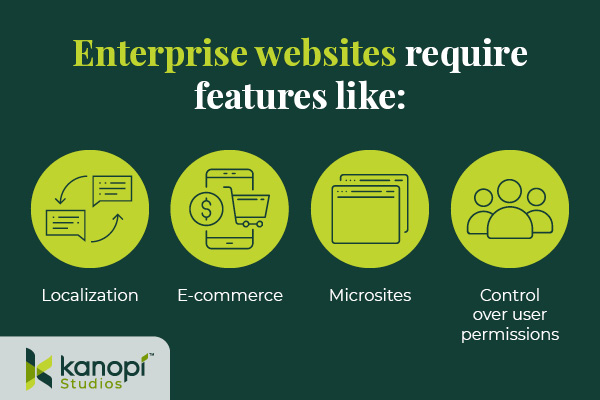
Enterprise websites require the ability to handle significant traffic and user engagement. Often, these sites will need to support features like:
Localization. Localization requires adjusting site content to the cultural and linguistic norms and context of different target audiences. Localization involves translating text and adjusting images and text to ensure all website elements are culturally appropriate and relevant. This is especially important for organizations that offer services for an international audience, such as airports or global health organizations.
E-commerce. Some enterprise websites require e-commerce functionality that allows visitors to browse products or services and complete secure transactions. This involves an online storefront and a secure payment processor with multiple payment options.
Microsites. A microsite is an individual web page or site made to function as a separate entity while still being a part of your existing website. Some corporations use microsites to promote sub-brands or special events.
Control over user permissions. Enterprise websites need to only allow specific users permission to access certain features. This promotes greater security across the organization.
Enterprise websites must connect with a diverse, often global audience. These features make it easier for marketing professionals to promote their businesses while maintaining reliable security and other core features.
What’s better for an enterprise — WordPress or Drupal?
As you search for a new CMS, you might also come across Drupal as a top option. Drupal is another open-source CMS that organizations with complex needs, like enterprises and government institutions, use to create robust and secure websites.
Drupal also offers multilingual functionality, security, and control over user permissions. In addition, Drupal has strong accessibility for both back- and front-end users. The release of Drupal 10 in 2022 unveiled the platform’s most modern, accessible editing experience yet, along with a host of additional advanced features. When choosing between Drupal and WordPress, consider your corporation’s unique needs and what CMS features you will prioritize. Explore our guide to Drupal vs. WordPress to learn more about the primary differences between these platforms and help determine which CMS is right for your enterprise.
Common WordPress for Enterprise Misconceptions
Due to the early days when it was primarily a blogging platform, several misconceptions about WordPress’s capabilities have prevailed over time. Here are a few common misunderstandings:
WordPress is only for blogs and is not a true CMS.
As mentioned, WordPress powers 43% of all websites (including websites for some of the biggest brands today), meaning it can do much more than just blogging.
WordPress is not great for security.
Third-party plugins may create a little bit of risk, but WordPress’s core system is incredibly safe.WordPress has also invested in fast security releases, with a team of 50 experts managing them. Even whitehouse.gov is on WordPress, showing how far the platform has come in regard to security.
Open source is not reliable at the enterprise level.
Enterprise-level organizations can safely use an open-source CMS. Massive sites like Facebook and Google use open-source systems to power their tech.
WordPress doesn’t offer a lot of support.
WordPress’ extensive open-source community facilitates access to tons of contributors and developers that create new plugins, themes, and features every day. As a well-known and popularly-used CMS, WordPress has plenty of support from millions of users and experienced developers.
12 Benefits of WordPress for Enterprise
What’s the true story about what WordPress can do for your enterprise website? Let’s take a look at the top benefits of WordPress for enterprise:
1. High ROI
WordPress’s return on investment is very high compared to proprietary systems, especially in terms of the total cost of ownership (WordPress is free!) and implementation speed. Building and testing new features can be completed in just a few weeks because of easy access to themes and plugins.
2. Strong security
As mentioned, WordPress offers consistent updates and security releases to protect users from common hacks. You can also look to additional security plugins to further protect your site.
3. SEO friendly
Search engine optimization (SEO) is crucial to help boost the visibility of your enterprise website across search engine results pages. WordPress offers built-in SEO-friendly features, such as optimized URL structures and category and tag options that help search engines better understand your website’s structure. Plus, using an SEO plugin like Yoast, All in One SEO, or SEOPress can make the optimization process even simpler.
4. Access to integrations
Because WordPress is so popular, there is already a vast number of third-party tools that are ready to integrate with your system. This means your enterprise business can quickly add features and make site updates without needing to invest in expensive custom solutions. Besides the many free tools, enterprise businesses can also invest in premium paid plugins with added support!
5. Easy to use
Once your site is up and running, the WordPress platform is perfect for non-technical users. The Block Editor (also known as the Gutenberg editor) offers an intuitive backend experience that arranges content into a series of blocks for text, images, videos, and other page elements. This ensures that any of your enterprise businesses’ team members can jump in and make necessary changes.
If you need help along the way with managing your content, there are plenty of resources available—start with Kanopi’s webinar on the subject!
6. Open-source community
One of the most valuable features of WordPress is the open-source community supporting its development. These contributors create new plugins, themes, security patches, and features to help WordPress users customize their sites to their needs. This community is always growing and evolving.
7. Accessible
WordPress is devoted to creating accessible front- and back-end user interfaces. Their Accessibility Team runs ongoing audits and tests on themes and functionality using assistive technologies. Also, any code built into the WordPress core system must meet the Web Content Accessibility Guidelines version 2.1 level AA.
8. Scalable
WordPress has made great strides when it comes to improving website performance. You can ensure your website is prepared to handle a large amount of traffic by making use of these WordPress elements:
Keep your code clean and only invest in high-quality, lightweight plugins and themes.
Use a page caching tool to help improve page load speed.
Select an enterprise WordPress host that emphasizes scalability.
Scalability is necessary to ensure that your enterprise website can manage a large volume of traffic efficiently.
9. Streamlined media management
Enterprise businesses use many online media types such as documents, visual media like photos and videos, and audio files. With WordPress, you can upload and manage just about any media type in a streamlined and intuitive manner. Easily manage media on the backend and edit it visually on the front end.
10. User management and multisite domains
Your enterprise website may need to run a network of subdomains or microsites and give access to only a select number of team members. WordPress supports multisite usage with Super Admins, a user role that can set up networks and control user permissions.
11. International capabilities
Your enterprise website must be scalable on an international level. WordPress is available in over 100 languages, ensuring you can effectively reach your global audience.
12. Flexible and agile
This is the true differentiator between a proprietary and open-source system. Your enterprise business’ next goal is always going to be starting a new project, making processes more efficient, or releasing updates, all without compromising quality.
That’s why you need a system with high agility, like WordPress. With easy collaboration between content editors and developers, the WordPress system allows your team to build and expand website features quickly without breaking the bank.
Enterprise WordPress Development Services
Do you have a large-scale project in mind? Or do you already have a built-out enterprise-grade website and just need support?
Consider working with a WordPress development expert like Kanopi. Our professionals work closely with your enterprise business to understand your unique needs and strategize how your WordPress website can best support them.
Plus, Kanopi takes a continuous improvement approach to ensure that your site is always improving over time — perfect for a quickly-growing enterprise business.
Plus, we have a dedicated enterprise support tier customized to your business needs, ensuring that your website stays updated and viable over the long term.
WordPress is a flexible, scalable, reliable CMS that can take your enterprise website to the next level. If you’re looking to upgrade your CMS or switch to WordPress, the recent release of WordPress 6.1 and the improvements that come with it mean that it’s a great time to get on board.
Looking for more information about what WordPress can do for your business? Start here:
The Top WordPress & Drupal Trends for 2023. WordPress is making significant strides toward greater performance, accessibility, and personalization. Explore more WordPress (and Drupal) trends with this guide.
Kanopi’s WordPress Design & Development Projects. Interested in what a development agency like Kanopi can do for your enterprise website? Check out examples of our WordPress development projects.
The What & How of CSS Theming: Common Concerns & Helpful Tools
Kate Walsh
When CSS was first introduced, it was straightforward. There weren’t any CSS variables, there were no preprocessors. The world was simple, and we were so young! Developers added colors to a site with a hex code (or rgba if they were very lucky and cutting edge!), and those colors were what they were. If a developer wanted to implement a dark and light mode — they often needed to create two completely separate stylesheets and swap the site’s body classes out with JavaScript. Implementing multiple themes on a single site was cumbersome, hefty, and required a lot of additional maintenance.
With the introduction of CSS variables and other color and theme-related CSS features, custom CSS theming has become much easier. When we talk about CSS theming, we’re talking about changing a site based on a user-provided context that lets us still fully control the experience. There is still some element of JavaScript required to swap out the body classes when using a toggle to allow the user to use their preferred theme on your site, but no longer do you have to maintain two separate stylesheets. Native CSS variables make theme swapping much easier than it once was. CSS theming is an excellent way to allow users and developers to dictate website settings easily.
Ways to Use CSS Theming
Dark/Light Mode
Dark and light modes are one awesome, commonplace way to use CSS theming. Users can set their preferred dark or light mode via system settings, browser settings, or even special applications to modify user settings. You can make your entire website respect the user’s settings — which is always nice!
Branding
Say you’re working on a website that features a few similar products, like breakfast cereals. Each product uses the same overarching information for its brand — just with different colors and fonts. Without rewriting huge swathes of CSS for each different product, you can use CSS theming and perhaps a body class in your HTML to provide totally different branded looks for your products.
Accessibility
A combination of prefers-contrast or forced-colors media queries with CSS theming can help make your website more accessible. You can make your site look even better and more accessible to users with these preferences.
Common Considerations Introduced by CSS Theming
CSS theming is a valuable tool to have in your developer toolkit, but it does add some complexities you’ll need to consider during implementation.
Respecting User Settings
As mentioned elsewhere, it’s important to respect user settings where possible. It burns the eyes a bit when you’ve got everything set to shades of black (charcoal, onyx, obsidian, jet), and you suddenly land on a page in blinding, brilliant white — or vice versa.
Images
Images are important when theming. Whether it’s an icon where the font color is adjustable, an SVG where the fill color is adjustable, or a regular old JPG, PNG, or WEBP image — you will have to adjust all of the images on your website. A common example is a client logo reel — you’ll have to store two copies (a dark mode compatible and a light mode compatible) in most instances. If you’re lucky enough to have a client logo reel consisting entirely of SVGs, you’ll be able to use CSS to swap the fill. Most of us aren’t so blessed, however. On a site with tons of images — duplication of image files can even become a storage concern if the images are poorly optimized.
Increased QA Time
When you implement CSS theming, the time required to perform quality assurance checks on the work increases. The same pages must be checked multiple times when using dark and light modes. Instructions for swapping dark and light mode must be written so that less-technical QA agents understand the necessary steps and how to perform them. It’s important to bake these increases into the budget and turnaround time when working with CSS theming.
FART
Haha, right? Not so much. The “Flash of inAccurate coloR Theme,” or FART for short, occurs when you have improperly digested your CSS selectors a momentary flash of the incorrect color scheme. For example, say your user prefers to use a dark theme — but your website defaults to a light theme before detecting and swapping to the user-specified preference. FART can be handled in several different ways and is an important consideration when theming. Properly-handled rendering makes your site look that much more polished and awesome.
Tools to Help You Theme
CSS Variables (+ JavaScript)
CSS variables are key to effectively theming with CSS. CSS variables enable you to swap out various CSS properties throughout your custom theme. Variables have been widely supported in modern browsers since approximately 2017, so 2023 is a great (and safe) time to start using them.
Variables enable flexibility in your theme and stylesheet. They function similarly to preprocessor-based variables, with a slightly different syntax and a key difference: CSS variables can be updated live. Preprocessors compile your variables, so once you’ve set a variable — that’s that; it can’t be updated or changed within the stylesheet. Native CSS variables can be scoped to different CSS classes, and function more like CSS properties.
With a little extra JavaScript toggle magic, the brand-light and brand-dark colors can be added to any part of the page. For a global theme, those brand classes can be added to the html tag or the CSS :root selector. For more specific parts of the page, those classes can be added to individual parts and components.
Media Features & CSS Properties
prefers-color-scheme is a CSS media feature “used to detect if a user has requested light or dark color themes” (MDN). prefers-contrast is similar, used to “detect whether the user has requested the web content to be presented with a lower or higher contrast.” These color scheme preferences work like any standard @media query used to target browsers by screen size — they’re just working off of color and contrast preferences instead of size.
Color scheme is the user setting engaged either in system settings or occasionally the browser settings. This allows you to make your CSS more specific when the user prefers a light or a dark mode, or a high-contrast theme.
These media features are important for accessibility work, which helps users with low or no sight when browsing your website. When you make your site look even better for these users, you’re going the extra mile in terms of accessibility – always a worthwhile endeavor!
When drilling down to specific elements, the color-scheme property can assist. This property allows an element to indicate which color schemes it can be rendered in. This property is especially useful when styling default form controls; custom form controls such as select or radio buttons can be a bit of a tangle under normal circumstances. The color-scheme property and default form elements make that process slightly less painful.
Theming Specific Libraries, Tools, and Practices
https://toggles.dev/ provides some amazing premade animated toggles for light and dark modes. Lightbulbs, suns and moons, and other cute icons galore!
Various front-end libraries have implemented theming-specific tools. It’s always a good idea to check out what the big players are implementing. Bootstrap and Tailwind both have some great ideas and inspiration for CSS theming, with the benefit of widespread usage. It’s great when someone else runs into your problem before you do!
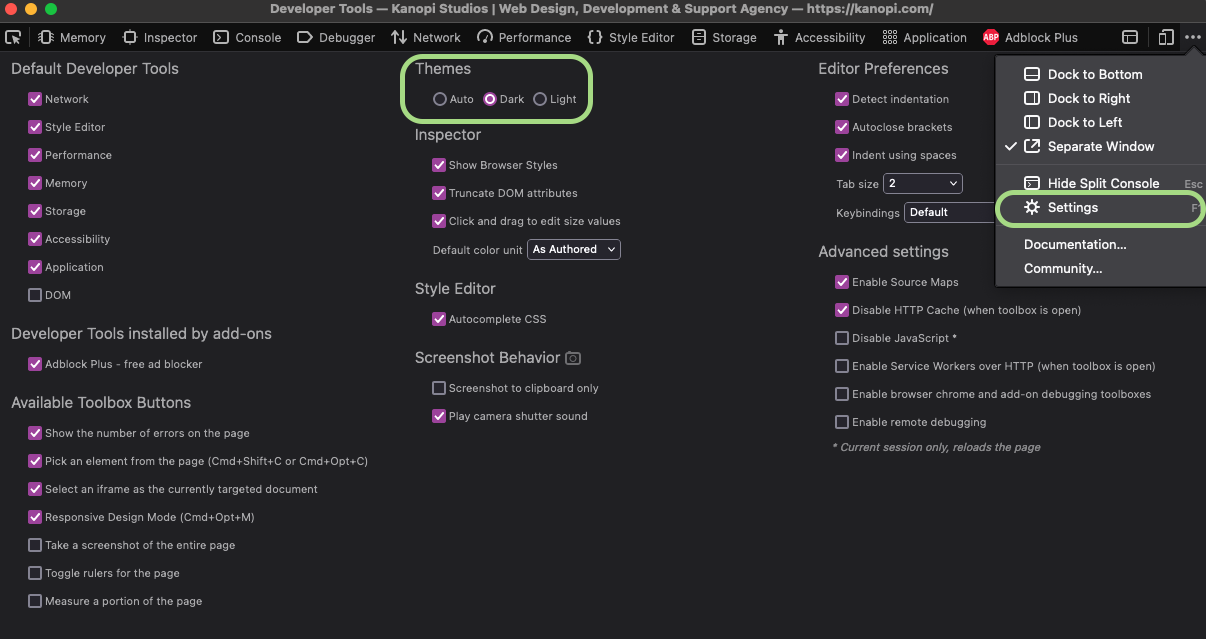
For testing and QA purposes, you can swap between dark and light modes in various ways. Your computer’s global system settings will allow easy swapping between dark and light modes. However, if you don’t want to go that far — the developer tools in various browsers often also allow you to switch between light and dark modes. Here’s a screenshot showing how to do this in Firefox.
Firefox interface shows how to switch between light and dark modes.
Summing Up CSS Theming
CSS theming is a new paradigm, with new concerns and considerations. However, there is a lot of power and flexibility that comes along with CSS theming. It’s a worthwhile endeavor to get familiar with CSS theming and the associated new CSS features such as variables, media features, and theming-specific CSS properties. There are plenty of new tools and libraries out there to help you gain fast proficiency with CSS theming.
Using Gutenberg to Elevate the WordPress Editing Experience
Faye Polson
“Gutenberg” is the name given to the movable block editor adopted by WordPress back in 2018, harkening back to Johannes Gutenberg who invented one of the early European movable-type printing presses. Reusable individual letters that could be moved, and reused, eventually lead to typography and fonts as we know them.
Of course, nowadays we have printing technology that Johannes could not have even imagined, let alone believe that an entire online editing experience would be named after him.
But what exactly is Gutenberg?
Most of us are familiar with editing experiences, such as typing in an email, Microsoft Word, or Google Docs. These experiences are mostly similar; you have a blank space to type and buttons for alignment, styles, fonts, sizes, etc. This has been a common website editing interface for decades, but it is both creatively and logistically restricting.
If you wanted to move a section from one location to another, you’d have to copy and paste it, then delete the original. Trying to completely rearrange your content would be frustrating and time consuming. Or if you wanted some snappy responsive columns, you would have to switch to view the document code and write HTML and CSS.
Gutenberg is WordPress’s native “drag and drop” site builder. It solves those problems by allowing you to create your content in blocks designed for the specific content you’re using. There are over 90 blocks to choose from. You can play around with all of these options on the Gutenberg demo.
This flexibility allows content editors to populate their website with more complex content, and then shuffle it around within the layout. In fact, there are many themes that lean so heavily on Gutenberg that you wouldn’t need a developer at all. With the introduction of Full Site Editing, nearly anyone could put together a working website that’s beautiful too.
Why use a web developer at all?
While there are many themes that do leverage everything Gutenberg has to offer (those 90+ blocks), that’s not the case for most of them. And for existing sites with legacy themes, there is little chance that they are able to take advantage of this newer technology. Out-of-the-box websites are useful and serve a purpose but when you need custom design, structure, and functionality, you need to call in professionals.
Another struggle with drag-and-drop sites is the global element. If you have 30 headings on your website and decide you want to change them all from green to blue, you’d need to go through and edit the color settings on all 30 headings one by one. While there are some global elements, the vast majority of your page content will require manual editing. This can be incredibly time-consuming.
Native Gutenberg blocks can be unexpectedly limiting. For example, if you desire rounded borders on all media but the block you’re using doesn’t have support for a border-radius, you’d need a developer to create and apply custom classes. Keep going down that path and suddenly you can have a site full of custom classes and blocks that never look the same from one to another. This can be an editing nightmare and require excess documentation to keep it all straight. Suddenly that easy drag-and-drop editing experience requires a higher level of skill.
There’s a better way to customize.
Kanopi approaches Gutenberg blocks from the perspective of creating consistent and branded content. One of the big advantages of Gutenberg is that we can create new blocks and apply our own styles and structure. This allows us to create blocks that can hold and display any type of content within a defined set of rules. Instead of pouring budget into styling 90+ blocks (and their hundreds of combinations) that may never be needed, our team focuses on creating custom content solutions for our clients.
This “best of both worlds” approach lets site editors continue to use the ease of Gutenberg’s drag-and-drop experience, while also creating consistent, branded content. As a website moves from its initial build into support, these blocks can be expanded upon and updated globally (and thoughtfully). Even older sites without any Gutenberg usage can be configured to allow for this type of block expansion without disrupting the existing content.
Gutenberg is here to stay.
It’s clear that WordPress is leaning in on the use of Gutenberg and the Full Site Editing implemented in the past year. Meanwhile, Advanced Custom Fields Pro (the preferred and recommended plugin for enhancing WordPress’s content management) is keeping pace to ensure custom block creation works seamlessly with every stride made. Whether using an out of the box theme, or having an agency custom building according to your organization’s needs, Gutenberg is a phenomenal solution with room to grow in many directions.
A new year means a new look at what’s on the horizon. Kanopi is always looking ahead to what is happening in the development space, so we asked our team to give their thoughts on what’s ahead for next year.
We’ve split this into three sections:
The top WordPress trends for 2023
The top Drupal trends for 2023
The top website development trends (regardless of CMS) for 2023
Let’s start with WordPress …
Top WordPress trends for 2023
New WordPress, new theme, same direction
With the release of WordPress 6.1, Twenty Twenty-Three has already arrived; the new default theme is called (numerically incremented, as usual) Twenty Twenty-Three (TT3). What hasn’t changed is the focus on Full Site Editing (FSE). In fact, TT3 continues with the trend of moving towards FSE. Block patterns are prevalent and variations are implemented theme-wide to allow for a huge variety of customizations (10 theme style variations!) without having to touch any code whatsoever.
What else is new in WordPress 6.1
WordPress 6.1 released on November 2nd with many improvements with much of the focus placed on accessibility and performance. Both of these areas were Identified by developers and the community (after heavy criticism) as needing more love as the Gutenberg block editor received the lion’s share of updates in recent releases.
Happily, many needed improvements and fixes were implemented in this release. Below are links to comprehensive lists of the updates, including:
Block Patterns will continue to be used and will become ubiquitous across any block-based theme.
Top Drupal trends for 2023
Drupal continues its rapid development pace, adding more secure and performant code releasing Drupal 10 on the backbone of Symfony 6 and PHP 8.1.
Upgrading from Drupal 9 to Drupal 10 is easy using the drupal-rector tool, which looks for deprecated code. There are also a large number of contributed modules that already have been ported. So if you’re on D9, moving to D10 should be easy.
Drupal 10 features include:
The new, modern Claro administration theme, which provides a better administration experience.
Olivero default theme, which is the new default front-end theme for Drupal with a modernized look and feel
CKEditor 5 which provides a much better authoring experience and more modern editing.
Modern JavaScript components to replace some uses of jQuery for better performance.
Theme Starterkit tools for bespoke theme creation.
But as the Drupal crew is ever working hard to keep evolving, the work has already begun to be included in Drupal 11. The following core initiatives are being worked on in the contrib community, and will be merged into core when they are ready:
Project Browser: this will allow ambitious site builders to discover and install modules and theme from their admin screens.
Drupal Recipes: allows site builders to install and configure groups of modules to achieve features such as an event section, or a blog.
Automated Updates in Core.
A more streamlined Core: the Great Module Migration continues moving lesser used modules from core to the contrib community for a smaller Drupal core.
General website trends
Performance and Speed
As we wrote in a blog post about Core Web Vitals earlier this year, research shows the chance of a bounce increases by 32% when a page load time takes one to three seconds, and by 90% when the page load time takes up to five seconds. Speed matters! Make sure to take a look at your Core Web Vitals.
Accessibility
This is a drum that Kanopi beats frequently, but that’s because it’s really that critical. 26% of US adults identify as being permanently disabled in some way. If you count those with temporary disabilities like a broken wrist, or situational disabilities like being on a noisy subway, the number climbs considerably. That’s a huge percentage of people that feel alienated when a site isn’t accessible to them. There are many ways to make a site accessible, including adding captions and alt text to images and videos, ensuring proper contrast, and entering content with a correct heading structure. Make 2023 the year you decide to make your site as accessible as possible.
Thumb-Friendly Mobile Navigation
In 2022, 60% of all website traffic came via mobile devices, so a mobile-first approach is imperative. This also means that all critical elements on a website must be within easy reach of a user’s thumbs, including the navigation. Think about what’s really necessary on each page and what can get edited. Focus on a vertical orientation rather than a landscape one, and what functions need to be done on your site with a touchscreen.
Artificial Intelligence (AI and Machine Learning (ML)
2023 should be the year when companies will move forward with implementing both of these, if they haven’t already (and our Creative team sees this trend on the design and content side as well). On top of improving productivity and using data more efficiently, AI doesn’t have to prove its usefulness anymore. Plus, it’s become quite accessible to work with as most cloud platforms offer it as a plug-and-play service.
AI enables machines to learn from their experiences and make decisions without human intervention. This technology can be used to automate mundane tasks such as data entry or content generation, allowing developers to spend more time focusing on more complex problems. For example, there are plugins that can help you create better content for your website by using artificial intelligence.
ML is also being used in web development, enabling sites to better understand user intent and behavior so they can deliver personalized experiences tailored just for them. For example, think about how chatbots can deliver a personalized experience with your audiences.
Speaking of …
Personalization
It’s impossible to talk about future website trends without discussing personalization. The days of one-size-fits-all websites are quickly coming to an end as organizations look for ways to tailor their websites to individual users’ needs, wants, and interests. Consider that Gen Z has grown up with some degree of personalization and expects it, and apps such as Spotify and Netflix have already conditioned us to expect some personalized recommendations on what we hear and watch. (Personalization is also critical in content strategy and web design for 2023.)
While it initially felt uncomfortable or intrusive when platforms knew personal things about us, it’s now become a more mainstream experience that helps users get what they want or need faster.
A few examples:
Geolocation: location services can help your audiences find events local to them.
Product recommendation: a great example of online shopping is Patagonia. After filling out a questionnaire about sizing, the site predicts what size would be best on every single product page. The algorithm bases itself on the information a user shares but also the reviews it receives from similar users who made the purchase.
Personalized newsletter: This is tangential to your website, but why ignore this critical marketing tool that leads readers to your website? It’s become a common practice to send a newsletter with content specific to your audience’s needs (and there’s lots of data to back up the power of personalized newsletters). Split up your newsletters by audience so you are speaking to their goals, then direct them to the content on your website so they do the conversions you want.
Voice Interfaces & Voice Search Optimization
Voice interfaces are becoming increasingly popular as more people turn to voice assistants such as Siri or Alexa for help with their online searches. To stay ahead of the curve, web developers need to start optimizing their sites for voice search by ensuring that all content is written in conversational language and utilizing structured data markup tools like Schema.org or Google’s Structured Data Markup Helper tool. This will ensure that your content is easily readable by search engines so that it shows up when people search via voice assistants.
Small bites can create big wins.
With these new developments come exciting opportunities for organizations looking to stay ahead of the competition. While some of these trends might not seem achievable or even necessary for your organization to implement at a large scale, even implementing some in smaller ways can garner big results. CMOs and marketing managers should keep an eye on these emerging trends so they can capitalize on them before their competitors do!
And as always, if you need any help with your websites in 2023, Kanopi is here to assist. Contact us anytime.
The next major release of Drupal is just around the corner: December 2022 is the target release date.
Drupal 10 will bring with it some significant changes that could potentially affect your website. As such, it’s important to be prepared and take the necessary steps to ensure a smooth transition. There are some major benefits to upgrading to Drupal 10, including improved security, performance, and accessibility. And, because Drupal 10 uses the same overall structure as Drupal 9, the transition shouldn’t be too difficult for most developers.
But what does this mean for CMOs and marketing managers who are using or considering using Drupal? Let’s review what you need to do to get ready for Drupal 10 and make sure your website is up to date.
What’s New in Drupal 10?
Drupal 10 includes several major new features and improvements, including:
A new default administration theme called Claro that is mobile-responsive and optimized for accessibility, replacing D7 which was over 10 years old.
A new default frontend theme called Olivero that replaces Bartik.
Initial upgrades to CKEditor from version 4 to version 5, introducing more modern content editing functionality and a better author experience.
Ongoing modernization of the JavaScript stack, replacing the large jQuery library with smaller, more performant solutions
Leveraging our technology partner’s improvements and upgrading from Symfony 4 to Symfony 6 and making the minimum version of PHP 8.1 to keep the whole stack secure and more performant.
These changes will be welcome additions that improve the overall experience for both users and administrators.
Preparing for the Upgrade
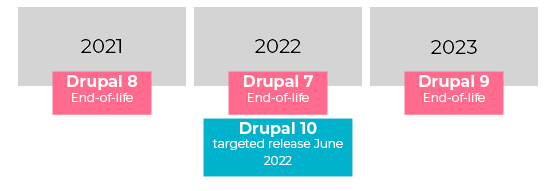
If you’re currently on Drupal 7 (as almost 54% of Drupal sites still are), you have some time as end of life is scheduled for November 2023. But it is recommended to upgrade to 9 as soon as possible; by upgrading, you ensure your website stays updated with the latest features and security measures. Our guide to transitioning from Drupal 7 to 9 provides additional insight into this process, or you can go straight to D10.
If you’re currently on Drupal 8, it’s time to upgrade asap. D8 was end of life in November 2021, and most Drupal sites have upgraded. You need to as well.
If you’re currently using Drupal 9, congrats! Because Drupal 10 uses the same overall structure as Drupal 9, the transition shouldn’t be too difficult for most developers. But here are a few steps to consider:
1) Check Your Version of PHP
One of the first things you’ll need to do is check what version of PHP your website is running on. As of Drupal 10, the minimum supported version of PHP will be 8.1. You can check your website’s PHP version by logging into your hosting account and checking the settings in your control panel. If you’re not sure how to do this, contact your hosting provider for assistance.
2) Update Your Modules and Themes
It’s important to make sure that all of the modules and themes on your website are up to date. While many modules and themes are already compatible with Drupal 10, there may be some that aren’t. Checking for updates is easy enough: head over to the “Updates” page in your Drupal admin panel and install any available updates. Once you’ve done this, it’s a good idea to clear your website’s cache so that the changes can take effect.
3) Test, Test, Test
Once you’ve updated your website for Drupal 10, it’s important to test everything thoroughly before taking your site live. The Kanopi support team uses tools like PHPstan and Drupal Rector to perform automated code checks to verify your codebase works as expected on the upgraded versions on PHP, Symfony, and Drupal.
We also recommend manually testing. This includes testing all forms, pages, links, etc. to ensure that they’re working as intended. It’s always better to catch any potential problems before they cause issues for your live website visitors.
You have time to upgrade.
While December is fast-approaching, upgrading to Drupal 10 is a decision that should be made on a case-by-case basis. If your website or application is already running smoothly on Drupal 9 (or earlier), there may not be enough incentive to justify the time and expense to do this immediately. However, if you’re starting from scratch or looking for an excuse to make a big change, migrating to Drupal 10 could be the perfect opportunity.
Uh oh. It’s come to your attention that your website needs to be accessible.
Whether it’s the Americans with Disabilities Act (ADA) and Section 508, the Accessible Canada Act, or the governing legislation in your area, the reality is your site has to be compliant with WCAG 2.1 Level AA guidelines or risk legal ramifications.
What is website accessibility, also known as A11y? Accessibility is “the quality of being able to be reached,” or, basically the idea that every part of your website can be accessed and used by anyone. So how do you achieve that? Well, on one hand you can spend the time, effort, and money having your website audited and remediated, then set up an ongoing process to ensure your site stays current with accessibility needs and requirements. Or you can install an accessibility overlay and call it a day.
The question is, do you feel lucky?
First, what is an accessibility overlay?
Accessibility overlays (including widgets and toolbars) are automated software solutions that serve third-party scripts intended to resolve accessibility problems on websites and applications.
Firstly, they usually apply a series of controls to a website that allow the user to adjust aspects of their viewing experience, such as colors, text size, and contrast.
Secondly, they use JavaScript to alter the code and content of your website on the fly to try and make up for existing accessibility errors with automated “repairs.”
Thirdly, they are really, really, really, really, really, really bad.
Wait, what? Why are accessibility overlays so bad?
Overlays may run into conflicts with user privacy.
Because users of assistive technologies often have specific settings on their devices and browsers, some overlays automatically detect those settings and attempt to utilize them for their configuration. To maintain this, it stores a cookie on the user’s machine, saving info about their disability settings without any kind of opt-in from the user.
To make matters worse, any other website using the same overlay can access that same cookie to apply the same configuration. Information about an individual’s disability is incredibly personal, and this is essentially a privacy breach the user never opted into. Having an accessibility overlay on your site could risk noncompliance with GDPR, CCPA, and the like.
They increase your site’s security risk.
Anytime you load a third-party script onto your site, you are putting part of your site’s safety in the hands of the vendor. If their server is insecure, then you could be directly impacted.
Your website performance will suffer.
This is a tale as old as time; the longer it takes for your site to load, the more likely it is that the user is going to leave. JavaScript always increases page load, and third-party scripts are even worse because it’s the vendor’s server dictating the speed of that script. It’s a known fact that Google and other high priority search engines monitor site speed and that metric is utilized in your SEO ranking. Slowing down your site with an accessibility overlay will directly impact your search ranking with Google.
Website creators may become reliant on them.
Overlays are insufficient bandaids to problems that designers and developers will continue to make if they are not required to solve them. This gives the team a false sense of security and no motivation to create inclusive, accessible websites.
The “repairs” made by overlays may not be reflected in the source code.
If you were to “view source” on a webpage, what’s reflected there may not match up with what you see being delivered by the overlay JavaScript. This means anyone using assistive technologies that rely on the source code would not be served the accessibility changes.
Overlays may be blocked by the intended audience.
Extensions designed to block ads are known to also block overlays, but ad blockers are a common tool users employ to ensure their assistive technologies are working properly. Instead those users will be served your existing inaccessible website without the overlay.
They actually create barriers to accessibility.
This is the big one. Most users of assistive technologies agree that overlays are ineffective at best, and detrimental at worst. These widgets often require activation via buttons or toolbars which of themselves may not be accessible to the user. Remember, not everyone is using their eyes and a mouse to navigate the page. Just because you can see and click on them doesn’t mean everyone can.
Moreover, users requiring assistive technologies already have solutions which impact the experience across their entire device and web browsers. An overlay can override or conflict with these settings, or even adapt unreliably (if at all), creating a frustrating experience for the user.
Companies using accessibility overlays are subject to brand damage.
Yeah. They are regarded that badly by the A11y community and those who use assistive technology. Companies caught using overlays have been called out for it on social media, and it is not a good look. The general feeling is that those organizations care more about their legal obligations than the actual end user.
If accessibility overlays are so bad, why are they so popular?
They require no actual accessibility knowledge or expertise.
They provide controls that seem very helpful, like color contrast and text size.
They promise fast and easy accessibility compliance.
It’s that last one that draws in companies and organizations looking to meet regulations. Accessibility overlays look like a temptingly cheap and quick fix for a big, expensive problem.
But accessibility overlays do fix accessibility problems, right?
No. A thousand times, no.
There is currently no way for a single automated tool to detect all accessibility issues on a website. This is widely known in the A11y community. When we do accessibility audits at Kanopi, we use a minimum of four different automated tools, in addition to manually testing via keyboard and screen reader. Most automated tools can only detect up to 30% of potential problems, leaving up to 70% undetected. It takes a human user with training, additional tools, and a good chunk of time to find the remaining items. How then could an overlay possibly identify all accessibility issues on a webpage?
Unfortunately, they can’t. And therefore, they cannot meet the WCAG 2.1 Success Criteria. Conformance is defined as meeting all of the requirements of the standard; partial compliance is not sufficient. Any accessibility overlay provider claiming conformance is misrepresenting their product.
Just a few examples of issues an overlay is not going to be able to address, but are basic A11y requirements:
Detect / repair missing headings, or misused headings
Fill in missing alt text with appropriate content
Add missing labels on form fields or submit buttons
Fix missing or incorrect error management and handling
Provide reliable focus control on form inputs
Provide reliable keyboard access
Correct JavaScript content injected independently of the overlay
Enable zoom
Correct the usage of layout tables
Reliably correct focus order
Prevent keyboard traps
There’s more, but these are areas that are known to be big problems for users of assistive technologies and can make your site completely unusable for part of your audience.
What’s the worst that could happen?
In 2020, more than 250 lawsuits were filed against companies using overlays to solve accessibility issues on their sites. In fact, around 70% of accessibility cases are brought by the same ten law firms who are actively seeking websites using overlays. These law firms specialize in accessibility lawsuits and are looking for easy targets.
Hunt Huey (PLLC) confirms this is a known strategy, stating: “The law firms who file website accessibility lawsuits and their pet clients start the process of finding a target using automated tools that scan for compliance with the technical requirements of the Web Content Accessibility Guidelines 2.0 or 2.1.”
“The conclusion is simple. If avoiding litigation is your goal, an overlay or widget won’t do the trick.”
Hunt Huey
The reality is, if you want to avoid legal action then you need to reach WCAG 2.1 Level AA compliance.
So, back to the original question: Do you feel lucky?
How do you become compliant?
It takes time, it takes expertise, it takes commitment. It takes caring about real people who use assistive technologies. Folks with disabilities are worthy of respect and inclusion. Design and build your website with inclusion and accessibility in mind, so that your site can be ‘reached’ by all. Dedicate resources to ongoing automated and manual A11y audits of your site, addressing issues at the root of the problem instead of applying bandaids.
Kanopi can help. If you’d like to know more about our A11y audits, or our dedication to building Level AA websites, get in touch with us.
Why do we need to make accessible websites?
Because it’s the right thing to do.
Forget the legal ramifications. Forget the fact that there’s a strong business case for it. Consider for a moment the ethical responsibility to ensure your site is barrier free to anyone regardless of who they are. Consider that your clients and customers are people to respect, not problems to solve.
When designing and developing your website, partnering with one agency that handles both offers advantages that are hard to ignore.
Whether for your higher education institution, nonprofit, or your software as a service (SaaS) firm, a website build is often thought of as a two-phase process during its construction.
Firstly, you need a platform design and strategy. You’ll want to study your typical website visitors, organize and audit your pages and content, and create an information architecture while thoughtfully choosing fonts and colors for your user interface. The UX design process is a crucial part of every platform build, ensuring your site will be a pleasure to navigate while meeting website visitors’ needs.
Website development naturally follows once you have your design. Engineers code, test, debug, and retest every component of your site to ensure it’s functional, accessible, and secure before it’s ready to go live.
It’s not uncommon for companies to think of each of these vital phases — design and development — as two distinct and separate entities. Because of this, folks often consider partnering with one agency to design their platform and another to develop it.
We don’t deny this strategy can produce fantastic websites. In some instances, choosing a specialized agency to focus on a single phase of your site build makes sense. However, we’d like to highlight how design and development are not as independent as some think, and there are advantages to having the two phases connected.
Working with one agency that’s mastered both design and development can save you time and money while ensuring your site is a joy to use and will be for many years to come. We’ve pulled together our top four reasons firms should consider choosing one agency for designing and developing their website.
Four reasons for choosing an all-in-one design and development agency:
1) You’ll launch faster.
When gaining both design and development from the same agency, your project life cycle is more efficient, meaning your website is able to go live faster. This valuable time-saving is the result of consistent alignment between designers and engineers.
Whenever Kanopi inherits a platform designed elsewhere, we ensure the strategic thinking isn’t lost in the transition as this is one of the most common blockages when your platform moves from the design agency to a development agency. Accessibility issues,missed content requirements, and an unworkable CMS can also crop up when working with separate design and development firms.
One agency can ensure your site is accessible.
Design agencies that don’t offer website development in-house can sometimes create design specs that don’t meet accessibility and usability guidelines. When it comes time to build your site, engineers may need to do extra work or modify your agreed-upon design to meet the needs of everyone who uses your website.
With design and development working together, accessibility isn’t an afterthought and can be included in the strategy and design of your website from the very beginning.
Understanding your content requirements is more seamless.
Another challenge that can extend project timelines are missed content requirements, as design agencies can occasionally overlook your company’s content requirements due to focusing on aesthetics. Unfortunately, we’ve seen designs break when it comes time to migrate a company’s actual content over to the platform design. Without a technical review of the actual content that needs migrating, designers might miss any number of needs, including not taking image size requirements into consideration, ensuring that content isn’t being broken up into multiple components, or creating space for headlines that are too short to accommodate actual headline length.
Conversely, what if the designers create visuals around content that doesn’t yet exist? It can look great having all the bells and whistles in the design, but if the content doesn’t exist, someone has to make it, or the design may look flat. Make sure things like images, videos, and content fields exist or can be created before signing off on that design.
With development and design working hand-in-hand, engineers are able to provide expertise on content needs while designers are beginning to craft a beautiful website that’s functional.
You’ll get a CMS that’s easier to use.
Lastly, disjointed design and development can sometimes leave behind the unique needs of content managers. Busy content teams need a content management system (CMS) that’s a breeze to use. With a focus on front-end design, design-only firms sometimes provide designs that do not lend well to editing specific assets in the CMS (for example, image sizes that require Photoshop or another outside tool to crop to proper sizes). Development can lean into the design process to help integrate a CMS that’s user-friendly, no matter the skill level of your content team members.
Additionally, having a pattern library within your CMS is crucial to keep your site’s design consistent over time. Design firms tend to design each of your web pages, but rarely design full pattern libraries that work across an entire site that help maintain a smooth workflow between design and code when it’s time for development. Creating every web page in isolation leads to multiple ways to display content, slowing down your project.
When Kanopi develops websites, we look for patterns we can apply site-wide to eliminate gaps that commonly appear through separate page design. Without pattern libraries, numerous patterns may be created for similar content, which can lead to increased complexity, longer development time, and the need for additional project management support with a heftier price tag.
2) Feature development is easier.
When you decide to partner with an agency providing both design and development, designers and engineers work in tandem and are able to understand the nuances of the features necessary to make your website the best it can be.
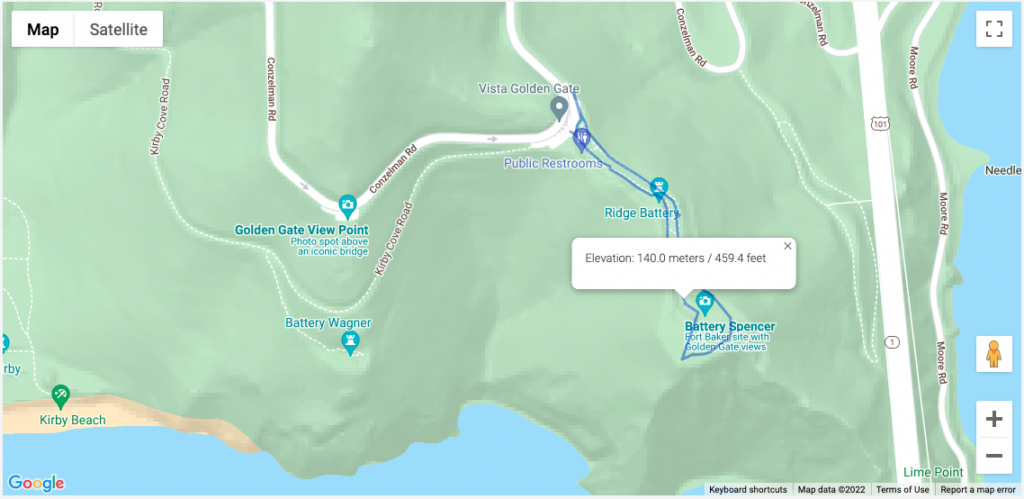
Mapping, in particular, is a complex feature for the park and one that needs to look great while providing an intuitive user experience and a CMS behind the scenes that’s fit for purpose. Kanopi created a content administration experience, allowing for polygon drawing and mapping files to direct intricate paths for hiking in the park:
An example of one of the many available maps of the trails managed by Parks Conservancy. This one overlooks the Golden Gate Bridge.
3) Project management is more cohesive.
When you partner with an all-in-one agency, you ensure the smoothest transition possible as your platform passes from the designers to the engineers.
Designers within an all-in-one agency understand the skillsets, workflow, and limitations of the engineers with whom they work. They’re familiar with what design practices are going to make the job of the developers as smooth as possible, and which ones might come up against issues in the build phase. Those built-in efficiencies make a huge impact on time and budget.
Working with separate design and development agencies can lead to numerous layers of project management with a costly transfer (in terms of both time and money) between them all.
Working with an all-in-one agency can also help your internal project management go more smoothly. You can avoid misaligned team expectations with the help of the agency, which will work to meet with senior-level stakeholders regularly and keep them up to date on your web strategy. Learn more about this process in our guide to avoiding the “Swoop and Poop.”
4) Your designs will have more longevity.
The final reason for choosing the same agency for both design and development comes down to the sustainability of your site. Websites designed and developed by the same team prove the test of time because designers, engineers, and project managers can collectively gain a deep understanding of your company’s mission and long-term goals. They are able to strategize a plan for your website post-launch, so it continues to support your business goals and remain a great site to interact with next year and the year after next.
With design files at the ready, simple navigation enhancements and tweaks to key elements can be made quickly and easily, keeping your website looking sharp and delightful to navigate.
Weeks can stretch into months for design updates that need to go back to an original contractor that crafted your initial platform design. An all-in-one agency becomes an expert in your business, armed with a thorough understanding of your history and unique growth plans.
Build a better, more sustainable platform with Kanopi.
Kanopi is a close-knit team of designers, engineers, and project managers, who are all working towards the same mission of pairing creative solutions with solid and sustainable architecture while keeping our client’s entire ecosystem in mind.
We’re incredibly proud of the award-winning websites we’ve designed and built for our clients. In addition to design and development, we provide robust support after your website goes live, going above and beyond basic bug fixes and security updates.
‘When I describe Kanopi to others, I talk about customer service, great services, a sustainable site, and a relationship that gets better over time. Every project we have done with Kanopi has improved our site and made it work harder and better for us.’
Hot on the heels of Drupal 9 (D9) comes its successor, Drupal 10 (D10). D10 is set to be released in December 2022, a mere two years after the release of D9. For current Drupal 9 users, this won’t be a major overhaul of your current system, but it’s still important to review the details of the upgrade to prepare for this new version.
In this guide, we’ll cover everything you need to know about the Drupal 10 release, from what’s included in the update to how to prepare your website effectively. Remember, you can stay in the loop regarding all Drupal updates by signing up for the Drupal newsletter and keeping an eye on industry resources like Kanopi’s blog.
Drupal 10 FAQs
When will Drupal 10 be released?
Drupal 10 is set to be released on December 14, 2022.
What is the latest Drupal version?
Drupal 9 is the latest version of Drupal, released in June 2020.
How long will Drupal 9 be supported?
Drupal 9 will be supported until November 2023. This coincides with the EOL (end of life) for Symfony 4, which is the framework upon which Drupal 9 is built.
What’s Included in Drupal 10
Unlike previous releases (like the transition from D7 to D8), Drupal 10 will not be a comprehensive overhaul. Instead, it will provide a variety of new or enhanced features, including:
Improvements to the Layout Builder and Media Library features, offering greater out-of-the-box functionality.
Enhanced decoupled developer and site builder experiences, with particular attention made to menus and URL handling.
Replacing CKEditor 4 with CKEditor 5, facilitating a better authoring experience and modern editing tools.
Swapping out jQuery components with more modern and performant JavaScript elements.
Replacing Symfony 4 with Symfony 5 or 6 and upgrading PHP from 7 to 8. PHP 8 is a significant update to the PHP scripting language.
These updates will make the Drupal platform easier to use while providing more advanced, state-of-the-art tools for developers to explore.
How to Prepare for the Drupal 10 Release Date
Depending on what version of Drupal you’re currently using, the process will vary when upgrading to Drupal 10:
Drupal 7 users: Drupal 7 will reach its end of life in November 2023. While Drupal 10 will feature some tools to help upgrade from D7 to D10, it’s highly recommended to upgrade to D9 as soon as possible. By upgrading at the earliest possible time, you ensure your website stays updated with the latest features and security measures. Our guide to transitioning from Drupal 7 to 9 provides additional insight into this process.
Drupal 8 users:Drupal 8’s end of life occurred on November 2, 2021. You’ll have to upgrade to Drupal 9 to be able to upgrade to Drupal 10 next year. The migration from D8 to D9 is generally straightforward, so it’s in your best interest to initiate this upgrade as soon as possible.
Drupal 9 users: If you’re currently using Drupal 9, you’re in a strong position to start preparing for the release of D10. To position your site for a successful upgrade, keep your code updated and conduct ongoing site maintenance. For instance, with Kanopi’s ongoing support process, we run automated tests and checks on every code change, ensuring that we keep our code up to date with Drupal 10 development.
All Drupal users can join the dedicated Slack channel where the Drupal 10 readiness team hosts meetings every Monday at 6 p.m. GMT in the #d10readiness channel. If you’d like to stay updated on the latest D10 news, you can join the conversation and get your questions answered.
Working with a Technology Consultant
You might be doing all you can to keep your site updated and secure, but when it comes time to conduct a version upgrade, things can get more complicated. Plenty of web development and design firms (like Kanopi!) can help manage your website upgrades and ensure you’re in a strong position ahead of Drupal 10’s release.
Whether you’re currently working on D7, 8, or 9, technology consultants can help enhance your website with a variety of services. These professionals can:
Conduct a technology assessment to determine the effectiveness of your website and digital strategies.
Take your Drupal web design to the next level with enhanced visual and interactive design, improved accessibility, and streamlined page structures.
Manage your website’s upgrade to Drupal 9 and eventually Drupal 10.
Here at Kanopi, no project is too large or complex for our team of Drupal experts. Whether you’re looking to upgrade to Drupal 9, better maintain your site, or ensure you’re doing everything you can to prepare for Drupal 10, we’re here to help.
Each of our team members has, on average, 11 years of experience in Drupal Development, and several of them are Acquia-certified. We also are a supporting partner to the Drupal Association, regular contributors to the Drupal Project, and one of the main organizers of BADCamp, a Drupal-focused community event.
Additional Resources:
Drupal 7 to 9 Migration Planning Guide. Do you need to upgrade your Drupal 7 site to Drupal 9? This guide offers everything you need to know about the migration.