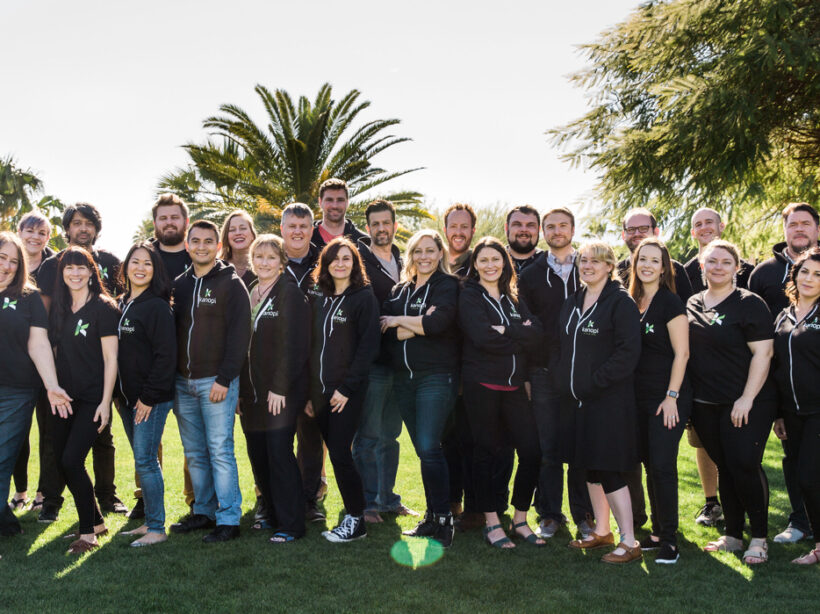

Kanopi's Jen Hill, Tim Tufts, and Joe Tuen giving high fives and thumbs up.

12 Website Design & Development Trends for 2026

Key Takeaways

  • Agentic Journeys: AI agents (like Gemini and GPT) are now bypassing traditional website funnels to complete transactions directly.
  • Semantic HTML as “SEO 2.0”: Clean, machine-readable code is no longer optional; it’s how AI discovers and recommends your site.
  • Calmer UX: Design is shifting toward minimalist, “distraction-free” interfaces that prioritize speed and accessibility.
  • Trust UX: Privacy and consent are now core architectural requirements, not just legal checkboxes.
  • Component-Driven Development: Using unified design systems to scale content rapidly without technical debt.

It’s that time of year again when we look ahead to what’s coming. We admittedly don’t love the word “trends” because it implies something fleeting, while our entire philosophy here at Kanopi is about building sustainably and intelligently, so websites will last. The word “trends” works great for a short headline, but this article is more about outlining what we see coming in all aspects of website design and development, so you can be prepared to decide what could work for your business. 

We’ll warn you: artificial intelligence is covered a lot in this article. Love it or hate it, it’s here. While we are all learning to find ways to allow AI into our workflows in order to create efficiencies, it’s critical to use it in a way that keeps humanity strong! (If you’re curious, here’s how Kanopi uses AI for clients).

1. Let the bots organize large datasets

One thing that AI is very skilled with is helping aggregate large, disparate datasets. Think competitor research, user behavior data, or analytics reports.

Our content and UX strategy teams use a combination of ChatGPT and Claude to analyze large datasets, identify patterns, and turn complex information into clear, human-readable insights. AI can be used here to reduce the manual lift required for time-intensive activities; work that once took weeks can now be completed in just a few days, freeing our strategists to focus on the high-impact thinking that drives meaningful results for our clients. 

As always, human guidance is key. A human needs to review the outputs as they come. It helps maintain accuracy, minimize bias, and ensure that AI outputs stay closely aligned with the project’s goals and broader strategic direction. 

2. Agentic journeys & funnel flattening

AI agents (ChatGPT, Gemini, custom enterprise agents, etc.) will increasingly handle research, booking, donations, and transactions end-to-end, collapsing multi-step funnels into single-intent, conversational flows. Early adoption in 2026 will raise new questions about attribution, fraud, consent, and regulation. 

What about website design, UX and content?

3. Make your content speak AI

AI isn’t just reading your content anymore. It’s deciding whether to recommend you at all. If your site isn’t structured in a way that ChatGPT, Gemini, and other AI agents can understand, you’re basically invisible to a growing chunk of how people discover things online. We’re talking semantic HTML, well-structured and agent-friendly APIs, stable URLs, and clean information hierarchies, and structured data … all the stuff that makes your content machine-readable. This is no longer optional. Think of it as SEO 2.0, except now you’re optimizing for robots that are way smarter than the old-school web crawlers. Otherwise, expect degraded representation in AI-driven search and assistants.

What Kanopi is doing: We start with AI-led content audits that reveal exactly where your content stands. What’s discoverable, what’s buried, what’s redundant, and what’s completely invisible to AI systems. These audits don’t just identify problems, they inform strategy, helping you prioritize what to fix first based on actual impact.

4. Scale your content without sacrificing your voice

One of the biggest challenges teams face is keeping content fresh and consistent across dozens (or hundreds) of pages. You’ve got style guides gathering dust, content editors struggling to match tone, and updates that take forever because every piece needs multiple rounds of review. AI changes that equation completely. But only if it’s trained on your voice, not generic internet speak.

What Kanopi is doing: We’re building custom AI workflows that learn your brand’s style guide, tone, and content patterns, then generate copy variations that actually sound like you. But we’re not just handing you a robot and wishing you luck. We’re creating prompt libraries and content templates tailored to your team’s specific needs. Need 10 variations of a CTA? Done. Want to update product descriptions across your catalog while maintaining consistency? Easy. We’re giving your content editors AI tools that work with them, not against them, so they can keep sites current without burning out. It’s like having a writing assistant who’s read every piece of content you’ve ever published and knows exactly how you like things done.

5. Design for speed and intuition

Nobody wants to click through five pages to do something an AI can handle in one conversation. We’re witnessing a significant shift toward interfaces that anticipate users’ needs and deliver them faster. Think calmer designs, less clutter, smarter personalization that doesn’t feel intrusive. Multi-step funnels are collapsing into simple, conversational flows because that’s what AI agents are built for and what users now expect. The best interfaces in 2026 will feel less like navigating a website and more like having a helpful assistant who intuitively understands your needs.

What Kanopi is doing: We’re using AI-powered tools to streamline our design workflows that create meaningful efficiencies for our downstream development teams. Our Figma to Claude process enables rapid component prototyping. This means we can create more, iterate faster and refine work, without putting timelines or budgets at risk. 

6. Unifying theme and atomic/component-driven design

A major trend shaping 2026 web design is the continued move toward unified, component-based systems. Instead of designing every page from scratch, we create a consistent library of reusable interface elements, buttons, cards, forms, navigation patterns, that work together seamlessly across your entire site. This ensures visual cohesion, faster development, and a smoother user experience.

What Kanopi is doing: We take this further by pairing modern design tools with cutting-edge AI development workflows. Using Figma’s Model Context Protocol (MCP), our design files connect directly to advanced AI coding tools like OpenAI Codex and Anthropic’s Claude. This means our designs are translated into high-quality, production-ready code with exceptional accuracy.

Once components are built, we use Google Chrome DevTools MCP to let AI validate how each piece actually renders in a real browser, catching visual issues early and ensuring the final experience matches the design vision.

From there, our developers ensure each component can be easily managed in your CMS. Finally, we build end-to-end functional tests that automatically watch for regressions, ensuring that as your site evolves, nothing breaks along the way.

The result is a unified design system powered by intelligent workflows that keeps your site visually consistent, easy to maintain, and ready to scale.

Other things we see coming

  • AI can serve as a valuable design research partner, helping designers quickly surface trends, industry-specific design patterns and assessing the accessibility of design components as they are being designed. 
  • Aesthetically speaking, we’re noticing a shift to calmer user experiences; minimalist interfaces, fewer distractions, more clarity, and clearer information hierarchies. 
  • Lastly, compliance for WCAG and “Consent UX” or “Trust UX” — the design of user interfaces and flows that ethically obtain user permission for data collection and use — is becoming mandatory. See the “Trust, Privacy, Consent & compliance in the next section for more information on this.  

There’s even more happening in website development (whether it’s Drupal, WordPress, or custom code)

Just like in strategy, content, and design, development is also undergoing a meaningful shift. These aren’t fads. They’re structural changes in how teams build, maintain, and future-proof websites. Here’s what we see shaping 2026:

7. Server-side rendering & resilient delivery

We’re watching teams swing back toward server-side rendering (SSR), static site generation (SSG), and progressive enhancement. This isn’t nostalgia, instead it’s a response to what users (and AI systems) now expect: fast initial loads, predictability, resilience, and content that’s easily discoverable by both humans and machines.

Modern frameworks absolutely still have a place, especially when rich interactivity is required, but we’re seeing a clearer separation between where complexity adds value and where it gets in the way.

8. Rethinking architecture: agents vs. complex frontends

As AI agents begin handling more of the “consumption layer” — surfacing answers, facilitating transactions, navigating information — the value of extremely complex, client-heavy architectures is being reconsidered.

 For informational sites and straightforward user journeys, well-structured, semantic content often wins over front-end flexibility. Complex frontends will continue to power robust applications, but many marketing and discovery-focused sites are trending back toward hybrid or server-first models.

Agents are already consuming AI-friendly APIs, and with evolving authentication, they’ll get even better at interpreting content over time. With the current pace of innovation, we predict this will be a delicate dance throughout 2026.

9. AI-accelerated technical debt

AI coding tools are incredible accelerators, but they’re accelerators in both directions. Yes, they speed up delivery. They also multiply code volume, inconsistency, and architectural drift if teams don’t stay vigilant.

This is where strong standards, clean patterns, and senior oversight matter more than ever. Without them, organizations end up with AI-generated technical debt and fragmented prompt/model sprawl — problems that cost significantly more to untangle later. Kanopi builds governance into our workflows so speed never comes at the expense of long-term stability.

As AI becomes embedded in websites and applications, the way we communicate trust changes too. Users need clarity around how their data is used, how permissions work, and what AI agents are doing on their behalf.

“Trust UX” is becoming its own discipline. Transparent consent flows, auditable agent actions, and understandable data policies are now core engineering requirements, not afterthoughts. And with legal scrutiny around consent management on the rise, we expect this to intensify in the coming year.

11. Predictive personalization & AI-driven adaptation

Users increasingly expect experiences that adapt to them, including personalized recommendations, context-aware content, and layouts that respond to user intent. Achieving this requires real AI infrastructure: data pipelines, model governance, and ethical frameworks.

Basic rules-based personalization won’t cut it anymore. Organizations that want to deliver anticipatory digital experiences will need to invest in more holistic, AI-driven systems.

12. Accessibility & inclusion as architectural foundations

Accessibility is no longer something you “add on” during QA. It’s becoming a structural requirement. Semantic HTML, non-JavaScript critical paths, and robust WCAG compliance are essential for AI discoverability and multimodal search (and are just good practice regardless).

As agents rely more on clean, machine-readable content, inaccessible markup and JS-gated experiences will carry increasing penalties. Building inclusively from the start is now both an ethical responsibility and a competitive advantage.

Curious about what Kanopi’s doing specifically? Here are a few exciting projects keeping us engaged:

Drupal CMS, Drupal Canvas, and Site Templates!

We’re hard at work in the Drupal community, helping Drupal CMS development continue. Drupal CMS 2.0 was released in January 2026, complete with a working Site template example building on top of Drupal Canvas, the new editor coming to Drupal.

There are AI integrations, theming in the browser, and instant component creation. This all will minimize development cycles and empower content creators to prototype and publish as they see fit.

We will be working to release a Site Template in the initial launch of the Drupal.org marketplace, so check back with us in the spring at DrupalCon Chicago.

AI Tooling to increase content editor and developer efficiency

We’re working to build AI workflows and tools into our tech stack and into Drupal and WordPress sites to help all of us be more productive in our day to day tasks. We’re connecting Figma to coding agents, as well as connecting automated audits to ticketing systems, content, image, and audio generation in content management systems. Basically, we are working in a way that we can do more with less.

Things are moving quickly, but the basics are still critical.

It’s a lot to absorb when technology moves ever faster, but it’s important to remember that the basics still hold true: your website needs to work for the humans that use it. Your visitors need the information they came looking for, and your editors on the back end need to be able to make updates that keep the website performant, accessible, and fresh. 

There’s always going to be more we can do to make websites better, so it’s easy to get overwhelmed with everything that’s coming. But remember this: you don’t need to know everything, you only need to know the things that will make your website meet the goals you’ve defined for it. 

We hope this post helps inspires you with ideas on how to make your website stronger in 2026!

Kanopi’s Drupal development services focus on creating functional, sustainable Drupal websites.

SEO, GEO, and AEO: How Modern Optimization Actually Works

Search optimization has changed. Traditional SEO still matters, but it is no longer enough on its own. Today, your site also needs to perform well in generative search engines and AI-driven tools like ChatGPT, Perplexity, and Google’s AI Overviews. That is where GEO (Generative Engine Optimization) and AEO (Answer Engine Optimization) come in.

At Kanopi, we do not treat SEO, GEO, and AEO as separate strategies. They rely on the same foundation: a site that is fast, crawlable, accessible, and clearly structured for both humans and machines. When that foundation is strong, your content can perform across traditional search, AI tools, and whatever comes next.

This approach also aligns well with how many of our clients are thinking about Drupal AI consulting and ongoing optimization, rather than one-time fixes.

Below is how we approach it in practice, with real examples from our work.

Start with the Technical Foundation

Strong optimization always begins with the basics. If search engines or AI systems cannot reliably crawl and understand your site, everything else is harder.

At this stage, our work typically includes:

  • Auditing crawlability, performance, templates, metadata, internal linking, and accessibility
  • Identifying and fixing issues that suppress search performance, such as broken links, orphaned pages, duplicate content patterns, redirect gaps, and low-value pages that dilute crawl budget
  • Ensuring Drupal, WordPress or site templates and content models support consistent indexing and interpretation

This work is not flashy, but it is essential. It creates the conditions for SEO, GEO, and AEO to work together instead of competing with each other.

Make Content “Answer-Ready” for GEO and AEO

AI tools tend to reward content that answers questions clearly and quickly. That does not mean dumbing content down. It means structuring it so the core message is easy to extract, while also reinforcing credibility (strong brand and entity signals), keeping key pages fresh and consistent, and ensuring the format is accessible to both crawlers and AI systems.

We focus on:

  • Restructuring key pages so the primary question is answered early, using clear headings, short summaries, and scannable sections
  • Strengthening entity clarity and relationships (for example: between people, departments, research areas, programs, and initiatives)
  • Reducing ambiguity so AI systems can connect concepts accurately and return answers with proper context and attribution

This helps content perform better in AI-generated answers, featured snippets, and zero-click experiences, while still encouraging users to visit the site for deeper information.

Add Machine-Readable Signals Without Overdoing It

Search engines and AI systems rely on structured signals to understand what your content represents. We add these carefully and intentionally.

This usually includes:

  • Implementing or refining structured data where it provides real value, such as organization, person, article or news, and events
  • Standardizing key on-page signals like titles, descriptions, canonical patterns, and Open Graph metadata
  • Reducing conflicting signals so platforms interpret your content consistently

The goal is clarity, not complexity. More markup is not always better.

Manage Bot Traffic So Performance Stays Stable

AI crawlers and aggressive bots can put real strain on sites, especially on search results and listing pages. We treat bot management as part of optimization, not just security.

Here’s how we manage bot traffic:

  • Blocking malicious bots as early as possible, ideally at the CDN or WAF layer before requests reach your Drupal, WordPress, or the database
  • Applying rate limiting and bot controls to reduce resource strain from aggressive crawlers
  • Maintaining a robots.txt strategy that supports SEO while limiting unnecessary crawling
  • When appropriate, implementing an llms.txt (proposal-level, community-led) approach to guide some AI crawlers towards key pages to also reduce unnecessary crawling

We also review bot patterns regularly and adjust controls as new crawlers emerge.

Measure, Iterate, and Improve Over Time

SEO, GEO, and AEO are not one-time projects. They improve through iteration.

Ongoing work often includes:

  • Using analytics and search data to identify high-value queries, zero-result patterns, and content gaps
  • Maintaining an optimization backlog and delivering improvements incrementally
  • Folding this work into ongoing support, alongside performance, accessibility, and analytics improvements

This avoids disruptive overhauls and keeps progress steady.

Real Examples from Our Work

Kanopi Studios
We applied this same approach to our own site. We clarified service language, improved content structure, and added machine-readable signals for AI discovery. Today, roughly one-third of our new inbound leads originate from ChatGPT and similar tools. That is GEO and AEO driving real business outcomes.

COIT
For COIT, we focused on structuring service pages and how-to content to answer common user questions directly. This increased visibility in AI-generated answers and featured snippets, while still guiding users back to the site. We also supported franchise-related content so it was easy to discover and accurate across both traditional search and AI platforms.

San Francisco International Airport
For SFO, we supported SEO and emerging AEO strategies on a large, high-traffic site. Our work focused on performance, content clarity, and structured data so users could quickly find authoritative answers about services and operations.

Centre for Digital Media
For the Centre for Digital Media, we improved the sitemap and clarified user pathways, strengthening information architecture and internal linking. This improved discoverability and reinforced SEO fundamentals that also support AI interpretation.

Ongoing Support Clients
Technical SEO is a recurring part of many of our support engagements, alongside performance tuning, analytics, and continuous improvement. This is where SEO, GEO, and AEO work tends to live and mature over time.

How clients are using AI on their websites today

AI tools are still emerging for many organizations, but early adopters are already seeing practical benefits.

PEN America
PEN America publishes a high volume of image-based content. Manual alt text creation was slow and inconsistent. We implemented AI-powered alt text generation directly into the editorial workflow. Editors can review and refine suggestions, reducing manual effort, improving accessibility compliance, and speeding up publishing.

Settle In US
Settle In US serves people navigating complex immigration information. Long, text-heavy pages were difficult for some users. We implemented text-to-speech using Eleven Labs, improving accessibility and making critical content easier to consume.

Exploratorium
Exploratorium manages a large and diverse content library. The keyword search made discovery difficult. We implemented Algolia with AI-based semantic search, allowing users to find relevant content even when their terms did not match exact keywords. This improved discovery and engagement across the site.

A solid foundation helps your content be found.

SEO, GEO, and AEO are not separate checklists. They are different expressions of the same goal: making your site easy to understand, easy to access, and genuinely helpful.

When the foundation is solid, this is where you can expand your content strategy so your content can perform across search engines, AI tools, and future platforms without constant reinvention. Visibility also comes from getting your best content cited and discussed beyond your site. That can include digital PR, partnerships, guest contributions, and community-first participation where your audiences already ask questions. In many generative experiences, sources often include a mix of authoritative publishers and community platforms like YouTube and Reddit, so the right off-site strategy can reinforce your credibility and improve how often your content is referenced.

If that is the direction you are already heading, or want to head next, this is where ongoing optimization and AI-aware strategy really start to pay off.

Illustration of a woman standing in the middle of a field of tall grass with blue skies and clouds around her as icons of different navigation options float above her head to help her decide where to go.

Website Navigation Patterns (and the Future of Navigation with AI Search)

If you manage a website for a nonprofit, university, or healthcare organization, chances are your audience isn’t just browsing for pleasure. They’re looking for something important: how to donate, how to register for classes, or how to schedule care for themselves or a loved one.

That’s why navigation is so critical. It’s not just about design, it’s about helping people find what they need quickly, clearly, and confidently.

In this post we’ll break down the most common website navigation patterns, along with a look at how AI-powered search is changing and how website owners and editors should think about navigation.

1. Top Navigation Bar

The navigation bar for San Francisco Conservatory of Music

Source: sfcm.edu/ 

What it is:

A horizontal menu across the top of the page, often with your logo on the left and links like “About,” “Programs,” or “Donate” on the right.

Why it works:

  • It’s familiar and expected
  • Keeps the most important pages of your website experience front and center
  • Easy to use on desktops, tablets and larger mobile devices (depending on the number of options)

Things to watch:

  • Too many items can clutter the user interface (UI)
  • Not suitable for websites with dense or complex information architecture

Where it fits:

Perfect for mission-driven websites with clear, high-level goals, which use a simple, action-oriented top menu like: Donate, Get Involved, Refer a Patient.

2. Sidebar Navigation

An example of navigation from the UCSF Department of Surgery, where the navigation menu is a vertical list on the left.

Source: surgeryeducation.ucsf.edu/people 

What it is:

A vertical menu, often used on the left side of the screen.

Why it works:

  • Ideal for content-heavy sections, like articles or staff directories
  • Lets users see where they are in a hierarchy (e.g., Admissions → Graduate Programs → Apply)

Things to watch:

  • Can eat up valuable screen space on desktop
  • Doesn’t always translate well to mobile unless adapted
  • Better for secondary navigation, not primary navigation

Where it fits:

Great for internal portals, academic department pages, or patient resources where structure matters.

3. Dropdown & Mega Menus

The mega menu navigation from Humane World for Animals

Source: www.humaneworld.org/en 

What they are:

Hovering over a main menu reveals sub-pages. Mega menus take it further, organizing many links into columns, often with headings.

Why they work:

  • Help users browse complex topics (like academic programs or service offerings) without getting lost
  • Group related items for easy scanning
  • Opportunities to include richer content

Things to watch:

  • Need careful organization to avoid overwhelm
  • Don’t rely on hover alone, make sure they work well on tap interfaces too

Where they fit:

Larger institutions, like universities or hospital systems, that have complex information architecture or diverse audience groups.

4. Hamburger Menus

A navigation bar with a "hamburger" menu on the far right, which is indicated by an icon of three short lines stacked on top of each other

What it is:

The 3-line icon that hides and reveals the primary navigation, common on mobile devices.

Why it works:

  • Keeps mobile screens clean
  • Makes room for other important content like content call to action (CTAs)

Things to watch:

  • Some users don’t recognize or notice it
  • Always test it for clarity and make sure key pages are still discoverable
  • Ensure it works on tap and click
  • Should not be used on desktop or larger devices

Where it fits:

Every site should have a mobile-friendly version — hamburger menus are a reliable standard, but don’t hide everything if it’s critical.

The footer navigation for Flagler College

Source: www.flagler.edu/ 

What it is:

Links placed at the bottom of every page.

Why it works:

  • Offers a second chance to guide visitors
  • Good place for contact info, careers, privacy policy, and internal links

Things to watch:

  • Avoid cramming it with too many items
  • Keep it visually simple and organized
  • Consider including key items from your main navigation to create a secondary point for users to traverse your site

Where it fits:

All websites benefit from a helpful footer,  it’s the safety net for people who scroll all the way down looking for answers.

The Next Shift: AI-Powered Navigation

Now for what’s coming next, and is already starting to show up on forward-looking websites … instead of clicking through layers of navigation, more and more visitors want to just ask a question:

“How do I apply for tuition assistance?”

“I need directions to the clinic.”

“How can I get involved beyond just donating?”

AI-powered search tools,  including chat-style interfaces and natural language search are making this possible. It’s like giving your site a smart assistant that understands questions and points people to the right answer instantly.

Why it matters for your mission:

  • Saves time for visitors (and staff)
  • Reduces friction points, especially during stressful moments (like seeking care or emergency help)
  • Helps users find specific, deep content without navigating complex menus

AI tools can supplement your menus, not replace them. For example, a donor might browse your navigation, but a returning volunteer could just ask the chatbot “Where’s the login page for last year’s volunteers?”

As more people expect intuitive experiences everywhere, organizations that invest in smart search tools,  especially on high-traffic or information-dense sites, will have an opportunity to  stand out.

Choose the right navigation pattern for your needs.

Good navigation helps people find what they need with the least amount of friction. Whether someone wants to make a donation or explore academic programs, choosing the right navigation pattern is critical for making it easier for users to connect with the content that matters most. It’s all about removing friction and guiding people in the right direction.

Kanopi Dev Team Jumping

How to Future-Proof Your SEO With Links in an AI-First World

Search is getting chatty. Around 35% of desktop queries now surface a Google AI Overview before the blue links even show up, and when that happens, click-through rates drop by 56%. To stay visible, we need to shift our mindset from “collect more links” to “earn more citations.” That means:

  1. Quality-first backlinks that AI trusts.
  2. Smart internal linking so bots understand your expertise.
  3. Brand mentions on Reddit, LinkedIn, and niche forums that prove real-world authority.

AI Has Rewritten the SEO Playbook

What changed?

  • Conversational results: Large Language Models (LLMs, which is software that predicts the next best word, like ChatGPT or Gemini) answer questions in a chat box instead of a list of pages.
  • Zero-click reality: 65% of searches already end without a website visit, and projections hit 70% by mid to late 2025.
  • Visibility > traffic: If an AI cites you, you win impressions and brand recall, even when no one taps a link.

Why it matters to marketers

Traditional SEO measures success by ranking and clicks. In an AI-first world, the real KPI is how often the robots say your name. Authority signals, like links, mentions, structured content, feed those answers.

How LLM’s Surface Data For a Query

Fan-out queries are the extra searches that an AI (like ChatGPT, Gemini, or Google’s AI Overviews) launches behind the scenes to build a rich, well-rounded answer. Think of them as the follow-up questions a savvy researcher would type into Google after hearing your main question.

How Fan-Out Queries Work in 3 Steps

1. Intent Mapping

The AI model reads the user’s original prompt and breaks it into the underlying “jobs to be done.” 

Example: A user asks, “What’s the healthiest plant-based protein for muscle gain?” The AI decides on sub-topics like: “protein quality,” “amino-acid profile,” “digestibility,” “protein cost.”

2. Query Generation (the “fan-out”)

For each sub-topic, the AI spins up more specific searches, often 5–20 at a time.

  • “best complete plant protein source”
  • “digestibility score of pea protein vs soy”
  • “price per gram plant protein 2025”
  • “clinical studies plant protein muscle hypertrophy”

3. Aggregation & Synthesis

The engine scrapes results, scores credibility, and stitches the findings into a single conversational answer. Only the polished summary appears to the user; the fan-out queries stay under the hood.

Quick Optimization Tips

  • Cover related sub-topics in one hub post (you can then write more in-depth articles separately, and link to those from your hub post – continue to read for more details on this)
  • Use descriptive sub-headings (H2/H3)
  • Include data points (especially our own data), definitions, and mini-FAQs
  • Refresh supporting stats annually

Fan-out queries are the AI’s way of triple-checking its work. By anticipating these spin-off questions and addressing them clearly on your website, you position your content to be the source the bots (and your future customers!) keep coming back to.

Yep, backlinks still move the needle, but only the right ones. Think quality over quantity, context over random link swaps. Long gone are the days when any old link could bump you up the rankings. 

In 2025, Google’s AI Overviews and chat-based engines like ChatGPT weigh backlinks more like reputation votes. They look at who is linking to you, why they’re doing it, and whether the surrounding content makes sense for your topic. 

If a respected publication, niche podcast site, or university blog points to your guide, that’s gold. Ten spammy directory links? Dead weight.

What still works

Links aren’t dead; they’re pickier. AI assesses:

  • Source authority (Is the site trustworthy?)
  • Topical relevance (Does the surrounding content match your niche?)
  • Anchor context (Natural language > exact-match keyword stuffing).
  1. Create genuinely linkable assets: original research, interactive tools, or deep guides others want to reference.
  2. Upgrade anchor text: Mix branded mentions with partial-match phrases so it reads like real prose. (i.e. “Check out Kanopi Studio’s AI-SEO checklist” instead of “Click here.”)
  3. Partner up: Cooperate with trade groups, podcasts, or complementary SaaS platforms for joint studies and co-branded webinars.
  4. Think digital PR, not link exchange: Pitch journalists with newsworthy data; the story earns you natural links and brand buzz.

Anchor text is the clickable words in a hyperlink. It tells both readers and search engines what they’ll get on the other side.


Internal Linking: Your Secret Weapon for AI Understanding

Internal links are the signposts that tell AI, “Here’s how all our content connects.” As Google’s AI Overviews roll out, internal links help “AI algorithms better recognize the relevance and authority of your site,” increasing the chance your page is chosen for the summary box.

Google calls solid link architecture “crucial” for getting a site fully indexed because it signals which topics are broad pillars and which are supporting details.

Let’s pretend we’re working on a boat repair brand.  

1. Pillar-cluster model (quick refresher)

  • Pillar page: A broad, authoritative hub (i.e. “Your Ultimate Guide to Boat Maintenance”).
  • Cluster pages: Deeper articles that cover subtopics (i.e., “Winterizing Your Engine,” “Cleaning Fiberglass Hulls”).
  • Links both ways: Every cluster links back to the pillar and to each related cluster.

2. Semantic anchor text strategy

Instead of repeating the exact same anchor text “boat maintenance guide” 10+ times, vary with natural phrases: “seasonal service tips,” “engine tune-up checklist.” This diversity feels more “human” and also helps AI map related ideas.

3. Implementation checklist

  1. Audit: Use tools like Screaming Frog or Ahrefs to spot orphan pages (a webpage with no internal links pointing to it, making it hard for users and bots to find) or pages with low internal links.
  2. Map clusters: Use a Google Sheet to group URLs and note missing links.
  3. Add context links: Place them inside sentences, not sidebars. Contextual placement carries more weight with AI and readers alike.

Google and OpenAI both license Reddit data – so having a presence on forums (Reddit and Quora) is definitely recommended! 

LinkedIn pulses also tend to show up in business queries.All of these unlinked brand shout-outs train AI on who you are and whether you’re trusted.

Why mentions matter

AI tries to mimic real-world consensus (which is why they love crawling forums like Reddit, or review sites). When your brand name pops up across different credible conversations, it acts like digital word-of-mouth. That familiarity makes an AI citation more likely

How to spark the right chatter

Use social listening tools (Brandwatch, Mention) to track new discussions, then jump in to clarify facts or offer resources. Every helpful reply is a brand mention in the making!

Three Tactical Wins You Can Deploy Today

  1. See what AI already says about you

    Open ChatGPT or Gemini and ask, “What is [Brand]?” Note missing or incorrect points, then update your About page and top-traffic posts to make these facts easy for AI to pull.
  2. Mine AI for unanswered questions

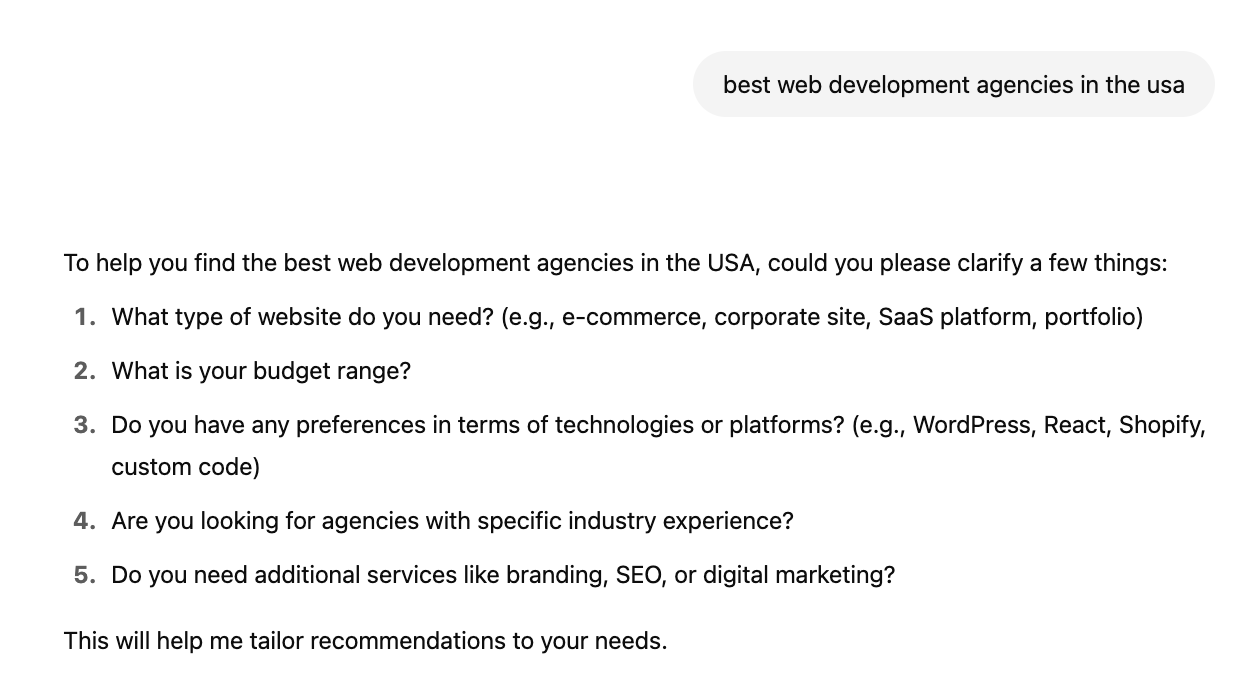
    This is a fun trick I love to use. Run a Deep Research prompt (if you have a paid ChatGPT subscription, which I highly recommend!) on your main keyword. The model spits out common sub-queries (see below). Turn each gap into a quick FAQ or blog update, or include them on your service or product pages! 
A ChatGPT response for best web development agencies in the USA
  1. Track citations over time

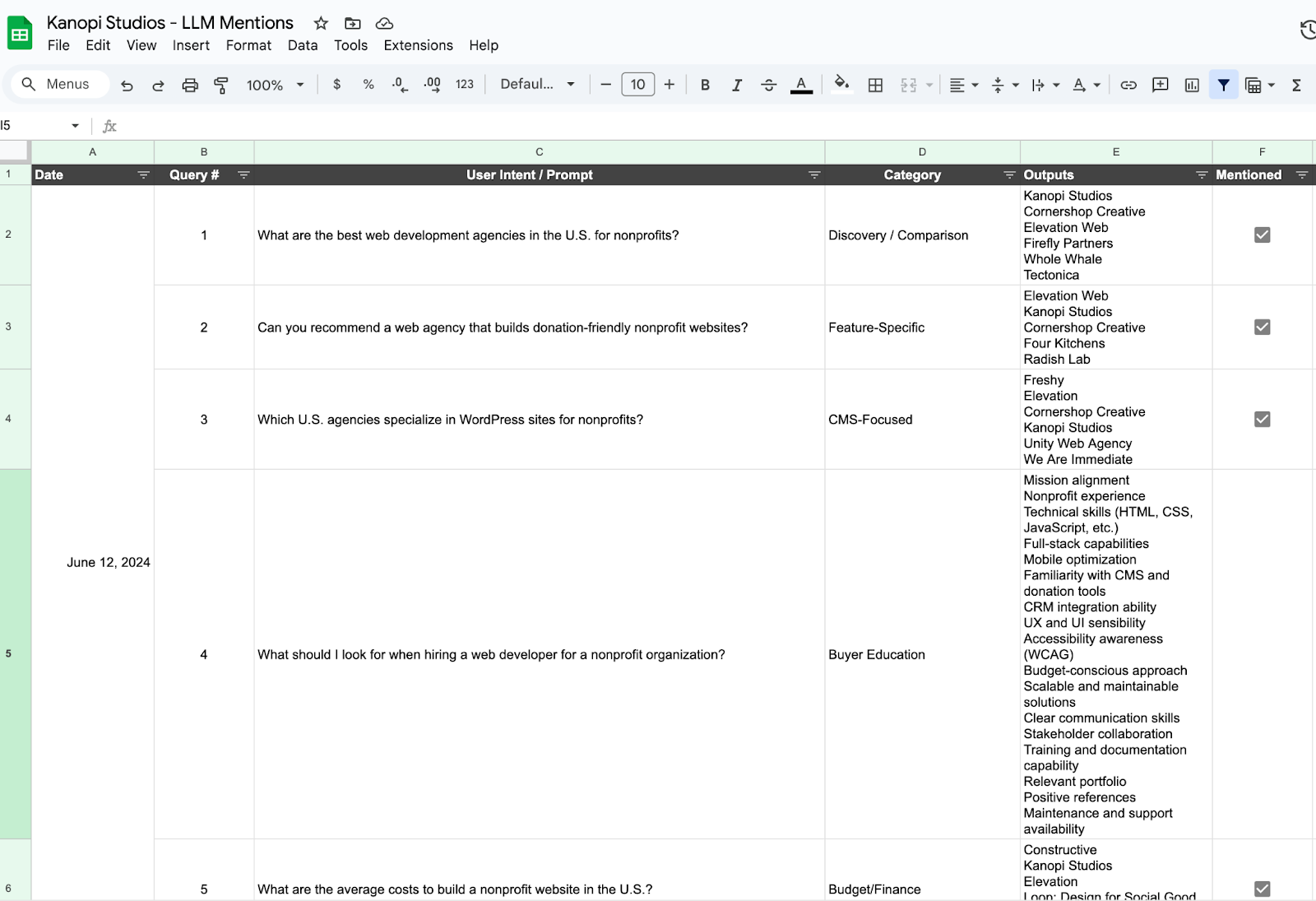
    Pick 5 to 10 queries that are relevant to your brand (ex. “best virtual golf simulators,” or “best web development agency”) and record which brands AI lists every 2-4 weeks. Find an LLM Mention template and example for this here. There are also tools like XFunnel.AI that help to automate this task but typically cost a subscription fee.

So that’s the game plan! Ditch the “collect-all-the-links” mindset, double-down on quality signals that AIs actually trust, and give those fan-out queries everything they need to pick your brand first. 

If we tighten up our internal links, spark real chatter out in the wild, and watch our citation share like a hawk, we won’t just survive the AI shake-up, we’ll ride it. Let’s get out there and make sure the next time someone asks a smart bot a question, your name pops up in the answer.

Quick Glossary

  • LLM (Large Language Model): A type of AI that predicts words to generate human-like text.
  • AI Overview: Google’s summary box powered by generative AI, they appear above organic links.
  • Anchor text: The words you click in a hyperlink.
  • Internal link: A link that points to another page on the same website.
  • Orphan page: A page with no internal links linking to it, making it hard to find.

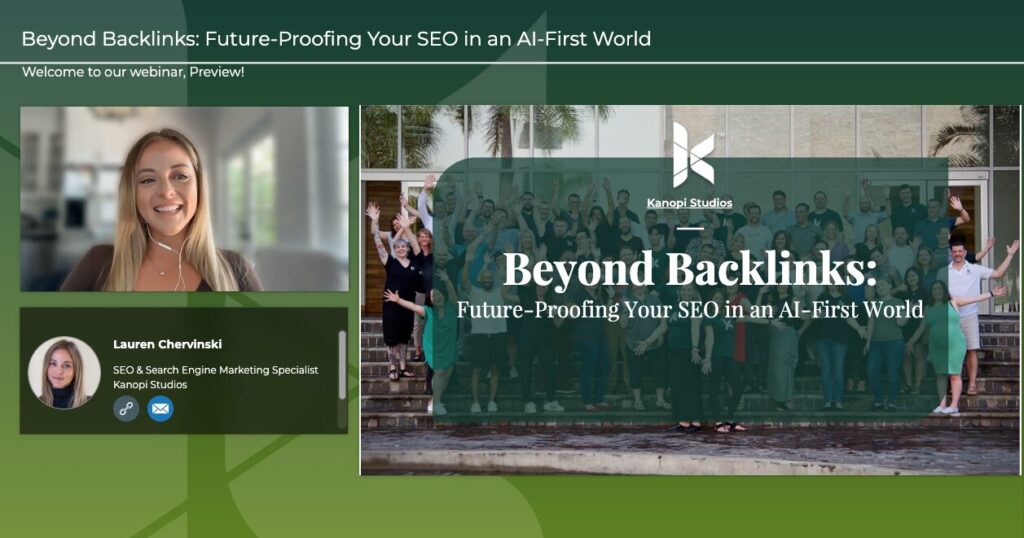
Want more? We held a webinar about it.

Interface of ON24's webinar platform with Lauren CHervinski giving a webinar on SEO usage with AI.

How is AI transforming the SEO game? Kanopi’s Lauren Chervinski breaks it all down in this webinar, “Beyond Backlinks: Future-Proofing Your SEO in an AI-First World” (48 minutes)

An AI-generated illustration of a young adult sitting in a large, comfortable chair, happily reading a big book. The setting is predominantly green.

Creating Content Your Users Want to Read

“Americans either don’t, won’t, or can’t read.” Advertising legend Neil French opened a long-copy ad for the National Newspaper Association with this zinger nearly 25 years ago. While it may seem like a cheap crack about declining literacy rates, French was actually commenting about our changing media consumption habits. Turns out he wasn’t wrong. Fast forward to today, where attention spans are measured in seconds and content consumption happens between sips of coffee and doomscrolling. The challenge seems more difficult than ever: How do you create content that people actually want to engage with — that they actually find not only interesting, but also helpful?  

We can create content that people want to read by applying timeless storytelling principles. At Kanopi, we specialize in helping education, nonprofit, arts and culture, and healthcare organizations create engaging, impactful content. We not only develop strategies and create content for our clients, but we’ve also crafted a simple nine-step storytelling guide to equip their internal teams with the tools to create their own great content in perpetuity. Designed to be practical and actionable, it helps teams craft content that resonates with audiences because they find it relevant and useful.

And since we love helping tell great stories, we’ve decided to share this little sneak preview — right here, right now.

The Kanopi Nine-Step Storytelling Guide

1. Be Scannable.

Admit it. You’re probably scanning this right now. In fact, only 20% of high-skill readers fully read what they see online. Clarity and scannability are key to engaging them. So, cut the fluff. Break your content into short, digestible paragraphs, use bullet points, and include subheadings to guide readers through your material. Remove any unnecessary words and get straight to the point. The more concise your content, the easier it is for users to consume and retain.

2. Start at the End.

Every piece of content should have a clear goal. Whether you want to encourage educators to use a specific resource or inspire students to take action, starting with the outcome in mind will shape how you present the information. Your introduction and body should be structured to naturally funnel the reader toward the desired action. This ensures that your content is goal-oriented and helps users move toward taking the next step.

3. Add Emotion.

Despite how logical we like to think we are, the truth is, we humans make decisions based primarily on our feelings. By tapping into excitement, empathy, or inspiration, you can create content that resonates deeply. Consider the emotions you want to evoke and structure your content accordingly. For example, if you’re promoting a cause, highlight its impact on people’s lives to inspire action.

4. Back It Up with Data. 

While storytelling is powerful, reinforcinging it with relevant data can make your content even more compelling. Using statistics helps validate your message and provides a sense of credibility. When telling a story, try to incorporate three key stats that enhance your narrative. 

Just make absolutely sure your data is from reliable sources! This is critical to building trust with your audience — especially in this day and age.

5. Keep (and use) a Story Journal.

Ever been snorkelling, when out of nowhere a really cool fish swims right past you, and then disappears forever?

Great ideas are just like that. Oftentimes, if you don’t capture them somewhere, they vanish altogether.

To keep a steady flow of compelling material that you won’t lose or forget, create a story journal. Dedicate two minutes daily to jot down any interesting stories you come across — whether it’s an inspiring anecdote, an insight from a user, or a breakthrough moment in your industry. This simple habit will ensure you always have a bank of stories to draw from when creating content.

6. Pay Attention to Structure. 

Story structure is critical. It keeps your ideas organized, ensures clarity, and delivers the intended message effectively.

If you’re familiar with web design principles, structure your content like a user story.

For example: “As a [type of user], I want [their goal] to achieve [the benefit].”

This format keeps your content focused on the user’s needs and desired outcomes. By telling stories that are centered on your audience, you make your content more relatable and engaging.

You can also incorporate interactive elements like “scrollytelling” — a technique where animations and color changes guide users as they scroll, helping them track their position and enhancing the overall storytelling experience. For Flagler College, for example, we used a narrative-driven design to seamlessly showcase its history and campus, combining visuals and intuitive navigation to create an immersive and memorable experience.

7. Speak to Your Niche.

Trying to create stories that appeal to absolutely everyone is the most surefire way to ensure they’ll resonate with no one.

Tailor your content to speak directly to your specific audience. By defining your niche and understanding what your users care about, you can create messages that feel personal and relevant. Speak to your ideal users in a language they relate to, and address their specific needs, challenges, and interests.

Our Exploratorium website redesign is a prime example of how compelling stories can be seamlessly integrated into design. The custom Oppenheimer theme uses stunning visuals and videos to showcase science content, guiding visitors to engage with the material in a more intuitive and interactive way. By simplifying content types and focusing on visual narratives, the site enhances user interaction, making the content more engaging and easier to explore. 

8. Sell the Experience.

The best stories center on the hero’s transformation. For the Gilder Lehrman Hamilton website, we used a combination of educational resources and performance art to help users connect emotionally with history, transforming the way they engage with the subject matter. By personalizing the experience based on user type (teacher, student, parent), it creates a deeper, more meaningful connection with the content. 

9. Focus on What Makes You Unique.

What makes you stand out in your field? Whether it’s a unique perspective, an innovative approach, or a specialized area of expertise, emphasize what sets you apart. Tell your audience why your product or service is the solution they’ve been looking for, and how it addresses their specific pain points. This uniqueness helps you build trust and loyalty with your users.

Happily Ever After…

Those of you who have studied writing and/or filmmaking before are probably reading all this and thinking,

“Well hey, these principles apply to all forms of writing and storytelling, don’t they?”

And you’d be correct. The principles of good storytelling have more or less remained the same ever since our ancient ancestors first gathered around the campfire. And they remain the same today, regardless of medium.

Creating content your users want to read isn’t about guessing what will resonate; it’s about understanding your audience, structuring your content for easy consumption, and using storytelling to make an emotional connection. By following these tips, you’ll be able to craft content that not only captures attention but also builds lasting relationships with your users.

Of course, if you’d still prefer to have some professional help telling your story, we’re here for it. Our storytelling experts will ensure your content hits the mark on all nine tips, while showing your team how to create engaging, audience-focused content that drives real results.

Kanopi Team

Create What You Need, Not What You Have: Why Discovery and Content Strategy Are Essential

Here’s a question we occasionally hear from new and prospective clients: 

Why do we need to invest in discovery and content strategy?

These clients believe that a fresh design and upgraded functionality are all that’s needed to improve the user experience and achieve their website goals.

Fortunately, there’s a short, straightforward answer to this question:

Because the goal of a redesign is to get the website you really need — not just a prettier, faster version of the one you already have.

Of course, there are always those clients that still require a bit more convincing. We don’t mind this at all, since it allows us to dive into our long-version answer that includes a surprisingly relevant analogy about a weird house.

Creating an effective website takes more than fresh design and code.

Gaining deep insights about your users, their behaviours, and the needs and desires that motivate them isn’t some extraneous, value-added luxury item. If you’re serious about meeting your website goals, investing in discovery and content strategy is absolutely critical.

After all, you don’t want a Winchester Mystery House.

Located in San Jose, California, the Winchester Mystery House is an architectural curiosity built by the heiress to the Winchester rifle fortune. While we won’t delve into its bizarre and spooky history, we mention it here as a real-world example of what happens when you try and build something with no master plan. Constructed continuously from 1886 to 1922, the sprawling mansion ended up as a maze of 160 rooms, with staircases leading to nowhere, doors that open into walls, and all manner of mismatched design elements.

Without a clear plan that includes discovery, websites can become just as chaotic — with disjointed navigation, unclear messaging, and features that frustrate rather than guide users. We see this happen more often than we’d like. (Usually, we’re the ones called upon to fix it.)

Successful sites begin with discovery.

Discovery lays the groundwork for a successful website by providing you with a comprehensive understanding of your audience and goals. Our discovery process integrates two essential research methods: 

  1. Quantitative research involves analyzing search trends and website analytics to reveal measurable patterns and behaviours — a.k.a. the ‘what.’ 
  2. Qualitative research engages internal interest-holders and listens to external audiences to learn as much as possible about their underlying motivations and needs — a.k.a. the ‘why’ — behind these patterns. 

By incorporating both strategies, we gain both data-driven clarity and human context, creating a strong foundation for your site’s success.

(If you’re curious to learn more, this post explains more about our discovery process and why we value both ‘Q’ methods equally.)

Critical next steps: Content Strategy and UX Design

Discovery’s ultimate purpose is to guide you in creating an intelligent content strategy that ensures your messaging is clear, persuasive, and aligned with your goals. Effective content strategy also drives engagement, helping you connect with your audience.

With a solid content strategy in place, the User Experience (UX) designers now have something to build on. Smart UX design ensures the site is easy to navigate, accessible, and seamless. Wireframes and prototypes transform strategy into a user-friendly structure that meets both user needs and your organization’s goals.

Only after all this does the visual design start — and again, this means that if you skip discovery, every step that follows will be misinformed. Or, to borrow that old accountant’s adage: Garbage In, Garbage Out.

A strategic investment for long-term impact

As with most long answers, this one ends up at the same conclusion as the short version — that discovery and content strategy are not optional extras. They’re the difference between a website that offers little more than visual appeal and one that serves its true purpose. Especially for nonprofits, where resources are limited, discovery and content strategy help ensure your website becomes a tool for real change.

Don’t forget SEO! We gave a webinar about it.

Interface of the ON24 webinar platform showing Lauren Chervinski hosting her webinar about SEO.

Ready to Boost Your Website’s Performance Without the Overwhelm? A must-attend webinar for business owners, marketers, and anyone looking to make SEO work smarter, not harder. Lauren Chervinski gave a webinar focused on SEO called “SEO Survival Kit: 5 Steps to Thrive Now and in the AI Era .” (47 minutes)

Kanopian from the back looking at a laptop. Their tshirt says kanopi.com on the back.

Migrating Your Website? Here’s How to Maintain and Boost Your SEO

Moving your website to a new platform or domain can be an exciting step for your organization. It can also be a bit nerve-wracking, especially when it comes to preserving your hard-earned SEO rankings. However, with thoughtful planning and execution, you can ensure a smooth transition that retains SEO value and link integrity. It also enhances the user experience and helps preserve search rankings.

Let’s walk through the process:

Pre-Migration: Laying the Groundwork

Before you start packing up your digital boxes, it’s crucial to do some prep work:

Benchmark Your Current Performance

Document your current rankings, organic traffic, and other key metrics. This will be your baseline for measuring success post-migration.

Audit Your Current Site

Take a good look at your existing website. What’s working well? What could use improvement? This is your chance to identify any SEO issues you can fix during the migration. Use Google Analytics and Google Search Console, and tools like SEMRush to analyze current traffic, keyword rankings, and backlink profiles.

Identify High-Value Pages

Focus on migrating pages with high traffic, strong backlinks, and substantial SEO value first.

Create a Comprehensive Redirect Map

Compile a list of your current URLs and map them to their new locations on the site. This step is vital for preserving link equity and avoiding 404 errors.

Review and Update Content

Ensure all migrated content is updated for relevance, readability, and SEO. This includes adding internal links, optimizing images with alt text, and ensuring proper keyword usage.

Structured Data Markup

Use structured data (schema markup) to improve how search engines interpret your content.

During Migration: Executing with Precision

Now that you’ve done your homework, it’s time for the big move!

Implement 301 Redirects

Set up 301 redirects from all old URLs to their new locations to maintain link equity and avoid 404 errors. This informs search engines that your content has permanently moved. 

And don’t forget to test them! Verify that all redirects work correctly — you can either test them manually or use tools like Screaming Frog.

Create a URL Map 

Document and map all existing URLs to their new counterparts. This ensures every old URL points to a relevant new URL.

Update Internal Links

Remember the links within your site content. Update them to point to the new URLs to avoid creating redirect chains.

Preserve Metadata

Make sure that your title tags, meta descriptions, and header tags remain intact during the transition. If you’re updating content, seize the opportunity to enhance your metadata by reviewing and aligning it with SEO best practices and relevant keywords.

Check Robots.txt

Ensure the robots.txt file is correctly configured to allow search engines to crawl the new site.

Post-Migration: Monitoring and Optimizing

You’ve made the move, but your job isn’t done yet:

Conduct a Full SEO Audit

Conduct a comprehensive SEO audit post-migration to ensure all elements are correctly implemented and the site performs as expected.

Submit Your New Sitemap

Generate a new XML sitemap and submit it to Google Search Console and Bing Webmaster Tools. This helps search engines discover and index your new pages quickly. 

Monitor for Crawl Errors

Keep a close eye on your Google Search Console for any crawl errors or indexing issues. Address them promptly to minimize any negative impact.

Configure Sensible Metadata Defaults

For new content, set up default metadata to ensure sensible values are used when the content editor does not provide custom metadata. 

Continue to Track Your Performance

Remember those benchmarks you set? Now’s the time to compare your new site’s performance against them. There are a few steps here: 

  • Look for any significant drops in traffic or rankings. If you see them, investigate the cause. 
  • Set a schedule to regularly monitor the site’s performance. Use Google Analytics and Google Search Console to monitor traffic changes, rankings, and indexing issues, so that you can refine your SEO strategy based on performance data and industry trends. 
  • Test with Lighthouse. Use Google’s Lighthouse testing to help address any performance and SEO issues that might affect search placement.

Lastly, Fix Issues Promptly!

Now that you have a shiny new migration done, don’t just ‘set it and forget it.’ Address any 404 errors, crawl issues, or drops in rankings as soon as they are identified.

Bonus Tips for SEO Success

While you’re at it, why not take this opportunity to give your SEO a boost?

Improve Site Speed

A new platform often means better performance. Use the opportunity to optimize your page load times, which is a crucial ranking factor.

Enhance Mobile Responsiveness

Ensure your new site provides an excellent experience across all devices. Google’s mobile-first indexing makes this more important than ever. Test the new site for mobile compatibility using tools like Google’s Mobile-Friendly Test.

Create Fresh, Quality Content

Use the migration as an opportunity to refresh your existing content or create new, valuable pieces that support your SEO strategy.

Remember, a website migration is a big undertaking, but it’s also an opportunity. By following these steps and remaining proactive, you can ensure that your SEO not only survives the transition but also flourishes in its new environment.

And if you need a hand at any point, just reach out to us! We’re here to help you make this journey as smooth as possible.

Check out our webinar on SEO.

Interface of the ON24 webinar platform showing Lauren Chervinski hosting her webinar about SEO.

Ready to Boost Your Website’s Performance Without the Overwhelm? A must-attend webinar for business owners, marketers, and anyone looking to make SEO work smarter, not harder. Lauren Chervinski gave a webinar focused on SEO called “SEO Survival Kit: 5 Steps to Thrive Now and in the AI Era .” (47 minutes)

Hands on a keyboard

Google’s Search Generative Experience 101

How it will impact your healthcare website

Google recently rolled out its new search generative experience (SGE) to select users based in the United States.

In this blog, we outline what SGE is, why it matters, and how it’s predicted to impact the healthcare industry and its websites.

Before we do that, though, let’s run through a quick Google & AI history lesson:

History of Google & AI

  • For 25 years, 80% of Google’s revenue came from ads. 
  • At the same time, search is declining: 25% predicted as folks embrace Artificial Intelligence (AI).
  • We’re trained to search through learned behavior: unnatural phrasing, lack of verbs, and unconversational. 
  • AI allows us to search using full-sentence structures, following our natural behavior and conversations.

What is Search Generative Experience or SGE?

Google’s Search Generative Experience (SGE) is an experiment using AI to create search engine results page content. Believe it or not, Bing is already doing this and has been doing it for a while now.

Google continues to change the format, layout, content, data, and other elements in SGE results. 

What’s being displayed?

  1. Collapsed view (AI-generated content is collapsed for the searcher)
  2. Opt-in (a prompt appears at the top of the page, allowing searchers to opt-in to an AI-generated overview of their search) 
  3. Long(er) queries (a pediatrician who accepts Aetna in Chicago) display specific locations & people knowledge cards. 
  4. Informational queries (e.g. “What is stiff neck?”) display an AI-generated top-of-page snippet. 
  5. Local queries (e.g. “best neurologist near me”) display doctor profile knowledge cards.

Where’s Google getting its data? 

  1. Listings (Google Business Profiles)
  2. Reviews (Google Business Profiles)
  3. Site content, Find a Doctor (FAD) & third-party sites like Yelp. 

Search engine marketing (SEM) impact

  • 23% of ads show up on top of SGE
  • 32% of ads show up below SGE
  • 0% of ads show up within SGE (for healthcare)

What we’re seeing 

Google continues to experiment, though we’re seeing:

  • Data populating SGE directly from Google Business Profiles. This includes listings & review data.
  • Website content that is more structured and sitting on heavily schema-tagged pages is showing more often.
  • Google is “summarizing” page content – including patient reviews on provider pages and content on well-structured content pages.
  • Paid ads are not showing most of the time (at least not for now.)

The impact is already huge

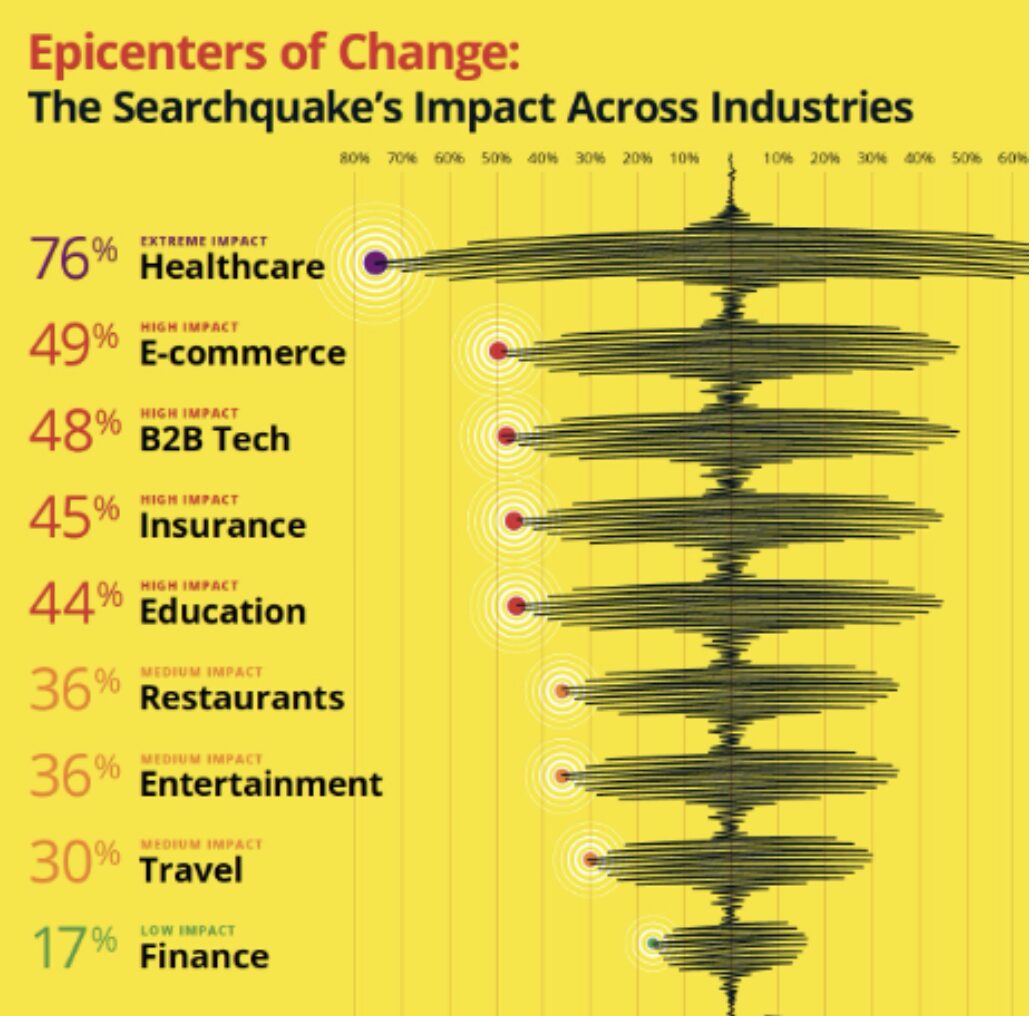
Graph demonstrating how the change in SGE is impacting various industries, with Healthcare being by far the most affected

Source: BrightEdge

Organic traffic to healthcare websites is predicted to decline. An 18-75% loss could be seen overnight. Education sites should prepare for a decline as high as 44%. 

The hardest-hit sites will be content pages (such as Healthgrades, WebMD, Mayo Clinic, etc.) and any content pages on your healthcare organization’s website.

Things to consider

  • Expect organic traffic to decline dramatically. 
  • Already, we’re seeing changes to how websites are discovered (or not discovered).
  • Queries that contain “who, what, and where” type questions will likely see the most declines in organic traffic to healthcare sites.
  • Informational queries that are more research-based are now more likely to reduce organic traffic, whereas they once could have led to traffic to sites .
  • Expect a focus on people over paid; your doctors, physicians, healthcare professionals, and medical school faculty will be heavily prioritized to show in SGE results. 
  • Changes will affect how people (doctors, faculty, etc.) appear in SGE, making listings and reviews over paid ads all the more critical to your healthcare website’s content strategy right now.

What you can do now

  1. Sign up to Search Labs and play around with it.
  2. Focus on search intent, and what people mean when they search and find healthcare sites.
  3. Consider ways to craft content for long-tail queries.
  4. Prioritize listings and reviews. Ensure that data is robust, up-to-date, properly structured, and connected to platforms to help drive better impressions and accuracy on Google and other sites.
  5. Don’t ignore Google reviews (respond, generate, etc.) 
  6. Build relationships and horizontal pathways between content on your healthcare website.

Focus on E-E-A-T

Experience, Expertise, Authoritativeness, and Trustworthiness come from your brand. We can help you connect the dots on your website and tell your story if you fear this is currently lacking from your site.

Horizontal pathways between related site content are vital. We’ve helped a number of healthcare clients achieve this, including the award-winning UCSF Department of Surgery website and some nimble support redesigns like the UCSF School of Nursing.

With the UCSF Department of Surgery in particular, it’s about making connections between content about health conditions, people who treat them, and the places where surgeons can see patients with related conditions. 

Each page should be properly structured and display an optimized content hierarchy, taking into consideration how Google can reference information in SGE. 

And most importantly: ensure every page is schema-tagged!

Focusing on website transactions 

As your healthcare website content continues to be distributed to train AI algorithms, websites will increasingly become places where folks need to transact, not learn. 

Websites need to focus on these key transactions:

  1. Phone calls to make appointments. 
  2. Online appointment bookings. 
  3. Other calls to action (newsletter sign-up, apply for a clinical trial, etc.) 

SEO will become SGO

As SGE continues to evolve, SEO will increasingly resemble SGO.
Healthcare websites need to pivot towards becoming transactional hubs, facilitating intuitive actions such as appointment bookings and clinical trial sign-ups directly from search engine results pages (SERPs).

While Google’s Search Generative Experience reflects a paradigm shift in search engine functionality, it also presents exciting opportunities for hospitals, clinics, and medical schools to enhance their digital strategies.

By embracing AI-driven data analyses, optimizing content for search intent, and prioritizing patient, donor, and resident engagement through transactional website functionalities, healthcare organizations can proactively adapt to the changing digital landscape and continue to thrive in this emerging AI-centered online world.

Hands holding credit card and using laptop. Online shopping

Improve Conversions with Better CTAs: a Quick Guide

Your organization has just rebranded its website. It’s got a beautiful, modern design full of updated visuals and tons of ways for supporters to engage with your mission—great!

Weeks and months go by. You’re still promoting your campaigns, programs, and newsletter sign-up options like normal, but you don’t notice any changes in your performance. Your online fundraising results seem roughly the same as before.

Was the website investment a mistake? Did it make a difference? 

Unfortunately, major website updates might not make a difference for your digital bottom line if your online marketing foundation is shaky to begin with. The purpose of your organization’s website is to communicate and inspire action. Rebrands and design updates can help you excel at the former, but if you’re neglecting the latter, you’re facing an uphill battle.

The calls to action, or CTAs, on your website (as well as your emails and social media posts) convert online engagement into a tangible impact for your organization. With poor CTAs, even the most well-designed nonprofit or higher education websites can struggle to generate value and on-the-ground engagement. 

Even experienced marketers can benefit from revisiting the basics of conversions and CTAs to ensure your website is making the most of current best practices. Improving your website’s ROI is easily approachable once you get a refresher on the basic concepts at play. Let’s take a look.

What’s a conversion?

In the marketing world, a conversion occurs whenever a reader or web visitor completes a specific target action. For nonprofit organizations, for example, these target actions typically include:

  • Donating online
  • Donating via text-to-give
  • Signing up to receive emails
  • Signing up to volunteer
  • Signing up to receive SMS messages

Other organizations might have target actions such as:

  • Downloading a white paper
  • Registering for a webinar or event
  • Signing up to receive emails
  • Purchasing an item

Conversions generally revolve around a specific endpoint in a user journey like the examples listed above. 

Your website and other marketing materials will have already stewarded and encouraged web visitors to reach that point and feel ready to take the target action. You can drill down and track intermediary steps like clickthroughs to your website from an email as distinct, unique conversions as part of the process to reach the ultimate desired action.

Essentially, you can think of a conversion as the final step a visitor takes that gets you closer to a concrete goal like increasing campaign revenue or your donor acquisition rate. In other words, it’s the point when an interested visitor is officially “converted” into a secured donor, volunteer, email recipient, etc.

What’s a call to action (CTA)?

A call to action is the explicit way in which you ask readers or site visitors to take a target action. 

Calls to action usually include buttons or graphics and include text and visuals that entice users to take action. All CTAs should direct users straight to a target landing page, the web page that includes the form or instructions for how to take the target action. 

For nonprofits, a blanket “donate now” button in your website’s header is considered best practice. You’ll also need to include more targeted asks throughout your website depending on each page’s purpose in order to support your organization’s more specific goals, like email, volunteer, recurring gift, or membership sign-ups.

Essential elements of effective CTAs

So what makes an effective call to action? Each CTA will look different depending on its unique context and the goal it’s supporting, but these are some essential elements that all CTAs should include:

1) Relevance

Simply put, what you’re asking readers to do must make sense. What can you assume users are looking for or seeking to accomplish when they visit specific pages of your website? Consider these factors:

  • A user’s intent and goals when visiting a specific web page. Are they looking to learn more about something? Are they looking to take a specific action? Depending on the purpose of the page, determine what would make the most sense to ask this user to do.
  • The specific context of the message. For instance, if it’s part of an email stream for previous volunteers, ask them to learn more about your new opportunities and join your next event rather than sign up for an orientation session.
  • A user’s readiness. Do they need more information before being likely to take your target action? For example, a brief section of your “ways to give page” about planned gifts will be more successful if it asks readers to click through to a more detailed page about how bequests work. That page is where a more specific request to set up a bequest will make the most sense contextually in the user’s journey. 

Ensuring relevance requires putting yourself in a visitor’s shoes. When adding or updating your CTAs, look at the page in question and think about who lands on it and why. Putting thought into the page’s context will allow you to add truly relevant additional CTAs to it that will boost its conversion-generating power. 

For some organizations that offer direct services to large audiences, like healthcare institutions, there could be much more complex user intents and goals at play. Their web designs and CTA strategies need to be more carefully plotted out to ensure each page’s CTAs are relevant to visitors’ goals and journeys. Check out Kanopi’s healthcare web design guide for an overview of what these strategies look like in action.

2) Compelling language

Your CTAs, whether they’re on a web page, email, marketing text message, social post, or even a printed mailer, need to stand out. What would you be more likely to click—“click here to donate” or “give a lifesaving gift today”?

To encourage clicks and engagement, use compelling and engaging language. Consider these best practices:

  • Use active voice and action verbs.
  • Avoid industry jargon.
  • Use “power words” that help tap into supporters’ emotions, curiosity, or concern.
  • Avoid using “we” and centering your organization—the focus should be on your supporters.
  • Evoke a sense of urgency or time sensitivity when appropriate.

Take a look at the donate and sign-up buttons on your website and email drafts and quickly review their language. Are there any immediate improvements you can identify? These are fast, easy changes you can make, and while they might seem small, they add up. If just 10 more supporters are encouraged to click through, learn about your mission, and give a gift for the first time, those are 10 more donors and gifts you wouldn’t have otherwise acquired!

3) Specificity 

Similarly to the importance of compelling language, your CTAs should also be very clear. Readers should immediately understand what you’re asking of them and where you’ll direct them if they click through.

When drafting the language for your CTA buttons, links, and graphics, double-check that you’re being as clear as possible. A good rule of thumb is to keep your text short and direct, balancing conciseness with the compelling action tips listed above. 

For most organizations, this will be fairly easy since most of your asks are quite straightforward—donate, sign up, learn more, contact us, etc.

More complex institutions should put extra consideration into the clarity of their CTAs. For example, college websites have to house a lot of diverse material that will be used by a wide range of audiences—students, alumni and families, staff, donors, community partners, and more. Understanding your audiences, making asks that are relevant to their goals, and using compelling but specific language will make a smoother experience for everyone who arrives on the website.

4) Prominent design and placement

You also need to consider the visual look and placement of your CTAs. Follow these best practices:

  • Visuals
    • For buttons, use bold colors that complement your website’s color scheme and stand out against the background. Ensure that the text color has sufficient contrast to be easily seen.
    • For graphics, also use bold colors that complement your main color scheme, but consider the additional visual elements. Your logo and well-designed illustrations will work, but photos of people tend to best catch users’ attention.
  • Placement
    • If you want readers to see something, make it easy to find! Bold buttons at the end of paragraphs and banner graphics at the tops and bottoms of pages are natural placements for CTAs.
    • Charitable organizations should include a “donate now” button on their website’s running header.
    • Including multiple CTAs is fine and often recommended, but don’t overdo it—keep each page focused on its core purpose.
    • If you have embeddable email sign-up forms, calendars, and donation tools, make use of them! These elements streamline the user experience and can boost engagement.

CTAs should be prominent but shouldn’t feel haphazardly placed. Each of the essential elements discussed in this guide involves considering the user experience and the context in which you ask visitors to take target actions. If you take a moment to think through the CTA from the user’s perspective, it becomes much easier to identify the right placements that will ensure it’s seen and acted upon.

Getting started and measuring your performance

Once you’ve got a solid grasp on call-to-action best practices and implement updates to your strategy, how do you ensure they actually make a difference? Follow these steps on an ongoing basis:

  1. Set clear goals. What are the specific outcomes you want to see as a result of updating your approach to CTAs? For example, you might aim to increase online fundraising conversions by 25% overall in the next 6 months, or you might set channel-specific goals, like increasing email clickthroughs by 15%.
  1. Create dedicated landing pages to support your goals. It’ll be easiest to track your progress when all the CTAs that are part of a campaign all point users to the same place. This allows you to review incoming traffic to a single landing page and its specific sources without wading through unnecessary amounts of irrelevant data. The landing pages should include the forms or instructions that will allow users to complete the final target action that you’re asking of them.
  1. Actively track your conversion rates. By funneling traffic to a dedicated landing page and tracking the number of form completions, you can calculate your conversion rates for the different CTAs that send users there. Web analytics tools and website plugins can greatly simplify this task. However you collect the data, make sure to intentionally track it so that you can measure your progress over time.
  1. Correlate performance to specific strategies. With conversion data in hand, you can take a closer look at your highest- and lowest-performing calls to action. What strategies do they employ? What audiences are they targeting? These are the insights that will help you continually improve your conversion rates and better understand your audience’s motivations for engaging with your organization.
  1. Test and refine your CTAs. With everything you’ve learned, make targeted changes to your CTAs and track the results. For a more systematic approach, try an A/B test in which you present two similar audiences with slightly different variations on the same CTA. Keep the process running with fine-tuned updates, testing, and analysis.

The data collection and analysis aspects of an effective CTA strategy are often harder for small shops to handle, which is why third-party help can be so valuable. Web designers and consultants can help with your CTA strategy, develop custom landing pages, and provide analytics solutions to help you roll out a professional-grade conversion strategy.


The bottom line is that conversions (and the calls to action that create them) must be approached intentionally. A beautiful website is only a true asset for your organization when it can make an impact, and that’s accomplished by understanding and adapting the strategies discussed here. Best of luck!

A nonprofit-specific version of this blog post was originally published on Mogli.