After all, you’ve probably heard the news by now; as of January 5th, 2025, everyone’s beloved, trusted Drupal version 7 will reach its end-of-life. If you haven’t done so already, this means it’s time to start thinking about the ‘m’ word — yup, migration — to a newer version.
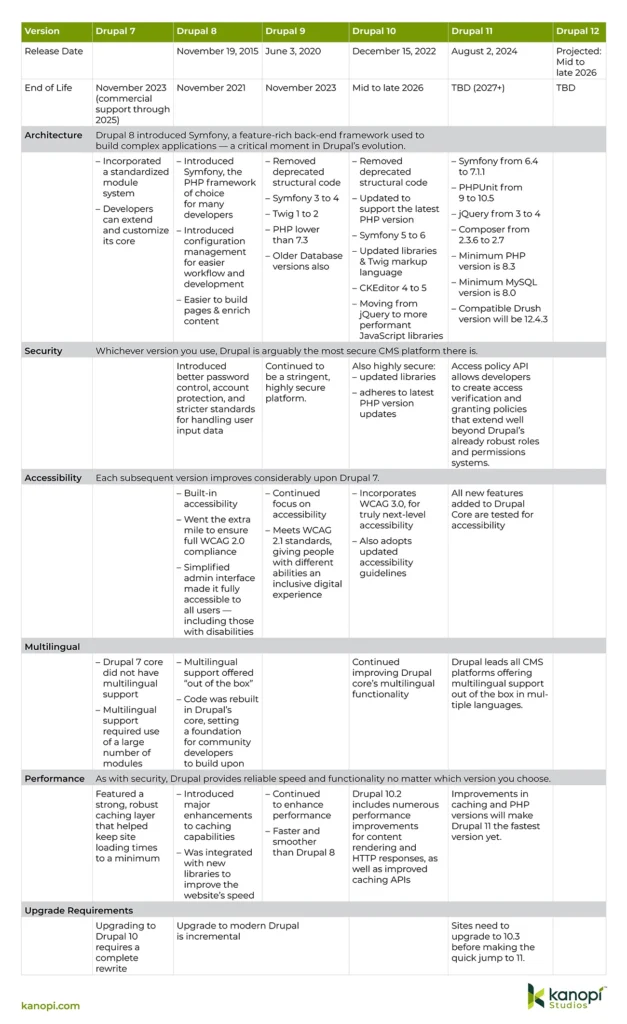
Modern Drupal’s versions 8, 9, 10, and the newly released 11 are similar in many ways, yet very different in others. The Drupal 7 migration process is kind of similar to finally trading in your trusty old well-worn VW camper van for a brand new Porsche. As you can imagine, a transition of such magnitude could be a tad jarring for some — not to mention a wee bit confusing.
That’s why we’ve created this handy infographic, to give you an overview of the key differences between each modern Drupal version, their respective functionalities, and how they solve specific business needs.
What about Drupal 8 & 9?
Since these versions have both reached their end-of-life, there’s no long term support for them. We’ve still included them in our comparison, since their features are integral to understanding the path of version 10 and beyond; however, we don’t recommend them for new builds or upgrades.
The one thing to keep in mind is that anything higher than Drupal 8 is part of Drupal’s composable future — i.e., not only can Drupal integrate with virtually any business or marcom software or service, but it in itself is composable. Taking the best open source tools — CKEditor, Symfony, and Twig, for example — allows modern Drupal to keep innovating and improving while keeping your website’s appearance and functionality intact.
Drupal remains an excellent platform, and its newest releases demonstrate its commitment to staying current and providing the best possible experience to its users. It’s also incredibly complex, which is why any successful migration from Drupal 7 will involve a great deal of planning and resources — not to mention expertise. That’s why it’s highly recommended to work with a web developer, whether as part of your organization or a third-party web development firm.
Where does Drupal CMS fit in?
Drupal CMS aims to make Drupal more accessible to a broader, less technical audience while keeping the platform feature-rich. Rather than downloading and installing the latest version of Drupal, a user who wants to spin up a Drupal site quickly can instead download Drupal CMS for an easy-to-use, out-of-the-box experience. This makes it easier than ever for users to go from installation to a fully functional website, even if they have little to no prior Drupal experience. Drupal CMS comes pre-packaged with carefully curated “recipes” that cater to everyday use cases. We’ve written about Drupal CMS here.
When searching for the right Drupal partner, it’s helpful to find an organization with experienced developers who contribute to the project on an ongoing basis. At Kanopi Studios, we provide Drupal development services for all types of organizations, including nonprofits, corporations, healthcare organizations, and higher education institutions.
We’ve also written several blog posts about the various Drupal versions and their upgrade paths:
In the fast-paced digital content creation and management world, having a robust system to organize and distribute your assets is crucial. This is where Digital Asset Management (DAM) tools come into play. DAM tools provide a centralized platform to store, manage, and share various digital assets such as images, videos, documents, and more. Fortunately, many of these tools seamlessly integrate with popular content management systems (CMS) such as Drupal and WordPress.
What is a Digital Asset Management Tool?
A Digital Asset Management tool is essentially a digital library for all your digital assets. It allows you to:
Store: Keep all your assets in a secure and organized repository.
Manage: Categorize, tag, and search for assets with ease.
Share: Distribute assets internally or externally with controlled access.
Track: Monitor asset usage and performance.
One of the biggest benefits of using open-source software such as Drupal or WordPress is the modular nature of the platforms. Plugins and modules are already available for many common third-party systems, including DAMs. If a more custom solution is needed, a qualified partner can build an integration for any tool that provides an API and works seamlessly with your CMS. If a DAM is right for your organization, several integrate well with either Drupal or WordPress for businesses with a wide range of resources and needs.
1. Acquia DAM (formerly known as Widen)
Acquia DAM is a comprehensive DAM solution offering various features for managing and distributing digital assets. It is a powerful and versatile solution suitable for organizations that require a robust and scalable platform to manage their digital assets effectively.
Pros:
Seamless Integration: Acquia DAM integrates smoothly with both Drupal and WordPress, making it easy to access and manage assets directly within your CMS.
Robust Features: It offers a wide array of features, including fine-grained roles and permissions, advanced search, metadata management, and version control.
Scalability: Acquia DAM can handle large volumes of assets and users, making it suitable for organizations of all sizes.
Brand Consistency: Provides centralized control over brand assets, ensuring consistency across all channels.
Cons:
Cost: Acquia DAM can be relatively expensive compared to some other DAM solutions.
Complexity: The extensive feature set can make the learning curve a bit steep.
Common Use Cases:
Enterprise-Level Asset Management: Acquia DAM excels in managing large and complex asset libraries, making it suitable for large organizations with diverse asset management needs.
Marketing and Creative Teams: The platform’s robust features and integrations support marketing and creative workflows, streamlining asset creation, management, and distribution.
Brand Management: Acquia DAM helps maintain brand consistency by providing centralized control over brand assets and ensuring proper usage across all channels.
2. Bynder
Bynder is a user-friendly and collaborative DAM solution that excels in helping organizations maintain brand consistency and streamline creative workflows. Its intuitive interface and focus on teamwork make it a valuable tool for marketing and creative teams that must collaborate effectively and ensure that their brand is presented consistently across all channels.
Pros:
Intuitive Interface: Bynder’s interface is easy to navigate and understand, even for users with varying levels of technical expertise, minimizing the learning curve.
Collaboration: The platform offers tools for real-time collaboration, allowing teams to work together on asset creation, review, and approval processes, fostering efficiency and productivity.
Brand Consistency: Bynder helps maintain brand consistency by providing centralized control over brand assets, ensuring that everyone uses the most up-to-date and approved versions.
Creative Workflow Management: Bynder streamlines creative workflows with features like task management, project tracking, and feedback tools, facilitating efficient collaboration between creative teams and stakeholders.
Cons:
Limited Integrations: While Bynder integrates with Drupal and WordPress, the integrations might not be as seamless as some other DAM solutions.
Pricing: Bynder can also be on the pricier side.
Common Use Cases:
Marketing and Creative Teams: Bynder’s collaborative features and focus on brand consistency make it ideal for marketing and creative teams to work together efficiently and maintain brand standards.
Brand Management: The platform’s centralized control over brand assets and usage guidelines helps organizations ensure their brand is consistently presented across all channels.
Global Teams: Bynder’s cloud-based architecture and multi-language support make it a good fit for organizations with globally distributed teams. It facilitates collaboration and asset sharing across different locations.
3. MediaValet
MediaValet is a cloud-based digital asset management (DAM) solution that prioritizes scalability, performance, and security, making it well-suited for organizations that handle large volumes of digital assets and require fast, reliable access.
Pros:
Cloud-Based Architecture: MediaValet’s cloud-based nature eliminates the need for on-premise infrastructure, enabling easy access to assets from anywhere with an internet connection.
High Performance: The platform is built for speed and efficiency, ensuring quick uploads, downloads, and asset previews, even for large files.
Scalability: MediaValet can handle massive asset libraries and user bases, making it suitable for organizations with growing needs.
Security: The platform employs robust security measures, including encryption, access controls, and audit trails, to safeguard valuable digital assets.
Integrations: MediaValet offers integrations with various third-party applications, including popular CMS platforms and marketing tools, streamlining workflows.
Cons:
User Interface: Some users might find MediaValet’s interface less intuitive than other DAM solutions.
Feature Set: While MediaValet offers a good range of features, it might not be as comprehensive as some other solutions.
Common Use Cases:
Large Asset Libraries: MediaValet excels in managing and delivering large volumes of digital assets, making it ideal for organizations with extensive media libraries.
High-Traffic Environments: The platform’s focus on performance ensures fast and reliable asset access, even in high-traffic scenarios.
Security-Conscious Organizations: MediaValet’s robust security features make it a good fit for organizations that handle sensitive or confidential information.
Distributed Teams: Cloud-based access enables teams across different locations to collaborate and share assets seamlessly.
Video and Rich Media Management: MediaValet’s support for video and rich media formats and its high-performance capabilities make it well-suited for organizations that work extensively with these assets.
4. PhotoShelter
PhotoShelter has an intuitive UI to drive brand engagement, get better content ROI, and improve efficiency. PhotoShelter is used by 75% of the top 50 higher education institutions, including global enterprise clients like Delta Airlines, FreshDirect, IMG Golf, and Wendy’s. The HIPAA compliance make it a good choice for healthcare.
Pros:
HIPAA compliance & proprietary data infrastructure: PhotoShelter manages its own HIPAA-compliant private cloud infrastructure, so data isn’t sent to a 3rd party for hosting. And the company claims it has never been hacked or lost an asset in the 20 years since it was founded.
Real-time workflow: With smart features, PhotoShelter can get content from live shots to launch on social media in under a minute, so users are never slowed down.
Easy search with AI: PhotoShelter’s unique AI Visual Search and proprietary AI tagging capabilities can save tons of time on searching and adding manual metadata.
Social media content amplification: PhotoShelter offers tools to automatically distribute content and track its engagement across other social media accounts. An organization can tap into followers from partners, influencers, employees, or other key groups.
Cons:
Not for very small organizations: PhotoShelter is not appropriate for very small organizations; it works best for organizations that are mid-market or larger and need a collaborative platform.
Not for federal government organizations: PhotoShelter is not FEDRAMP or ITAR/EAR certified, so it is not appropriate for organizations requiring those certifications.
Common Use Cases:
Enterprise Organizations: Enterprise organizations trust PhotoShelter to ensure their content workflows are seamless across all of their teams.
Marketing & Creative Teams: PhotoShelter’s real-time workflow, collaboration tools and integrations mean it can help marketing & creative teams get content created, organized, and distributed faster than ever.
Live Content: With PhotoShelter’s real-time distribution capabilities, it is great for getting content out from live events, ensuring maximum engagement.
Complex Social Media Ecosystems: Because of PhotoShelter’s social media distribution & tracking capabilities, PhotoShelter’s social media distribution & tracking capabilities make it ideal for organizations who want to drive engagement across an ecosystem of accounts – such as partners, employees, influencers, or talent.
Which Digital Asset Management tool is right for your needs?
Choosing the right DAM tool depends on your specific needs and requirements. Acquia DAM, Bynder, and MediaValet all offer powerful features and integrate well with Drupal and WordPress. When deciding, consider factors such as budget, ease of use, scalability, and feature set. Remember, a well-implemented DAM solution can streamline your asset management workflow, improve collaboration, enhance brand consistency, and ultimately empower your organization to tell its story effectively through digital content.
In Drupal 10.3, the DefaultContent API was added to Drupal core as part of the experimental Recipes APIs. These APIs allow Drupal to create content from files that are part of a recipe.
This content that we programmatically create isn’t intended for deploying or migrating content, we have the Workspaces and other modules for that.
Instead, it can be a great tool in our toolkit for creating demos and test content, while freeing developers and testers from the drudgery of repetitive content creation.
How did we get here?
Starting back in 2011, a group of open-source Drupal developers started working on a new install profile for Drupal called Snowman. Instead of having a generic and unopinionated starting point, the idea behind Snowman was that it wanted to provide a ready-to-use Drupal site tailored for a specific use case.
While we added a way in core to consume content config files from recipes, we are still at the start of what core can do, and mid-journey of what the contrib module aims to do.
Until the recent interest from the Recipes Initiative team, the Default Content module has always been used for creating default content configuration files for custom modules and install profiles. You could create content on a local site, export it to your module or a module in an install profile, and when that module was enabled (or a site was started from the install profile), and you installed the default content module as a dependency, you would get your content imported. This all still works exactly as it always has, and now it can also be used with recipes.
Drupal Recipes are a framework and set of tools for automating the configuration of a site. They allow developers to rapidly configure entities, fields, and other settings. A recipe can be applied to any number of different sites. This means creating multiple sites can be achieved faster and with a greater degree of consistency in how they are configured. A great deal of human error and forgetfulness can be avoided by using Recipes, particularly for repetitive config. (Check out my comprehensive guide to Drupal recipes.)
Using the Default Content module
The export process is the same for modules and recipes. Let’s review that now.
Getting set up
Install the module as you normally would. Since I am using the module for creating content for recipes, I install it in the dev section of my composer requirements as I do not need it in production.
composer require --dev drupal/default_content
And enable the module:
drush en -y default_content
The module doesn’t have a user interface. Instead, it provides drush commands that can be run to export content.
What can we export?
Out of the box, we can export the following entity types:
Content type nodes:node <node id>
Taxonomy Terms:taxonomy_term <taxonomy term id>
Files:file <file id>
Media:media <media id>
Menu Links:menu_link_content <menu link id>
Content blocks:block_content <block id>
Shortcuts:shortcut <shortcut id>
At this time, there isn’t a way to export by bundle type, think all nodes of type Article, or all menu links from the main menu, but there is a patch for it.
Let’s take a look at the three commands that the module provides to export content.
Default content drush commands
default-content-export-references
Exports an entity and all its referenced entities. This is my go to command as it helps you export referenced media, files, taxonomy terms, and users from the parent node.
Alias:
dcer
Arguments:
entity_type – The entity type to export.
entity_id – The ID of the entity to export
One of these arguments is required.
Options:
folder – The module or recipe’s content folder to export to. Entities are automatically grouped by entity type into directories.
Examples:
# Exports node 123 and all its dependencies.
# To a module:
drush dcer node 123 module_name

# To a recipe:
drush dcer node 123 --folder=recipes/recipe_name/content

# Export all nodes and all their dependencies.
drush dcer node --folder=modules/custom/my_custom_module/content
default-content-export
Exports a single entity. If you want to manage your own dependencies.
Alias:
dce
Arguments:
entity_type – The entity type to export.
entity_id – The ID of the entity to export
Both of these arguments are required.
Options:
file – Write out the exported content to a file instead of stdout
Examples:
# Exports node 123 only. You are responsible to export dependencies.
drush dce node 123 module_name
default-content-export-module
Exports all the content defined in a module info file. This is most helpful for distribution and install profile maintainers where they would want to maintain and update default content from a canonical source.
Alias:
dcem
Arguments:
module – The machine name of the module
The argument is required.
Options:
None
Examples:
# Exports all the content defined in a module info file.
drush dcem module_name

# The module's info file would need to have a section like this:
default_content:
  node:
	- c9a89616-7057-4971-8337-555e425ed782
	- b6d6d9fd-4f28-4918-b100-ffcfb15c9374
  file:
	- 59674274-f1f5-4d6a-be00-fecedfde6534
	- 0fab901d-36ba-4bfd-9b00-d6617ffc2f1f
  media:
	- ee63912a-6276-4081-93af-63ca66285594
	- bcb3c719-e266-45c1-8b90-8f630f86dcc7
  menu_link_content:
	- 9fbb684c-156d-49d6-b24b-755501b434e6
	- 19f38567-4051-4682-bf00-a4f19de48a01
  block_content:
	- af171e09-fcb2-4d93-a94d-77dc61aab213
	- a608987c-1b74-442b-b900-a54f40cda661
Creating a Drupal recipe with Default content
So let’s create a recipe that can store default content we can send to a test server so our QA engineer can test. We’ve created a node that has our new feature on our local environment. Rather than having to rebuild that page manually, we will export the content, and apply the recipe after it has been deployed.
Create the recipe structure
We keep our recipes in the recommended folder above the webroot.
You can manually create a recipe folder, the content folder, and a recipe.yml file or use the command line:
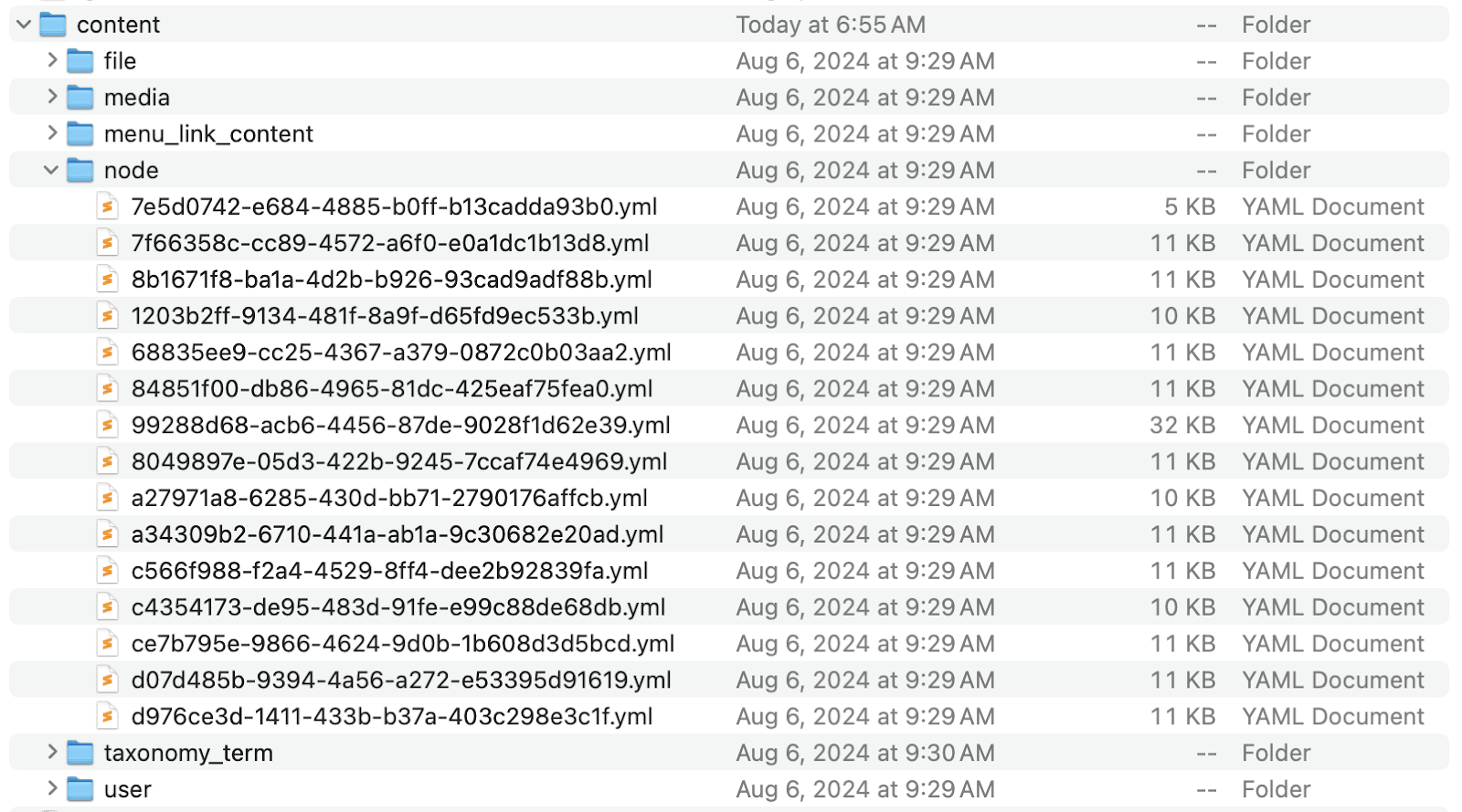
Using the drush commands above, usually the dcer command to export the content you need. Verify in your /content folder that you now have the entities you expect. It should look something like this:
We can now uninstall the Default Content module from our local environment.
Normally we just use recipes in our local development environments and deploy the resulting config, but when leveraging the Default Content module in your recipes, you will deploy them to your server.
Once deployed and applied on your site, you’ll probably want to remove your recipe in a subsequent pull request as you don’t need it in production.
Commit and deploy your new recipe along with your code changes as you normally would.
Applying the recipe
Once your deployment has finished, you can use Drupal core’s recipe script to apply the recipe. If you have cli access to your server, from the webroot you can run:
This uses the recipe PHP script from Drupal to apply the recipe from its current location. The -v flag prints verbose information during the application process.
If you are using Drush 13 or above, they added a recipe command which is a wrapper around the core script.
drush recipe ../recipes/recipe-name -v
If you are on Pantheon, you can user Terminus to run either command:
Verify the content has been created as expected and have your PMs and clients rejoice in the fact that you saved them some time having to recreate it!
What Default content isn’t made for
Default content is not meant to be a replacement for content deployment solutions. It can be a good starting point on new sites. It’s great for demo sites, and quality assurance and user acceptance testing, but there are better solutions like the Workspaces module in Drupal core that allow for you to stage content and deploy it later.
One of the biggest reasons is that we don’t know what the IDs will be on the destination site. You may have started out with the same database, but there is a good chance that the IDs have been increased on the production site by content editors adding new articles or pages.
You can also apply a recipe multiple times, or install and uninstall a module and add that default content again. There are issues in the module’s queue to address some of these situations, but work still needs to be done to improve the processes.
What’s next?
There are plenty of issues in the module’s issue queue to improve the quality and functionality of Default content, and the eleven year old Support default content entities core issue that has recently won some success thanks to the Recipes initiative.
I’d love to hear your thoughts and feedback on how you are using Default Content, or how you plan on using it! Please reach out to me in the Drupal Slack or on LinkedIn.
If you’re up to date on your Drupal news, you’re probably aware that Drupal 10 was released in December 2022, and Drupal 11 was launched in August 2024.
As a current Drupal 9 user, you may be strategizing your website’s transition. Drupal 9 users must first upgrade to Drupal 10.3 before they can move to Drupal 11. As Drupal explains, “All core updates added prior to 10.3.0 have been removed.”
Luckily, the Drupal 9 to 10 upgrade was heralded as the easiest upgrade in Drupal’s history. That’s because Drupal 10 is backward-compatible with Drupal 9 and does not require a major overhaul of the core system. However, the planning and development process will still require time and attention to ensure the upgrade goes smoothly.
Let’s examine the Drupal upgrade process and how your organization’s marketing team can provide support.
Fast Facts about the Drupal 9 to 10 Upgrade
Brush up on your Drupal release history with these fast facts:
Drupal 9 was released in June 2020. At the time of its release, it offered an easier upgrade than ever before, as it built on features released for Drupal 8.
Support for Drupal 9 ended in November 2023. That means there aren’t any new features or security updates being released for this version anymore.
Drupal 11 was released in August 2024. However, before they can upgrade to D11, Drupal 9 users must upgrade to Drupal 10.3.
What’s New in Drupal 11?
As mentioned, Drupal 11 is built on innovations released as part of Drupal 9. When switching to Drupal 10 and 11, you won’t be confronted with an entirely new structure and system to get used to.
That being said, Drupal 11 offers plenty of new features to look forward to, including:
The experimental Recipes API that enables simple sharing of module configurations and additions.
The Drupal core Workspace module that facilitates content staging using multiple workspaces on a single site.
Single-Directory Components for simplified front-end development.
A new Navigation module that restructures the admin toolbar using modern tools.
An Access policy API that provides more flexibility for access controls.
Steps to Upgrade From Drupal 9 to 10
If you upgraded your site from Drupal 7 to 9 in the past, you know that migration required transferring all of your data to a brand new Drupal 9 website. The Drupal 9 to 10 migration (and 10 to 11!) won’t be such a significant undertaking.
However, you can still take a few measures to set your website up for success. Follow these steps to prepare your Drupal 9 site for the migration:
Upgrade to at least Drupal 9.4.4 or later. Core updates made before 9.4 have been eliminated, so you must be on at least Drupal 9.4.4 to use the data upgrade path from CKEditor 4 to CKEditor 5.
Run Drupal Rector on custom modules and themes. Drupal Rector scans code for deprecated functions and helps developers upgrade them.
Check your PHP version. Drupal 10 requires PHP 8.1 or higher. Log into your website’s hosting account and check the settings in your control panel to verify which version of PHP you’re using.
Check your modules and themes. Not all modules and themes from Drupal 9 will be compatible with Drupal 10. If your site uses a module or theme that was removed from Drupal core, download the contributed project version before migrating to Drupal 10.
Update to Drupal 10 and test your site. Run automated code tests using tools like Drupal Rector or PHPStan. Also, conduct manual testing to ensure that everything is working as expected. Check your forms, links, page navigation, and other site elements to note any user experience issues.
If you have a web developer on your team, you can either take these steps yourself or work with an external Drupal developer.
Working with a Drupal Development Expert
Although the Drupal 9 to 10 transition is a more straightforward upgrade, it’s still typically recommended that you work with a Drupal web developer to oversee the process. This can ensure a smooth transition and help maintain data integrity and security.
Look for a Drupal web development firm that offers services such as:
Overseeing the process from start to finish
Custom module development depending on your organization’s needs
An accessibility-focused approach to ensure your website is usable for all audiences
Third-party and custom API integrations to integrate tools like your payment gateway or security portal seamlessly with your Drupal website
Mobile responsive design to create a positive mobile user experience
Search engine optimization (SEO) recommendations to maintain or enhance your website’s search results rankings
Ongoing support to implement module upgrades and security patches as needed and to help with other aspects like content strategy and performance enhancements
If you’re looking for an experienced Drupal partner, Kanopi Studios is a great choice. Our Drupal team members have an average of 11 years of Drupal experience each. We are also a supporting partner to the Drupal Association, a founding sponsor of Discover Drupal, and regular contributors to the Drupal Project.
Upgrading your website from Drupal 9 to 10 and eventually 11 shouldn’t be a hassle. With these tips, you can make the already simple process even easier.
Looking for more Drupal tips and resources? Start here:
The Ultimate Guide to Drupal Planning and Development. Kanopi’s Drupal planning and development guide offers tips for keeping your website up-to-date and effective, no matter which version you’re currently using.
The Top WordPress & Drupal Trends. Want to know the latest trends for top content management systems WordPress and Drupal? Check out this guide.
In the ever-changing world of web development, staying ahead of the curve is crucial. Traditional monolithic websites have served us well, but as the demand for more dynamic, interactive, and flexible digital experiences grows, so does the need for more advanced solutions.
A headless website separates the backend (your content management system or CMS, such as Drupal or WordPress) from the front end (the user interface), allowing developers to deliver content via APIs to any device or platform. This architectural approach provides numerous advantages but isn’t appropriate for every project. So when does a headless website make sense for your business, and why might it benefit your next web development project?
When is a headless website the right choice?
Omnichannel Delivery
A headless CMS delivers content across multiple platforms — web, mobile, IoT (Internet of Things) devices, smartwatches, and more. The headless architecture empowers you to integrate and deploy content and experiences via APIs, ensuring consistency and flexibility across various channels. With a headless site, you can create content once and distribute it everywhere, enhancing your reach and user engagement. You can also create a single, unified experience that ties your disparate platforms together — so your CMS, e-commerce platform, membership program, and any other tool you can think of can be integrated into a seamless experience for your users.
Technical Flexibility
Headless websites offer unparalleled flexibility for projects requiring high customization and a unique user interface. Since the site decouples the front and back end, developers can build the user interface using any technology or framework (React, Vue.js, Angular, etc.). This freedom enables bespoke, highly interactive, and performance-optimized websites tailored to your business needs.
Improved Performance and Scalability
Headless websites can significantly improve performance and scalability. Decoupling the front and back ends allows you to optimize each layer independently. This separation allows for faster load times and a more responsive user experience. Additionally, it’s easier to scale different parts of the architecture according to demand, ensuring your website can handle traffic spikes without compromising performance.
Enhanced Security
Security is a paramount concern for any website. Headless architectures can enhance security by reducing the attack surface. Since the front and back end are separated, attackers find it harder to exploit vulnerabilities. Furthermore, APIs can be secured independently, and sensitive data can be better protected, giving you peace of mind.
Content Personalization and A/B Testing
Personalizing content for different user segments and conducting A/B testing are essential strategies for improving user engagement and conversion rates. A headless CMS makes these tasks straightforward and more efficient. By leveraging APIs, you can dynamically deliver personalized content and easily integrate A/B testing tools to optimize user experience in real-time.
Future-Proofing Your Digital Strategy
As technology continues to evolve, having a future-proof digital strategy is crucial. A headless architecture ensures your website can adapt to emerging technologies and platforms without requiring a complete overhaul. This adaptability allows your business to stay competitive and quickly respond to market changes and technological advancements.
Streamlined Workflow for Development Teams
Headless websites foster a more streamlined workflow for development teams. Frontend and backend developers can work simultaneously without dependencies, accelerating the development process. This parallel workflow reduces bottlenecks and enhances collaboration, leading to faster project completion and more efficiency.
When might a headless website not be the right choice?
While headless websites offer numerous benefits, they might only suit some projects. Here are a few scenarios where a traditional monolithic approach might be more appropriate:
Ease of Familiarity
WordPress or Drupal are well known to users and are known for their ease of use and user-friendliness. This familiarity makes it simple for non-technical users to update the site’s configuration.
Although a headless site can have content driven by WordPress or Drupal, technical knowledge is paramount when adding and updating configuration. A developer will usually be required.
Plugin/Module Ecosystem
WordPress and Drupal boast an almost endless ecosystem of plugins/modules that can extend the functionality and features of your website, from SEO to commerce, forums, and beyond.
A headless site can have its own suite of plugins, and if driven by WordPress and Drupal, some plugins/modules will play nicely with the headless front end. However, your pool of choice is drastically reduced.
Content delivery
Even if you do need to share content from your CMS with your mobile applications and other systems, you can still do so using Drupal or WordPress in a traditional CMS build. These platforms provide robust and customizable APIs that other applications can leverage, whether the main content site is headless or not.
This allows you to allow your CMS to do what it does best, manage content while serving the content you choose to the applications that need it.
Theming and Design
WordPress and Drupal both offer many free themes for almost every industry. Vendors in this space can build you a custom theme that is nearly endlessly flexible — and flexible to the content editor. This allows editors to create unique landing pages on the fly and move components around as they see fit without the need to bring in a developer.
Although a headless CMS has complete freedom when it comes to design, the design still needs to be implemented on the front end. This takes a lot of time and budget. Once built, that end product can actually be a bit rigid, requiring you to get a developer every time you want to create a different type of landing page or move a component above or below the fold.
Cost and Technical Debt
WordPress and Drupal will have a lower initial cost to build and maintain, even with maintenance, to ensure that all security updates are released in a timely manner. The pool of skilled developers and agencies is vast, and hosting partners offer automated updates, allowing you to find a maintenance package that fits your budget.
A headless CMS will require a significant investment to build initially and may cost more to maintain than a traditional CMS build. You are now maintaining two systems: your back end and your front end. Developers familiar with this architecture are highly specialized, and development may take longer or require more expensive and less widely available development resources. Depending on your hosting partner and final architecture, managing two hosting environments may also be a challenge: one for your front end and one for your back end.
Real-time Preview
WordPress and Drupal provide real-time feedback while managing content. They allow you to preview content before publishing it to the public. The instant visual feedback in the editor allows you to better illustrate your message by knowing how it will display on the front end.
While real-time preview in headless environments is becoming better and more prevalent, it can require a separate build process, which may slow down content creation.
Edit in Place
In a CMS such as WordPress and Drupal, editing in place (inline editing) has become common practice. It is supported by core WordPress or Drupal or by plugins and modules that add or expand it. Editing in place gives the content creator the ability to modify content directly on a webpage without having to navigate to a separate editing interface, much like you would in Google Docs or MS Word.
Editing in place on a headless website is possible, but may be more complex. Using plugins to bring inline editing into your site requires up-front investment and development efforts. One of the main differences here is that plugins on a headless site are not plug-and-play and often require development efforts to ensure that they work correctly without issues across the entire breadth of your site’s content.
Page Caching
WordPress, Drupal, and the respective hosting partners that specialize in managed hosting handle page caching extremely well. Whether you publish a new page or update an existing one, the CMS knows the ID of the page being created/updated and clears only that page’s cache on the front end immediately. When this does not happen, it is usually due to aggressive caching practices that a vendor can help you tailor to your needs.
Rebuilding a page’s cache in a headless CMS can be cumbersome and require revalidating large sections of your site at once — sometimes even the entire site. It can result in a large performance hit just to publish a simple content update. Maximizing performance with aggressive caching on the front end can prevent content from going live until the next time the site cache is cleared or the API data refreshes.
SEO
WordPress and Drupal have a vast number of SEO features built-in and provided by contributed plugins/modules. Allowing content editors and administrators to tailor their SEO on the fly without the need for developer intervention.
A headless CMS requires heavy manual effort up front to configure and set up the site’s SEO. Any changes to the SEO strategy will require a developer to work with the site’s code.
Support & Community
Both WordPress and Drupal have the support of a well-established, massive, and ever-growing community of developers and advocates. This makes it easy to find resources, well-trained and knowledgeable developers, and efficient issue troubleshooting.
Headless websites require specialized skills and expertise. While the headless community is growing, there are a vast number of implementation methods out there, making the community specialized and fragmented. This makes it harder to troubleshoot issues, find skilled developers, and maintain the site long-term. Implementing and maintaining a headless architecture might be challenging for your team if they need to gain experience with modern front-end frameworks or API management.
Simple Websites with Limited Interactivity
A headless architecture might be overkill if your website is straightforward with minimal interactivity. Traditional CMS platforms like WordPress can efficiently handle such requirements.
What if I have an existing CMS?
If you have an existing WordPress or Drupal CMS, then there is good news. Both of these popular platforms have evolved to support a headless CMS architecture. The content management capabilities that you are used to are separated from the presentation layer or front end and used solely for storing and managing content.
The front end can be built with the technology we previously mentioned, including React. This approach provides a backend that is familiar to your organization while allowing for the flexibility of a headless front end.
Although a headless approach makes tasks like personalization and A/B Testing more flexible and achievable, they are possible within your existing CMS. Third-party tools and plugins like Lytics and Optimizely can be used to provide these services.
The choice is yours.
Headless websites offer flexibility, performance, and scalability that traditional monolithic architectures cannot match. Some projects demand omnichannel delivery, customized user interfaces, improved performance, enhanced security, content personalization, future-proofing, and streamlined development workflows. In that case, a headless website might be the right choice for you.
Evaluating your specific project requirements, budget, and available resources is essential before deciding on your site architecture. By carefully considering these factors, you can determine whether a headless website is the right fit and ensure the success of your digital strategy.
Whether you choose a headless or traditional approach, the key is to deliver exceptional user experiences that meet your business goals and keep your audience engaged.
You’re always on edge. You can’t relax. You can’t sleep. You’re thinking about it constantly. At the neighbor’s BBQ. At your daughter’s recital. Even yoga class provides no respite. It’s not giving you a moment’s peace.
Of course, I’m talking about your website.
Hey, we’ve seen it a thousand times before here at Kanopi. You have a website that was built in the Drupal content management system (CMS), and now it’s making your life a living hell. Content updates — even ones that should be simple and routine — are an excruciating, soul-crushing ordeal.
There’s a name for this condition: Drupal Burn. And if it’s happening to you, it may comfort you to know you’re not alone.
We’ve seen it happen, with Drupal 7 clients and onward. Even clients on modern Drupal, like Drupal 10 or 11, aren’t always immune. In fact, we’ve seen cases so severe in some clients that they’re practically begging us to scrap it all and rebuild in a different CMS — even if they just built a modern Drupal site in recent years.
Degrees of Drupal Burn
At Kanopi, we diagnose Drupal Burn according to 1st, 2nd and 3rd degrees:
1st Degree Drupal Burn
Updating your site is a constant struggle.
Edits take way longer than they should.
Each update to a section of the site requires multiple humans to sort out.
Your site search constantly brings back incorrect, irrelevant information.
Your current or previous vendor is holding you hostage; i.e. not providing you with administrative access to the site, the code, and the database.
2nd Degree Drupal Burn
All 1st degree symptoms, plus:
You don’t like the design.
The site isn’t converting.
You need to find workarounds everytime you edit the site.
You don’t have access to the site, or are unsure where it is hosted, or registered, or if it’s even being maintained.
3rd Degree Drupal Burn
All 1st and 2nd degree symptoms, plus:
Your site is constantly down due to performance and security issues.
Your performance scores are so low they are in the sub-basement.
You can’t edit the site without it crashing.
You’re in constant triage and reactive mode.
You’ve been abandoned by your previous vendor.
At this point you hate Drupal with the passion of a thousand suns, and are ready to give up on it altogether. Alas, do not despair, Drupal Burn victims. Despite how things may seem, it is a highly curable condition.
How to cure Drupal Burn
Quite often, the cure for Drupal Burn is much simpler than a complete rebuild. Believe it or not, all it takes is some training, along with reworking parts of your site to address pain points.
In fact, we’ve developed a specific treatment for each stage of Drupal Burn.
Treating 1st Degree Drupal Burn
Training
Like many things in life, editing-related headaches large and small are often a matter of proper training. We’ll work with you to identify editing issues and provide thorough, efficient, relevant training.
Each training session is recorded and provided to you for future reference. We can also provide written training documentation upon request.
Full site access
It’s a frustrating feeling when you lack proper access to your site and its various assets, especially since it all belongs to you. We’ll ensure that you can always access your site’s properties, including:
You administrative account
Hosting
Domain registration
Analytics
Code
Database
Plus all third-party integrations.
Treating 2nd Degree Drupal Burn
These types of Drupal Burn can typically be treated by implementing strategic enhancements with ongoing support hours. This allows us to work with you to target priority issues causing Drupal Burn. Prioritizing these items is a collaborative effort that involves ranking issues according to importance, impact, and effort level. In doing so, we can customize an editing experience that works best for you and your team.
Treating 3rd Degree Drupal Burn
These, of course, are the most severe types of Drupal Burn; however, even these are treatable.
In addition to technical work, we find that our Drupal Burn patients also require emotional support — helping you navigate, sort, and file the negative experience of a content management system that didn’t allow you to manage content.
Along with combining 1st and 2nd degree treatments, treating 3rd degree Drupal Burn also requires:
Pinpointing troublesome code, and replacing it with modules or efficient, secure code.
Installing and testing upgrades and updates.
Locating and resolving content editing issues
Create an editing flow that works for you and your team.
Analyzing your hosting environment,
Making recommendations to improve performance and security.
Just don’t burn your Drupal site
We know Drupal Burn hurts. It’s frustrating. It wastes your time, and it can make you feel like you’ve wasted a lot of money. Hang in there and don’t give up. Reach out for help. We’ve provided numerous clients with a permanent cure for their Drupal burn, including:
After all, your website has klout. It has SEO juice. It was a big investment, and is of course an ongoing investment. And remediating a modern Drupal site (Drupal 8+) is a far lower level of effort and investment than rebuilding your site from scratch.
When properly configured and supported, your modern Drupal site can run cost-effectively and produce results for 10 years or more. We’re here to help you make it happen. Think of Kanopi as the prescription for your Drupal Burn.
After building an engaging WordPress website that tells your organization’s story to the world, you might be tempted to take a break from web development and let maintenance concerns fall by the wayside. However, ongoing WordPress maintenance is critical to the long-term health of your website.
A lot goes into maintaining a WordPress site, especially if you want longevity, security, and the ability to grow. We’ve put together a guide to help you sort out what you need to make your site last, stay safe, and continue to meet your needs down the road. Here’s what we’ll cover:
To answer this question, we must consider another: what happens if you don’t maintain your site? What if you just pop a site up on a host somewhere and never touch it again?
In the best-case scenario, nothing. Your site exists, but that’s about it. It will be left in the dust as the rest of the web progresses. Even search engines will “forget” about it, so to speak, as they give higher priority to sites that are updated regularly. And since search engine optimization (SEO) performance and user expectations evolve monthly, your site may not be able to continue meeting your audience’s needs effectively.
Worst-case scenarios are far more interesting to talk about. With all those security holes, from the lack of updates to WordPress core and your third-party plugins, the site could easily be hacked—remember, when they release the fix, they also reveal the security flaw. If you have no backups, you can’t restore to a version before the hack (where it will still be vulnerable to the same hack).
Or, your website host could one day alert you that they no longer support the version of PHP or MySQL your site is using. Some hosts automatically update these tools, and some even update Core for you, but not your plugins. Depending on how out-of-date your site is, these could be site-breaking compatibility issues.
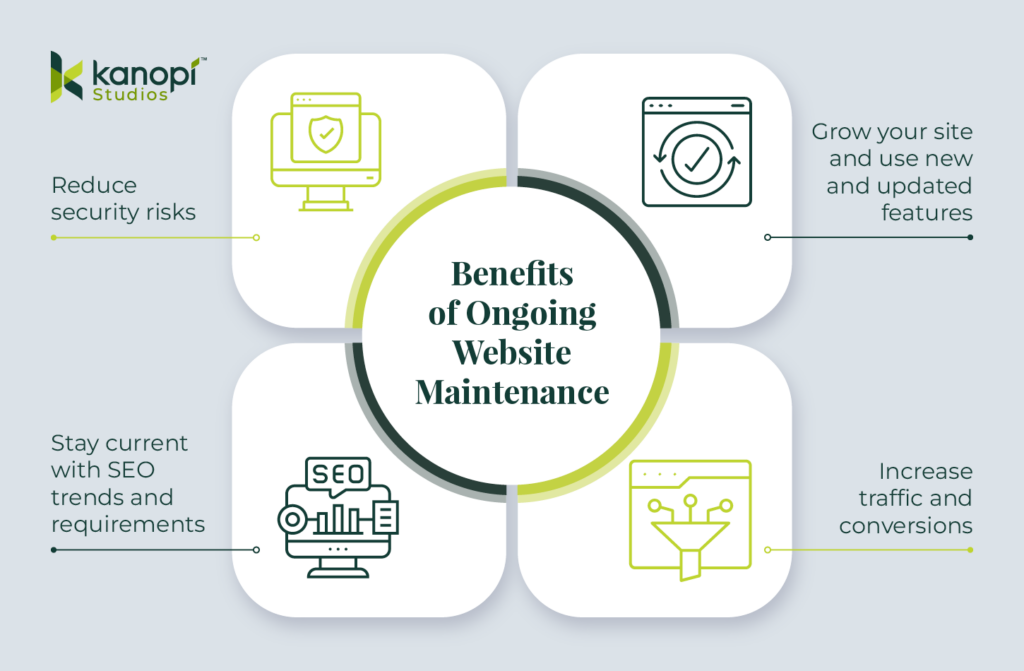
Clearly, it’s a huge risk to keep a poorly maintained or completely unmaintained website. On the other hand, the benefits of good maintenance and consistent support far outweigh the costs. Maintaining your website allows you to:
Reduce security risks
Stay current with SEO trends and requirements
Grow your site and use new and updated features
Increase traffic and conversions
However, proper maintenance can be time-consuming, requiring extensive research and hosting, WordPress, and website development expertise. That’s why many organizations and businesses turn to expert support providers like Kanopi to lighten the load (more on our services in a bit!).
The exciting (and stressful) truth about the web is that it changes daily. Designers and developers must quickly become proficient in techniques they may have never heard of before.
For site owners, this constant change means a lot of upkeep. What’s standard today could be different in a month. You must commit to regular, ongoing website maintenance to ensure your WordPress website stays healthy and up-to-date. While hosting companies will maintain your site’s server (where your website lives on the internet), most don’t offer the kinds of hands-on updates and support your specific website needs.
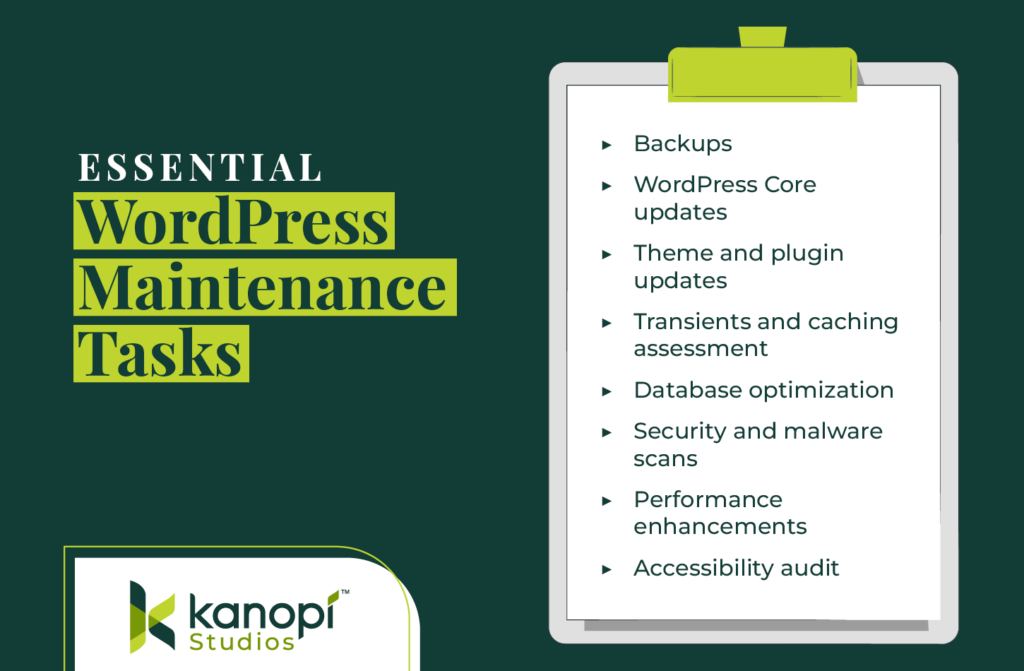
With that in mind, here are the most essential support tasks you must conduct regularly to keep your site healthy:
Backups
You’re not really a web developer until you’ve deleted something critical and had to restore it. Most hosts offer backup plans, or at the very least provide you with a method of downloading your own backups. At Kanopi Studios, we use hosts that provide daily backups and let us create manual backups, ensuring we have total control in the event a site needs to be restored.
WordPress core updates
WordPress is a growing, living thing. That’s what those little version numbers really mean—version 6.5.4 is out as of this writing. Core updates include security patches, as well as new or updated features that your developer can use to add innovative functionality to your site.
The real cornerstone of this process is the security updates; when the WordPress team finds and resolves a security problem, they release an updated version of WordPress core, along with an explanation of that flaw. This means that the same security bug is now public knowledge and available to nefarious individuals to take advantage of. That’s why it’s essential to update your site promptly after a new core release.
Theme and plugin updates
Likewise, purchased themes or third-party plugins are subject to change for similar reasons—plugging security holes or adding new and improved features. It’s good practice to update these elements at least once a quarter to stay on top of it.
Plus, it’s almost always easier to jump between minor versions (eg. 6.4.2 to 6.4.5) than to wait and go from one major release to another (eg. 4.3.1 to 6.4.5). Although, it is a good way to get that adrenaline pumping, especially if you don’t have backups (but we strongly advise against it if you want your site to stay intact!).
Transients and caching assessment
Both servers and browsers cache websites to deliver content faster. A cache essentially stores a “snapshot” of a website and then delivers that snapshot upon subsequent visits to reduce load time.
Of course, as a website owner, you want this snapshot to update when you add new information. Sometimes caching can be too aggressive or non-existent. It’s valuable to consider your website’s specific needs to choose the right type of caching. WordPress also uses something called transients, which allow developers to add additional caching for specific types of database queries. This is essential for large or complex sites.
Caching can be done in several ways: your website host may have caching, you could use a third-party caching plugin or service, a developer could add caching-specific code, or you could implement a combination of all three.
Database optimization
Over time, new content is added to your website database, with either new rows or columns of data, new database tables, or new connections between tables. It’s like your website’s filing cabinet, going back to the beginning of time. This growth can get messy if it’s not maintained and pruned regularly.
Some hosts offer manual “one-click” database optimization solutions, but for a real thorough cleanup, you need someone with the technical know-how and familiarity with your site. Also, backups. Always backups.
Security and malware scans
Sometimes, you may do everything you can to keep WordPress core and your plugins updated, but your site still ends up vulnerable to cyber attacks. Because of WordPress’s popularity, it is by far the most hacked CMS (it’s the target of 90% of all hacking attempts). That’s why it’s wise to run ongoing security checks and malware scans to catch any potential issues.
WordPress offers a variety of security plugins to manage these scans. However, we recommend working with an experienced web developer who can recommend the right tool for your site that won’t compromise performance.
Performance enhancements
Website performance involves the ongoing tasks and elements that allow your site to run like a well-oiled machine. When load speeds, conversion opportunities, and other technical factors are optimized, your site will be a performant resource that exceeds your audience’s expectations. With that in mind, you should conduct the following performance checks every few weeks:
Assess your site’s load speeds. Ideally, your website should load in 2 seconds or less. You can use PageSpeed Insights to test your site’s pages.
Set up a notification if your site goes down. Whenever a website goes offline, even if it’s just for a few minutes, it can damage the site’s reputation and reduce conversions. Use a free tool or plugin to set up a notification if your site goes down so you can identify the issue and get your site back up and running.
Test your site’s most important conversion forms. Your site’s conversion opportunities enable casual visitors to engage with your organization, whether through making a purchase, donating, signing up for your newsletter, registering to volunteer, or taking another action. Ensure your conversion forms work properly and load quickly on laptops and mobile devices.
Accessibility audit
Last (but certainly not least), you must make accessibility a core priority for your WordPress maintenance efforts. Emphasizing accessibility ensures your website can remain a usable resource for all audience members. Accessibility best practices and technologies constantly evolve, so you must stay up to date with relevant guidelines and assistive tools.
You can use automated tools to assess your site’s accessibility (we cover a few options in the next section), but we also recommend manually testing your site. This allows you to recreate the user experience and catch any issues that may have slipped through undetected.
To build a website that’s truly accessible at its core, we recommend taking a holistic approach to accessibility with the help of an experienced web design partner. For example, here’s a quick look at Kanopi’s integrated accessibility approach:
Contact us to learn how we can support your unique accessibility needs based on your audience’s characteristics.
10 effective WordPress maintenance services and tools
There are plenty of WordPress maintenance tools and services available online that can help you maintain a high-quality website for years to come. We’ve rounded up a few of our favorite solutions to help you get started.
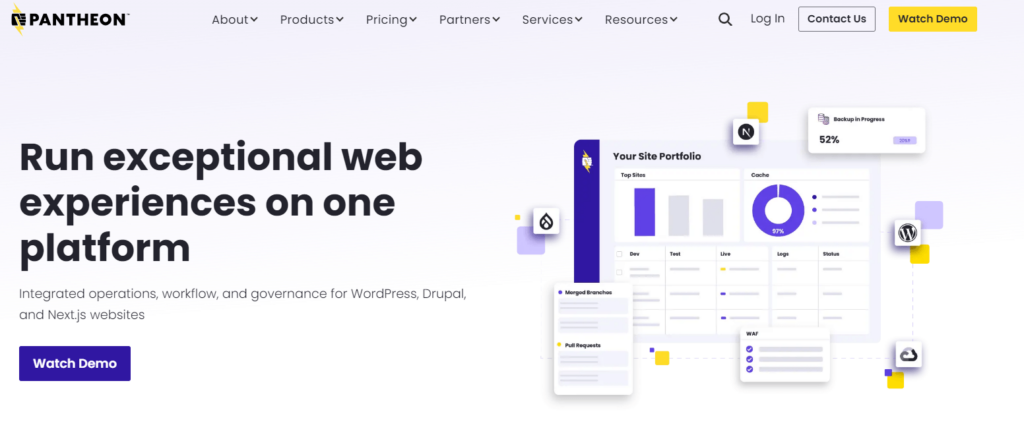
Pantheon: WordPress Host
Pantheon is one of Kanopi’s partners for a reason! We love using their platform for hosting WordPress sites. They have powerful features for iterative development and rollouts, and you can even check your plugin versions right from the dashboard with security alerts attached.
WP Engine: WordPress Host
WPEngine also specializes in WordPress hosting, which means they know the ins and outs of the CMS and can help with common problems. Their support is fast, knowledgeable, and dedicated. Their platform also keeps up with the latest stable PHP version and WordPress core, with easy testing and deployment.
Yoast: WordPress Search Engine Optimization
Yoast is a plugin we regularly use and recommend for WordPress websites. Yoast automatically adds basic schema data to your website, creates a sitemap XML, and empowers you to create dynamically generated metadata for your various post types. The free version has all the features you need, making this an affordable addition to your tech stack.
Screaming Frog SEO Spider: Website Crawler
Screaming Frog’s SEO Spider is another solution that can help you monitor and improve your site’s technical performance, which will in turn boost your SEO rankings. The SEO Spider crawls your website to identify issues like broken links, redirect chains, defective meta descriptions and titles, and duplicate content. Then, you can quickly correct these issues to enhance your site’s performance and make it easier for search engines to crawl and index the site.
Google Analytics: Website Analytics Platform
Google Analytics offers website analytics to assess the effectiveness of your engagement and conversion opportunities. With Google Analytics, you can track metrics such as your website’s page views, bounce rate, time on page, traffic sources, and other detailed information. This data provides a well-rounded picture of who your visitors are and what they want from your site.
HotJar: User Experience Assessment Tools
HotJar is a WordPress plugin that advertises itself as a tool to discover “Everything you ever wanted to know about your website… but your analytics never told you.” In practice, this means HotJar offers detailed user experience tracking tools such as website heatmaps, user session recordings, and feedback and survey tools to gather input from real site visitors.
HotJar is effective for gaining a comprehensive understanding of the user experience on your website and ways you can improve the experience as part of your ongoing maintenance efforts.
Kraken.io: Image Optimization
Images make up a lot of your website’s “weight,” which is why it’s necessary to compress images to ensure faster page load speeds. Kraken.io is a paid service with a WordPress plugin that allows you to create optimized images for your website. For quick image optimization, you can also use a free tool like TinyPNG.
PageSpeed Insights: Page Speed and Accessibility Assessments
PageSpeed Insights gives you a quick overview of how well your site is doing across the board, including performance, SEO, accessibility, and best practices. Put any URL in and see how it stacks up compared to Google’s standards. You can also download this as an extension (Google Lighthouse) for Chrome and run it directly in your browser.
To keep your site healthy and expand its functionality over the years, you need more than just simple maintenance services and security scans. You need a dedicated partner who can learn your website inside and out and offer reliable support all year round. That’s where Kanopi comes in!
We work with some great hosting partners who understand what we’re about, and it lets us hold the right reins when it comes to our client sites. Our developers are experienced with the CMS and strive to uphold WordPress’s own standards.
Top Features of Kanopi’s WordPress Maintenance Services
Kanopi’s well-rounded team of experienced designers, strategists, and developers enables us to support your WordPress website at any stage of its lifecycle. Got a lemon that needs a serious overhaul? Need a complete rebuild? Have a freshly built higher ed website or hospital website that needs extra care to keep it going? We’ve got the combination of skills and people needed to handle your website wherever it’s at.
Like your site, our team is also always growing its knowledge base. We stay up-to-date with security releases, changes to WordPress core, industry standards, and new technologies. If the next version of PHP is on the way, we’re already preparing your site for the update.
We’re not just about keeping your website running—Kanopi works closely with you to genuinely understand your organization. Forging this partnership allows us to help you create a website that truly represents your organization as we strategize together.
We take a continuous improvement and growth-driven approach with incremental updates like navigation strategy and SEO fixes that boost your site over time. Here’s a look at how our growth-driven approach works vs. traditional website design and development:
Interested in learning more about Kanopi’s WordPress services? Check out our WordPress work to see examples of how we’ve supported and improved sites over time. We work with all types of WordPress websites across industries, including healthcare, education, nonprofit, corporate, and arts and culture sites.
Final thoughts
To summarize, yes, you need to maintain your WordPress website, yes, there’s a lot to do, and yes, someone else can do it for you. If you’re interested in a partnership with Kanopi, we’d love to hear from you. If you need more information about the maintenance process, start with these additional resources:
Drupal is an open-source software content management system (CMS) that powers over 1 million websites globally. As a Drupal user, you were probably drawn to the platform because of its scalability and flexibility. You also know your site requires continual planning and updates to retain an informative, engaging online presence.
To ensure your website continues to excel, you must stay up-to-date with the latest changes in the Drupal world. Specifically, Drupal’s latest version, Drupal 11, launched in August 2024.
Now is a good time to review how these changes will impact your CMS planning. We’ve crafted this Drupal planning and development guide to help you prepare for upgrades and migrations and preserve your website well into the future. Let’s start by looking at some frequently asked questions from Drupal users regarding planning and development.
Drupal Planning and Development FAQs
What is the difference between WordPress and Drupal?
Both Drupal and WordPress are user-friendly, open-source platforms used to build powerful, comprehensive websites. Generally speaking, WordPress is known for its relatively simple admin user experience with many ready-made themes to choose from. By contrast, Drupal is often used by organizations looking to build complex sites, integrate with other services, and receive ongoing support from an agency or in-house developers.
If you’re looking to switch systems or are adopting a robust CMS for the first time, compare each platform’s features to determine which one better suits your needs. Kanopi’s Drupal vs. WordPress guide can help steer your decision-making.
I see Drupal 11 is the latest version. Should I upgrade to Drupal 11?
Upgrading your website to Drupal 11 depends on your current codebase and whether you have the resources and time needed to manage a migration. An audit of your existing Drupal site can help you decide when the best time to update to Drupal 11 should be.
Kanopi can help you work out the best upgrade or migration path. We’ll take a deep dive into your Drupal planning and development roadmap later on in this post.
How often should I make security and module updates in Drupal?
Review Drupal core security updates and contributed modules as they are released and apply them with expedience based on their Security Risk level. The higher the level, the more risk the vulnerability is to the site.
Non-security module updates are best done monthly or quarterly depending on time available or budget. Keeping your code up to date with the latest releases helps make future site upgrades easier, takes advantage of bug fixes, and can add additional functionality.
How can I get started building my Drupal planning and development strategy?
If you’re unsure where to begin with your Drupal planning, consider partnering with a Drupal development specialist. We’ve compiled a list of key support tasks you should expect to receive from an agency offering to assist you with your Drupal planning. They should:
Work with you to create a Drupal strategy roadmap.
Get familiar with your organization and your budget.
Define the best way to curate existing content to maximize conversions.
Provide module support.
Offer Drupal training.
We’ll highlight additional ways a Drupal specialist can help optimize your website later on in this post.
Where can I find Drupal talent?
Drupal.org is a great place to start if you’re looking for Drupal talent. Kanopi also has a friendly team of Drupal experts ready to help you strategize your Drupal planning and development. Each of our Drupal experts has an average of 11 years of experience in Drupal development.
Where can I find more Drupal development tools and resources?
Kanopi’s resource library can help you learn more about Drupal, stay up to date on release updates, and craft your development strategy. Drupal also has a dedicated Slack channel for users. Other resources include:
Preparing Your Drupal Planning and Development Roadmap
Have you reviewed your website users’ needs recently? What about your site’s usability, accessibility, and content quality?
User needs change over time. That’s why it’s essential to have the most up-to-date picture of your users’ unique needs and take steps to determine whether your website content meets those demands.
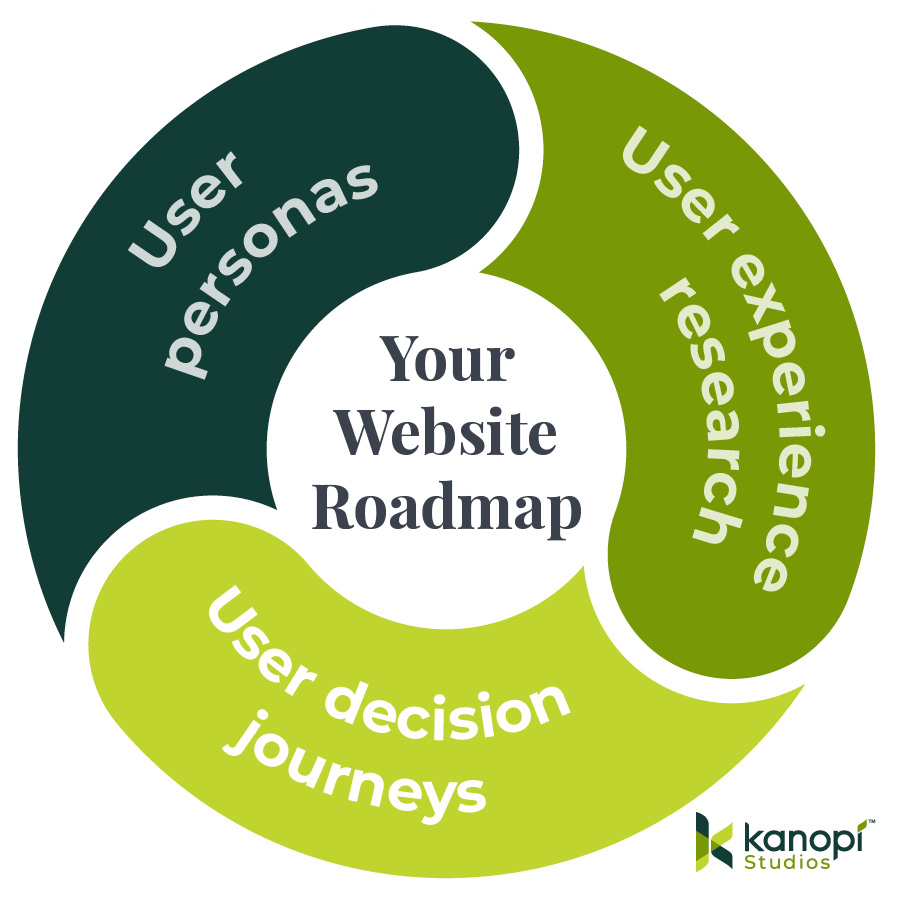
If you’re brainstorming your Drupal roadmap, we suggest carefully considering the following:
Undertaking user experience (UX) research. Use your website analytics and traffic patterns to determine how effectively different website aspects engage visitors. For instance, does your nonprofit’s online donation form have a high conversion rate? Can visitors easily find your business’s contact information and event calendar? Test site elements such as load speed, mobile-friendliness, and accessibility.
Streamlining your user decision journey. The user decision journey is the steps your audience members take to learn about your organization and determine whether they want to engage with you further. This might involve purchasing one of your products or services, donating to your cause, or signing up to become a member of your group. Assess whether your website streamlines the user journey by asking questions about how visitors are likely to engage with your site. Do you have a variety of calls to action throughout the site that encourage visitors to get more involved?
Fine-tuning your user personas. Is your website reaching the right people? Creating in-depth audience profiles allows you to understand your audience’s needs, goals, and interests and design your website content accordingly. Reassess your user personas to determine whether your audience has changed. Use the information in your customer or constituent relationship management system to assess your audience’s demographics, purchasing habits, and other distinctive characteristics.
By assessing the UX and appealing to your user personas, you can deal with blockages in your customers’ decision journey and create a more valuable website experience. You can also identify any sweet spots where your site currently excels that could be built upon ahead of your site migration.
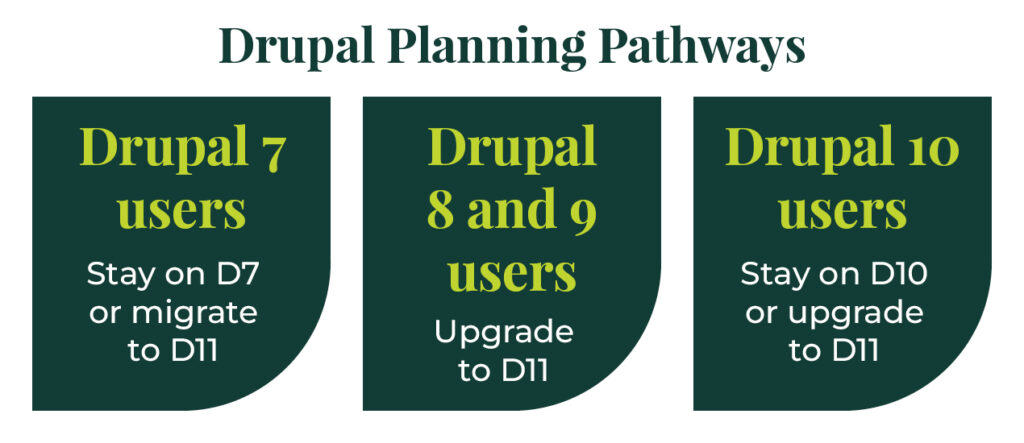
Planning Pathways for Drupal Users
Your upgrade and maintenance process will differ depending on the Drupal version you’re currently using. This article explores the options available to Drupal users who intend to stay on the system.
Exploring Drupal 11
As mentioned, Drupal 11 was released in August 2024. Our recent blog post recaps everything you need to know about Drupal 11’s new features, including:
The Drupal core Workspace module, which helps manage content changes by staging new content or previewing a major site overhaul.
Single-Directory Components that are now supported in core to provide a simplified front-end development workflow.
Navigation module that updates the admin toolbar with modern options.
Recipes API to help apply complex configurations.
Access policy API to build custom policies to accommodate a wide variety of access verification needs.
Drupal 11 has the same basic functionality as Drupal 10.3, which many sites were upgraded to in the spring of 2024. Drupal 11 was released to offer new features and eliminate deprecated code.
So, how can you prepare for D11? No matter what Drupal version you’re currently using, we’ve got a planning and development roadmap for you.
Drupal Planning: 7 to 11
Drupal 7’s end-of-life (EOL) date was adjusted to January 2025. Therefore, many D7 users have decided to stick with this version to give themselves more time to prepare for an eventual transition to a later version.
Although you can remain on D7 for a while longer, now is a great time to transition to D11. Your D7 to D11 migration roadmap should include the following tasks:
Make a plan for content that can be retired from your site before moving to Drupal 11.
Map out how redirects will be handled for any content you remove from the current site to ensure your SEO isn’t negatively affected.
Review the modules you use in Drupal 7 and investigate the upgrade path needed for those modules to be compatible with Drupal 11.
Identify and recommend alternative modules, tools, or third-party services for modules that aren’t available for Drupal 11.
Look at the site’s content types and determine if anything needs to be changed or combined to meet your users’ needs and/or make the site easier to maintain.
We recommend switching to D11 before D7 reaches its end-of-life (in January 2025) so you can continue benefiting from security team updates and fixes..
Drupal 8 and 9 Users
There’s good news and bad news for Drupal 8 and 9 users. Let’s start with the bad news: D8 reached its end-of-life in November 2021, and D9 reached EOL in November 2023. Drupal 8 and 9 are no longer supported and no more bug fixes or improvements will be released, so if your site is currently running on one of these versions, it’s more vulnerable to cyber-attacks and other security threats.
Here’s the good news: if you plan to upgrade from D8 or 9 to 11, you are looking at a very simple, streamlined migration process.
Look for any deprecated code in your code base that may need to be updated for D11.
Make sure that the modules you use in Drupal 8 or 9 are compatible with Drupal 11, or have a target date for compatibility.
Ensure that the site’s configuration files are tidy so that it’s easy to export/import configuration during the upgrade.
Upgrading your D8 or 9 site to D11 as soon as possible will help you maintain its security and functionality.
Drupal 10 Users
If you’re currently using D10, you’re in a great position to migrate to D11. Support for Drupal 10 will end in 2026, so you still have some time to transition, but it’s never a bad idea to stay ahead of the curve to make the most of the new features available in D11.
You can prepare for D11 by staying up-to-date with bug fixes and other security updates. If you have custom code on your site, keep an eye out for deprecation notices as well, and update that code regularly to remove them. You can use Upgrade Status and Drupal Rector to identify modules and deprecated code that need to be updated.
You’ll also need to update your website to the latest version of Drupal 10.3 because, as Drupal explains, “all core updates added prior to 10.3.0 have been removed. If any modules or themes have been removed you may use the respective contributed project instead.”
Consider working with a web development consultant to help you stay on top of all updates. For instance, the Kanopi team offers website support services for all Drupal users. This includes:
Module and plugin updates
Bug fixes and security patches
Performance enhancements
Development modifications
Read on for a deeper look inside Kanopi’s Drupal development and support offerings.
Exploring Kanopi’s Drupal Planning and Development Services
Kanopi can support your Drupal site until it’s ready for an upgrade, even if that means going beyond the end-of-life date of your current operating version. Instead of large structural changes, we recommend focusing on incremental changes that can be delivered with a potentially fluctuating budget, such as:
Improved navigation
Revised content strategy
New content curation
Accessibility support
Search engine optimization (SEO)
We can also provide a website growth plan for you, which typically includes:
How to increase website conversions for your organization
Customization based on your unique situation
A breathing window to maintain your site ahead of a migration (if your site is operating on D7)
Along with our Drupal 7 maintenance package, we also have options for Drupal 8, 9, and 10 users to help create a game plan or launch a migration.
Looking for more information to learn more about Drupal planning and development? These additional Kanopi resources can help:
All About Drupal 11. Explore additional new features and information you need to know before upgrading to D11.
Healthcare websites are subjected to a higher standard of data security than other organizations due to the sensitive nature of the information they have access to. With that in mind, your organization must use a HIPAA-compliant website analytics tool to avoid any potential violations of this law.
This guide explores how HIPAA impacts healthcare websites and highlights seven effective analytics tools.
What is HIPAA and how does it impact healthcare analytics tracking?
The Health Insurance Portability and Accountability Act of 1996 (HIPAA) requires healthcare organizations and hospitals to maintain the privacy and security of patient health data, known as “protected health information” (PHI). The law aims to “assure that individuals’ health information is properly protected while allowing the flow of health information needed to provide and promote high quality health care and to protect the public’s health and well being.”
HIPAA helps protect patient privacy, control fraud, and establish national standards for electronic healthcare transactions. It applies to any form of data—written, spoken, paper, or electronic.
Conducting risk assessments with a HIPAA security officer
Not discussing patient information in public places
Using strong passwords
Sharing how patient data is used and shared outside your healthcare facility
Getting signed consent from patients to use or disclose their personal information
Website analytics tools track and measure online user behaviors using external software, so there’s a risk of disclosing sensitive information with a third-party organization in a way that violates HIPAA.
That’s why many healthcare organizations seek HIPAA-compliant analytics tools to mitigate risks while still gathering the valuable website data they need to create a positive online experience.
Features of HIPAA-compliant analytics tools
To find a HIPAA-compliant analytics tool, make sure the platform you use:
Doesn’t share protected health information with non-compliant platforms
Offers a business associate agreement (BAA) outlining their roles and responsibilities in protecting patient data and ensuring HIPAA compliance
Allows you to not collect website visitors’ IP addresses
Encrypts sensitive data
7 best HIPAA-compliant analytics tools
Let’s review the top options for managing your healthcare website’s analytics tracking. These tools may also be useful for other industries requiring stricter data protections, such as higher education, airport, or government websites.
Freshpaint
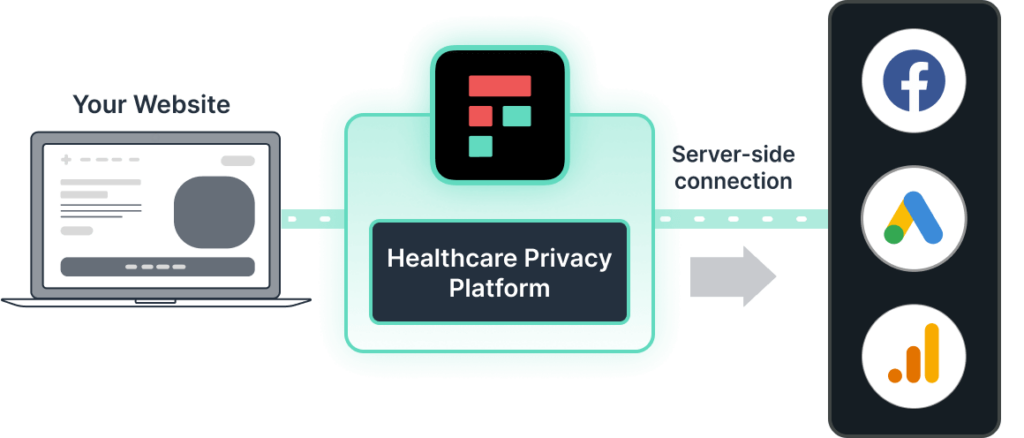
Freshpaint is a healthcare privacy platform. It prevents protected data from being shared with non-compliant technologies by centralizing all website visitor data into one secure platform supported by a BAA.
Rather than requiring users to filter out sensitive data from being collected, the platform’s default approach is to not share sensitive information at all. You can use Freshpaint to block any HIPAA identifiers from being shared with Google Analytics.
Instead, the platform creates an anonymous user ID and leverages irreversible cryptographic hashing to de-identify the user data. This way, you can still view complete visitor journeys without knowing each individual’s identity.
Siteimprove
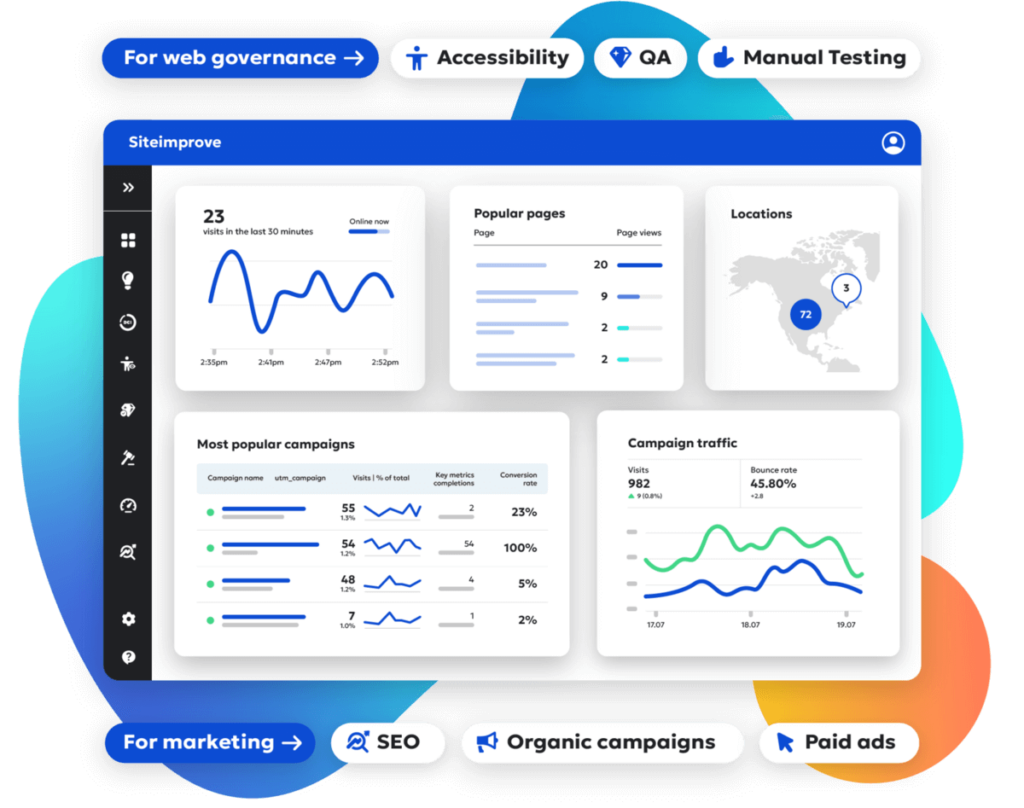
Siteimprove offers both content and marketing analytics solutions. Users can ensure HIPAA compliance by enabling the platform’s IP Anonymization feature. Siteimprove also protects data with advanced encryption measures, such as managing their own encryption keys.
Using Siteimprove, you can:
Track key KPIs
Monitor conversions
Gain real-time visitor insights
Analyze the complete user journey
This solution makes it easier to design a more useful and engaging website for your audience.
Piwik
Piwik provides a suite of analytics tools, including dashboards, customer journey optimization, and customization options. They offer two options for making their platform HIPAA-compliant:
De-identifying all PHI in your data
Signing a BAA with Piwik
The platform fully supports either option. Users can also benefit from features such as secure hosting, safe backup storage, SOC 2 security standards, data encryption, and more.
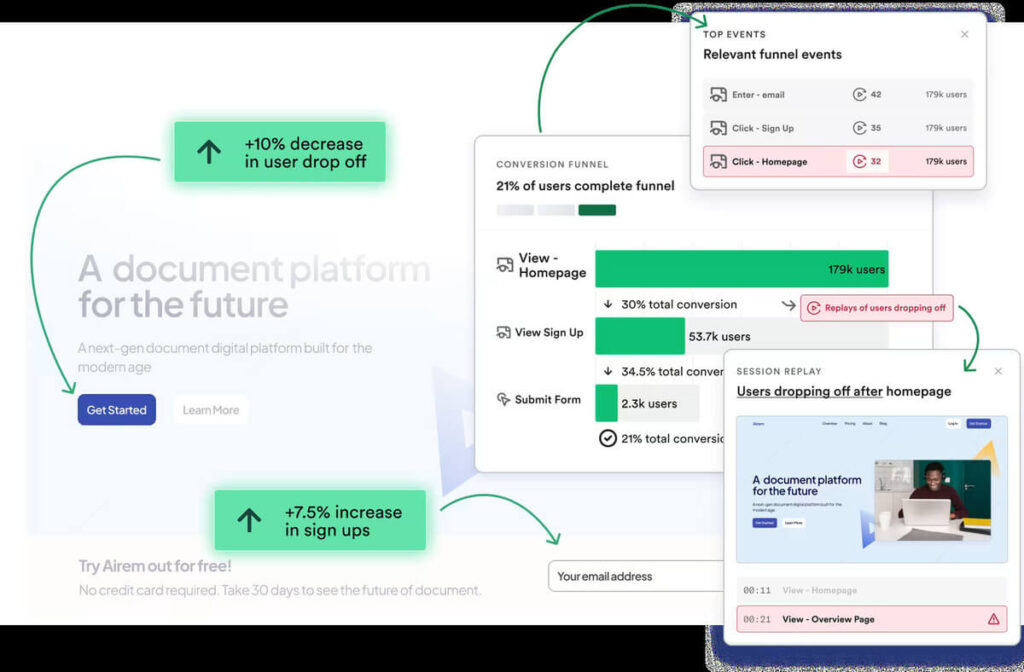
You can configure Heap to be HIPAA-compliant by blocking the collection of IP or geolocation information. Their tools are also designed to meet other security regulations like The General Data Protection Regulation (GDPR) and The California Consumer Privacy Act (CCPA).
Matomo
Matomo’s analytics platform prioritizes data privacy to protect your organization’s reputation and maintain compliance. Similarly to Heap, you can configure Matomo to be HIPAA-compliant. The process requires multiple steps, which you can view on their website. The Matomo team can support the setup process through installation, configuration, and troubleshooting.
Countly
Countly is a privacy-first product analytics platform built for web, mobile, and desktop apps. It’s popular in healthcare because it can be self-hosted, keeping sensitive data under your control while still offering rich analytics and engagement tools.
Features:
Full data ownership with on-premise or cloud hosting
HIPAA/GDPR-compliant by design
Funnels, cohorts, retention, and crash analytics
Engagement tools (push, surveys, A/B testing)
Broad SDK support for quick integration
Improvado
Improvado is an AI-powered marketing analytics platform that offers marketing dashboards, customizable data visualizations, and AI insights. They offer BAAs to clients who are subject to HIPAA regulations. They also employ SOC 2 Compliance and safeguards for other data privacy regulations such as GDPR and CCPA.
PostHog
PostHog is a full-service platform for testing, deploying, and analyzing new website features. Their analytics features include:
Protecting your patients’ personal data is key to not only remaining compliant with industry regulations but also fostering trust in your community. Use this list as a starting point to understand your analytics options and find a solution that aligns with your needs and budget.
Looking for more healthcare website resources? Start here:
Healthcare Website Design | Kanopi Studios. Learn about Kanopi’s healthcare web development, design, and support services and how we go above and beyond to ensure HIPAA compliance for our healthcare clients.