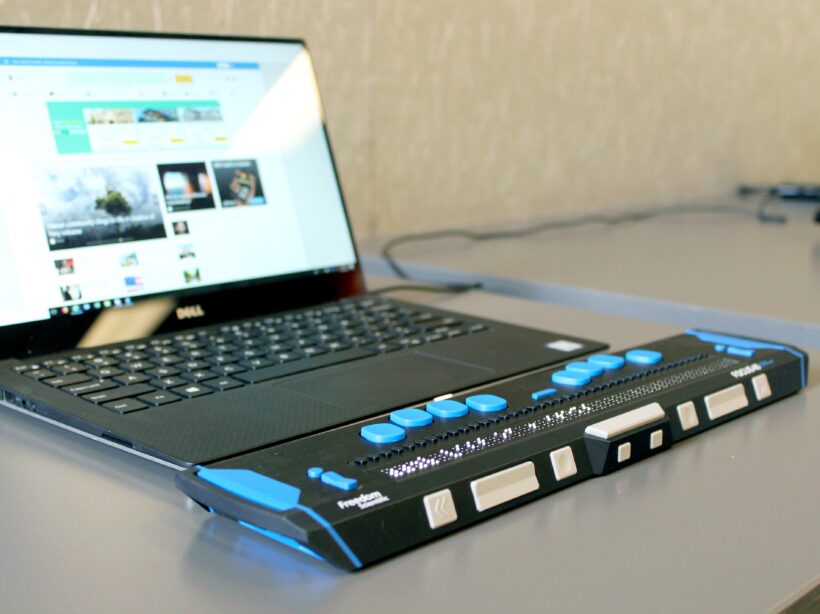

a close up photo of a lap top with a Braille keyboard attachment

How to Test Your Website for Accessibility

Faye
Faye Polson

There’s something wonderful about putting on adult shoes as a kid. They’re enormous and floppy and shuffle around on your feet as you lift and walk. I remember doing this often with my dad’s shoes, regardless of the smell, giggling all the way.

Somewhere along the line between then and now, walking in someone else’s shoes loses that magical charm. It’s more comfortable to maintain the status quo. What works for us must work for everyone, right?

Except it doesn’t. Humans are not “one size fits all” and this is also true when it comes to the internet. Like a building needs accessibility access, a website needs accessible code so that it can be used by everyone.

Many people have vision problems, hearing loss, physical limitations and more. In fact, 27% of adults — a full 61 million people — in the United States alone are permanently disabled in some way. Once you include temporary disabilities (such as a broken wrist), or extend the range to teens and children, that number soars even higher.

Your site could be unusable for up to a quarter of your audience, and it’s worth it to check. Follow this guide to do some quick testing, or jump down to our tl:dr.

Why automated tools are useful but also insufficient

We’re often asked for metrics and automatic scans that can “score” a site for accessibility. As appealing as that may sound, it’s simply not an option in the current technical landscape. In reality, it is generally accepted that automated tools can only detect about 30% of WCAG’s 2.1 success criteria. Any tool or service that claims 100% automation is 100% lying.

The reason for that is there are many accessibility issues that Artificial Intelligence (AI) simply cannot understand, and while a scan could possibly identify a place where a human mind should take a look, it couldn’t say with any certainty whether or not there is an error there. In fact, the more aggressive the scanning tool, the more likely it is that there are false positives in the results.

A common example of this are images. Automated tools can detect whether or not an image has alternative text (a requirement for accessibility) but they can’t tell if the alternative text is appropriate for the image.

Because of this, testing requires both automated tools and manual tests. And since each tool is different in what it can detect, and how it presents its errors, it’s recommended that you use multiple tools when testing website accessibility. Each tool has its own pros and cons, things it does really well, and areas that need improvement.

By the way, the disparity between automated testing and manual testing is also why we highly recommend you avoid quick fix solutions like overlays. There are a number of other reasons, including legal reasons, but when it comes down to it automated tools are only part of the process.

Automated scanning tools to use

Lighthouse (Google)

Pros:

  • Provides scores out of 100 (for people who love metrics)
  • Gives advice for manual checks
  • Easy to use extension
  • Generally no false positives
  • Identifies target size errors
  • Can also provide SEO and Performance audits
  • Links errors to Deque’s aXe ruleset

Cons:

  • Very simple scan
  • Only audits 44 possible accessibility errors
  • Provides minimal information regarding errors

WAVE

Pros:

  • Easy to use via URL
  • Allows toggling styles and javascript on and off for scans
  • Attractive visual interface
  • Shows Level A and AA items as errors (red)
  • Shows Level AAA, and Best Practice items as warnings (orange)
  • Identifies all ARIA used
  • Identifies all structural elements
  • Identifies accessibility features applied
  • Identifies contrast errors separately
  • Provides helpful information regarding error
  • Links errors to WebAIM’s WCAG 2 Checklist
  • Links directly to code in Developer Tools
  • Has built in contrast checker

Cons:

  • Cannot scan javascript injected content
  • Generates a few false positives each scan

aXe

Pros:

  • Shows Level A and Level AA errors
  • Best Practice items can be toggled on and off
  • Groups errors by serious, critical, moderate, and mild errors
  • Groups uncertain items for manual review
  • Links errors to Deque’s aXe ruleset
  • Explains specific fix options for each error
  • Links directly to code in Developer Tools
  • Rarely gives false positives

Cons:

  • Extension can be overwhelming and difficult to use
  • Does not scan hidden items
  • May or may not scan javascript injected content

SiteImprove

Browser extension
Paid Platform

Pros:

  • Platform version can scan site wide
  • Platform scans for Level A, Level AA, and Level AAA errors
  • Includes scans for Best Practices
  • Platform provides a score out of 100 (for people who love metrics)
  • Extension can be configured to scan for specific levels, such as warnings, items to review, best practice, items likely related to content entry, etc
  • Links errors to WCAG 2:1 Guidelines
  • Links directly to code in Developer Tools
  • Groups errors by guideline

Cons:

  • Aggressive scan causes frequent false positives
  • Considers many Level AAA and Best Practice items to fall under Levels A and AA
  • Difficulty understanding javascript injected content

ANDI

Pros:

  • Extremely easy to install
  • Very visual interface
  • Provides information on how a screen reader might interpret some elements
  • Great entry into understanding what kinds of errors can exist
  • Has built in contrast checker

Cons:

  • Does not link errors to guidelines
  • Limited suggestions for fixes

Add manual testing to find what the automated tools didn’t

Once you’ve run your site through some of the automated tools, it’s time to get some hands-on experience about what it’s like to use your site in someone else’s shoes.

How to do keyboard testing

Believe it or not, keyboard testing is actually “low key” and easy to do. There are only a few things that you need to know in order to do this testing on your own.

Tab, Shift + Tab

Pressing tab will move you down a webpage through interactive elements like links, buttons, and form fields. Pressing shift + tab will take you backwards through those same elements.

Spacebar / Enter

These keys “activate” interactive elements. When you are focused on a link, hitting one of these will open that link. Sometimes they can also move you into an “application” state where other keys become usable (see Arrow Keys).

Arrow Keys

These keys will scroll the page up and down, but not always. Tabs, accordions, sliders, and menus can be designed as applications. That means once you are focused on them (or enter them using the spacebar), using the arrow keys will navigate you through those interactive elements instead of scrolling the page.

Esc

If you have entered an application, or a popup window, the escape key should exit that area and allow you to continue down the page where you left off.

Knowing these interactions, you should be able to use your webpage without a mouse. Try it for yourself and see if you can reach and use all of the interactive elements.

  • Can you see where your focus is (what your next keypress will activate)?
  • Can you navigate through your menu?
  • Is tabbing logical, or does the focus move to unexpected areas?
  • Can you use sliders, accordions, galleries, videos, and tabs?
  • Can you enter form information and submit?
  • Do you get “trapped” anywhere and need to use your mouse to move on?

If you can’t use your page without a mouse, or if the keyboard experience is generally frustrating, then there’s some improvement to be made with accessibility. Keyboard functionality is vital to most assistive technologies, and if you had a hard time then chances are so is someone else.

A note about screen reader testing

You will likely need to hire someone to do this for you, as it takes a high level of skill and experience to operate. But using the ANDI tool on your site can show you some of the things a screen reader will present to a user, so if you’re interested give that tool a try.

To learn more about screen readers and assistive technology, check out our Screen Reader 101 blog post.

Where to find real users to test your site

Putting your site in front of real users with a variety of disabilities will most certainly uncover any issues missed by automated and keyboard testing.

Here are some resources for finding those users:

If you think there’s a problem, it’s time for a deep dive audit

While the methods mentioned here can give you an overall picture of a single page’s level of accessibility, it doesn’t reflect the full breadth of your site. For that, you’ll want a deep dive accessibility audit.

This type of work typically takes someone with a good deal of experience in the accessibility space. It would entail automated and manual testing of multiple pages to try and get a sample of each template used, in addition to some randomly selected pages. The auditor needs to know how to use multiple tools, how to test via keyboards and screen readers, how to investigate Javascript injected content, and know what to look for in criteria that can’t be caught in an automated scan.

Kanopi specializes in accessibility for our clients and we do offer deep dive accessibility audits, including itemized results for remediation. If you’re interested, send us a message!

TL:DR for testing your website’s accessibility

Try to use your website without a mouse.
If it’s frustrating for you, it’s frustrating for someone else.

Imagine someone was trying to navigate your homepage only by headings and links.
If someone couldn’t see the page and only had these elements to navigate by, would they know where to go?

Run your most popular page through two or three of the tools mentioned in this article.
A single issue can prevent someone from buying a product, viewing a service, or understanding your content. Take any errors seriously.

Re-test your site every so often.
Updates to code and content can unexpectedly change your site’s accessibility. Regular testing helps keep you informed about potential barriers on your site.

Want more accessibility info via a webinar?

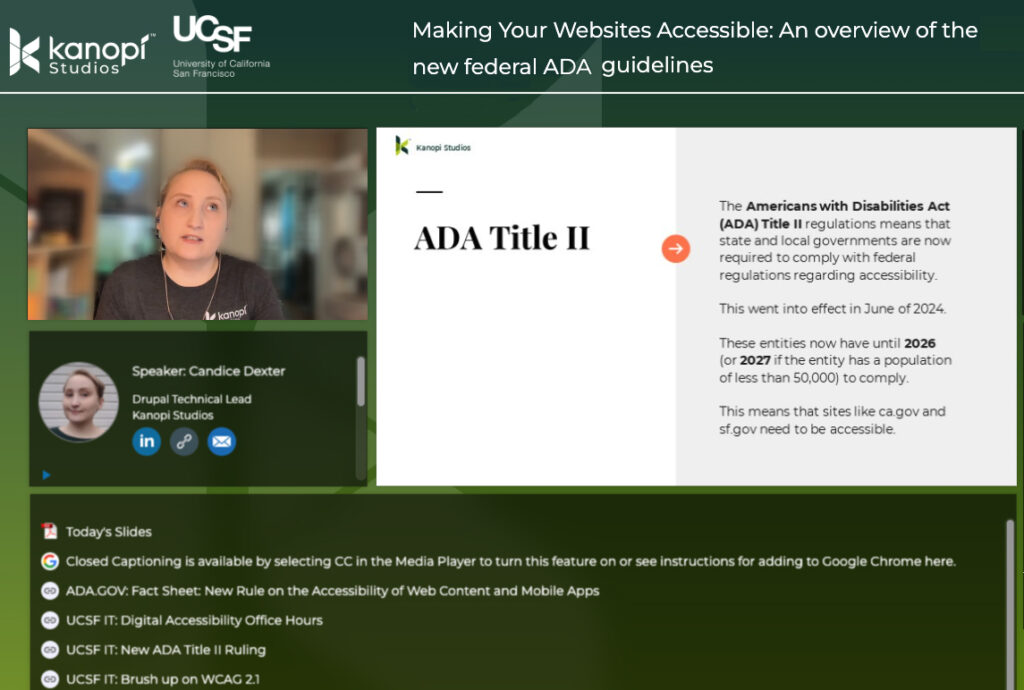
Interface of ON24's webinar platform with Candice Dexter giving a webinar on the ADA guidelines.

Kanopi’s Candice Dexter gave a webinar for our client the University of California San Francisco called “Making Your Websites Accessible: An Overview of the New Federal ADA Guidelines.” (30 minutes)

Businessman pointing finger at chart to analyzing growth, Site stats, Data inform, Statistics, monitoring financial reports and investments concept illustration

7 Key Tactics to Drive Website Homepage Conversions

Vivian Clark

The homepage is the first impression of your website. Ensure it's attractive, compelling, and easy to use so they'll stay on your site rather than bounce to competitors.

How does your website conversion rate affect your business?

Your website conversion rate is the percentage of visitors who take specific actions on your site (e.g., sign up, download, purchase). Your website conversion rate affects revenue, customer acquisition cost, return on investment (ROI), and customer engagement and loyalty — some of the most critical factors determining your business’s long-term success.

So how do you create a great homepage? Let’s walk through 7 key strategies you can apply immediately to your homepage to improve conversion rates.

1. Understand your audience 

Create meaningful connections with your customers by understanding who they are and what they want. You must understand their needs, goals, behaviors, and values. The best way to do that is by using quantitative and qualitative research methods and building personas.

  • Google Analytics: What are people coming to your site for? What pages are they landing on? How much time are they spending on the site? These questions can reveal valuable insights about how customers interact with your homepage — and where you might fall short.

Related read: Goodbye Universal Analytics. Hello, Google Analytics 4 (GA4)!

  • User research: You can also learn a lot by analyzing user interaction with heat mapping. Better still, interview your audience directly about the problems they’re trying to solve, what pain points or frustrations they are experiencing while trying to complete their tasks, and what improvements they would like to see implemented.

Related read: Audience Behavior: Learn More with User Research

  • Personas: After quantitative analysis and user research, you can create personas, which are fictional characters that represent your target audience. Ultimately, personas help prioritize content, design solutions, and user experience to meet better user needs. They also establish messaging that can be used across different channels — from social media to email marketing — to better communicate with customers.

Related read: How personas help with website design

2. Clear Value Proposition

Create a one-sentence description of why your company exists. It goes beyond the obvious — “we make great software” — to explain what makes your product special and unique. 

The best value propositions have three characteristics:

  • They are specific: They use quantifiable metrics or measures (number of customers, dollars saved, etc.) to show how your product works for the customer.
  • They are unique: You should describe how your product differs from and is better than competitors’ offerings.
  • They tell a story about how customers will benefit from using your product or service.

Many websites with strong value propositions effectively communicate the benefits of their products or services to potential customers. Here are a few examples:

  1. Grammarly – Great Writing, Simplified: The value proposition is specific and unique in helping users improve their writing skills by eliminating grammar errors. It also tells how using Grammarly can help users make a better personal and professional impression.
Grammarly's home page
Grammarly’s home page
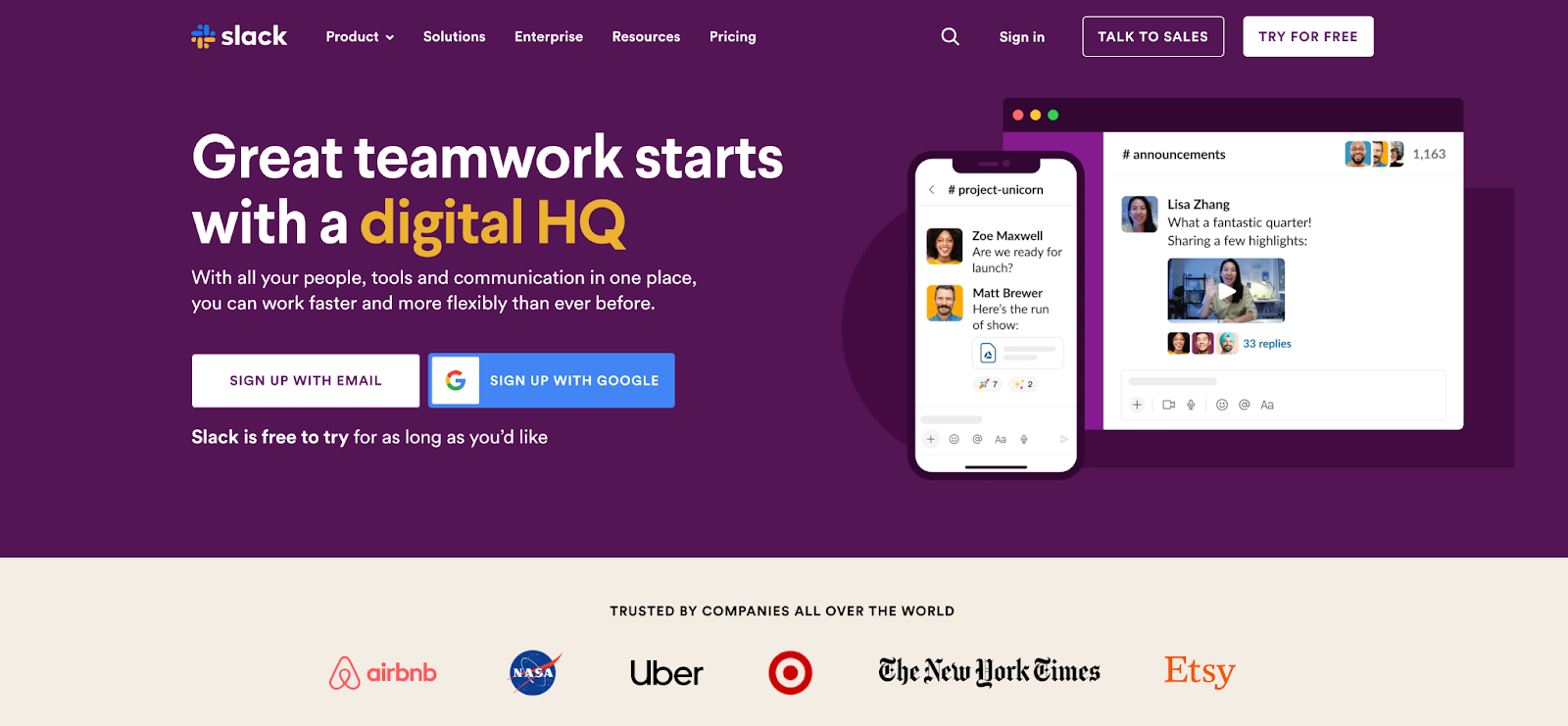
  1. Slack – Credibility and Productivity: Slack’s value proposition focuses heavily on the remote teams’ pain points by offering workplace communication and collaboration solutions. They also tell a story about how using Slack can help users stay connected and productive no matter where they are.
Slack's home page
Slack’s home page
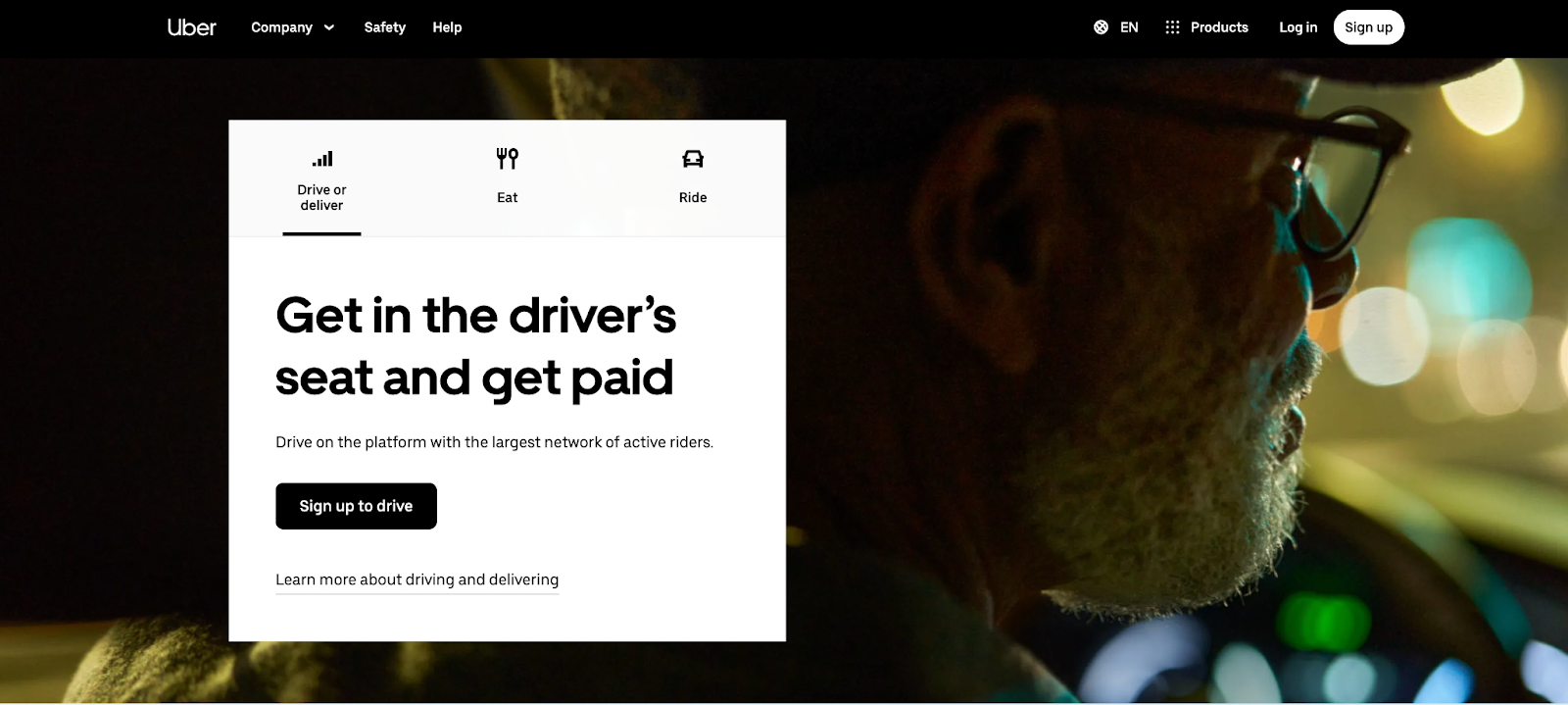
  1. Uber – Offering Convenience: Uber’s value proposition centers on providing a convenient, reliable, affordable transportation service through a user-friendly mobile application. They target two distinct audiences with different value propositions: passengers and drivers.
Uber home page
Uber’s home page

Related read: The Top 5 Content Strategy Trends for 2023, Five Ways to Improve Your Healthcare Content Strategy.

3. Goal-Based Information Architecture

Information architecture (IA) is the structure that supports the organization of content and functionality on a website. It is how visitors navigate a site and find the information they’re looking for. It is not supposed to be a reflection of how your organization is structured; instead, information architecture aims to provide users with access to information in a way that makes sense to them.

High findability and discoverability results from a goal-based information architecture and well-designed navigation system. It reduces the number of unnecessary clicks by offering straightforward user journeys, which can increase customer satisfaction and loyalty.

As you think about building your site information architecture, keep these components in mind:

  • Organization: How we categorize and structure information.
  • Labeling: How we represent information.
  • Navigation: How users browse or move through information.
  • Search: How users look for information.

4. Offer a More Engaging User Experience

Make sure your website is easy to use, engaging, and relevant. Here are some tips to help you do that:

  • Include search functionality: Searching is one of the most popular and efficient ways to navigate online. So help your visitors find the information that interests them without having to click through multiple pages or scroll through lengthy content.
  • Create easy-to-scan web pages: Nowadays, people rarely read web pages word-for-word. Instead, they scan them to get the gist of what’s being said. It is especially true for users with low reading skills or who are in a hurry. To help with this, break up your content into digestible chunks that make sense and get your message across, and be strategic about how you use images to aid in understanding.
  • Offer live chat support: Live chat support allows visitors to contact someone from your organization immediately if they have questions about products or services before buying.

5. Improve Page Load Time

Speed is a significant factor in the success of a website. The faster your website loads, the more likely it is to convert your visitors into customers. If your site takes too long to load, people will leave and go somewhere else.

  • Images are often one of the biggest causes of slow-loading pages. Ensure you’re using the correct image format (JPEG or PNG) and compressing them as much as possible without losing quality. Also, don’t forget to check image dimensions — if they’re too large, they’ll slow down your site even more.
  • The content of your page is another major factor in its speed — especially if you’re using some plugin or lots of external resources, such as fonts. You should also make sure that both your CSS and JavaScript files are cached by browsers. You can add expired headers or move them to a CDN (Content Delivery Network).
  • Use loading progress indicators or skeleton screens for any action that takes longer than one second. Skeleton screens provide a blank version of the page into which information is gradually loaded. It creates the immediate sense that data is incrementally displayed on the screen and lets people have a great experience while waiting.

PageSpeed Insights by Google is an excellent tool for checking your site performance and getting recommendations for optimizations.

6. Design for Mobile Devices

Designing a mobile-friendly website is one of the critical things you can do to improve your conversion rate. While desktop computers are still the most common devices used to browse the Web, over 50% of all online searches happen on mobile devices. Mobile users also make more purchases on their phones and tablets than desktops (which means that your forms should be easy to use as well). 

Here are some helpful tips for designing for the small screen:

  • Make your site mobile-friendly and responsive: A mobile-friendly website displays correctly on any device — including smartphones, tablets, and desktop computers — without requiring users to scroll horizontally or zoom to view content on their screens. Responsive design adjusts the layout of a page depending on whether someone is viewing it on a mobile device or desktop computer.
  • Reduce Clutter: Mobile screens are smaller than desktops — so it’s important to reduce clutter and focus on the most critical information. You can remove unnecessary graphics and text and minimize content that isn’t crucial to the user’s primary task. 
  • Minimize user input: Reduce the amount of information required from users. Limit forms to only those essential fields, allowing users to submit data without entering it manually and taking advantage of touch controls.
  • Keep Mobile Navigation Simple: Refine navigation to be discoverable, accessible on mobile, and easy for users to explore and complete all primary tasks without explanation. Navigation should always be available, not just when we anticipate that the user needs it. Ensure the labels are clear and concise, and all links are visually distinct to make them clear when users have activated them.

7. Craft strong call-to-action (CTA)

A strong CTA is the most crucial part of your homepage. It should be clear and compelling but not pushy or salesy. It should also take visitors to a page that matches their intent — one that’s relevant to their interests and needs.

It’s tempting to think of your homepage as an opportunity to get people excited about what you do but remember why they’re there first: because they want something from you. The best CTAs are specific and measurable (for example, “sign up for our newsletter”) rather than vague (“learn more”). If visitors need to know what they’ll get from signing up for something, there’s no reason for them to do it!

A good CTA has three key elements:

  • Clear: It’s clear what visitors should do when they click the button (e.g., sign up for your newsletter).
  • Compelling: The button should inspire visitors to take action, not just give them an option. An effective CTA will lead people through the funnel and get them closer to conversion than a weak one.
  • Concise: Your CTA needs to be short enough that it doesn’t distract from the rest of your content but long enough that it still feels like an actionable step for visitors.

Start converting! 

This suggestions list, while extensive, is not exhaustive. But by following these essential strategies and keeping them in mind when developing a website, you will be able to create a powerful and effective homepage that is useful for users and drive conversions that result in loyal customers and fantastic ROI.

Want to learn more about how you can leverage your website to generate demand and drive conversions? Contact us, and we’ll guide you through these strategic processes.

Kanopi Team

How to make your website recession-proof

Take these steps to set your site up for success.

The economy is ever-changing, but one thing is certain: websites are here to stay, and are increasingly critical to the success of any business. The world continues to navigate through the pandemic, inflation, and bank closures while some economists predict a recession in the near future. Through all that uncertainty, it’s important to make sure your website is recession-proof so you can maintain your business during tough times. 

As luck would have it, these tips are best practices regardless of whether there’s a recession or not. If you’re already doing these steps, well done! You’re already set up for success if times get tough. 

If you aren’t, what are you waiting for? Whether you’re just starting out or already have an established presence online, there’s no time like now to make sure your website is prepared for whatever lies ahead.

Let’s take a look at some of the best ways to make your website recession-proof:

  • Know your audience
  • Improve the user experience
  • Develop an SEO strategy
  • Focus on quality content
  • Optimize for mobile devices
  • Build brand loyalty
  • Perform regular maintenance on all the above

    Know your audience. 

    This may seem obvious, but don’t dismiss this step. One of the most important aspects of running a successful website is understanding who your audience is and what they want. Knowing your target demographic can help you create content that resonates with them, resulting in higher engagement and more conversions. 

    Use analytics tools such as Google Analytics to track user behavior on your site so you can identify trends and adjust accordingly. Additionally, use surveys and polls to gain direct feedback from customers about their experiences on your site. 

    Improve the User Experience. 

    User experience (UX) is also key when it comes to making sure your website stands out from the competition during a recession. People don’t have time to waste hunting around for information or struggling through an overly complex navigation system — they want answers quickly. Make sure your site has a simple and intuitive design, attractive visuals, and easy-to-find information about products and services so users can find what they need without wasting time. 

    Additionally, utilize customer feedback to see where improvements could be made and keep track of customer engagement on each page of your site so you know what works best and where changes should be made. 

    Develop an SEO strategy. 

    Search engine optimization (SEO) is essential for getting your website noticed by potential customers. When people search for a product or service related to what you offer, they want to find relevant results quickly. This means that you need to optimize your website with the right keywords so that it appears on the first page of search engine results pages (SERPs). 

    How do you do this? Use tools like SEMRush or AnswerThePublic to study what keywords people search for. Next, create quality content that uses those keywords (but don’t engage in keyword stuffing! That will have a negative effect). Lastly, you’ll want to create backlinks from other websites back to yours, such as providing a guest post on another site that provides a link back to your blog. 

    An effective SEO strategy will help increase organic traffic which in turn can lead to increased sales during times of economic uncertainty. 

    Focus on quality content. 

    Piggybacking off the SEO needs, your content should always be king when it comes to making sure your website stands out from the competition. Quality content not only helps attract new visitors but also keeps existing ones coming back for more. Aim to provide valuable information through blog posts, videos, images, and other media. If you’re able to answer frequently asked questions or provide helpful advice regarding topics relevant to your business, even better! This will help establish authority and trust with potential customers while also boosting SEO rankings. 

    Additionally, make sure you’re optimizing your content. In addition to using the right keywords, ensure that all titles, tags, headlines and images are accurate and relevant to what customers are looking for. 

    Lastly, make your content as accessible as possible to reach a wider audience.

    Optimize for mobile devices. 

    With more people turning to their phones and tablets as their go-to device for browsing the web, optimizing for mobile devices has become increasingly important. When it comes to mobile, you’ll want to make it easier for users to find what they’re looking for quickly and efficiently. 

    Make sure all page elements are sized properly so that they fit within a phone or tablet screen without having to zoom in or scroll horizontally. Additionally, consider utilizing responsive design techniques so that pages automatically adjust based on the size of the device being used to view them. 

    Build brand loyalty. 

    Engaging with customers on a personal level can be key when it comes to staying afloat during economic downturns. Building customer loyalty through social media campaigns and newsletters can be an effective way of connecting directly with potential customers and encouraging them not only visit but also return to your website frequently. You can also use surveys or feedback forms on your website so that customer opinions can be taken into account when making decisions about product offerings or services in order to better meet their needs.  

    Perform regular maintenance on all of the above.

    Creating a website is not a “set it and forget it” activity. As the internet evolves, your site needs to evolve with it. It’s best to keep your site updated regularly with iterative updates rather than let it sit for too long; if you leave too much to fix at once, you can get stuck making expensive fixes later.

    Revisit your audiences biannually to make sure you’re still addressing their needs. Review your data regularly to see what’s resonating with your audiences, and where you’re losing them, and make UX edits accordingly. Audit your content regularly as well to modify content that’s underperforming and update content that’s performing well to keep it that way. Check your site’s performance regularly to make sure it’s loading quickly, which will cut down on bounce rates and site abandonment.

    Making these changes now will pay off in the long run.

    A recession doesn’t have to spell doom for businesses operating in the digital space — not if they take proactive steps toward ensuring their websites are optimized in every way possible. By following these steps today, you can ensure that your website will remain competitive tomorrow no matter what economic conditions may come your way.

    And if you need help, Kanopi’s always here for you

    Crowded video screen with diverse multinational people on it. Video meeting online for office employees working remotely. Multiracial colleagues involved in online conference, video call. Hr data base

    How personas help with website design

    Having a strong online presence is crucial as the internet becomes an increasingly integral part of our lives. But simply having a website is not enough — your website needs to be designed in a way that appeals to your target audience and helps you achieve your business goals. 

    That’s where personas come in.

    A persona is a representation of your ideal customer based on qualitative and quantitative data and market research. Understanding user behavior will lead to more effective design decisions, as personas help web designers create websites that are tailored to the specific needs and wants of their target audience. By utilizing personas, designers can determine how users will interact with a site and what features they need or want in order to have a positive experience. This helps them create an optimized user experience and websites that actually convert.

    Creating a persona might seem like a time-consuming task, and you may think you know your audience well enough to proceed without them. But don’t skip this critical step! Like any other tool you might use in your business, personas are an essential tool for any organization that wants to create a customer-centric approach to its marketing and product development. Taking the time to create a persona for your target audience supports your organization’s UX maturity, ensuring your website will be designed and developed in a way that not only appeals to user needs, but also helps you achieve your business goals.

    Personas also make it easier to train future staff about your ideal customer base since you already have your audiences documented, and makes it easier for you to adjust your website on a regular basis as you can review and update the personas as they evolve over time. 

    Plus creating personas is actually fairly straightforward. First, you’ll need to gather data about your current customers through surveys, interviews, and market research. Once you have this data, you can combine it with quantitative analytics and behavior data in order to create a holistic picture of your users. 

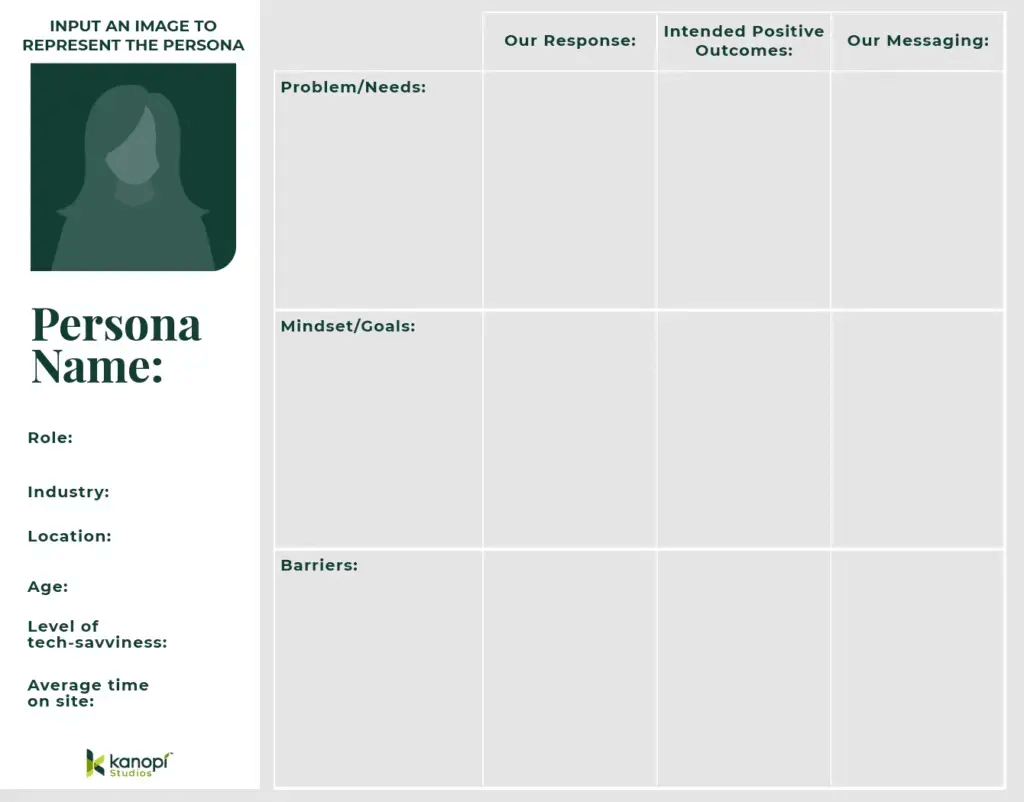
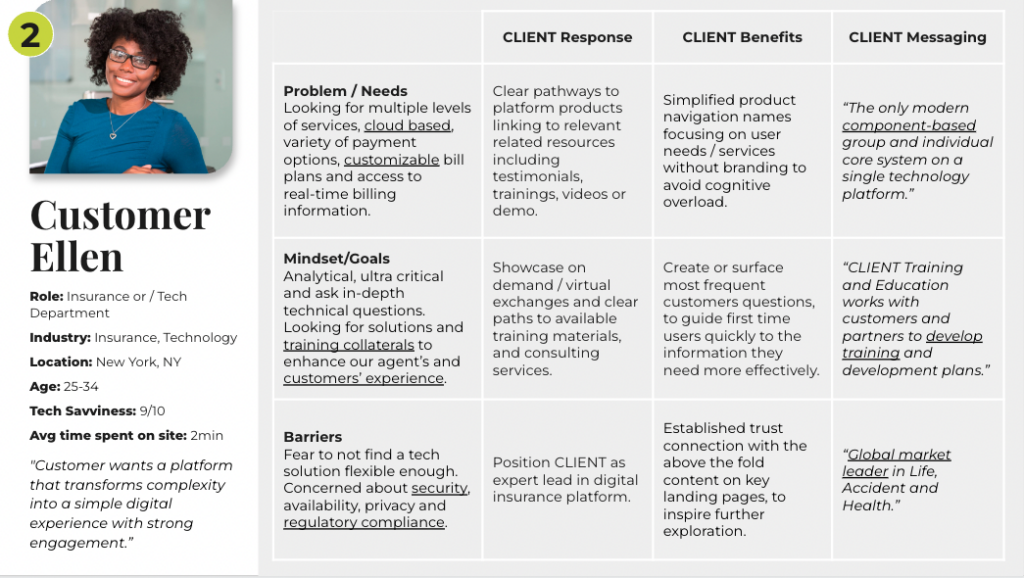
    What’s included in a persona?

    Personas generally include the following key pieces of information:

    • Persona Group (i.e. Prospective Student or Donor)
    • Fictional name
    • Job titles and major responsibilities
    • Demographics such as age, education, ethnicity, location, and family status
    • Technical skills such as comfort level with technology, preferred device type, etc. 
    • A quote that sums up what matters most to the persona as it relates to your site
    • Pictures representing that user group
    • Add any accessibility needs (color blindness, motion sickness, poor vision, etc) this persona might have to ensure accessibility is baked into the initial strategy. 
    • Behavioral patterns such as how they use the website, what their goals are when visiting your website, their friction points, and your tactical response to their needs, etc.

    Here’s an example: 

    Let’s expand on the behavioral part. 

    While most of the items on the above list are fairly straightforward and/or easy to determine from your analytics, that last bullet — behavior patterns — is the key part that needs to be analyzed and expanded. These patterns will not only determine the user journeys, but will also shape the narrative and storytelling through every page of your site, all the way down to the calls to action (CTAs) you use. 

    One example of an incredible and personalized customer experience is Chewy.  They’ve created a human-centered, customer-centric brand. They understand the significance that emotion plays in customer purchase intent and decisions, then leverage their ability to create genuine customer connections to build loyalty and expanded market share. As such, their website is strategized and designed around user behaviors. They know what you’re looking for and how to make it easier for you to make that purchase. 

    And those customer connections? Chewy adds in a ton of personalization and brand personality; everything from email confirmations saying, “our paws are working on your order,” to sending condolence notes when a pet passes away. That kind of attention to detail allows Chewy to enjoy huge customer loyalty.

    While your organization may not need the same level of personalization and customer service that Chewy provides, there’s lots of inspiration to be found in Chewy’s example. Ask yourself how you can connect with your users: what are their needs? Where do they want to go? How can you develop your brand voice to make stronger connections with them? Where do they get stuck on your website and abandon the task? Do they use different keywords to search your site?

    Look at every touchpoint your user comes across in their journey on your site, and make it not only seamless for them to find what they need, but find a way to inject your organization’s personality into each of those steps.

    Three to five personas is the sweet spot.

    It’s rare when a website only has one audience. For example, an airport website could have travelers, loved ones looking for flight or pickup information, and people looking for business opportunities in its audience. A healthcare site could have current patients, caregivers, staff, and donors. It’s generally standard to have somewhere between three and five personas

    Look at your customers to determine how many you need. What different kinds of consumers do you have? 

    But keep in mind that it’s also critical to try not to be all things to all people. If you try to cater to too many audiences, you risk not creating a clear delineation between them, making it harder for you to attract, engage, delight, and convert any of them. Don’t dilute your message with too many personas.

    A reminder about accessibility.

    Kanopi is a huge advocate for web accessibility. Many audiences can need accommodations on your site — anything from needing help due to poor vision, color blindness, or vestibular needs. So we recommend wrapping in any accessibility needs for your personas at this initial strategy phase before the design and development of your site to ensure you’re keeping accessibility top of mind throughout your project.

    I’ve created my personas. How do I use them? 

    Once you have your persona created, you can use them as a reference point during the web design process. Every time you make a design decision, ask yourself “would my persona enjoy this?” If the answer is no, then it’s probably not the best decision for your website. 

    Here are key ways that personas will guide your website:

    • SEO strategy: do your personas use different keywords to search around on your website? 
    • User journeys: do your personas use different pathways to get what they want?
    • Copywriting: do your personas respond better or worse to certain phrases or tone?
    • Imagery: do your personas respond better or worse to certain imagery?
    • Content strategy: do your personas respond to different manners of storytelling?

    Also, consider the potential expansions of your brand; while personas are most commonly used in web design, they can actually be helpful for any type of marketing or product development. So if you’re looking to create a more customer-centric approach to any facet of your business, start by creating a persona!

    Want to get started with personas? Kanopi can help. 

    Start by diving into our Step by Step guide on how we create personas for our clients. Or contact us and we’ll help craft them for you.

    And remember: always keep getting feedback from customers as trends change over time. This will ensure that your user personas stay up-to-date with customer needs so you can continue offering valuable products/services no matter what industry changes may come.

    Related content: user testing on a budget

    ON24 webinar interface as Derek Bermingham gives his webinar on user testing.

    Quality user testing does not have to be expensive. In fact, options are available for almost any budget. Derek Bermingham gave a webinar called “User Testing on a Budget” and outlined both how to conduct affordable user testing and how to recruit the ideal user base to deliver meaningful, budget-friendly insights. (44 minutes)

    Kanopi Dev Team Jumping

    Google’s Core Web Vitals: What they are & how to improve yours

    The user experience signals you shouldn’t ignore.

    When someone arrives on your website, it should load before their eyes in seconds. If it doesn’t, they will look elsewhere for what they need. Research shows the chance of a bounce increases by 32% when a page load time takes one to three seconds and by 90% when the page load time takes up to five seconds. 

    How do you ensure every page on your site loads visually fast? Understanding and improving your website’s Core Web Vitals could be the solution. 

    Core Web Vitals are specific factors that Google considers essential in a webpage’s overall user experience. In other words, Core Web Vitals form one part of the key factors used by Google to calculate your page experience score — their way of measuring your web pages’ overall user experience (UX).

    What are Core Web Vitals? 

    Core Web Vitals take the form of three speed and user interaction measurements: 

    1. largest contentful paint, 
    2. first input delay, and 
    3. cumulative layout shift.

    Largest Contentful Paint (LCP)

    This metric directly refers to your website’s loading speed. It evaluates how fast the main content of your web page loads and becomes visible to users. 

    Source: Google 

    What’s a good LCP score, you ask? Your organization should be aiming for an LCP of 2.5 seconds or less to provide a decent user experience. 

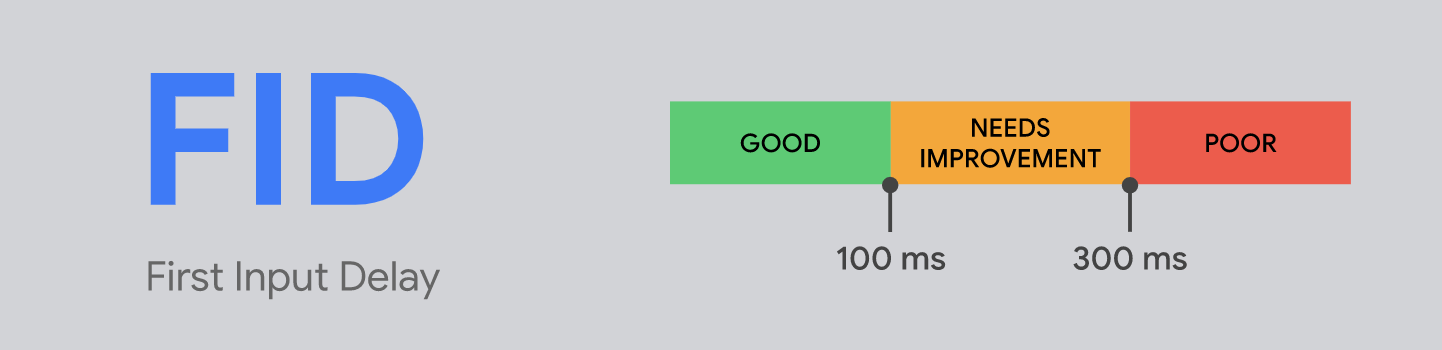
    First Input Delay (FID)

    FID is all about interactivity. Precisely, it measures the length of time it takes for one of your site visitors to interact with your web page. A good First Input Delay is 100ms or less: 

    Source: Google 

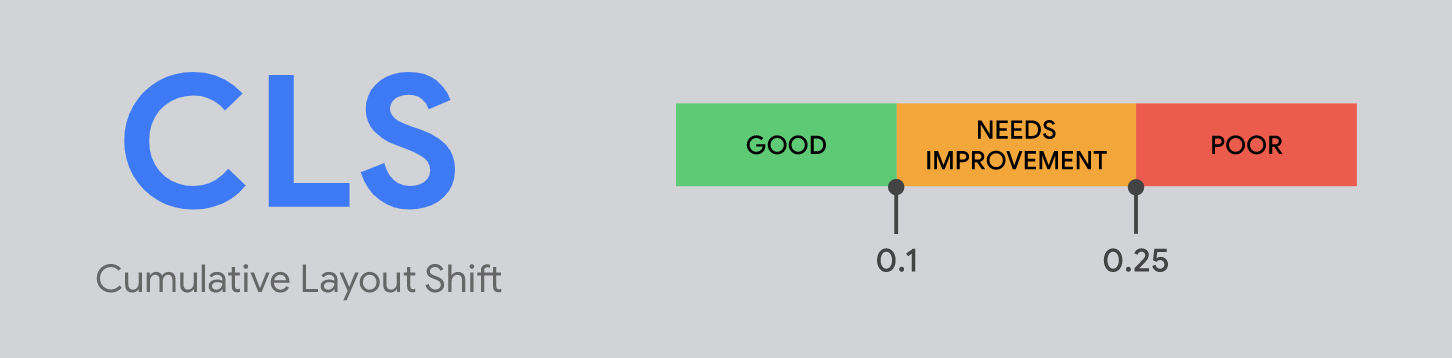
    Cumulative Layout Shift (CLS)

    Last but not least, there is our website’s CLS, which evaluates the visual stability of your site. 

    Google measures how stable your web page is as it loads, and the largest burst of layout shift scores for every unexpected layout shift that occurs during the entire lifespan of a page.

    To provide your site visitors with the best user experience possible, aim for a CLS score of 0.1 or less:

    Source: Google 

    Why Core Web Vitals matter

    Why should your organization care about your Core Web Vitals? From evolving metrics to competitor advantage, we outline four reasons to pay more attention to your website’s user experience: 

    1. Google’s introduced Core Web Vitals gradually.

    Google first signaled the launch of Core Web Vitals back in May 2020. It took over a year for the search engine to use the metrics as a ranking factor for sites, with a gradual rollout of Core Web Vitals last summer. 

    Unlike some of its other search engine updates, Google is taking a slow approach with the rollout of Core Web Vitals, with many of the eventual search ranking impact not fully realized yet.

    2. Core Web Vitals metrics are likely to change.

    Google has indicated Core Web Vitals metrics may evolve over time and stated that it will “incorporate more page experience signals every year.” It aims to “further align with evolving user expectations and increase the aspects of user experience we’re able to measure.” 

    Essentially, even if your website is doing well on Google’s current measures, it’s a good idea to keep on top of the user experience and be ready for any changes that will likely come further down the road.

    3. Core Web Vitals now affects desktop traffic.

    One significant change could already be affecting organic traffic to your site. 

    Historically, Core Web Vitals were only used as a ranking factor for mobile traffic. However, in November last year, Google announced that it would begin incorporating page experience measures into its desktop rankings from February this year. 

    Other desktop page experience indicators, such as HTTPS security and the absence of intrusive banner ads, will remain unchanged. Although your site’s mobile-friendliness continues to impact your mobile rankings, it won’t affect desktop rankings.

    Completed in March of 2022, we’re still waiting to see this update’s full impact on website rankings. However, it now means that even websites without a large percentage of mobile traffic need to show interest, which adds to site managers’ need to monitor Core Web Vitals.

    4. Your competitors are taking action.

    Data from Google’s monthly user experience report shows that between May and October 2021, overall compliance with Core Web Vitals across all websites globally increased by 58%. As of October last year:

    • 44% of sites were compliant with Largest Contentful Paint. 
    • 91% complied with First Input Delay.
    • 71% met the requirements for Cumulative Layout Shift. 

    If your organization hasn’t paid much attention to Core Web Vital metrics yet, it could feel the sting of inaction as you start to slip below your competitors on your coveted search engine results page. 

    Six ways to improve your company’s Core Web Vitals

    The simple fact is people spend more time on a website when its pages load faster. Let Kanopi help you tackle your Core Web Vitals today by following our six top tips: 

    1. Avoid page builders and heavy themes 

    Our support team sees this all too often when we partner with an organization wondering why their ranking has taken a hit and they can’t figure out why pages on their website are slow to load. 

    We recommend stripping these heavy tools and replacing them with a custom theme. This will help your site to load in the blink of an eye.

    2. Optimize your images 

    Another common culprit of a sluggish page load is unoptimized images. 

    Start the image optimization process by ensuring you’ve chosen the suitable image format and the correct image compression level for all images across your site.

    Serving images to mobile that are sized for desktop-sized can use 2 to 4 times the needed data. Swap the “one-size-fits-all” approach to your site’s imagery by serving different image sizes to different devices.

    3. Eliminate any unnecessary Javascript 

    You can reduce your Javascript page load time without changing code by minifying, compressing, and distributing.  

    • Minifying the code reduces the code size without compromising any of its functionality.
    • Compressing JavaScript assets and finally 
    • Distributing static assets using a Content Delivery Network (CDN) allows you to serve website visitors geographically from a place closer to them. 

    4. Focus on your mobile experience 

    Do you know how many people access your site using mobile phones? The number could surprise you. Over 50% of nonprofit website traffic comes from mobile users, so look at your mobile experience page load time.

    Also, consider using Accelerated Mobile Pages, or AMP, to speed up your search-optimized content. An official AMP plugin for WordPress is a great starting point if you’re on that platform.

    5. Fine-tune your content strategy 

    Refresh your content strategy and make sure it’s data-driven. If you’re in the healthcare industry, consider our five content strategy recommendations to boost your healthcare website. 

    Begin by looking at keywords you want to rank for and how your competitors rank for those words. 

    We also suggest combining similar articles and updating out-of-date ones for greater impact, bypassing the need to develop brand-new content if you’re tight on resources.

    Quality, not quantity, is vital here. 

    6. Consider a ‘Critical CSS’ approach

    Critical CSS is an optimization task that allows you to rethink how Google loads CSS by prioritizing the CSS for above-the-fold content ahead of below-the-fold content. 

    When deployed correctly, your site visitors sense a perceived decrease in page-load time owing to quicker page rendering. 

    What do we mean by above-the-fold content? Above the fold relates to the content your visitors see on your web page before scrolling. Any content someone would need to scroll down to see is considered ‘below the fold’. The ‘fold’ is where the browser window ends, but the content continues underneath.

    Choose quality over quantity to make your site shine.

    With a global effort to improve lighthouse scores underway, there’s no time like the present to improve your site’s user experience while boosting your Google ranking in the process. 

    Kanopi helps dozens of clients move from a poor to above-average rating when it comes to Core Web Vitals every day. If you think it’s time to update your website, consider a website transition plan. With Kanopi’s help, you can ensure your site’s a pleasure to navigate while reaching your crucial marketing goals with ease.

    Hands on a keyboard

    What Gen Z wants from a higher education website: a marketing manager’s guide

    It can be difficult to market higher education to Generation Z. They are digital natives who have grown up with technology at their fingertips; they don’t remember life without smartphones, and have been using touch screens since they were toddlers. Additionally, they are coming of age in a time of economic uncertainty. They are also the most diverse and educated generation yet. They are sophisticated about technology. 

    As such, it’s no surprise that this generation has different expectations when it comes to higher education. So, how do you reach them? How do you market to Generation Z in a way that resonates? 

    The first step is understanding what they want from higher education. Here are four key things that Generation Z is looking for when choosing a college or university:

    1. Affordable tuition
    2. A collaborative learning environment
    3. Technology-enabled learning
    4. Flexible learning options 

    So how can your college/university website support them in their efforts? Let’s address these one by one.

    1. Affordable tuition: The cost of higher education is a major concern for Generation Z. They are more likely to research the net price of attendance before applying to schools. Highlight any financial aid or scholarship opportunities that your school offers. Outline all the costs: textbooks, meal plans, any additional fees, etc. Lay it all out. The more transparent, the better. This is a great place to consider statistics or infographics as visual content.
    2. A collaborative learning environment: Generation Z wants to be able to collaborate with their peers and professors, even if only online. They are used to working in teams and they crave social interaction. When marketing your higher education website to Gen Z, be sure to emphasize any opportunities for collaboration, such as group projects, study abroad programs, or study groups on campus in cool locations.
    3. Technology-enabled learning: This generation has grown up with technology, so it’s no surprise that they want their learning experiences to be technology-enabled. Highlight any tech-savvy features, such as online classes or mobile apps. 
    4. Flexible learning options: Generation Z values flexibility and they want their higher education experiences to reflect that. They are more likely than any other generation to take classes online or pursue an alternative educational path, such as a gap year or MOOCs. In fact, according to eLearning Industry, 43% of Gen Zers say they would take an online course if it were offered by their dream school. So find a way on your website to market and highlight any flexible learning options that your school offers. 

    Keep in mind there are other needs that this generation has as well, and your website can support these efforts: 

    1. Personalization: Gen Zers are accustomed to being able to customize their experiences, whether it’s the music they listen to or the news they read. This need for customization extends to their education as well. Find ways to make the website customized to them, which could be as simple as giving them skin options they can choose for their interface, branded video backgrounds, or what widgets they can have on the school website once they log in (like weather reports or lunch menus). With third-party cookie tracking going away, building a 1:1 relationship-based personalization strategy will benefit you in the long run. 
    2. Social Media Presence: Since social media is such a huge part of Gen Zers’ lives, it’s no surprise that they want colleges and universities to have a strong social media presence. In fact, 78% of prospective students say that a school’s social media presence would influence their decision about whether or not to apply there. Platforms like TikTok and Instagram offer an excellent way for colleges and universities to give Gen Zers a behind-the-scenes look at life on campus and show them what makes their school unique. Think about how to best incorporate social media into your website presence in order to achieve your goals, whether they are for general brand recognition or campaigns around a particular event.
    3. Mobile-first is critical: this should be very obvious, but it’s so important we’ll state it again. The mobile version of your site has to be very user-friendly and highly performant (don’t let any page take more than 3 seconds to load). When making any tweaks or improvements to your site, always check it on mobile devices. Use PageSpeed to check the load time on all heavily-trafficked pages. . 

    Make sure you know what your users want from your website.

    Marketing teams in higher education need to be aware of these key differences in order to appeal to this demographic. By understanding what Generation Z wants from their college experience, you can craft a marketing strategy for your website that will attract the best and brightest students from this tech-savvy generation.

    woman shopping with a credit card on a laptop

    #GivingTuesday: Expert Tips for Successful Communication

    GivingTuesday 2024 broke records by raising $3.6 billion, and one agency is predicting that this year’s GivingTuesday will bring in even more for nonprofits and charitable causes. Of course, organizations shouldn’t just rest on their laurels and assume these funds will automatically come to them. Rather, to prepare for GivingTuesday, nonprofits need to plan their community and campaign strategy in advance. 

    To help you get ready, this article will explore core communication tips specific to GivingTuesday before diving into strategies to get your website ready for this year-end celebration of giving. 

    • 4 Tips for Developing Your #GivingTuesday Communication Strategy
    • 4 Website Tips to Boost Year-End Giving

    Depending on your organization’s current approach to GivingTuesday, some parts of your strategy may already be planned and ready to go. For example, nonprofits who have a strong website likely won’t need to make major changes to get the best results possible on GivingTuesday. Explore these tips to find the solutions and strategies that fit your unique situation. 

    4 Tips for Developing Your #GivingTuesday Communication Strategy

    Successful GivingTuesday campaigns have strategies to get their message out there and invite supporters to spread it as far as possible. Use these tips to improve your GivingTuesday communication strategy to reach an even wider audience than you did last year. 

    1. Set measurable goals.

    Are you aiming to raise awareness for your cause? Increase engagement on your social channels? Earn a specific dollar amount? Whatever your goals are, establish a plan for how each objective will be measured and tracked with specific, quantifiable metrics you’ll use to evaluate your campaign’s success.

    This will allow you to determine whether your efforts made up your ROI. It will also help you understand how you can adjust your approach for next year’s GivingTuesday.

    GivingTuesday even has a goal setting worksheet. Also be sure to check out the the GivingTuesday Complete Guide to get more information around including timeline planning, campaign design, messaging, sample emails, staff delegation, and more.

    2. Identify your #GivingTuesday audience.

    Knowing your audience is a critical step for any marketing campaign, and how well you’re able to create appeals targeting that specific audience will have a big impact on your success. If you don’t have them already, creating personas is helpful here.

    When identifying your audience, try to be as specific as possible. Yes, donors can be considered an audience, but that is likely too broad of a category. The more you can narrow down your audience, the better, allowing you to more accurately choose the voice, tone, content, and presentation of your messages. 

    Try thinking in terms of specific groups that share similar values, motivations, and needs. Some examples might include young mothers of school-aged children, or middle-class, liberal retirees. Consider creating a values statement for your audience to zero in on their needs and motivations. Follow this model as a template:

    As a (type of person) I want to (do something) so that (someone) can (experience a benefit).

    Spending time getting to know your audience and their motivations will help you create messages that reach them more effectively.

    3. Craft and test your messaging.

    After determining your audience, think about the types of messages that will inspire them and speak to their values and priorities. 

    Create a few test options, and ask people who fit your target audience to review your messages and tell you which ones are most likely to motivate them to act. Feel free to enlist friends, family members, regular volunteers or others who are a part of your network to help out with this. Ask them about their experience and even ask them questions to help create user stories to get a better sense of what it’s like to interact with your content. 

    4. Choose your social media promotion channels.

    Now that you know what you want to do, who you want to speak to, and what you want to say, it’s time to build your plan of action. GivingTuesday lends itself particularly well to marketing through social media, email, websites, and other online channels. 

    The hashtag #GivingTuesday gets millions of impressions each year, and social media allows for easy sharing. Think through the timing and number of your social posts, the channels you plan to use, the strategy for each channel, and how you’ll drive traffic back to your website. Here’s a breakdown of the four top social media channels most nonprofits should look to: 

    • Facebook. Facebook is ideal for longer posts, allowing you to explain a bit more about your mission, share a story, or present your latest research.  
    • Instagram. With its primary focused on images, Instagram gives nonprofits with a strong graphic design or photography team or with a solid library of images a chance to stand out. Create eye-catching images to attract attention to your posts, then share a link to your donation page in your description, along with #GivingTuesday to help your discoverability. 
    • Twitter (X) and/or BlueSky. Both focus on short messages, making them useful platforms to provide quick updates. Throughout GivingTuesday, consider how you can use your accounts to provide supporters with updates on how close you are to your goal and other messages that will encourage engagement, such as polls, videos, questions, and other content outside of text-only messages. 
    • TikTok and/or YouTube Shorts. Are you able to create short, easy-to-produce videos with your cell phone? TikTok excels at rapid, trend-driven virality and community features like duets and stitches, making it ideal for quick, high-engagement content. YouTube Shorts offers better long-term discoverability through its robust search and the potential to funnel viewers to longer-form content on the same platform. While your nonprofit can stand out with higher production and lengthier videos, making more casual videos (or including those made by supporters) can help promote your GivingTuesday Campaign. 

    Make sure to drive traffic to strong landing pages on your website that will help users learn more or take your intended action. These pages should expand on the messages brought up in your social media posts and lead visitors through the donation process, making a cohesive giving experience.

    Now that you’re engaging with your audience, let’s address your website so they can donate! 

    4 Website Tips to Boost Year-End Giving

    As your organization’s main information hub for supporters, your website is an important resource for promoting your GivingTuesday campaign and other year-end giving opportunities. Use these tips to improve your website ahead of the GivingTuesday season. 

    1. Make it easier to donate.

    GivingTuesday is about earning as many donations as possible in just 24 hours, so giving to your organization should be a fast, easy process. You can improve the donating experience ahead of GivingTuesday by:

    • Reviewing your content for clarity. By using clear and simple words, you’ll ensure your content can be read by the greatest number of people possible. Since people read slower on a screen compared to reading words on paper, keep it as brief as possible and make it easier to skim by using bullet points, lists, buttons, and bold text.
    • Casting a critical eye on your user journey. Focus on how people navigate to and through your website and identify any barriers that block your users from reaching their goals. Over 57% of nonprofit website traffic comes from mobile devices, meaning more than half your audience will likely try to access your website from their phones. Make sure the content on your site is responsive and mobile-friendly. 
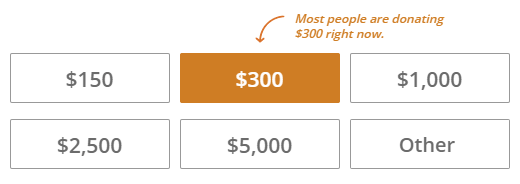
    • Reviewing the ease of your user experience (UX). User needs and behaviors change over time. You can ensure your site is continuing to meet the needs of your users by testing and refining your user experience. How easy are your donate buttons to find? Do you have clear giving amounts? Make recurring giving easy to retain your GivingTuesday supporters long after their initial donations. 
    • Make the donation form simple. Users will abandon a form if it’s too difficult to fill out. Avoid this by only using the fields you absolutely need to use. 

    While your nonprofit should have other methods for accepting donations, online giving has only increased in popularity year-over-year, making your website one of the first places you should look to improve your giving experience.  

    2. Tell real stories.

    Donors give because they want to make an impact, and you can demonstrate how your nonprofit does just that by sharing real stories about your work. Conduct interviews with your beneficiaries, volunteers, staff, and anyone else at your organization who may have a meaningful story to share with donors. 

    After collecting these stories, consider how you’ll present them in your outreach materials. While you should never distort the facts of what happened in each story to maintain an ethical standard, you will need to make creative decisions about how you frame them to encourage supporter engagement. Here are a few strategies that can make your stories stand out:

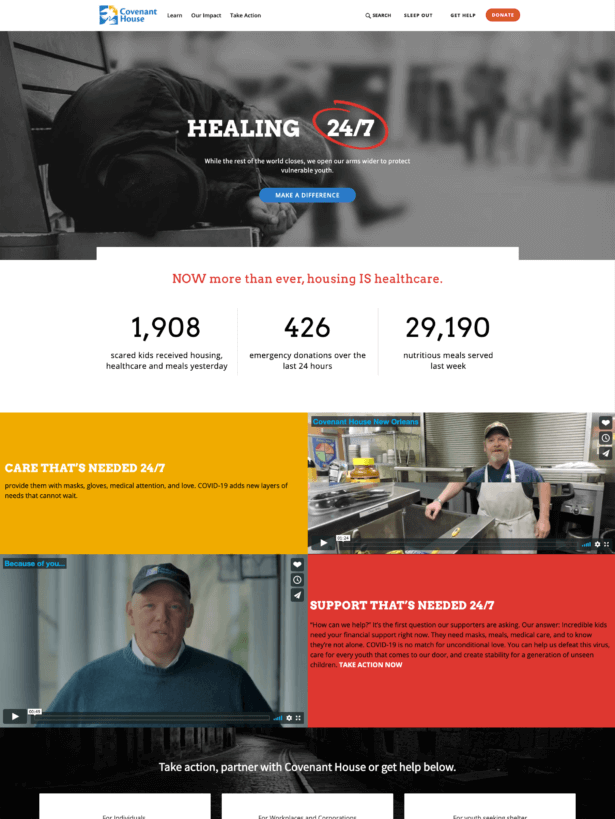
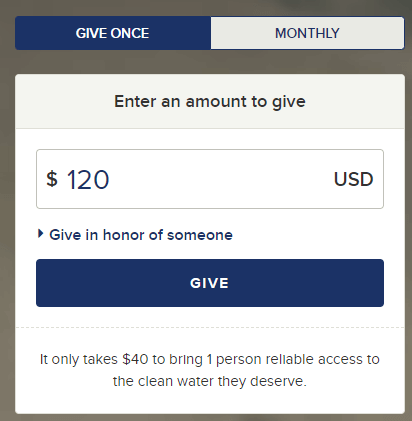
    • Help donors visualize the impact of their donation by turning suggested fundraising amounts into tangible and positive outcomes. For example, a one-time donation could provide a Christmas dinner for a family of four, or a monthly donation could provide a young person with safe shelter and support, giving them the ability to enroll in school full time. 
    • Bring your stories to life with embedded images, films, and quotes from the people whose lives will be affected by each donation. Consider your audience and which platform will be best to share this story on. For example, you might share a longer video on Facebook, then edit it down for TikTok. 
    • Clarity is the key to conversion! Every call to action should have one central goal: to motivate your donors to take action. While details can make your stories more memorable, ensure your calls to action are clear and tell people what to do and why in the most direct way possible.

    Remember that your website is also a great place to host storytelling videos. Use your website design tools to embed videos into pages about your initiatives, impact, and giving program to engage visitors. 

    3. Ensure accessibility.

    Having an inaccessible website could mean losing potential donors. Even more importantly for many industries including nonprofits, it could also mean breaking the law. With 1 in 4 US adults living with a disability and many more with temporary or unreported disabilities, it’s vital your site follows web content accessibility guidelines (WACG).

    You can improve your website’s accessibility for all visitors by:

    • Adding captions and transcripts to your videos will ensure the greatest amount of people will be able to access your content. Doing this will also help search engines pick up your pages and index them, improving your visibility in organic searches. 
    • Ensuring your donation forms are screen-reader friendly. Include alternative text for images, practice navigating your pages via keyboard, and conduct other tests to ensure visitors using screen-readers can get the same experience as your other supporters. 
    • Making your pages readable by using sufficient color contrast between your text and backgrounds, allowing text size to be increased, and using multiple indicators besides just color to show required fields and other information. 

    There are a variety of tools built specifically for improving your website’s accessibility that you can explore. Remember that maintaining accessibility should be a year-long commitment, but double-checking that your pages are ready ahead of GivingTuesday can ensure that you engage as many supporters as possible. 

    4. Use a multichannel marketing strategy. 

    GivingTuesday campaigns succeed when they engage as many supporters as possible and encourage those supporters to engage as many members of their networks as possible. To get the word out, ensure you’re casting a wide net by using multiple channels in your outreach. 

    For most nonprofits, the majority of their GivingTuesday marketing will take place online, and the following channels are the most reliable for earning support:

    • Your website. To collect donations online, all of your other messages will need to lead back to your website. However, your website is also a promotional tool as supporters linked from other communication channels will look to your website to learn about your mission and organization. Create a GivingTuesday event landing page that includes information about your organization, such as its mission, values, and how supporting your fundraiser will make a difference in the community. Ensure your website also makes it easy to further promote your GivingTuesday campaign by including social media sharing buttons on core pages like your donation form. 
    • Social media. As discussed, social media marketing is essential for making an impact on GivingTuesday. Ensure you already have a following on the platforms you intend to use to make sure your messages will get shared by your supporters. Use #GivingTuesday in your posts to reach new audiences, get people excited about your campaign, and direct them to your site quickly in order to donate.
    • Email. Email remains one of the most reliable ways to reach supporters directly. Send out personalized messages to your supporter email lists on GivingTuesday to tell them about your campaign, ask for a donation, and invite them to continue spreading the word by making a social media post or telling a friend about your cause. 

    Many of your supporters will likely connect with your nonprofit on multiple channels over the course of GivingTuesday, but this will ultimately help your campaign more. Donors often need to see several calls to action before they finally act on one, so creating multiple touchpoints with the same supporters will likely pay off in the long run. 


    This is a lot of information, but even doing a few of the items on this list can translate into more money for your cause before the end of the year. You want to make your donors feel empowered this GivingTuesday. Spread your message online, showcase your impact, and make it easy to make a difference. Building a digital connection with your donors will only become more important as giving becomes more common online.

    Need more information? Here are tips and resources straight from GivingTuesday.

    A top down view of a vintage typewriter sitting on a dark wood plank table.

    5 Simple Ways to Improve Website Content Accessibility

    Faye
    Faye Polson

    Accessibility is a growing demand on the internet as our world shifts from in person to online in a variety of aspects. The pandemic has escalated that shift, and it’s becoming increasingly clear that all websites need to be accessible regardless of legal requirements.

    While WCAG 2.1 compliant websites are coded following accessibility guidelines, it’s easy for a site to slip away from compliance through regular content entry. Or perhaps accessibility isn’t something that you’ve prioritized before and you’re just getting started on making improvements. Either way, here are five simple actions you can take right now to improve your website accessibility from a content perspective.

    1. Review / Revise Acronyms & Abbreviations
    2. Remove All Caps
    3. Use Sequential Heading Structure
    4. Alt Text
    5. Descriptive Links

    Review / Revise Acronyms & Abbreviations

    Acronyms and abbreviations are common in a number of organizations and industries. What’s often overlooked is how those are interpreted by screen readers.

    I once came across some website content where they were comparing Generation X to Generation Z, but they used the abbreviations “Gen. X” and “Gen. Y”. Screen readers will often try to expand an abbreviation for clarity. When I tested the content, I discovered it was being read as “General X” and “General Y”. So while the original intent was to save on space, the meaning was confusing to anyone using a screen reader.

    Likewise, some acronyms can be troublesome. P.O.W. would be read as “Prisoner of War” while POW would be read as “pow!” like the comic book action. It’s a good idea to read aloud to yourself the content on your website, and consider the potential for misinterpretation by someone hearing rather than seeing it.

    Remove All Caps

    Whenever I think of all caps, I think of AmyJune Hineline, former Kanopian and winner of the 2021 Aaron Winborn Award (she really loves that being mentioned). She used to regularly remind us all of how all caps can be a common source of frustration and miscommunication with the hashtag #NOWTHATCHERISDEAD. AmyJune would then ask, “Who’s dead? Cher or Thatcher?”

    Switching to all lowercase in this circumstance won’t help either. If you are looking for a way to make hashtags more readable, capitalize the first letter of each word (NowThatcherIsDead). It’s called Camel Case (or Pascal Case, depending on who you ask) and it improves readability considerably. For the record, I promised AmyJune that if I ever had a child I would name them Cher Thatcher so the original hashtag would still be true when they passed. Problem solved.

    Of course we typically use spacing and punctuation in website content, which helps alleviate some confusion, and all caps are typically used as an easy way to identify something as a heading or to indicate additional importance. But due to the uniform shape that capital letters give words, they become more difficult to identify at a glance and therefore reduce readability. Using Title Case (Now Thatcher Is Dead) is considered easier to parse, both visually and cognitively.

    Use Sequential Heading Structure

    HTML headings are structured similarly to an essay outline. Your page starts with an “H1” and should only have one of these. This is the heading that tells search engines and users what the focus of the page is. This is typically the title of your page or blog post. The remaining heading values (H2 – H6) are used to identify the content hierarchy of the page. 

    Screen readers depend on headings to navigate a page, as users will typically bounce through the headings to find a section to read. If your page skips heading levels, or uses heading levels incorrectly, these users will not be able to correctly navigate your content.

    • H1 – Page Title
      • H2 – Section Title
        • H3 – Subtitle
        • H3 – Subtitle
          • H4 – Subtitle
          • H4 – Subtitle
        • H3 – Subtitle
      • H2 – Section Title
      • H2 – Section Title
        • H3 – Subtitle
        • H3 – Subtitle
        • H3 – Subtitle

    Alt Text

    Alternative text, commonly known as the alt text, displays when an image link is broken and can’t be displayed. And it’s far more useful than you may realize. Search engines use alt text to further understand the context of your web page and so it’s also useful for SEO purposes. But even more important, alt text is what’s read aloud by a screen reader. For someone with low or no vision, this description helps them identify the content of an image without needing to see it.

    Decorative images, such as swoops or waves or other abstract design elements don’t require alt text, but your average image does. But not all alt text is created equal. When describing a picture, consider the purpose of the image and the feeling it’s meant to convey. Identify what is important to understand from the context of the image and the content around it, then articulate that in the alt text. Remember, if it’s valuable enough to show to a sighted user, it’s worth describing to users of assistive technology.

    Take a look at this image taken by the James Webb Telescope, uploaded by NASA. The alt text reads, “A large pink, speckled galaxy resembling a wheel with a small, inner oval, with dusty blue in between on the right. Two smaller spiral galaxies about the same size are to the left, all against a black background.” This accurately conveys the image content without being too wordy.

    A large pink, speckled galaxy resembling a wheel with with a small, inner oval, with dusty blue in between on the right, with two smaller spiral galaxies about the same size to the left against a black background.
    Credits: NASA, ESA, CSA, STScI, Source

    Most CMS platforms offer the ability to easily add alt text to your images and it’s highly recommended that you take advantage of the option to do so. Visit your website’s media library and review uploaded images, updating as needed. Then remember to add alt text when new images are added and you should be good to go.

    Links are plentiful on almost any webpage. From the navigation bar, to the footer, there’s bound to be several links leading to other areas of your website or even to external sites. One of the most common types of links seen in content is the “read more” link. Generic phrases such as “Learn More,” “Read More,” “View,” and “Click Here”  offer little content to assistive technologies which often scan the links of a page and simply provide them to a user without the surrounding context. 

    For example, if your page has three cards for news articles and the links for each are “Read More”, assistive technologies may present them as “Read more, link, read more, link, read more, link.” That is useless to the user if they cannot visually see the title of the article that goes with the link. 

    In fact, this type of link is so discouraged, Google penalizes it when calculating a website’s SEO score. And yet this is an incredibly common practice. Even Kanopi’s website utilizes read more links in a number of situations. So how can you get around this ambiguity? 

    Ideally it’s done by having hidden screen reader text added in addition to the “read more.” You’ll find an accessible website often has additional content that’s hidden visually but presented specifically to assistive technology. Instead of reading “Read more, link,” the screen reader is presented with, “Read more [about our blog post on accessible design], link.” This is how we do it with Kanopi’s site, making it possible to use “read more” as link text.

    But because this method requires some behind-the-scenes code, it’s more commonly used in templated areas that automatically present content with read more links. When you’re adding textual content to your site, you may just want to add a button or link to send the reader onto more information. When that happens, it’s important to remember the link may be reviewed independently of the content around it. Being descriptive will help your SEO and your accessibility. 

    I could tell you to “read more,” but it would be better for me to point you to an article about inclusive and accessible webforms.

    Beyond Content Entry

    Accessibility is an absolute necessity as assistive technology opens up the internet to more and more people. If you’re interested in achieving a WCAG 2.1 compliant website, get in touch with Kanopi. We’d love to help you create a site that is accessible to all.

    Kanopi Team

    7 Statistics to Guide Your Next Website Refresh or Upgrade

    You don’t need to be an expert, but you do need to understand key stats and data to ensure users come to your site, stay and convert. Use these statistics to guide your website refresh.

    When planning a nonprofit website refresh or upgrade, you might feel overwhelmed deciding where to get started or which website elements you should prioritize. You can take the website refresh process in many different directions, and as a result, you might be uncertain of which changes will actually make the biggest difference in driving traffic to your site. 

    This is where it can be immensely helpful to review studies and statistics on website traffic, design, and promotional strategies. Assessing these statistics can help you create a data-driven game plan for your website revamp project. 

    The top nonprofit websites take user research and user experience (UX) best practices into consideration to create a better visitor experience through an iterative process. With this in mind, we’ve compiled seven illuminating statistics to guide your website refresh and promotion strategy. Let’s dive in!

    1. Visitors can assess your website’s visual appeal within 50 milliseconds

    Clearly, your visitors’ first impressions of your website mean everything. A negative first impression can cause would-be donors, volunteers, and advocates to click away and dismiss your organization. By contrast, a positive first impression can influence a casual visitor to learn more about your cause, get involved, and even donate. 

    So, how can you make the most positive first impression possible for new visitors? Nonprofit websites that stand out from the crowd have streamlined, well-designed home pages that offer visual harmony and multiple opportunities for visitors to engage further. 

    In your website refresh, optimize your home page by including a variety of calls to action (CTAs) that appeal to different audiences. For instance, you might include buttons or links to sign up for your email newsletter, register to volunteer, or donate. Also, your home page should be visually cohesive, fully branded to your organization, and make effective use of white space. 

    2. The past three years have seen a 42% increase in online giving.

    Online giving is growing in importance every year as a major driver of nonprofit revenue. That’s why your website planning and development process should include a significant focus on improving your online donation process. 

    Ensure your online giving page is easy to find by including CTAs across your website that point back to it. The form itself should be as simple as possible so donors can fill it out easily. Only ask for necessary information, such as donors’ names and payment information. Also, offer suggested giving amounts so donors can determine how much they want to donate without having to fret over the decision. 

    3. Over 50% of nonprofit website traffic comes from mobile users. 

    You’ve probably heard time and time again that your website must be mobile-responsive, but it’s helpful to see just how crucial this is by reviewing the stats. Failing to make your website mobile-friendly can inadvertently create a negative experience for over half of your potential audience.

    Make your website just as successful on mobile devices as it is on desktops by assessing each page in the mobile view to check for formatting issues. Toggle between the mobile, tablet, and desktop views using your content management system (CMS) tools to edit each version independently. You can also run your website through Google’s mobile-friendly test to quickly assess whether your site is mobile-friendly or not. 

    4. 43% of all websites are powered by WordPress. 

    This equates to hundreds of millions of websites built on WordPress, the world’s most popular CMS platform. What does this have to do with your website refresh journey? If you’re looking to upgrade your website from a free or less complex content management system to a more robust platform, WordPress could be the right choice for you. 

    WordPress is distinguished by its user-friendly, intuitive interface, flexible editing experience, and powerful support community. A variety of organizations turn to WordPress, along with other robust CMS platforms like Drupal, to build more long-lasting, complex websites. Review Kanopi’s guide comparing Drupal and WordPress for more information on each system and to help choose the best platform for your website upgrade. 

    5. Approximately 96.8% of website home pages have accessibility failures. 

    Following accessibility policies like the Web Content Accessibility Guidelines (WCAG) makes your website usable for everyone, including those with and without physical or mental disabilities. Accessible websites make the internet a more inclusive place, but unfortunately, the vast majority of sites come up short.

    As you redesign your website, follow the WCAG standards to improve accessibility. These guidelines include adding alternative text for images and captions for videos, using a color contrast ratio of at least 4.5:1 for text, keeping navigation consistent across pages, and more strategies to make your site more inclusive. 

    6. A well-designed user interface could raise your website’s conversion rate by 200%, and a better user experience can increase conversion rates up to 400%. 

    User experience is the way your website visitors feel when interacting with and navigating your website. As you can see, when your organization’s website offers a positive user experience, you can boost your conversion rates considerably. This can translate into more donations for your cause, volunteers for your volunteer opportunities, subscribers to your email newsletter, and so on. 

    Ensure your nonprofit’s web design creates a positive user experience by:

    • Offering intuitive navigation that’s uniform across website pages.
    • Reducing page load times by compressing images and minimizing your code. 
    • Standardizing your branding to reassure visitors that they’re interacting with your organization, helping them feel more comfortable when donating online.  

    Assess your website’s analytics, such as time on page and bounce rate, to determine whether you’re engaging visitors effectively and what you can do to improve your user experience. 

    7. The Google Ad Grant Program has given over $9 billion in free advertising to more than 115,000 nonprofits in over 50 countries.

    The Google Ad Grant Program offers eligible nonprofits $10,000 per month to spend on Google advertising. This represents a valuable opportunity to get your organization’s website in front of more prospective supporters. Using Google Ads, you can connect with individuals who are searching for terms related to your organization, allowing you to connect with an audience that’s already interested in your mission.

    Getting Attention’s Google Ad Grant guide recommends optimizing your website to drive conversions before using ads to direct audience members to it. During your website refresh, take the opportunity to create a targeted landing page to use for your Google ads. This page should include an engaging headline, compelling visuals, impact stories, and CTA buttons that allow visitors to get more involved.


    As you plan your nonprofit website refresh or upgrade, keep in mind that you aren’t just updating your website; you should be thinking about new ways to engage and build your online community. When you design your website with trends and user research in mind, you can appeal to your audience more effectively and create a more positive website experience. 

    And if you need help, contact us.

    Originally written for and posted on the AFP Global website.