A pile of silver forks, knives and spoons haphazardly dumped in a pile, demonstrating the messiness of a site not using custom post types..

Custom Post Types: Using WP for Content Management

Faye
Faye Polson

Confession: I don’t separate my cutlery.

I just grab a handful of forks and spoons and knives and shove them into the tray, ignoring the divisions made to help organize your utensils, and then just hope nobody ever looks in there to realize how ridiculously lazy I am.

Of course, separating my cutlery would make it easier to find what I’m looking for, especially considering I seem to have 6 million spoons and only 5 forks. It’s completely silly that I don’t.

WordPress has the same problem as my cutlery drawer

Out of the box, WordPress websites come with Posts and Pages. Pages are what we use to build a site’s homepage, contact page, about page, landing pages, etc. Pages almost always appear in the navigation menus of your site, otherwise users would have a hard time finding them.

Posts, on the other hand, are meant to show off content in an Archive. For example, a news feed, or a blog. They also auto publish; add a new post and it magically appears at the top of your blog page (which is actually not a Page). Posts also use Categories and Tags, which can be clicked on to view Archives of posts in those Categories or Tags.

Where this gets messy is when people use their Posts as sort of a catch all for content that doesn’t fit on a page. Press releases, resources, news, blogs, announcements, videos, links, etc. I’ve clicked on the “Posts” in the WordPress dashboard and cringed to see all that content jammed into one place, knowing it must be an absolute nightmare for the site owner to navigate and sort through.

Post Formats to the rescue?

Not exactly. WordPress has something called Post Formats which allows you to choose a format for your Post. You can choose if something is a video, or a link, or a gallery, a quote, etc.. But unless your theme has templates for each one of those types, they’re useless. And considering there are 9 post formats, that’s a pretty big budget consumer for something that still won’t solve the larger issue; there’s just too much cutlery in one place.

Custom Post Types to the rescue! For realz this time.

The truth is, WordPress is made up of posts. Users are posts, Categories and Tags are posts, files and images are considered posts, even Pages are posts! The entire infrastructure of WordPress revolves around this one method of data storage. As a result, it’s really easy to make more.

While there are Custom Post Types Plugins, a developer can literally add a custom post type through their own plugin, or to a theme’s functions, with just a few short lines of code. They can add Categories and Tags to it, tell it to behave like a Page or a Post, or give it it’s own custom taxonomies. This essentially means you can separate your content by purpose, and then present it back to the user accordingly.

Cleaning up the Cutlery Drawer: A Study in Books

Let’s get practical. I like cool used bookstores, so let’s imagine you have a used bookstore and need a website that works for the type of content you want to show.

The default Posts that come with WordPress, those will be your news / blog posts. Thanks to Gutenberg, you can really design your posts as you need them, without post formats and templates. 

You’ll want an Events section, so you can brag about the upcoming J.K. Rowing book signing, or the long awaited release of Book 3 from Patrick Rothfuss. With Advanced Custom Fields (ACF), Kanopi could make a robust Custom Post Type that has event dates and times, associated authors with their social media, promotional images. We could even display this in a calendar format with integrations for Google Calendar reminders.

Next, you’ll want a rare book section. Obviously your bookstore is amazing and has some serious stock that you’re not about to upkeep online, but there’s always those special books that could bring in the collectors. Our next Custom Post Type might be Rare Books, and with the magic of ACF, we could make bibliographies and a gallery of images of the book and some of its pages. Maybe a little history blurb about the book or what makes it such a hot ticket item for collectors.

Now, you’ll also want to draw in average readers and book lovers who maybe don’t have the budget for rare books, so let’s make a Custom Post Type for Recommended Reading where you can put together a list of some highlighted books that are likely to appeal to a wider audience. It can be categorized and sortable too, so users can browse and filter. It’s going to be amazing.

Lastly, a Team Custom Post Type, because your book store has a staff of six, plus the store cat (because you’re really cool like that). Each post becomes a Team Member page, with a bio, job title, and — this is where it gets really neat — you can associate them with their favorite books from the Recommended Reading posts. In fact, let’s go one further, we can attach your staff to the blog / news posts they’ve written and show that alongside their bios. Kanopi actually does this for our own staff.

Where previously you might just jam all this content onto a single page, or into a mash up of Posts, we can take all this content and give it custom data entry and custom templating that allows for some neat cross connection and interactivity for users to better travel your site and find what’s relevant to them. Have a cat that lives at the store? You never know . . . the store cat’s blog posts might be a huge hit.

Structured Content is Mappable Content

What if simply by telling your cutlery drawer what you’re having for breakfast, it was able to select the necessary eating implements for you? Having cereal? Here’s a spoon. Pie and ice cream? No judgement, here’s a serving knife, ice cream scoop, and a fork.

The additional advantage of an intentional content structure using custom post types is that you can then apply what’s called schema data to essentially map your content. Our fictional bookstore could actually pass specific information to Google about those rare books and events to get them in front of the people most likely to be genuinely interested. Consistent data is also extremely useful for filters and searches, announcement bars, feeds, and more. It allows for a deeper level of content strategy and design to better achieve your online goals.

Are you convinced to use Custom Post Types in WordPress? Ready to start stacking your silverware? 

Get organized with Kanopi
Kanopi Team

Metadata vs Schema

Faye
Faye Polson

It’s just data about data.

As a twenty something, I thought drawing a picture of Lt. Commander Data from Star Trek the Next Generation holding a clipboard of statistics about himself was a fantastic study aid for the definition of “metadata”. Okay, as a thirty something I still think that’s pretty funny.

Metadata essentially just that — data about data. It’s context for the information you’re about to consume. Nearly everything technical has it; when you take a picture on your smartphone, it stores the date and time the photo was taken, and some kind of generic name. If you have location services installed, it can even add where the picture was taken to its internal clipboard.

Most of the time metadata happens without us even realizing it, and nobody thinks twice about it until they want to improve their website Search Engine Optimization (SEO), which has definitely popularized the term. But for most people it’s just a huge ambiguous concept without any real concrete applications. 

So how does metadata work for your site?

Whenever you hop on your search engine of choice, for the purposes of this article we’ll be talking specifically about Google, your search results often come up with a website name, url, and a short description about the page. Every site has a title and url, and if it’s missing a description a good search engine will automatically pull the first few lines of text it can get from the site. 

Metadata Sample to demonstrate the difference between metadata vs schema

There’s a lot of misconception as to what this data is for, and how the search engines are using it, but the bottom line is that this information is for the user, not the search engine. This is your opportunity, as a website owner, to connect with your potential users. If you have the content they want to consume, this is where you tell them that. You have the ability to control your title, urls, and descriptions. Yoast is a fantastic extension for those kinds of edits, available for both WordPress and Drupal sites, but there are many others if Yoast doesn’t meet your specific needs.

Try it out

For fun, google your own company or organization, and see what comes up in the listings. Is it compelling? Does it accurately convey what you do and who you are? Would it appeal to a potential customer? If not, maybe it’s time to revisit your metadata content. Consider taking a look at your titles, urls, and descriptions for your most important pages.

If that seems like a daunting task, don’t fret; we can crawl your website and provide an audit of what search engines encounter when they navigate through it. Armed with that data, you can take an iterative approach to improving your pages based on importance.

Okay but then what is Schema Data?

Where metadata is data about data, schema is the map for that data. Take an events page, for example. It would have an event title, a ticket cost, a date, and a time. All that data is on the website, but how would a search engine know that unless you actually told it where to look and for what? Schema lets you assign context to that data. So along with the page that the user sees, you can send a map to the search engine that tells it the page is about an event, when it is, where it is, how much it costs, even the type of event. Is it a fundraiser, or a concert? Who’s organizing this event? Are there any promotional offers?

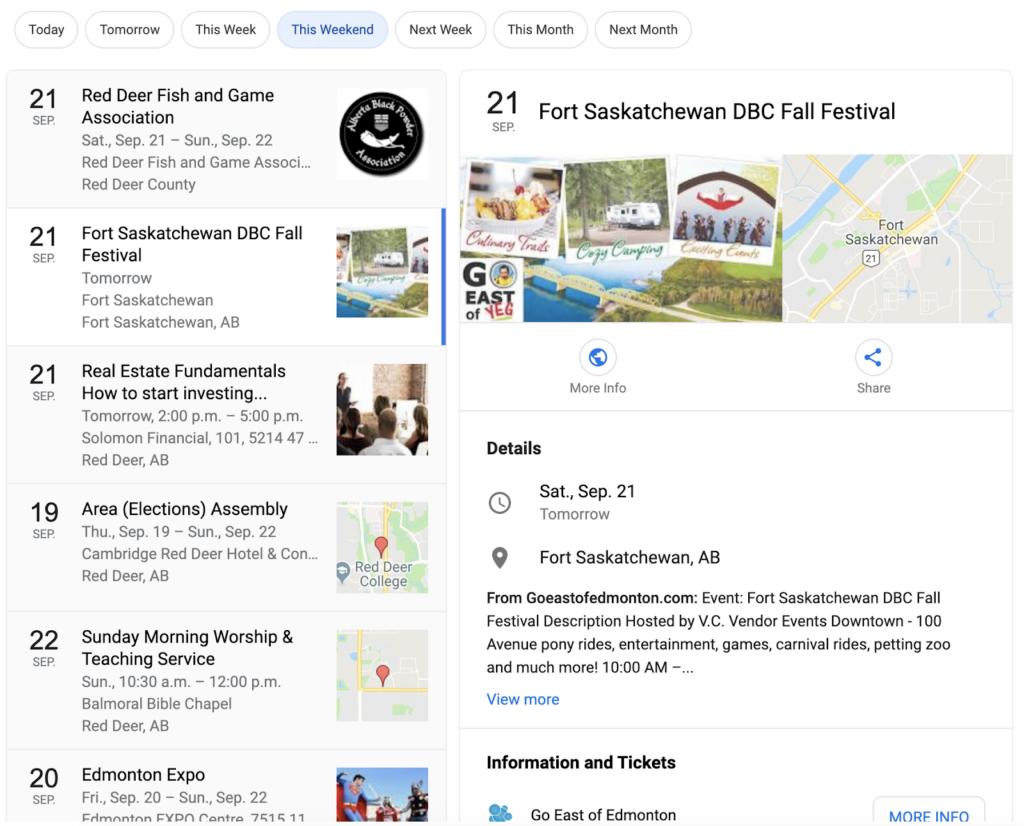
As an example, this is a Google search where I simply typed “upcoming events” and then chose “This Weekend.” Now I’m getting a list of events in the area with some relevant data.

Schema Sample that demonstrates metadata vs schema

How did it get there? Most likely those websites are utilizing schema data to map their event information. Google can find it now, understand its context, and present it in a relevant search.

How do I get schema data on my site?

Lucky for you, basic schema is possible with a plugin or module. Yoast, for example, adds some global site schema and basic page specific schema. Even just this alone can help boost your site’s content presentation to a search engine, and it’s a fairly low level of effort to integrate. If your site has an SEO plugin, you might already have some schema being applied. Head over to the Structured Data testing tool from Google and plug in your homepage to see what pops up. 

If you don’t see much, or you see a lot of errors, then you’re missing some valuable SEO leverage. But it usually takes a little more punch than third-party extensions can offer to get your specific content into schema markup; it’s time to hire a developer.

We’re not shy! Take a look at Kanopi’s schema markup.

Kanopi Homepage: Here we’ve been able to tell Google when our site was last modified, that we’re a company, all of our social media accounts, what our logo is, and what the most important image on the page is.

Staff Member Page: On Jim’s profile, we’ve got the global information included on the homepage, but we’ve also added that this specific page is about a person, with his name, his position, his picture, and all of his social accounts.

We’ve done the same for our blog pages, service pages, and case study pages. We’ve put extra care into communicating with search engines about the content of our site to better reach our audience, concentrating on the appropriate suggestions provided in the Google Search Gallery.

Schema can be applied to almost anything — in fact, the list of things you can use schema for will make your head spin. If you’re ready to move into the next stage of SEO, give us a call! The development experts at Kanopi are ready to help audit your site and develop a customized SEO plan to enhance your visibility among your target audience.

Team meeting

Accelerating Projects with Staff Augmentation

Jessica Skewes, Director of Strategy
Jessica Skewes

The are times the adage “less is more” applies to web projects. It can make a project a joy. Aligned stakeholder priorities. A single decision maker. Structural consistency. Design consistency. Simple, easy to understand requirements. Fewer, clearer calls to action to maximize conversions. Sounds great doesn’t it?

But sometimes you need staff augmentation when, “less is more” doesn’t work to our advantage. Places like timelines, budget and resources. When these are scarce, it creates a challenging environment for project success.

If this strikes home for you, you may be a team lead for web projects. You may be an expert in one or two disciplines in the project life cycle. And you may be way too familiar with the pain of projects that have gaps. You may need to extend or enhance the skills of your team to meet a deadline or budget.

The good news is, if resource constraints are your challenge, there are options!

Staff augmentation can help.

Expanding your team with outside experts is a time-tested way to accelerate your project life cycle or build the skills of your internal team. You can get fresh perspectives on the latest industry trends. You can avoid groupthink by bringing more diverse and varied experience and skill sets to a web development project.

At Kanopi, we understand the stress created by aggressive timelines, resource constraints, and knowledge gaps. “Nimble” is a core value, and offering seamless staff augmentation is one of the many ways we bring it to life: we have successfully partnered with clients and other agencies in a variety of ways to help them achieve their goals. We love the challenge of blending our skills with client teams to help your internal staff perform heroic feats for your end clients.

Jumping in to lend a helping hand 

Here are a few recent examples that demonstrate our team’s nimble agility in helping to save the day on a variety of projects across varied industries. 

The Berkeley School of Information 

The Kanopi team helped Berkeley’s School of Information by building out their new website on Drupal 8, all while training their internal team along the way. The Berkeley team is now well versed in Drupal 8 and needs only minimal support to maintain their highly-customized site. Berkeley’s Senior Director of Information Technology was thrilled with the results of our partnership, sharing that “The Kanopi team’s expertise and enthusiasm were critical to the success of our project. We couldn’t have done it without them.” 

Benetech Bookshare

Kanopi partnered with Benetech’s team to establish a rapid and repeatable process to translate the organization’s Bookshare websites into any language, making thousands of books accessible for people with visual impairment or other print disabilities around the globe. The Benetech team built the API, working with the Kanopi team to build out the websites. 

BC Services 

BC Services was racing toward the finish on a tight timeline to launch its Intranet. They needed help building out search and a complex custom homepage. In addition to jumping in to build out features, the Kanopi team was able to find ways to improve the site’s user experience while reducing technical complexity on the site. And the best part of all was that the project gained momentum and came in ahead of schedule with Kanopi’s extra help. Our main contact was so excited about this that he waited to tell his director that the project was ahead of schedule until the Kanopi team could be there to see the excitement on her face!

International Rescue Committee (IRC)

The Kanopi team is currently hard at work to help IRC meet website deadlines after their technical architect left the organization. Kanopi’s developers took the lead, writing user stories to ensure clarity, creating tickets, coaching and training development staff, and keeping all work on track. 

Need a hand? We can help.

Even with a fantastic internal team of seasoned experts, there are times when staff augmentation can assist with an extra hand or a niche skillset. Contact us if your latest project could use consulting services or helping hands within our full spectrum of web project services.

Kanopi’s Drupal development services focus on creating functional, sustainable Drupal websites.

How to Prevent Scope Creep

Managing the risks of scope creep will keep your website project running smoothly.

Your project is off to a good start; progress is being made, the timeline is being honored, and the budget is on track. Then one day you check your email and learn that a key stakeholder has left the project. You hear the suspenseful theme from Jaws in the back of your mind; this is the perfect scenario for that dreaded fiend scope creep to show up. 

I say fear not!  

Like a robocall in the middle of the night, scope creep is something nobody wants to encounter, especially during a project. That being said, it is also a natural part of any project and is bound to happen. The good news is that you can be proactive about heading it off at the pass, or preventing it from happening in the first place.     

Common Contributors to Scope Creep

Scope creep is the introduction of anything that can cause the focus or goals of a project to expand, and go beyond the original scope of the project. It’s not necessarily a bad thing when handled properly, but it can put the success of a project in jeopardy when handled poorly. 

Many factors can contribute to scope creep but most commonly it’s the humans that do the creeping. Any individual could knowingly or unknowingly contribute to creep; personal needs, internal politics, or the inability to make decisions are just some reasons that an individual or group can cause a project’s scope to expand. Other contributors to creep are:

  • A change in stakeholders
  • Revisions to the project goals
  • Introduction of new features or functionality
  • Additional rounds of revision to deliverables

With so many areas for creep to originate, how do you prevent it?

Preventing Scope Creep

The sad news is that you can’t prevent it from growing; humans are curious, and it’s natural that there will be questions and requests that will prod scope. So while you can make sure the team is educated in what the scope of the project is, there will always be some level of curiosity as to what additional is possible. 

You can, however, prevent it from affecting your project. I’ll go into greater detail as to specific approaches you can use for preventing creep, but it’s important to note that prevention starts with being engaged, and being a defender of the scope. 

It’s easy to be so caught up in the day to day running of a project that requests may be made or requirements added  that will push the boundaries. Consider yourself standing guard preventing those requests from making their way into the project. If you fall asleep at your post, you may find yourself clambering to remove the creep.     

Know What’s in Scope

Kind of a duh, I know, but this is so often overlooked. It’s not uncommon for project participants to come and go throughout the course of a project’s life cycle. Therefore every consideration should be given to making sure every person has reviewed the project scope; which should be provided in clear documentation that outlines the roadmap for the project. This may be in the form of a contract, proposal, or a project outline. If you don’t have one, define the scope before the project even begins.

The most effective documentation not only goes into detail as to what is IN scope, but also what is OUT of scope. This helps to clearly define where the focus will be for the project. Having participants review this documentation stops scope creep in the minds of those who might introduce it, and makes everyone a guardian of the scope.  

The project manager is the core individual monitoring the pulse of the project, and it is a big responsibility to act as the sole protector of scope. By imbuing this mission in others you build a team that can move together toward a single destination, rather than spending time keeping everyone on the same path. 

Establish an MLP

MLP stands for minimum loveable product; essentially the simplest version of your completed project that you can live with. An MLP can make a huge difference in ensuring that everyone on your project is rowing in the same direction. By clearly defining what makes up the MLP, you’ll have a goal in mind where the team can place their focus before working on lower priority, or scope creep items. This isn’t to say you can’t iterate and improve on the MLP once complete; by working on what’s most important you’ll at least have something that you’re happy with. Everything else is just icing on the cake.

Document the Changes

There will always be changes during the course of a project, it’s unavoidable and that’s fine. What’s important is how those changes are adapted to the existing scope. “Change Requests” turn new requirements or requests into official scope. They’re crucial especially when additional work is going to push the boundaries of a budget, and additional funding is needed. And if additional funding isn’t possible? A change request can clearly outline how existing scope items may change or be removed to make room. Without a change request, scope is not only going to creep but expectations are going to be misaligned.

Document the Risks  

We’ve talked about making everyone a guardian of scope, but because the team can’t be on alert 24/7, how do you focus everyone’s efforts so you know what to guard against?  Documenting risks is another way to reinforce the team’s focus. Risks are those items that you know could potentially impact the success of the project or cause the scope to balloon. You may already know what they are, or they could arise organically throughout the course of the project. Regardless, what is important is to document the risks and make sure the team has transparency into those items. Include a detailed description of the item, if known, a plan to address it, and better yet; assign someone to keep an eye on it.  

Scope creep also provides opportunities!

Hopefully I haven’t made scope creep out to be the villain; as much as it is something to be on the lookout for, it’s also an important opportunity to start planning for the future. Document, and track them; those items that may be scope creep now could also be the next positive expansion for your project. 

All Hands Meeting

Goodbye Classic Editor, Hello Gutenberg

Faye
Faye Polson

Making movable type a reality on the web.

Anyone who’s used Microsoft Word, Pages, Google Docs, or your average email composer knows how to use TinyMCE, the Classic Editor that has been bundled with WordPress since 3.1. But with WordPress 5, TinyMCE has been replaced with the powerful block style builder known as Gutenberg. Instead of editing content in one large WYSIWYG field, your content is broken up into smaller ‘blocks’ made from a variety of field types.

Are Blocks Really Better?

Heck, yes! The advantage of blocks is that each chunk of content is contained in its own block, whether it’s a paragraph, a button, a gallery, or a video. Since you can move blocks, you can then reorder your content without needing to copy and paste. Just click and drag and suddenly that video sits above your closing paragraph instead of below. Some blocks are even interchangeable: should that paragraph actually be a list? Convert its block type in one click. 

And while it makes content entry so much simpler, developers also love it. It’s much lighter than other block building editors that are often included in themes or added by developers who aren’t familiar with powerful content management tools like Advanced Custom Fields (ACF). Instead of bloating your page with excess divs and classes, you’ll only see those elements when absolutely needed to maintain the block function and style.

Adding onto Gutenberg

Gutenberg has a fantastic variety of block types like headings, separators, blockquotes, galleries, tables, columns, widgets, videos, and more. And if you create a block you want to reuse elsewhere, you can save it as a reusable block and it will become available to you in the same way in the rest of your WordPress site.

But it can also be extended. Developers can create their own blocks and insert them into Gutenberg’s builder. So if you need a specific layout for say an event teaser, or product information, an agency like Kanopi can create those custom templates and add them to the available blocks. Even ACF integrates nicely with Gutenberg, and many other plugins do as well.

Gutenberg is now WordPress Core

That is, WordPress 5 ships with Gutenberg. New sites use it, and older sites will install it when updated from 4 to 5. But don’t panic! If your pages and posts were originally made with TinyMCE, they will still work as a Classic Editor block type within Gutenberg until you’re ready to convert them. Within each page / post you can click the ‘convert to blocks’ option and watch as your classic content gets automatically shuffled into headings, paragraphs, images, videos, etc. It should go without saying, we recommend you perform a backup before you do this. 

But don’t worry if your site isn’t ready for Gutenberg, there’s a plugin to maintain the Classic Editor. You’ll be able to continue updating WordPress without losing TinyMCE, that is until 2022 when support is expected to fully switch over to Gutenberg. Make sure you’re ready!

Kanopi can help you with that

Need more convincing?

WordPress has put up a Gutenberg demo where you can rearrange and edit a page exactly as you would inside a page or post. Play with the block types, shuffle content, mess around! Try to click every button at least once and see how powerful block builders can really be.

Gutenberg Demo

Hands on a keyboard

ACF Pro: One Plugin to Rule Them All

Faye
Faye Polson

Advanced Custom Fields has changed the way we use WordPress.

Like Drupal, Joomla!, and other content management systems, WordPress is a powerful platform for building beautiful, custom websites to suit most any need. And like other platforms, it comes with a host of extensions known as plugins that can extend the functionality of your site. There are plugins for SEO, performance, event calendars, contact forms, content organization, user profiles, carousels and sliders, in fact you can find a plugin for pretty much almost anything you can think of!

Of course, the drawback of using a multitude of plugins to get the perfect website experience is something developers often call ‘bloat’. Every plugin comes with a package of code, and the more code your website has to process to deliver, the slower it is. Not to mention the time involved to keep all of those plugins up-to-date and avoid security risks!

So then why use plugins at all?

Because most of them have hours of development and a team of support behind them to help keep them up-to-date with WordPress Core. Plugins can save development time, allowing developers to focus their attention on custom features and beautiful theming. For anyone with a WordPress site, it’s incredibly valuable to hit that sweet spot between bloat and extended functionality.

The most valuable plugin on the market is Advanced Custom Fields Pro (ACF), which comes with a lifetime license and is extremely affordable at $25 per website. A good agency knows that ACF can be leveraged to turn any set of data into reusable, fully customized templates throughout WordPress, saving your site from plugin bloat while still keeping production costs reasonable. Instead of having an event plugin with a location add on, a user profile extension, a media plugin for a video gallery, and a resource directory, a developer can make all of these things using ACF.

How Advanced Custom Fields Pro works.

ACF allows a developer to attach a set of custom fields to almost anything within the WordPress Core. Users, posts, pages, even settings. It can even be used to make Gutenberg blocks for sites already using the latest and greatest editor from WordPress. In turn, this makes it extremely easy for someone who is not a developer to fill in that data exactly as you would fill out a form. Then developers like ours can dynamically manipulate that data to create beautiful, consistent layouts using all of the programming tools in their arsenal without the need for additional plugins.

Seeing is Believing.

Kanopi uses ACF to create stunning features for our WordPress sites. Here’s a few of our favorites to show off how versatile the plugin is. You really can make anything with ACF! 

Certent (visit)

  • Video Hero (shown to first time visitor).
  • Hero Sliders (shown to return visitors). Uses ACF to populate individual slides with content, that are then pulled together into a carousel by a custom template.
  • Accordions & Pill Tabs. Allows the display of services and links in a variety of ways for easy, digestible viewing that can be utilized in other areas of the site.
  • Customizable CTAs (calls to action). These CTAs have toggleable options for style and layout, and can be created anywhere within the page layout.
  • Logo Wall. Each partner has additional fields for logo and content to create “card” teasers when clicked.
  • Testimonials. Using ACF, it provides the ability to hook into the TechValidate API to fetch specific customer testimonials.
  • Page Layout. Each component on this page is made as ACF, but they all sit together in a flexible page template that allows for easy organization. Should the client choose to display testimonials first, or second, it’s as simple as click and drag the component to the desired location.

PHR (visit)

  • Stats Counter. Stats can be updated easily, with full control of the background media for each section.
  • Graphs & Charts. Data entered in ACF is transformed into beautiful graphs and charts with Javascript.
  • History Timeline. An easily adjustable timeline component with images, videos, descriptions, and links.

McEvoy Foundation for the Arts (visit)

  • Announcement Bar. A single field allows for important announcements to be applied to the entire site in the top right. Meanwhile the top left always shows today’s hours, also generated through ACF content.
  • Feature Slider. Slides for showing off exhibits and events can be customized from the content to the buttons without any additional development.
  • Customizable CTAs. A different style than Certent, but similar in concept.
  • Upcoming Events. With extra information added to the events through ACF, these post types can be displayed with content like dates and times.
  • Global Contact Information. No more changing the phone number in 6 different places! One field, used globally, makes it simple and easy to keep content up-to-date.
  • Social Media Icons. Add and take away global icons with a click. No developer hours needed.
  • Hours of Operation. A great addition that will show the hours globally, but also indicate in the top left hand bar what today’s hours are.

Changing the Way We Care (visit)

  • Story Slider. A visual slider experience for sharing meaningful content.

Kanopi’s Website uses Advanced Custom Fields Pro.

That’s right, we practice what we preach! Every single page of this website is utilizing Advanced Custom Fields Pro in some manner, right down to the schema data behind the scenes. We can’t give away all our secrets, but if you’re looking for a website that is plugin smart instead of plugin heavy, you’ll want a developer who knows the ins and outs of Advanced Custom Fields Pro (wink wink, nudge nudge).

Let us know you’re interested

San Francisco City Hall on a sunny day against a blue sky. The keyword for this blog post is drupal for government.

8 Reasons Governments Should Use Drupal CMS

The right website content management system can help government websites establish citizen trust, provide relevant and timely information, maintain solid security, and make the most of limited budgets. At Kanopi Studios, we believe that Drupal for government is an especially strong choice, further validated by the fact that governments across more than 150 countries have turned to Drupal to power their digital experiences. This includes major sites in the United States like The White House and NASA.

What makes Drupal the best choice? Read on for our top 8 reasons why Drupal should be the content management system of choice for government websites.

1. Mobility 

Website traffic from mobile devices surpassed desktop traffic years ago. In fact, according to Pew Research Center, one in five adults in America are smartphone-only internet users, and that number is likely to continue to grow. Government websites need to prioritize a superior mobile experience so they can meet the needs of citizens of all ages and economic levels and allow users to access critical information on the go.

Drupal can help. Drupal 8 was built to scale across devices, load mobile content at top speeds, provide a wide selection of responsive themes, and more. Drupal also allows content editors the ability to add or update site content via mobile, unlocking the ability to make emergency updates from anywhere. 

2. Security 

Offering a secure site that protects your content and sensitive user information is critical for maintaining your reputation and public trust. Drupal offers robust security capabilities, from regular patches to prominent notifications about updates to security modules you can install for additional peace of mind. Unlike other open source platforms, Drupal has a dedicated security council that keeps an eye out for potential issues and develops best practices to keep sites stable and secure.

3. Accessibility

A number of federal, state and local laws require government websites to serve the needs of all citizens, regardless of their abilities. Focusing on accessibility compliance from the very beginning of your website project can help your team avoid costly re-work and launch delays. 

Drupal has accessibility baked in, with all features and functions built to conform to the World Wide Web Consortium (WCAG) and ADA guidelines, including the platform’s authoring experience. That means that people of all abilities can interact with your Drupal website, whether they are adding and editing content, reading news, filling out forms, or completing other tasks. Drupal allows screen readers to interpret text correctly, suggests accessible color contrast and intensity, builds accessible images and forms, supports skip navigation in core themes, and much more. 

If you’re a content editor, we recently wrote about eight things you can do to make your site more accessible

4. Simple content management

Drupal’s content editor helps busy government website administrators add posts, pages, and resources in an environment that’s nearly as simple and familiar as a Word document. The what you see is what you get (WYSIWYG) editing mode supports text formatting, links, embedded media, and more. 

Drupal also enables administrators to set up customized roles, permissions, and content workflows. This allows any number of team members to contribute to the site while maintaining administrative control of the content that gets through to the public.

5. Ability to handle significant traffic and data

Many government websites store hefty data and resources and see significant spikes in traffic based on seasonal demand, news cycles, and many other factors. Drupal has the power to deal with large databases and intense site traffic with ease, another good reason to choose Drupal for government sites.

Drupal’s database capability includes a wide range of ways to sort and organize content via its module system, supporting the needs of almost any content library without the need to create custom code. 

Drupal powers a number of heavily visited sites including NBC’s Olympics, The Grammy Awards, and Weather.com, keeping them going strong even when traffic levels are enormous.

6. Flexibility 

The helpful features included in Drupal core are just the beginning. Many, many additional modules have been contributed and tested by the Drupal community and are ready to be added to your site as needed. How many? The Drupal community has contributed well over 40,000 modules, so it’s a safe bet that there’s something already out there that can help meet the needs of your project.

Modules can be added to your site at any time, like building blocks. A few popular examples include social sharing, image editing, calendars, metatags, and modules that support integrations with external systems, from email platforms to customer databases. 

7. Affordability

Government budgets are often tight, with plenty of competing priorities for every dollar spent. With Drupal, you tap into a free, open-source system that’s supported by an enormous community of developers. Building your website on an open-source platform means you can focus your budget on creating an ideal experience for your citizens through professional services including content strategy, user experience, and design rather than dedicating funds to software licensing fees. And Drupal’s flexible modules reduce or even eliminate the need for custom code, helping you save even more.

8. Support for multiple sites in multiple languages

It’s not uncommon for government entities to have multiple websites. Whether your government maintains a few sites or hundreds, building each one individually would require an incredible amount of time and funds. Thankfully, Drupal’s multisite feature allows your site’s code base to be copied and adjusted to create as many new websites as you need, leveraging features that already exist without the need to build them from scratch. To meet language requirements, Drupal offers Content and Entity Translation modules that help content authors translate pages, individual elements, or specific fields into more than 100 languages.

Kanopi Studios loves government website projects

At Kanopi, we’re Drupal experts. We’ve harnessed its power to create citizen-focused sites for the San Francisco Police DepartmentSan Francisco Health Service System and more. We’d love to hear from you, learn about the problems you are trying to solve, and share even more details about why you should choose Drupal for government.

Kanopi Team

Kanopi Studios Named an Industry Leader on Clutch

In today’s burgeoning digital marketplace, finding a reliable digital partner has become more important than ever.

And Kanopi is proud to be one such partner to our clients, from development to comprehensive web design, our team creates solutions that empower our incredible clients.

As we mentioned before, we have enjoyed a positive presence on Clutch, a ratings and reviews platform for B2B service providers. Although we have always been a top firm on Clutch, we just received a new accolade. We are excited to share that we have been awarded the title of industry leader, topping the list of the best web design companies in San Francisco. After being put through the wringer with nearly 400 of San Francisco’s top web designers, we were listed as eighth overall.

Clutch analysts use a number of metrics to evaluate service providers, but the top consideration for quality is what a firm’s clients have to say about them, and our clients have delivered in spades. With eight verified client reviews, we maintain a perfect rating of five stars, and we have received feedback such as:

“I think there’s a professionalism at Kanopi Studios that is not always present in the web development world. They’re adept at bridging the gap between plain language and tech-speak. They also make sure they’re thinking about any possible side effects caused by executing a task and they’ve mastered the almost lost art of effective, friendly customer service.”

We always appreciate hearing from our clients, and what they have shared is better than anything we could have hoped for. Their feedback is valuable as we look forward to improving our offerings.

In addition to being named an industry leader, we have also been featured on Clutch’s sister-site, The Manifest. The Manifest is a resource that provides help to firms of all shapes and sizes, offering industry insights and how-to guides regarding a number of projects and challenges. We were featured on their list of the top web development companies in San Francisco, with notice being taken of the quality of our work and the reputation of our clients. Our feature on both Clutch and the Manifest highlights our ability to design and deliver web projects of the highest caliber. And to demonstrate that, we have put up a portfolio on Visual Objects, a place for prospective clients to compare the work of various web designers in San Francisco.

We are hopeful that the expansion of our digital presence will help us build new partnerships, but we must take the time to acknowledge the partnerships we have made along the way. A huge thank you to all of our clients! Your support means the world to us, and we cannot wait to see what you have for us going forward.

Ready to launch? Here’s a pre-launch checklist

It’s been a lot of hard work and the time has finally come to launch your new website. Congratulations!

But before you push that launch button, take a minute to think; are you REALLY ready to launch your website?

  • Multiple rounds of quality assurance testing? CHECK!
  • Cross browser and responsive testing? CHECK!

But is there something else you might have missed?

The items above are some of the more obvious steps a team may go through when preparing a site to launch, but there are some lesser known or sometimes forgotten steps that are just as important to take when launching a new website. So what do we also include in our pre-launch checklist?

  • Set up redirects
  • Check links: Absolute vs Relative
  • Accessibility checks
  • Decide what to do with your old site
  • Decide who will maintain your new site

Set up redirects

Over the years you may have amassed a great deal of content on your old website, and  chances are that in the course of creating your new website you’ve changed how that content is organized. This can lead to content revisions during the process of migrating  that content to the new system. Any team that has gone through this process can tell you that it is a massive effort; even if you’re automating the migration of content in someway. During this flurry of activity in moving content from point A to point B, it’s easy to forget one simple matter: How will users find the same or similar content on the new website?

Creating Redirects ensures that users who arrive at the site via an outdated URL, say from a bookmark or external site, are automatically sent to the appropriate content. Setting up redirects is incredibly important to creating a solid User Experience and it’s good for SEO. Just about every URL on your old site should have a redirect if the URL has changed. This may seem like a herculean effort, but it actually pairs well with the process of moving content from the old to new website.

First off a brief explanation of Absolute versus Relative URLs. An Absolutely URL encompasses a URL in its entirety. ie: https://kanopi.com/about-us. A Relative URL is just the portion of the URL that occurs after the “.com” in the example above. ie. /about-us. In the course of preparing a new website by loading copy and uploading images, you most likely are working from a temporary Development URL. When the time comes to launch the new website, the Development URL will change. When the URL is changed, any links that are pointing to the Absolute Development URL will break. This is a common mistake, and one that can have disastrous results once your new website goes live.

As a general rule of thumb try to avoid Absolute URLs when loading content to any environment. This ensure that if the core URL ever changes, your links won’t break. Leading up to launch, try to work with your Developer to identify and rectify any Absolute URLs.   

Accessibility checks

Accessibility was not exactly a top priority of early website development; supporting users with impairments is becoming an ever increasing need for any modern website. Accessibility starts early on in a project’s planning, and should be discussed early and often. From initial designs through to development, there are many touch points where a project team can ensure that the site is compliant with standards.

But what if your site is about to go live and you haven’t considered this? Luckily there are tools like Site Improve that allow you to run automated tests to see where your site may need remediation before it can be compliant. Not only is it good for SEO, but making sure your site is accessible to the widest range of users ensures you reach a wider audience and that they have the best user experience possible.   

Bot Mitigation

With the ever-increasing presence of AI, bots are crawling the internet seeking answers to our questions and returning the most relevant results to users. The strain and stress this places on an unprepared site can affect performance, degrading the overall experience for human users or even bringing down a site entirely. Bot mitigation needs to be considered when launching a website nowadays.

Making sure your site has an llms.txt file that allows Large Language Models to more easily parse your site’s content. Creating a plan to ensure your site isn’t overwhelmed by the wrong bots; nefarious bots who can bring down your site through Denial of Service (DDoS) attacks are becoming increasingly common, trying to blend in and take advantage of the rise in bot traffic. These are just a few factors to consider in your bot mitigation plan. Contact us for more insights and to help develop a plan tailored to your website launch.

Decide what to do with your old site

In the activity leading up to the launch of your new website, it’s easy to overlook this question. Regardless of how confident you are in the new website, it’s important to have a plan in place for what to do with your old website. Here are some important questions to consider when considering the fate of your old website:

Will you need to reference your old site at any point in the future? Perhaps you weren’t able to move all the content to the new site before launch or maybe there is old content that won’t be migrated, but you still need to reference it in the future. Whatever the reason may be if the answer to this question is yes, you’ll want to keep your site up in some capacity.

Can you afford to host two websites at the same time? This one is a little less straightforward; depending on the size, state, and makeup of your old website, you have options. From a budgetary standpoint, paying for a website that no one will really visit is probably not going to look all that great to accounting. The good news is that with no traffic visiting the old website you probably don’t need all that expensive infrastructure; many enterprise level hosting providers have a free tier that is great for storing a legacy site on.    

Regardless of your situation, you can always find options. What’s most important is that you have a plan.

Decide who will maintain your new site

Building a website is a process; one that requires regular upkeep and ongoing maintenance. Understand that your website is a tool, and built right it should be designed to grow and adapt to the changing needs of your business. This is the philosophy we at Kanopi believe in, and try to instil in our projects. So with that in mind, it’s important to consider who will be responsible for ongoing improvements, maintenance, updates, and bug fixes when the times arise.

While not uncommon for teams to try to take this on internally, it’s important to consider if you have the right skill sets, let alone bandwidth for this to be a viable option. Another solution is to work with an agency like Kanopi to provide ongoing support for your site. An agency will have access to a wider range of expertise and ensures maximum flexibility for the future growth of your site.

Need a more in-depth checklist?

If you want more beyond this list, we do have a multi-page checklist you can download that goes into much more granular detail, covering everything from SEO to GDPR to accessibility, and so much more. You can download that checklist here.

Use our pre-launch checklist, and you’re good to launch!

These items may seem like big additions to your plate leading up to launch, but they pale in comparison to the what could occur if you leave them out. Plan for these pre-launch checklist items early on, and it will ensure your launch goes off with one less hitch. And contact us if you need help.