Kanopi Studios is a Top Provider on Clutch

Screen grab of the Clutch website home page

It’s not easy to find a development partner you can trust. Particularly if you’ve never been immersed in the world of web development, it may take you some time to learn the language. That can make it even more difficult to know whether your partner is really staying on track with what you want to accomplish.

Luckily, knowing what to look for in a business partner can save you from all of the potential troubles later on. Ratings and reviews sites like Clutch can help you get there. This platform focuses on collecting and verifying detailed client feedback and then using a proprietary research algorithm to rank thousands of firms across their platform. Ultimately, Clutch is a resource for business buyers to find the top-ranked service providers that match their business needs.

Luckily for us, users on Clutch will also find Kanopi Studios at the top of the list to do just that. Kanopi has been working with Clutch for a few months to collect and utilize client feedback to find out what we should focus on in the coming year. Through the process, we’ve coincidentally been named among the firm’s top digital design agencies in San Francisco.

Here are some of the leading client reviews that led us to this recognition:

“They were fantastic overall. We had great success communicating to their team via video conferencing, and they were able to answer every question we had. They also worked quickly and were very efficient with their time, so we got a great value overall.”

“Kanopi Studios’ staff members are their most impressive assets — extremely intelligent, experienced, and personable. Building a website is never easy, but working with people you both respect and like makes a huge difference.”

“Kanopi Studios successfully migrated our Drupal platform while preserving all the content that we’ve built up over the years. They worked hard to achieve a responsive design that works well on both mobile and large desktop displays.”

Not only have these kind words earned us recognition on Clutch, but we’ve also gained the attention of the how-to focused platform, The Manifest (where we are listed among top Drupal developers in San Francisco), and the portfolio-focused site, Visual Objects (where we are gaining ground among top web design agencies site-wide).

Thank you, as always, to our amazing clients for the reviews and the support.

Contact us if you’d like us to do amazing 5-star review work for you.

Kanopi 2019 DrupalCon Seattle Sessions

Screen grab of DrupalCon Seattle website banner

We are thrilled to have had three of our sessions chosen for DrupalCon Seattle in April 2019. You’ll find us at the booth, in the hallway, and out and about in Seattle, but make sure to visit us in our three Builder Track sessions:

Keep Living the Dream! How to work remotely AND foster a happy, balanced life

Virtual. Remote. Distributed. Pick your label. This style of organization is becoming wildly more in demand and popular among many Drupal shops. While many folks have gone remote, some people find the experience quite isolating and disconnected.

In this session we will talk about how to be the best remote employee, as well as provide ideas if you are a leader of a remote team. We will talk about key tactics to keep you (and all other staff) inspired, creative, productive and most importantly, happy!

Presenter: Anne Stefanyk

Date: Thursday, April 11, 2019
Time: 3:15pm-3:45pm 

Deep Cleaning: Creating franchise model efficiencies with Drupal 8

COIT offers cleaning and 24/7 emergency restoration services. Their 100+ locations serve more than 12 million homes & businesses across the United States and Canada.

It had been years since the COIT site had been updated, and it posed a host of technical challenges. Franchise content optimizations resulted in redundant updates for the SEO team. The mobile experience wasn’t optimized for conversions. There was a mountain of custom technical debt. And despite the current content administrative challenges, the localized experience lacked the level of context-awareness that consumers have come to expect. It was time for COIT to clean up its own mess.

In this case study we will cover the more technical parts of this Drupal 8 implementation: how we kept a multinational but distinctly separate brand presence with geolocative features, maintained custom promotions tailored to each franchise location, and kept the existing hard-won SEO and SEM business drivers intact.

Presenters: Anne Stefanyk and Katherine White 

Date: Thursday, April 11, 2019
Time: 9:45am-10:15am
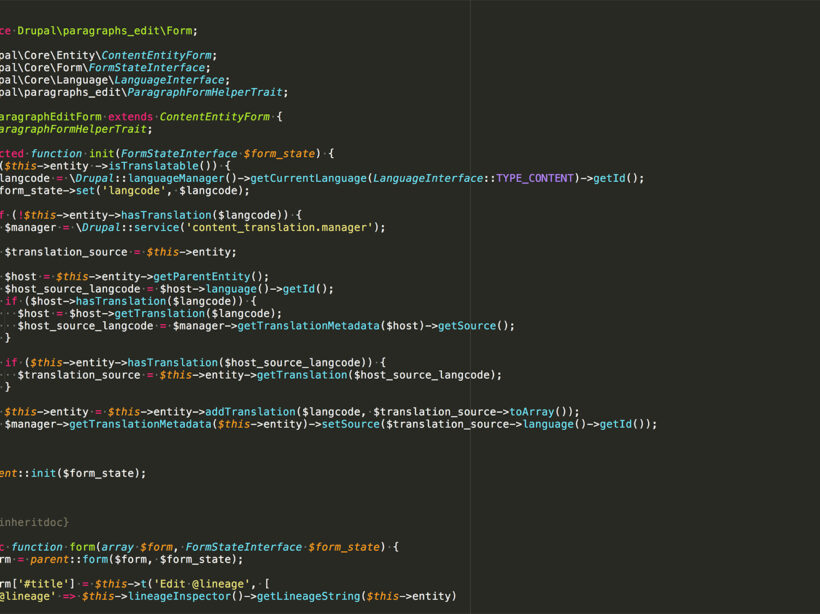
Image of the code behind the Paragraphs module

Easier Editing with Drupal 8 Paragraphs Edit

The Paragraphs module in Drupal 8 allows us to break content creation into components.  This is helpful for applying styles, markup, and structured data, but can put a strain on content creators who are used to WYSIWYG editors that allow them to click buttons to add, edit, and style content.

The Drupal Paragraphs Edit module adds contextual links to paragraphs that give you the ability to  edit, delete and duplicate paragraphs from the front end, giving editors a quick, easy and visual way to manage their content components.

Installing

Install and enable the module as you normally would, it is a zero configuration module.  It works with Drupal core’s Contextual Links and/or Quick Links module. I did have to apply this patch to get the cloning/duplication functionality working though.

Editing

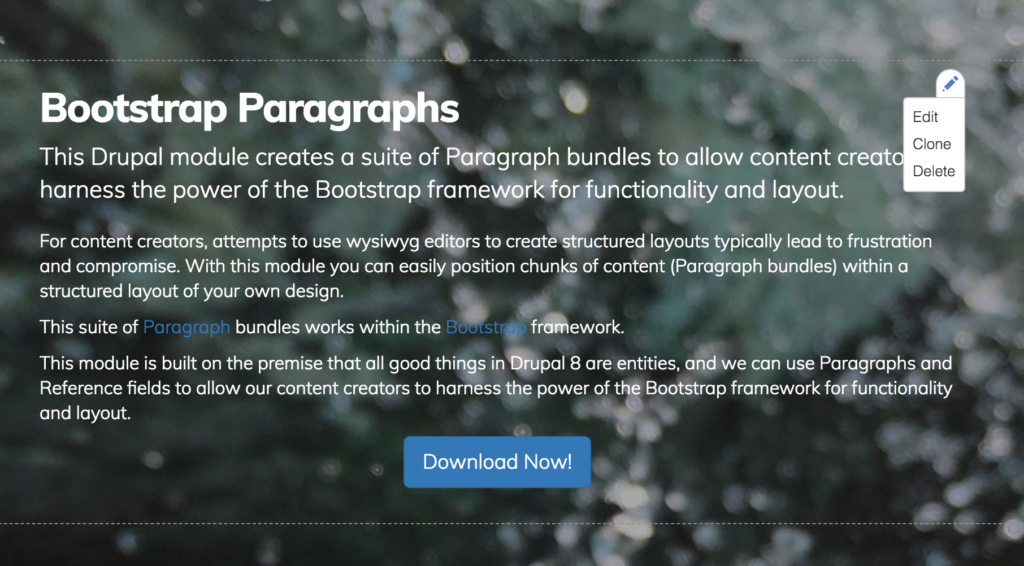
To use, visit a page and hover over your content area.  You will see an icon in the upper right corner of the Paragraphs component area.   

Screen grab of hover state for Paragraphs component

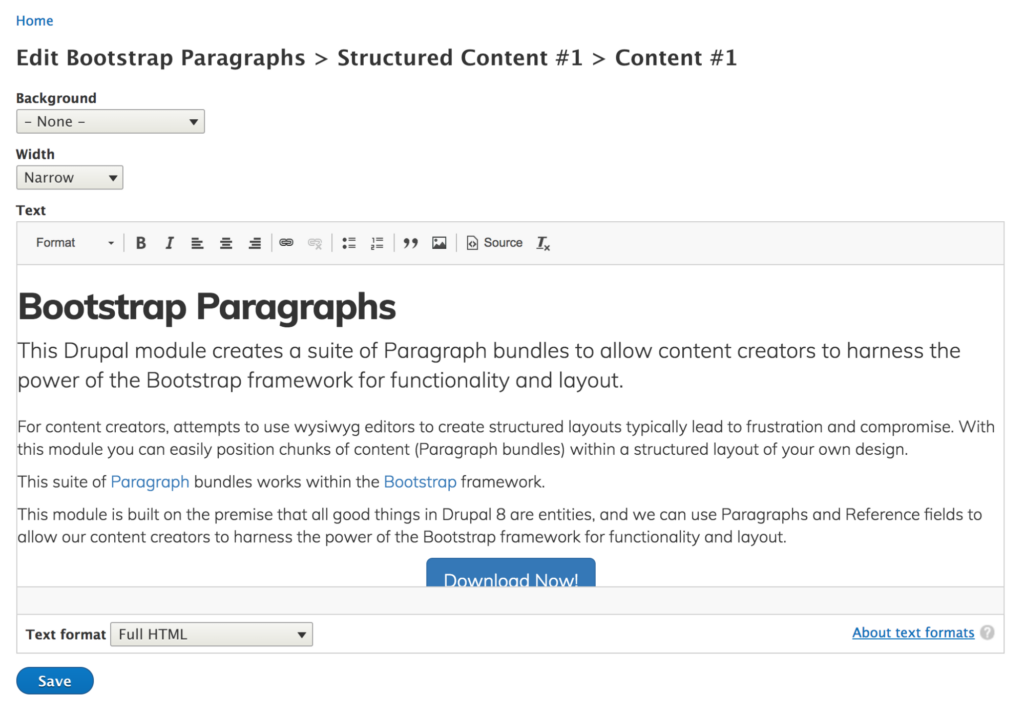
When you click the Edit option, you are taken to an admin screen where you can edit only that component.

Screen grab of admin screen for Paragraphs component area

Make your changes and click save to be taken back to the page.

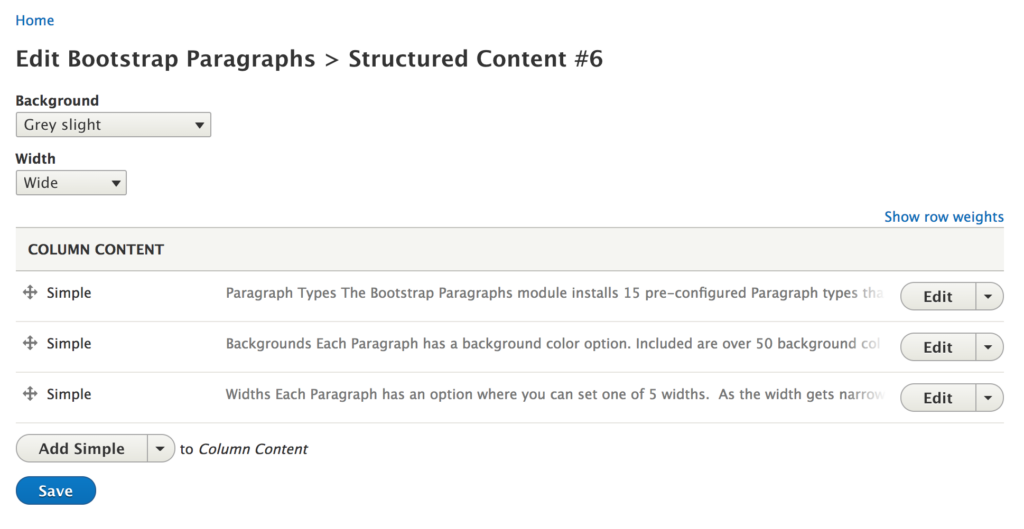
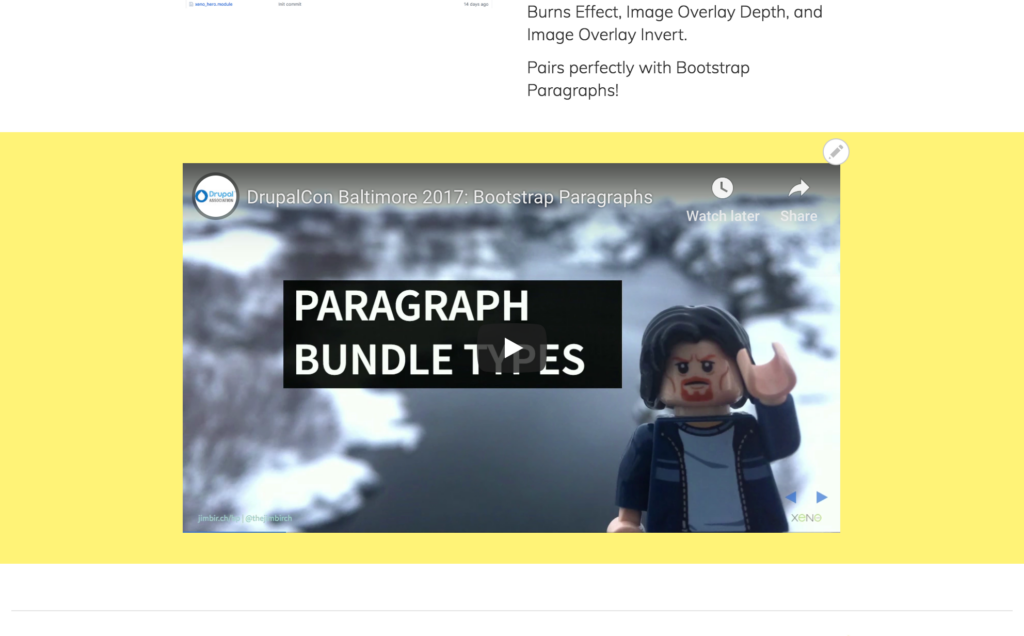
In components that are nested, like the Bootstrap Paragraphs columns component, you will see one contextual link above the nested components.  If you click this, you will be taken to the edit screen where you can modify the parent, and the children.  That is the Columns component, and the 3 text components inside.

Screen grab of editing with the Bootstrap Paragraphs columns component
Screen grab of editing with the Drupal Paragraphs Edit module.

Duplicating/Cloning

The term that is used most often for making a copy of something in Drupal is to “Clone” it.  This is a little more complicated because it is technically complicated, but once you get the hang of it, it will become second nature.

Hover over a contextual link and click Clone.

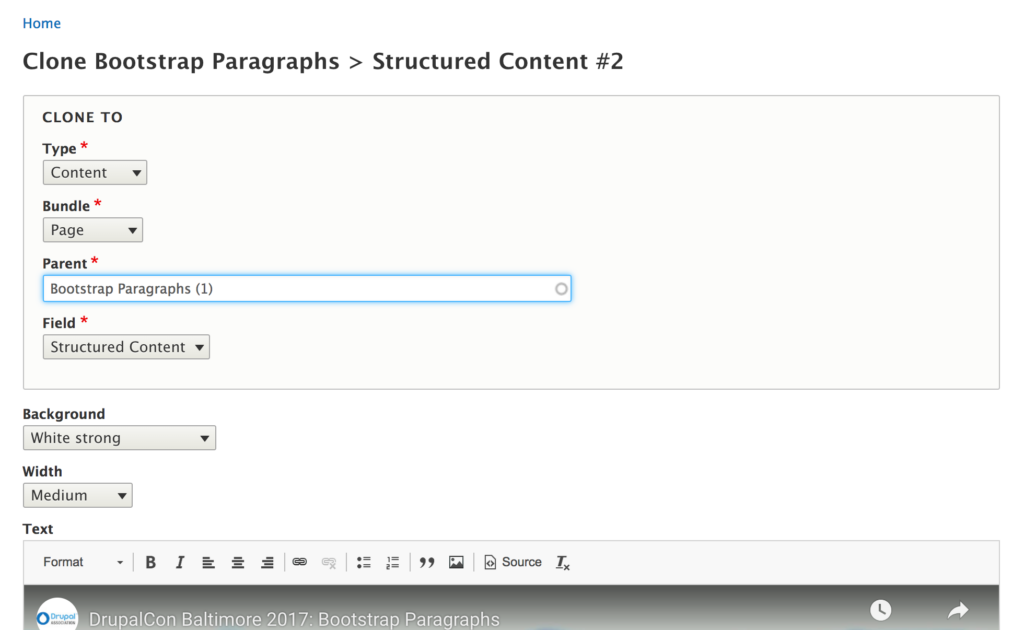
On the edit screen, you are presented with a new Clone To section.  In this section you can choose where to send this clone to, whether that be a Page or a Paragraph.  In this example, I want to duplicate this component to the same page.

  • Type: Content
  • Bundle: Page
  • Parent: (The page you are on)
  • Field: (The same field on that page.)
Screen grab of editing with the Drupal Paragraphs Edit module.

You can also make any edits you want before saving.  For example, you could change the background color. Click save, and your new component will appear at the bottom of the page, with the new background color.

Screen grab of editing with the Drupal Paragraphs Edit module.

There are a bunch of possibilities with this way to duplicate components.  To clone to another page, change the Parent. To clone to a nested paragraph component, change the Type to Paragraphs and configure the settings you need.

Deleting

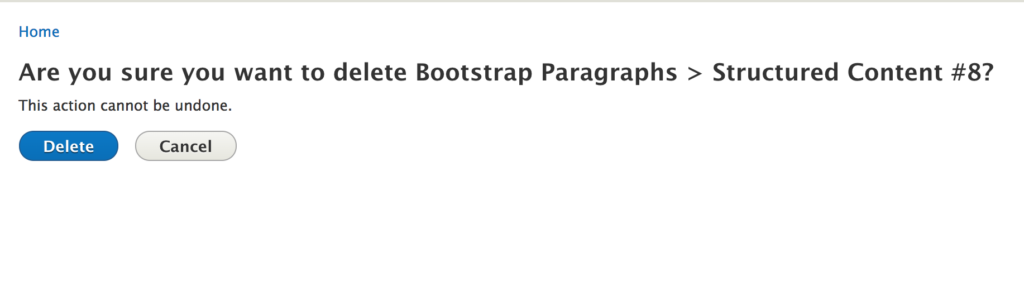
Deleting a component is as you’d expect.  Once you click delete, you are taken to a confirmation screen that asks you if you want to delete.

Conclusion

The Paragraphs Edit module is a simple and powerful tool that gets us a bit closer to inline editing and making our content creator’s lives easier and allows them to be more productive.  Give it a try on your next project and spread the word about this great little helper module!

Need help with your Drupal site? Contact us

Image from WordPress for Publishers

WordCamp for Publishers 2018: Hard Questions and Answers

WordCamp for Publishers 2018 was a community-organized event for people who build, manage publications using WordPress. In its second year, the event attracted professionals from higher ed, agencies, and both tech and content teams from national, regional, and hyper-local media organizations.

This was my first time attending the event, which moves host cities every year. This year the event took place on the shores of Lake Michigan at the Northwestern University Pritzker School of Law in downtown Chicago.

The theme of this year’s event, and the challenge put out to potential speakers by the organizers was “Taking Back The Open Web”. Inspired by Drupal founder Dries Buytaert’s blog post “Can We Save the Open Web”, the organizers asked for sessions that discussed whether an open web ever existed, it’s current state, consequences of a closed web, and how publishers may exist moving forward.

The result was a plethora of amazing sessions that delved deep into many aspects of the topic, and how it ties into WordPress and publishing. The presentations ranged from technical topics like designing and developing for the new WordPress Gutenberg editor, to case studies and panels about paywalls, implementing large networks of sites, and sustaining hyper-local newsrooms.

I was humbled to be asked to speak and kicked off the second day with a technical session on implementing Schema.org vocabularies for structured data and current best practice meta tags in WordPress.

This session presents a whirlwind, two fisted, no holds barred, data filled session that has almost too much information. I present how to implement and test Schema.org schemas, and current meta tag best practices in WordPress to gain search features in Google and enhance the look of your content on social media sites like Facebook, Twitter, LinkedIn, and Pinterest. I even got to introduce the new Speakable vocabulary for which Google announced support just a few days before, and discuss Google’s support for Datasets, HowTo, QAPage and FAQPage all of which are especially pertinent to publishers.

All of the sessions from the event were recorded and can be found online at WordCamp.tv. I have a newfound respect for those working on balancing the need for independent journalism with the need to make a profit. Publishers and the tech teams that work with them cover the full gamut of types of stories, editorial workflows, business models, site and app performance, search engine optimization and more. Each one of these things can make or break a site or company. WordCamp for Publishers 2018 provided a unique opportunity to come together to listen, discuss and learn from unique voices in the publishing industry. I will be sure to keep an eye on which city the event moves to next. Thanks to all the volunteer organizers for their professionalism in making WordCamp for Publishers 2018 an amazing and informative event!

Pelo Fitness spinning class

Drupal Security: 7 Strategies for Longterm Protection

One of the best things about Drupal is its security. When tens of thousands of developers work collectively on an open source project, they find all the holes and gaps, and strive to fix them. When one is found, patches go out immediately to keep sites safe and secure. But a site is only secure if those patches are applied when they are released.

Pelo Fitness is a Marin County-based community dedicated to a culture of fitness. They offer cycling, strength, yoga & nutrition programs customized to an individual’s needs and fitness level. Whether someone is a competitive athlete, a busy executive or a soccer mom (or perhaps all three), their programs are designed to build strength and endurance, burn calories and boost energy.

Yet their site was weak since they hadn’t applied a few major Drupal security updates. There was a concern that the site could be hacked and jeopardize client information. Pelo Fitness customers use the site to purchase class credits and reserve bikes for upcoming classes, requiring users to log in and enter personal information.

Want to keep your site secure? Contact us to get started. 

The solution

Kanopi performed all the security updates to get the Pelo Fitness on the latest version of Drupal. All out of date modules were updated, and the site was scanned for suspicious folders and code; anything that looked suspect was fixed. Care was taken not to push code during high traffic times when reservations were being made, so code was pushed live during specific break times that would allow for the least disruption. Lastly the site was also moved over to Pantheon for managed hosting.

Due to the Drupal support provided by Kanopi, the Pelo Fitness website is now protected and secure. Inspired to make all their systems stronger, Pelo Fitness also switched to a different email system as well so all their tech solutions were more up to date.

How to keep your site secure

Websites are living organisms in their way, and need constant care and feeding. It’s imperative to always apply critical security patches when they come out so your users information (and your own) is kept secure at all times. There are a few simple things that you can do on your Drupal site to minimize your chances of being hacked.

  • Stay up to date! Just like Pelo Fitness, make sure you pay attention to security updates for both Drupal core and your contributed modules. Security releases always happen on Wednesdays so it’s easy to keep an eye out for them. To stay up to date, you can subscribe via email or RSS on Drupal.org or follow @drupalsecurity on Twitter.
  • Enable two-factor authentication on your site. It’s a few seconds of pain for an exponential increase in security. This is easily one of the best ways to increase the security of your site. And besides, it helps you makes sure you always know where your phone is. The TFA module provides a pluggable architecture for using the authentication platform of your choice, and Google Authenticator integration is available already as part of their basic functionality.
  • Require strong passwords. Your site is only as secure as the people who log into it. If everyone uses their pet’s name as their password, you can be in trouble even if your code base is “bulletproof” (nothing ever is). The Password Policy module sets the gold standard for traditional password strength requirements, or you can check out the Password Strength module if XKCD-style entropy is more your thing.
  • Make sure you’re running over a secured connection. If you don’t already have an SSL (TLS, technically, but that’s another story) certificate on your website, now is the time! Not sure? If your site loads using http:// instead of https://, then you don’t have one. An SSL certificate protects your users’ activities on the site (both site visitors and administrators) from being intercepted by potential hackers.
  • Encrypt sensitive information. If the unthinkable happens and someone gets hold of your data, encryption is the next line of defense. If you’re storing personally identifying information (PII) like email addresses, you can encrypt that data from the field level on up to the whole database. The Encrypt module serves as the foundation for this functionality; check out the module page and you can build up from there.
  • Don’t let administrators use PHP in your content. Seriously. The PHP filter module can get the job done quickly, but it’s incredibly dangerous to the security of your site. Think seriously about including JavaScript this way, too. If your staff can do it, so can a hacker.
  • Think about your infrastructure. The more sites you run on a single server, the less secure it is. And if Drupal is up to date, but your server operating system and software isn’t, you still have problems. Use web application and IP firewalls to take your security even further. 

Contact us at Kanopi if you need help with Drupal security.

Image of MVP in task board

Defining a Minimum Lovable Product

Congratulations! Your Boss just gave you approval to build the website you’ve been pitching to them for the past year. A budget has been approved, and you have an enthusiastic team eager to get started. Nothing can stop you… until you receive the deadline for when the website has to go live. It’s much earlier than you planned and there just simply isn’t enough hours in the day, or resources available to make it happen. Whatever will you do?

Let me introduce you to the minimum lovable product, or MLP.

What is a minimum lovable product (MLP)?

You may have heard of a minimum viable product (MVP). Where a minimum viable product is a bare-bones, meets your needs solution; the minimum lovable product can be described as the simplest solution that meets your needs and is a positive step toward achieving your goals. It’s easy to view every aspect, every deliverable, as being fundamental to a project’s success. But when you actually look at each nut and bolt with a more discerning eye, you begin to realize that each component is not fundamental to the overall product’s success.

So basically the MLP is the sufficient amount of features your site needs to be satisfactory to your business goals for launch.

It’s important to note that an MLP is not necessarily a reduction in scope. It’s more a prioritization in the order for which things are addressed. The project team can circle back on anything that wasn’t part of the MLP. The goal behind an MLP is to deliver a functional product that you’re excited about, within the confines of the project.

When should you consider a minimum lovable product?

An MLP isn’t for every project, but is usually best leveraged when there is a restraint of some sort. I used timeline as an example in my opening, but as you know restraints can take many forms:

  1. Timeline: Maybe the deadline you need to hit, simply won’t provide enough time to complete all the work you have queued.
  2. Resource Availability: Perhaps there are scheduling conflicts, or limited resource availability during your project.
  3. Budget Constraints: Another possibility is that the budget just isn’t sufficient to get to everything you have on your list.

Regardless of the restraint you’re facing, an MLP can help you realign priorities, and expectations to compensate. But how do you go about evaluating your project for an MLP?

Need help with defining your MLP? Contact us.

How do you create a minimum lovable product?

When you’re able to parse the individual elements that are crucial to your website’s success into user stories and features, you’ll have effectively identified your project. But how do you actually go about separating the core building blocks that will comprise your MLP from the bells and whistles?  It all starts with goals.

Goals

Chances are that you already have a set of goals describing  what you’re hoping to achieve with the project. These ideally should be as specific as possible (ie. increase traffic) and ideally measurable (analytics). Without realistic, concrete goals you set the project up for failure. For example if your goal is to make people happy; chances are you’re going to have a hard time measuring whether you were successful. Establishing measurable goals will set the project up for success.

It’s not enough to know your goals, you have to be able to prioritize them. It’s simply not realistic that every goal be top priority. Try to narrow your priorities down to no more than three goals. Goals in hand where do we go from here in our quest to define an MLP?

Definition

Begin by thinking of all the factors that are needed for a User to accomplish a given goal. These could include anything from Layouts, to Features, to Content. Start a list of these factors:

  1. What are the things a User sees?
  2. What copy does a User read?
  3. What actions is a User taking while they navigate through the site?

Everything you write down while asking these questions should be in the interest of one of your priority goals. If an item isn’t directly contributing to accomplishing the goal, then it should not be on the list. If you’re not a subject matter expert that will be directly contributing to the work, you should connect with your team to determine the specific work that needs to be carried out for each of the items you’ve identified. Additional refinement, and further simplification may be needed to compensate for the restraint you’re up against.

By this point, you’ve probably realized that defining the MLP is a difficult task. The choices will be tough, and ultimately everyone is not going to get their way. What’s important is that the work you do strives to meet the goals you’ve set. This sometimes means detaching personal wants from the needs of the company. If you can tie the work back to this core philosophy, you’ll always have a strong direction for your product.

Time to get to work!

All done? Congratulations! You’ve now defined your MLP. Now you’re off to the races. Best of luck on the journey of building out your minimum lovable product.

Need help defining your MLP? Contact us. We’re happy to help.

Strata Center at MIT

Kanopi at Design 4 Drupal’s 10 Year Anniversary in Boston

Nestled right off Main Street in Cambridge, Massachusetts lies the Ray and Maria Stata Center on the campus of the Massachusetts Institute of Technology (MIT).  This abstract building designed by Pritzker Prize-winning architect Frank Gehry was the perfect venue to house the longest running, front-end focused Drupal conference in the US, Design 4 Drupal.  It demonstrates that the modern and abstract design Cambridge and MIT has seen can work perfectly with the structure needed within.

Image of sculpture at MIT that spells out "MIT" in metal, from the at Design 4 Drupal conference.

The Design 4 Drupal conference highlights training sessions and seminars focusing on designing for, and building the “front-end” of websites, or what gets seen and used by end users.  This area of focus encompasses graphic design, user experience, accessibility, performance, tooling, and much more.

Like a lot of our Higher-Ed clients, MIT is a user of Drupal, and is proud to offer this space to the Drupal community to learn and share knowledge.  I was pleased to be asked to present two sessions at the conference, and even more pleased with the knowledge I was able to take away from attending the event.

Meta and Schema: Defining the Content about your Content

The first session I presented focuses on designing and implementing a metadata strategy for your website.  Metadata is the content that describes your content. It is very important in how web pages are found in search engines, and how they are displayed on social network sites.

Image of Jim Birch's presentation in a large classroom with a projector screen at Design 4 Drupal

The presentation is a deep dive into the different specifications for meta tags and Schema.org schemas, how to decide what to markup, and then how to text and validate that you’ve done it correctly.

This session was not recorded due to technical difficulties, but the slides are available at jimbir.ch/meta-schema-drupal

Building a Better Page Builder with Bootstrap Paragraphs

The second session presented reviews the Bootstrap Paragraphs module for Drupal 8 that I developed and how it combines the power of the world’s most popular front end framework, Bootstrap, with Drupal Paragraphs, the powerful module that allows content creators to build layouts and structured pages using content components.

I have been working on this module since I first presented it at the BADCamp 2016 Front-end Summit.  The module installs a suite of components that allow content creators to quickly build out pages.

I love giving this presentation because I always get great feedback from people who use the module; who are going to use the module; or who are going to use my methodology to create their own version that fits their specific needs.  The module currently has over 25,000 downloads, and has had users from all around the world.

You can watch a recording of the session here.

Need help designing your website? Contact us and we can help

The Keynotes

The Building Blocks Of The Indie Web – Jeremy Keith

The conference featured not one, but two great keynotes.  On the first day author and developer Jeremy Keith, who was also in town for An Event Apart Boston, presented a session in which he encouraged a return from social media publishing to independent publishing.  It was a great reminder that the web was ham radio before it was cable, and can still be so.

Exploring the New Drupal Front-end with JavaScript – Dries Buytaert

The second keynote was given by founder and project lead of Drupal, Dries Buytaert.  Dries was the keynote at the very first Design 4 Drupal, so it was a special treat have have him back for the tenth anniversary.  His presentation reviewed the history of JavaScript on the web, API-first vs. API-only approaches and gave behind-the-scenes insights into Drupal’s JavaScript modernization initiative.

Design 4 Drupal Sessions

Thanks to Kevin Thull, and the organizers of Design 4 Drupal,  most of the presentations were recorded and are available to anyone at Design 4 Drupal’s YouTube channel.  There was a broad mix of different types of sessions that covered developers, designers, User Experience (UX), Accessibility (A11Y), and Tools.  Below are some highlights of the sessions I went to.

Web Accessibility Tips and Tools – Abby Kingman

Abby gave a session that was near and dear to my heart.  We are always learning about how to make our websites more accessible, and Abby’s presentation covered where to find current guidelines and specifications, and then when onto to review tools for testing.  There are lots of great links to follow from this one.

This session validated the approach we take at Kanopi to accessibility in design and development.  A lot of the tools and testing techniques were all part of our processes, and I look forward to exploring the ones I didn’t know about!

Webform Accessibility – Jacob Rockowitz

Jacob is the current maintainer and a prolific blogger and thought leader in the Drupal-sphere.  We penned an article in advance of this presentation where he reviewed his thought process, and recorded his presentation.  My favorite takeaway from this presentation was:

“Learning about accessibility can be overwhelming. We don’t have to be accessibility experts. We just need to care about accessibility.”

Kanopi has a long history of both building new and retrofitting existing sites to be WCAG compliant.  This presentation showed me that our approach, ongoing learning and iteration have us on the right track.

Variable Fonts and Our New Typography – Jason Pamental

I’m a big fan of Jason’s body of work, from his book, Responsive Typography: Using Type Well on the Web, to his blog, and frequent appearances on the Talking Drupal Podcast.

Jason’s deep knowledge of typography truly shows in this presentation that gives a brief history of type, how it moved from paper to the screen, and how the future of digital typography will be with variable fonts.

I look forward to exploring more about variable fonts with the designers at Kanopi.  The design possibilities, and the performance gains make these new tools very attractive.

Building a Living Style Guide with Herman – in Your Sass! – Chris Wells

In this technical presentation, Chris Wells, CTO of Redfin Solutions gave a nice overview of Herman, which uses SassDoc to reads comments in your stylesheets to build a static website  that is your style guide. It is not as extensive as a full blown style guide like Pattern Lab, but can be very useful for smaller teams.

This presentation has me researching simple style guide solutions.  Not every project has the budget or need for a solution like Pattern Lab, but since I already try to comment style sheets and templates, it makes sense to do it in a way that something like Herman or KSS Node can parse.

Thanks Design 4 Drupal!

Thanks to all of the volunteer organizers, especially Leslie Glynn, who was my point of contact before, during, and after the event, and in true New England fashion, made sure I took home some famous Boston cannolis for my mother.  Kanopians help organize a few different conferences across the states including BADcamp and MIDcamp, and we know putting on these conferences is a labor of love, so thank you!

The General Data Protection Regulation (GDPR) is a big shift in the way businesses may process and control personal data within all 28 EU countries. The new law focuses on giving European citizens full control of their data. They control who has it, what they can have, and how they can use it.

The GDPR goes into effect on May 25, 2018. The consequences for noncompliance are hefty. Organizations found to be out of step with the regulations can face fines of €20 million or 4% of their worldwide revenue, whichever is bigger.

Does GDPR affect my organization?

Most likely. It is safest to assume that. Even if you don’t do active business in the EU, you may well have site visitors from countries protected by GDPR. It can be difficult, if not impossible, to passively determine who qualifies. Making your website compliant is the safest route, and the basics are fairly simple. However, GDPR affects much more than just your website.

We are not lawyers. We are here to help! But we’re not a substitute for talking to your legal counsel to ensure you’re complying with the new regulations.

What should I do if I market to the European Economic Area (EEA)?

If you company markets to users in the EEA, GDPR should be a focus for you. we recommend discussing compliance with both your legal counsel and with a security expert. We have a security ace on staff who can work with you to help create a plan for your site. Reach out and our team of experts will get you started. Reach out and our team of experts will help you get started.

What counts as “personal data?”

The GDPR broadly expands the definition of personal data. According to Article 4 of the GDPR:

‘personal data’ means any information relating to an identified or identifiable natural person (‘data subject’); an identifiable natural person is one who can be identified, directly or indirectly, in particular by reference to an identifier such as a name, an identification number, location data, an online identifier or to one or more factors specific to the physical, physiological, genetic, mental, economic, cultural or social identity of that natural person.

In less legal-sounding language, personal data is anything that can, in isolation or in aggregate, be used to identify a specific individual. The “in aggregate” piece is important. A person with a generic sounding name may not be easy to identify. But pair that with a physical location or a device signature and they absolutely are.

It’s important to note that cookies count as personal data, too.

What do I need to do know about GDPR and my website?

Here is a basic overview of some of the pieces of GDPR that will be most relevant to your online presence. That said, GDPR affects many more aspects of your organization than just your website.

Everyone loves a good memory device. I like to think of GDPR as something you can distill down to four Cs: Consent, Communication, Clarity, and Care.

GDPR greatly expands the definition of user consent. EU citizens have a right to know exactly what you are going to store and how you are going to use it. Any time you collect their information, make sure it’s okay with them first. Explicit consent is critical to all aspects of GDPR compliance. And a person must be able to revoke their consent, too, at any time.

This means that implied opt-ins, pre checked checkboxes, or consent given through some sentence buried deep in your terms and conditions won’t hold under GDPR. Consent must always be active and informed.

It also means that you can no longer box someone in to an all or nothing acceptance of cookies to use your site. Cookies required for the site to function are one thing. A user can’t opt out of those, or the site would cease to function. (Which is something you need to explain, given the need for clear Communication according to GDPR.) Things like your analytics cookies aren’t strictly necessary, though. Users must be allowed to opt out of them.

Similarly, it should be as easy to revoke consent as it was to give it. This applies to cookies, mailing lists, and any other data collection point. So if all it takes is a checkbox to get in… it has to only take a checkbox to get out again.

Ensure that third party partners you work with are in compliance with GDPR as well. Analytics platforms, mailing tools, CRM systems, and the like are all affected. You’ve probably started seeing notifications from your vendors about this already. There may be steps you need to take to keep your account current with the new regulations. If you haven’t heard from your partners, definitely reach out. Now is the time.

Communication: Informing your Users

Another major focus of the new legislation is the clarity and transparency of your communication with your users. Article 12 of the GDPR states that the data subject has a fundamental right to communications that are “in a concise, transparent, intelligible and easily accessible form, using clear and plain language.” This means no more “legalese” in your term and conditions or your privacy policy. Language must be easy to understand. You must be fully transparent about what you collect and how you use it to be in compliance with GDPR.

Chapter Three of the GDPR outlines the rights of the data subject in full. The first thing to tackle on the road to GDPR compliance is your privacy policies and terms and conditions. Ensure these notices make it easy for EU citizens to exercise their rights with regards to their personal data.

Clarity: User Rights

It is worth highlighting a few specific points in the rights of data subjects. These can affect how you may manage user data in the context of your content management system.

Users have the right to access and modify their personal data. Users must be able to request clear, transparent access to the data that you have collected on them. They have the right to change or request changes to their data at any time. The preferred scenario is giving them direct access to their own information. Profiles work well for managing this for logged in users.

Users have the right to portability of their data. Users cannot only request access to the full spectrum of data you have on them, but they can request that you hand it all over to them or to another party in a portable format. So ensure that users can download their history and any data you have collected on them directly from your systems to make this requirement as easy as possible.

Users have the right to be forgotten. At any time, a user can revoke their consent to your use of their personal data. They can request that all processing cease and that you destroy all copies of that data. So don’t collect or store more data than you absolutely need. Set up your sites to delete any stored content after a reasonable period of time.

Care: Data Protection & Retention

There is always an important distinction between privacy and security. You can have security without privacy. But it doesn’t work the other way around. There are some important steps you should do to take care of the data you do choose to collect on your site users.

Run your site over HTTPS. Hopefully you’re already doing this. This is what encrypts and protects the information transferred between your users and your servers. If you need help wrangling this, you can start with the talk I gave at the Nonprofit Technology Conference this year. Or reach out to us and we’ll help you get started.

Don’t collect what you don’t need. With GDPR, less is more.It seems like a smart idea to collect and keep everything you can think of about your users. GDPR makes that risky. Only collect what you need to meet your relationship objectives with your users. Let go of the rest. For forms, you’ll see your conversion rates go up this way, too.

Encrypt personal data. There are encryption modules for Drupal and encryption plugins for WordPress that will help with this. If you’re storing personal data on your websites, make sure that you are doing your due diligence to keep it secure.

Expire your personal data. This goes for data you have now, and data you’re collecting moving forward. Only hold on to data for as long as you need to. For some form plugins and modules, there are entry automation tools that can help with this. Or have a developer set it up a solution for you that will run at a regular interval.

Need help with GDPR? Contact us to help

Where should I start with GDPR?

This is the hardest part of all. Where to begin? Here’s our short list of the most impactful things you can do today to get ready for GDPR. The bad news is that if you’re just starting down this road, May 25, 2018 is right around the corner. The good news is there are impactful steps you can take now to get moving in the right direction.

  1. Check with your legal counsel. Learn how GDPR affects your organization and your marketing activities.
  2. Update your privacy policy and terms and conditions. Reference all the required “information to be provided” in Article 13 and Article 14 of GDPR.
  3. Update any form where you request personal data. Require explicit consent to having the information stored. Link to your (simple, clear) policy notices of how you process and use the data.
  4. Allow for more granular acceptance of cookies. Provide an explanation of the differences in the types of cookies you set on your site with a cookie policy.
  5. Check on your third party tools. Make any data retention adjustments needed as your vendors get ready for GDPR. As a Data Processor, this change in regulation affects them too. Most of our clients are using Google tools in some form or fashion. Here are some quick links to help you get your Google Analytics and Google Tag Manager accounts compliant.
  6. Start with a handy-dandy checklist! Create a roadmap for GDPR and what in your policies and procedures may need to change.
Project managers looking at a whiteboard

Keeping things on track: Website project management tips for clients

Amber
Amber Young

So your company is redesigning its website and you are going to be the project manager. You will be the one responsible for making sure that everything goes according to plan. You are probably excited! And maybe a bit overwhelmed as well. Good project management will make all the difference.

The more you know going into this process the better. Since we have managed thousands of digital projects at Kanopi Studios, we wanted to share our expertise to help you hit the ground running with solid project management.

Set clear and measurable goals

This is a critical step before getting started. Since your organization is investing time and money into its website, you’ll want to be able to prove it’s effectiveness and value. Think of all of the ways that a new website can support your organization’s goals and give some thought to how you could measure its impact. Having clear goals determined in advance will help your website vendors understand where to focus to deliver the most targeted solutions. It will also help you prioritize scope and features and prove the value of the site after it launches.

Find the right vendor

First, you need to write a strong RFP. Then, it’s on to selecting the right vendor for your project. You want to find a partner who you can communicate easily with, who has the expertise to do the job right and also meets your budget needs. To make things even more complicated, when you review the set of RFP responses, it is rarely apples to apples. The pricing and information represented in them will likely differ wildly. Be sure to ask each vendor what is included in their price. Some agencies will bid low to win your business, expecting that they will be able to issue change orders for more funds throughout the process. In general, you do get what you pay for, in websites as in other areas of life, so beware of the lowest bidder. And since your digital projects are probably only one part of your busy job, finding a vendor who is flexible, experienced, and trusted will help make things easier on you, leading the way to a successful outcome.

Gather (and wrangle) your stakeholders

Before your project ever starts, there is expectation setting to be done with your internal teams. We encourage you to establish a core team of approvers who will stay engaged throughout the project and understand the progression as decisions are made. Then, you’ll need to decide on the cadence for how you will share progress with the rest of your organization. Make sure everyone knows and agrees to their role in order to avoid last minute changes or requests that can throw off the process you have put in place. Consider documenting roles in a RACI chart for additional clarity. It can be to your advantage to use the project budget and timeline as a defense mechanism against new and last minute requests, as these things will have an effect on deadlines and dollars.

Keep vendors accountable

Work with your vendors to establish a cadence of check-ins and regular reporting on budget, percent complete, next steps, and risks. Ensure that you know what to expect from deliverables and when to expect them so that you can schedule time with the right people for reviews and approvals. Find out if your vendor uses a shared project management software platform that will allow you the ability to track progress, add tasks and keep all messages and files in a single, organized location. At Kanopi, we use TeamWork and have had strong success using it to increase transparency on projects.

Understand the creative process

During the UX and design process, your vendor will be establishing guiding principles that will carry through the project. The further the process goes, the harder it will be to change course. So if you aren’t sure about something, ask! It is always easier to adjust a strategy document or tweak a design than it is to rebuild something once it is in code. This should be a collaborative process, so we recommend frequent discussions and reviews to stay in touch on progress and get buy-in from your team.

Think about content early. Check in about content often.

Pay attention during the design phase to how content will be presented on the new site. Always be thinking: Do we have existing content to fill those boxes in the designs? Or will we need to create it? If there is new content to be created (as there most often is), do you have dedicated in-house resources to make this happen? Are your subject matter experts prepared to share details to help your writers deliver? Don’t forget that content also means images! We recommend making an internal content timeline that includes milestones and due dates to ensure that content delays don’t throw a wrench in your plans. If you don’t have the resources you need and are planning to hire, do this early on in the project so that your writers can be in aware of the strategy and design for the site. This will help speed their process, reduce rewrites and ensure that the copy is on target.

Requirements

While it can be hard to understand requirements documentation, it is important, because it serves as the blueprint for how your site will be built. Requirements should be presented in the form of user stories for the technical build to help put things in simpler terms and define expectations. A user story puts requirements into simple language and follows a common structure: As a (type of user), I need to (do something) so that I can (experience a result). While these may seem theoretical, they will impact the day to day reality for your content authors and site users. This is another area where you shouldn’t be afraid to ask questions to ensure that you know what you are approving and that you understand what it will mean once the site is launched.

Search Engine Optimization

With all of the activity prior to launch, SEO can fall through the cracks. It’s also a responsibility that may be split between your vendor and your internal team. With a little planning and coordination, you can ensure that SEO is in place prior to launch. Check in with your vendor about SEO, establish who is doing what and double check it all before launch. Moz has a handy pre-launch SEO checklist that lists SEO actions in priority order.

Need help with project management? Contact us.

User acceptance testing (UAT)

During this stage, your team will be reviewing the website and entering feedback prior to launch. Ideally, your team will have plenty of time to check the site thoroughly on all devices and browsers, clicking every link and paying special attention to more complex functionality including forms, transactions and interactive features. It is also ideal for your vendor to have enough time to address the issues that your team finds prior to launch. However, in reality, this process can be constrained by launch deadlines, making clarity and communication essential. Be sure to prioritize issues, making it clear which are launch blockers and which are nice to have fixes. Include the URL the issue was discovered on, the browser, device and version being used, details describing the issue and the desired fix.

Preparing for launch day

Talk with your vendor to make sure that there is a plan in place for launch day. Line up your core group up to test the site as soon as it is live and make sure your vendor will be available in case anything unexpected needs to be addressed. It’s best to delay announcing that the site is live until these final checks can be completed. We’ve even made a pre-launch checklist you can reference! If you need to announce the site launch in advance, plan the timing with your vendor and make sure there is enough buffer time to allow for a site review and bug fixes.

Don’t forget about support

Your project management has gotten you to launch. And yet, launch day in many ways is just the beginning! Inevitably your site will need something … whether it’s small bug fixes you discover after launch or some of those new feature ideas that came up in discovery but got put in the phase two bucket. In addition, keeping your CMS up to date and ensuring site security updates are in place is an ongoing and critical process. Website support is the answer. Having a support contract in place before launch ensures that you will not miss a beat and that you can evolve your site as you learn from using it, receiving feedback on it and examining analytics.

If you’ve followed these steps, your project management has gotten you far. If you need a little help getting farther, contact us.