
50% Of All Big Projects Fail, including Websites. Why?

Jimmy's Photo
Jim Hoogewind

Marketing leaders have the best intentions going into an expensive and large six-figure website overhaul. However, according to the Harvard Business Review, as many as half of big projects like these are considered failures when all is said and done. And you’re left wondering…

  • Why did this take longer than I was told?
  • Why was more funding needed than was estimated?
  • Why were there so many surprises and scope changes?
  • Why do I feel so burned by the agency my team selected?

Now you find yourself facing down another big website overhaul and all the risk associated with it. How will you feel confident it will be successful this time? How will you be sure you won’t be left with heartburn and the same frustrating questions as last time?

In my 15+ years working in this industry, I’ve learned there are three key elements to ensuring a big website design and development project is successful.

Think of it like a three-legged stool…

1) Stakeholder Alignment

Performing candid and skillfully focused stakeholder exercises which tease out the goals and intentions of important leaders in your organization. These exercises force invaluable conversations, and ultimately lead to buy-in.

2) User Experience

Target audience data mitigates risk by replacing assumptions with defined needs and specific pain points. These eventually inform the site experience that’s most helpful to each audience.

3) Design & Development Planning

With stakeholders aligned and users defined, design and development planning can begin using models such as sitemaps and wireframes. Technical and functional requirements can start to be dialed in as well.

Unfortunately, most agencies focus only on one or maybe two of the legs described above, resulting in a shaky foundation to your project. But not Kanopi. We focus on and thrive at all three, and we make it fun along the way. 

We call this endeavor the Website Growth Plan (WGP). Through this proven process, we’re able to answer questions such as:

  • I know my site is not working for me, but how do I improve it? 
  • I will need to migrate from Drupal 7 to D8 or D9, but what will that budget look like?
  • How can I improve my SEO? How is my site performance now?
  • I need a new content strategy, but how can I do this properly when I am already so busy?

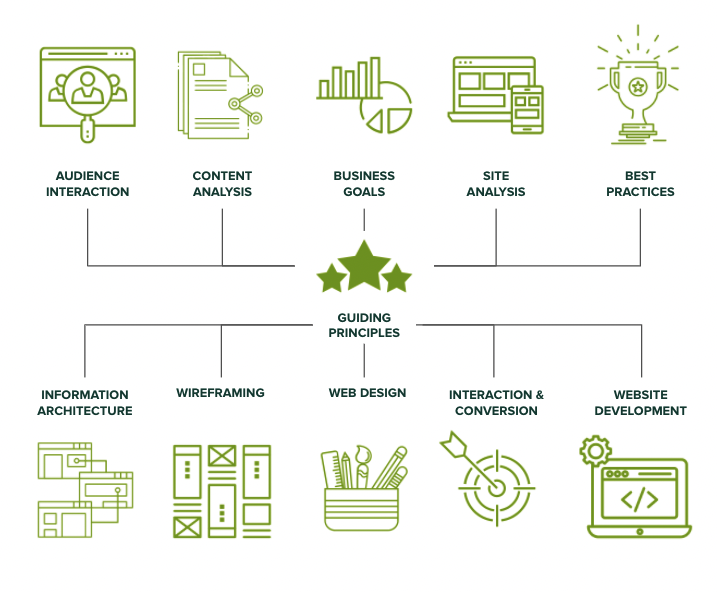
After taking factors (like the ones illustrated below) into account, the WGP delivers an all encompassing action plan for your website. By setting expectations early and often, this helps avoid the heartburn-inducing questions you were left with after your last website project.

Which website growth plan is right for me?

More information can be found here, but below is an overview of our various plans:

Website Reimagine

This plan is a concentration of UX research, content strategy, and a bite-sized amount of design. It helps formulate a game plan that drives clarity for the team and gets some early design thinking on the table. Plus, it is actually a wonderful use of time as it is the first step in an overall design and development project, as the deliverables include a roadmap to launch.

Usability and Design

This is a data-informed optimization plan incorporating user experience, visual design and content recommendations delivered in an actionable plan for next steps.

Content Strategy

Amplify your message through a powerful analysis of important information, including user needs, competitor analysis, personas and Customer Decision Journey mapping — from Awareness to Advocacy. This plan focuses on storytelling content, user experience, visual design recommendations, and more.

Drupal 7 Transition Plan

You should feel secure planning and budgeting for the transition from D7 to D8/9 or to WordPress. This plan removes the “unknown” and illuminates the details for your organization to make an informed decision and take action on next steps.

Technical SEO

This is a deep-dive to analyze your website’s SEO technical health and set you up for search engine optimization success.

GDPR & Compliance

The General Data Protection Regulation (GDPR) is a legal framework that sets guidelines for the collection and processing of personal information from individuals who live in the European Union (EU). This plan gets you compliant.

Accessibility

Reach your audience and meet compliance with Website Compliance Accessibility Guidelines (WCAG 2.1 AA or higher) through a skillful analysis and recommendations action plan.

Technical Review

A comprehensive technical deep-dive into your site’s code and technical health to provide foundational recommendations for optimization and stability.

And if one of those doesn’t quite fit? Don’t worry. Our nimble nature finds us creating custom packages for our clients to best meet their needs. Contact us to chat about which plan is the best fit.

What is an Inclusive Content Strategy?

AmyJune
AmyJune Hineline

You’ve likely invested in your content strategy to some extent, and know it’s an important part of any good business. But the term ‘inclusive content strategy’ may not be something your organization has considered. Many value-driven organizations are overlooking this vital part of creating content that puts their audiences’ unique needs at the forefront. 

The Content Marketing Institute defines it this way: We define inclusive marketing as creating content that truly reflects the diverse communities that our companies serve. It means that we are elevating diverse voices and role models, decreasing cultural bias, and leading positive social change through thoughtful and respectful content.

What is Inclusion?

“Diversity is being invited to the party. Inclusion is being asked to dance.”

Verna Meyers, Public Speaker

Often Diversity and Inclusion are lumped together, or used interchangeably. But it’s important to make the distinction, especially when creating an Inclusive Content Strategy. 

  • Diversity: Refers to the vast array of human differences.
  • Inclusion: Refers to the intent of individuals or systems to actively include and support this vast array of differences.

In other words, diversity is the “what” and inclusion is the “how”. And, that’s exactly what we’re going to cover in this article: how you can create and implement an Inclusive Content Strategy.

Inclusive Language 

The foundation of an Inclusive Content Strategy is inclusive language. When we strive to understand the ways that language often unconsciously makes assumptions about people, we can work to increase inclusivity. There are many ways we unintentionally reinforce dominant norms (like language related to gender, sexual orientation, race, class, ability/disability, and age).

To really understand what it means to use inclusive language, it’s helpful to compare it to language that isn’t inclusive. 

Ableist Language

Ableist language is any word or phrase that devalues people who live with a disability. Though often inadvertent, ableist language suggests that people with disabilities are abnormal.

Inclusive content strategy takeaway:

  • Use “people with disabilities” instead of “the disabled”
  • Use “people living with HIV/AIDS” rather than “AIDS victims”
  • Use “people who use wheelchairs” rather than “wheelchair-bound” or “someone confined to a wheelchair.”
  • It’s become rather common to use descriptive words like “crazy,” “dumb,” or “retarded” in the workplace, Using “crazy” might seem harmless, but giving negative value to words like crazy or insane can marginalize people.
  • ADD, ADHD, and OCD are common terms that are misused and can be hurtful. Obsessive-compulsive disorder is a mental illness that means so much more than a knack for organization. It is an obstacle that some people live with every day. Use words like “clean” or “organized” instead.

Gendered Language 

Another aspect of inclusive language is being sure words are gender neutral. Use words that encompass all genders, rather than only two.

Inclusive content strategy takeaway:

Use gender neutral terms:

  • Nouns
  • Titles and names
  • Pronouns

Gendered words and their better alternatives:

  • Man the booth → Work the booth
  • Man Hours → Work hours
  • Freshman → First year student
  • Stewardess, Steward → Flight attendant
  • Man-made → artificial
  • Mother / Father → Parents
  • Waiter, Waitress → Server
  • Sissy → Coward
  • Forefathers → Ancestors
  • Mr. and Mrs. → Mx.

Racial Undertones

Our language is littered with symbolism of white as positive and black as negative. Let’s eliminate using the word “colored” when describing people, instead use “people of color,” which is a widely accepted umbrella term that includes any non-white person.

“Gypped” comes from the word “gypsy,” which refers to Romanian people who are often characterized unfairly as swindlers. 

“Ghetto”  is suspected to derive from an Italian slang term for waste, and dates back to the concentration camps of World War II. it also has been used to label the neighborhoods that marginalized communities were forced to inhabit due to social and economic disadvantage. Classism and racism come into the picture when you call a place, or a person “ghetto.”

Cultural racism in phrases like “culturally deprived,” “economically disadvantaged” and “underdeveloped” are other terms which warps the truth to and frames a sense of  superiority.

Inclusive content strategy takeaway:

Avoid negative or demeaning language:

These common phrases unfortunately have negative origins:

Privilege

There’s also a lot of hidden bias around the idea of privilege when it comes to our language

For example, we shouldn’t assume that all people have graduated from high school and/or gone to college (or will go to college after high school), and we should use language that keeps this in mind.

It’s also important to use language that does not assume a certain level of financial means or certain type of vocation. For example, we should not assume that everyone is presently employed, has a stable living situation, or can afford to meet their basic needs. Using phrases like “real job” and “honest living” can be problematic by perpetuating discriminating against certain sectors of the labor force.

Inclusive content strategy takeaway:

Consider areas of privilege when writing content:

  • Level of Education
  • Socio-Economics
  • English as a second language
    • Situational privilege 

Be mindful in your writing.

It’s unfortunate how many non-inclusive examples there are in our language that have snuck in over the decades, and we aren’t even aware of it! This is why it’s important to be mindful of what you write.

Want to learn more? I’ve created an entire presentation around inclusive content strategy. 

If you need help creating an Inclusive Content Strategy, we’re here! We’ve helped many organizations create accessible and inclusive websites. Reach out to us to start the conversation. 

Four ways to optimize your higher education website

Donna
Donna Bungard

Build trust through effective content strategy.

Higher education students, like many others, are facing hard choices this year. COVID-19 has changed things, and though some students are happily returning to school, others have opted to wait. McKinsey’s student enrollment survey found 15% of students are very likely to defer by at least a semester in 2020. Other studies predicted that nearly 30% of students would delay. Though the actual numbers vary by school, area, and so on, there is a lesson for us to learn from and a unique opportunity to optimize your higher education site. Start the conversation and build a connection with prospective students who need to decide what they will do for the 2021 winter semester. 

Let’s start by recognizing the great work you’ve done so far! We know many institutions have had to quickly pivot and make changes to address user needs. We’re into the fall semester, and you’ve helped many students figure out what they’re doing for the next few months. 

Now is the time to ensure your website meets your users’ needs and supports your institution’s goals for the rest of the calendar year. A college’s website is the most influential resource used by prospective students for their higher education search. You can risk losing your audience by not paying attention to your website and the power it yields. Additionally, there’s a risk of your school looking out of touch and underprepared if you don’t adjust your content strategy in light of COVID-19. 

A McKinsey report stated, “normal operations may not resume for US higher education institutions until summer 2021.” By strengthening your online presence now, you can turn people nervously researching your post-secondary school into enrolled students who feel confident and safe starting their education with you next year.

Here are 4 content strategy fixes you can make to your higher education website to increase student enrollment:

Review user personas 

We suggest taking a close look at your existing user personas and exploring how the pandemic may be affecting what they need and expect from your website content. We looked at the most common user personas held by our higher education clients and how shifts in their needs may affect your content strategy:

  • Prospective students may want reassurance their education won’t be negatively affected by changes your college or university has made as a result of COVID-19. Moreover, they may fear the choice to defer a semester could negatively impact their long term success. Ensure your content addresses their concerns, and manages their expectations. Be transparent about what you are doing to alleviate their worries, and what you’ll do to make the experience as genuine as possible. In the end, every user needs to feel valued and heard. Make content relating to their needs (financial aid, admission updates) and desires (you paused, not stopped) easy to find and simple to scan.
  • A parent of a prospective student worries about the long and short term impact COVID-19 will have on their child’s education. 85% of parents said they need to know more about what colleges and universities are doing to ensure student safety. Others are looking for what comes next. It’s vital to bring this information front and center on your website.
  • Alumni often have a deep connection and want to support their school. Make it easy for them to make a difference: from clear user pathways to donations to empowering users to share their stories, updates to your strategy can give them a clear path forward to support you during this unprecedented time.

Improve site navigation

Make it easy for students to find what they are looking for by improving your website’s navigation. 

  • Make sure your site has multiple welcome mats. Research from last year explains more and more that students are not always entering your website through the front door (your homepage). People search the web using keywords and phrases and are navigating directly to pages on tuition fees, particular majors, top professors, and campus life. Wherever a prospective student ends up on your site, they should find consistent, relevant, and up-to-date information that guides them on their journey through your site.
  • Improving your website’s search functionality can do wonders for students trying to navigate to the content they want and need, quickly and easily. Explore “fuzzy” search or optimize a no results page to help them find what they are looking for. 
  • Ensure users can access your content. Users cannot take action if content is out of their reach:
    • More than 60% of users are surfing on their phones, and more than 50% of searches take place on a mobile device; it’s vital your website offers a robust mobile experience. 
    • Approximately 25% of US and Canadian adults self-identify as disabled. With nearly a quarter of your audience affected, accessibility is more than a legal matter. 
    • Many sources have estimated that nearly 50% of searches will be done via voice by the end of this year, which means that the accessible features you build in will help more of these users find you. 

Your content should be as easy to perceive and navigate regardless of what medium the site visitor uses. Take a look at Kanopi’s top tools and tech to use to help you meet accessibility standards.

Refine call to actions (CTAs)

Audit the existing CTAs on your landing pages through the lens of someone who may be anxious about enrolling in college during a pandemic. Do your CTAs take into account people’s current fears? Do they reassure prospective students while at the same time convincing them to do something? 

  • Make it personal. Use pronouns ‘you,’ ‘us’ and ‘we’ to build a digital connection with prospective students.
  • Use empowering, reassuring language, and an empathetic tone. The unpredictable nature of COVID-19 has made students anxious about starting college. Address this in your call to actions to connect with your users emotionally to empower students to take action.
  • Simplicity converts. The key to a successful call to action is to tell people what they should do and why they should do it in the most direct way possible. 
  • Make CTAs accessible. don’t use vague language like “learn more” or “read more.” For blind users, it might not be clear what will happen when they click. Instead, get specific, such as “download the white paper” or “subscribe now.”

Where possible, go virtual  

We know the pressure is mounting on many colleges and universities to embrace more online learning tools due to the COVID-19 pandemic. If your institution has plans for virtual learning, you should focus on moving towards that, and your online presence should reflect and complement this.

  • Virtual tours can give people a greater sense of what your school represents and help prospective students decide if it’s the right fit for them. Even if you choose to deliver a large proportion of classes online, virtual tours can strengthen your school’s brand, presence, and create a sense of community. Make sure to include captions so all users can perceive this valuable content. 
  • Consider new ways to connect prospective students with faculty, staff, guidance counselors, and each other through your website. Could short video clips give students a clear idea of what they should expect from a particular curriculum, and what enhanced support is available? If you go that route, remember that representation matters! 
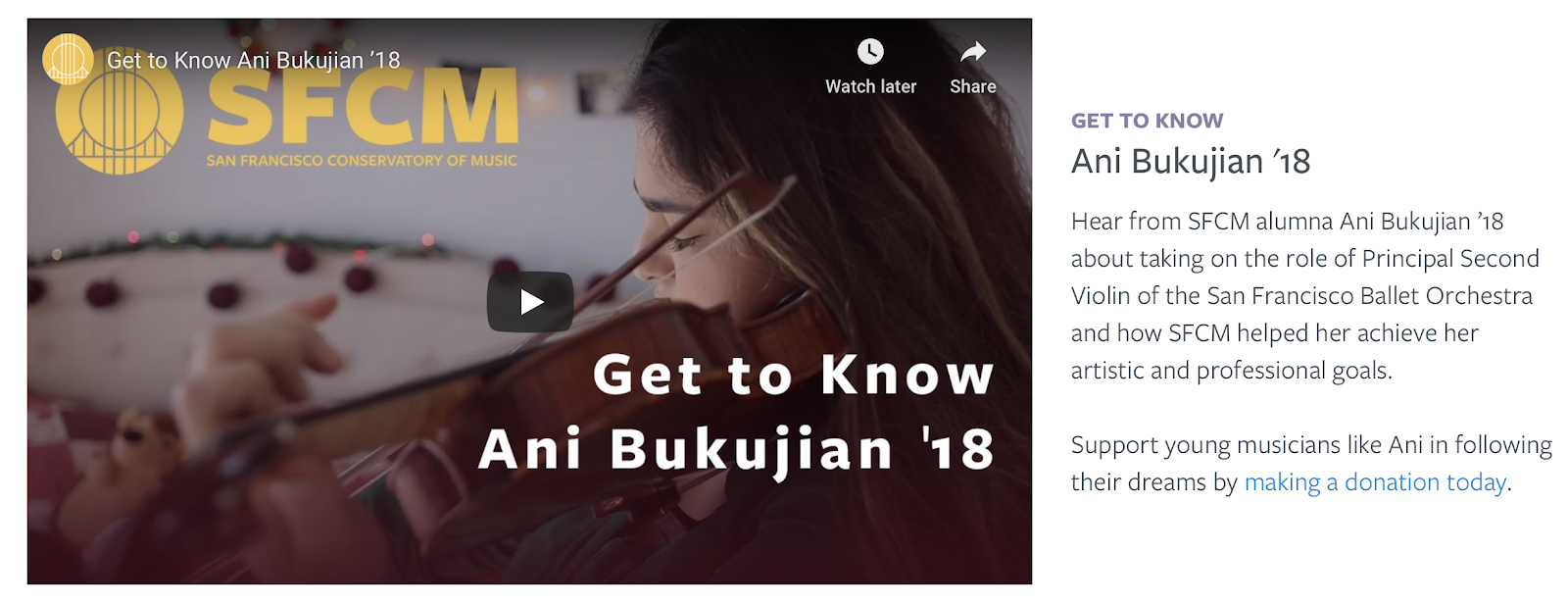
  • Help alumni tell their success stories online. Allowing for user-generated content will make it easy for them to share photos, videos, and quotes explaining how attending your school impacted their lives and careers for the better:
Image from the San Francisco Conservatory of Music case study
San Francisco Conservatory of Music case study

Building connection

Engaging prospective students through a robust online presence and by building a digital connection with them, you can build on students’ trust that your online classes now and the 2021 courses you’re planning will be just as rewarding. 

Need some assistance with how to optimize your higher education website to increase enrollment? Kanopi can help! Kanopi has years of experience building and supporting higher education websites across the United States and Canada. We’ve partnered with UCLA, Stanford, and the University of British Columbia, to name a few. Contact us to start the conversation

Kanopi Dev Team Jumping

How to Make a Website Last: Best Strategies and Tools

A continuous improvement approach is best for sustaining your website for the long-term.

One of my favorite things to talk about with clients is how to get the most of your budget. As Kanopi’s CEO, I spend every day doing exactly that. So much so that I created the above webinar around making your site last for the long-term. But I also wanted to touch on some of the principles and tools here in a post

In the older days of the web, it was standard to redo a site every few years. There were enough drastic changes in the early days of the internet that every few years it was imperative to overhaul a site to keep up. It cost a lot of money, and could take anywhere from 6 to 12 months depending on the scope. 

But here at Kanopi, we’ve recognized that the internet has grown up, and we’ve gotten away from that approach. Can we do a full overhaul if it’s the best option for your project? Absolutely! But we prefer to adopt a more Kaizen approach. Why? Because websites are never done. We like to say the first day of your project is actually the day your site launches, because yes, it’s wonderful that you’ve built a site, but now it has to evolve and grow over time. And the best way to do that is via a continuous improvement approach that improves it in small, positive increments over time. It’s more sustainable for both your team and your budget.

How do I apply continuous improvement to my website?

Usually you know when it’s time to give your site some love. It’s typically when you can say yes to any number of the following questions: 

  • Has your organization evolved?
  • Has your industry evolved?
  • Can your users find what they are looking for?
  • Have your users’ needs changed?
  • Is your content presented effectively for your users?
  • Is your conversion rate declining?
  • Have your search engine rankings changed?
  • Have your competitors changed their approach?
  • Is your site fast enough?
  • Does your site overuse design trends?
  • Does your site look great on mobile devices?
  • Is your site easy to use and edit?

So let me ask you: even if you can answer yes to just ONE of these questions, why not make that small improvement now? Why wait until you have lots of issues that require a larger lift? If you had a 100 year old house, you wouldn’t ignore all the small problems that accumulate over time. You’d fix them as they presented themselves, or else your house becomes an expensive money pit (or a total tear-down). 

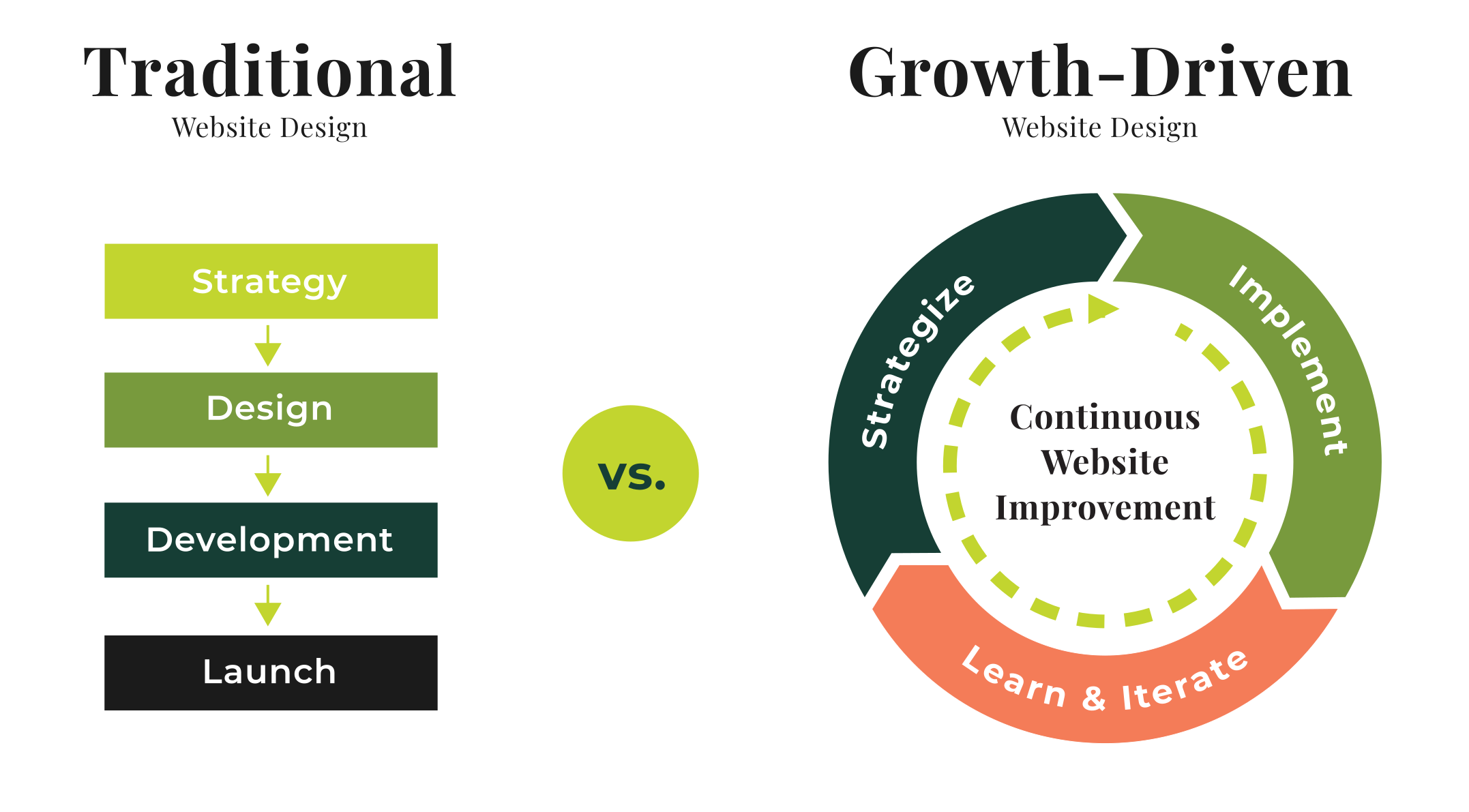
This is where you need to think about your site in terms of a circular flywheel. Don’t think about your site in terms of Strategy > Design > Development > Launch, and then let it sit untouched for a while.

Instead, think of a circular process of Strategy > Implement > Learn & Iterate, where after you Iterate, you revisit Strategy again! This will translate into a site that is always being refreshed and improved without breaking the bank.

Traditional vs Growth-Driven

Start with Strategy

No matter what we do, at Kanopi we always start with strategy. Here is where I recommend focusing on what matters most to your user and stakeholders, and don’t waste your time on things that don’t matter. This is where you can look at doing any of the following activities; 

  • SWOT analysis: outline your strengths, weaknesses, opportunities and threats. 
  • User journeys: look at how your users go through your site. What pathways do they take, and do those align with the pathways you want them to follow?
  • Personas: how well do you know your users? Are you targeting the right audience?
  • Competitive Analysis: what do your competitors do well? What do they do poorly?
  • Data & Analytics: what does your data tell you? Do you know how to interpret it?
  • Site Audit: is your content old and irrelevant? It may be time to either update or archive it.

Once you’ve taken a look at all those items, then it’s time to make a plan for moving forward. There are many areas of your site where you can make incremental — but positive — improvements to address the above strategic questions: 

  • Information architecture: should you rework your links, or change how your site is structured?
  • Usability: how can you make it easier for visitors to use your site? 
  • Design: small design enhancements
  • Accessibility: how accessible is your code and your content?
  • Performance: is your site as fast as you need it to be?
  • Content: are your calls to action clear? Does your content speak to your users?

Consider these quick wins

Decide which of these matter the most to you and can propel you forward in the best way. You can start with some low-hanging fruit, such as:

  • Navigation: remove links people click on the least.
  • Simple theme changes: refining the type and tweaking the color palette.
  • Focused design: make design alterations to the homepage or key landing pages.
  • Accessibility: make sure your content is accessible as possible, including your images. 
  • Reimagine or archive content: freshen up content that needs it, and archive content that is no longer useful or relevant. Check out this presentation about auditing your site for additional help, as well as this one on content strategy improvements you can make today.

Now it’s time to Implement

Here’s where we operationalize the plan. Break the work into two- or three-week long sprints. Determine what you can get done in that concentrated timeframe that will get you the results you need. It sounds a bit like agile development, and it is in the sense of breaking it into smaller chunks. A sprint schedule helps deliver value quickly and consistently. As we like to say: small bites create big wins!

Learn and improve from there

Now that you’ve completed that one discrete piece, measure it. How did it go? What can be improved? 

Doing these activities can also help keep the momentum going: 

  • Share wins and successes: talk with your team about what worked and how it can be made even better.
  • Measure regularly (weekly/monthly/rolling): by doing regular data checks, you can keep on top of what is still working over time. 
  • Schedule user testing: remember, your site is all about meeting your users needs. Test with users regularly to make sure you’re still meeting their needs. 
  • Use sprints to integrate feedback: you can even set up feedback on a sprint schedule. 

Will all that information, keep the momentum going and head back to Strategy! 

Continuous improvement keeps you nimble: you’ll to get into a place where you’re doing less, launching more often, and making more impact. And if something doesn’t work as well as expected, luckily it’s over after a short time frame, so you can move on to the next piece. 

And if you have a Drupal 7 site, we wrote a whole blog post specifically about how there’s still life in your D7 site. You can keep it going for a while past its expected end of life in Fall 2021. (On the other hand, if you’re determined to upgrade to Drupal 9, check out our guide on D9 planning: a guide to upgrading or extending the longevity of your site.)

Tools for making your website last

Here are some tools that can help you extend the life of your site. This is not a comprehensive list (each category has many more great options), but these are some of our regular go-tos:

SEO 

Search engine optimization is an ever-evolving practice of increasing the quality and quantity of website traffic by increasing the visibility of your website (or a specific web page) to users. But you don’t have to be an expert in SEO to make demonstrable improvements to your site with some handy tools:

  • Google Search Console, Bing Webmaster Tools: if you are not communicating directly with the search engines, you are missing out on valuable tools and information.
  • SEM Rush: research both your and your competitor’s keywords, and identify pages that rank for the terms for which you want to rank.
  • Screaming Frog SEO Spider: crawl your site like a search engine does, and see exactly what they see.  Helps identify issues and opportunities.
  • Moz Local: if you manage a local business, check out this suite of tools that helps you define data about your business, and distributes it to aggregators and sites where you want to be found.
  • Majestic: research and develop backlink strategies with Majestic’s incredibly vast link database.

Accessibility 

These days it’s imperative to make your site accessible. In many industries — and the number is growing — it’s illegal to have an inaccessible site. These tools can help you get there: 

  • Wave: a browser extension that checks for compliance issues found in Section 508 and WCAG 2.1 guidelines.
  • Lighthouse: an open-source automated accessibility testing tool. Available as a browser extension, from the command line, or as a Node module, this tool will scan the URLs for performance, accessibility, SEO, and more.
  • Axe: Axe is an accessibility testing engine for websites and other HTML-based user interfaces. It’s fast, secure, lightweight, and was built to seamlessly integrate with any existing test environment so you can automate accessibility testing alongside your regular functional testing.
  • SiteImprove: their content and accessibility audits use Web Content Accessibility Guidelines (WCAG 2.1) as its guide. The tool checks that there are no broken links or misspellings, and also identifies when page content is too dense or hard to comprehend.
  • TotA11y Plugin: this tool helps visualize how your site performs with assistive technologies.

Additionally, here’s another blog post we wrote about Kanopi’s Favorite Accessibility Tools. Also read our thoughts on how content editors hold the keys to an accessible website.

Usability 

It’s critical to test with your users to make sure they are getting the information they want when they want it. These tools will help achieve that:

  • UserTesting.com: a usability customer experience testing platform that gets on-demand feedback about a product or service from real users.
  • HotJar: HotJar uses heatmaps so you can see how visitors are really using your website, collect user feedback and turn more visitors into customers.
  • Crazy Egg: you can use Crazy Egg to learn what your web visitors are doing. Heatmaps, recordings, A/B testing & more.
  • Optimizely: It’s best known for its A/B testing, and allows for terrific segmentation for more accurate results. 

Measuring Data 

We always recommend measuring what matters, and that will be different for every organization. What matters to you? Is it the number of page views? Is there a certain conversion goal you are trying to hit (like number of donations, or email newsletter sign-ups)? Is it page views? Or perhaps speed? 

  • Google Analytics: this is Google’s free web analytics service that allows you to analyze in-depth detail about the visitors on your website
  • Google Tag Manager: a free tool that allows you to manage and deploy marketing tags (snippets of code or tracking pixels) on your website or mobile app without having to modify the code.
  • Lighthouse (again): because this open-source automated testing tool does so much more than just accessibility, we had to include it here as well. Available as a browser extension, from the command line, or as a Node module, this tool will scan the URLs for performance, accessibility, SEO, and more.
  • GTmetrix: a free tool that analyzes your page’s speed performance. GTmetrix generates scores for your pages and offers actionable recommendations on how to fix them.

However you measure your data, you will have to track your users. And it’s critical to find the balance between learning from your users without getting insidious with how the data is being collected. We all want to know more so we can make better websites that attract users, but we need to be responsible about it!

With small bites, you can make your website last!

At Kanopi, we love to say, “small bites create big wins!” And it’s just so doable: you really can make huge improvements in smaller chunks to avoid feeling overwhelmed and also keep your budget in check. 

But if you do need the assist to make your website last for the long-term, that’s our specialty. Contact us. We’d love to help. 

Inclusive Storytelling

Donna
Donna Bungard

Speak to a larger audience with an inclusive content strategy

What is an inclusive content strategy? It is about presenting your digital content in such a way as it is able to reach and speak to (not talk at) the largest audience, regardless of what makes us different. There are countless variables that allow users to be truly individual. It sounds like a big mountain to climb, but it doesn’t have to be. Let’s look at what we should consider and how we can approach our content to be inclusive with inclusive storytelling.

“Diversity is being invited to the party; inclusion is being asked to dance.”

Verna Myers

Diverse vs Inclusive

Diversity is the acknowledgment of what makes us different, where inclusivity invites all the different users to participate in the conversation. The diversity of your users can be calculated through statistical or survey data — it is reliant upon who they are. On the other hand, how inclusive your content is, is all about you. You’re fully able to make a positive impact. 

How are we different?

Each of us is unique and continually in a state of growth. While some differences may present challenges online, all will impact the way in which we consume content. Accessibility is focused primarily on the challenges and works to create equal online experiences for those who live with ambulatory, visual, audio and/or cognitive differences. An Inclusive approach takes Accessibility into consideration while looking at a larger picture. Things such as gender identity, socio-economics, sexuality, and familiar differences play a large role in how we interpret information. 

Let’s break this down a bit: Many years ago my mother held up a plate in front of me and asked what shape I saw. I told her I saw a circle. She tilted it slightly and asked what shape I saw: an oval. She then held it flat and asked again: a line. The plate had not changed, its content and composition were the same. My perception of it changed and though I intellectually knew the shape of that plate — it did not change the distinctive differences in point-of-view. 

Unlike the plate, your content is more malleable. Inclusive content acknowledges the different ways and tries to invite all perspectives to participate in the user journey you’re building on your site. 

What are the keys to speaking to a larger audience?

Empathy

Empathy is at the heart of all effective communication. 

“Great marketers have immense empathy for their audience. They can put themselves in their shoes, live their lives, feel what they feel, go where they go, and respond how they’d respond. That empathy comes out in content that resonates with your audience.” – Rand Fishkin

Practices such as the unconscious use of gendered language, financially-dependant sense of accomplishment, or the bias towards those who do or do not choose a family life are present all throughout society. To be clear, yes, there are times that your subject matter may focus more on a specific target market that meets demographics. If you sell diapers you’re going to use more family-focused language. If you are a men’s health publication, your content will be geared towards a gendered crowd. That said, in both of these examples, there are secondary, “stakeholder” personas that you’re reaching out to too and those personas need to feel included. 

Having inclusive content does not mean you are never going to reference the expensive new car or any particular gender. Having empathy means you are making a conscious decision to speak to an audience while acknowledging that others may also want to learn about this too. You’re inviting others to participate without losing your focus.

Awareness

Most marketers spend countless hours identifying their target market and building personas. You make yourselves aware of demographic information, buying histories and other patterns of behavior. You mix data and instinct to create a picture of “Robin Smith” and put their picture on a cubical wall so everyone in your department will remember to whom you are speaking. 

  • Do all of your personas all self identify as a binary gender?
  • Are they all married and if so, are same-sex couples represented?
  • Are all of your personas neurotypical or are they ADHD or on the spectrum?
  • Do they experience physical challenges? 

Representation matters. 

The words we choose and the imagery we use can include or exclude audiences without intent. Ensure that your process is building awareness: starting from your personas and straight through to execution. Let your users see themselves in your content. Inclusive content lets them know that you are aware of them – that they are seen and matter to your brand. 

Accessibility

We cannot talk about inclusive storytelling without talking a bit more about Accessibility. With a lot of the focus typically put on visual and audio challenges – there are many out there that can be assisted through an inclusive content strategy. Here are a few ways to help:

  • Determine the reading level you’re writing for and use a free online tester such as a Flesch Kincaid Grade Level to assess if your content is speaking to or at your user. 
  • Keep each phase of the user journey as succinct as needed to help users who may struggle with focus make it through to the next step.
  • Be wary of words that may inadvertently alienate a portion of your market.
  • Remember that Accessibility often focuses on allowing users to take in the meaning of content through more than one way simultaneously; ensure your words and images (and their alt text) compliment each other and create a clear message. 

Empower Users

Every great user-journey ends with the user being the hero as they cross the line to conversion. We are not selling products or promoting a service any longer, we are building a brand’s story one piece of content at a time. Let your users be seen, be acknowledged and become a part of the story through inclusive practices. 

Want to learn more about inclusive storytelling? Visit our own AmyJune Hineline’s recent talk from NTC on Inclusive Content Strategy.

Hands on a keyboard

Web Accessibility: 4 Best Tools & Technologies

Here at Kanopi, we’re always paying attention to web accessibility testing. Ensuring that our clients’ websites adhere to accessibility standards is something for which we budget, because having compliant websites is important to guarantee that everyone has access to the web. As such, this is a list of our favorite web accessibility tools.

The World Wide Web Consortium (W3C) says, “The Web is fundamentally designed to work for all people, whatever their hardware, software, language, location, or ability. When the Web meets this goal, it is accessible to people with a diverse range of hearing, movement, sight, and cognitive ability.

A11Y testing overview

A11Y is a numeronym for accessibility. “A” and “Y” being the first and last letters of the word accessibility with the “11” being the number of letters in between. Using specialized A11Y testing tools, we can run a website audit to determine how it can be improved for accessibility standards. These tools check for key elements on a webpage such as color contrast, heading levels, link focus and visibility, buttons, form inputs, alt text for images, and content.

Testing tools serve as a means of getting a good baseline on where your website rates in terms of accessibility standards. However, a person navigating through a site while tabbing with a keyboard or using specialized text to voice or screen reader software such as Voiceover for Mac or JAWS for Windows is considered invaluable.

For example, a <button> element is usually fine on its own but there might be cases where you have a link <a> that needs to act as a button, for example when submitting a form. In the case of a link, we might add something like this:

<a href="#" role="button">Submit</a>

In another example, one might have a <span> or <div> that has interactive behavior via JavaScript and now that needs keyboard focus while tabbing. In this case, we can add tabindex=″0″, indicating that the element should be in the natural flow of tabbing through the page.

Getting started: our favorite web accessibility tools

There are a variety of tools that can be employed for A11Y testing and many are available as browser extensions. The testing tools we’ll discuss include Axe, Lighthouse, Tota11y, and Siteimprove.

Lighthouse

Chrome’s built in audit tool, Lighthouse, is a general testing tool for webpage performance, SEO, best practices, and accessibility. The underpinnings of the accessibility piece in Lighthouse is based on Axe, an open source accessibility testing suite for websites and other HTML-based user interfaces. When a test is run, Lighthouse judges a webpage’s score up to 100 for each piece mentioned above.

Screengrab of Lighthouse Accessibility score from Chrome’s Lighthouse audit tool, one of our favorite Web Accessibility Tools.

Pictured above, Lighthouse Accessibility score from Chrome’s Lighthouse audit tool.

Lighthouse’s advantage is that it’s built right into Chrome and test results give you a great overview of potential A11Y issues on a given webpage. We are excited about implementing automated testing with the integration of Lighthouse into our Circle CI deploys.

Axe

Axe is available as a command line interface (CLI) tool or as a Chrome browser extension. Though Lighthouse uses Axe, the Axe tool on its own gives more specific and granular results and suggestions for accessibility fixes.

Screengrab of Axe CLI with links for information to fix a given problem, one of our favorite Web Accessibility Tools.

Pictured above is Axe CLI with links for information to fix a given problem

Siteimprove

Siteimprove is an extremely thorough and detailed A11Y testing tool, it is also available as a Chrome extension. Siteimprove gives an ultra-detailed report about accessibility best practices. The nice thing about this tool is, it goes into depth with a drill-down approach with several options for filtering by conformance level, severity, and responsibility.

Screengrab of Siteimprove’s test results screen, one of our favorite Web Accessibility Tools.

Pictured above is Siteimprove’s test results screen

Conformance refers to the three ranks used to grade a site based on its level of accessibility. These levels,“A”,“AA”, and“AAA”, are set forth by the Web Content Accessibility Guidelines (WCAG) with “AAA” being the highest / most accessible level to strive for.The neat thing about Siteimprove is that you can expand a section to drill down to see more specific info about an issue with recommendations, a link to specific code in dev tools, as well as external documentation for a given issue.

Tota11y awesome

One other of our favorite web accessibility tools is Tota11y for its “screen reader wand” which simulates a screen reader as you navigate through a page. This really comes in handy. In addition, Tota11y has an annotation feature for things like missing alt tags, headings, contrast, and more.

Tota11y’s screen reader wand in action, on of our favorite Web Accessibility Tools.

Pictured above is Tota11y’s screen reader wand in action

Implementing fixes

What’s great about all these tools is that they give real actionable fixes to implement. So if you’re a developer working in your local environment, you can make some of the suggested code fixes and then see the new results in real time. The same holds for content editors as well.

It should be noted that in some cases, there might be false flags that require a manual review. A good example of this is, let’s say you have a website about books and reading showing book cover images on a grid. These will probably be flagged as having “Text within images.” In context, this is fine but it’s important to ensure that these images have appropriate alternative text tags that mirror each book’s image text. Let’s say we have the book, “Ender’s Game.” The image tag for it might look like this:

<img src="enders_game.jpg" alt="Book cover of Ender's Game by Orson Scott Card">

In this case, the alt text accurately describes the text pictured on the book cover image. There will be other cases where a manual review is required so judgment and best practices come into play as well.

The power of the Web is in its universality. Access by everyone regardless of disability is an essential aspect.

— Tim Berners-Lee, W3C Director and inventor of the World Wide Web

Assistive technologies: tabbing and screen reader software

Of course, nothing replaces real world testing whether that is using your keyboard to tab through a page or using a screen reader such as Voiceover for Mac (VO) or JAWS for Windows. It might be that in these cases, you will find accessibility issues that were not evident with any of the standard testing tools.

When we test with these kinds of assistive technologies, we gain a lot of insight into how a page is ordered and if navigating either using tabbing or with software makes sense to the user. This is why tools like Siteimprove often say that a “manual review” is required for certain elements.For example, carousels present a difficult challenge as they are notoriously inaccessible. We strive to make carousels and other widgets like this accessible using keyboard listeners, tabbing detection, and custom ids and indexes to help with assistive technologies.

This carousel is a good example. We’ve added, custom roles, labels, data elements, and ids to help with being able to fully navigate it with a keyboard.

<div class="carousel-dots" role="tablist">
    <button role="tab" class="carousel-dot" data-target="#carousel-92" aria-label="1" data-slide-to="1" id="tab-0-1" aria-selected="true"></button>
    <button role="tab" class="carousel-dot" data-target="#carousel-92" aria-label="2" data-slide-to="2" id="tab-0-2" aria-selected="false"></button>
</div>

Summary

This is just the tip of the iceberg when it comes to A11Y testing, but in this day and age, it’s something that can no longer be ignored.

Accessibility teaches the most important skill a designer can have. That skill is empathy. Because what is design if it is not the practice of giving empathy a form? Design is putting ourselves in other people’s shoes and solving their problems.

John Brownlee

Resources

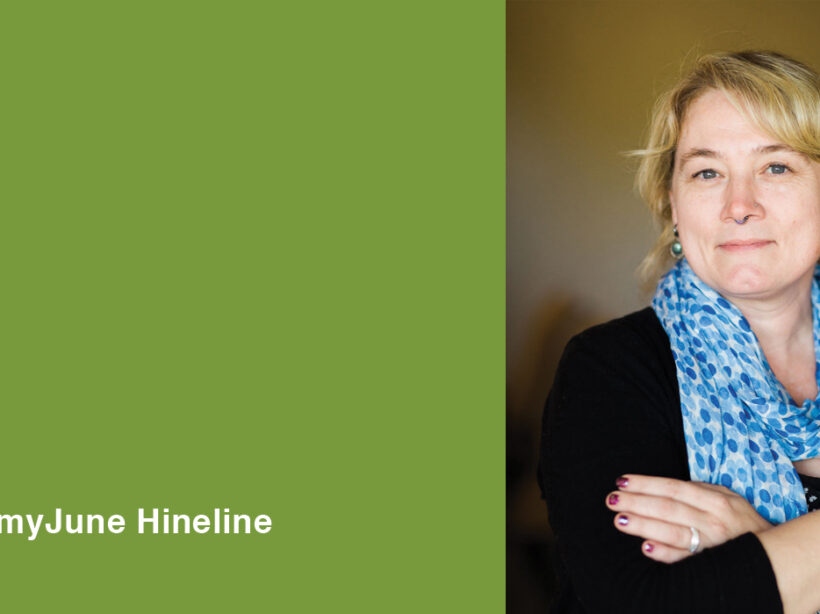
Image of AmyJune Hineline for her Accessible Media webinar. She has a blue scarf and her arms are folded.

Join us October 8th for a Free Webinar on Accessible Media

AmyJune
AmyJune Hineline

If you’re in charge of your website, you have a lot of things to cover between keeping it up to date, entering and managing content, and making sure it’s all accessible. As part of an inclusive content strategy, how accessible is your media?

Join us for a webinar led by Kanopi’s own AmyJune Hineline where we’ll do a deep dive on making your media more accessible. We’ll cover definitions, standards, guidelines, as well as images, videos, captions, transcripts, and more. Don’t worry about which CMS you’re using: creating accessible content is achievable regardless of which content management system you use!

DATE: Tuesday October 8th
TIME: 2:00 ET
COST: Free!

UPDATED POST-EVENT: below is video of the webinar.

Hands on a keyboard

Demystifying Website Accessibility Compliance

Donna
Donna Bungard

Bringing #clarity to common website accessibility terms

Like much of technology, the world of online and website Accessibility is full of letters, numbers, acronyms and other terms that can be confusing to important stakeholders who are invested in your site’s success. Here we will break down a few of the terms that we’ve been asked the most about. 

WCAG

(“W.C.A.G.” or “Weeekag”)

This acronym is short for “Web Content Accessibility Guidelines” and in short, these are the internationally recognized standards that determine what it means for a website to be Accessible. They are based on the P.O.U.R. principals: 

  • Perceivable: can users get to the information on the screen?
  • Operatable: can users who are using assistive technologies operate the function of the site?
  • Understandable: are users able to decern the meaning or the value of the content?
  • Robust: is the site robust enough to work in a variety of ways to allow all users an equal experience? 

WCAG 2.0 vs WCAG 2.1

In this case, the numbers are reverencing accepted version numbers. Version 2.0 had marked a big step forward in these guidelines and this is the version that has been accepted as the “Go To” resource for some governments including the U.S. government. 

Version 2.1 was the next evolution in these requirements, adding additional criteria to keep up with changing technologies. For example, screen orientation had not been considered in 2.0 as it was not as widespread, but now, it is part of standard user experience. Different orientations may present different challenges for differently-abled users and that is now recognized in 2.1. 

Version 2.1 is gaining adoption internationally, including the Canadian government. 

A, AA, AAA

When discussing Accessibility requirements, stating the version alone is not enough. You then need to identify what level of Accessibility you are trying to reach. What do we mean by “level”? Well, there are different benchmarks in terms of how accessible you make a website. These are broken down into A, AA, and AAA. Let’s take a moment to talk about these in more simplified terms. 

  • A: this is the minimum you can do on a site to help reach that larger, differently-abled audience. 
  • AA: widely accepted as the industry standard, this reaches a wide range of users, accounting for disabilities. 
  • AAA: this is the most strict set of criteria and is often considered going ‘above and beyond.’ For some audiences, however, it should be the norm (such as organizations where a majority of users are impaired in some way, such as the National Council for the Blind (NCBI)). This formats a website to be the most compatible with assistive technologies

508 Compliance

In the U.S., the American with Disabilities Act (ADA) was signed in 1990 to help ensure Americans are provided with equal access. Over the following decade, this expanded more into the digital world as well. Section 508 was created to eliminate barriers in the digital realm. In January 2017, this was updated to be in alignment with WCAG 2.0 Level AA requirements. 

But what is Section 508?

This is a set of standards, based on WCAG 2.0 Level AA. These are “standards,” not “laws”. Organizations are required to be in compliance with them however it is handled, from a legal perspective, differently than laws. Please consult your legal counsel for their interpretation. 

OCR

Ironically, OCR can mean two different things in the world of Accessibility. Those who are familiar with trying to make PDFs more accessible are familiar with the phrase “Optical Character Recognition.” This is when you scan a printed document and relay on the computer to recognize the images of characters and read it as text. 

This is not what we are referring to here. 

In this case, OCR is referencing the Office of Civil Rights. The Office of Civil Rights is a sub-agency of the U.S. Department of Health and Human Services. They focus on ensuring equal rights by enforcing laws, regulations, and standards that prohibit schools from behaviors that may discriminate on the basis of race, color, national origin, sex, disability, age, or the like. Though responsible for enforcement, the Office of Civil Rights first acts as a neutral party that tries to resolve the issues presented.

Bill C-81

The Accessible Canada Act: An Act to Ensure a Barrier-free Canada

The US government is far from the only country making big strides in Accessibility. In May of 2018, Bill C-81 had unanimous support by the House of Commons. On June 21, 2019, the Accessible Canada Act became law after receiving Royal Assent.

What does this mean for website Accessibility in Canada?

It means that Canada now joins many other countries that use the international WCAG guidelines as the standard for success with online Accessibility. They strive for a minimum level of WCAG 2.1 Level AA compliance. 

#clarity

If you build these terms into your organizational culture, it will promote continued clarity as you expand your audience to include differently-abled individuals.

Also check out our blog post about Web Accessibility 101 to help you get started with the tools you need to be more accessible.

Let us know if you need help with creating more accessibility around your website. 

San Francisco City Hall on a sunny day against a blue sky. The keyword for this blog post is drupal for government.

8 Reasons Governments Should Use Drupal CMS

The right website content management system can help government websites establish citizen trust, provide relevant and timely information, maintain solid security, and make the most of limited budgets. At Kanopi Studios, we believe that Drupal for government is an especially strong choice, further validated by the fact that governments across more than 150 countries have turned to Drupal to power their digital experiences. This includes major sites in the United States like The White House and NASA.

What makes Drupal the best choice? Read on for our top 8 reasons why Drupal should be the content management system of choice for government websites.

1. Mobility 

Website traffic from mobile devices surpassed desktop traffic years ago. In fact, according to Pew Research Center, one in five adults in America are smartphone-only internet users, and that number is likely to continue to grow. Government websites need to prioritize a superior mobile experience so they can meet the needs of citizens of all ages and economic levels and allow users to access critical information on the go.

Drupal can help. Drupal 8 was built to scale across devices, load mobile content at top speeds, provide a wide selection of responsive themes, and more. Drupal also allows content editors the ability to add or update site content via mobile, unlocking the ability to make emergency updates from anywhere. 

2. Security 

Offering a secure site that protects your content and sensitive user information is critical for maintaining your reputation and public trust. Drupal offers robust security capabilities, from regular patches to prominent notifications about updates to security modules you can install for additional peace of mind. Unlike other open source platforms, Drupal has a dedicated security council that keeps an eye out for potential issues and develops best practices to keep sites stable and secure.

3. Accessibility

A number of federal, state and local laws require government websites to serve the needs of all citizens, regardless of their abilities. Focusing on accessibility compliance from the very beginning of your website project can help your team avoid costly re-work and launch delays. 

Drupal has accessibility baked in, with all features and functions built to conform to the World Wide Web Consortium (WCAG) and ADA guidelines, including the platform’s authoring experience. That means that people of all abilities can interact with your Drupal website, whether they are adding and editing content, reading news, filling out forms, or completing other tasks. Drupal allows screen readers to interpret text correctly, suggests accessible color contrast and intensity, builds accessible images and forms, supports skip navigation in core themes, and much more. 

If you’re a content editor, we recently wrote about eight things you can do to make your site more accessible

4. Simple content management

Drupal’s content editor helps busy government website administrators add posts, pages, and resources in an environment that’s nearly as simple and familiar as a Word document. The what you see is what you get (WYSIWYG) editing mode supports text formatting, links, embedded media, and more. 

Drupal also enables administrators to set up customized roles, permissions, and content workflows. This allows any number of team members to contribute to the site while maintaining administrative control of the content that gets through to the public.

5. Ability to handle significant traffic and data

Many government websites store hefty data and resources and see significant spikes in traffic based on seasonal demand, news cycles, and many other factors. Drupal has the power to deal with large databases and intense site traffic with ease, another good reason to choose Drupal for government sites.

Drupal’s database capability includes a wide range of ways to sort and organize content via its module system, supporting the needs of almost any content library without the need to create custom code. 

Drupal powers a number of heavily visited sites including NBC’s Olympics, The Grammy Awards, and Weather.com, keeping them going strong even when traffic levels are enormous.

6. Flexibility 

The helpful features included in Drupal core are just the beginning. Many, many additional modules have been contributed and tested by the Drupal community and are ready to be added to your site as needed. How many? The Drupal community has contributed well over 40,000 modules, so it’s a safe bet that there’s something already out there that can help meet the needs of your project.

Modules can be added to your site at any time, like building blocks. A few popular examples include social sharing, image editing, calendars, metatags, and modules that support integrations with external systems, from email platforms to customer databases. 

7. Affordability

Government budgets are often tight, with plenty of competing priorities for every dollar spent. With Drupal, you tap into a free, open-source system that’s supported by an enormous community of developers. Building your website on an open-source platform means you can focus your budget on creating an ideal experience for your citizens through professional services including content strategy, user experience, and design rather than dedicating funds to software licensing fees. And Drupal’s flexible modules reduce or even eliminate the need for custom code, helping you save even more.

8. Support for multiple sites in multiple languages

It’s not uncommon for government entities to have multiple websites. Whether your government maintains a few sites or hundreds, building each one individually would require an incredible amount of time and funds. Thankfully, Drupal’s multisite feature allows your site’s code base to be copied and adjusted to create as many new websites as you need, leveraging features that already exist without the need to build them from scratch. To meet language requirements, Drupal offers Content and Entity Translation modules that help content authors translate pages, individual elements, or specific fields into more than 100 languages.

Kanopi Studios loves government website projects

At Kanopi, we’re Drupal experts. We’ve harnessed its power to create citizen-focused sites for the San Francisco Police DepartmentSan Francisco Health Service System and more. We’d love to hear from you, learn about the problems you are trying to solve, and share even more details about why you should choose Drupal for government.