Don’t look now… but 2024 is already lurking around the corner. Among other more festive things, this means it’s once again time to peer into the near future and see what the upcoming year may bring to the world of web development. There are so many cool things going on in the “dev” world these days that it’s hard to encapsulate it all into the kind of singular, broad summary that initiates many of these posts.
If there is a connecting string, it’s that more parts of the user experience are becoming automated than ever before. Providing greater control over the editing experience not only saves creators time, but also allows both creators and developers to focus on key issues like accessibility, performance, and security.
Here are a few specific development trends to look out for in 2024:
More machine learning and web personalization
Machine learning will continue to gain traction in the personalized web space, thanks to its ability to analyze massive volumes of data on user behaviors and surface recommendations and experiences that suit users best.
More AI
With the buzz around artificial intelligence in 2023, we’ll likely see more use cases and integration with the web. AI models and systems will continue to be woven into personalization and the content editing experience.
For example, the ChatBot ChatGPT for WordPress plugin can build a complex understanding of your site content to engage with end users, providing relevant responses that are specific to your content, and the user experience.
(One note here: the key word here is ‘relevant’, by which I’m referring to technical relevance. For a discussion about AI’s capabilities compared to human writing, check our companion post: Top trends in content and design for 2024.)
On the Drupal front, projects like the ChatGPT and the OpenAI modules provide in-site help to editors for content generation, translation, assistance for SEO, and image generation.
More modular layouts
The rise of drag-and-drop editing in web development will continue to make life easier for editors.
Tools like WordPress Block Editor (a.k.a. Gutenberg blocks) and block patterns (a collection of blocks) continue to become more editor-friendly.
Content editing will continue becoming modular thanks to predefined blocks, blocks built for their site, and reusable blocks.
Drupal has put the power of flexibility into the editor’s hands with Drupal Paragraphs, Layout builder, and a suite of additional modules and hooks that allow developers to create a drag-and-drop editing experience.
More security — and continued privacy concerns
2024 will finally see Google officially move to block all third-party cookies within the Chrome browser. Stronger data protection measures like Google’s will inevitably lead to more enhanced, conscious cookie mechanisms and management.
Overall, we’ll see the web itself continue to adapt to become compliant with evolving data protection regulations, such as adhering to personal identity information (PII) policies. This includes publicly accountable organizations like educational institutions and government agencies (and their private contractors and suppliers) taking more steps to ensure their data remains in the country.
More mobile devices and better overall performance
Did you know that more people these days have access to a mobile phone than a computer? It’s true — and this number continues to grow. As more users in low-bandwidth areas require access to information, making sites fast and efficient across devices is more critical than ever. Mobile-first design will keep growing in 2024, as will content-first design and development — i.e. prioritizing meaningful content over flash and glitter.
More accessibility
In 2024, accessibility requirements across industries will continue to be in the spotlight. More industries than ever are realizing that being accessible to all audiences is incredibly important. For example, meeting your industry’s accessibility’s compliance levels and having clear on-site policies can mitigate potential liability.
Did you know that Shane is our very first Kanopi employee, ever? If you’ve enjoyed reading his post, please check out his other great works in our blogosphere, such as: Four Simple Steps to Migrate from Drupal to WordPress
In 2019, total online nonprofit revenue grew by 10% and is predicted to only continue rising.
The online world is rich and full of information. From watching Netflix to exploring your Instagram feed to looking up dinner recipes, there seems to be no end to the internet content available.
With such a truly saturated space, your nonprofit needs a focused and comprehensive digital strategy if you want to reach supporters in meaningful ways and increase fundraising for your mission. Otherwise, your message can get buried and you risk losing sight of your goal.
The best digital nonprofit strategy likely spans multiple tools and marketing outlets. Creating this type of strategy can seem intimidating, especially if you’re not aware of how those tools and outlets support each other. This guide will dive deep into not only exactly what a digital nonprofit strategy is, but also how to best create one for your organization and some top tips to maximize those efforts.
Your nonprofit organization likely already depends on a few key tools to reach and engage your supporters. Your online donation platform facilitates gifts, your content management system (CMS) helps you create a beautifully designed website, and your marketing tools promote upcoming campaigns and engage donors.
However, it’s not enough to just have an arsenal of working tech. In fact, it takes careful planning and coordination to ensure that your tools and marketing strategies not only work together but also support each other. That’s where your digital nonprofit strategy comes in.
In simple terms, your digital nonprofit strategy is a focused plan that takes action on your fundraising and donor engagement goals through digital marketing methods.
Your overarching nonprofit goals, any budget constraints, and the technology you have all impact your digital strategy. This strategy then informs your online marketing efforts, with the two working together to maximize your nonprofit’s impact.
The common tools and marketing channels nonprofits use for their digital strategy include:
Nonprofit website – Your website is an increasingly important part of your nonprofit digital strategy. Your nonprofit site centralizes your online engagement and is likely the first place supporters will look when they want to find out more about your mission and any upcoming events or campaigns. It’s also where donors give! How you design your website and the content you add to it is crucial in your digital marketing efforts.
Online fundraising solution – This is how you accept online gifts from your supporters. It’s important that the tools you use accurately capture donor data and protect their sensitive information.
Email/text communications – Sending your supporters marketing materials, whether through email or text, is a popular way to get the word of an upcoming campaign out quickly. Use your communication tools to further relationships with donors by sending them personalized messages, donor thank you letters, and other targeted content.
Social media content – More and more, people are finding out about exciting events and nonprofit efforts through social media content. Because of its easy shareability, it’s a great way to not only reach your current supporters but also expand your audience. Encourage your followers to repost your content and thank them publicly for it on the platform!
One of the great things about your nonprofit digital strategy is that it naturally depends on tools and is generating valuable data. You can reference this data to continually refine your digital strategy and reach your target audience in more meaningful ways.
Steps To Creating A Nonprofit Digital Strategy
Your nonprofit digital strategy is unique to your organization, goals, and audience. These are some common steps that all nonprofit leaders will generally follow:
1. Determine overarching nonprofit goals
The first step to creating a successful nonprofit digital strategy is to establish your goals. This is the foundation of your entire strategy — each engagement and decision your nonprofit makes should be with your core goals in mind.
To begin brainstorming, consider these questions. Do you want to:
Raise a certain amount of money?
Increase awareness of your mission?
Grow your audience or base of supporters?
Increase a specific audience profile?
Generate new leads?
Once you have a general idea of the goals you want to accomplish, it’s time to make them actionable. Start by:
Identifying gaps in your current nonprofit digital strategy and consider how you might tackle them for your updated strategy.
Analyzing data in your database to find a quantifiable target for your overarching goals. For instance, look at past successful fundraising campaigns to gauge what a realistic goal may be this time around.
Brainstorming the technology that will play a role. What digital tools and marketing outlets will you be using?
Determining your goals is crucial to guide your nonprofit digital strategy and to provide insight into the choices you’ll make. Make sure your goals are specific and actionable, with clear targets and ways to measure success.
2. Define audience and web personas
If you want to make the most of your nonprofit digital strategy, you have to become familiar with the audience you’re trying to reach.
Start with reviewing your past data to learn more about how your existing audience engages with your nonprofit. Looking to your website, Google Analytics, CRM, and email marketing metrics can give you clues into the types of supporters that engage with you online and the content that they best respond to. For instance, if past donors heavily engaged with your Instagram posts, then that’s worth noting when creating your new digital strategy.
You can use this same data to create audience or web personas. Web personas are detailed profiles of your nonprofit’s target audience. Your organization will likely use more than one web persona to account for the different types of people who support your nonprofit. With a clearly defined target customer in mind, it’s much easier to tailor your digital content to speak directly to them.
To create web personas, you need to:
Research your audience. Some key audience details to take note of are age, location, income level, interests/activities, and donor behavior.
Document and organize information. If there are common data points, begin grouping them together to start creating a persona. This could by interests, needs, preferences, age group, corporate match eligibility, and more. How you segment your own supporters will depend on your unique organization and goals.
Bring personas to life. It’s easier to create targeted marketing content for a persona when you think of them as real people. Consider giving your audience personas a name with a visual/face that matches their general description.
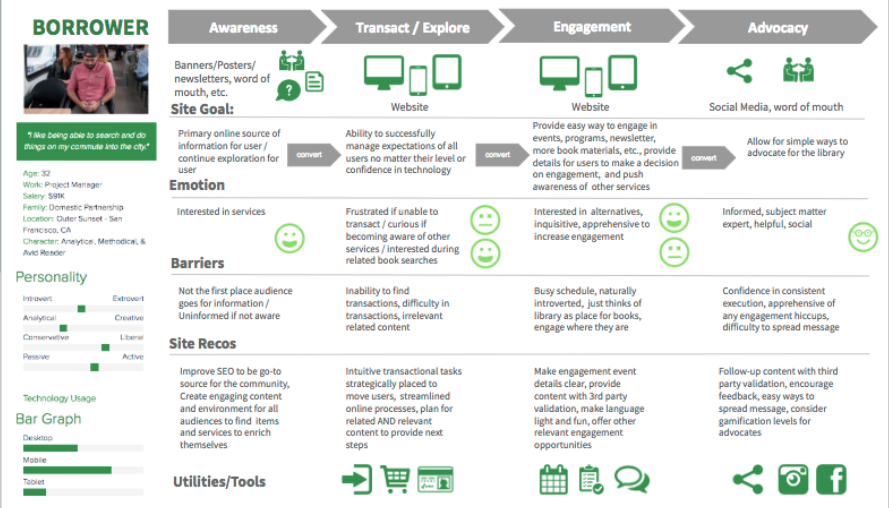
When creating web personas it’s helpful to get as detailed and specific as possible. The above image is an example of how you might organize the details in a web persona and determine the best way to connect with that audience. From there you can produce website content and other digital materials catering to each persona, creating a more engaging and personalized user experience.
3. Consider any constraints
As you develop your digital nonprofit strategy and set your goals, you also have to consider any constraints. While it’s nice to think that the sky’s the limit, it’s often unrealistic and can set your strategy up for failure.
These might not all apply to you, but here are some of the common constraints to keep in mind:
Financial budgets. Consider how much you can spend when it comes to developing, implementing, and executing new digital marketing and fundraising strategies.
Technological constraints. What is the current state of your organization’s technological infrastructure?
Timing. Is the timing of the digital strategy aimed towards a certain date, such as Giving Tuesday, or an anniversary?
Staffing and labor. Is your current team enough to handle everything when it comes to your digital nonprofit strategy? Remember, you can also turn to volunteers or even a tech consultant for additional staffing.
4. Invest in the necessary tools
If you’re looking to really bring your digital nonprofit strategy to the next level, you might have to invest in a new tool or platform. The internet is always changing, with new ways to engage online popping up all the time. It’s worth it to review your current processes and make sure that it’s meeting the needs of your growing nonprofit and supporters.
Today, nonprofits see their digital engagement with supporters occur in these locations:
Nonprofit website
Online marketing campaigns
Social media activity
Email marketing campaigns
Is your current nonprofit solution doing all it can for the above channels? Consider the gaps in your toolkit or ways your tools could work better together. For example, let’s say your digital nonprofit strategy’s focus is social media and peer-to-peer engagement. Do you have all of the necessary accounts and fundraising tools you need?
Or, let’s say you’re pushing corporate giving. Does your organization have the appropriate tools in place to promote matching gifts and drive more match requests to completion? This might mean embedding an employer search tool into your donation form for donors to research their eligibility or enabling autosubmission tools to let donors automatically submit requests to employers post-donation.
Often, nonprofits seek the help of a nonprofit technology consultant at this stage. The right consultant can perform an audit of your nonprofit’s current tech solution and make suggestions. If your website no longer supports your growing organization, a consultant can help upgrade your current CMS platform or optimize it with extensions.
5. Align your messaging and content
Now that you have concrete goals and the tools to carry them out, it’s time to think about your marketing content. This is the voice of your nonprofit digital strategy and helps tell your story.
When it comes to the story you want to tell, you not only have to be true to your mission but also figure out how to tell it in easily shareable and digestible bites. Short, but emotionally investing, stories are much more likely to resonate with supporters and reach new prospects via reposting and sharing.
The content of your digital strategy should address your audience first. Remember how we defined the audience and developed personas in an earlier step? This data can now be used to personalize the messaging and content to each persona group.
For instance, consider the persona of a completely new supporter. Let’s imagine them stumbling upon your nonprofit website. To immediately connect with them through your content, consider embedding a high-quality image within your homepage of the community you help, along with some quick stats about why they are in need. This can capture the visitor’s attention and introduce them to the most immediate goals for your organization.
6. Consider the channels you use
You already know that the most important digital channels to your nonprofit digital strategy are your website, social media accounts, email campaigns, and any other online advertising.
But how do those channels work together?
Your nonprofit website is the central hub for your digital strategy. It can connect supporters to your email list, social media accounts, and is where they can give online. Your website needs to be well designed, informative, valuable, and fully integrated with your other online fundraising and CRM platforms.
Social media platforms are great for reaching wide audiences. Consider where your current supporters are most active online and focus on those few platforms to promote any upcoming campaigns, advertise blog posts, and share fun, but relevant, videos or viral challenges. Try to post content that encourages supporters to share it with their own network.
Email marketing is an essential part of your nonprofit digital strategy. Not only can you use it to reach a wide number of people at once, but you can also even create segmented email lists to cater to more of your specific audience personas. Make sure to track open and response rates to determine which email outreach tactics work best.
Online advertising and other digital marketing strategies are important for increasing visibility. This can include online ads on different websites or links back to your organization from other reputable charity organizations. This can also involve SEO techniques that help boost the visibility of your website and blog posts during organic internet searches.
7. Measure campaign’s success
The last thing you need to determine before you start employing your digital nonprofit strategy is how you’re going to measure success. This should have been outlined during the goal-setting stage, but you can take it to the next level with some key tools.
For instance, use your nonprofit tech solution to compile reports and compare metrics based on the combined data from all of your tools and marketing channels. What types of data points and metrics should you look at? Here are some of the top ones:
Completed donations
Volunteer applications
Email subscriptions
Pledge signatures
Email open rates
Email response rates
Website bounce rate
Online donation page bounce rate
Compile reports on these metrics prior to the campaign and after. This gives you a direct look into how your digital nonprofit strategy impacted and helped your organization.
5 Tips to Make The Most Of Your Nonprofit Digital Strategy
The best digital nonprofit strategy is data-based and audience-centric. While how you make the most of your own strategy is dependant on your organization and mission, here are the top tips that can help all nonprofit leaders:
Optimize for a mobile experience. Did you know that roughly 1-in-5 American adults are “smart-phone only” users? At every touchpoint in your digital nonprofit strategy, it’s crucial that you consider how this may look on a mobile device. Otherwise, you’re missing out on some key opportunities.
Use email appeals. Even as new technology and platforms arise, email is still the best way to reach your supporters online. Make sure that donors are aware of your email list and embed forms for users to opt-in on your website, social media accounts, and other relevant places. And don’t be afraid of being aggressive with your send schedule; data shows that while people may grumble about getting too much email, they still open, read, and interact with it.
Personalize messaging. Whenever you can, you should make your marketing content and messaging as personalized as possible. This is most used in email marketing, but can be implemented with text messaging and even within your website. For instance, consider creating specific landing pages for each of your audience personas to better target their needs.
Inbound marketing techniques. This involves all the ways you make it easy for supporters to find your nonprofit and is much more subtle than outright contacting them. For instance, creating educational blog posts, hosting events, implementing search engine optimization, and sharing social media posts are key inbound ways to build brand awareness. The more people see and recognize your nonprofit, the more likely they want to find out more and support your cause. Remember to always include a link to your nonprofit website and other specific landing pages so that supporters know how to take action if inspired.
Partner with a nonprofit tech consultant. Sometimes, partnering with a nonprofit tech consultant is the best method of truly optimizing your digital strategy. The right agency should work closely with your organization to become familiar with your goals, your audience, and current technology solution. Then, they can provide their expertise when it comes to optimizing that solution for your nonprofit’s needs.
If you think a nonprofit technology consultant is what you need, explore our own services to see if Kanopi is right for you.
How Kanopi Can Optimize Your Nonprofit Digital Strategy
A crucial component of any nonprofit digital strategy is the website. It’s the centralizing factor of almost all of your online engagements and where donors can make gifts. As a top partner for nonprofits, we at Kanopi Studios have helped develop over 150 active sites.
When you partner with us, we don’t just develop, maintain, and support your nonprofit website (though we are experts at it!). We like to think of ourselves as extensions of your organization. With thorough research and data analysis, we dive deep into your unique online audience and provide specific suggestions based on carefully crafted web personas.
We take a continuous improvement approach to website maintenance, as smaller and consistent fixes tend to be more beneficial to your website health than large systematic updates that only happen once a year.
Along with this, we also provide a website growth plan to help you make the most of your online presence even when our partnership is over. We don’t just set up your website and hand over the reins — you’ll get specific and customized next steps as to how to increase conversions and further expand your online platform.
User persona creation to map your supporters’ journeys once they visit your site.
Staff augmentation to provide extra help when it comes to design or development tasks.
Don’t forget SEO! We gave a webinar about it.
Ready to Boost Your Website’s Performance Without the Overwhelm? A must-attend webinar for business owners, marketers, and anyone looking to make SEO work smarter, not harder. Lauren Chervinski gave a webinar focused on SEO called “SEO Survival Kit: 5 Steps to Thrive Now and in the AI Era .” (47 minutes)
What you may be wondering is… do you need to worry about the CCPA? What kinds of businesses does CCPA affect? And what do you need to do if your business must comply with the regulations?
About the CCPA
The state of California passed the CCPA in 2018. It went into effect in January 2020. The law gives residents more control over who can retain (and profit from) their information. It gives them more options if a data breach impacts their personal data.
The act endeavors to give Californians more transparency. They must be given access to their data on request. They have the “right to be forgotten,” and may request the deletion of their data at any time. These requirements align with the EU General Data Protection Regulation (GDPR).
Affected Businesses
Only a subset of businesses acquiring information about residents are required to be compliant with CCPA, but it affects more companies than you might think.
The CCPA applies to you if you fit any of the following definitions:
You make more than $25 million in revenue per year.
You collect information on 50,000 or more Californians per year.
You make 50% or more of your revenue per year by selling information.
The “collecting information” definition is the trickiest one. This would include any of these:
Online advertising impressions.
Email addresses you collect to book appointments or start conversations.
“Selling, renting, releasing, disclosing, disseminating, making available, transferring, or otherwise communicating orally, in writing, or by electronic or other means, a consumer’s personal information by the business to another business or a third party for monetary or other valuable consideration.”
It is important to note the last part of this statement. It means that “selling” data can be more than a financial transaction. For example, if you engage in data sharing (exchanging your data for other company’s data), that’s “valuable consideration.”
What qualifies as personal data
I will paraphrase the source here. I’ve cut this down to focus on typical website data. The language in the CCPA states any of the following qualify as personal identifiers:
A real name, alias, or postal address.
An Internet Protocol (IP) address or email address.
Any account name, social security number, driver’s license number, passport number, or similar.
Commercial information, including products or services purchased, obtained, or considered, or other purchasing or consuming histories or tendencies.
Browsing history, search history, and information regarding a consumer’s interaction with an Internet website, application, or advertisement.
Geolocation data.
Audio, electronic, visual, thermal, olfactory, or similar information.
Professional or employment-related information.
Education information.
Inferences drawn from any of the information identified here that create a profile about a consumer reflecting the consumer’s preferences, characteristics, psychological trends, preferences, predispositions, behavior, attitudes, intelligence, abilities, and aptitudes.
Updating your site to comply with CCPA
At this point, you should have a good idea of whether you need to comply with the CCPA. If you do, take these steps next.
Add a link that reads “Do Not Sell My Personal Information” — no exceptions. This is the language you need to use. Place the link in the footer of your site, by your privacy policy.
This link points to a “Do Not Sell” page. It should talk about your data collection policies, and how or if you sell data to third parties. Even if you don’t sell information, having a page saying so is a good idea.
Add a form, making it easy for users to request you do not sell their information. The user can’t be forced to have an account or otherwise “log in” to use this form.
Be prepared to exclude that person in any sales information for 12 months.
Add language to your privacy policy that links to the “Do Not Sell” page.
Use a cookie management tool like CookiePro. This gives users a list of granular categories for data you track. Parallel those categories in your “Do Not Sell” page.
Consider additional data you may be selling. Data your partners may be collecting, for example, when serving ads on-site.
And yet across the globe, out of all the websites built with a CMS, WordPress dominates with nearly 60% of the market share, while Drupal just squeaks over 4.5% and is barely knocked out of second place by Joomla!.
Why would anyone switch from Drupal to WordPress?
Because sometimes a power tool isn’t the right tool. Imagine buying a chainsaw to cut delicate flowers for an art project. I don’t doubt it would be amazing to watch, but it would ultimately be a messy, expensive endeavor with an outcome that doesn’t look anything like the result you would have gotten if you’d just used a regular pair of craft scissors.
Maybe you went with Drupal because you didn’t know there were other options. Or maybe Drupal seemed like the right CMS at the time, but now that you’ve had your site for a few years it isn’t quite what you’d been hoping for. Perhaps your needs and goals have significantly changed, and your site no longer lines up.
Regardless of how you ended up with a Drupal site, you now wonder if you need a different tool for the job.
Drupal vs WordPress
Before you decide to move away from Drupal, it’s a good idea to take a look at what both Drupal and WordPress can do specifically for you. They’re both quality platforms that can get the job done, but they do excel in different ways.
5 Advantages of Drupal
Robust User Access Control If you need a lot of users, or various permissions and access controls, then Drupal is going to give you more options from the start, with plenty of room to grow.
Multilingual Functionality Drupal has multilingual functionality baked right into the core. If your audience is multilingual, or your site will be used by a variety of countries, you’ll want this out of the gate.
Easier to Keep Secure Drupal core has a lot to offer developers, meaning they often don’t need as many third-party additions and extensions. Fewer modules means fewer potential holes in a site’s structure. If you’re storing sensitive data, you’ll want to consider this angle
More Flexible Content Types, Views, and Taxonomies Of course other CMSs have these capabilities, but Drupal has increased flexibility and control over how your content is displayed and the relationships between data.
Better for Storing Huge Amounts of Data Large directories, content types, products, etc., require big solutions. If you need to store hundreds of thousands of entries, you will want something made the handle that kind of bulk.
5 Advantages of WordPress
Easier to Use Overall, WordPress is highly user friendly and non-developers have a much easier time using the administrative backend, and Gutenberg has made the content editing process even better.
Larger Library of Extensions and Themes Because WordPress has such a high rate of use across the world wide web, it has a huge community, with a massive library of plugins and themes, both free and paid. There’s plenty to choose from and you’ll almost always find a ready-made solution.
Easier to Get Developers and Support More usage means more developers, and more avenues for support. There’s no shortage of WordPress devs out there, nor a lack of communities and forums where you can find solutions for your site.
Lower Development Costs WordPress has more ‘out of the box’ solutions that require less customization and development time. Reducing costs in those areas means developers can focus their energies on other aspects of your site.
Faster Builds Because of the ease of use, extendibility, community support, and available developers, WordPress builds tend to take less time. Your site can be up and running on a shorter timeline, and then continue to grow it as your budget allows.
How to Decide
Make a list of what you want your site to do for you. Add to that a list of things that would be nice to have, but aren’t absolutely necessary. Then make a list of barriers that you’re facing. Compare those items to the advantages listed above. At first glance, which CMS seems to address the majority of items on all three lists?
If it’s starting to look like you don’t need any of the high powered Drupal capabilities mentioned above, then maybe you’ve been using a chainsaw to cut paper flowers.
WordPress is an amazing pair of craft scissors
WordPress doesn’t own 60% of the world market share of CMS usage for no reason; it is a phenomenal platform. Developers can extend it to handle robust content needs, and can build most anything with or without third party tools.
Security also doesn’t have to be a concern; using custom solutions reduces the security risks associated with excessive plugin use, and there are several security services and hosts that specialize in WordPress.
As your needs grow, WordPress can grow too. You don’t have to switch back to Drupal because three years down the line you suddenly find a need for tightly controlled user roles and permissions, those things can be built into your site. Same with multilingual solutions and large data storage. Over time your site might become a Swiss Army tool of sorts, with new attachments being added onto those craft scissors, but instead only adding what you need as you need it. Sometimes a precise tool is better than a power tool.
Choose Your Tool
If a Drupal site is working for you, stick with it. We often recommend it for clients with complex needs, and who have a passionate crew of Drupal contributors. And as an agency that builds Drupal sites, we’re fans. But if it’s not working out, then maybe WordPress is the better tool for you. Whatever direction you choose, contact us if you need help.
It’s not easy to find a development partner you can trust. Particularly if you’ve never been immersed in the world of web development, it may take you some time to learn the language. That can make it even more difficult to know whether your partner is really staying on track with what you want to accomplish.
Luckily, knowing what to look for in a business partner can save you from all of the potential troubles later on. Ratings and reviews sites like Clutch can help you get there. This platform focuses on collecting and verifying detailed client feedback and then using a proprietary research algorithm to rank thousands of firms across their platform. Ultimately, Clutch is a resource for business buyers to find the top-ranked service providers that match their business needs.
Luckily for us, users on Clutch will also find Kanopi Studios at the top of the list to do just that. Kanopi has been working with Clutch for a few months to collect and utilize client feedback to find out what we should focus on in the coming year. Through the process, we’ve coincidentally been named among the firm’s top digital design agencies in San Francisco.
Here are some of the leading client reviews that led us to this recognition:
“They were fantastic overall. We had great success communicating to their team via video conferencing, and they were able to answer every question we had. They also worked quickly and were very efficient with their time, so we got a great value overall.”
“Kanopi Studios’ staff members are their most impressive assets — extremely intelligent, experienced, and personable. Building a website is never easy, but working with people you both respect and like makes a huge difference.”
“Kanopi Studios successfully migrated our Drupal platform while preserving all the content that we’ve built up over the years. They worked hard to achieve a responsive design that works well on both mobile and large desktop displays.”
Not only have these kind words earned us recognition on Clutch, but we’ve also gained the attention of the how-to focused platform, The Manifest (where we are listed among top Drupal developers in San Francisco), and the portfolio-focused site, Visual Objects (where we are gaining ground among top web design agencies site-wide).
Thank you, as always, to our amazing clients for the reviews and the support.
Contact us if you’d like us to do amazing 5-star review work for you.
One of the best things about Drupal is its security. When tens of thousands of developers work collectively on an open source project, they find all the holes and gaps, and strive to fix them. When one is found, patches go out immediately to keep sites safe and secure. But a site is only secure if those patches are applied when they are released.
Pelo Fitness is a Marin County-based community dedicated to a culture of fitness. They offer cycling, strength, yoga & nutrition programs customized to an individual’s needs and fitness level. Whether someone is a competitive athlete, a busy executive or a soccer mom (or perhaps all three), their programs are designed to build strength and endurance, burn calories and boost energy.
Yet their site was weak since they hadn’t applied a few major Drupal security updates. There was a concern that the site could be hacked and jeopardize client information. Pelo Fitness customers use the site to purchase class credits and reserve bikes for upcoming classes, requiring users to log in and enter personal information.
Kanopi performed all the security updates to get the Pelo Fitness on the latest version of Drupal. All out of date modules were updated, and the site was scanned for suspicious folders and code; anything that looked suspect was fixed. Care was taken not to push code during high traffic times when reservations were being made, so code was pushed live during specific break times that would allow for the least disruption. Lastly the site was also moved over to Pantheon for managed hosting.
Due to the Drupal support provided by Kanopi, the Pelo Fitness website is now protected and secure. Inspired to make all their systems stronger, Pelo Fitness also switched to a different email system as well so all their tech solutions were more up to date.
How to keep your site secure
Websites are living organisms in their way, and need constant care and feeding. It’s imperative to always apply critical security patches when they come out so your users information (and your own) is kept secure at all times. There are a few simple things that you can do on your Drupal site to minimize your chances of being hacked.
Stay up to date! Just like Pelo Fitness, make sure you pay attention to security updates for both Drupal core and your contributed modules. Security releases always happen on Wednesdays so it’s easy to keep an eye out for them. To stay up to date, you can subscribe via email or RSS on Drupal.org or follow @drupalsecurity on Twitter.
Enable two-factor authentication on your site. It’s a few seconds of pain for an exponential increase in security. This is easily one of the best ways to increase the security of your site. And besides, it helps you makes sure you always know where your phone is. The TFA module provides a pluggable architecture for using the authentication platform of your choice, and Google Authenticator integration is available already as part of their basic functionality.
Require strong passwords. Your site is only as secure as the people who log into it. If everyone uses their pet’s name as their password, you can be in trouble even if your code base is “bulletproof” (nothing ever is). The Password Policy module sets the gold standard for traditional password strength requirements, or you can check out the Password Strength module if XKCD-style entropy is more your thing.
Make sure you’re running over a secured connection. If you don’t already have an SSL (TLS, technically, but that’s another story) certificate on your website, now is the time! Not sure? If your site loads using http:// instead of https://, then you don’t have one. An SSL certificate protects your users’ activities on the site (both site visitors and administrators) from being intercepted by potential hackers.
Encrypt sensitive information. If the unthinkable happens and someone gets hold of your data, encryption is the next line of defense. If you’re storing personally identifying information (PII) like email addresses, you can encrypt that data from the field level on up to the whole database. The Encrypt module serves as the foundation for this functionality; check out the module page and you can build up from there.
Don’t let administrators use PHP in your content. Seriously. The PHP filter module can get the job done quickly, but it’s incredibly dangerous to the security of your site. Think seriously about including JavaScript this way, too. If your staff can do it, so can a hacker.
Think about your infrastructure. The more sites you run on a single server, the less secure it is. And if Drupal is up to date, but your server operating system and software isn’t, you still have problems. Use web application and IP firewalls to take your security even further.
The General Data Protection Regulation (GDPR) is a big shift in the way businesses may process and control personal data within all 28 EU countries. The new law focuses on giving European citizens full control of their data. They control who has it, what they can have, and how they can use it.
The GDPR goes into effect on May 25, 2018. The consequences for noncompliance are hefty. Organizations found to be out of step with the regulations can face fines of €20 million or 4% of their worldwide revenue, whichever is bigger.
Does GDPR affect my organization?
Most likely. It is safest to assume that. Even if you don’t do active business in the EU, you may well have site visitors from countries protected by GDPR. It can be difficult, if not impossible, to passively determine who qualifies. Making your website compliant is the safest route, and the basics are fairly simple. However, GDPR affects much more than just your website.
We are not lawyers. We are here to help! But we’re not a substitute for talking to your legal counsel to ensure you’re complying with the new regulations.
What should I do if I market to the European Economic Area (EEA)?
If you company markets to users in the EEA, GDPR should be a focus for you. we recommend discussing compliance with both your legal counsel and with a security expert. We have a security ace on staff who can work with you to help create a plan for your site. Reach out and our team of experts will get you started. Reach out and our team of experts will help you get started.
What counts as “personal data?”
The GDPR broadly expands the definition of personal data. According to Article 4 of the GDPR:
‘personal data’ means any information relating to an identified or identifiable natural person (‘data subject’); an identifiable natural person is one who can be identified, directly or indirectly, in particular by reference to an identifier such as a name, an identification number, location data, an online identifier or to one or more factors specific to the physical, physiological, genetic, mental, economic, cultural or social identity of that natural person.
What do I need to do know about GDPR and my website?
Here is a basic overview of some of the pieces of GDPR that will be most relevant to your online presence. That said, GDPR affects many more aspects of your organization than just your website.
Everyone loves a good memory device. I like to think of GDPR as something you can distill down to four Cs: Consent, Communication, Clarity, and Care.
Consent: Data Collection
GDPR greatly expands the definition of user consent. EU citizens have a right to know exactly what you are going to store and how you are going to use it. Any time you collect their information, make sure it’s okay with them first. Explicit consent is critical to all aspects of GDPR compliance. And a person must be able to revoke their consent, too, at any time.
This means that implied opt-ins, pre checked checkboxes, or consent given through some sentence buried deep in your terms and conditions won’t hold under GDPR. Consent must always be active and informed.
It also means that you can no longer box someone in to an all or nothing acceptance of cookies to use your site. Cookies required for the site to function are one thing. A user can’t opt out of those, or the site would cease to function. (Which is something you need to explain, given the need for clear Communication according to GDPR.) Things like your analytics cookies aren’t strictly necessary, though. Users must be allowed to opt out of them.
Similarly, it should be as easy to revoke consent as it was to give it. This applies to cookies, mailing lists, and any other data collection point. So if all it takes is a checkbox to get in… it has to only take a checkbox to get out again.
Ensure that third party partners you work with are in compliance with GDPR as well. Analytics platforms, mailing tools, CRM systems, and the like are all affected. You’ve probably started seeing notifications from your vendors about this already. There may be steps you need to take to keep your account current with the new regulations. If you haven’t heard from your partners, definitely reach out. Now is the time.
Communication: Informing your Users
Another major focus of the new legislation is the clarity and transparency of your communication with your users. Article 12 of the GDPR states that the data subject has a fundamental right to communications that are “in a concise, transparent, intelligible and easily accessible form, using clear and plain language.” This means no more “legalese” in your term and conditions or your privacy policy. Language must be easy to understand. You must be fully transparent about what you collect and how you use it to be in compliance with GDPR.
Chapter Three of the GDPR outlines the rights of the data subject in full. The first thing to tackle on the road to GDPR compliance is your privacy policies and terms and conditions. Ensure these notices make it easy for EU citizens to exercise their rights with regards to their personal data.
Clarity: User Rights
It is worth highlighting a few specific points in the rights of data subjects. These can affect how you may manage user data in the context of your content management system.
Users have the right to access and modify their personal data. Users must be able to request clear, transparent access to the data that you have collected on them. They have the right to change or request changes to their data at any time. The preferred scenario is giving them direct access to their own information. Profiles work well for managing this for logged in users.
Users have the right to portability of their data. Users cannot only request access to the full spectrum of data you have on them, but they can request that you hand it all over to them or to another party in a portable format. So ensure that users can download their history and any data you have collected on them directly from your systems to make this requirement as easy as possible.
Users have the right to be forgotten. At any time, a user can revoke their consent to your use of their personal data. They can request that all processing cease and that you destroy all copies of that data. So don’t collect or store more data than you absolutely need. Set up your sites to delete any stored content after a reasonable period of time.
Care: Data Protection & Retention
There is always an important distinction between privacy and security. You can have security without privacy. But it doesn’t work the other way around. There are some important steps you should do to take care of the data you do choose to collect on your site users.
Run your site over HTTPS. Hopefully you’re already doing this. This is what encrypts and protects the information transferred between your users and your servers. If you need help wrangling this, you can start with the talk I gave at the Nonprofit Technology Conference this year. Or reach out to us and we’ll help you get started.
Don’t collect what you don’t need. With GDPR, less is more.It seems like a smart idea to collect and keep everything you can think of about your users. GDPR makes that risky. Only collect what you need to meet your relationship objectives with your users. Let go of the rest. For forms, you’ll see your conversion rates go up this way, too.
Expire your personal data. This goes for data you have now, and data you’re collecting moving forward. Only hold on to data for as long as you need to. For some form plugins and modules, there are entry automation tools that can help with this. Or have a developer set it up a solution for you that will run at a regular interval.
This is the hardest part of all. Where to begin? Here’s our short list of the most impactful things you can do today to get ready for GDPR. The bad news is that if you’re just starting down this road, May 25, 2018 is right around the corner. The good news is there are impactful steps you can take now to get moving in the right direction.
Check with your legal counsel. Learn how GDPR affects your organization and your marketing activities.
Update your privacy policy and terms and conditions. Reference all the required “information to be provided” in Article 13 and Article 14 of GDPR.
Update any form where you request personal data. Require explicit consent to having the information stored. Link to your (simple, clear) policy notices of how you process and use the data.
Allow for more granular acceptance of cookies. Provide an explanation of the differences in the types of cookies you set on your site with a cookie policy.
Check on your third party tools. Make any data retention adjustments needed as your vendors get ready for GDPR. As a Data Processor, this change in regulation affects them too. Most of our clients are using Google tools in some form or fashion. Here are some quick links to help you get your Google Analytics and Google Tag Manager accounts compliant.
Whether it be tax receipts, family photos or medical information, the general public assumes that their personal information is safe and secure when they carry out any sort of transaction or activity online.
But the latest leak on May 9 — dubbed the “Panama Papers” — of another massive (searchable!) public data dump from the Panama law firm, Mossack Fonseca, totaling more than 11 million items and 2.6 terabytes of data (considered the biggest breach of online security of its kind the world has ever seen), continues to remind us that data stored online is only as secure as the systems in place to protect it and the people who oversee those systems.
So, what went wrong? In the story of how the Panama Papers came to be, there is an important lesson to be learned about the critically important albeit unglamorous part of website development — website maintenance and support.
Experts all agree that the breach was the result of the company’s failure to keep its website’s security systems updated. The Mossack website, was built using a combination of outdated, vulnerable versions of WordPress and Drupal content management systems. Its webmail servers were also outdated, meaning all of its website components were either outdated or not configured correctly in the first place to protect sensitive information. By failing to stay current on Drupal security updates, Mossack Fonseca compromised their clients’ sensitive information and is now paying dearly for it with this Panama Papers incident.
Is My Drupal Website Secure?
While no website is 100% safe from possible intrusions, Drupal is considered one of the most robust open source platforms when it comes to keeping information secure.
Drupal core has a variety of built-in features that are designed to protect sensitive data including:
Encrypted passwords that can be configured with a variety of parameters such as password length, complexity, and expiration.
Roles and permissions that limit the amount of access that a user can have on a site.
Robust encryption system for sensitive data.
Form API which scrubs and validates data before entering into the database.
The ability to limit the number of failed login attempts.
In addition, there are a number of contributed modules that can add an additional layer of security to your website’s data.
Tips for Protecting Your Website Data
Again, all of the above features are only as effective as the time and effort spent on maintaining them. Here are some ways to work with your developer to ensure the continued protection of your site’s data:
Make sure to allocate a few hours a month for your developer to perform security updates/patches and be flexible with that time if critical updates are available to limit the time your site is exposed to critical vulnerabilities.
Subscribe to module updates
Only store data on your site that is essential to the functioning of your business.
Avoid embedding php on your site.
Minimize the use of custom code
If your site must store users’ Personally Identifiable Information(PII) such as medical history, credit card numbers, or SSNs, ensure you are following the appropriate security standards and consider having a security professional perform a penetration test of your site.
Maintaining and bolstering your website’s security is an ongoing never-ending process that requires diligence, attention to detail and always staying informed about up and coming vulnerabilities in order to mitigate them.