






Project managers looking at a whiteboard

Keeping things on track: Website project management tips for clients

Amber
Amber Young

So your company is redesigning its website and you are going to be the project manager. You will be the one responsible for making sure that everything goes according to plan. You are probably excited! And maybe a bit overwhelmed as well. Good project management will make all the difference.

The more you know going into this process the better. Since we have managed thousands of digital projects at Kanopi Studios, we wanted to share our expertise to help you hit the ground running with solid project management.

Set clear and measurable goals

This is a critical step before getting started. Since your organization is investing time and money into its website, you’ll want to be able to prove it’s effectiveness and value. Think of all of the ways that a new website can support your organization’s goals and give some thought to how you could measure its impact. Having clear goals determined in advance will help your website vendors understand where to focus to deliver the most targeted solutions. It will also help you prioritize scope and features and prove the value of the site after it launches.

Find the right vendor

First, you need to write a strong RFP. Then, it’s on to selecting the right vendor for your project. You want to find a partner who you can communicate easily with, who has the expertise to do the job right and also meets your budget needs. To make things even more complicated, when you review the set of RFP responses, it is rarely apples to apples. The pricing and information represented in them will likely differ wildly. Be sure to ask each vendor what is included in their price. Some agencies will bid low to win your business, expecting that they will be able to issue change orders for more funds throughout the process. In general, you do get what you pay for, in websites as in other areas of life, so beware of the lowest bidder. And since your digital projects are probably only one part of your busy job, finding a vendor who is flexible, experienced, and trusted will help make things easier on you, leading the way to a successful outcome.

Gather (and wrangle) your stakeholders

Before your project ever starts, there is expectation setting to be done with your internal teams. We encourage you to establish a core team of approvers who will stay engaged throughout the project and understand the progression as decisions are made. Then, you’ll need to decide on the cadence for how you will share progress with the rest of your organization. Make sure everyone knows and agrees to their role in order to avoid last minute changes or requests that can throw off the process you have put in place. Consider documenting roles in a RACI chart for additional clarity. It can be to your advantage to use the project budget and timeline as a defense mechanism against new and last minute requests, as these things will have an effect on deadlines and dollars.

Keep vendors accountable

Work with your vendors to establish a cadence of check-ins and regular reporting on budget, percent complete, next steps, and risks. Ensure that you know what to expect from deliverables and when to expect them so that you can schedule time with the right people for reviews and approvals. Find out if your vendor uses a shared project management software platform that will allow you the ability to track progress, add tasks and keep all messages and files in a single, organized location. At Kanopi, we use TeamWork and have had strong success using it to increase transparency on projects.

Understand the creative process

During the UX and design process, your vendor will be establishing guiding principles that will carry through the project. The further the process goes, the harder it will be to change course. So if you aren’t sure about something, ask! It is always easier to adjust a strategy document or tweak a design than it is to rebuild something once it is in code. This should be a collaborative process, so we recommend frequent discussions and reviews to stay in touch on progress and get buy-in from your team.

Think about content early. Check in about content often.

Pay attention during the design phase to how content will be presented on the new site. Always be thinking: Do we have existing content to fill those boxes in the designs? Or will we need to create it? If there is new content to be created (as there most often is), do you have dedicated in-house resources to make this happen? Are your subject matter experts prepared to share details to help your writers deliver? Don’t forget that content also means images! We recommend making an internal content timeline that includes milestones and due dates to ensure that content delays don’t throw a wrench in your plans. If you don’t have the resources you need and are planning to hire, do this early on in the project so that your writers can be in aware of the strategy and design for the site. This will help speed their process, reduce rewrites and ensure that the copy is on target.

Requirements

While it can be hard to understand requirements documentation, it is important, because it serves as the blueprint for how your site will be built. Requirements should be presented in the form of user stories for the technical build to help put things in simpler terms and define expectations. A user story puts requirements into simple language and follows a common structure: As a (type of user), I need to (do something) so that I can (experience a result). While these may seem theoretical, they will impact the day to day reality for your content authors and site users. This is another area where you shouldn’t be afraid to ask questions to ensure that you know what you are approving and that you understand what it will mean once the site is launched.

Search Engine Optimization

With all of the activity prior to launch, SEO can fall through the cracks. It’s also a responsibility that may be split between your vendor and your internal team. With a little planning and coordination, you can ensure that SEO is in place prior to launch. Check in with your vendor about SEO, establish who is doing what and double check it all before launch. Moz has a handy pre-launch SEO checklist that lists SEO actions in priority order.

Need help with project management? Contact us.

User acceptance testing (UAT)

During this stage, your team will be reviewing the website and entering feedback prior to launch. Ideally, your team will have plenty of time to check the site thoroughly on all devices and browsers, clicking every link and paying special attention to more complex functionality including forms, transactions and interactive features. It is also ideal for your vendor to have enough time to address the issues that your team finds prior to launch. However, in reality, this process can be constrained by launch deadlines, making clarity and communication essential. Be sure to prioritize issues, making it clear which are launch blockers and which are nice to have fixes. Include the URL the issue was discovered on, the browser, device and version being used, details describing the issue and the desired fix.

Preparing for launch day

Talk with your vendor to make sure that there is a plan in place for launch day. Line up your core group up to test the site as soon as it is live and make sure your vendor will be available in case anything unexpected needs to be addressed. It’s best to delay announcing that the site is live until these final checks can be completed. We’ve even made a pre-launch checklist you can reference! If you need to announce the site launch in advance, plan the timing with your vendor and make sure there is enough buffer time to allow for a site review and bug fixes.

Don’t forget about support

Your project management has gotten you to launch. And yet, launch day in many ways is just the beginning! Inevitably your site will need something … whether it’s small bug fixes you discover after launch or some of those new feature ideas that came up in discovery but got put in the phase two bucket. In addition, keeping your CMS up to date and ensuring site security updates are in place is an ongoing and critical process. Website support is the answer. Having a support contract in place before launch ensures that you will not miss a beat and that you can evolve your site as you learn from using it, receiving feedback on it and examining analytics.

If you’ve followed these steps, your project management has gotten you far. If you need a little help getting farther, contact us.

Woman enjoying a website on her computer

Website Musts: How to Define Everything That Your Website Needs to Do

Woman enjoying a website on her computer

Every good, juicy story is built from three basic elements: a compelling beginning to draw the reader in,  action throughout the plot to keep people engaged, and a strong ending that wraps up the story elements in a satisfying way.

Like a good story, your website needs to draw your desired audience in, keep the user engaged, and offer a means for them to take the desired actions to complete their journey, whether that means making a donation, purchasing a product, or applying for a job.

In this post, we explore how to write that story. Or in other words, how to define everything it needs to do to create a proper customer journey on a website. Utilize this no-fail approach to outlining the needs and requirements of your organization and audience to ensure that everyone gets the results they’re looking for.

Chapter 1: Defining your Audience

All websites must start by defining an audience. If you don’t know who you are writing, designing, or developing your website for, your story will read like a complicated mystery that doesn’t end well for your brand.

Start with two incredibly valuable and fairly simple exploration activities that will help you 1) uncover your user segments and 2) craft value statements for them.

You can uncover your user segments by working through these simple five questions:

  • Who is this website / mobile app for?
  • Why will they use it?
  • When will they use it?
  • How will they use it?
  • Why will they keep using it?

As an example, we’ll use a Community Garden nonprofit organization looking to build a site to promote their events and information on healthy food choices.

Their target audience would likely be: Families and individuals looking for a way to eat healthy on a low income

Next, we’ll craft value statements, using a simple xyz formula:

For [target audience X]

that [cares about topic Y]

[your organization]

is a [your solution/product/service]

that [provides benefits Z]

The community garden would write a statement something like this: For families who are looking for a way to eat fresh and healthy food, Our Community Garden is an organization that provides opportunities for people to help grow, harvest and enjoy locally-grown produce.

Chapter 2: User Personas

User personas represent the different types of people who will interact with your website or product. These fictional characters can be based on real users or the types of users you’d like to attract to your site. Creating personas can help  identify the features and functionality that will needed on your website to support user needs. HubSpot provides a great set of questions that can can be the basis for your user personas. In addition, we have a few tips for creating effective user personas below.

  • Represent a user group for your website – Include existing clients or buyers. It can also be helpful to  consider users of competitor websites.
  • Write your personas as if they were real people with backgrounds, goals, and values. Include the four pillars:
    • Geographical – country, city, population, density
    • Demographics – age, gender, family size, occupation, income, education
    • Psychographic – lifestyle, personal values, activities, interests, opinions
    • Behavioral – occasions, usage, readiness
  • Express and focus on the major needs and expectations of your most important user groups and don’t be afraid to prioritize them.
  • Describe user’s expectations and how they’re likely to use the site
  • Express common concerns and objections

Chapter 3: Tactics to Create User Personas

Here are some basic questions that can help to define your user personas.

  • Define your priority initiative. What triggered the user to visit and browse your site?” Example: A flyer sent home from your child’s school about your weekend gardening program
  • Identify the factors that will define success and what this will look like. What is the result or outcome they are expecting from visiting your site and what might prevent them from achieving this result? This could be easily finding information about dates and locations of weekend gardening programs.
  • Frame out all the potential barriers (and don’t be afraid to be honest). Barriers could include a poorly designed homepage where events are difficult to find.
  • Agree on your decision criteria. What criteria would the visitor use during their evaluation of your offerings? For example, ease of finding event locations and times.
  • Map your conversion path.What is the key factor that will trigger the decision to act? What resources will they trust in helping them make a decision to move forward? For example, knowing that their child’s’ school is sponsoring a gardening day through the community gardening program may motivate the parents to participate.

Don’t forget to review your current data – it will speak volumes. Look at your site’s analytics for at least the past 6 months, focusing heavily on the “Audience Reports” within Google Analytics. This information can feed directly into your user demographics.

Additional approaches to acquire data include:

Interview your internal sales, customer service or support teams. Their interactions with your clients can provide a wealth of first-hand insight.

Administer a survey to your users. Set up a simple survey on your website through a third party program or webform like SurveyMonkey. Send the survey out to your email list to expand your reach and results.

Interview your audience. Establish a set of basic questions, then reach out to your users or clients to schedule an in-person, phone or online interview. Consider offering an incentive like a discount or coupon or small gift to make it easier to secure interviewees and to show your appreciation for their time.

The bottom line: any research is better than no research. It doesn’t have to be complicated or costly to be effective, so don’t skip this crucial step!

Chapter 4: User Stories

Start by establishing your organization’s objective (the action you want the user to complete on your site). Next, extract the objectives, needs, and desires of your users as defined in your user personas.

Then, fill out the following template:

As a [type of site visitor] I need a way to [do something] so that I can [benefit somehow]

Don’t forget to let your value statements be your guide to ensuring that user stories map to high-level user goals.

Chapter 5: Defining Features

What are the actions your users need to take on your website? These should correlate to features, which can include everything from downloading a program schedule, to contacting you for more information, to  registering for a class online.

For example:

Action: Families need to be able to see a list of nearby gardening events that are appropriate for their children.

Corresponding website feature: An event content type that can be sorted by date, age range, and geographic location.

Happy ending

Using the information from your user personas, map each user’s tasks to create a feature and functionality document for your website. Through this process it’s common for the highest value features to be consistent across multiple personas and rise to the top. These become your site’s core features. Any additional features become your subset features. Depending on your budget and timeline, you can start by developing your site’s core features and save your subset for subsequent releases or when additional budget is available.

Finding the sweet spot between your organization’s needs, your user’s needs and your technical needs will ensure strong results and a happy ending for your website project.

If you or your organization needs assistance with creating a customer journey on a website, contact us today! We can work with you on any aspect of this process, from developing personas to crafting user stories to defining feature requirements.

Design meeting

If it ain’t broke …

How to know if your site needs a total rebuild or a focused fix

Designers mapping out a website.

So your site isn’t working the way you want it to. Maybe it’s sluggish, or you’re not seeing the conversions you want, or customers are complaining. Before you drop a huge chunk of your budget on a complete rebuild, consider that there might be a simpler (and more affordable) solution to your website woes.

We see a lot of Drupal 7 and WordPress websites here at Kanopi Studios, and we often discover that it’s more cost-effective for our clients to simply update their sites rather than rebuilding them. Making targeted updates can allow you to focus on addressing a few key issues, while still leveraging the investment of time, energy and funds that went into your site’s foundation.

Here are three key topics to consider:

1. How do you know when it’s time for a change?
2. Is your website optimally organized and designed to be user-friendly?
3. How strong is your technical foundation?

How do I know it’s time for a change?

Do any of these problems sound familiar?

  • Low conversion rates
  • Site pages take more than 3 seconds to load
  • Site doesn’t work well on mobile or other devices
  • Updating content is a difficult and frustrating process
  • Users struggle to find what they need on the site or have shared negative feedback
  • Site crashes when updating
  • Too many bugs
  • Building new features is difficult or may not even be possible
  • Site is not loading on https and triggers security warnings

If your answer to any of these is yes, it’s time to take action.

But first … is it really that important for me to address these issues?

Yes! A website that isn’t working optimally can dramatically affect your bottom line. An out-of-date or poorly designed website can:

  • Damage your credibility. If your website loads slowly, is crowded with clutter or is just plain not working, you are sending the message that your company is unprofessional.
  • Make you appear out of touch. A dated website tells your customers you are behind the technological times, or worse – you don’t care enough to stay up-to-date.
  • Cost you customers. Every customer who leaves your site in frustration due to broken links, complex forms, slow pages or confusing navigation is a customer you won’t get back. If your competitors offer similar services and have a stronger website experience, your loss will be their gain.

Decision time. If you want to avoid the damage that a dated website can cause, you’ll need to either rebuild your site or update it. If you’re ready to take action, we can help you find the best and most cost-effective approach.

There are two primary things to consider when maximizing your site’s ROI: your user’s needs and the technology that drives your site. If you can identify and fix problems in both of these categories, you can most likely avoid a costly rebuild.

Venn diagram showing optimum website health at the intersection of smart user experience and strong tech foundation.

Next, we’ll dive a bit deeper into tips to help you level up your user experience and update your website technology without starting over from scratch. Consider it the non-surgical, diagnostic approach to improving your website experience right where it needs it the most. 

Collaborative meeting

How’s your user experience?

How to know if your site is optimally organized and designed

Now that you’ve decided that it’s time to take action to improve your website, it’s time to see if any user experience upgrades could help. Take a look through our list of issues below, and the tips to help resolve them.

Having a hard time converting leads or getting sales?

If you’re not sure why you’re not generating business from your website, it’s time to get serious about strategy and subsequent user experience upgrades. Here’s how:

  • Add a survey to your website using tools like Jotform’s Survey Maker to understand what users are looking for
  • Take a look at your analytics to understand where you are losing your users. If you don’t have analytics installed, get either Google Analytics or Tag Manager set up on your site.
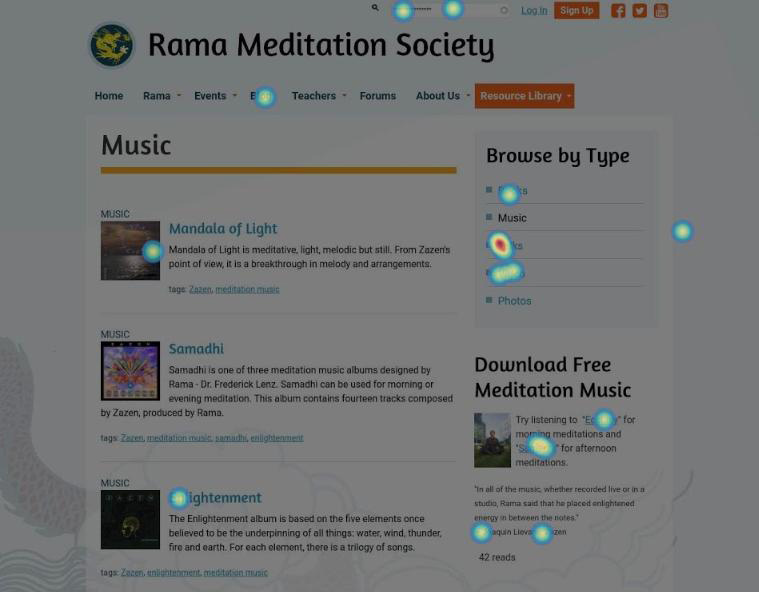
  • Try an online user testing platform like Hotjar to help you go beyond standard analytics with heatmaps, visitor recordings, conversion funnels and more.
    Complete a User Experience & Conversion Optimization Audit with Kanopi Studios. We can make a whole range of insightful recommendations within your budget. Contact us to learn more.

Does your site take forever to load?

If it takes longer than three seconds, you have a problem.

  • Use Google PageSpeed or Pingdom to test your site’s speed, understand what might be slowing it down and take action to resolve any issues.
  • Make sure you have a reliable hosting company backing your site at the right level for the amount of traffic you receive.

Does your site work on mobile? Is it accessible?

It’s vital to make sure your site is accessible to everyone, no matter what device or screen size they are using. Here’s how to check:

  • Try using your site on a phone or a tablet. If you have to pinch or zoom to interact with the content, it’s time for a responsive design.
  • Make sure you can tab through all navigation and content on your site using only your keyboard, that all images have alt tags, and that you are able to use a voice browser to “read” your pages out loud. If not, you are missing key elements of accessibility.
  • Contact Kanopi Studios about an accessibility audit. We can help you identify the issues and build a plan for how to resolve them.

Is it frustrating – or impossible – to update content on your site?

If it’s a major undertaking to change even the simplest thing, something needs to happen.

  • Define your ideal workflow, then ask an expert to take a look and see how you can optimize the backend.
  • Consider the types of content that your site needs to support. Do you have templates in place that meet your needs? If not, it may be time to consider a bit of design and development time to build additional page types on your site.

Getting negative user feedback?

If the people visiting your site are taking the time to complain, chances are they might also take the time to help you make things better. Here’s how:

  • Collect feedback by sending out a survey, or document your customer service calls.
  • Always thank people for taking the time to help you improve.
  • Look for trends in the information you are receiving from users and build a plan to address any issues to help meet their needs

If none of the issues above apply, congratulations! Your user experience is likely more solid than many of the websites out there! But there are still more things to consider before committing to rebuilding your site. In our next post, we will walk you through a number of common technical issues and some helpful fixes for them.

mage of business people hands working with papers at meeting

Concerned About the Health of Your Website? Download our Checklist.

Amber
Amber Young

There are so many factors that go into creating and maintaining a successful website that it can be hard to know where to start. It’s also difficult to prioritize your limited time and resources. That’s why we made a checklist to help you track best practices, from design, to user experience to accessibility, SEO and everything in between. 

Use it as a reference to evaluate your website and focus your energy on the areas where you can make the biggest impact for your business and your audience.         

We’re planning to create more checklists that dive deeper into some of our main practice areas. Let us know if there is a topic that would be helpful to you by writing to hello@kanopistudios.com.     

Get the checklist   

How to “humanize” the web development process to effectively share your story & connect with your audience

Your audience is made of people. Not numbers.

While “looking at the numbers” is a quantitative way to determine how well you’ve succeeded at meeting your business goals, your audience is not a troop of robots that generate traffic numbers and donation statistics. They are living, breathing, thinking, analytical people.

Not only are they people, but most likely, they’re people with very little time in their day. In an age of constant connectivity and ubiquitous multitasking, it’s important to make an immediate impact and a clear call to action when they choose to spend their precious moments with you.

How do you make the greatest impact when you have only a few seconds of someone’s attention? Here are some tips to use during the web development process to help you to make their visit as impactful as possible.

Provide Relevant Content

The key word here is relevant. You need to dig deeply into what will be relevant for your audience. Think about the frame of mind they are in when they reach your site. For example, if most site visitors are coming to your site through a Facebook advertisement, then the page they land on should pick up the messaging and push them towards the conversion action set in that Facebook advertisement. We do not want to interrupt or divert their path, we want to extend it.

Analytics and site feedback from your users also give you big clues as to what content and activities resonate most with your audience. Optimize your site for those items. Your site needs to live, breathe, and adjust to the ever-changing needs and interests of your site visitors.

  • Kanopi Tip: Have a strategy for ongoing site maintenance to make it easy to continually optimize your site. Kanopi’s strong support team works with your organization to identify and implement optimizations. We are an extension of your team and are always there when you need us!
  • Kanopi Tip: Providing more relevant content might mean more targeted, expert content development for your site. Showcasing your expertise will lead to your audience seeing you as a trusted resource (and will help with your SEO for findability!)

Provide a Reason to Care

Your mission is important. But do your visitors realize how important it really is? Giving them a big fat “Donate” button in the header and expecting them to click it doesn’t acknowledge the whole picture. The button is only part of the work. Giving them ways to donate or join the conversation in spots they can always access helps, but you must provide this content in the context of a story. Your story. As passive visitors to a site, we want to be sold on why we should do something — not just told what to do.

  • Kanopi Tip: Compel your users to take action by involving them in your story. Don’t just tell them about your mission. Evoke emotion and connect with them. Promote pathways for conversions and donations in logical, progressive ways. Kanopi works to determine conversion points within the experience that make sense. For example, if you are talking about stories involving the individuals you help, share those individuals’ perspectives, images, or testimonials. Invite the user to engage with others or to share their story with you. This type of conversion can lead to donations, certainly. But more importantly it can lead to advocacy, inspiring your visitors to become advocates for your mission and spreading the word to others.

Don’t Trust Your Gut

While it is critical to humanize the experience, you do need those numbers to back up decisions as to what the humans on your site actually want and need. Making a subjective decision based on internal demands and objectives will only please the internal teams — not your users. Make your audience your focus during the web development process. Put benchmarks into place, and ask users for feedback. Getting information directly from your audience and their online behavior is the best way to be sure you address their needs within your site.

Make Interaction Easy

We mentioned the idea of “content in context” — integrating logical conversion points throughout your site experience in spots your users can always easily access, as well as within the context of your larger story. But we also need to optimize for a user’s environment. Mobile is now the dominant form of internet browsing. Our users are on the go. Don’t expect your audience to be settled in with a cup of coffee and a dedicated block of time to wander through your site on their desktop. Mobile is critical to the web development process.

  • Kanopi Tip: A responsive site should be thought of as “mobile-first”. At Kanopi, we strategize starting with the smallest screen sizes and work our way up from there. How do people interact with elements that you want to be omnipresent if they’re in a mobile context? Should the donation button, usually in the main header on desktop, be pinned to the bottom of the phone’s viewport for easy access? Should the phone number be more prominent on a mobile device?
  • Kanopi Tip: When designing for mobile, also think about the ergonomic position in which someone holds a phone — usually one handed, making their thumb the easiest way to navigate. Should that primary call to action go right next to where their thumb naturally lies for even easier access? And how big does it need to be to ensure an easy click target for touch?

Make Interaction Fast

Statistical data shows that the average page load time in the US for most sites is 5-7 seconds. Those same statistics show that abandonment rates take an exponential rise if your page takes longer than three seconds to load, and Google prefers that you have it under two seconds.

Given that in the US, ~71% of digital minutes spent are on mobile devices, and it’s ~62% in Canada, one thing is clear — speed matters in getting your message out. When it comes to web pages, bigger isn’t always better.

  • Kanopi Tip: Consider implementing Accelerated Mobile Pages (AMP) for your site. AMP is an open source project backed by Google that is focused on building a faster, simpler, and more performant web that is optimized for mobile devices. And As a bonus, you’ll get an SEO boost from the use of this approach.
  • Kanopi Tip: The biggest culprit in slow page load time on most pages is the number and file size of image assets. Kanopi recommends being very choosy in your use of imagery. Well designed vector imagery, use of color, and beautiful typography can have just as big a visual impact with a much smaller page footprint. And always leverage an image compression tool when you’re managing image files on your site.
  • Kanopi Tip: Only load what a user needs. At Kanopi, we take a progressively enhanced approach to web development. By starting mobile-first, we will load only the assets the mobile experience needs to render, keeping it as fast as possible. And we’ll add features and functionality as we scale. We are also not afraid to ask the hard questions — if a mobile user doesn’t need that feature… does anyone? Users leveraging external readers and “reading views” on web pages are becoming more and more prominent. They don’t want your eye candy. They want your content.

There is no “Build it and they will come.”

Building an audience-focused website with compelling stories will not cause an automagical spike in your site interactions or user donations. Understanding where your audience was before and after your site experience will give you a better understanding of how to market to them. Your site is one step in a multifaceted customer journey.

Where did their journey start? Were they at a third party platform that focuses on your subject matter? Can you partner with that platform to serve content about your organization?

Do they typically leave to visit a site rating your subject matter? Should you beef up your testimonials there to help them make a decision on interacting with you?

  • Kanopi Tip: Your site is one piece of your digital presence, and one piece of your audience’s user journey. Thinking of your site as the sole representation of your organization is not wise. People jump around and research with all the different resources available to them. Making conscious marketing choices can help make your presence, once they do land on your site, more valid, more recognizable and an authority for your cause.

Humanize the web development process!

Putting your users and their needs front and center helps both your audience and your organization and builds a relationship of trust and advocacy between them. It is the human element of our online experience that drives the numbers we use to justify our digital marketing activities to our stakeholders and makes the web development process more targeted and effective. If you try some of our tips, please contact us and let us know how they worked for you. And if you need assistance or have questions, reach out. We are always here for you.


About Kanopi

Kanopi is a women-run and family-owned business that is centered around beautiful design and strong architecture. Our data-driven approach fosters user-centricity and creates holistic web experiences based on user decisions. We believe that regular communication and support are the cornerstones of good development, and strive to give our clients a unique sense of ownership and investment in their work with Kanopi.

Taming the Wild Beast: Building Better Higher Education Websites

A large classroom in a higher education setting: there are many seats facing a large video screen and dry-erase board.

Colleges, universities, and other higher education websites have to be a lot of things to a lot of people. These institutions are filled with some of the smartest people on the planet who are trying to share their information with not only their peers, but also with laypeople and prospective students. Some institutions have hundreds of departments, each with its own goals and priorities. So how do you build a website that meets the complex and multilayered needs of higher education?

Our answer is research. We’ve worked with universities and colleges both big and small — from Stanford and Berkeley to local community colleges. And all of them start in the same place: targeted research to determine who is actually using the website (as opposed to who faculty and staff think is using the website) and what is important to those users.

Clients are often surprised by the findings of our user-focused research. Why? Because the results don’t mesh with their preconceived notions of how many people are using the site and for what purposes. But the end results speak for themselves. Knowing exactly who your audience is and what they need is a crucial but often overlooked step that can make the difference between a good website and a brilliant one. As an added bonus, being able to point to the research can help to manage the sometimes competing goals and priorities (and dare we say egos?) of various departments … and department heads.

Once the research has been conducted, we turn our attention to organization. Universities are often what we affectionately call “hoarders.” When we migrated the Berkeley School of Information’s legacy website to a new version of Drupal, we had to work with ten years of content — much of which was outdated and no longer relevant to the university’s audience.

During the discovery process, we went through each content type and mapped the old content to the new website. This process allowed the School to carefully analyze how much of the old information was necessary to bring over to the new site. It also allowed the Kanopi team to gain clarity on the specific content that needed to be migrated during the development phase. Working with immense amounts of content is a challenge that particularly applies to higher education, which is why we develop a system for content governance early in the process.

We know that many colleges and universities have their own information technology systems and protocols, and we’re happy to work within those. We have a strict “don’t reinvent the wheel” policy! (Another reason we do so much research up front: we know exactly what we’re working with — which saves the client time and money down the road.)

Integration is key when managing higher education websites that are both broad and deep, with multiple sections and applications. Our years of experience integrating single sign-on for users saves time and headaches and streamlines what once was an unwieldy, cumbersome process.

Thankfully for the world we live in, institutions of higher education are hotbeds of free thinking and intellectual independence. Of course, this isn’t limited to the lecture hall and academic papers. The spirit of independence also applies to website management and maintenance. No higher ed client wants to depend on their web company for every little change and problem, so we use a “teach the teacher” support model. We train the power users and site admins so that they aren’t tied to us, but are empowered to manage their own sites going forward. Of course, if things ever get out of hand or the IT department goes on vacation all at once, we’re here 24/7 with reliable, responsive support.

Kanopi has years of experience working with higher education websites and clients all across the United States and Canada. Some recent clients include UCLA, Stanford, Berkeley, Washington State, UCSF, Columbia, the University of Delaware, and the University of British Columbia. We do our homework (lots and lots of homework), test our theories through vigorous research, and then build the very best websites for our nation’s very brightest institutions of higher learning. Contact us to help with yours.

Going Guerilla: Helping Nonprofits Raise More Money Through Affordable UX

Your nonprofit organization needs a new website. Expectations are huge, but your budget is tiny. Once again, you’re being asked to turn straw into gold. And you get it — donors want their money going to your life-changing programs, not into bells and whistles for your website. But how can you build a website that serves the mission of your organization when you have limited resources?

Sound familiar?

At Kanopi Studios, we love nonprofit organizations. In fact, most of us are volunteers, activists, and donors for causes as diverse as famine relief in East Africa to programming lessons for underprivileged kids in San Francisco. And we understand the push-back some nonprofits get when it comes to spending money and time building a great website — especially when it comes to user experience (UX) research.

We’re a data-driven web development company. That means we don’t just make websites that look good; they have to work hard — and smart — at the same time. In the nonprofit world, that means your website not only needs to look modern and appealing, but most importantly, it needs to be usable and have captivating content for YOUR users to help you raise money. The distinction here is that your audience is unique and you need to understand them in order to build a website experience with which they will engage. In our many years of experience, the best way to make this happen is by conducting user experience research before doing anything else.

You know the saying, “Do it right or do it twice?” Definitely applies here. In fact, not doing UX research will likely cost you money — maybe a lot of it. If a donor comes to your site with the intention to give, but can’t figure out how to do that or is put off by an awkward or frustrating experience, they won’t be coming back. You’ll have missed out on what could have turned into a lifelong philanthropic partnership. And as boomers and millennials turn more and more toward online and mobile giving, your website is becoming an increasingly vital part of your fundraising strategy. Doing thoughtful but affordable UX research will help you understand what your audience needs. This will inform better usability and help you create compelling content, which will tip potential donors over the threshold into donating funds.

So how to conduct the user experience research you need with the budget you have? For starters, hire a web development company that understands and loves non-profits — like us! We offer great non-profit rates while still providing the same top-quality service we give our corporate clients. We happily work within limited budgets, from UX through to the finished product. We know that improving your website is just one of many projects on your to-do list! Leaning on an experienced firm like Kanopi Studios will all you to focus on changing lives while we do what we’re best at.

Here’s just a sample of how we can bring affordable UX research to your organization:

Create an online site survey. We start with your current users and ask them what’s working and what isn’t (and we’re experts in asking the right questions to get the data we need). We keep the survey short and sweet to make sure it’s not daunting to your audience.

Conduct online user session research. We use an analytics platform to see how current uses are navigating around your site, learning from their behavior.

Use online analytical tools. Google Analytics and other online tools are useful (and free) ways to get an idea of how users are currently interacting with your site. In fact, many organizations (maybe yours?) already have Google Analytics but aren’t using it to its full potential.

Keyword analysis. Keeping with the Google theme, Google’s free keyword planner can help you determine which key phrases will resonate with your audience and direct them toward the action you’d like them to take.

Do a comparative analytics review. We not only analyze your site, but sites similar to yours — especially those that are working well.

Recruit friends and family. Research participants don’t have to be strangers, and they don’t have to get paid. Reach out to your volunteers, staff, donors, and board members (and ask them to reach out to their friends and families!) to create a pool of research participants. Try to find people who fit into your target audience, and remember: not every opinion will apply to your needs. The idea here is to identify general trends.

Go where your audience is. Do you organize a big fundraising event like a gala or a run? This is the perfect place to ask a few questions of your target audience, most of whom will be thrilled to offer feedback. And it costs you nothing. Focus on asking specific questions versus just asking for them to provide their opinions on the site. For example, ask, “What type of information are you looking for when you consider donating to an organization?” Asking questions like these can help inform your content strategy.

Use the back of the napkin strategy. In Rocket Surgery Made Easy, Steve Krug suggests sketching out your web design and flow on the back of a napkin or a scrap piece of paper, and ask test subjects to tell you how they would navigate that site. Nothing fancy, but it gives you the results you need. It’s also easy and quick to modify in this format, so you can iterate as you go.

Card sorting. If we’re going old school with napkins, we can’t forget the UX power of card sorting! Use index cards or sticky notes to map out your site–one card for each page or section. Then ask someone in your target audience to sort the cards according to how they would group the information together. The results can be enlightening! (And it’s also kind of fun.)

Sometimes simple changes translate into big results — but you won’t know what changes to make without research. One of our nonprofit clients was struggling with converting website visitors to donors. Our research showed that the problem was the color of the “Donate” button. Seriously. We changed the color and donations increased.

For another client, the confusion lay in how to log into their personalized account page. Through a series of tests, we determined that a simple language change on the homepage would bring more clarity to site visitors and direct them to where they wanted to go. It worked.

We know that as a nonprofit, you have to do more than less. And we’re committed to helping you with affordable ux as well as other effective ways to spread your message and raise money for your cause. Contact us today and let’s talk about how we can create the very best website for your organization.

Aerial shot of Kanopi leadership around a table working on a project with laptops open.

How to write a winning RFP

Starting a new website project can feel overwhelming. Finding the right agency — one that truly understands your needs and can deliver effectively — is crucial. The best way to set yourself up for success? Ask the right questions from the start. But equally as important is providing as much clarity as possible in your Request for Proposal (RFP), ensuring that the responding agencies can offer accurate estimates and informed responses.

For large organizations with multiple decision-makers (we’re looking at you higher education and healthcare!) this process can be even more complex. Procurement requirements, departmental priorities, and differing opinions can make alignment challenging.

We see a lot of RFPs … ones that are 100 pages long and full of legal and procurement boilerplate, to those that are just three to five pages (and in case you were wondering, we prefer the shorter, more concise ones that get to the heart of the problem). So we have thoughts on what makes a great RFP.

To simplify the process, we’ve created an RFP template to serve as a foundation for your next website project. Our friends at the Drupal Association have written an RFP template as well specifically around open source projects.

As you work through the template, here are a few essentials to keep in mind:

  • Know your goals. Align with your internal teams in advance of the RFP process to define (and align) your needs.
  • Think in terms of building a long-term relationship. A good partnership with your vendors is key and should be established from the beginning. Do you like them as people? Can you imagine being on hours of calls? Choose an agency you can imagine collaborating with for years.
  • Be transparent. Clarity will benefit everyone. The clearer you are, the stronger and more customized the proposals you’ll get.
  • State your budget. This is a big one. When you include a realistic budget range, agencies can tailor their recommendations and avoid over- or under-scoping. It saves everyone time, builds trust, and ensures proposals are grounded in what’s achievable. Also consider reserving some percentage for contingency.  
  • Don’t be overly prescriptive. Describe your challenges, not the exact solutions. Good agencies are gifted at coming up with expert solutions to challenges that are stated in terms of problem statements or business objectives. Keeping an open mind will allow you to see (and compare) your prospective vendor’s recommendations and benefit from their expertise. 
  • Give yourself and your vendor enough time. Start the RFP process before your need is immediate to avoid extra pressure on both sides to meet an unnecessarily tight timeline to respond. Allowing more time can also mean more considered and complete responses.
  • Talk to your potential vendors ahead of time. This allows you to establish the relationship and pre-select the ones you suspect will be a good fit. The right vendors can provide a lot of value early in the process, which may even help inform the scope or direction of the RFP. Even better? Complete your strategic planning first to get extra clarity.

If you use AI to write your RFP:

AI tools can help you get started faster, but be careful: they tend to add unnecessary detail (and bloat equals a higher budget). To keep your RFP sharp:

  • Begin with a clear problem statement and desired outcomes.
  • Ask AI to outline sections, not write a full document.
  • Review, refine, and delete anything that doesn’t add value.
  • Separate “must-haves” from “nice-to-haves.”
  • Always have a human proofread any AI parts of your RFP to sanity-check the output against your goals and budget.

What’s next?

Once you’ve written that RFP and gotten responses back, it’s time to choose your vendor! We’ve also got advice on how to evaluate the RFP responses you receive.

Kanopi’s Allison Manley gave a presentation at the NTC Conference on how to write a winning RFP. Check out her presentation below to get more in-depth information.