
Hands holding credit card and using laptop. Online shopping

Considered Purchases: How to Influence Buyers With Audience Support

Jessica Skewes, Director of Strategy
Jessica Skewes

If you’re an online shopper (and who isn’t these days!) then you likely understand that there are at least two types of purchase cycles that naturally occur.

If you’re an online shopper (and who isn’t these days!) then you likely understand that there are at least two types of purchase cycles that naturally occur: the impulse buy, and the considered purchase.

The first is your impulse buy. It’s much easier to be impulsive when you are considering low-cost items or decisions that won’t result in significant consequences.

Other types of purchases are much more complex, involving products or services are expensive or that represent emotional or financial risk. These complicated transactions are called considered purchases. Because they matter more, we tend to research them more carefully, spend more time thinking through options, and look for different types of content at each stage of our decision-making process. This complexity can present a challenge for brands that offer products or services in this category.

At Kanopi, we’ve developed some frameworks to help clients influence the complicated ecosystem of the considered purchase. By understanding customer mindsets at each stage of their journey, you can tailor an experience that provides the right message at the right time, tipping the scales in favor of your brand.

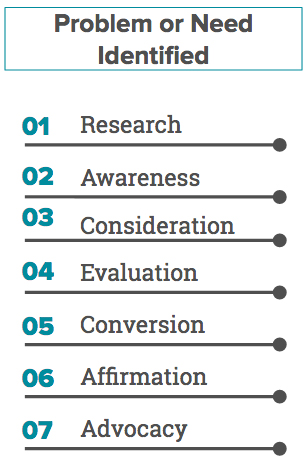
First, it’s helpful to become familiar with the standard customer journey, pictured below.

Image of standard 7-step customer journey stages: Research, Awareness, Consideration, Evaluation, Conversion, Affirmation, and Advocacy.

Consider the needs of your personas at each of their journey stages. Think about how their needs may be different, where they overlap, and what types of content could help support them, taking the following details into account:

  • Age
  • Technology use
  • Mindset
  • Barriers to conversion
  • Length of each journey stage
  • Other forms of research they might use
  • Emotion
  • Location
  • Personality traits
  • Actionable needs
  • Informational needs

Once you’ve mapped in your personas’ needs across their journey, you can more easily identify where existing content fits in, and where you may need to create fresh content to fill gaps in your experience.

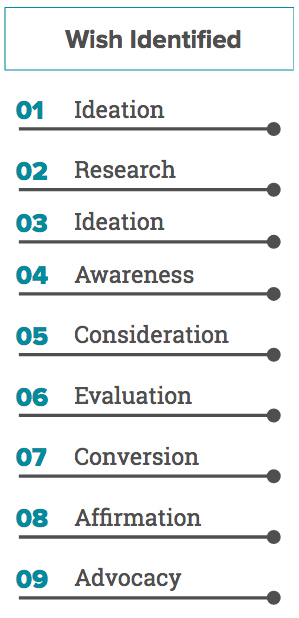
It’s also important to think beyond the typical journey stages to identify the path that’s most likely for your product or service. This can vary quite a bit, especially for high-cost, high-stakes considered purchases. In those cases, users may follow a journey that looks a bit more like this:

Image of 9-step journey stages: Ideation, Research, Ideation, Awareness, Consideration, Evaluation, Conversion, Affirmation, and Advocacy.

While it’s possible to sell a luxury car or new home entirely online, that doesn’t mean that’s how your audience typically behaves. Let’s walk through an example:

Customers in the market for luxury cars understand that the purchase takes significant resources and commitment, and has the potential to provide great joy or become a big mistake.  As a result, they will likely be cautious and conduct a lot of research. They may have been planning this purchase for a long time. Ask yourself, how long would each of their journey stages take? What are the barriers they might face? To what degree will they need a personal touch? How will they know they can trust you? How can you create content that gets your customer as close as possible to the sensory experience of that new car smell and the feel of sliding into a leather seat?

The best way to understand the real journey for your customers is to ask them. Customer research can yield invaluable insights into buying habits, preferences and emotional states that you can address to help set your brand apart.

It’s also helpful to work with a team of seasoned strategists who can guide your research process, stay focused on customer needs, and spot useful insights from the data you already have available.

Kanopi Studios’ strategy team partners with you to make sure that your customers’ needs are supported throughout their entire journey, especially if your product or service falls into the considered purchase category. Think of us as guides for navigating the right balance of information, credibility, personality, and persuasion that will remove barriers and deliver conversions. If you’d like to learn more about how we can help with your considered purchase, we’d love to hear from you!

Ready to launch? Here’s a pre-launch checklist

It’s been a lot of hard work and the time has finally come to launch your new website. Congratulations!

But before you push that launch button, take a minute to think; are you REALLY ready to launch your website?

  • Multiple rounds of quality assurance testing? CHECK!
  • Cross browser and responsive testing? CHECK!

But is there something else you might have missed?

The items above are some of the more obvious steps a team may go through when preparing a site to launch, but there are some lesser known or sometimes forgotten steps that are just as important to take when launching a new website. So what do we also include in our pre-launch checklist?

  • Set up redirects
  • Check links: Absolute vs Relative
  • Accessibility checks
  • Decide what to do with your old site
  • Decide who will maintain your new site

Set up redirects

Over the years you may have amassed a great deal of content on your old website, and  chances are that in the course of creating your new website you’ve changed how that content is organized. This can lead to content revisions during the process of migrating  that content to the new system. Any team that has gone through this process can tell you that it is a massive effort; even if you’re automating the migration of content in someway. During this flurry of activity in moving content from point A to point B, it’s easy to forget one simple matter: How will users find the same or similar content on the new website?

Creating Redirects ensures that users who arrive at the site via an outdated URL, say from a bookmark or external site, are automatically sent to the appropriate content. Setting up redirects is incredibly important to creating a solid User Experience and it’s good for SEO. Just about every URL on your old site should have a redirect if the URL has changed. This may seem like a herculean effort, but it actually pairs well with the process of moving content from the old to new website.

First off a brief explanation of Absolute versus Relative URLs. An Absolutely URL encompasses a URL in its entirety. ie: https://kanopi.com/about-us. A Relative URL is just the portion of the URL that occurs after the “.com” in the example above. ie. /about-us. In the course of preparing a new website by loading copy and uploading images, you most likely are working from a temporary Development URL. When the time comes to launch the new website, the Development URL will change. When the URL is changed, any links that are pointing to the Absolute Development URL will break. This is a common mistake, and one that can have disastrous results once your new website goes live.

As a general rule of thumb try to avoid Absolute URLs when loading content to any environment. This ensure that if the core URL ever changes, your links won’t break. Leading up to launch, try to work with your Developer to identify and rectify any Absolute URLs.   

Accessibility checks

Accessibility was not exactly a top priority of early website development; supporting users with impairments is becoming an ever increasing need for any modern website. Accessibility starts early on in a project’s planning, and should be discussed early and often. From initial designs through to development, there are many touch points where a project team can ensure that the site is compliant with standards.

But what if your site is about to go live and you haven’t considered this? Luckily there are tools like Site Improve that allow you to run automated tests to see where your site may need remediation before it can be compliant. Not only is it good for SEO, but making sure your site is accessible to the widest range of users ensures you reach a wider audience and that they have the best user experience possible.   

Bot Mitigation

With the ever-increasing presence of AI, bots are crawling the internet seeking answers to our questions and returning the most relevant results to users. The strain and stress this places on an unprepared site can affect performance, degrading the overall experience for human users or even bringing down a site entirely. Bot mitigation needs to be considered when launching a website nowadays.

Making sure your site has an llms.txt file that allows Large Language Models to more easily parse your site’s content. Creating a plan to ensure your site isn’t overwhelmed by the wrong bots; nefarious bots who can bring down your site through Denial of Service (DDoS) attacks are becoming increasingly common, trying to blend in and take advantage of the rise in bot traffic. These are just a few factors to consider in your bot mitigation plan. Contact us for more insights and to help develop a plan tailored to your website launch.

Decide what to do with your old site

In the activity leading up to the launch of your new website, it’s easy to overlook this question. Regardless of how confident you are in the new website, it’s important to have a plan in place for what to do with your old website. Here are some important questions to consider when considering the fate of your old website:

Will you need to reference your old site at any point in the future? Perhaps you weren’t able to move all the content to the new site before launch or maybe there is old content that won’t be migrated, but you still need to reference it in the future. Whatever the reason may be if the answer to this question is yes, you’ll want to keep your site up in some capacity.

Can you afford to host two websites at the same time? This one is a little less straightforward; depending on the size, state, and makeup of your old website, you have options. From a budgetary standpoint, paying for a website that no one will really visit is probably not going to look all that great to accounting. The good news is that with no traffic visiting the old website you probably don’t need all that expensive infrastructure; many enterprise level hosting providers have a free tier that is great for storing a legacy site on.    

Regardless of your situation, you can always find options. What’s most important is that you have a plan.

Decide who will maintain your new site

Building a website is a process; one that requires regular upkeep and ongoing maintenance. Understand that your website is a tool, and built right it should be designed to grow and adapt to the changing needs of your business. This is the philosophy we at Kanopi believe in, and try to instil in our projects. So with that in mind, it’s important to consider who will be responsible for ongoing improvements, maintenance, updates, and bug fixes when the times arise.

While not uncommon for teams to try to take this on internally, it’s important to consider if you have the right skill sets, let alone bandwidth for this to be a viable option. Another solution is to work with an agency like Kanopi to provide ongoing support for your site. An agency will have access to a wider range of expertise and ensures maximum flexibility for the future growth of your site.

Need a more in-depth checklist?

If you want more beyond this list, we do have a multi-page checklist you can download that goes into much more granular detail, covering everything from SEO to GDPR to accessibility, and so much more. You can download that checklist here.

Use our pre-launch checklist, and you’re good to launch!

These items may seem like big additions to your plate leading up to launch, but they pale in comparison to the what could occur if you leave them out. Plan for these pre-launch checklist items early on, and it will ensure your launch goes off with one less hitch. And contact us if you need help.

All Hands Meeting

Audience Behavior: Learn More with User Research

Jessica Skewes, Director of Strategy
Jessica Skewes

Marketing 101 tells us that all successful efforts begin with knowing your audience.

But simply knowing who you are talking to is only one piece of the puzzle. Consider how much more effective you could be if you were able to see below the surface and observe audience behavior in real time.

Imagine you own a family restaurant. It makes sense that you would start by targeting families. You read some market research that tells you mothers make most of the decisions about where the family eats out. So you decide to develop a persona based on mothers who are looking for restaurants that offer fun options for kids.

It’s a good start! You can now build more useful content and even make some website updates to better connect with this persona. But do you know if there are pain points in your navigation? When your users visit a page, do you know where they are clicking and where they get stuck? Are there additional features or content that could add value?

There are some simple user research methods and tools which can help you get the detail you need on audience behavior to gain deeper insight. By combining direct and indirect sources of data, you’ll be able to build a user experience that truly connects with your audience.

Here’s some ways you can do this.

Direct user feedback

When you want to know something, sometimes it is easiest to just ask! Asking your users a few simple questions about their needs shows that you care about their experience and can reveal tremendous insights. We recommend making it a quick and painless process by focusing on a short list of questions through a survey on your site, or asking directly to potential/current customers, including:

  • What do you visit our website to do?
  • Did you find what you were looking for?
  • Is there anything else we could include on our site that would be helpful?

An easy way to gather this information is by setting up a pop-up survey on your website through HotJar’s polling feature. You’d be surprised how much data you can collect in just a few weeks.

For longer surveys, SurveyMonkey can be a good option. SurveyMonkey allows you to send surveys to a curated segment of your audience and can even help you gather additional input from internal stakeholders. Typeform also has several options with an intuitive admin interface, a conversational tone and engaging interface for users.

Whenever possible, we also recommend 1-1 interviews with your customers. These conversations can be invaluable in helping you to understand people’s mindset, motivations and needs by going beyond what people are doing by asking them why.  

Indirect user feedback

HotJar also supports indirect feedback methods, including heatmaps, user session recordings, and conversion form tracking.

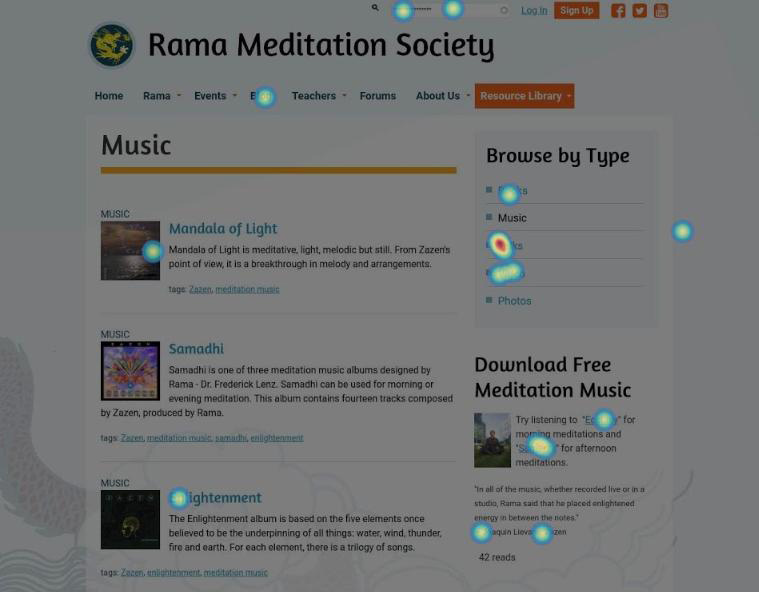
Heatmaps allow you to see where users click, allowing you to compare the amount of attention each page element receives. For example, many websites have important calls to action in more than one place on a page because they aren’t sure which placement is more effective. Installing a heatmap will tell you which link is performing better, which can help you streamline your page. Heatmaps are most helpful on pages that receive a fair amount of traffic so that they can collect enough data available to support solid decisions.

Example of a heat map on a web page for Rama Meditation Society

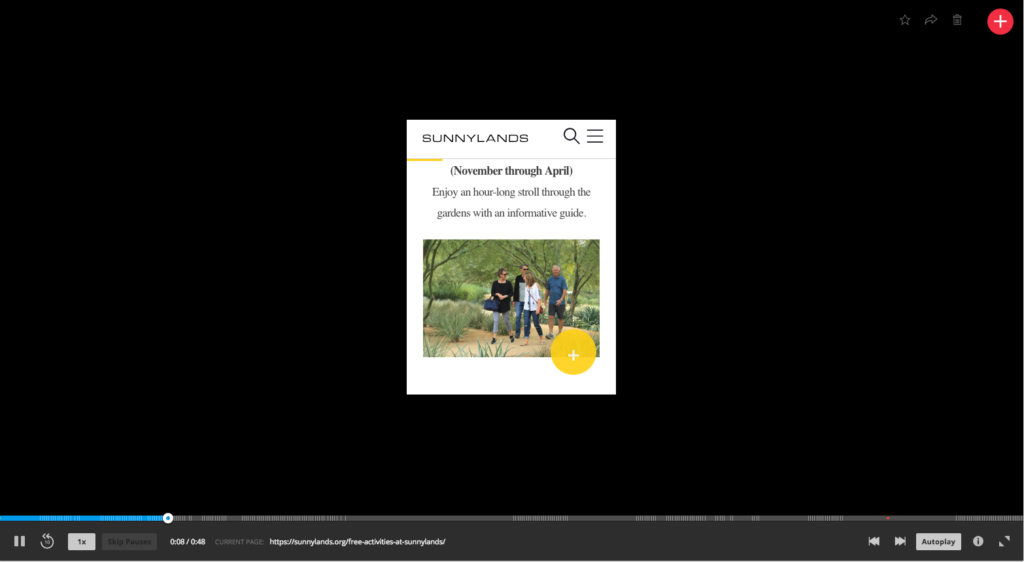
User session recordings do exactly what their name promises: recording user actions so that you can see what people are doing on your site, and exactly where they pause or struggle. Looking at user sessions in aggregate can help you restructure your pages to support common paths and eliminate common challenges.

Screen grab of a user session recording

Conversion form tracking can help you see which form fields users struggle with and where they drop out of the process. This information can guide decision making around where and how to streamline forms so that they can accomplish their number one goal … conversion!

Get started understanding audience behavior today!

We know that conducting user research as part of a website project can sound expensive or time consuming, or both. But the whole reason why you need a website is to connect with your users. Without a true understanding of their needs, even the best intentions can miss the mark.

The good news is that there are a number of options available through HotJar and other tools that make user research easier to tackle than ever. And Kanopi Studios is here to help, whether you’d like more information about using user research tools or need an experienced team to lead and interpret the research. Building your website around data and insights is the best way to elevate your relationship with your audience by providing them relevant content, optimized user pathways and ultimately a better relationship with your brand. So let’s get started!

Kanopi Studios is a Top Provider on Clutch

Screen grab of the Clutch website home page

It’s not easy to find a development partner you can trust. Particularly if you’ve never been immersed in the world of web development, it may take you some time to learn the language. That can make it even more difficult to know whether your partner is really staying on track with what you want to accomplish.

Luckily, knowing what to look for in a business partner can save you from all of the potential troubles later on. Ratings and reviews sites like Clutch can help you get there. This platform focuses on collecting and verifying detailed client feedback and then using a proprietary research algorithm to rank thousands of firms across their platform. Ultimately, Clutch is a resource for business buyers to find the top-ranked service providers that match their business needs.

Luckily for us, users on Clutch will also find Kanopi Studios at the top of the list to do just that. Kanopi has been working with Clutch for a few months to collect and utilize client feedback to find out what we should focus on in the coming year. Through the process, we’ve coincidentally been named among the firm’s top digital design agencies in San Francisco.

Here are some of the leading client reviews that led us to this recognition:

“They were fantastic overall. We had great success communicating to their team via video conferencing, and they were able to answer every question we had. They also worked quickly and were very efficient with their time, so we got a great value overall.”

“Kanopi Studios’ staff members are their most impressive assets — extremely intelligent, experienced, and personable. Building a website is never easy, but working with people you both respect and like makes a huge difference.”

“Kanopi Studios successfully migrated our Drupal platform while preserving all the content that we’ve built up over the years. They worked hard to achieve a responsive design that works well on both mobile and large desktop displays.”

Not only have these kind words earned us recognition on Clutch, but we’ve also gained the attention of the how-to focused platform, The Manifest (where we are listed among top Drupal developers in San Francisco), and the portfolio-focused site, Visual Objects (where we are gaining ground among top web design agencies site-wide).

Thank you, as always, to our amazing clients for the reviews and the support.

Contact us if you’d like us to do amazing 5-star review work for you.

Accessibility at BADCamp = Education, Inspiration and Opportunity

Now that the excitement of BADCamp has worn off, I have a moment to reflect on my experience as a first-time attendee of this amazing, free event. Knowing full well how deeply involved Kanopi Studios is in both the organization and thought leadership at BADCamp, I crafted my schedule for an opportunity to hear my colleagues while also attending as many sessions on Accessibility and User Experience (UX) as possible.

Kanopi’s sessions included the following:

The rest of my schedule revolved around a series of sessions and trainings tailored toward contributing to the Drupal community, Accessibility and User Experience.

For the sake of this post, I want to cover a topic that everyone who builds websites can learn from. Without further ado, let’s dive a bit deeper into the accessibility portion of the camp.  

Who is affected by web accessibility?

According to the CDC, 53 million adults in the US live with some kind of disability; which adds up to 26% of adults in the US. Issues range from temporary difficulties (like a broken wrist) to permanent aspects of daily life that affect our vision, hearing, mental processing and mobility. Creating an accessible website allows you to communicate with 1 in 4 adults you might otherwise have excluded.

What is web accessibility?

Accessibility is a detailed set of requirements for content writers, web designers and web developers. By ensuring that a website is accessible, we are taking an inclusive attitude towards our products and businesses. The Web Content Accessibility Guidelines (WCAG) are a globally acknowledged set of standards that help us publish content that fits within the established success criteria. These guidelines are organized into the following four categories.

WCAG Categories:

  • Is your website perceivable? This applies to non-text content, time-based media (audio and video), color contrast, text size, etc.
  • Is your website operable? This ensures that content is easy to navigate using a keyboard, that animations and interactions meet real-user requirements, buttons are large enough to click, etc.
  • Is your website understandable? This means that text content is easy to read for someone at a ninth grade reading level, that interactions follow design patterns in a predictable manner, that form errors are easy to recover from, etc.
  • Is your website robust? This means that content should be easy to interpret for assistive technologies, such as screen readers.

The World Wide Web Consortium (W3C) is an international community whose mission is to lead the Web to its full potential. They have also published a checklist to aid our efforts in meeting WCAG success criteria.

Need help with making your site accessible? Contact us.

How can we be successful in making the web accessible?

Industries have varied requirements when it comes to web accessibility. WCAG has three levels of compliance, ranging from A to AA to AAA. A conformity has the lowest set of requirements and AAA has the strictest set of requirements; so strict, in fact, it may be impossible to achieve across an entire site.

Efforts to meet these standards fall on every individual involved in the process of creating a website. Although there are many tools that aid in our journey, we reach accessibility through a combination of programmatic and manual means.

The most important thing to keep in mind is the fact that achieving success in the world of accessibility is a journey. Any efforts along the way will get you one step closer towards a more inclusive website and a broader audience base.

Please Remember: Once Kanopi helps you launch an accessible site, it’s your job to maintain it. Any content you add moving forward must be properly tagged; images should have proper alt text and videos should have captions. Users come to your site because they love your content, after all! The more you can make your content accessible, the more you will delight your users.

Interested in making your site more accessible? Check out some of the resources I linked to above to join in learning from my peers about accessibility at BADCamp. If you need more help getting there, let’s chat!

Children engaging in an atomic design project - molecular forts!

The Creative Chemistry of Atomic Design

Building a strong visual foundation with atomic design

What is Atomic Design?

Designing for the web has evolved. And with good reason. Creating strong, consistent and flexible designs for responsive sites comes with unique challenges. How do we craft a responsive site with tons of different content needs and keep it unified? Enter atomic design.

Pattern-based design systems (or pattern libraries) aren’t a new idea. But atomic design gives this old concept a new framework. It helps us think about how to build from the bottom up to create a final web site.

Atomic Design is the brainchild of Brad Frost. His initial article on the subject is a great place to get an overview of this mental model. His analogy relates a smart design system to principles of chemistry.

See a video overview here.

Atoms

Atoms are the fundamental elements of your design. It doesn’t get smaller than this! They are the tiniest components of a site. These patterns establish the ground rules that everything else builds on. Atoms are a combination of the concrete and the abstract. Atoms are basic HTML elements like headers, paragraphs, and form fields. Alternatively, they are visual elements of your brand guidelines, like colors and fonts.

Molecules

Molecules are simple combinations of our design atoms. Just a few of them. Again, the emphasis is on incremental complexity. Some good examples are a photo and its caption, an article teaser block, or a search form.

Organisms

This is when things get interesting. With molecules in our toolbox, we can start to create organisms which represent larger sections of a site. Headers, footers, and grids of articles are examples of organisms.

For our clients, the site design starts to come to life with organisms. The larger layout components are a complete thought on their own, and we mix and match them to create templates.

Templates

The chemistry analogy falls away at this point, but not the benefits of the approach. Templates aggregate organisms into layouts that contain placeholder content. They establish whole layout patterns that we can apply to different types of content on the site.

Pages

Pages let us stress-test our templates by adding real content to the layouts. We create several pages that use the same template but different content. Pages help us see if our molecules don’t work in the real world and need adjusting. This feedback cycle helps create a tight, flexible site design that responds to the true needs of our clients.

Need help designing your site? Contact us. 

Benefits of Pattern-based Design

Kanopi specializes in Drupal and WordPress CMS development. In this context, pattern-based design methodologies really shine. Content management systems like Drupal and WordPress are inherently component driven. They use and re-use “building blocks” in different contexts throughout the system. An atomic approach enables us to reconfigure and repurpose molecules. It creates a consistent but flexible site architecture. This in turn is an efficient and scalable way to build a CMS-driven site experience. These patterns makes your site consistent. They give you the tools you need to evolve your site as the needs of your organization change.

Atomic Design at Kanopi

Kanopi takes two different approaches to pattern libraries based on the needs of our clients. Both follow the atomic design philosophy. One is an interactive design approach using clickable wireframes and modern design tools. The other is a living, breathing design that is purely code-based, using the Pattern Lab tool.

Interactive design

Strong designs start with strong strategic and UX thinking. Wireframing is a key step early in this process. Wireframes are the “bones” of your site. They give an idea of information hierarchy for your templates. They can also help understand what user interaction with the site will feel like. We create interactive, clickable wireframes. Using this tool, stakeholders and users interact with key features of the site interface early on. This way we catch usability issues before we ever get into visual design.

Kanopi’s experienced design team takes the wireframes and layers on the look and feel. They define patterns, or symbols, using web-centric design tools like Sketch. These symbols build upon one another in a way that maps beautifully to the atomic design process. These are static files, but they are built with a developer’s eye. How? Our web designers are front-end developers! As a result our designs start with the fundamental elements of HTML and grow and evolve from there.

In-browser design with Pattern Lab

In-browser design can feel strange and unfamiliar at first. But embracing it means faster design iterations. It gives a better real world picture of the site. And it serves as a foundation we can leverage in theme development to make the rest of the project go faster.

Pattern Lab is an open-source tool created to help designers architect efficient atomic design systems. It is our preferred tool for creating pattern libraries for our clients. Wireframing starts in this interface, in simple grey and white. This ensures we have identified all the patterns needed for the functionality and features of the site.

We take the established “bones” and flesh them out with established colors, typography, and visual elements. At the end, we can see templates that respond to your browser. Interacting with Pattern Lab feels like pages in a finished site. It eliminates the guesswork and misalignment that come from static, traditional mockups. The final experience gives you a link that you can share with stakeholders. They see what they need to see, on their device of preference.

To see a Pattern Lab design system in action, check out the demo on the Pattern Lab website.

Project managers looking at a whiteboard

Keeping things on track: Website project management tips for clients

Amber
Amber Young

So your company is redesigning its website and you are going to be the project manager. You will be the one responsible for making sure that everything goes according to plan. You are probably excited! And maybe a bit overwhelmed as well. Good project management will make all the difference.

The more you know going into this process the better. Since we have managed thousands of digital projects at Kanopi Studios, we wanted to share our expertise to help you hit the ground running with solid project management.

Set clear and measurable goals

This is a critical step before getting started. Since your organization is investing time and money into its website, you’ll want to be able to prove it’s effectiveness and value. Think of all of the ways that a new website can support your organization’s goals and give some thought to how you could measure its impact. Having clear goals determined in advance will help your website vendors understand where to focus to deliver the most targeted solutions. It will also help you prioritize scope and features and prove the value of the site after it launches.

Find the right vendor

First, you need to write a strong RFP. Then, it’s on to selecting the right vendor for your project. You want to find a partner who you can communicate easily with, who has the expertise to do the job right and also meets your budget needs. To make things even more complicated, when you review the set of RFP responses, it is rarely apples to apples. The pricing and information represented in them will likely differ wildly. Be sure to ask each vendor what is included in their price. Some agencies will bid low to win your business, expecting that they will be able to issue change orders for more funds throughout the process. In general, you do get what you pay for, in websites as in other areas of life, so beware of the lowest bidder. And since your digital projects are probably only one part of your busy job, finding a vendor who is flexible, experienced, and trusted will help make things easier on you, leading the way to a successful outcome.

Gather (and wrangle) your stakeholders

Before your project ever starts, there is expectation setting to be done with your internal teams. We encourage you to establish a core team of approvers who will stay engaged throughout the project and understand the progression as decisions are made. Then, you’ll need to decide on the cadence for how you will share progress with the rest of your organization. Make sure everyone knows and agrees to their role in order to avoid last minute changes or requests that can throw off the process you have put in place. Consider documenting roles in a RACI chart for additional clarity. It can be to your advantage to use the project budget and timeline as a defense mechanism against new and last minute requests, as these things will have an effect on deadlines and dollars.

Keep vendors accountable

Work with your vendors to establish a cadence of check-ins and regular reporting on budget, percent complete, next steps, and risks. Ensure that you know what to expect from deliverables and when to expect them so that you can schedule time with the right people for reviews and approvals. Find out if your vendor uses a shared project management software platform that will allow you the ability to track progress, add tasks and keep all messages and files in a single, organized location. At Kanopi, we use TeamWork and have had strong success using it to increase transparency on projects.

Understand the creative process

During the UX and design process, your vendor will be establishing guiding principles that will carry through the project. The further the process goes, the harder it will be to change course. So if you aren’t sure about something, ask! It is always easier to adjust a strategy document or tweak a design than it is to rebuild something once it is in code. This should be a collaborative process, so we recommend frequent discussions and reviews to stay in touch on progress and get buy-in from your team.

Think about content early. Check in about content often.

Pay attention during the design phase to how content will be presented on the new site. Always be thinking: Do we have existing content to fill those boxes in the designs? Or will we need to create it? If there is new content to be created (as there most often is), do you have dedicated in-house resources to make this happen? Are your subject matter experts prepared to share details to help your writers deliver? Don’t forget that content also means images! We recommend making an internal content timeline that includes milestones and due dates to ensure that content delays don’t throw a wrench in your plans. If you don’t have the resources you need and are planning to hire, do this early on in the project so that your writers can be in aware of the strategy and design for the site. This will help speed their process, reduce rewrites and ensure that the copy is on target.

Requirements

While it can be hard to understand requirements documentation, it is important, because it serves as the blueprint for how your site will be built. Requirements should be presented in the form of user stories for the technical build to help put things in simpler terms and define expectations. A user story puts requirements into simple language and follows a common structure: As a (type of user), I need to (do something) so that I can (experience a result). While these may seem theoretical, they will impact the day to day reality for your content authors and site users. This is another area where you shouldn’t be afraid to ask questions to ensure that you know what you are approving and that you understand what it will mean once the site is launched.

Search Engine Optimization

With all of the activity prior to launch, SEO can fall through the cracks. It’s also a responsibility that may be split between your vendor and your internal team. With a little planning and coordination, you can ensure that SEO is in place prior to launch. Check in with your vendor about SEO, establish who is doing what and double check it all before launch. Moz has a handy pre-launch SEO checklist that lists SEO actions in priority order.

Need help with project management? Contact us.

User acceptance testing (UAT)

During this stage, your team will be reviewing the website and entering feedback prior to launch. Ideally, your team will have plenty of time to check the site thoroughly on all devices and browsers, clicking every link and paying special attention to more complex functionality including forms, transactions and interactive features. It is also ideal for your vendor to have enough time to address the issues that your team finds prior to launch. However, in reality, this process can be constrained by launch deadlines, making clarity and communication essential. Be sure to prioritize issues, making it clear which are launch blockers and which are nice to have fixes. Include the URL the issue was discovered on, the browser, device and version being used, details describing the issue and the desired fix.

Preparing for launch day

Talk with your vendor to make sure that there is a plan in place for launch day. Line up your core group up to test the site as soon as it is live and make sure your vendor will be available in case anything unexpected needs to be addressed. It’s best to delay announcing that the site is live until these final checks can be completed. We’ve even made a pre-launch checklist you can reference! If you need to announce the site launch in advance, plan the timing with your vendor and make sure there is enough buffer time to allow for a site review and bug fixes.

Don’t forget about support

Your project management has gotten you to launch. And yet, launch day in many ways is just the beginning! Inevitably your site will need something … whether it’s small bug fixes you discover after launch or some of those new feature ideas that came up in discovery but got put in the phase two bucket. In addition, keeping your CMS up to date and ensuring site security updates are in place is an ongoing and critical process. Website support is the answer. Having a support contract in place before launch ensures that you will not miss a beat and that you can evolve your site as you learn from using it, receiving feedback on it and examining analytics.

If you’ve followed these steps, your project management has gotten you far. If you need a little help getting farther, contact us.

Woman enjoying a website on her computer

Website Musts: How to Define Everything That Your Website Needs to Do

Woman enjoying a website on her computer

Every good, juicy story is built from three basic elements: a compelling beginning to draw the reader in,  action throughout the plot to keep people engaged, and a strong ending that wraps up the story elements in a satisfying way.

Like a good story, your website needs to draw your desired audience in, keep the user engaged, and offer a means for them to take the desired actions to complete their journey, whether that means making a donation, purchasing a product, or applying for a job.

In this post, we explore how to write that story. Or in other words, how to define everything it needs to do to create a proper customer journey on a website. Utilize this no-fail approach to outlining the needs and requirements of your organization and audience to ensure that everyone gets the results they’re looking for.

Chapter 1: Defining your Audience

All websites must start by defining an audience. If you don’t know who you are writing, designing, or developing your website for, your story will read like a complicated mystery that doesn’t end well for your brand.

Start with two incredibly valuable and fairly simple exploration activities that will help you 1) uncover your user segments and 2) craft value statements for them.

You can uncover your user segments by working through these simple five questions:

  • Who is this website / mobile app for?
  • Why will they use it?
  • When will they use it?
  • How will they use it?
  • Why will they keep using it?

As an example, we’ll use a Community Garden nonprofit organization looking to build a site to promote their events and information on healthy food choices.

Their target audience would likely be: Families and individuals looking for a way to eat healthy on a low income

Next, we’ll craft value statements, using a simple xyz formula:

For [target audience X]

that [cares about topic Y]

[your organization]

is a [your solution/product/service]

that [provides benefits Z]

The community garden would write a statement something like this: For families who are looking for a way to eat fresh and healthy food, Our Community Garden is an organization that provides opportunities for people to help grow, harvest and enjoy locally-grown produce.

Chapter 2: User Personas

User personas represent the different types of people who will interact with your website or product. These fictional characters can be based on real users or the types of users you’d like to attract to your site. Creating personas can help  identify the features and functionality that will needed on your website to support user needs. HubSpot provides a great set of questions that can can be the basis for your user personas. In addition, we have a few tips for creating effective user personas below.

  • Represent a user group for your website – Include existing clients or buyers. It can also be helpful to  consider users of competitor websites.
  • Write your personas as if they were real people with backgrounds, goals, and values. Include the four pillars:
    • Geographical – country, city, population, density
    • Demographics – age, gender, family size, occupation, income, education
    • Psychographic – lifestyle, personal values, activities, interests, opinions
    • Behavioral – occasions, usage, readiness
  • Express and focus on the major needs and expectations of your most important user groups and don’t be afraid to prioritize them.
  • Describe user’s expectations and how they’re likely to use the site
  • Express common concerns and objections

Chapter 3: Tactics to Create User Personas

Here are some basic questions that can help to define your user personas.

  • Define your priority initiative. What triggered the user to visit and browse your site?” Example: A flyer sent home from your child’s school about your weekend gardening program
  • Identify the factors that will define success and what this will look like. What is the result or outcome they are expecting from visiting your site and what might prevent them from achieving this result? This could be easily finding information about dates and locations of weekend gardening programs.
  • Frame out all the potential barriers (and don’t be afraid to be honest). Barriers could include a poorly designed homepage where events are difficult to find.
  • Agree on your decision criteria. What criteria would the visitor use during their evaluation of your offerings? For example, ease of finding event locations and times.
  • Map your conversion path.What is the key factor that will trigger the decision to act? What resources will they trust in helping them make a decision to move forward? For example, knowing that their child’s’ school is sponsoring a gardening day through the community gardening program may motivate the parents to participate.

Don’t forget to review your current data – it will speak volumes. Look at your site’s analytics for at least the past 6 months, focusing heavily on the “Audience Reports” within Google Analytics. This information can feed directly into your user demographics.

Additional approaches to acquire data include:

Interview your internal sales, customer service or support teams. Their interactions with your clients can provide a wealth of first-hand insight.

Administer a survey to your users. Set up a simple survey on your website through a third party program or webform like SurveyMonkey. Send the survey out to your email list to expand your reach and results.

Interview your audience. Establish a set of basic questions, then reach out to your users or clients to schedule an in-person, phone or online interview. Consider offering an incentive like a discount or coupon or small gift to make it easier to secure interviewees and to show your appreciation for their time.

The bottom line: any research is better than no research. It doesn’t have to be complicated or costly to be effective, so don’t skip this crucial step!

Chapter 4: User Stories

Start by establishing your organization’s objective (the action you want the user to complete on your site). Next, extract the objectives, needs, and desires of your users as defined in your user personas.

Then, fill out the following template:

As a [type of site visitor] I need a way to [do something] so that I can [benefit somehow]

Don’t forget to let your value statements be your guide to ensuring that user stories map to high-level user goals.

Chapter 5: Defining Features

What are the actions your users need to take on your website? These should correlate to features, which can include everything from downloading a program schedule, to contacting you for more information, to  registering for a class online.

For example:

Action: Families need to be able to see a list of nearby gardening events that are appropriate for their children.

Corresponding website feature: An event content type that can be sorted by date, age range, and geographic location.

Happy ending

Using the information from your user personas, map each user’s tasks to create a feature and functionality document for your website. Through this process it’s common for the highest value features to be consistent across multiple personas and rise to the top. These become your site’s core features. Any additional features become your subset features. Depending on your budget and timeline, you can start by developing your site’s core features and save your subset for subsequent releases or when additional budget is available.

Finding the sweet spot between your organization’s needs, your user’s needs and your technical needs will ensure strong results and a happy ending for your website project.

If you or your organization needs assistance with creating a customer journey on a website, contact us today! We can work with you on any aspect of this process, from developing personas to crafting user stories to defining feature requirements.

Design meeting

If it ain’t broke …

How to know if your site needs a total rebuild or a focused fix

Designers mapping out a website.

So your site isn’t working the way you want it to. Maybe it’s sluggish, or you’re not seeing the conversions you want, or customers are complaining. Before you drop a huge chunk of your budget on a complete rebuild, consider that there might be a simpler (and more affordable) solution to your website woes.

We see a lot of Drupal 7 and WordPress websites here at Kanopi Studios, and we often discover that it’s more cost-effective for our clients to simply update their sites rather than rebuilding them. Making targeted updates can allow you to focus on addressing a few key issues, while still leveraging the investment of time, energy and funds that went into your site’s foundation.

Here are three key topics to consider:

1. How do you know when it’s time for a change?
2. Is your website optimally organized and designed to be user-friendly?
3. How strong is your technical foundation?

How do I know it’s time for a change?

Do any of these problems sound familiar?

  • Low conversion rates
  • Site pages take more than 3 seconds to load
  • Site doesn’t work well on mobile or other devices
  • Updating content is a difficult and frustrating process
  • Users struggle to find what they need on the site or have shared negative feedback
  • Site crashes when updating
  • Too many bugs
  • Building new features is difficult or may not even be possible
  • Site is not loading on https and triggers security warnings

If your answer to any of these is yes, it’s time to take action.

But first … is it really that important for me to address these issues?

Yes! A website that isn’t working optimally can dramatically affect your bottom line. An out-of-date or poorly designed website can:

  • Damage your credibility. If your website loads slowly, is crowded with clutter or is just plain not working, you are sending the message that your company is unprofessional.
  • Make you appear out of touch. A dated website tells your customers you are behind the technological times, or worse – you don’t care enough to stay up-to-date.
  • Cost you customers. Every customer who leaves your site in frustration due to broken links, complex forms, slow pages or confusing navigation is a customer you won’t get back. If your competitors offer similar services and have a stronger website experience, your loss will be their gain.

Decision time. If you want to avoid the damage that a dated website can cause, you’ll need to either rebuild your site or update it. If you’re ready to take action, we can help you find the best and most cost-effective approach.

There are two primary things to consider when maximizing your site’s ROI: your user’s needs and the technology that drives your site. If you can identify and fix problems in both of these categories, you can most likely avoid a costly rebuild.

Venn diagram showing optimum website health at the intersection of smart user experience and strong tech foundation.

Next, we’ll dive a bit deeper into tips to help you level up your user experience and update your website technology without starting over from scratch. Consider it the non-surgical, diagnostic approach to improving your website experience right where it needs it the most.