Team meeting

Accelerating Projects with Staff Augmentation

Jessica Skewes, Director of Strategy
Jessica Skewes

The are times the adage “less is more” applies to web projects. It can make a project a joy. Aligned stakeholder priorities. A single decision maker. Structural consistency. Design consistency. Simple, easy to understand requirements. Fewer, clearer calls to action to maximize conversions. Sounds great doesn’t it?

But sometimes you need staff augmentation when, “less is more” doesn’t work to our advantage. Places like timelines, budget and resources. When these are scarce, it creates a challenging environment for project success.

If this strikes home for you, you may be a team lead for web projects. You may be an expert in one or two disciplines in the project life cycle. And you may be way too familiar with the pain of projects that have gaps. You may need to extend or enhance the skills of your team to meet a deadline or budget.

The good news is, if resource constraints are your challenge, there are options!

Staff augmentation can help.

Expanding your team with outside experts is a time-tested way to accelerate your project life cycle or build the skills of your internal team. You can get fresh perspectives on the latest industry trends. You can avoid groupthink by bringing more diverse and varied experience and skill sets to a web development project.

At Kanopi, we understand the stress created by aggressive timelines, resource constraints, and knowledge gaps. “Nimble” is a core value, and offering seamless staff augmentation is one of the many ways we bring it to life: we have successfully partnered with clients and other agencies in a variety of ways to help them achieve their goals. We love the challenge of blending our skills with client teams to help your internal staff perform heroic feats for your end clients.

Jumping in to lend a helping hand 

Here are a few recent examples that demonstrate our team’s nimble agility in helping to save the day on a variety of projects across varied industries. 

The Berkeley School of Information 

The Kanopi team helped Berkeley’s School of Information by building out their new website on Drupal 8, all while training their internal team along the way. The Berkeley team is now well versed in Drupal 8 and needs only minimal support to maintain their highly-customized site. Berkeley’s Senior Director of Information Technology was thrilled with the results of our partnership, sharing that “The Kanopi team’s expertise and enthusiasm were critical to the success of our project. We couldn’t have done it without them.” 

Benetech Bookshare

Kanopi partnered with Benetech’s team to establish a rapid and repeatable process to translate the organization’s Bookshare websites into any language, making thousands of books accessible for people with visual impairment or other print disabilities around the globe. The Benetech team built the API, working with the Kanopi team to build out the websites. 

BC Services 

BC Services was racing toward the finish on a tight timeline to launch its Intranet. They needed help building out search and a complex custom homepage. In addition to jumping in to build out features, the Kanopi team was able to find ways to improve the site’s user experience while reducing technical complexity on the site. And the best part of all was that the project gained momentum and came in ahead of schedule with Kanopi’s extra help. Our main contact was so excited about this that he waited to tell his director that the project was ahead of schedule until the Kanopi team could be there to see the excitement on her face!

International Rescue Committee (IRC)

The Kanopi team is currently hard at work to help IRC meet website deadlines after their technical architect left the organization. Kanopi’s developers took the lead, writing user stories to ensure clarity, creating tickets, coaching and training development staff, and keeping all work on track. 

Need a hand? We can help.

Even with a fantastic internal team of seasoned experts, there are times when staff augmentation can assist with an extra hand or a niche skillset. Contact us if your latest project could use consulting services or helping hands within our full spectrum of web project services.

Kanopi’s Drupal development services focus on creating functional, sustainable Drupal websites.

How to Prevent Scope Creep

Managing the risks of scope creep will keep your website project running smoothly.

Your project is off to a good start; progress is being made, the timeline is being honored, and the budget is on track. Then one day you check your email and learn that a key stakeholder has left the project. You hear the suspenseful theme from Jaws in the back of your mind; this is the perfect scenario for that dreaded fiend scope creep to show up. 

I say fear not!  

Like a robocall in the middle of the night, scope creep is something nobody wants to encounter, especially during a project. That being said, it is also a natural part of any project and is bound to happen. The good news is that you can be proactive about heading it off at the pass, or preventing it from happening in the first place.     

Common Contributors to Scope Creep

Scope creep is the introduction of anything that can cause the focus or goals of a project to expand, and go beyond the original scope of the project. It’s not necessarily a bad thing when handled properly, but it can put the success of a project in jeopardy when handled poorly. 

Many factors can contribute to scope creep but most commonly it’s the humans that do the creeping. Any individual could knowingly or unknowingly contribute to creep; personal needs, internal politics, or the inability to make decisions are just some reasons that an individual or group can cause a project’s scope to expand. Other contributors to creep are:

  • A change in stakeholders
  • Revisions to the project goals
  • Introduction of new features or functionality
  • Additional rounds of revision to deliverables

With so many areas for creep to originate, how do you prevent it?

Preventing Scope Creep

The sad news is that you can’t prevent it from growing; humans are curious, and it’s natural that there will be questions and requests that will prod scope. So while you can make sure the team is educated in what the scope of the project is, there will always be some level of curiosity as to what additional is possible. 

You can, however, prevent it from affecting your project. I’ll go into greater detail as to specific approaches you can use for preventing creep, but it’s important to note that prevention starts with being engaged, and being a defender of the scope. 

It’s easy to be so caught up in the day to day running of a project that requests may be made or requirements added  that will push the boundaries. Consider yourself standing guard preventing those requests from making their way into the project. If you fall asleep at your post, you may find yourself clambering to remove the creep.     

Know What’s in Scope

Kind of a duh, I know, but this is so often overlooked. It’s not uncommon for project participants to come and go throughout the course of a project’s life cycle. Therefore every consideration should be given to making sure every person has reviewed the project scope; which should be provided in clear documentation that outlines the roadmap for the project. This may be in the form of a contract, proposal, or a project outline. If you don’t have one, define the scope before the project even begins.

The most effective documentation not only goes into detail as to what is IN scope, but also what is OUT of scope. This helps to clearly define where the focus will be for the project. Having participants review this documentation stops scope creep in the minds of those who might introduce it, and makes everyone a guardian of the scope.  

The project manager is the core individual monitoring the pulse of the project, and it is a big responsibility to act as the sole protector of scope. By imbuing this mission in others you build a team that can move together toward a single destination, rather than spending time keeping everyone on the same path. 

Establish an MLP

MLP stands for minimum loveable product; essentially the simplest version of your completed project that you can live with. An MLP can make a huge difference in ensuring that everyone on your project is rowing in the same direction. By clearly defining what makes up the MLP, you’ll have a goal in mind where the team can place their focus before working on lower priority, or scope creep items. This isn’t to say you can’t iterate and improve on the MLP once complete; by working on what’s most important you’ll at least have something that you’re happy with. Everything else is just icing on the cake.

Document the Changes

There will always be changes during the course of a project, it’s unavoidable and that’s fine. What’s important is how those changes are adapted to the existing scope. “Change Requests” turn new requirements or requests into official scope. They’re crucial especially when additional work is going to push the boundaries of a budget, and additional funding is needed. And if additional funding isn’t possible? A change request can clearly outline how existing scope items may change or be removed to make room. Without a change request, scope is not only going to creep but expectations are going to be misaligned.

Document the Risks  

We’ve talked about making everyone a guardian of scope, but because the team can’t be on alert 24/7, how do you focus everyone’s efforts so you know what to guard against?  Documenting risks is another way to reinforce the team’s focus. Risks are those items that you know could potentially impact the success of the project or cause the scope to balloon. You may already know what they are, or they could arise organically throughout the course of the project. Regardless, what is important is to document the risks and make sure the team has transparency into those items. Include a detailed description of the item, if known, a plan to address it, and better yet; assign someone to keep an eye on it.  

Scope creep also provides opportunities!

Hopefully I haven’t made scope creep out to be the villain; as much as it is something to be on the lookout for, it’s also an important opportunity to start planning for the future. Document, and track them; those items that may be scope creep now could also be the next positive expansion for your project. 

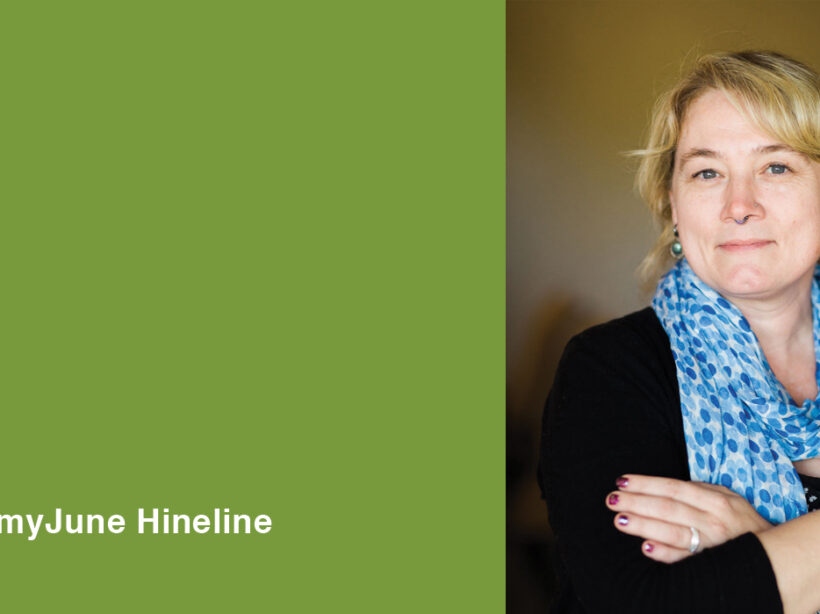
Image of AmyJune Hineline for her Accessible Media webinar. She has a blue scarf and her arms are folded.

Join us October 8th for a Free Webinar on Accessible Media

AmyJune
AmyJune Hineline

If you’re in charge of your website, you have a lot of things to cover between keeping it up to date, entering and managing content, and making sure it’s all accessible. As part of an inclusive content strategy, how accessible is your media?

Join us for a webinar led by Kanopi’s own AmyJune Hineline where we’ll do a deep dive on making your media more accessible. We’ll cover definitions, standards, guidelines, as well as images, videos, captions, transcripts, and more. Don’t worry about which CMS you’re using: creating accessible content is achievable regardless of which content management system you use!

DATE: Tuesday October 8th
TIME: 2:00 ET
COST: Free!

UPDATED POST-EVENT: below is video of the webinar.

All Hands Meeting

Goodbye Classic Editor, Hello Gutenberg

Faye
Faye Polson

Making movable type a reality on the web.

Anyone who’s used Microsoft Word, Pages, Google Docs, or your average email composer knows how to use TinyMCE, the Classic Editor that has been bundled with WordPress since 3.1. But with WordPress 5, TinyMCE has been replaced with the powerful block style builder known as Gutenberg. Instead of editing content in one large WYSIWYG field, your content is broken up into smaller ‘blocks’ made from a variety of field types.

Are Blocks Really Better?

Heck, yes! The advantage of blocks is that each chunk of content is contained in its own block, whether it’s a paragraph, a button, a gallery, or a video. Since you can move blocks, you can then reorder your content without needing to copy and paste. Just click and drag and suddenly that video sits above your closing paragraph instead of below. Some blocks are even interchangeable: should that paragraph actually be a list? Convert its block type in one click. 

And while it makes content entry so much simpler, developers also love it. It’s much lighter than other block building editors that are often included in themes or added by developers who aren’t familiar with powerful content management tools like Advanced Custom Fields (ACF). Instead of bloating your page with excess divs and classes, you’ll only see those elements when absolutely needed to maintain the block function and style.

Adding onto Gutenberg

Gutenberg has a fantastic variety of block types like headings, separators, blockquotes, galleries, tables, columns, widgets, videos, and more. And if you create a block you want to reuse elsewhere, you can save it as a reusable block and it will become available to you in the same way in the rest of your WordPress site.

But it can also be extended. Developers can create their own blocks and insert them into Gutenberg’s builder. So if you need a specific layout for say an event teaser, or product information, an agency like Kanopi can create those custom templates and add them to the available blocks. Even ACF integrates nicely with Gutenberg, and many other plugins do as well.

Gutenberg is now WordPress Core

That is, WordPress 5 ships with Gutenberg. New sites use it, and older sites will install it when updated from 4 to 5. But don’t panic! If your pages and posts were originally made with TinyMCE, they will still work as a Classic Editor block type within Gutenberg until you’re ready to convert them. Within each page / post you can click the ‘convert to blocks’ option and watch as your classic content gets automatically shuffled into headings, paragraphs, images, videos, etc. It should go without saying, we recommend you perform a backup before you do this. 

But don’t worry if your site isn’t ready for Gutenberg, there’s a plugin to maintain the Classic Editor. You’ll be able to continue updating WordPress without losing TinyMCE, that is until 2022 when support is expected to fully switch over to Gutenberg. Make sure you’re ready!

Kanopi can help you with that

Need more convincing?

WordPress has put up a Gutenberg demo where you can rearrange and edit a page exactly as you would inside a page or post. Play with the block types, shuffle content, mess around! Try to click every button at least once and see how powerful block builders can really be.

Gutenberg Demo

Hands on a keyboard

ACF Pro: One Plugin to Rule Them All

Faye
Faye Polson

Advanced Custom Fields has changed the way we use WordPress.

Like Drupal, Joomla!, and other content management systems, WordPress is a powerful platform for building beautiful, custom websites to suit most any need. And like other platforms, it comes with a host of extensions known as plugins that can extend the functionality of your site. There are plugins for SEO, performance, event calendars, contact forms, content organization, user profiles, carousels and sliders, in fact you can find a plugin for pretty much almost anything you can think of!

Of course, the drawback of using a multitude of plugins to get the perfect website experience is something developers often call ‘bloat’. Every plugin comes with a package of code, and the more code your website has to process to deliver, the slower it is. Not to mention the time involved to keep all of those plugins up-to-date and avoid security risks!

So then why use plugins at all?

Because most of them have hours of development and a team of support behind them to help keep them up-to-date with WordPress Core. Plugins can save development time, allowing developers to focus their attention on custom features and beautiful theming. For anyone with a WordPress site, it’s incredibly valuable to hit that sweet spot between bloat and extended functionality.

The most valuable plugin on the market is Advanced Custom Fields Pro (ACF), which comes with a lifetime license and is extremely affordable at $25 per website. A good agency knows that ACF can be leveraged to turn any set of data into reusable, fully customized templates throughout WordPress, saving your site from plugin bloat while still keeping production costs reasonable. Instead of having an event plugin with a location add on, a user profile extension, a media plugin for a video gallery, and a resource directory, a developer can make all of these things using ACF.

How Advanced Custom Fields Pro works.

ACF allows a developer to attach a set of custom fields to almost anything within the WordPress Core. Users, posts, pages, even settings. It can even be used to make Gutenberg blocks for sites already using the latest and greatest editor from WordPress. In turn, this makes it extremely easy for someone who is not a developer to fill in that data exactly as you would fill out a form. Then developers like ours can dynamically manipulate that data to create beautiful, consistent layouts using all of the programming tools in their arsenal without the need for additional plugins.

Seeing is Believing.

Kanopi uses ACF to create stunning features for our WordPress sites. Here’s a few of our favorites to show off how versatile the plugin is. You really can make anything with ACF! 

Certent (visit)

  • Video Hero (shown to first time visitor).
  • Hero Sliders (shown to return visitors). Uses ACF to populate individual slides with content, that are then pulled together into a carousel by a custom template.
  • Accordions & Pill Tabs. Allows the display of services and links in a variety of ways for easy, digestible viewing that can be utilized in other areas of the site.
  • Customizable CTAs (calls to action). These CTAs have toggleable options for style and layout, and can be created anywhere within the page layout.
  • Logo Wall. Each partner has additional fields for logo and content to create “card” teasers when clicked.
  • Testimonials. Using ACF, it provides the ability to hook into the TechValidate API to fetch specific customer testimonials.
  • Page Layout. Each component on this page is made as ACF, but they all sit together in a flexible page template that allows for easy organization. Should the client choose to display testimonials first, or second, it’s as simple as click and drag the component to the desired location.

PHR (visit)

  • Stats Counter. Stats can be updated easily, with full control of the background media for each section.
  • Graphs & Charts. Data entered in ACF is transformed into beautiful graphs and charts with Javascript.
  • History Timeline. An easily adjustable timeline component with images, videos, descriptions, and links.

McEvoy Foundation for the Arts (visit)

  • Announcement Bar. A single field allows for important announcements to be applied to the entire site in the top right. Meanwhile the top left always shows today’s hours, also generated through ACF content.
  • Feature Slider. Slides for showing off exhibits and events can be customized from the content to the buttons without any additional development.
  • Customizable CTAs. A different style than Certent, but similar in concept.
  • Upcoming Events. With extra information added to the events through ACF, these post types can be displayed with content like dates and times.
  • Global Contact Information. No more changing the phone number in 6 different places! One field, used globally, makes it simple and easy to keep content up-to-date.
  • Social Media Icons. Add and take away global icons with a click. No developer hours needed.
  • Hours of Operation. A great addition that will show the hours globally, but also indicate in the top left hand bar what today’s hours are.

Changing the Way We Care (visit)

  • Story Slider. A visual slider experience for sharing meaningful content.

Kanopi’s Website uses Advanced Custom Fields Pro.

That’s right, we practice what we preach! Every single page of this website is utilizing Advanced Custom Fields Pro in some manner, right down to the schema data behind the scenes. We can’t give away all our secrets, but if you’re looking for a website that is plugin smart instead of plugin heavy, you’ll want a developer who knows the ins and outs of Advanced Custom Fields Pro (wink wink, nudge nudge).

Let us know you’re interested

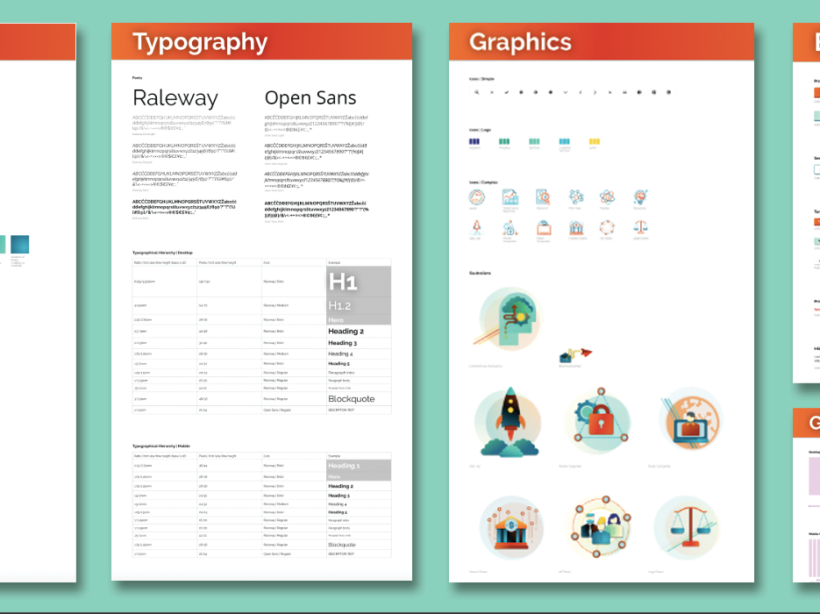
Examples of a pattern library, showing typography, button designs, grid, and iconography.

What is a Pattern Library?

Jessica Skewes, Director of Strategy
Jessica Skewes

One of the keys to a great user experience is consistency. Your users should be able to understand what an element on your website is for and how to interact with it, no matter where it appears on your site. 

Identifying those reused elements (also referred to as “modules” or “components”) is a hugely important piece of the wireframing and designing process.

So the question becomes, once these elements are created, why would you design them more than once? That would be a waste of time! How can we best make use of elements that already exist?

So what is a Pattern Library?

Pattern libraries are the set of components upon which your site is built. Your site is essentially made up of pieces that act as a vocabulary upon which you can build your pages. These include forms, buttons, blocks of text, calls to action (CTAs), photo captions, etc. Good designers will ensure that within those components are consistent and reflect the brand properly in regards to typography, color usage, and other design treatments.

The designer will start from the smallest pieces of a component, and build from there. Using Brad Frost’s atomic design principles, which mimics the building blocks used in chemistry, the progression is atoms, molecules, organisms, templates, then pages. These look like this (definitions from Brad Frost):

  • Atoms: include basic HTML elements like form labels, inputs, buttons, and others that can’t be broken down any further without ceasing to be functional.
  • Molecules: relatively simple groups of UI elements functioning together as a unit. For example, a form label, search input, and button can join together to create a search form molecule.
  • Organisms: relatively complex UI components composed of groups of molecules and/or atoms and/or other organisms. These organisms form distinct sections of an interface.
  • Templates: page-level objects that place components into a layout and articulate the design’s underlying content structure.
  • Pages: specific instances of templates that show what a UI looks like with real representative content in place. 

These building blocks allow site builders and designers to create a site in a modular way, building pages with reusable elements. 

Why is a Pattern Library valuable?

With a focused approach, designing in a pattern library can save everyone a lot of time and ensure your users have a consistent interaction with your brand online. Here are a few reasons why:

Easier Change Management 

Once the pattern library is created, and the full pages are assembled, adjustments may need to be made to improve the flow. But with the implementation of a pattern library, it’s a much simpler process since each element can be adjusted slightly on its own, updating the page easily and quickly.

Scalability

Now, let’s say you need to rebrand and tweak colors, or add a new piece of functionality. These types of updates are not only much more effortless to implement in a library, but will be cohesive with the already defined patterns. And if you need to add pages to a site, you can simply reuse existing elements from the library to create those pages, and scale from there.

Consistency

Because the components in a pattern library are created with the brand in mind, and consistently used across pages of a site, it results in a better user experience for end users. Users will be able to navigate faster and understand what the design and layouts for each interaction mean.

How do I create a Pattern Library?

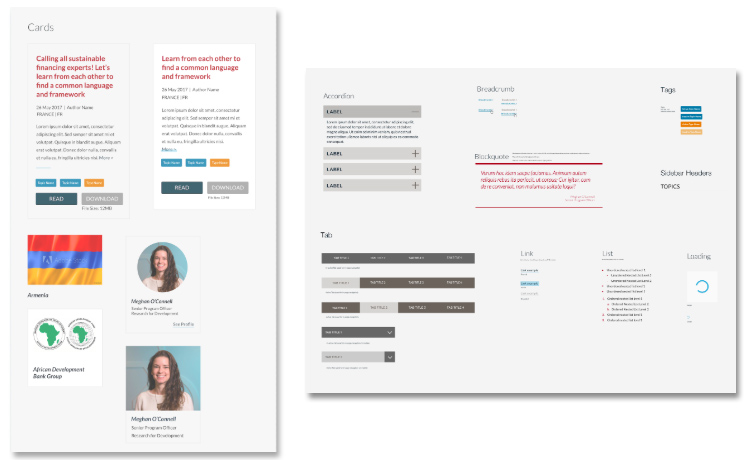
While several tools can be utilized to create pattern libraries, our favorite right now for design is Sketch. Here is an example of a pattern library Kanopi created for Results 4 Development using Sketch (LNCT.global):

Pattern Library

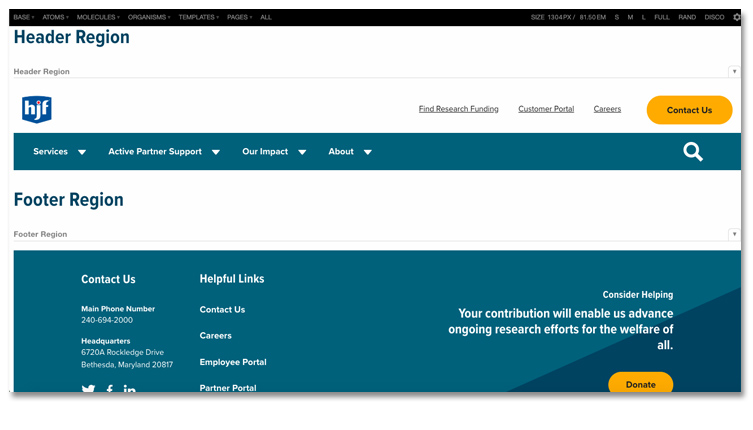
What can be really powerful and magical is a coded design system, which is when the library is built with code as opposed to as design files (like Sketch) The benefits of a coded design system is the visual design elements can then be connected to your website. That then allows even faster changes to be made by designers and to your site. Kanopi coded a pattern library for https://www.hjf.org/ to make it even easier to change elements in the future. Here’s an example using a tool called Pattern Lab:

Pattern Library Sample

Here are some other trusted examples of good pattern libraries:

Is a Style Guide the same thing as a Pattern Library?

“Style guides” and “Design systems” are often used as interchangeable with the term Pattern Library. In reality, they all work together.

Your style guide will contain elements of brand voice and tone, typography, colors, logo usage, etc, to create standards which guide the consistency of your brand mandatories. Those design signals are used to create brand consistency in your pattern library. Your pattern library and style guide are a subset of your entire Design System.

Let’s scale together!

Pattern libraries are just another tool that allows Kanopi’s designers to create superior user experiences and visual design patterns for our clients. We always build with the future in mind, because we not only create new or redesigned sites, but we also we have an amazing support department that helps sites evolve. With scalability and ease of change in mind, we can help our clients and our support team to maintain and improve the site for you over the long term. Contact us if you’re interested in working with us on your next project. 

Jess and Kim making plans

The top six website metrics to track

Jessica Skewes, Director of Strategy
Jessica Skewes

If your website is the hub for your audience to interact with your brand, then presumably you are doing all sorts of marketing tactics to get them there.

Once they are there, how are you tracking them? How do you know your efforts are effective?

There are a few key website metrics to track in order to help you to optimize your marketing efforts, understand how the site is doing, continuously improve your website, and to allow you to report to others in your company about where the focus of marketing needs to lie.

First off, you need to determine what your goals are per marketing activity. How are you performing on these goals now? What are doing to affect those goals? How will you measure it? Identify not only your main conversions, like a form completion or a purchase, but soft conversions like a newsletter sign-up or a PDF download.

Next, either review your metrics based on these items or put in these metrics to track moving forward. 

Here are some commonly reviewed and important items to track. Most of these will be familiar to you, but #6 can be a game changer!

1. Time on Site

This metric allows you to see an aggregate of how long your audience spends on your site. If your site is centered around exploration and information, you will want this number to increase over time.

2. Bounce Rate

Your bounce rate is the percentage of users who visit your site, but only visit one page and then leave. Google Analytics defines it as the user only visiting the site for 0 seconds, then they exit. This means they see one page of your site, but the analytics does not have enough time to trigger a duration of their session. 

Several reports lean towards an “Acceptable” bounce rate can range between 26 to 70%. But this is a large range across multiple industries. Look deeper to learn what is considered “acceptable” in your industry, because a high bounce rate absolutely depends on your industry and the goals of your site. For example, if you are a restaurant and the visitor simply visits to grab your phone number, then you have reached your goal!

This should be looked at in combination with the other analytics in this article, since looking at the bounce rate alone will not tell you an accurate story. Researching a good bounce rate for your website type and industry is fantastic, but also look to see where you are today and then focus on reducing it (if appropriate).

3. Number of Pages visited

Again, if your site is more informational and built to provide a “next step” for exploration with your users, than you will want this metric to increase. If the number is closer to 1, but you focus all your traffic to a single page, than you should look deeper into that single page’s analytics, before you are concerned with this number.

4. New vs Returning Visitors

In Google Analytics, there is an overlap in these numbers. “New Visitor” is a unique visitor visiting your site for the first time, on a specific device. If you visit a site once on your phone, then again on your desktop, you will be counted as 2 new visitors.

Once the visitor visits your site again, on a device they already used, they will be counted as a, “Returning Visitor” for the next two years (then the clock starts over again).

This could be a great metric to use when you are running a campaign in different areas or industries, for example. If you pay close attention, you can see which campaigns garnered more new traffic.

5. Traffic Sources

Analytics programs will report to you where your traffic is coming from, which illuminates the more and less popular sources. It will also provide you referral sites, which helps you to see your ROI if you partner with others to send traffic to your site.

Seeing how each traffic source performs for you will continue you on the path of honing what works well for you (and what does not).

6. Search

The most crucial advice we provide our clients is to track your in-site search.

This is done as an admin in your “view settings” for Google Analytics. The reason this is so very powerful is it provides you exactly what your visitors want from your site.

A behavioral studies from the Nielsen Group and other research findings show that more than 50% of people visiting a start page on a website go straight to the internal search box in order to navigate. Those figures prove that search box becomes essential navigation tool on every website.

From this data, you can organize, adjust or create your content plan. You can revamp your navigation or the order at which content is laid out on your site. You can write relevant FAQs or shift your focus from one audience group to another. The reason this can be so compelling for your business is because you are directly answering the needs of your audience. 

These will get you started!

Many more metrics exist which can help you to analyze your effectiveness in your marketing tools and traffic sources, but these six are the best ones with which to start. Once you have defined what is important for you, continue to review your analytics over the course of time so you can continually optimize your site’s effectiveness.

Your website is a living and breathing entity that needs nurture and care to continue its growth and work harder for your business. If you need help with a strategy to define and determine which website metrics to track, contact us. We’d be glad to help. 

Erin writing on a computer creating accessible content

Accessible Websites: 8 Steps for Content Editors

Donna
Donna Bungard

A brief overview of the whys, whats and hows of accessible content

Once upon a time I used to be a designer and front end theme developer. Though I’d love writing and would frequently manage content, my focus was on the building with the goal of creating a consistent brand presence. When that was my focus, I thought, like so many do, that the way to keep a website formatted in the way it was originally designed was to restrict an editors ability to change things. I was wrong. I was ignoring accessible content.

Over the span of my career to date, I’ve seen more than an evolution in the technologies we use but also in the way people approach the day-to-day issues on their teams and when looking at their company’s website. We’ve gone from hard coded websites fully managed by webmasters to building dynamic CMS driven digital experiences that empower users to build a connection with the sites they visit. Think about that for a moment: we’ve changed our focus from what we can do, to empowering people to drive their online user journey and get the most from their online experiences. With this movement, inclusion and it’s subset, accessibility has been given increasing attention; the more users who have rewarding user experiences means a better web for us all. 

So now it’s time to continue this movement of empowerment by opening the floodgates of possibilities and educating content editors, including you, so that we can all build and maintain accessible content. In the following article we’ll touch on why accessibility is important, what to look for, and how to start incorporating it into your content publication workflow. 

Why is Accessible Content Really Important?

We’ve all seen the shift in the digital ecosphere to be more inclusive. Companies have been adding non-binary options for gender on their sign up forms and writers have used more neutral content when needed. It has not saturated the web (yet) but it’s there and often discussed. A huge factor in this as been the role that accessibility has played. With nearly 1 in 5 US adults self-identifying as having some sort of disability, there’s no question accessibility is critical.

By the numbers: 

  • ~20% of U.S. Adults self-identify as disabled
  • ~2.4m have Alzheimer’s disease, senility or dementia
  • ~7.6m Americans experienced difficulty hearing, including 1.1m whose difficulty was severe
  • ~8% of males from northern European descent are colorblind
  • ~2m Americans are blind or unable to see
  • According to Austin Learning Solutions, 40 million American adults are dyslexic 

And, once we take into account those who may not see themselves as disabled (I know a few colorblind men who do not identify as such) as well as those who are underage, than the people impacted by accessibility blocker grows. And then there are the temporary disabled: broken wrist, injured eye, and so on. And then (yes this keeps going!) there are those who are experiencing a poor user experience such as a poor internet connection, a glare or cracked screen, or a loud/crowded location: these users benefit from accessible best practices too!

So you’re thinking, “okay, the numbers support what she’s saying but I’ve heard this all before,” and you know, you probably have. So as much as we all WANT to focus on the feel-good, lets touch base on some of the other ways accessibility is important.

  • An SEO friendly site may not be more accessible but an accessible site is more SEO friendly. Google uses a lot of the same information as assistive technologies. 
  • Legal pressure is building. In the US, since the Winn-Dixie case in 2017 that set the precedent that a website can be a gateway to a brick and mortar location and therefore is subject to the ADA’s 508 compliance, hundreds of organizations have had legal action taken against them. An accessible site keeps you out of legal trouble as well as gains a lot of goodwill among your customer base.
  • Voice recognition is not just for assistive technology! How often do you ask Alexia or Siri for information? You’re likely using some of the same code that those who use assistive technologies are using every day. 

So . . . after all these words, why is it important to build accessibility best practices into your content creation and editing workflow? Because if you don’t you are missing out on millions of potential conversions while potentially placing your team at risk of being found non-compliant. 

“Okay Okay, I get it — accessibility is important but where do we even start?!”

I’ve heard something along those lines from marketing teams as well as those new to government website management. Somewhere along the lines we’ve mistakenly sent the message that everyone needs to be some sort of expert to put efforts into effect. That’s not true! 

One of the most inclusive and talented writers/speakers I know keeps telling me that she’s not the expert, and yet at this point she’s learned so much she’s assessing more sites and guiding more people than I am. Why? Because she started by looking at what the biggest blockers were for users from an accessibility point of view, and helped the content managers figure out what they can do to fix them. And then she learned more, and she kept going, helping others learn along the way. It’s now a part of her everyday life, not because she set out to be an expert on accessible content, but because she collected knowledge and started putting that into practice. 

That’s all any of us need to do: start with some common issues and keep learning. 

With that, let’s dive into eight of the most common issues that content editors will see and how to fix them for more accessible content.

1. Alternative Text 

What is it? Alternative (alt) text is a word or phrase that can be inserted as an attribute in an HTML image tag to describe the meaning of the image on the site. If the image is purely decorative, it can be indicated as such by having the HTML tag present but empty. 

How to implement: 

  • Don’t get wordy: keep it to around the same length as a Tweet: approximately 120 characters. 
  • Use descriptive text: describe the image itself without using phrases such as “image of” or “photo of” (that’s a given!).

2. Descriptive Text Links 

What are they? The text that we include in a link matters. When we link only the words “learn more” in a given sentence, this gives users (and search engines) little idea of the value of the linked text. If we link a full phrase or sentence such as, “To learn more about sloths, read this article.” we are setting more complete expectations as to what will be learned by clicking that link. 

How to implement:

  • Use text that explains the context and value of the link to the user. 

3. Linked Images

What are they? Linking images can be a powerful visual tool but this can present problems to non-sighted users (and offers less of an SEO benefit). 

How to implement:

  • Use alternative text.
  • If there is too much information to convey via alternative text, you can give that image an empty alt text and then provide an image caption. 
  • Do not use both alt text and a caption if the information is redundant in any way.

4. Video Captions & Transcripts 

What are they? Video captions and transcripts are the written text of the material audible in a video. Captions are presented inline as words are spoken and sounds are included. Transcripts are separate from the video and often provided below the media or via a link. 

How to implement:

  • Captions must be consistent, clear, and readable.
  • Make sure the meaning of what is said is preserved: identity who is speaking, and how (such as [yell] or [whisper]).
  • Accuracy is critical!
  • Sound effects can be included with brackets. 
  • User proper page structure (headings) and grammar in transcripts.

5. Avoid All Capital Letters

What are they? It’s a common practice to use all uppercase letters as a stylistic choice but this can cause readability issues for those who are dyslexic. 

How to implement:

  • Only use all capital letters for acronyms, and not for style.

6. Unique Page Titles

What are they? The page title sets the stage for all content on the page and your websites theme should already have programmed this to be the H1 of your page. This tells both users and search engines why the page is important to them. Duplicate page titles lead to confusion and can contribute to either a frustrating or abandoned user journey. 

How to implement:

  • With each title to be informative and unique. 
  • Be brief: each title should be between 55 and 60 characters.

7. Heading Structure

What is it? When we’re talking about heading structure we’re talking about the proper use of the header tags (H1, H2 and so on). Headers give users of assistive technologies cues as to where they are on a page and what they will find in it. Search engines use these tags to better determine what is valuable on the page. Poorly used or omitted heading tags can create a poor user experience while misleading search engine rankings. 

How to implement:

  • Use Header Tags in sequential order. 
    • An example of the correct order is H1, H2, H3, H4, H2, H3, H3 etc. 
    • An example of an incorrect order is H2, H6, H6, H2, H4 
  • Make the content of the Header Tags relevant to the content on the page.

8. Table Formatting

What is it? Tables can be the most accurate way to present data. However they can create barriers for those using assistive technologies. The best rule of thumb is this; if you can present the information in a way that does not utilize a table, then do not use a table.

How to implement:

  • Avoid tables unless absolutely necessary.
  • Provide table captions.
  • Utilize column and row headings.
  • Never nest tables.

There you have it. Educating yourself and your team on these eight steps sets you up for success and on the road to compliance. If you want to learn more in-depth tricks, watch Kanopi Community Ambassador AmyJune Hineline give a talk on Inclusive Content Strategy (50 mins). 

Accessible Content is About Everyone’s Empowerment

The days of content editors being restricted are long gone. The digital ecosphere is changing and with that comes opportunities and the ability to create positive user journeys for all of our users. Though professional growth and incremental education, teams are able to evolve their web presence to be more inclusive, accessible and search engine friendly, while building in safeguards for the organization as a whole. You have the tools and the ability to make a difference!

Want to learn more or have a team member take a more in-depth look at the things that make your challenges unique? Reach out to us: we want to empower you to make accessible content.

Website Rebuild

Executing a Website Rebuild: 5 Things to Consider

Donna
Donna Bungard

You’ve decided it’s time to rebuild your website.

Research has been done, conversion rates have been analyzed, the team has selected a rebuild over a focused fix, and you and your team are committed to making a website rebuild happen. One of the easiest ways of ensuring your success is to remain mindful of a few key things as you work your way through this larger process.

Regarding that term, “mindful:” one of the Kanopi team’s favorite authors is Brené Brown. She writes, “Mindfulness requires that we not “over-identify” with thoughts and feelings so that we are not caught up and swept away by negativity.” For the purposes of your website rebuild, I’d adapt this to be, “Mindfulness requires that we not “over-focus” on what we’ve done before, and rather remain aware of what’s important for our success so that we can focus on where we want to be.”

So, let’s get to it and break down what the top five things we need to be mindful of when executing a rebuild project.

1. YOU are the difference! Be engaged.

Stakeholder engagement can make or break a rebuild. But rebuilds are time-consuming, and you and your stakeholders will likely be pulled in several directions as you try to execute a rebuild while balancing other priorities and projects.

Your availability, open communication, and timely feedback is critical to enable your team to create the web presence your organization needs to reach its goals. Be realistic in what time your team can devote to the project so you can be as fully engaged as possible. Define roles and responsibilities early as well so it’s clear who is handling what.

If you need an assist from an outside agency to keep the project moving quicker, be direct with them about your business needs and wants. Help them to understand your users and audiences. An agency will make every effort to dive deeply into understanding your market, but at the end of the day, you and your team are the experts on what you do. So view any outside agency as a partner who can work with you towards success, and stay engaged with them throughout the process.

2. Define success & track it

We cannot know if we’re successful until we have identified what success will look like. For some sites, it’s simply exposure. For others, it’s a need to meet specific goals. Take the time to define what your organization needs to achieve, and which key metrics will allow us to quantify success.

Not sure where to start? Here are common metrics should you benchmark now as you prepare for the rebuild:

  • Users: note how many users are regularly coming to your site
  • Bounce Rate: record the overall bounce rate. Make note if this is at, above or below your industry’s standard.
  • Average Session Duration: how long are users staying on your page?
  • Sessions by Channel: where are your users coming from? How much organic traffic is coming in?
  • Top Keywords: identify what words are being used in the search engines when users are finding you. Are these surprising?
  • Competitor Keywords: are users who are looking at your competitors using the same keywords?
  • Top Referrers: who is sending traffic to your site? Maybe social media is key, or you’re more focused on industry referrals. Determine where you should be in the market.
  • Conversion Rates: what forms do you need users to fill out? What conversions are critical to your business goals? These can take the form of contact or forms from your CRM tools such as Marketo or Pardot, or even visits to a specific page or video views.   
  • Accessibility: does your site meet national or international compliance standards?

In short, benchmark where you are now, and use this data to help round out that definition of success. Then come back a few months after launch to reevaluate and compare so you can quantify the success to your stakeholders.

3. Get your content strategy in order

The old saying “Content is King” is truer today than ever. Users are more educated. Search engines have become smarter, looking for more than keywords — they look for meaning in phrases to help determine the focus of a given page.

As one of the most effective methods of growing audience engagement, developing your brand presence, and driving sales, content marketing is a mission-critical growth method for most businesses. — Hubspot

This is where most people turn to me and tell me they’ll get their team on it so they can move further along in the content process. But don’t underestimate the time and energy content development/aggregation can take, even if your larger project is hiring a copywriter to augment your team. All too often, when content becomes a late-stage endeavor a few things happen:

  • timelines get pushed out, waiting for content to be approved.
  • changes to the previous UX are often required to account for unrealized navigation or calls to action, causing potential budget overages.
  • content is rushed and not in alignment with the overall vision.

To help this process come together for your team, here are a few action items to start with:

  • Audit your content: take a full inventory of your site’s content to better identify:
    • what to keep
    • what to repurpose
      • for example: the video may look dated, but could your team could write a blog post from that material?
    • what should not be migrated to your new site
      • this can be archived to be referenced at a later date
  • Build a sitemap: determine the hierarchy of the content on the new site.
  • Identify missing content: comparing your audit to your sitemap, what needs to be produced?
  • Track content creation: track who is responsible for writing, editing and approving content — and give them deadlines
  • Start thinking ahead: you may need to start planning future content. Developing an editorial calendar will help keep the process moving. Content typically included in an editorial calendar:
    • blog posts
    • social media posts
    • videos
    • infographics

When preparing for a rebuild, your content strategy has to be one of the first things your team takes on. This approach will save you time, headaches, and likely budget moving forward. 

4. Consider your users’ digital experience

By this stage in the process you should know your target market, their buying habits and why your product or service is of value to them. You likely have personas and other data to help back this up. But in the omnichannel world in which we thrive, there is often more to architecting an effective user journey. Understanding the nuances of the devices, the influence of how a user comes to your site, and the overall adherence to best practices are complex. For example, consider the following:

  • What percentage of users are coming from mobile devices?
    • Are you CTAs and main conversion points easy to access on a small screen?
    • Is the user journey simplified?
  • Are you users coming from social media?
    • Is it your blog driving traffic or more word of mouth?
    • Is it positive or negative attention?
  • Have you produced a user journey map to identify the different pathways to conversion?
    • Is your site currently set up to promote these journeys?
    • Are you utilizing personalization to customize that user journey?

You can learn more about how to use user research to gain insight into audience behavior to help you frame your thoughts about your personas overall user journey to conversion.

5. Think about the future of your site

Websites need to evolve and adapt as the needs of your users change over time, but as you rebuild, are you setting yourself up for more incremental changes moving forward? Keep in mind that most rebuilds are focused on the MLP or “Minimum Lovable Product.” It’s the simplest iteration of your site that will meet your current needs with the intent to continually improve it over time. Regardless of whether you’re focused on an MLP launch due to either time or budget constraints, we need to keep these future goals in mind as we progress.

And then there’s the technology side of this: whether you’re looking ahead to Drupal 8 or 9 or the next major evolution with WordPress, consider those needs now to help ‘future proof’ your new site. The web changes too quickly to risk your site being stale when it’s still brand new. Talk this through from the start with your team.

These steps will set you up for success in your website rebuild.

Your site speaks to who you are as an organization to your target market. Whether you’re a non-profit, higher education or a corporate entity, being mindful now will set your team’s rebuild up for success. And if you need help with your rebuild, contact us. We’d love to partner with you and help you recognize that success.