All Hands Meeting

Goodbye Classic Editor, Hello Gutenberg

Faye
Faye Polson

Making movable type a reality on the web.

Anyone who’s used Microsoft Word, Pages, Google Docs, or your average email composer knows how to use TinyMCE, the Classic Editor that has been bundled with WordPress since 3.1. But with WordPress 5, TinyMCE has been replaced with the powerful block style builder known as Gutenberg. Instead of editing content in one large WYSIWYG field, your content is broken up into smaller ‘blocks’ made from a variety of field types.

Are Blocks Really Better?

Heck, yes! The advantage of blocks is that each chunk of content is contained in its own block, whether it’s a paragraph, a button, a gallery, or a video. Since you can move blocks, you can then reorder your content without needing to copy and paste. Just click and drag and suddenly that video sits above your closing paragraph instead of below. Some blocks are even interchangeable: should that paragraph actually be a list? Convert its block type in one click. 

And while it makes content entry so much simpler, developers also love it. It’s much lighter than other block building editors that are often included in themes or added by developers who aren’t familiar with powerful content management tools like Advanced Custom Fields (ACF). Instead of bloating your page with excess divs and classes, you’ll only see those elements when absolutely needed to maintain the block function and style.

Adding onto Gutenberg

Gutenberg has a fantastic variety of block types like headings, separators, blockquotes, galleries, tables, columns, widgets, videos, and more. And if you create a block you want to reuse elsewhere, you can save it as a reusable block and it will become available to you in the same way in the rest of your WordPress site.

But it can also be extended. Developers can create their own blocks and insert them into Gutenberg’s builder. So if you need a specific layout for say an event teaser, or product information, an agency like Kanopi can create those custom templates and add them to the available blocks. Even ACF integrates nicely with Gutenberg, and many other plugins do as well.

Gutenberg is now WordPress Core

That is, WordPress 5 ships with Gutenberg. New sites use it, and older sites will install it when updated from 4 to 5. But don’t panic! If your pages and posts were originally made with TinyMCE, they will still work as a Classic Editor block type within Gutenberg until you’re ready to convert them. Within each page / post you can click the ‘convert to blocks’ option and watch as your classic content gets automatically shuffled into headings, paragraphs, images, videos, etc. It should go without saying, we recommend you perform a backup before you do this. 

But don’t worry if your site isn’t ready for Gutenberg, there’s a plugin to maintain the Classic Editor. You’ll be able to continue updating WordPress without losing TinyMCE, that is until 2022 when support is expected to fully switch over to Gutenberg. Make sure you’re ready!

Kanopi can help you with that

Need more convincing?

WordPress has put up a Gutenberg demo where you can rearrange and edit a page exactly as you would inside a page or post. Play with the block types, shuffle content, mess around! Try to click every button at least once and see how powerful block builders can really be.

Gutenberg Demo

Hands on a keyboard

ACF Pro: One Plugin to Rule Them All

Faye
Faye Polson

Advanced Custom Fields has changed the way we use WordPress.

Like Drupal, Joomla!, and other content management systems, WordPress is a powerful platform for building beautiful, custom websites to suit most any need. And like other platforms, it comes with a host of extensions known as plugins that can extend the functionality of your site. There are plugins for SEO, performance, event calendars, contact forms, content organization, user profiles, carousels and sliders, in fact you can find a plugin for pretty much almost anything you can think of!

Of course, the drawback of using a multitude of plugins to get the perfect website experience is something developers often call ‘bloat’. Every plugin comes with a package of code, and the more code your website has to process to deliver, the slower it is. Not to mention the time involved to keep all of those plugins up-to-date and avoid security risks!

So then why use plugins at all?

Because most of them have hours of development and a team of support behind them to help keep them up-to-date with WordPress Core. Plugins can save development time, allowing developers to focus their attention on custom features and beautiful theming. For anyone with a WordPress site, it’s incredibly valuable to hit that sweet spot between bloat and extended functionality.

The most valuable plugin on the market is Advanced Custom Fields Pro (ACF), which comes with a lifetime license and is extremely affordable at $25 per website. A good agency knows that ACF can be leveraged to turn any set of data into reusable, fully customized templates throughout WordPress, saving your site from plugin bloat while still keeping production costs reasonable. Instead of having an event plugin with a location add on, a user profile extension, a media plugin for a video gallery, and a resource directory, a developer can make all of these things using ACF.

How Advanced Custom Fields Pro works.

ACF allows a developer to attach a set of custom fields to almost anything within the WordPress Core. Users, posts, pages, even settings. It can even be used to make Gutenberg blocks for sites already using the latest and greatest editor from WordPress. In turn, this makes it extremely easy for someone who is not a developer to fill in that data exactly as you would fill out a form. Then developers like ours can dynamically manipulate that data to create beautiful, consistent layouts using all of the programming tools in their arsenal without the need for additional plugins.

Seeing is Believing.

Kanopi uses ACF to create stunning features for our WordPress sites. Here’s a few of our favorites to show off how versatile the plugin is. You really can make anything with ACF! 

Certent (visit)

  • Video Hero (shown to first time visitor).
  • Hero Sliders (shown to return visitors). Uses ACF to populate individual slides with content, that are then pulled together into a carousel by a custom template.
  • Accordions & Pill Tabs. Allows the display of services and links in a variety of ways for easy, digestible viewing that can be utilized in other areas of the site.
  • Customizable CTAs (calls to action). These CTAs have toggleable options for style and layout, and can be created anywhere within the page layout.
  • Logo Wall. Each partner has additional fields for logo and content to create “card” teasers when clicked.
  • Testimonials. Using ACF, it provides the ability to hook into the TechValidate API to fetch specific customer testimonials.
  • Page Layout. Each component on this page is made as ACF, but they all sit together in a flexible page template that allows for easy organization. Should the client choose to display testimonials first, or second, it’s as simple as click and drag the component to the desired location.

PHR (visit)

  • Stats Counter. Stats can be updated easily, with full control of the background media for each section.
  • Graphs & Charts. Data entered in ACF is transformed into beautiful graphs and charts with Javascript.
  • History Timeline. An easily adjustable timeline component with images, videos, descriptions, and links.

McEvoy Foundation for the Arts (visit)

  • Announcement Bar. A single field allows for important announcements to be applied to the entire site in the top right. Meanwhile the top left always shows today’s hours, also generated through ACF content.
  • Feature Slider. Slides for showing off exhibits and events can be customized from the content to the buttons without any additional development.
  • Customizable CTAs. A different style than Certent, but similar in concept.
  • Upcoming Events. With extra information added to the events through ACF, these post types can be displayed with content like dates and times.
  • Global Contact Information. No more changing the phone number in 6 different places! One field, used globally, makes it simple and easy to keep content up-to-date.
  • Social Media Icons. Add and take away global icons with a click. No developer hours needed.
  • Hours of Operation. A great addition that will show the hours globally, but also indicate in the top left hand bar what today’s hours are.

Changing the Way We Care (visit)

  • Story Slider. A visual slider experience for sharing meaningful content.

Kanopi’s Website uses Advanced Custom Fields Pro.

That’s right, we practice what we preach! Every single page of this website is utilizing Advanced Custom Fields Pro in some manner, right down to the schema data behind the scenes. We can’t give away all our secrets, but if you’re looking for a website that is plugin smart instead of plugin heavy, you’ll want a developer who knows the ins and outs of Advanced Custom Fields Pro (wink wink, nudge nudge).

Let us know you’re interested

San Francisco City Hall on a sunny day against a blue sky. The keyword for this blog post is drupal for government.

8 Reasons Governments Should Use Drupal CMS

The right website content management system can help government websites establish citizen trust, provide relevant and timely information, maintain solid security, and make the most of limited budgets. At Kanopi Studios, we believe that Drupal for government is an especially strong choice, further validated by the fact that governments across more than 150 countries have turned to Drupal to power their digital experiences. This includes major sites in the United States like The White House and NASA.

What makes Drupal the best choice? Read on for our top 8 reasons why Drupal should be the content management system of choice for government websites.

1. Mobility 

Website traffic from mobile devices surpassed desktop traffic years ago. In fact, according to Pew Research Center, one in five adults in America are smartphone-only internet users, and that number is likely to continue to grow. Government websites need to prioritize a superior mobile experience so they can meet the needs of citizens of all ages and economic levels and allow users to access critical information on the go.

Drupal can help. Drupal 8 was built to scale across devices, load mobile content at top speeds, provide a wide selection of responsive themes, and more. Drupal also allows content editors the ability to add or update site content via mobile, unlocking the ability to make emergency updates from anywhere. 

2. Security 

Offering a secure site that protects your content and sensitive user information is critical for maintaining your reputation and public trust. Drupal offers robust security capabilities, from regular patches to prominent notifications about updates to security modules you can install for additional peace of mind. Unlike other open source platforms, Drupal has a dedicated security council that keeps an eye out for potential issues and develops best practices to keep sites stable and secure.

3. Accessibility

A number of federal, state and local laws require government websites to serve the needs of all citizens, regardless of their abilities. Focusing on accessibility compliance from the very beginning of your website project can help your team avoid costly re-work and launch delays. 

Drupal has accessibility baked in, with all features and functions built to conform to the World Wide Web Consortium (WCAG) and ADA guidelines, including the platform’s authoring experience. That means that people of all abilities can interact with your Drupal website, whether they are adding and editing content, reading news, filling out forms, or completing other tasks. Drupal allows screen readers to interpret text correctly, suggests accessible color contrast and intensity, builds accessible images and forms, supports skip navigation in core themes, and much more. 

If you’re a content editor, we recently wrote about eight things you can do to make your site more accessible

4. Simple content management

Drupal’s content editor helps busy government website administrators add posts, pages, and resources in an environment that’s nearly as simple and familiar as a Word document. The what you see is what you get (WYSIWYG) editing mode supports text formatting, links, embedded media, and more. 

Drupal also enables administrators to set up customized roles, permissions, and content workflows. This allows any number of team members to contribute to the site while maintaining administrative control of the content that gets through to the public.

5. Ability to handle significant traffic and data

Many government websites store hefty data and resources and see significant spikes in traffic based on seasonal demand, news cycles, and many other factors. Drupal has the power to deal with large databases and intense site traffic with ease, another good reason to choose Drupal for government sites.

Drupal’s database capability includes a wide range of ways to sort and organize content via its module system, supporting the needs of almost any content library without the need to create custom code. 

Drupal powers a number of heavily visited sites including NBC’s Olympics, The Grammy Awards, and Weather.com, keeping them going strong even when traffic levels are enormous.

6. Flexibility 

The helpful features included in Drupal core are just the beginning. Many, many additional modules have been contributed and tested by the Drupal community and are ready to be added to your site as needed. How many? The Drupal community has contributed well over 40,000 modules, so it’s a safe bet that there’s something already out there that can help meet the needs of your project.

Modules can be added to your site at any time, like building blocks. A few popular examples include social sharing, image editing, calendars, metatags, and modules that support integrations with external systems, from email platforms to customer databases. 

7. Affordability

Government budgets are often tight, with plenty of competing priorities for every dollar spent. With Drupal, you tap into a free, open-source system that’s supported by an enormous community of developers. Building your website on an open-source platform means you can focus your budget on creating an ideal experience for your citizens through professional services including content strategy, user experience, and design rather than dedicating funds to software licensing fees. And Drupal’s flexible modules reduce or even eliminate the need for custom code, helping you save even more.

8. Support for multiple sites in multiple languages

It’s not uncommon for government entities to have multiple websites. Whether your government maintains a few sites or hundreds, building each one individually would require an incredible amount of time and funds. Thankfully, Drupal’s multisite feature allows your site’s code base to be copied and adjusted to create as many new websites as you need, leveraging features that already exist without the need to build them from scratch. To meet language requirements, Drupal offers Content and Entity Translation modules that help content authors translate pages, individual elements, or specific fields into more than 100 languages.

Kanopi Studios loves government website projects

At Kanopi, we’re Drupal experts. We’ve harnessed its power to create citizen-focused sites for the San Francisco Police DepartmentSan Francisco Health Service System and more. We’d love to hear from you, learn about the problems you are trying to solve, and share even more details about why you should choose Drupal for government.

Kanopi Team

Kanopi Studios Named an Industry Leader on Clutch

In today’s burgeoning digital marketplace, finding a reliable digital partner has become more important than ever.

And Kanopi is proud to be one such partner to our clients, from development to comprehensive web design, our team creates solutions that empower our incredible clients.

As we mentioned before, we have enjoyed a positive presence on Clutch, a ratings and reviews platform for B2B service providers. Although we have always been a top firm on Clutch, we just received a new accolade. We are excited to share that we have been awarded the title of industry leader, topping the list of the best web design companies in San Francisco. After being put through the wringer with nearly 400 of San Francisco’s top web designers, we were listed as eighth overall.

Clutch analysts use a number of metrics to evaluate service providers, but the top consideration for quality is what a firm’s clients have to say about them, and our clients have delivered in spades. With eight verified client reviews, we maintain a perfect rating of five stars, and we have received feedback such as:

“I think there’s a professionalism at Kanopi Studios that is not always present in the web development world. They’re adept at bridging the gap between plain language and tech-speak. They also make sure they’re thinking about any possible side effects caused by executing a task and they’ve mastered the almost lost art of effective, friendly customer service.”

We always appreciate hearing from our clients, and what they have shared is better than anything we could have hoped for. Their feedback is valuable as we look forward to improving our offerings.

In addition to being named an industry leader, we have also been featured on Clutch’s sister-site, The Manifest. The Manifest is a resource that provides help to firms of all shapes and sizes, offering industry insights and how-to guides regarding a number of projects and challenges. We were featured on their list of the top web development companies in San Francisco, with notice being taken of the quality of our work and the reputation of our clients. Our feature on both Clutch and the Manifest highlights our ability to design and deliver web projects of the highest caliber. And to demonstrate that, we have put up a portfolio on Visual Objects, a place for prospective clients to compare the work of various web designers in San Francisco.

We are hopeful that the expansion of our digital presence will help us build new partnerships, but we must take the time to acknowledge the partnerships we have made along the way. A huge thank you to all of our clients! Your support means the world to us, and we cannot wait to see what you have for us going forward.

Ready to launch? Here’s a pre-launch checklist

It’s been a lot of hard work and the time has finally come to launch your new website. Congratulations!

But before you push that launch button, take a minute to think; are you REALLY ready to launch your website?

  • Multiple rounds of quality assurance testing? CHECK!
  • Cross browser and responsive testing? CHECK!

But is there something else you might have missed?

The items above are some of the more obvious steps a team may go through when preparing a site to launch, but there are some lesser known or sometimes forgotten steps that are just as important to take when launching a new website. So what do we also include in our pre-launch checklist?

  • Set up redirects
  • Check links: Absolute vs Relative
  • Accessibility checks
  • Decide what to do with your old site
  • Decide who will maintain your new site

Set up redirects

Over the years you may have amassed a great deal of content on your old website, and  chances are that in the course of creating your new website you’ve changed how that content is organized. This can lead to content revisions during the process of migrating  that content to the new system. Any team that has gone through this process can tell you that it is a massive effort; even if you’re automating the migration of content in someway. During this flurry of activity in moving content from point A to point B, it’s easy to forget one simple matter: How will users find the same or similar content on the new website?

Creating Redirects ensures that users who arrive at the site via an outdated URL, say from a bookmark or external site, are automatically sent to the appropriate content. Setting up redirects is incredibly important to creating a solid User Experience and it’s good for SEO. Just about every URL on your old site should have a redirect if the URL has changed. This may seem like a herculean effort, but it actually pairs well with the process of moving content from the old to new website.

First off a brief explanation of Absolute versus Relative URLs. An Absolutely URL encompasses a URL in its entirety. ie: https://kanopi.com/about-us. A Relative URL is just the portion of the URL that occurs after the “.com” in the example above. ie. /about-us. In the course of preparing a new website by loading copy and uploading images, you most likely are working from a temporary Development URL. When the time comes to launch the new website, the Development URL will change. When the URL is changed, any links that are pointing to the Absolute Development URL will break. This is a common mistake, and one that can have disastrous results once your new website goes live.

As a general rule of thumb try to avoid Absolute URLs when loading content to any environment. This ensure that if the core URL ever changes, your links won’t break. Leading up to launch, try to work with your Developer to identify and rectify any Absolute URLs.   

Accessibility checks

Accessibility was not exactly a top priority of early website development; supporting users with impairments is becoming an ever increasing need for any modern website. Accessibility starts early on in a project’s planning, and should be discussed early and often. From initial designs through to development, there are many touch points where a project team can ensure that the site is compliant with standards.

But what if your site is about to go live and you haven’t considered this? Luckily there are tools like Site Improve that allow you to run automated tests to see where your site may need remediation before it can be compliant. Not only is it good for SEO, but making sure your site is accessible to the widest range of users ensures you reach a wider audience and that they have the best user experience possible.   

Bot Mitigation

With the ever-increasing presence of AI, bots are crawling the internet seeking answers to our questions and returning the most relevant results to users. The strain and stress this places on an unprepared site can affect performance, degrading the overall experience for human users or even bringing down a site entirely. Bot mitigation needs to be considered when launching a website nowadays.

Making sure your site has an llms.txt file that allows Large Language Models to more easily parse your site’s content. Creating a plan to ensure your site isn’t overwhelmed by the wrong bots; nefarious bots who can bring down your site through Denial of Service (DDoS) attacks are becoming increasingly common, trying to blend in and take advantage of the rise in bot traffic. These are just a few factors to consider in your bot mitigation plan. Contact us for more insights and to help develop a plan tailored to your website launch.

Decide what to do with your old site

In the activity leading up to the launch of your new website, it’s easy to overlook this question. Regardless of how confident you are in the new website, it’s important to have a plan in place for what to do with your old website. Here are some important questions to consider when considering the fate of your old website:

Will you need to reference your old site at any point in the future? Perhaps you weren’t able to move all the content to the new site before launch or maybe there is old content that won’t be migrated, but you still need to reference it in the future. Whatever the reason may be if the answer to this question is yes, you’ll want to keep your site up in some capacity.

Can you afford to host two websites at the same time? This one is a little less straightforward; depending on the size, state, and makeup of your old website, you have options. From a budgetary standpoint, paying for a website that no one will really visit is probably not going to look all that great to accounting. The good news is that with no traffic visiting the old website you probably don’t need all that expensive infrastructure; many enterprise level hosting providers have a free tier that is great for storing a legacy site on.    

Regardless of your situation, you can always find options. What’s most important is that you have a plan.

Decide who will maintain your new site

Building a website is a process; one that requires regular upkeep and ongoing maintenance. Understand that your website is a tool, and built right it should be designed to grow and adapt to the changing needs of your business. This is the philosophy we at Kanopi believe in, and try to instil in our projects. So with that in mind, it’s important to consider who will be responsible for ongoing improvements, maintenance, updates, and bug fixes when the times arise.

While not uncommon for teams to try to take this on internally, it’s important to consider if you have the right skill sets, let alone bandwidth for this to be a viable option. Another solution is to work with an agency like Kanopi to provide ongoing support for your site. An agency will have access to a wider range of expertise and ensures maximum flexibility for the future growth of your site.

Need a more in-depth checklist?

If you want more beyond this list, we do have a multi-page checklist you can download that goes into much more granular detail, covering everything from SEO to GDPR to accessibility, and so much more. You can download that checklist here.

Use our pre-launch checklist, and you’re good to launch!

These items may seem like big additions to your plate leading up to launch, but they pale in comparison to the what could occur if you leave them out. Plan for these pre-launch checklist items early on, and it will ensure your launch goes off with one less hitch. And contact us if you need help.


Kanopi Studios is a Top Provider on Clutch

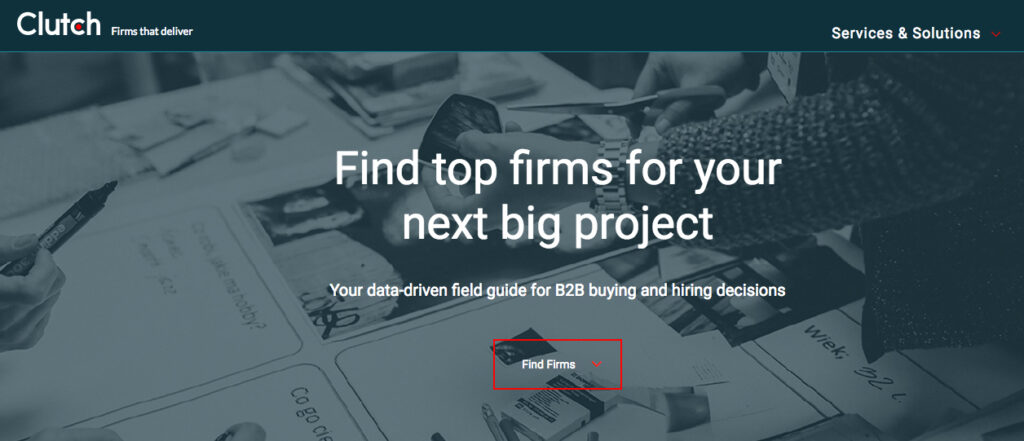
Screen grab of the Clutch website home page

It’s not easy to find a development partner you can trust. Particularly if you’ve never been immersed in the world of web development, it may take you some time to learn the language. That can make it even more difficult to know whether your partner is really staying on track with what you want to accomplish.

Luckily, knowing what to look for in a business partner can save you from all of the potential troubles later on. Ratings and reviews sites like Clutch can help you get there. This platform focuses on collecting and verifying detailed client feedback and then using a proprietary research algorithm to rank thousands of firms across their platform. Ultimately, Clutch is a resource for business buyers to find the top-ranked service providers that match their business needs.

Luckily for us, users on Clutch will also find Kanopi Studios at the top of the list to do just that. Kanopi has been working with Clutch for a few months to collect and utilize client feedback to find out what we should focus on in the coming year. Through the process, we’ve coincidentally been named among the firm’s top digital design agencies in San Francisco.

Here are some of the leading client reviews that led us to this recognition:

“They were fantastic overall. We had great success communicating to their team via video conferencing, and they were able to answer every question we had. They also worked quickly and were very efficient with their time, so we got a great value overall.”

“Kanopi Studios’ staff members are their most impressive assets — extremely intelligent, experienced, and personable. Building a website is never easy, but working with people you both respect and like makes a huge difference.”

“Kanopi Studios successfully migrated our Drupal platform while preserving all the content that we’ve built up over the years. They worked hard to achieve a responsive design that works well on both mobile and large desktop displays.”

Not only have these kind words earned us recognition on Clutch, but we’ve also gained the attention of the how-to focused platform, The Manifest (where we are listed among top Drupal developers in San Francisco), and the portfolio-focused site, Visual Objects (where we are gaining ground among top web design agencies site-wide).

Thank you, as always, to our amazing clients for the reviews and the support.

Contact us if you’d like us to do amazing 5-star review work for you.

Kanopi 2019 DrupalCon Seattle Sessions

Screen grab of DrupalCon Seattle website banner

We are thrilled to have had three of our sessions chosen for DrupalCon Seattle in April 2019. You’ll find us at the booth, in the hallway, and out and about in Seattle, but make sure to visit us in our three Builder Track sessions:

Keep Living the Dream! How to work remotely AND foster a happy, balanced life

Virtual. Remote. Distributed. Pick your label. This style of organization is becoming wildly more in demand and popular among many Drupal shops. While many folks have gone remote, some people find the experience quite isolating and disconnected.

In this session we will talk about how to be the best remote employee, as well as provide ideas if you are a leader of a remote team. We will talk about key tactics to keep you (and all other staff) inspired, creative, productive and most importantly, happy!

Presenter: Anne Stefanyk

Date: Thursday, April 11, 2019
Time: 3:15pm-3:45pm 

Deep Cleaning: Creating franchise model efficiencies with Drupal 8

COIT offers cleaning and 24/7 emergency restoration services. Their 100+ locations serve more than 12 million homes & businesses across the United States and Canada.

It had been years since the COIT site had been updated, and it posed a host of technical challenges. Franchise content optimizations resulted in redundant updates for the SEO team. The mobile experience wasn’t optimized for conversions. There was a mountain of custom technical debt. And despite the current content administrative challenges, the localized experience lacked the level of context-awareness that consumers have come to expect. It was time for COIT to clean up its own mess.

In this case study we will cover the more technical parts of this Drupal 8 implementation: how we kept a multinational but distinctly separate brand presence with geolocative features, maintained custom promotions tailored to each franchise location, and kept the existing hard-won SEO and SEM business drivers intact.

Presenters: Anne Stefanyk and Katherine White 

Date: Thursday, April 11, 2019
Time: 9:45am-10:15am
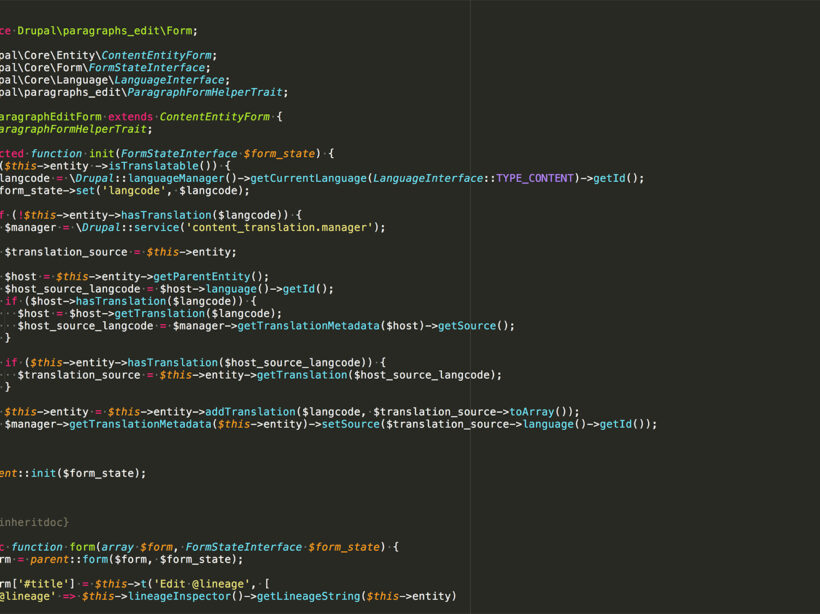
Image of the code behind the Paragraphs module

Easier Editing with Drupal 8 Paragraphs Edit

The Paragraphs module in Drupal 8 allows us to break content creation into components.  This is helpful for applying styles, markup, and structured data, but can put a strain on content creators who are used to WYSIWYG editors that allow them to click buttons to add, edit, and style content.

The Drupal Paragraphs Edit module adds contextual links to paragraphs that give you the ability to  edit, delete and duplicate paragraphs from the front end, giving editors a quick, easy and visual way to manage their content components.

Installing

Install and enable the module as you normally would, it is a zero configuration module.  It works with Drupal core’s Contextual Links and/or Quick Links module. I did have to apply this patch to get the cloning/duplication functionality working though.

Editing

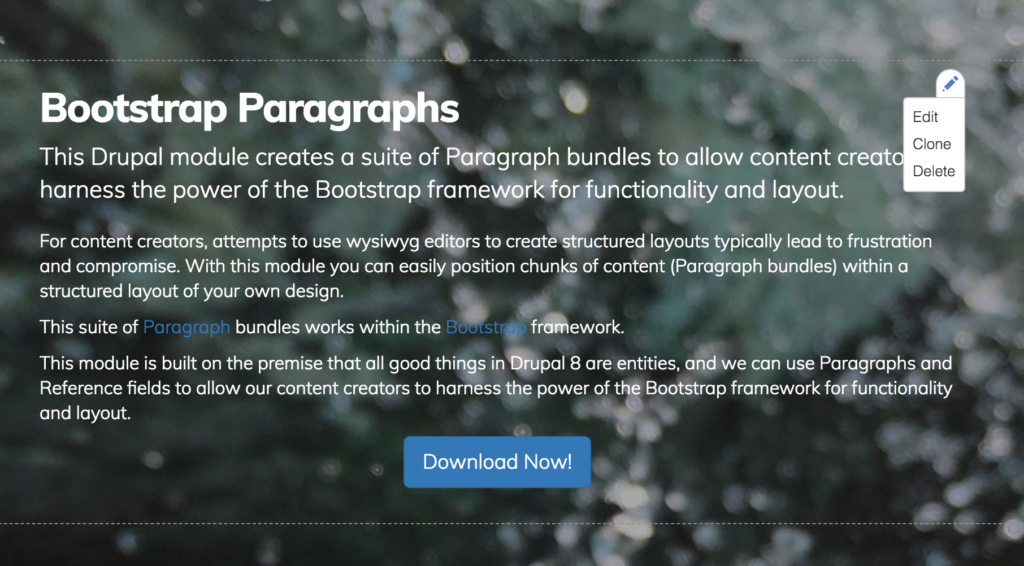
To use, visit a page and hover over your content area.  You will see an icon in the upper right corner of the Paragraphs component area.   

Screen grab of hover state for Paragraphs component

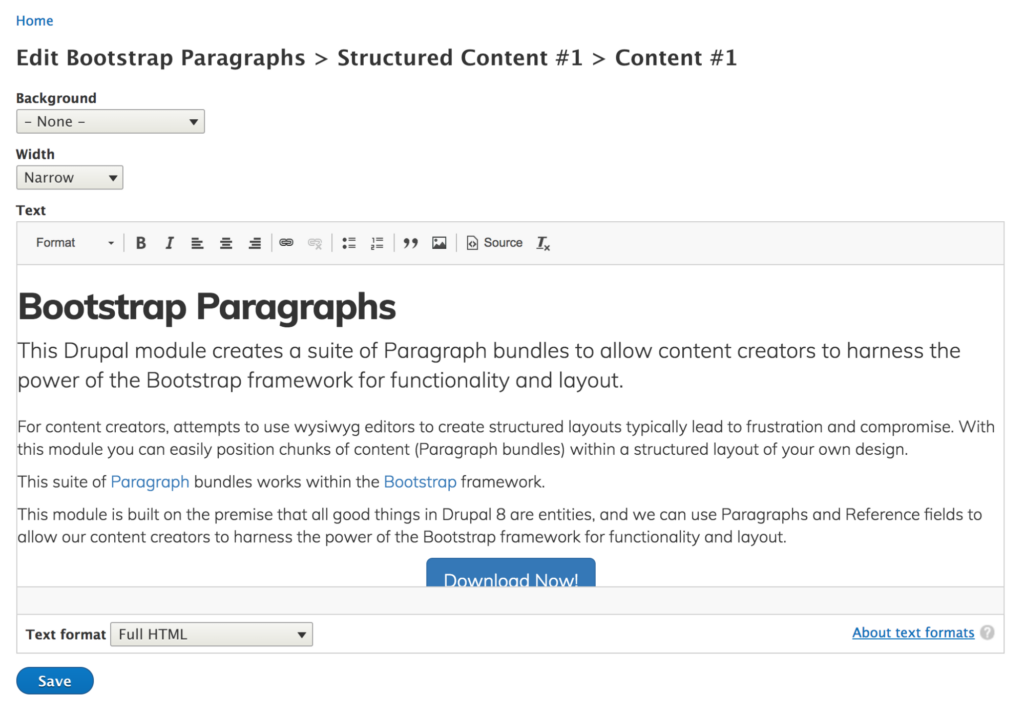
When you click the Edit option, you are taken to an admin screen where you can edit only that component.

Screen grab of admin screen for Paragraphs component area

Make your changes and click save to be taken back to the page.

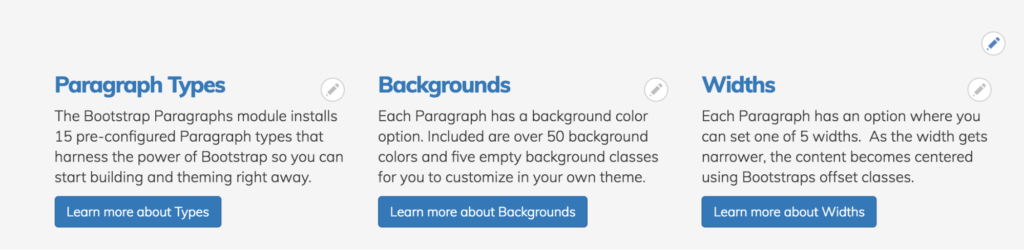
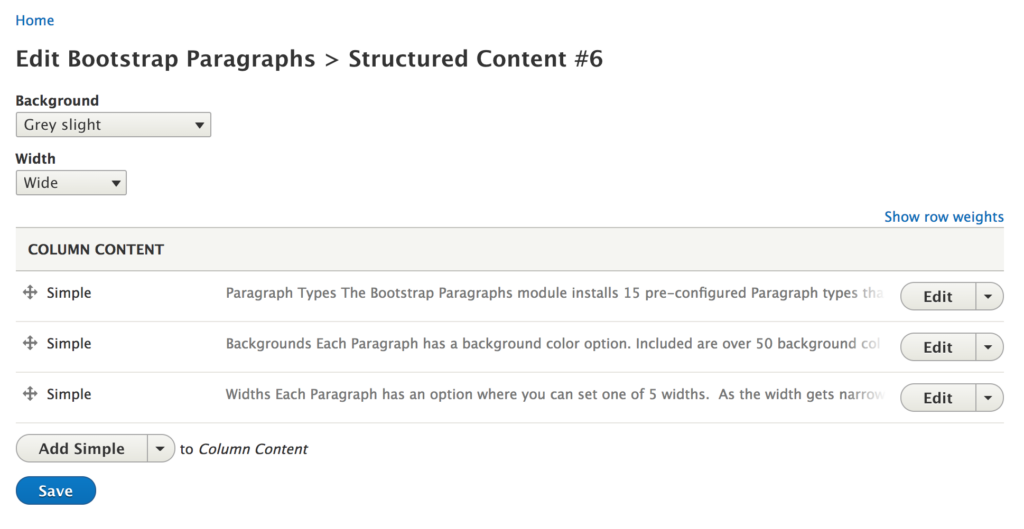
In components that are nested, like the Bootstrap Paragraphs columns component, you will see one contextual link above the nested components.  If you click this, you will be taken to the edit screen where you can modify the parent, and the children.  That is the Columns component, and the 3 text components inside.

Screen grab of editing with the Bootstrap Paragraphs columns component
Screen grab of editing with the Drupal Paragraphs Edit module.

Duplicating/Cloning

The term that is used most often for making a copy of something in Drupal is to “Clone” it.  This is a little more complicated because it is technically complicated, but once you get the hang of it, it will become second nature.

Hover over a contextual link and click Clone.

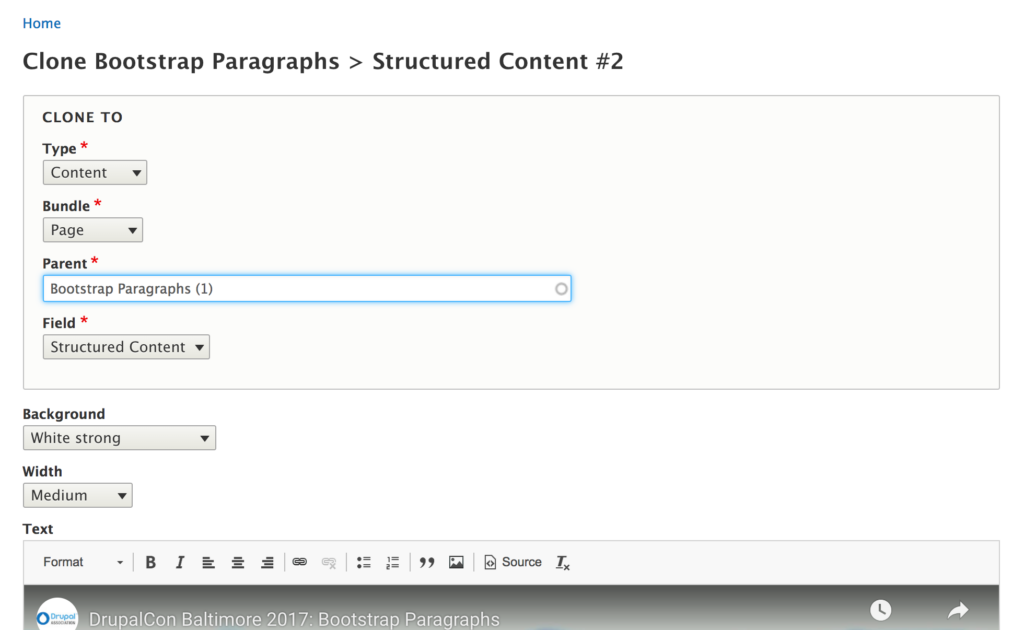
On the edit screen, you are presented with a new Clone To section.  In this section you can choose where to send this clone to, whether that be a Page or a Paragraph.  In this example, I want to duplicate this component to the same page.

  • Type: Content
  • Bundle: Page
  • Parent: (The page you are on)
  • Field: (The same field on that page.)
Screen grab of editing with the Drupal Paragraphs Edit module.

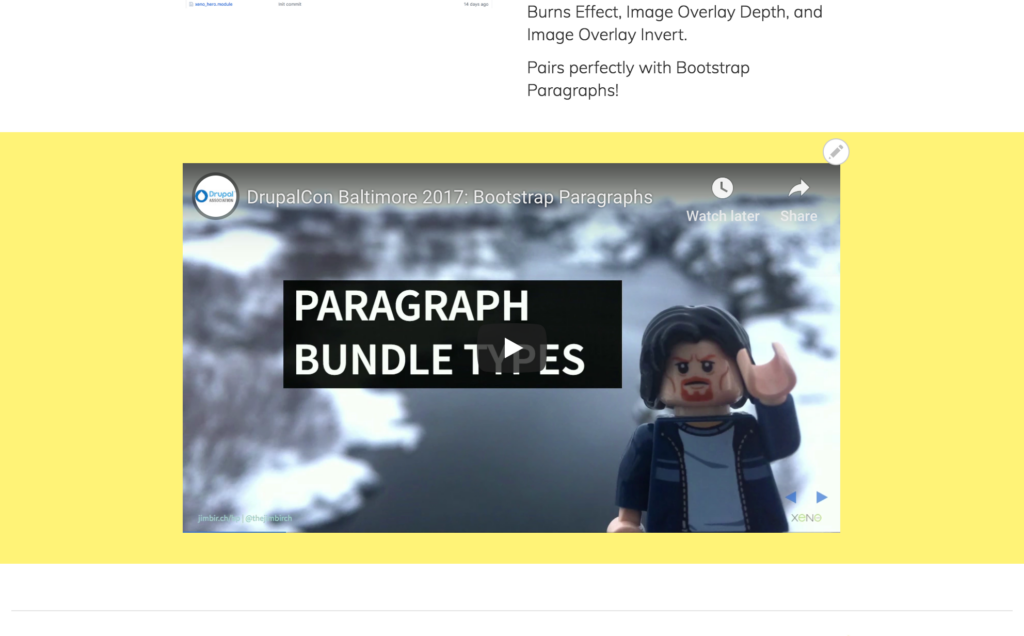
You can also make any edits you want before saving.  For example, you could change the background color. Click save, and your new component will appear at the bottom of the page, with the new background color.

Screen grab of editing with the Drupal Paragraphs Edit module.

There are a bunch of possibilities with this way to duplicate components.  To clone to another page, change the Parent. To clone to a nested paragraph component, change the Type to Paragraphs and configure the settings you need.

Deleting

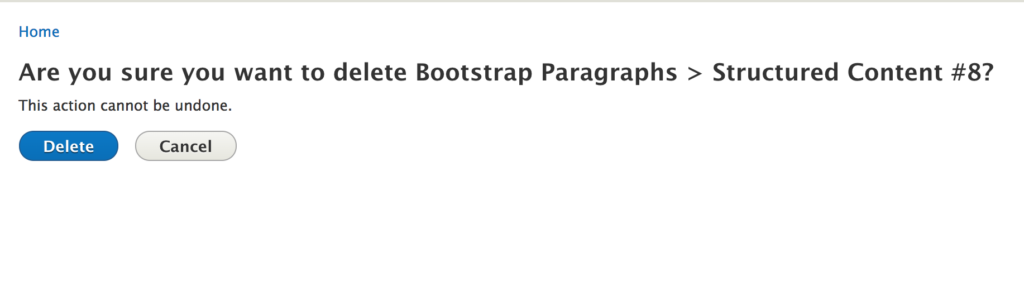
Deleting a component is as you’d expect.  Once you click delete, you are taken to a confirmation screen that asks you if you want to delete.

Conclusion

The Paragraphs Edit module is a simple and powerful tool that gets us a bit closer to inline editing and making our content creator’s lives easier and allows them to be more productive.  Give it a try on your next project and spread the word about this great little helper module!

Need help with your Drupal site? Contact us

Image from WordPress for Publishers

WordCamp for Publishers 2018: Hard Questions and Answers

WordCamp for Publishers 2018 was a community-organized event for people who build, manage publications using WordPress. In its second year, the event attracted professionals from higher ed, agencies, and both tech and content teams from national, regional, and hyper-local media organizations.

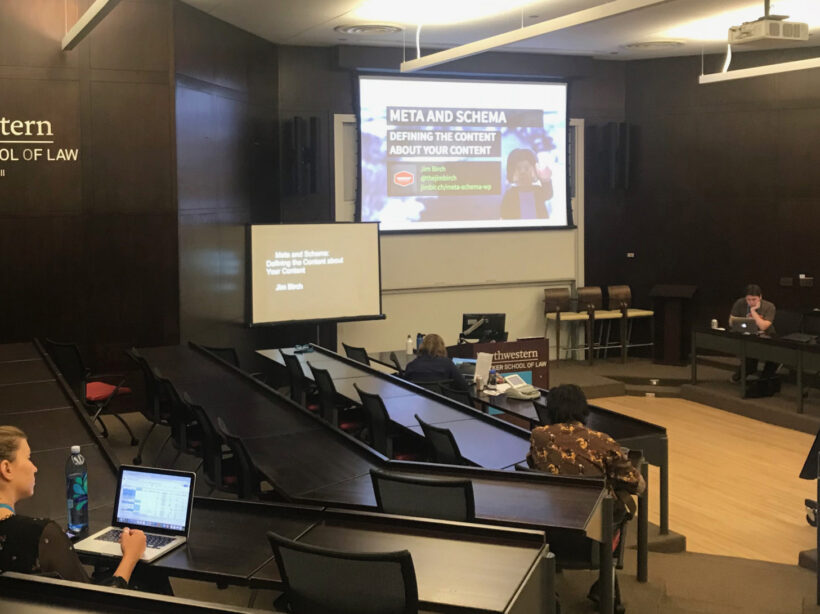
This was my first time attending the event, which moves host cities every year. This year the event took place on the shores of Lake Michigan at the Northwestern University Pritzker School of Law in downtown Chicago.

The theme of this year’s event, and the challenge put out to potential speakers by the organizers was “Taking Back The Open Web”. Inspired by Drupal founder Dries Buytaert’s blog post “Can We Save the Open Web”, the organizers asked for sessions that discussed whether an open web ever existed, it’s current state, consequences of a closed web, and how publishers may exist moving forward.

The result was a plethora of amazing sessions that delved deep into many aspects of the topic, and how it ties into WordPress and publishing. The presentations ranged from technical topics like designing and developing for the new WordPress Gutenberg editor, to case studies and panels about paywalls, implementing large networks of sites, and sustaining hyper-local newsrooms.

I was humbled to be asked to speak and kicked off the second day with a technical session on implementing Schema.org vocabularies for structured data and current best practice meta tags in WordPress.

This session presents a whirlwind, two fisted, no holds barred, data filled session that has almost too much information. I present how to implement and test Schema.org schemas, and current meta tag best practices in WordPress to gain search features in Google and enhance the look of your content on social media sites like Facebook, Twitter, LinkedIn, and Pinterest. I even got to introduce the new Speakable vocabulary for which Google announced support just a few days before, and discuss Google’s support for Datasets, HowTo, QAPage and FAQPage all of which are especially pertinent to publishers.

All of the sessions from the event were recorded and can be found online at WordCamp.tv. I have a newfound respect for those working on balancing the need for independent journalism with the need to make a profit. Publishers and the tech teams that work with them cover the full gamut of types of stories, editorial workflows, business models, site and app performance, search engine optimization and more. Each one of these things can make or break a site or company. WordCamp for Publishers 2018 provided a unique opportunity to come together to listen, discuss and learn from unique voices in the publishing industry. I will be sure to keep an eye on which city the event moves to next. Thanks to all the volunteer organizers for their professionalism in making WordCamp for Publishers 2018 an amazing and informative event!