Drupal 8 is packed with many changes and new enhancements geared towards optimization, performance, and standardization. Finally, after years of working within a hybrid environment, we are now truly moving towards a system that separates logic, behavior, and design. In this blog, I will go over some of the changes in Drupal’s theming layer that have gone from the wild, “cowboy-like” PHP template, to a more simplified and standardized templating system called Twig.
What is Twig?
Twig is the new templating engine for Drupal 8, which uses a different language and syntax than prior Drupal php templates used for theming and rendering output to a site page. Twig templates compile markup down to plain optimized PHP versus regular unoptimized PHP, thus enhancing speed and performance.
Why Twig?
The great advantages of using Twig is that it is fast, modern, and secure. It has been developed for use with Symfony, which is the new PHP framework behind Drupal 8 that follows the MVC (model-view-controller) architecture.
Not only is Twig a faster templating system than the PHP templates used in prior versions of Drupal, it also easy to learn. It provides clear error messaging and is also very well documented.
Twig also provides consistent theming practices that can be taken up by other developers and site themers as projects get handed off from one development company (dev team) to another, as many often do. The way Twig is structured it decreases the possibilities for wide differences in coding and theming practices, techniques, non-standard coding, and hacks often seen when working with prior versions of Drupal, where sites have been developed and maintained by other people and teams. Standardized consistency is a key advantage to Twig’s efficiency.
Twig Syntax
There are some key differences in syntax and coding standards when working with Twig versus the PHP templating system of prior Drupal versions. I won’t go into all of the differences that exist in this blog, but I will highlight a few examples to provide a general understanding or “bird’s eye view” so-to-speak.
Open and Closing Tags
In PHP templates prior to Drupal 8, we used open and closing tags as shown below:
    <?php
        /**
          * Some file comment…
        */
    ?>
In Twig, we open and close our template code as follows:
    {#
        /**
          * Some file comment…
        */
    #}
Template File Naming Conventions
When assigning file names to our PHP templates prior to Drupal 8 (Drupal 7 for example) we used a naming convention as follows:
node–webform.tpl.php
In Drupal 8 with the Twig template naming convention we will use this instead:
node–webform.html.twig
Function Naming Conventions
When declaring function names in PHP templates prior to Drupal 8 we used the following convention:
theme_node_links()
In Drupal 8, using the Twig template system we will use the following:
node-links.html.twig
Printing Variables
In prior versions of Drupal we would output a variable in the following manner:
    <div class="content">
        <?php print $content; ?>
    </div>
In Drupal 8 using Twig, we will instead output the variable like this:
     <div class="content">
        {{ content }}
     </div>
Assigning Variables
To assign a variable using the prior PHP template of older Drupal versions, we would do something like the following:
    <?php
        $myVar = $content->comments;
    ?>
With Twig templates we instead do this:
    {%
        set myVar = content.comments
    %}
Printing Hash Key Items
In the PHP templates we printed hash key items as follows:
    <?php
        print $item[‘#item’][‘alt’];
    ?>
In Twig templates will instead print hash key items like this:
   {{
        item[‘#item’].alt
    }}
Assigning an Array
Prior to Drupal 8, we would assign an array within the PHP template such as this:
    <?php
        $args = array(‘!author’ -> $author, ‘!date’ -> $created);
    ?>
In Drupal 8 using Twig, we will assign an array as follows:
    {%
        set args = {‘!author’:author, ‘!date’:created}
    %}
Conditionals
Using PHP templates we would setup a conditional statement like this:
    <?php
        if($content->comments):
            /* run some code… */
        endif;
    ?>
With Twig templates we setup the conditional like this instead:
    {%
        if content.comments
    %}
            /* run some code… */
    {%
        endif
    %}
Control Structures
Prior to Drupal 8 using PHP templates we would setup a control structure as follows:
   <?php
        foreach($users as $user) {
            /* run code… */
        };
    ?>
In the Twig template we do the following to setup a control structure:
    {%
        for user in users
    %}
        /* do something… */
    {%
        endfor
    %}
Translate (‘t’ function)
Prior to Drupal 8 within the PHP template, to translate a string of text we would do the following:
    <?php
        print t(“Hello World”);
    ?>
In Drupal 8 using Twig we instead do this to translate a string of text:
    {{
        “Hello World”|t
    }}
Other Examples of Syntax Differences
For more examples of Twig syntax see the Twig Documentation.
Exposing Variables in a Twig Template
While most common variables will be documented within a Twig template, there will be a need to expose additional variables within the scope of a Twig template such as those provided by modules.
Debugging:
To expose the variables available to a Twig template, debugging must first be enabled in order to output the variables for viewing. To enable debugging in Twig you’ll need to set the debug parameter to “true” within the “twig.config” section of the Drupal 8 YML file. This file is located within “yoursite.com/sites/default/services.yml”. Find the “twig.config” parameters and set “debug” to “true”.
Example:
parameters:
twig.config:
debug:true
Note: This is extremely useful for development purposes, but be sure to change the “debug” parameter back to “false” when migrating and using this YML file on a production site.
An advantage of using Twig debugging is that the markup of the Twig template is surrounded by HTML comments containing theming information like template file suggestions, similar to using the Theme Developer contrib module in Drupal 7.
Another advantage of Twig debugging is that the templates are automatically recompiled whenever a change in code is detected. This is achieved by by setting the “auto_reload” parameter to “true” within the YML file located at “yoursite.com/sites/default/services.yml”. As with the twig debug parameter, this too should be set back to “false” when migrating or using on a production site.
Outputting Variables – Using the “dump()” Function
To display variables available to a Twig template use the dump() function. To output all variables within the scope of a Twig template, simply use the dump() function with an empty parameter such as this:
    {{
        dump()
    }}
This is similar to using the “” function within the PHP theme template of prior Drupal versions.
If you know the particular variable you wish to output for inspection, you can use the dump() function including the variable name as a parameter within your Twig template like this:
    {{
        dump(author)
    }}
This is like using “<?php print_r($author); ?>” in prior versions of Drupal using PHP templates.
Markup in Drupal 8 (HTML5 & CSS)
HTML in Drupal 8
In regards to HTML markup in Drupal 8, a key difference now is that the doctype has evolved from XHTML to HTML5. We now have the ability to leverage syntactic tags such as: <audio>, <video>, and <canvas>, with the addition of SVG (scaleable vector graphic) support. This allows the the template to output multimedia and graphic content without the need for third party plugins and APIs. More importantly, HTML5 provides universal page elements common for theming such as: <article>, <header>, <footer>, <nav>, <section>, etc., which also enhances the semantic relevance of the page’s content.
CSS in Drupal 8
CSS in Drupal 8 has become much cleaner containing fewer selector IDs with simplified and more intuitive class names than prior versions. There is now less nesting from excessive divs, less code, and thus the markup as a whole is far more optimized and better geared towards performance.
Drupal 7 CSS Class Example:
<body class=”html front not-logged-in one-sidebar sidebar-first page-node”>
Drupal 8 CSS Class Example:
<body class=” “>
In Drupal 8, CSS structure and file naming conventions are based on SMACSS, which is a method for writing CSS that is both scalable and modular. SMACSS is a way of structuring CSS to add flexibility and better maintainability as a project grows and is shared among multiple themers and/or handed off from one development team to another.
Theme Structure in Drupal 8
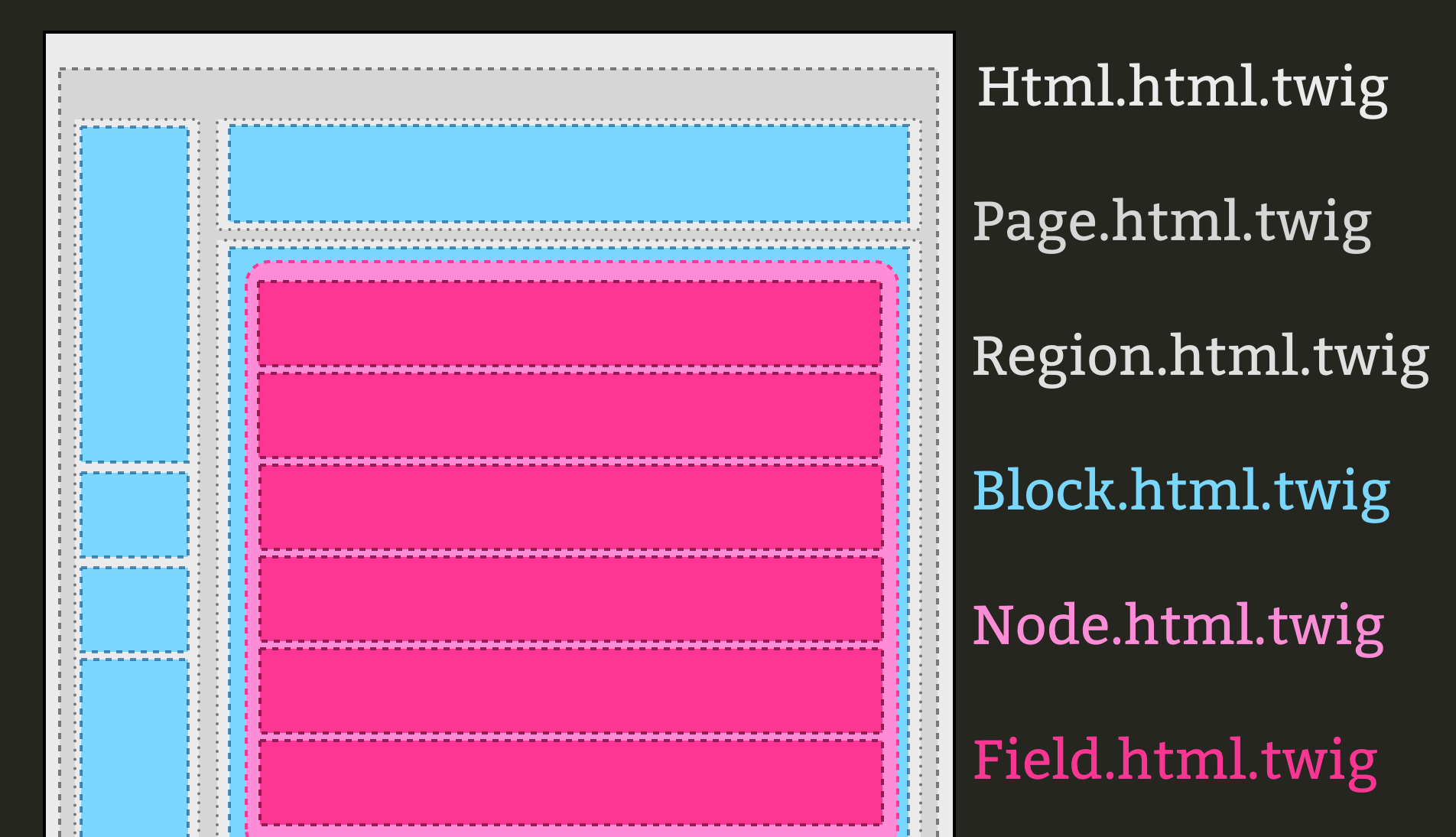
Basically, the structure of the theme’s page is the same as within Drupal 7. Here you have the “html”, “page”, “region”, “block”, “node”, and “field” layers, which make up the whole structure of a page and template files for each carry a similar naming convention except for “.html.twig” suffix required for the Drupal 8 template names.
Theme Template Name Examples:
a) Html.html.twig
b) Page.html.twig
c) Region.html.twig
d) Block.html.twig
e) Node.html.twig
f) field.html.twig
See a visual representation of the theme’s structure layers here:
http://mortendk.github.io/drupal8-twig-frankfurt-2014/images/pagebuild.png
Drupal 8’s Theme .info File
The .info for the theming layer within Drupal 8 is somewhat similar to Drupal 7, however there are a some significant differences. First of all, the .info file is now in YML and requires the “.yml” file name suffix. Ex: “mythemename.info.yml”. Another key difference is how the stylesheets and regions parameters are declared. Also, stylesheets are now called and named per the SMACSS convention as referenced above. Below is a comparison of a theme’s .info file in Drupal 7 versus Drupal 8.
Drupal 7 theme.info Example:
Drupal 8 theme.info.yml Example:
name: Bartik
type: theme
description: ‘A flexible, recolorable theme with many regions and a responsive, mobile-first layout.’
package: Core
version: VERSION
core: 8.x

stylesheets:
all:
– css/layout.css
– css/style.css
– css/colors.css
print:
– css/print.css
ckeditor_stylesheets:
– css/ckeditor-iframe.css
remove:
– sites/all/modules/somecontrib/style.css

regions:
header: Header
help: Help
page_top: ‘Page top’
page_bottom: ‘Page bottom’
highlighted: Highlighted
featured: Featured
content: Content
Excluding Unwanted Stylesheets via “remove:”
In the Drupal 8 .info.yml example shown above, notice the “remove:” that is now available to use. This is quite handy because as you know Drupal has a nasty habit of loading an excessive number of stylesheets when there is a heavy use of numerous contrib modules in a site. Before themers had to live with this and create many CSS overrides in their theme’s custom CSS file in order to work around and override the style rules coming from all of those unwanted and often unneeded stylesheets. Now in Drupal 8, we have the “remove:” option available to us to quickly and easily exclude any particular stylesheet(s) we do not want to load into our theme. Not only does this alleviate the themer’s workload, but also provides another means to enhance the site’s loading performance. Loading fewer stylesheets will increase the speed in which the site and the site’s pages display for the end user.
Do You Still Need to Use a PHP-based Template Engine with Drupal 8?
Are you one of those cowboy rebels, or a person who is bull-headedly resistant to change, and absolutely have to break the new theming convention to use PHP within your templates rather than use Twig? If so, Drupal 8 does provide an option for doing that. You can simply add the “engine:” parameter to your .info.yml file to override Twig entirely and fallback to PHP as shown in the example below.
Switching Drupal 8 Theme from Twig to PHP Example:
engine: phptemplate
Want help with your project? Contact us.
Outputting Regions to a Page in Drupal 8
In Drupal 8, the ability to display regions within a page template has gotten easier in terms of coding. The basic principle is essentially the same, however the syntax and markup used in Twig is a bit less and more simplified. Below is an example of how a region is displayed in a Drupal 7 PHP template compared to a Drupal 8 Twig template.
Drupal 7 Method for Displaying a Region Example:
    <?php if($page[‘footer’]); ?>
        <div id=”footer”>

        </div>
    <?php endif; ?>
Drupal 8 Method for Displaying a Region Example:
    {% if page.footer %}
        <div id=”footer”>
            {{ page.footer }}
        </div>
    {% endif %}
Summary
Of course there are many more specifics and differences that can be covered between Drupal 8 and theming with Twig versus older versions of Drupal. However, this blog should serve well in highlighting the broad scope of differences and basic usage of working with the new Twig templating system. The key takeaways here are that Drupal 8 has moved to a more efficient and optimized way of rendering a site’s theme through the use of Twig. Drupal 8 has come far in separating design from functionality and so sites will be more optimized and better tuned for performance, in addition to lifting some of the redundant and formerly heavy workload previously required of themers. Of course there is a learning curve as with any change in technology, but once the basic concepts are understood all else should fall into place rather quickly.
Resources