
After years of navigating uncertainty, the arts and culture sector is finally seeing a definitive resurgence as museum visitation has officially bounced back to pre-pandemic levels.
However, this return to physical spaces hasn’t signaled a decrease in digital demand. In fact, there has been a 29% year-over-year increase in website sessions, proving that audiences are now more digitally engaged with arts organizations than ever before. For institutions to thrive in this new landscape, their web design must become a high-performing, connective bridge between the virtual world and the gallery floor.
In this guide, we’ll explore tips and best practices for designing your website to drive greater mission engagement and conversions. We’ll cover:
- The importance of engaging arts and culture web design
- The key components of effective web design for arts and culture organizations
- Examples of effective web design for arts and culture
- Best practices for designing your arts and culture website
- How Kanopi can help build a stunning arts and culture website
The importance of engaging arts and culture web design
The value of your arts and culture organization is self-explanatory. You provide an incredible resource to your community through the artwork, music, or performances you offer, educating and inspiring the public. An engaging and thoughtful web design translates that value to your online community, transforming casual users into lifelong members of your cultural community.
With a well-structured web design strategy, you can:
- Balance stunning and immersive design with essential information like hours, pricing, and location.
- Increase conversion rates by nudging visitors toward financial support without feeling overly promotional.
- Make massive, metadata-heavy digital collections searchable and engaging for the general public.
- Create an accessible and positive experience for users with disabilities.
The key components of effective web design for arts and culture organizations
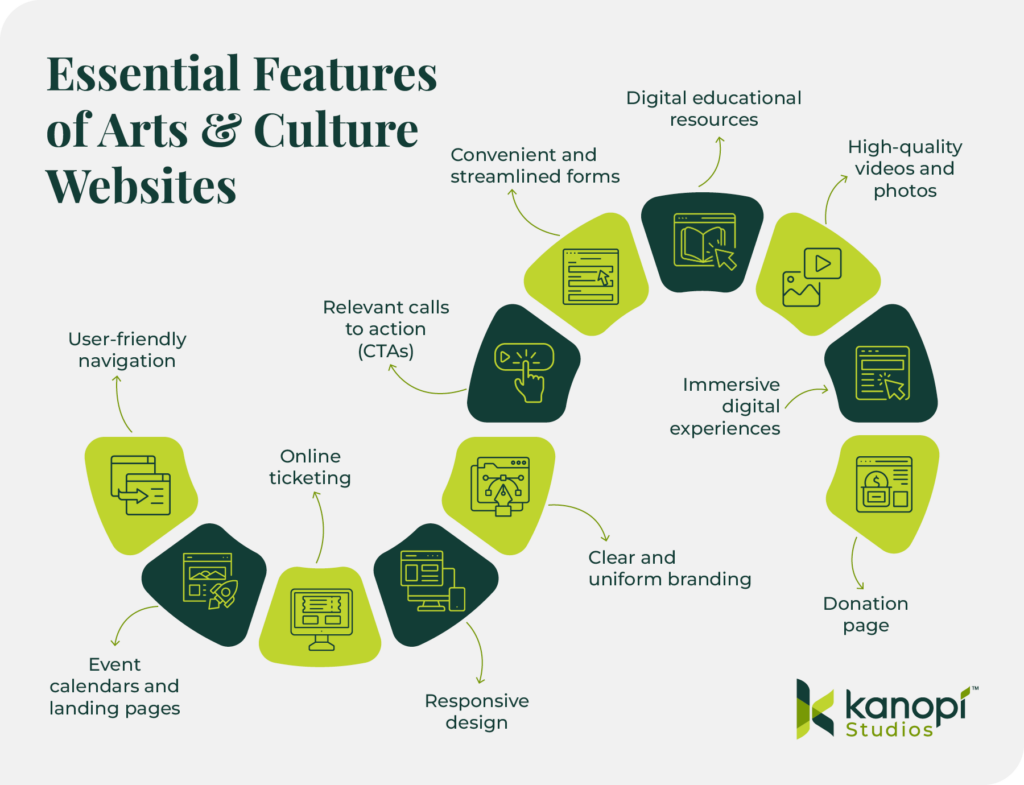
Every well-designed arts and culture website shares a few key qualities. To effectively promote your mission and connect community members to your cultural services, your website should have:
- User-friendly navigation: A clear menu structure and internal search functionality are crucial in helping users find the information, digital resources, or forms they need.
- Event calendars and landing pages: In 2024, there was a significant increase in users (32% overall) landing directly on event pages. These pages must be informative, with clear event details that include the date, time, and location.
- Online ticketing: 76% of museum professionals say that online ticket sales are a core revenue channel. Your online ticketing process should be easy to use, regardless of what device type visitors are using. It should deliver tickets to users immediately, allowing them to download them on their phones or print them.
- Responsive design: Mobile use accounts for 70% of all website sessions and generates 53% of revenue for cultural organizations. Your website should automatically adapt to mobile screens, with larger fonts and buttons optimized for mobile formatting.
- Clear and uniform branding: Cohesive colors, fonts, messaging, and imagery are key to creating a unified brand identity for your cultural organization.
- Relevant calls to action (CTAs): CTAs are buttons or links that help users navigate to different parts of your website. Your site CTAs should appeal directly to your target audience’s needs. For example, your homepage should have buttons that direct users to your online ticketing page, event calendar, and donation page.
- Convenient and streamlined forms: Forms such as your donation page, membership signup, and online volunteer registration allow your organization to gather information about visitors and build deeper relationships with them. Forms should be simple and mobile-optimized to guarantee a streamlined user experience.
- Digital educational resources: If your cultural organization has a strong educational focus, courses, videos, quizzes, and interactive learning widgets will bring your information to life for learners.
- High-quality videos and photos: Studies have shown that content with images receives 94% more views than content without. Include high-quality original photography and videos on your website to give visitors a glimpse into your exhibits. Your visual art is your best asset, so show it off!
- Immersive digital experiences (interactive maps, online behind-the-scenes tours, etc.): Many cultural organizations, like the Exploratorium, offer just as much educational value on their websites as they do in their physical locations. Interactive content allows online users to have an equally valuable experience as in-person visitors.
- Donation page: The vast majority of cultural organizations in the U.S. are nonprofits that rely on charitable donations to survive and thrive. Your online donation page should include a compelling reason to donate, impact information about what gifts help you achieve, and details about various giving options, including cash, donor-advised funds, and gifts of stock.
4 examples of effective web design for arts and culture
Reviewing examples of real cultural websites that exhibit design best practices can help inspire you when refreshing your own website’s design. Explore these four sites, all created, redesigned, or supported by Kanopi Studios, to understand what makes them so successful.
Accessibility & Scalability: The Frick Collection
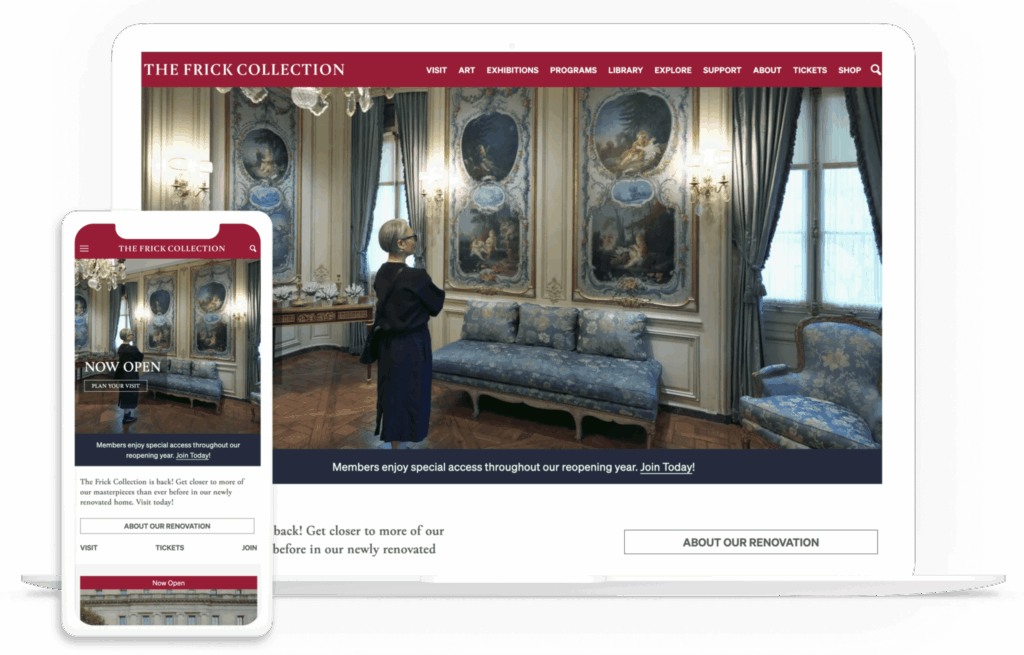
The Frick Collection is an art museum and research center located in New York City. This institution worked with the Kanopi design team to modernize its digital presence, simplify landing pages, and streamline the user experience.
What Works Well On this Website
- Streamlined mobile-first design: Mobile-first design means that this website was built with mobile-friendliness in mind from the outset, not as an afterthought. Mobile-friendly elements of this site include an expandable hamburger menu and adaptable forms.
- Advanced search tool: The Kanopi team built a robust, searchable collections catalog for the Frick Collection website. The tool seamlessly integrates with the museum’s existing collections management system.
- Accessibility: This website has a 100/100 Lighthouse accessibility score. Lighthouse is a tool that evaluates accessibility based on several factors, including verifying that images have alternative text and that form elements have clear associated labels.
Usability & Strategic Messaging: Sunnylands
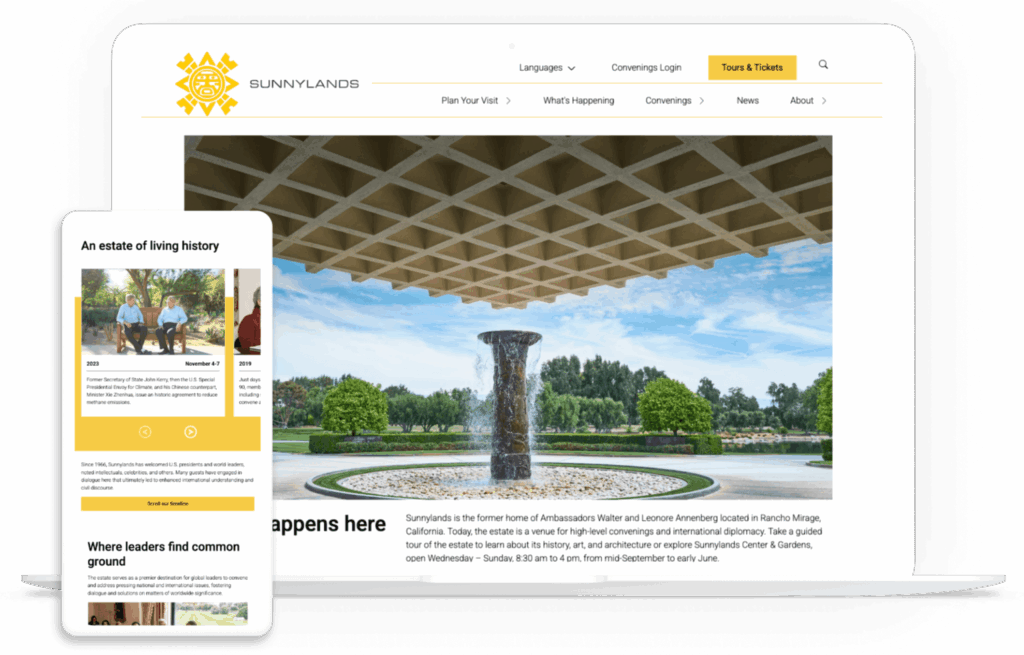
Sunnylands is a historic estate in Rancho Mirage, California, renowned for its rich history, art, and architecture. Sunnylands collaborated with Kanopi to refresh its website, refine its messaging, and create a streamlined user experience.
What Works Well On this Website
- Audited and streamlined content: We created dynamic content types for the Sunnylands website, such as “Convenings” and “Events,” to facilitate richer and more engaging storytelling.
- Improved accessibility and aesthetics: Through collaboration with the Sunnylands creative team, we updated the website’s visuals (including a new pink accent color), aligned the website with brand standards, and improved the Lighthouse accessibility score to 100/100.
- Updated strategic messaging: Sunnylands is more than just a historic building; it’s also a destination for leaders in government, science, academia, the nonprofit sector, and the private sector to meet and conduct high-level convenings and international diplomacy. Through updated language, the website now clearly outlines all of the center’s offerings.
Creativity & Navigability: San Francisco Conservatory of Music
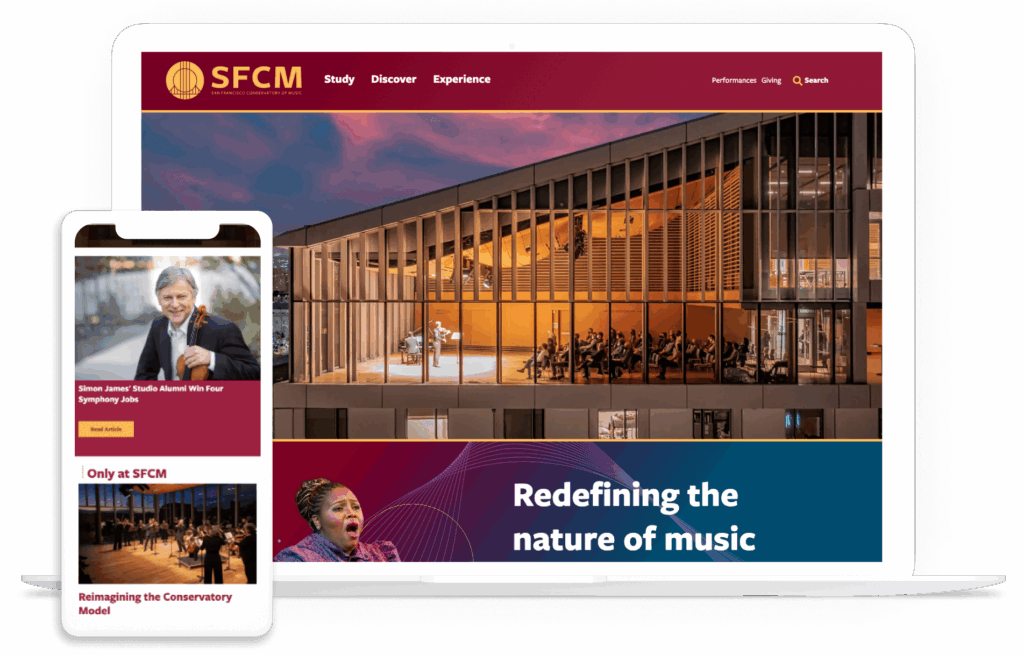
The San Francisco Conservatory of Music provides a comprehensive educational experience for students seeking to advance their artistic and intellectual aspirations. The organization’s collaboration with the Kanopi team led to a 24% increase in scroll depth and an 88% increase in “how to apply” page views.
What Works Well On this Website
- Enhanced performance calendar: We built the website’s online calendar with robust tagging, filtering, and organization, as well as live streaming capabilities.
- Clear messaging: The top-level main menu offers clear directives for users with active verbs, such as “Study,” “Discover,” and “Experience.”
- Flexible layouts: The Kanopi team incorporated new, flexible components into the website’s layout for more dynamic and engaging content.
Modernity & User-Friendliness: Hamilton Education Program
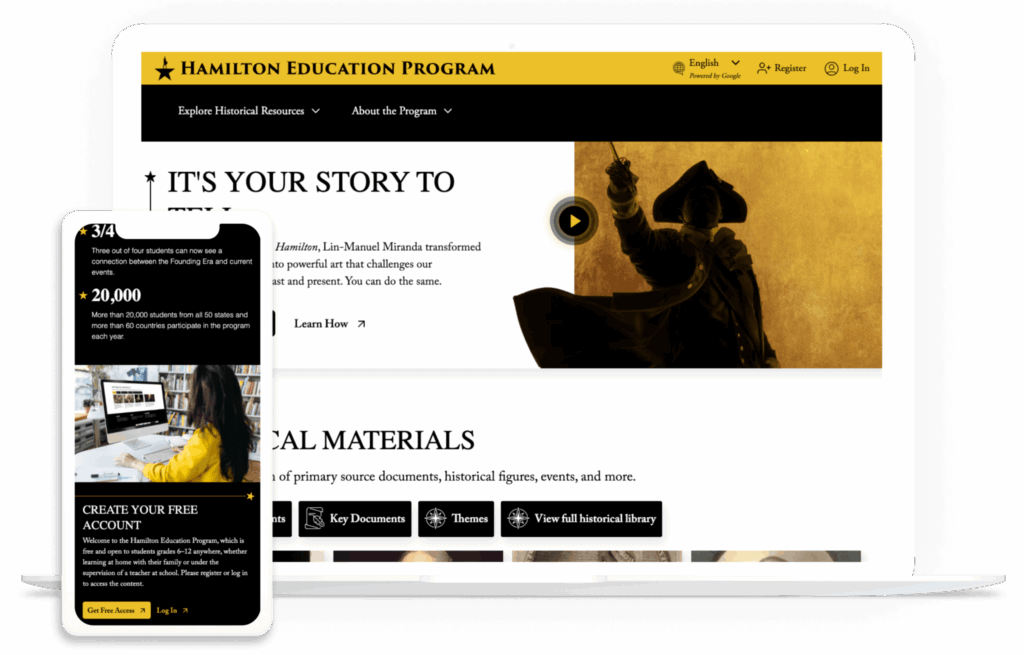
The Hamilton Education Program is a partnership between the Gilder Lehrman Institute of American History, Hamilton, and the Rockefeller Foundation. The program combines theatrical experiences with historical education to help students in grades 6-12 learn more about the events depicted in the musical Hamilton.
The program worked with Kanopi to reimagine their website into a high-performing resource and eliminate barriers to the user experience.
What Works Well On this Website
- Intuitive resource library: Users can easily find information by filtering by person, event, document, and theme. After clicking on a resource, visitors can delve deeper into its history and explore related resources, expanding their knowledge through a user-friendly interface.
- Curated content: The website presents a personalized user interface tailored to the user’s role, whether they are a parent, student, or teacher. They can view content customized to their interests and needs.
- Streamlined UX for teachers: The Kanopi team streamlined the user experience for teachers by ensuring that they only have to sign on once to create their account across both the Gilder Lehrman and Hamilton sites.
Best practices for designing your arts and culture website
To elevate your arts and culture website beyond the basics, consider the following best practices.
1. Go beyond accessibility basics.
Most organizations view “accessibility” as a legal checklist item. While it’s essential to comply with WCAG 2.1 standards, it’s best practice to go beyond these basic requirements to create a holistic and accessible experience for all online visitors. True leaders in the arts space are now designing for cognitive and sensory diversity in addition to physical disabilities.
The Problem: Typical “flashy” arts sites with auto-play videos and parallax scrolling can be overwhelming or exclusionary for neurodivergent visitors.
The Solution:
- Offer a “Quiet Mode” toggle that reduces motion and simplifies layouts.
- Use plain-language summaries for complex exhibition descriptions to improve engagement for users and ADHD or dyslexia. These summaries should be concise and free of jargon.
- Design simplified user journeys to help reduce anxiety for first-time visitors.
2. Maintain an ethical approach to AI and cultural rights.
72% of museums are already testing or adopting AI. With AI becoming a core part of web design, arts organizations face a unique philosophical crisis: how to use AI without exploiting the artists they represent.
The Problem: Standard AI search or chatbots might “hallucinate” facts about artifacts or use community-owned heritage without consent.
The Solution:
- Ensure community consent when digitizing and training AI on Indigenous or sensitive cultural heritage by connecting with the impacted communities and offering them opportunities to opt into or out of this type of data usage.
- Instead of letting a chatbot “guess” based on its general training, use retrieval-augmented generation (RAG). This forces the AI to only answer questions using the organization’s own verified database of records. If the answer isn’t in your vetted archives, the AI says “I don’t know” rather than making up an answer.
- Protect artists’ intellectual property. Artists are increasingly concerned about their style being mimicked by AI. Use AI models that are explicitly instructed to only discuss the art, not generate new images in the style of that artist. Ensure your web design team includes robots.txt instructions that prevent external AI crawlers from scraping high-resolution images of copyrighted works in your digital galleries.
3. Combine the digital and physical experience.
Most web design tips for arts and culture organizations treat the website and the physical space as two separate entities. In 2026, the website is the visitor’s primary tool during the actual visit.
The Problem: QR codes often lead to a dead-end experience. Your website should act as a holistic indoor navigator and haptic guide.
The Solution:
- Use hardware-free indoor navigation directly within the mobile browser, powered by technology providers like Mapsted or Pointr.
- Leverage haptic feedback (vibrations) on your website or mobile app to help visually impaired visitors “feel” the layout of a gallery.
- Design a post-visit digital experience that turns a one-time ticket buyer into a lifelong community member. For example, generate a museum visit recap information page for each visitor or send follow-up information and details about the specific exhibits they engaged with.
4. Measure impact holistically.
Standard SEO typically just focuses on “conversions” (AKA ticket sales). But cultural organizations often prioritize their social impact alongside their fundraising capabilities.
The Problem: Success for a museum isn’t just about ticket sales; it’s about igniting an educational spark and fostering a community connection.
The Solution:
- Measure digital dwell time as a proxy for educational value.
- Track metrics that indicate a visitor’s readiness to return, such as adding future events to their calendar or downloading digital resources.
- Use qualitative survey data in conjunction with quantitative data to report community resonance scores to board members and donors.
Leverage our free impact calculator here to define the educational impact of your website and determine the best next steps to take to improve impact.
Beyond the Box Office: Measure Your Social Impact
Calculate your museum’s educational resonance
How Kanopi can help build a stunning arts and culture website
Kanopi Studios has been a trusted web design partner for cultural websites for over a decade. We take a holistic approach to web design, meeting you where you are to support your website at every stage of the development cycle. Our web design services for arts and culture organizations include:
- Research and strategy: We thoroughly research your audience to understand the digital context and needs of your cultural organization. We leverage tangible metrics to inform our website design approach, building on what works best.
- Web development: Our expert development team, comprising over 30 experienced professionals, leverages their knowledge of WordPress and Drupal to build a site customized to your specific requirements. Every site we build is at least WCAG AA compliant to ensure accessibility.
- Design, user experience, and content: We bring your website to life with intuitive user journeys to guide visitors through your content and connect them to your services and resources. All of our designs are mobile-responsive by default, ensuring a seamless user experience regardless of the device visitors use.
- Web support: We provide cultural websites with the ongoing maintenance and iteration they need to thrive well into the future. We conduct bug fixes, update modules and plugins, and manage conversion optimizations to keep your website healthy and up-to-date.
Wrapping up
To truly excel, websites for arts and culture organizations must be designed with a user-centric approach at every stage. Your institution’s digital presence is where community members connect with your mission, whether they’re looking for easy online ticketing or accessible educational materials. By following the advice in this guide, you can ensure visitors find everything they need and have their expectations met when they arrive at your website.
Looking for more web design tips and best practices? Check out these free additional resources:
- Website Design and Development Trends for 2026. Explore more web design trends for this year to keep your strategy up to date.
- 35+ Best Nonprofit Websites for 2026 (& Optimization Tips!). Discover additional ways your organization can present fundraising opportunities online by getting inspiration from these nonprofit websites.
- Accessible personas: the key to inclusive web design. Learn how to create audience personas that take accessibility into account to design a more inclusive website.