
Hand writing in a notebook

Quiz: Is it time for a full rebuild or a focused fix?

There are a number of realities out there when it comes to your website.

Reality #1: You have to have one!

In today’s world, it is difficult if not impossible to be successful without a website for your business or organization. 

Reality #2: Technology moves quickly.

It is difficult to keep up with the pace of change, but it can also be costly to your reputation and results to fall behind. 

Reality #3: Your website will always need attention.

The days when you could launch a website and call it done are long over. The most successful organizations are continuously evolving their sites based on changing technology, customer insights and industry trends.  Knowing all of this, it’s likely that your website could use some love. But do you know whether it could benefit most from a focused fix or a full rebuild? What if you could meet your goals and continue to make progress on your site without the major expense and time commitment of a full rebuild? 

Take our quiz to diagnose the next steps for your website.

Do you understand your audience and their decision-making journey? 

1. Super clear
2. Clear
2. Mostly clear
3. Unclear

How hard or convoluted is it for your organization to make decisions?

1. Super easy
2. Smooth, but slow
3. Tricky
4. Super challenging

Do you have pressing events, deadlines or organizational goals that require a refreshed site as soon as possible?

1. Nothing immediate
2. Yes, but it can wait
3. Yes!
4. Serious crunch time!!

Do you currently have the capacity for a rebuild (including funds, staff time and opportunity costs)?

1. Yes!
2. Very soon
3. Within the next 1-2 years
4. Unclear

How old is your website technology?

1. Ancient and crusty
2. Old
3. Recent within the last 3-4 years
4. Modern, updated within the last 1-2 years

Is your site WCAG 2.0 AA compliant?
(WCAG 2.0 AA is an accessibility standard that is rapidly becoming the expected norm and is required of some organizations)

1. We need to be, but I’m not sure how to make it happen
2. We need to be, and we have a plan
3. We should be, but it’s not required 
4.  Yes!

Is your site responsive? 

1. No
2. We’re ready for that, but haven’t started
3. Yes, but we have no mobile strategy
4. We are fast and mobile-focused

How is the quiz going? Contact us if you need help with your project.  

Is your site working to help you hit your goals and improve your audience engagement?

1. Ha, no
2. I’m not really sure
3. I think so, but I’m not sure how to tell
4. Yes!

What’s your score?

Give yourself:
1 point for each 1 answer
2 points for each 2 answer
3 points for each 3 answer 
4 points for each 4 answer

What does it mean? 

If you scored: 

8 – 15 points: It’s time to get going on a full rebuild and redesign of your site. What are you waiting for? 
16 – 24 points: You are in the middle ground and need more analysis.
25 – 32 points: We recommend a focused fix to extend the life of your current site, continue to evolve it and get the most out of your existing investment  

Want Kanopi to help you with any of this? Contact us.

Project managers looking at a whiteboard

Keeping things on track: Website project management tips for clients

Amber
Amber Young

So your company is redesigning its website and you are going to be the project manager. You will be the one responsible for making sure that everything goes according to plan. You are probably excited! And maybe a bit overwhelmed as well. Good project management will make all the difference.

The more you know going into this process the better. Since we have managed thousands of digital projects at Kanopi Studios, we wanted to share our expertise to help you hit the ground running with solid project management.

Set clear and measurable goals

This is a critical step before getting started. Since your organization is investing time and money into its website, you’ll want to be able to prove it’s effectiveness and value. Think of all of the ways that a new website can support your organization’s goals and give some thought to how you could measure its impact. Having clear goals determined in advance will help your website vendors understand where to focus to deliver the most targeted solutions. It will also help you prioritize scope and features and prove the value of the site after it launches.

Find the right vendor

First, you need to write a strong RFP. Then, it’s on to selecting the right vendor for your project. You want to find a partner who you can communicate easily with, who has the expertise to do the job right and also meets your budget needs. To make things even more complicated, when you review the set of RFP responses, it is rarely apples to apples. The pricing and information represented in them will likely differ wildly. Be sure to ask each vendor what is included in their price. Some agencies will bid low to win your business, expecting that they will be able to issue change orders for more funds throughout the process. In general, you do get what you pay for, in websites as in other areas of life, so beware of the lowest bidder. And since your digital projects are probably only one part of your busy job, finding a vendor who is flexible, experienced, and trusted will help make things easier on you, leading the way to a successful outcome.

Gather (and wrangle) your stakeholders

Before your project ever starts, there is expectation setting to be done with your internal teams. We encourage you to establish a core team of approvers who will stay engaged throughout the project and understand the progression as decisions are made. Then, you’ll need to decide on the cadence for how you will share progress with the rest of your organization. Make sure everyone knows and agrees to their role in order to avoid last minute changes or requests that can throw off the process you have put in place. Consider documenting roles in a RACI chart for additional clarity. It can be to your advantage to use the project budget and timeline as a defense mechanism against new and last minute requests, as these things will have an effect on deadlines and dollars.

Keep vendors accountable

Work with your vendors to establish a cadence of check-ins and regular reporting on budget, percent complete, next steps, and risks. Ensure that you know what to expect from deliverables and when to expect them so that you can schedule time with the right people for reviews and approvals. Find out if your vendor uses a shared project management software platform that will allow you the ability to track progress, add tasks and keep all messages and files in a single, organized location. At Kanopi, we use TeamWork and have had strong success using it to increase transparency on projects.

Understand the creative process

During the UX and design process, your vendor will be establishing guiding principles that will carry through the project. The further the process goes, the harder it will be to change course. So if you aren’t sure about something, ask! It is always easier to adjust a strategy document or tweak a design than it is to rebuild something once it is in code. This should be a collaborative process, so we recommend frequent discussions and reviews to stay in touch on progress and get buy-in from your team.

Think about content early. Check in about content often.

Pay attention during the design phase to how content will be presented on the new site. Always be thinking: Do we have existing content to fill those boxes in the designs? Or will we need to create it? If there is new content to be created (as there most often is), do you have dedicated in-house resources to make this happen? Are your subject matter experts prepared to share details to help your writers deliver? Don’t forget that content also means images! We recommend making an internal content timeline that includes milestones and due dates to ensure that content delays don’t throw a wrench in your plans. If you don’t have the resources you need and are planning to hire, do this early on in the project so that your writers can be in aware of the strategy and design for the site. This will help speed their process, reduce rewrites and ensure that the copy is on target.

Requirements

While it can be hard to understand requirements documentation, it is important, because it serves as the blueprint for how your site will be built. Requirements should be presented in the form of user stories for the technical build to help put things in simpler terms and define expectations. A user story puts requirements into simple language and follows a common structure: As a (type of user), I need to (do something) so that I can (experience a result). While these may seem theoretical, they will impact the day to day reality for your content authors and site users. This is another area where you shouldn’t be afraid to ask questions to ensure that you know what you are approving and that you understand what it will mean once the site is launched.

Search Engine Optimization

With all of the activity prior to launch, SEO can fall through the cracks. It’s also a responsibility that may be split between your vendor and your internal team. With a little planning and coordination, you can ensure that SEO is in place prior to launch. Check in with your vendor about SEO, establish who is doing what and double check it all before launch. Moz has a handy pre-launch SEO checklist that lists SEO actions in priority order.

Need help with project management? Contact us.

User acceptance testing (UAT)

During this stage, your team will be reviewing the website and entering feedback prior to launch. Ideally, your team will have plenty of time to check the site thoroughly on all devices and browsers, clicking every link and paying special attention to more complex functionality including forms, transactions and interactive features. It is also ideal for your vendor to have enough time to address the issues that your team finds prior to launch. However, in reality, this process can be constrained by launch deadlines, making clarity and communication essential. Be sure to prioritize issues, making it clear which are launch blockers and which are nice to have fixes. Include the URL the issue was discovered on, the browser, device and version being used, details describing the issue and the desired fix.

Preparing for launch day

Talk with your vendor to make sure that there is a plan in place for launch day. Line up your core group up to test the site as soon as it is live and make sure your vendor will be available in case anything unexpected needs to be addressed. It’s best to delay announcing that the site is live until these final checks can be completed. We’ve even made a pre-launch checklist you can reference! If you need to announce the site launch in advance, plan the timing with your vendor and make sure there is enough buffer time to allow for a site review and bug fixes.

Don’t forget about support

Your project management has gotten you to launch. And yet, launch day in many ways is just the beginning! Inevitably your site will need something … whether it’s small bug fixes you discover after launch or some of those new feature ideas that came up in discovery but got put in the phase two bucket. In addition, keeping your CMS up to date and ensuring site security updates are in place is an ongoing and critical process. Website support is the answer. Having a support contract in place before launch ensures that you will not miss a beat and that you can evolve your site as you learn from using it, receiving feedback on it and examining analytics.

If you’ve followed these steps, your project management has gotten you far. If you need a little help getting farther, contact us.

Design meeting

If it ain’t broke …

How to know if your site needs a total rebuild or a focused fix

Designers mapping out a website.

So your site isn’t working the way you want it to. Maybe it’s sluggish, or you’re not seeing the conversions you want, or customers are complaining. Before you drop a huge chunk of your budget on a complete rebuild, consider that there might be a simpler (and more affordable) solution to your website woes.

We see a lot of Drupal 7 and WordPress websites here at Kanopi Studios, and we often discover that it’s more cost-effective for our clients to simply update their sites rather than rebuilding them. Making targeted updates can allow you to focus on addressing a few key issues, while still leveraging the investment of time, energy and funds that went into your site’s foundation.

Here are three key topics to consider:

1. How do you know when it’s time for a change?
2. Is your website optimally organized and designed to be user-friendly?
3. How strong is your technical foundation?

How do I know it’s time for a change?

Do any of these problems sound familiar?

  • Low conversion rates
  • Site pages take more than 3 seconds to load
  • Site doesn’t work well on mobile or other devices
  • Updating content is a difficult and frustrating process
  • Users struggle to find what they need on the site or have shared negative feedback
  • Site crashes when updating
  • Too many bugs
  • Building new features is difficult or may not even be possible
  • Site is not loading on https and triggers security warnings

If your answer to any of these is yes, it’s time to take action.

But first … is it really that important for me to address these issues?

Yes! A website that isn’t working optimally can dramatically affect your bottom line. An out-of-date or poorly designed website can:

  • Damage your credibility. If your website loads slowly, is crowded with clutter or is just plain not working, you are sending the message that your company is unprofessional.
  • Make you appear out of touch. A dated website tells your customers you are behind the technological times, or worse – you don’t care enough to stay up-to-date.
  • Cost you customers. Every customer who leaves your site in frustration due to broken links, complex forms, slow pages or confusing navigation is a customer you won’t get back. If your competitors offer similar services and have a stronger website experience, your loss will be their gain.

Decision time. If you want to avoid the damage that a dated website can cause, you’ll need to either rebuild your site or update it. If you’re ready to take action, we can help you find the best and most cost-effective approach.

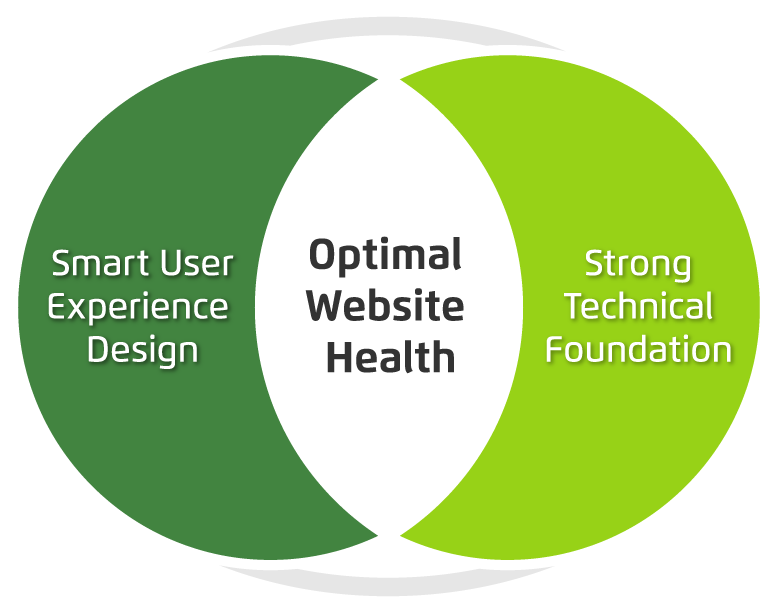
There are two primary things to consider when maximizing your site’s ROI: your user’s needs and the technology that drives your site. If you can identify and fix problems in both of these categories, you can most likely avoid a costly rebuild.

Venn diagram showing optimum website health at the intersection of smart user experience and strong tech foundation.

Next, we’ll dive a bit deeper into tips to help you level up your user experience and update your website technology without starting over from scratch. Consider it the non-surgical, diagnostic approach to improving your website experience right where it needs it the most. 

Collaborative meeting

How’s your user experience?

How to know if your site is optimally organized and designed

Now that you’ve decided that it’s time to take action to improve your website, it’s time to see if any user experience upgrades could help. Take a look through our list of issues below, and the tips to help resolve them.

Having a hard time converting leads or getting sales?

If you’re not sure why you’re not generating business from your website, it’s time to get serious about strategy and subsequent user experience upgrades. Here’s how:

  • Add a survey to your website using tools like Jotform’s Survey Maker to understand what users are looking for
  • Take a look at your analytics to understand where you are losing your users. If you don’t have analytics installed, get either Google Analytics or Tag Manager set up on your site.
  • Try an online user testing platform like Hotjar to help you go beyond standard analytics with heatmaps, visitor recordings, conversion funnels and more.
    Complete a User Experience & Conversion Optimization Audit with Kanopi Studios. We can make a whole range of insightful recommendations within your budget. Contact us to learn more.

Does your site take forever to load?

If it takes longer than three seconds, you have a problem.

  • Use Google PageSpeed or Pingdom to test your site’s speed, understand what might be slowing it down and take action to resolve any issues.
  • Make sure you have a reliable hosting company backing your site at the right level for the amount of traffic you receive.

Does your site work on mobile? Is it accessible?

It’s vital to make sure your site is accessible to everyone, no matter what device or screen size they are using. Here’s how to check:

  • Try using your site on a phone or a tablet. If you have to pinch or zoom to interact with the content, it’s time for a responsive design.
  • Make sure you can tab through all navigation and content on your site using only your keyboard, that all images have alt tags, and that you are able to use a voice browser to “read” your pages out loud. If not, you are missing key elements of accessibility.
  • Contact Kanopi Studios about an accessibility audit. We can help you identify the issues and build a plan for how to resolve them.

Is it frustrating – or impossible – to update content on your site?

If it’s a major undertaking to change even the simplest thing, something needs to happen.

  • Define your ideal workflow, then ask an expert to take a look and see how you can optimize the backend.
  • Consider the types of content that your site needs to support. Do you have templates in place that meet your needs? If not, it may be time to consider a bit of design and development time to build additional page types on your site.

Getting negative user feedback?

If the people visiting your site are taking the time to complain, chances are they might also take the time to help you make things better. Here’s how:

  • Collect feedback by sending out a survey, or document your customer service calls.
  • Always thank people for taking the time to help you improve.
  • Look for trends in the information you are receiving from users and build a plan to address any issues to help meet their needs

If none of the issues above apply, congratulations! Your user experience is likely more solid than many of the websites out there! But there are still more things to consider before committing to rebuilding your site. In our next post, we will walk you through a number of common technical issues and some helpful fixes for them.

Business people working on project in office

Why you should consider migrating to Drupal 8

Amber
Amber Young

By now you have likely heard quite a bit about Drupal 8. But do you have a good sense of when and why to make the switch?

Migrating to Drupal 8 will make new features and functionality available for your site and help you stay current with the latest best practices. But it will take time and effort, and may mean a bit of refactoring as well.

What’s new in Drupal 8?

Drupal 8 adds a number of helpful features into core, making it possible to build fully-featured websites out of the box. Drupal 8 takes care of basic needs, so contributed modules can be reserved for specialized functionality.

There are more than 200 new features in Drupal 8, including built-in support for multilingual and mobile-friendly sites, a simplified content authoring experience with in-place editing, native web services, Views integration into core, stronger HTML5 support and much more.

In addition, Drupal 8 is written in well structured, object-oriented PHP based on the Symfony framework. And it leverages the Twig templating system, making design patterns simpler, faster, more logical and more secure.

Once you are on Drupal 8, you can easily take advantage of minor releases that will add powerful functionality on a predictable schedule, without requiring you to reinvent your site. And the focus on backwards compatibility beginning with Drupal 9 means upgrading between major versions won’t be a massive headache like it has been with past versions of Drupal.

Time to switch?

There are a number of factors to consider when deciding on migrating to Drupal 8. In general, the sooner you can bring your site up to the most up-to-date standards, the better. But it’s also important to consider your objectives when deciding on the best time for an upgrade.

If the functionality in Drupal 8 would revolutionize the way you do business, or you are considering rolling out significant new functionality, now might be a good time to switch. But if your Drupal 7 site is running well and there aren’t any solid business reasons to make the switch, you may consider holding off until Drupal 9 becomes available.

To help clarify your decision, we’ve created a quiz to help you determine when it’s time to make the switch. You can also contact us if you want to talk through the options.

A pencil, circling quiz answers.

Quiz: Is now the time to switch to Drupal 8?

Nikki Stevens, Drupal Architect / Tech Lead
Nikki Stevens

At Kanopi Studios, we help a lot of clients with Drupal migrations, whether they are migrating from other platforms or from older versions of Drupal. While the choice to migrate is rarely straightforward, it can be especially complicated when clients are deciding whether it’s the right time to migrate from Drupal 7 to Drupal 8.

In the spirit of the quizzes I spent my childhood taking, here’s a way that you can think about whether the moment is right to switch to Drupal 8.

Is there a Drupal 8 feature that you’d like to implement on your site?

  1. Yes, and we really need it
  2. Yes! It looks cool, and if it weren’t too much work, we’d love it.
  3. Not really.  We have everything that we need.

Is your site running slowly?

  1. Yes! And we’ve done everything we know how to do to fix it.
  2. Sometimes, but it seems like some tweaks might solve our problems
  3. Nope, pretty zippy.

Do you have a lot of custom code?

  1. Not really, mostly just contributed modules.
  2. Not too much, and what we have is well-documented.
  3. So much we don’t even know how much and the people who wrote it are gone

Is your site in a really-specific industry or field?

  1. No, our business offerings are pretty easy to understand.
  2. Kind of.  It takes some figuring out, but once you learn about our business, it all makes a lot of sense.
  3. Yes, we’re very niche.

Answer key: 

If you answered: mostly As:  
You’re a great candidate for a Drupal 8 upgrade.  

If you answered mostly Bs: 
It sounds like you’re fine where you are, but an upgrade could provide you some extra value.

If you answered mostly Cs:  
You should probably wait to upgrade until it’s a business necessity. Depending on how true a lot of the Cs are for you, upgrading could be time and cost intensive.

Ready to make the switch to Drupal 8? We’re here to help.

Contact us for an evaluation of what it will take to migrate your website to Drupal 8.

mage of business people hands working with papers at meeting

Concerned About the Health of Your Website? Download our Checklist.

Amber
Amber Young

There are so many factors that go into creating and maintaining a successful website that it can be hard to know where to start. It’s also difficult to prioritize your limited time and resources. That’s why we made a checklist to help you track best practices, from design, to user experience to accessibility, SEO and everything in between. 

Use it as a reference to evaluate your website and focus your energy on the areas where you can make the biggest impact for your business and your audience.         

We’re planning to create more checklists that dive deeper into some of our main practice areas. Let us know if there is a topic that would be helpful to you by writing to hello@kanopistudios.com.     

Get the checklist   

Aerial shot of Kanopi leadership around a table working on a project with laptops open.

How to write a winning RFP

Starting a new website project can feel overwhelming. Finding the right agency — one that truly understands your needs and can deliver effectively — is crucial. The best way to set yourself up for success? Ask the right questions from the start. But equally as important is providing as much clarity as possible in your Request for Proposal (RFP), ensuring that the responding agencies can offer accurate estimates and informed responses.

For large organizations with multiple decision-makers (we’re looking at you higher education and healthcare!) this process can be even more complex. Procurement requirements, departmental priorities, and differing opinions can make alignment challenging.

We see a lot of RFPs … ones that are 100 pages long and full of legal and procurement boilerplate, to those that are just three to five pages (and in case you were wondering, we prefer the shorter, more concise ones that get to the heart of the problem). So we have thoughts on what makes a great RFP.

To simplify the process, we’ve created an RFP template to serve as a foundation for your next website project. Our friends at the Drupal Association have written an RFP template as well specifically around open source projects.

As you work through the template, here are a few essentials to keep in mind:

  • Know your goals. Align with your internal teams in advance of the RFP process to define (and align) your needs.
  • Think in terms of building a long-term relationship. A good partnership with your vendors is key and should be established from the beginning. Do you like them as people? Can you imagine being on hours of calls? Choose an agency you can imagine collaborating with for years.
  • Be transparent. Clarity will benefit everyone. The clearer you are, the stronger and more customized the proposals you’ll get.
  • State your budget. This is a big one. When you include a realistic budget range, agencies can tailor their recommendations and avoid over- or under-scoping. It saves everyone time, builds trust, and ensures proposals are grounded in what’s achievable. Also consider reserving some percentage for contingency.  
  • Don’t be overly prescriptive. Describe your challenges, not the exact solutions. Good agencies are gifted at coming up with expert solutions to challenges that are stated in terms of problem statements or business objectives. Keeping an open mind will allow you to see (and compare) your prospective vendor’s recommendations and benefit from their expertise. 
  • Give yourself and your vendor enough time. Start the RFP process before your need is immediate to avoid extra pressure on both sides to meet an unnecessarily tight timeline to respond. Allowing more time can also mean more considered and complete responses.
  • Talk to your potential vendors ahead of time. This allows you to establish the relationship and pre-select the ones you suspect will be a good fit. The right vendors can provide a lot of value early in the process, which may even help inform the scope or direction of the RFP.

If you use AI to write your RFP:

AI tools can help you get started faster, but be careful: they tend to add unnecessary detail (and bloat equals a higher budget). To keep your RFP sharp:

  • Begin with a clear problem statement and desired outcomes.
  • Ask AI to outline sections, not write a full document.
  • Review, refine, and delete anything that doesn’t add value.
  • Separate “must-haves” from “nice-to-haves.”
  • Always have a human proofread any AI parts of your RFP to sanity-check the output against your goals and budget.

What’s next?

Once you’ve written that RFP and gotten responses back, it’s time to choose your vendor! We’ve also got advice on how to evaluate the RFP responses you receive.

Kanopi’s Allison Manley gave a presentation at the NTC Conference on how to write a winning RFP. Check out her presentation below to get more in-depth information.

SFCM blog

Symbiosis FTW: Better Living Through Partnerships

“Mutualism” is a fancy term for a mutually beneficial, symbiotic relationship between two entities in nature. Organisms, from simple to complex, team up and help each other to the benefit of both; resources that may be scarce for one organism are easily provided by the other. So, how can mutualism apply in the agency world? The modern approach to building technology-agnostic experiences, allows the evolution of the User Experience and Design to lead the executional decisions on “how” (the technologies) to build the “what” that has evolved. At times, firms look for a partnership to complement their team. Therefore, mutualism with other agencies can become an extension of the firm and seamlessly keep projects moving forward.

At Kanopi Studios, we feel that a symbiotic collaboration of great minds breeds great work together! That’s why we are proud to highlight our partnership with Mule Design Studio on the San Francisco Conservatory of Music (SFCM) website.


San Francisco Conservatory of Music gives students the framework and foundation to succeed throughout their studies and careers, creating a path of lifelong learning. In partnering with Mule Design Studio, SFCM was looking for a full web transformation; one that would showcase the Conservatory’s unique mission and offerings. The goal was to delight prospective students and their parents and provide pathways to relevant content inspiring them to want to study at SFCM. SFCM also wanted a robust and manageable content administration process.

Mule expertly constructed an experience to propel the brand experience and accomplish these goals, then chose Kanopi Studios as their Development Partner to bring the experience to life.


“We seek development partners who specialize in implementing state-of-the-art web experiences. Kanopi’s decade-plus experience in Drupal development, their ingenuity, and their people are why we chose to work with their studio. Mule takes a holistic approach to strategy, design, and technology, and selecting a partner like Kanopi to be a part of delivering a successful site is imperative.”

– Mike Monteiro, Mule Design


Kanopi constructed a dedicated multidisciplinary team to perform technical guidance, feasibility and executional services for the project. Together, Mule and Kanopi provided thought-leadership on real-world implementation and actualization of design, while building a blueprint for the end user’s experience, both visually and technically. The partnership between Mule and Kanopi was seamless, and the teams strived to provide a unified experience for the end client.

As with many projects, there were complexities. In this case, the end-result needed to be more of a customized web solution. Not only did the experience require carefully crafted content, the sheer volume of content required a mindful execution for the front-end to be flexible to accommodate it, as well as the CMS administration that powered it. There were also integration points, such as an EMS calendar system. In order to further integrate the calendaring system into the experience, we were able to create a customized model to group related taxonomy with events on the calendar and create a guide that SFCM could build out and load content into as needed.


“Kanopi conducted a thorough technical discovery phase to inform and define the technical specifications for the project. These were outlined in a scope document for the client and included all third party integrations. It also mapped our implementation plan, defined parameters, and called out specific criteria for the build. Throughout the project, Kanopi provided further detailed plans for the client around each milestone: CMS Training, Content Entry, QA Testing, and Launch. This documentation enabled a smooth, on-time launch.”

– Maggie Glaize, Mule Design


Alignment between Mule and Kanopi was critical to provide a unified execution, but the end client’s partnership with the teams was just, if not more, pertinent. SFCM assembled a multi-skilled team to tackle the project and methodically navigated stakeholders on their side to gain buy-in and lead the effort. The project success was an absolute collaboration between several organizations all working diligently toward common goals, and leaning on each other throughout to successfully launch the experience.

In nature, measuring the precise benefits to the individuals in a mutualistic relationship is not always a straightforward process, particularly when organisms can receive benefits from a variety of sources. By creating lasting, trusted, ongoing agency partnerships, Kanopi builds personal connections. The more we understand how our agency partners think, the more we can intuit what they need, and the more we can intuit project needs. Interactions between Kanopi and our partners are harmonious, as are the relationships we have with our end clients. 

Want to form a partnership with us on your next project? Contact us.