403 Destination

403s or Access Denied pages. We have all been there and experienced them. They can interrupt a perfectly well-designed user experience as well as interrupt a developer’s work.

Recently, we came across a challenge with a login form on a 403 (access denied) page not properly redirecting to the original page after login.

If you’re not familiar with the flow here, if you hit page on a Drupal site that you do not have access to, usually because you’re not logged in, you get a page saying “Access Denied”. Good usability means having a login form right on that page so that if you do have access to the page you can log in and be redirected back to the page you were trying to access instead of having to navigate away to the user login.

Drupal allows you to set any URL as the 403 page, and in this case, there was one defined, but when the 403 page was loaded, there was no destination parameter set.

The destination parameter is used as storage for the ultimate page you want to be redirected to when completing an action such as logging in. This looks like “http://mysite.com/access-denied?destination=my-page“. Once logged in, you would get automatically redirected to “http://mysite.com/my-page“.

In order to fix this, we needed to ensure the destination parameter was being added to the 403 page URL, so we used a hook_drupal_goto_alter implementation to first check if we were getting redirected to the 403 page, then to add the destination parameter to the redirect URL, set to the current page path.

Here’s the code:

/**

* Implements hook_drupal_goto_alter()

* Ensure 403 redirect loads the current path as

* destination parameter

*/

function mymodule_drupal_goto_alter(&$path, &$options, &$http_response_code) {

if($path == variable_get(‘site_403’)) {

$options[‘query’] = array(

‘destination’ => current_path(),

);

}

}

Once you have added this code to your custom module, be sure to clear the site cache so the new function is registered, and don’t forget to test!

__________________________________

Above Code Courtesy of Paul Sheldrake

Nurturing Leads with Email Marketing

With all of the different marketing techniques, tech stacks and CRM platforms to source and convert leads, it can be hard to focus on which tool(s) you should invest both your time and financial resources in for maximum ROI. While referrals, advertising, PPC, direct web traffic, and networking are the most common ways of generating leads, one tactic that is more or less overlooked or just not executed to its full capacity is email marketing.

Email marketing may not be the sexiest of tactics but it is still the most effective way to reach and nurture leads. In our next post for the GoDaddy Garage Blog, we look at tactics to nurture leads through email marketing, as well as some tips and tricks on how to craft and send effective marketing emails.

Read the ENTIRE article and make sure to check back for more posts!

McKesson Giving Comfort Ruby on Rails Project

We converted a static Excel database into an interactive application that connects the McKesson Foundation with community partners – ultimately helping cancer patients receive much-needed comfort during their treatment.

It is so exciting to see our work generate results for our clients. When that client is a nonprofit that provides services to cancer patients, that work becomes even more meaningful. The McKesson Foundation provides cancer patients with non-medical direct services through a network of Cancer Care Community Partners – hospitals, treatment centers, and support organizations across North America. Their Giving Comfort program provides Comfort Kits to cancer patients through this network.

The network was managed through an Excel spreadsheet, administered by one person, which made sharing program information and expanding functionality nearly impossible. McKesson asked Kanopi to develop an online application that would support the expansion of the Giving Comfort to meet the McKesson Foundation’s growing needs.

Using an interactive Ruby on Rails Application, Kanopi worked collaboratively with McKesson to bring a new database to life –visually as well as interactively – to improve user functionality, display data and provide robust reporting to meet the organization’s program goals. Ruby on Rails combines modern graphic visualizations, a simple user interface, and a strong backend to interactively present data, allow users to search based on location, use geo-targeting to identify potential partners and run custom reports.

Using the client’s brand look and feel, we developed modern looking but visually engaging graphs to showcase their data. The new database now instantly displays the proximity of Community Partners to McKesson offices, facilitating the delivery of Comfort Kits to those in need and expand McKesson’s partnerships around the country and streamlining the work of our client Valerie Aubel, Product and Distribution Coordinator for the Giving Comfort program: “The database has made my job of managing the Community Partners EXPONENTIALLY easier and I am very grateful!!”

To learn more about ways that Kanopi helps nonprofit organizations reach their goals, visit our #kanopiforgood page.

Drupal logo with Drupal drop

Is Drupal the Right Platform for your Small Business?

Drupal is considered by many to be the Ferrari of open source content management systems. In the hands of a knowledgeable developer, the sky’s the limit in terms of what it can do. However, understanding how Drupal fits into the needs, expectations, and budget of a small business is crucial for successful deployment, ongoing maintenance and growth.

Read Anne’s blog post on the GoDaddy Garage website on how to determine whether Drupal is the right platform for your growing business or organization  GoDaddy Garage is a great resource for techies, web pros and small businesses alike to to keep up to date on the latest industry news and trends around web development, design, online marketing and more.

Read the ENTIRE article here – and make sure to check back for more posts!

Living the Themer’s Dream, and Taking Your Markup Back: 7 Contributions that Every Drupal Themer Should Live By.

Ok, so I’m biased. But I’ll say it anyways. Drupal is amazing. Between its strong answer to robust content management and the community surrounding it, we are practically living the dream. But it wasn’t always this way for me as a Drupal themer. Let me take you back in time….

Clean Markup & Semantics or Die.

Back in my day, (when we all had to walk uphill in the snow both ways) web standards ruled the internet world. Semantics and XHTML were words used reverently and not just kicked around. Designers/Front End Developers were known not only just showcase their slick and intuitive designs, but beamed with extra special pride as they prompted you also to “view the source”. Doing so showed that they were able to wrestle that complex design into the leanest, most minimal semantic markup up that code could muster. This was a code to live by. For Honor! For Glory! For…. ah you get the picture, though, right? So you can imagine the great dirty I felt inside the first time I viewed the source of a Drupal site. It was bad. Not just bad, it was insulting… It actually made me want to curl up into a little ball in the corner and start shivering.

Why, oh why are they doing this? I thought. Why is Drupal overloaded with classes and divs beyond what is reasonable? Why are there two thousand and two style sheets? Can this ever be wrangled? What can be done?

These are the questions that ran through my mind as I stared at my screen in disbelief facepalming the entire time. It was such to make one despair…

Believe it or Not….

So why do they do this? Believe it or not, there is a reason! Drupal core and module developers have no way of knowing or understanding every nuance that will go into each and every site that will be built on Drupal. And because of this, they try to account for as many possibilities as they can. Unfortunately, this means to bundle and wrap their code in as much structural markup as they can…. and while there are times that we simply cannot change this, there are ways that we can “tame the fires” of this woefully out of control drupal markup.

Sure you can modify the theme templates, but…

My initial approach to semantic and clean markup in Drupal was to tirelessly modify, create and override template files. And while this works, having 10 – 20 template files, (including views templates), didn’t seem reasonable. It was a bit unwieldy and not so direct for someone who would later support it to follow. There had to be a better way…

Contrib to the Rescue!!

Fortunately, there are many folks that share my sentiment and have decided to do something about it other than despair. They’ve contributed their own personal time and expertise to make our theming lives much easier. I’m always looking for great tools to boost my productivity and feed my fetish for clean markup. So you can imagine my delight as I discovered the following great modules (and base theme), and what they could do to help me have the cleanest possible markup that I could have on a drupal site.

Mothership – or Har!!! Walk da plank land luverz!

https://www.drupal.org/project/mothership

To quote the author directly:

“ Mothership is an HTML5 base theme that offers a workaround to Drupal’s obscure love for wrapping everything in 2 divs and slapping on 3 CSS classes wherever possible. Like other blank canvas base themes (eg Stark, Framework), this theme will NOT make your site look pretty. Unlike the others, it will do more to help you clean up the mess of excessive markup that Drupal provides out of the box, offering settings to optionally remove CSS classes in the markup.”

Mothership is wonderful. But it is not for the feint of heart! Upon installation of mothership, prepare yourself mentally, but do not panic! Your site will, and is supposed to look plain, blankish, black text on a white background. This is a good thing! This means all of those ridiculously extra divs and classes that come default with drupal are gone now! You have a blank canvas now. A tapestry upon which you can unleash all of your great drupal thematic imaginings.

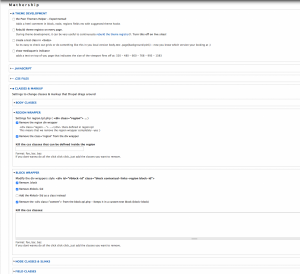
Here is what Motherships configuration page looks like:

As you can see there are a plethora of options and adjustments you can make, anywhere from stripping out certain html divs to removing extra classes throughout the site. Go ahead and explore this page, and give some options a try. I’ve found them incredibly useful!

Mothership, (along with these other modules I’m going to discuss), has allowed me to take my markup back and regain the control that I felt that I lost when arriving to Drupal. Plus they have that totally cool pirate theme going on. And that alone….

Semantic Views

https://www.drupal.org/project/semanticviews
Screen grab demonstrating Semantic View

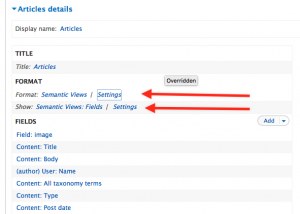
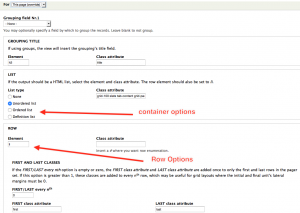
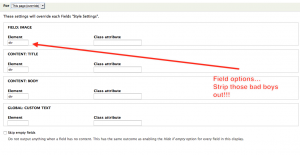
Semantic views is a module that is an oldie but still a goodie. One might think that views provide sufficient stripping of markup through the style options. It doesn’t. There are still markup woes when using default views with basic fields. Sure we can create and modify views templates, but semantic views make it so that I don’t have to. Upon downloading and enabling semantic views and going to the view you are working on, you will be provided with the semantic views formats. Using these formats will give you the formatting options that comes with it. You will be able to change both the format settings and the field settings:

Clicking on these settings gives you both container options, row options, and field options:

Screen grab demonstrating Semantic View

As you can see, you have a whole bunch of markup killing options here as well! Combined with the global: custom text field, and the field tokens, I can usually have any markup at my bidding. Any that I so desire. Yes. with semantic views, I truly am king.

Block Class

https://www.drupal.org/project/block_class

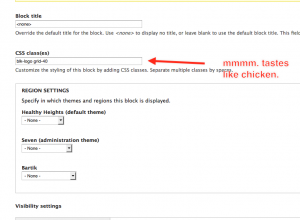
Block class is a staple in the themers module toolbox. It’s simple really. Have you ever wanted to add a custom class at the very top container of the block? Yes. Yes. and more Yes. That is exactly what block class does. All you have to do is install the module, go to that block’s settings and add your classes. And that’s all I’m gonna say about that.

Clean Markup

Ok. seriously. The module is actually named “Clean Markup” No fancy frills. No catchy splashes. Boom. That’s it. Clean Markup. This one immediately caught my attention. The clean markup and block class modules somewhat overlap in functionality. But not entirely. If you are going to use clean markup, however, you’ll likely not be using block class, as clean markup provides the same ability to add a class to a block as well. So what’s the difference? Clean markup simply has more options. It’s more robust. And it’s built improve markup woes in both panels and display suite.

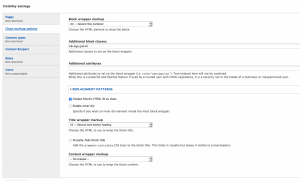
The clean markup settings can be found in the visibility settings of any block:

Screen grab demonstrating Clean Markup

As you can see, it’s quite a bit more robust than the simple block class module. In addition to adding the classes of your choice, you can add additional attributes such as the role attribute and more. You can also use tokens and replacement patterns. Super cool, eh? In addition, you can specify the markup around the title, and content, or even hide the title through the settings themselves. And if that wasn’t enough It also provides you some pretty decent, stripped down layout options in both panels and display suite. I won’t get into all of that. You may go forth and discover.

Fences

https://www.drupal.org/project/fences

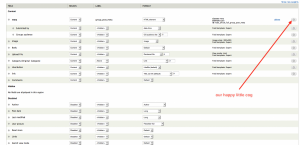
I hesitated to include this one because it’s a pretty vetted, well known and large module. And I know that the seething masses could say “What about panels!” But display suite addresses some very specific markup controlling needs in nodes especially, that I think is worth talking about. We all know what a “view mode” is right? No? View modes are those different display options that you see when you go to manage a node display. Drupal has these by default, however, display suite allows you to add your own custom View mode and, what’s more, select a layout for that view mode. Upon selecting a view mode layout, it makes other fields accessible to you that wasn’t readily available to you before. You will be able to drag and drop these fields in an order that you see fit, but what’s more, All of these fields will then have a cog next to it allowing you to access additional options for that node field.

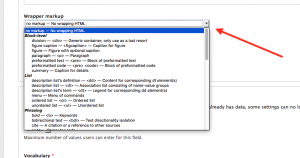
tag, or tag that you just want to get rid of. And you can’t. And you don’t know why. And it’s messing with your day like a wasp would. Have no fear! Fences! Fences does one thing, and one thing really great. It simply allows you to wrap any markup you want around any field that you want. You can even decide to have no wrapper at all!

To do this all you would have to do is go to the field settings of that particular field:

Screen grab of Fences view

And that, my friends, is Fences.

Browser Class

https://www.drupal.org/project/browserclass

In a perfect world, all browsers would render our CSS exactly alike. That would be good times, and sailboats and noodle salad. https://www.youtube.com/watch?v=8shdlcJjAJ8

But we all know that life and browsers just are not that way. And it’s not your fault. It’s not even their fault. It’s just that way. So what do we do? Come to terms with it. Live with it. DEAL with it. And then we go use browser class.

Upon installation and enablization, browser class will add various classes to the body field indicating what browser that user is using so that you can address that problematic element accordingly. It will even include a browser version class. Here is what that looks like:

Each browser will have it’s own unique abbreviation. The above indicates that I am using the firefox browser (ff) and firefox 42 at that (ff42). Hey look! It even adds a class indicating that I’m on a desktop and that my operating system is a mac. Super Cool!

Good times. Noodle Salad.

Display Suite

I hesitated to include this one because it’s a pretty vetted, well known and large module. And I know that the seething masses could say “What about panels!” But display suite addresses some very specific markup controlling needs in nodes especially, that I think is worth talking about. We all know what a “view mode” is right? No? View modes are those different display options that you see when you go to manage a node display. Drupal has these by default, however display suite allows you to add your own custom View mode, and then what’s more, select a layout for that view mode. Upon selecting a view mode layout, it makes other fields accessible to you that wasn’t readily available to you before. You will be able to drag and drop these fields in a order that you see fit, but what’s more, All of these fields will then have a cog next to it allowing you to access additional options for that node field.

A picture really is worth a thousand words, and I can see you getting wrinkles all up in your brow, so here’s image for you to view:

Clicking that cog will give you the awesome options that come with it, Including some “field template” options. Choosing “Expert” mode will give you a bunch of field controlling, markup controlling, goodness that will allow you do things like: add any wrapper around that field, add field classes, control the label name and classes. And much much more. With additional modules you can control nesting and additional parent or child divs. It’s a lot of control packed into one crazy module.

It does a whole lot more, but for this article, I just want to graze over the semantic and markup control advantages display suite can empower you with. It truly is a robust module, and has somewhat of a high learning curve, but once you’ve used it, and you know it, you won’t be able to theme without it.

Display suite. Learn it. Use it. Love it.

So go now and theme, grasshoppa! Great power is given to you.

With the rise of Sass and HTML5, and other robust front end technologies, it’s easy to forget. However semantics and clean markup are still important!. Even more so now than ever before! It makes data portable, and more accessible to api’s and devices. More easily readable by any person or any machine. And It can bring context to both of those things. Drupal handles data well. Unfortunately it’s a hawt mess where Markup is concerned (lots of which is addressed in drupal 8). The good news is, that it can be wrangled!

I love finding great tools. It makes me feel happy in life. If I find a good one, and add it to my toolbox, best believe it’ll be well used. Great tools help us save time. They make us more efficient and help us do our jobs better. And for the drupal themer, these will definitely do that. So now you know some of my secrets. You’re welcome. You owe me lunch. 😉

Upgrade & Migrate a Drupal 6/7 site to Drupal 8

With the upcoming release of Drupal 8, we are hearing a lot of discussion about what the upgrade process will look like.  With comments like – “There is a built-in upgrade path from Drupal 6 to Drupal 8 – there is no upgrade path from Drupal 6 to Drupal 7.“ – it appears as though some vendors are not quite clear on the difference between upgrade and migrate.

The assumption above may have been formed after reading Drupal.org’s post which states: “As of August 12, 2015, the D6 migrations in core are essentially complete. Work on D7 migrations is currently underway – the goal is to have the big four (terms, users, nodes, comments) complete by the end of next week (i.e., August 22 or thereabouts).”

It is important to note that this assumption is based on old information. As of today, (November 17th, 2015), the migration functionality is in Drupal 8 core.

It may sound like upgrading your Drupal site (Drupal 6 or Drupal 7) to Drupal 8 is easy: install D8 on the same box as the D6/7 install, and activate and run the migrate module in D8;  alternatively, run the drush migrate-upgrade command from the command line.  Sounds easy enough, right?  Unfortunately, there are quite a few things that some salespeople and vendors are not explaining …likely due to their lack of experience with Drupal upgrade/migration.

It is most important to note that the core migrate module only supports a few core modules.  NONE of the contrib modules or custom modules are currently supported in the core migrate module.  This means that the migration of a simple Drupal 6 or Drupal 7 site without any contrib modules may work out of the box.  However, a simple migration from views 2 or views 3 (the most used module in Drupal) is not yet supported.  In fact, it might never be supported, due to the fact that migration from views 2 to Drupal 7 views 3 is a nightmare, particularly if there are special contrib modules being used (remember – a lot of Drupal 6 views have custom PHP code, which is never going to be easy!).  This is just an example of some of the problems you may encounter when migrating to a new, major version of Drupal.

There is no doubt that the migration module makes the upgrade process easier for developers.  Having said this, you can’t underestimate the need for a skilled and knowledgeable developer who has an in-depth understanding of the system, particularly when there are custom modules involved.  The developer will need to know what these modules do, and have the ability to upgrade them manually.  This upgrade can be complicated even further, as there are a lot of contrib modules that are not yet supported on Drupal 8, making upgrading/migration impossible at this point in time.

Based on our experience with Drupal 6 to Drupal 7 migrations, we have learned that it is often easier to simply rebuild the site in D7, export the data from the D6 site, and import this data into the new D7 site.  Alternatively, you could write a special module to read the data from the D6 database and recreate it in D7 with the provided hooks. Since Drupal 8 is so different from any Drupal 6 or Drupal 7 installation, our initial thought is that it is going to be wise to follow a similar process for upgrading to D8.  Rebuild the site in Drupal 8, import all of the data from the D6 or D7 database, and rebuild your views.

As we can remember with the introduction of Drupal 7, a lot of contrib modules will not be available right away.  As a result, migrating a complex site that has a lot of contrib modules will not be easy to migrate.  It’s not quite as simple as “writing some code using the migration tools provided”, as some articles will have you believe.

Drupal.org’s post, Known Issues with the Drupal 6/7 → 8 Upgrade Path, gives you insight on some of the problems that you can expect when migrating a simple Drupal 6/7 site.

Some Drupal 6 site owners will hear something like this in the coming weeks/months: “Drupal 6 will be marked unsupported, 3 months after Drupal 8’s final release. So, dear customer, you better hire us to migrate your site to D8.”.  Even this (scare tactic) approach simplifies the dilemma.  It’s true that we are unlikely to see any security updates to Drupal 6 core, three months after Drupal 8’s final release.  Similarly, we will not see much development on any of the Drupal 6 contrib modules.  The latter is already the case, though, as most developers already concentrate on Drupal 7.  Many will be relieved to hear that there has been some discussion about extending the life of Drupal 6 by an extra 12 months, although this is yet to be confirmed (this extension would be for security updates since Drupal 7 updates are often based on problems found in Drupal 6).  Either way, we are of the opinion that it is now time to move away from Drupal 6, as a lot of new features and contributed modules are not in Drupal 6, nor are many Drupal 6 modules actively maintained.  Additionally, most Drupal 6 sites are not responsive and are in need of a major refresh.

Whether or not to upgrade a Drupal 6 site is not really up for debate.  The question is, do you upgrade your Drupal 6 site straight to Drupal 8?  As mentioned, a lot of contrib modules will not be ready for Drupal 8’s launch, and you can expect that it will take at least a year (if not more) before they are.  We anticipate that it will take longer than expected for these contrib modules since a lot of developers are not ready to use the new object oriented structure of Drupal 8.  We predict that some contrib modules will need new developers, or need the existing developers to learn how to code in Drupal 8. This all will take time, and we have a feeling that the learning curve for some developers will be too steep to jump right into Drupal 8 at the release.
Themers may also find the transition to Drupal 8 problematic.  We have noticed that several themers are still using the simple flat css2 file structures, which will limit their abilities within Drupal 8. For example, some themers may have trouble with responsive theming with the Sass preprocessor, which gives a lot more power than flat CSS allows. The key problem here is the fact it requires some technical knowledge of the command line interface to install.  Drupal 8’s arrival is increasing its complexity. Responsive theming is manageable, but the theming engine has changed, and Twig is replacing the PHPTemplate as the default templating engine. All of these changes pose new challenges for themers that are not accustomed to using the command line interface. Twig is less of a templating language and more of a programming language that needs to be learned before you can change a template.

Drupal 8 brings some other challenges with it.  Although this new release ships with modern responsive features, it drops support for IE 6,7 and 8, thus enabling the use of JQuery 2.0 (another challenge for many) and other code that assumes modern HTML/CSS3 browser support.  Also, Drupal 8 does not support browsers that do not support SVG (which includes IE 8 and Android browser 2.3).

So, what’s the verdict?

In our opinion, it is too early for complex sites to head down the Drupal 8 path. For new, simple sites, Drupal 8 is perfect and gives developers the chance to get their (D8) feet wet.  This experience will allow them to get ready for some serious developments as time passes.  One of Drupal 8’s goals is to make life easier for its users by moving several modules into the core, as well as the addition of an extended UI.  Building a site is getting easier for those without any programming experience, and this is a good thing.  Even so, a lot of the sites that I have been working on require custom modules, and that will continue to be the case, even with the advances in Drupal 8.

Our recommendation is that Drupal 6 sites should first convert to Drupal 7. The switch to Drupal 8 can be made in about 3-4 years, at which point many of the modules will be ready (and developers will have a lot more Drupal 8 experience!).  Considering that the true lifespan of a website is approximately 3-4 years, it would be a logical time to overhaul your site and make the upgrade to Drupal 8.  By this time, there will be great solutions on hand to transfer data to Drupal 8 (as we see today with D6 → D7).

Twig PHP Templating Language

Twig: The New Templating Engine for Drupal 8

Twig PHP Templating Language

Drupal 8 is packed with many changes and new enhancements geared towards optimization, performance, and standardization. Finally, after years of working within a hybrid environment, we are now truly moving towards a system that separates logic, behavior, and design. In this blog, I will go over some of the changes in Drupal’s theming layer that have gone from the wild, “cowboy-like” PHP template, to a more simplified and standardized templating system called Twig.

What is Twig?

Twig is the new templating engine for Drupal 8, which uses a different language and syntax than prior Drupal php templates used for theming and rendering output to a site page. Twig templates compile markup down to plain optimized PHP versus regular unoptimized PHP, thus enhancing speed and performance.

Why Twig?

The great advantages of using Twig is that it is fast, modern, and secure. It has been developed for use with Symfony, which is the new PHP framework behind Drupal 8 that follows the MVC (model-view-controller) architecture.

Not only is Twig a faster templating system than the PHP templates used in prior versions of Drupal, it also easy to learn. It provides clear error messaging and is also very well documented.

Twig also provides consistent theming practices that can be taken up by other developers and site themers as projects get handed off from one development company (dev team) to another, as many often do. The way Twig is structured it decreases the possibilities for wide differences in coding and theming practices, techniques, non-standard coding, and hacks often seen when working with prior versions of Drupal, where sites have been developed and maintained by other people and teams. Standardized consistency is a key advantage to Twig’s efficiency.

Twig Syntax

There are some key differences in syntax and coding standards when working with Twig versus the PHP templating system of prior Drupal versions. I won’t go into all of the differences that exist in this blog, but I will highlight a few examples to provide a general understanding or “bird’s eye view” so-to-speak.
 

Open and Closing Tags

In PHP templates prior to Drupal 8, we used open and closing tags as shown below:

    <?php
        /**
          * Some file comment…
        */
    ?>

In Twig, we open and close our template code as follows:

    {#
        /**
          * Some file comment…
        */
    #}

Template File Naming Conventions

When assigning file names to our PHP templates prior to Drupal 8 (Drupal 7 for example) we used a naming convention as follows:

node–webform.tpl.php

In Drupal 8 with the Twig template naming convention we will use this instead:

node–webform.html.twig

Function Naming Conventions

When declaring function names in PHP templates prior to Drupal 8 we used the following convention:

theme_node_links()

In Drupal 8, using the Twig template system we will use the following:

node-links.html.twig

Printing Variables

In prior versions of Drupal we would output a variable in the following manner:

    <div class="content">
        <?php print $content; ?>
    </div>

In Drupal 8 using Twig, we will instead output the variable like this:

     <div class="content">
        {{ content }}
     </div>

Assigning Variables

To assign a variable using the prior PHP template of older Drupal versions, we would do something like the following:

    <?php
        $myVar = $content->comments; 
    ?>

With Twig templates we instead do this:

    {%
        set myVar = content.comments
    %}

Printing Hash Key Items

In the PHP templates we printed hash key items as follows:

    <?php
        print $item[‘#item’][‘alt’];
    ?>

In Twig templates will instead print hash key items like this:

   {{
        item[‘#item’].alt
    }}

Assigning an Array

Prior to Drupal 8, we would assign an array within the PHP template such as this:

    <?php
        $args = array(‘!author’ -> $author, ‘!date’ -> $created);
    ?>

In Drupal 8 using Twig, we will assign an array as follows:

    {%
        set args = {‘!author’:author, ‘!date’:created}
    %}

Conditionals

Using PHP templates we would setup a conditional statement like this:

    <?php
        if($content->comments):
            /* run some code… */
        endif;
    ?>

With Twig templates we setup the conditional like this instead:

    {%
        if content.comments
    %}
            /* run some code… */
    {%
        endif
    %}

Control Structures

Prior to Drupal 8 using PHP templates we would setup a control structure as follows:

   <?php
        foreach($users as $user) {
            /* run code… */
        };
    ?>

In the Twig template we do the following to setup a control structure:

    {%
        for user in users
    %}
        /* do something… */
    {% 
        endfor
    %}

Translate (‘t’ function)

Prior to Drupal 8 within the PHP template, to translate a string of text we would do the following:

    <?php
        print t(“Hello World”);
    ?>

In Drupal 8 using Twig we instead do this to translate a string of text:

    {{
        “Hello World”|t
    }}

Other Examples of Syntax Differences

For more examples of Twig syntax see the Twig Documentation.

Exposing Variables in a Twig Template

While most common variables will be documented within a Twig template, there will be a need to expose additional variables within the scope of a Twig template such as those provided by modules.

Debugging:

To expose the variables available to a Twig template, debugging must first be enabled in order to output the variables for viewing. To enable debugging in Twig you’ll need to set the debug parameter to “true” within the “twig.config” section of the Drupal 8 YML file. This file is located within “yoursite.com/sites/default/services.yml”. Find the “twig.config” parameters and set “debug” to “true”.

Example:

parameters:
twig.config:
debug:true

Note: This is extremely useful for development purposes, but be sure to change the “debug” parameter back to “false” when migrating and using this YML file on a production site.

An advantage of using Twig debugging is that the markup of the Twig template is surrounded by HTML comments containing theming information like template file suggestions, similar to using the Theme Developer contrib module in Drupal 7.

Another advantage of Twig debugging is that the templates are automatically recompiled whenever a change in code is detected. This is achieved by by setting the “auto_reload” parameter to “true” within the YML file located at “yoursite.com/sites/default/services.yml”. As with the twig debug parameter, this too should be set back to “false” when migrating or using on a production site.

Outputting Variables – Using the “dump()” Function

To display variables available to a Twig template use the dump() function. To output all variables within the scope of a Twig template, simply use the dump() function with an empty parameter such as this:

    {{
        dump()
    }}

This is similar to using the “” function within the PHP theme template of prior Drupal versions.

If you know the particular variable you wish to output for inspection, you can use the dump() function including the variable name as a parameter within your Twig template like this:

    {{
        dump(author)
    }}

This is like using “<?php print_r($author); ?>” in prior versions of Drupal using PHP templates.

Markup in Drupal 8 (HTML5 & CSS)

HTML in Drupal 8

In regards to HTML markup in Drupal 8, a key difference now is that the doctype has evolved from XHTML to HTML5. We now have the ability to leverage syntactic tags such as: <audio>, <video>, and <canvas>, with the addition of SVG (scaleable vector graphic) support. This allows the the template to output multimedia and graphic content without the need for third party plugins and APIs. More importantly, HTML5 provides universal page elements common for theming such as: <article>, <header>, <footer>, <nav>, <section>, etc., which also enhances the semantic relevance of the page’s content.

CSS in Drupal 8

CSS in Drupal 8 has become much cleaner containing fewer selector IDs with simplified and more intuitive class names than prior versions. There is now less nesting from excessive divs, less code, and thus the markup as a whole is far more optimized and better geared towards performance.

Drupal 7 CSS Class Example:
<body class=”html front not-logged-in one-sidebar sidebar-first page-node”>
Drupal 8 CSS Class Example:
<body class=” “>

In Drupal 8, CSS structure and file naming conventions are based on SMACSS, which is a method for writing CSS that is both scalable and modular. SMACSS is a way of structuring CSS to add flexibility and better maintainability as a project grows and is shared among multiple themers and/or handed off from one development team to another.

Theme Structure in Drupal 8

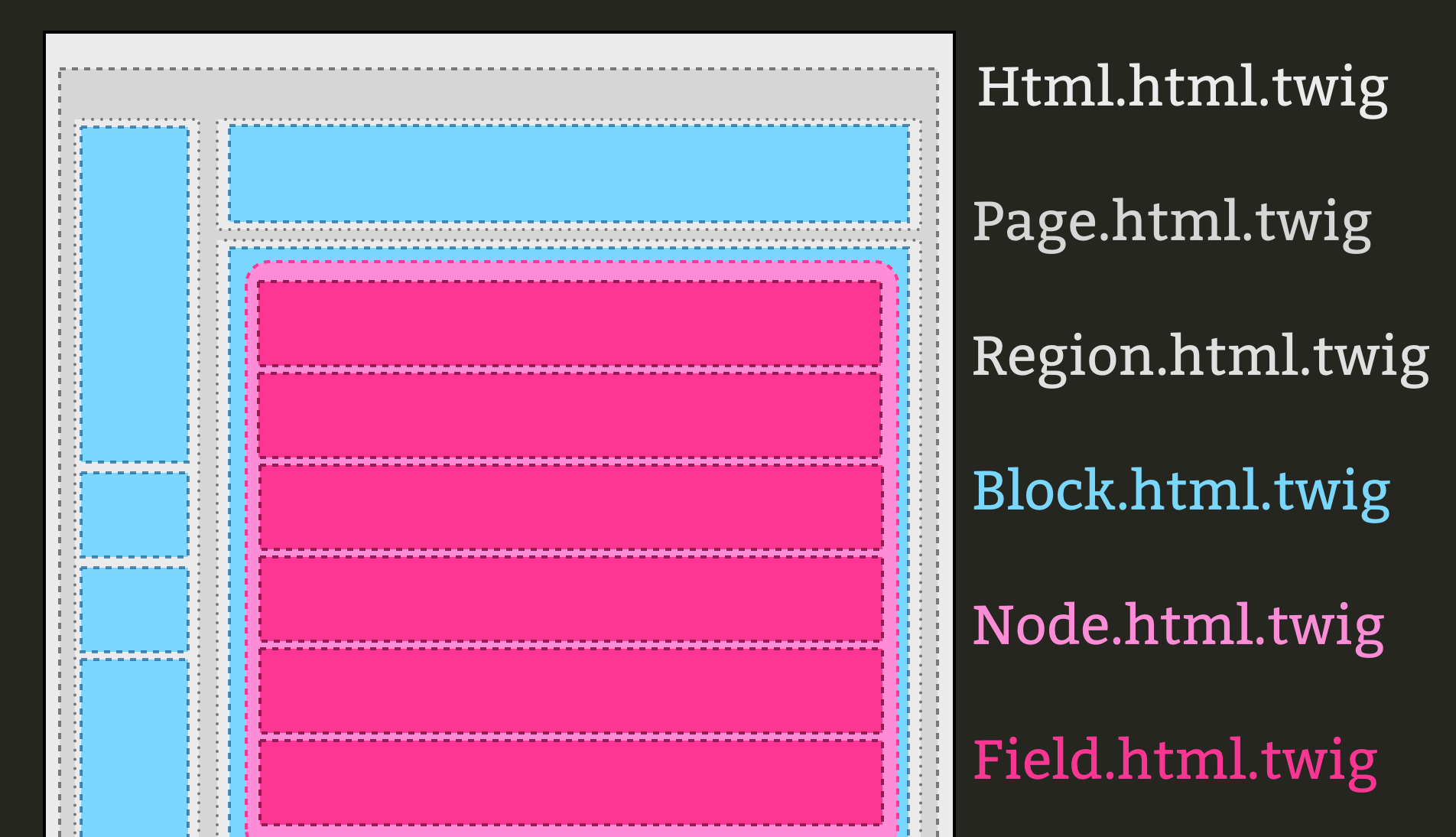
Basically, the structure of the theme’s page is the same as within Drupal 7. Here you have the “html”, “page”, “region”, “block”, “node”, and “field” layers, which make up the whole structure of a page and template files for each carry a similar naming convention except for “.html.twig” suffix required for the Drupal 8 template names.

Theme Template Name Examples:

a) Html.html.twig
b) Page.html.twig
c) Region.html.twig
d) Block.html.twig
e) Node.html.twig
f) field.html.twig

See a visual representation of the theme’s structure layers here:
http://mortendk.github.io/drupal8-twig-frankfurt-2014/images/pagebuild.png

Drupal 8’s Theme .info File

The .info for the theming layer within Drupal 8 is somewhat similar to Drupal 7, however there are a some significant differences. First of all, the .info file is now in YML and requires the “.yml” file name suffix. Ex: “mythemename.info.yml”. Another key difference is how the stylesheets and regions parameters are declared. Also, stylesheets are now called and named per the SMACSS convention as referenced above. Below is a comparison of a theme’s .info file in Drupal 7 versus Drupal 8.

Drupal 7 theme.info Example:

Drupal 8 theme.info.yml Example:

name: Bartik
type: theme
description: ‘A flexible, recolorable theme with many regions and a responsive, mobile-first layout.’
package: Core
version: VERSION
core: 8.x

stylesheets:
all:
– css/layout.css
– css/style.css
– css/colors.css
print:
– css/print.css
ckeditor_stylesheets:
– css/ckeditor-iframe.css
remove:
– sites/all/modules/somecontrib/style.css

regions:
header: Header
help: Help
page_top: ‘Page top’
page_bottom: ‘Page bottom’
highlighted: Highlighted
featured: Featured
content: Content

Excluding Unwanted Stylesheets via “remove:”

In the Drupal 8 .info.yml example shown above, notice the “remove:” that is now available to use. This is quite handy because as you know Drupal has a nasty habit of loading an excessive number of stylesheets when there is a heavy use of numerous contrib modules in a site. Before themers had to live with this and create many CSS overrides in their theme’s custom CSS file in order to work around and override the style rules coming from all of those unwanted and often unneeded stylesheets. Now in Drupal 8, we have the “remove:” option available to us to quickly and easily exclude any particular stylesheet(s) we do not want to load into our theme. Not only does this alleviate the themer’s workload, but also provides another means to enhance the site’s loading performance. Loading fewer stylesheets will increase the speed in which the site and the site’s pages display for the end user.

Do You Still Need to Use a PHP-based Template Engine with Drupal 8?

Are you one of those cowboy rebels, or a person who is bull-headedly resistant to change, and absolutely have to break the new theming convention to use PHP within your templates rather than use Twig? If so, Drupal 8 does provide an option for doing that. You can simply add the “engine:” parameter to your .info.yml file to override Twig entirely and fallback to PHP as shown in the example below.

Switching Drupal 8 Theme from Twig to PHP Example:

engine: phptemplate

Want help with your project? Contact us

Outputting Regions to a Page in Drupal 8

In Drupal 8, the ability to display regions within a page template has gotten easier in terms of coding. The basic principle is essentially the same, however the syntax and markup used in Twig is a bit less and more simplified. Below is an example of how a region is displayed in a Drupal 7 PHP template compared to a Drupal 8 Twig template.

Drupal 7 Method for Displaying a Region Example:

    <?php if($page[‘footer’]); ?>
        <div id=”footer”>
            
        </div>
    <?php endif; ?>

Drupal 8 Method for Displaying a Region Example:

    {% if page.footer %}
        <div id=”footer”>
            {{ page.footer }}
        </div>
    {% endif %}

Summary

Of course there are many more specifics and differences that can be covered between Drupal 8 and theming with Twig versus older versions of Drupal. However, this blog should serve well in highlighting the broad scope of differences and basic usage of working with the new Twig templating system. The key takeaways here are that Drupal 8 has moved to a more efficient and optimized way of rendering a site’s theme through the use of Twig. Drupal 8 has come far in separating design from functionality and so sites will be more optimized and better tuned for performance, in addition to lifting some of the redundant and formerly heavy workload previously required of themers. Of course there is a learning curve as with any change in technology, but once the basic concepts are understood all else should fall into place rather quickly.

Resources