Website Design & Development Trends for 2026

It’s that time again where we look ahead to what’s coming. We admittedly don’t love the word “trends” because it implies something fleeting, while our entire philosophy is about building sustainably and intelligently so websites will last. The word “trends” works great for a short headline, but this article is more about outlining what we see coming in all aspects of website design and development so you can be prepared to decide what could work for your business. 

We’ll warn you: artificial intelligence is covered a lot in this article. Love it or hate it, it’s here. While we are all learning to find ways to allow AI into our workflows in order to create efficiencies, it’s critical to use it in a way that keeps humanity strong! (If you’re curious, here’s how Kanopi uses AI for clients).

Let’s start with strategy.

Let the bots organize large datasets

One thing that AI is very skilled with is helping aggregate large, disparate datasets. Think competitor research, user behavior data, or analytics reports.

Our content and UX strategy teams use a combination of Chat-GPT and Claude to analyze large datasets, identify patterns, and turn complex information into clear, human-readable insights. AI can be used here to lessen the manual lift behind time-intensive activities; work that once took weeks can now be completed in just a few days, freeing our strategists to focus on the high-impact thinking that drives meaningful results for our clients. 

As always, human guidance is key. A human needs to review the outputs as they come. It helps maintain accuracy, minimize bias, and ensure that AI outputs stay closely aligned with the project’s goals and broader strategic direction. 

Agentic journeys & funnel flattening

AI agents (ChatGPT, Gemini, custom enterprise agents) will increasingly handle research, booking, donations, and transactions end-to-end, collapsing multi-step funnels into single-intent, conversational flows. Early adoption in 2026 will raise new questions about attribution, fraud, consent, and regulation. 

What about website design, UX and content?

Make your content speak AI

AI isn’t just reading your content anymore. It’s deciding whether to recommend you at all. If your site isn’t structured in a way that ChatGPT, Gemini, and other AI agents can understand, you’re basically invisible to a growing chunk of how people discover things online. We’re talking semantic HTML, well-structured and agent-friendly APIs, stable URLs, and clean information hierarchies, and structured data … all the stuff that makes your content machine-readable. This is no longer optional. Think of it as SEO 2.0, except now you’re optimizing for robots that are way smarter than the old-school web crawlers. Otherwise, expect degraded representation in AI-driven search and assistants.

What Kanopi is doing: We start with AI-led content audits that reveal exactly where your content stands. What’s discoverable, what’s buried, what’s redundant, and what’s completely invisible to AI systems. These audits don’t just identify problems, they inform strategy, helping you prioritize what to fix first based on actual impact.

Scale your content without sacrificing your voice

One of the biggest challenges teams face is keeping content fresh and consistent across dozens (or hundreds) of pages. You’ve got style guides gathering dust, content editors struggling to match tone, and updates that take forever because every piece needs multiple rounds of review. AI changes that equation completely. But only if it’s trained on your voice, not generic internet speak.

What Kanopi is doing: We’re building custom AI workflows that learn your brand’s style guide, tone, and content patterns, then generate copy variations that actually sound like you. But we’re not just handing you a robot and wishing you luck. We’re creating prompt libraries and content templates tailored to your team’s specific needs. Need 10 variations of a CTA? Done. Want to update product descriptions across your catalog while maintaining consistency? Easy. We’re giving your content editors AI tools that work with them, not against them, so they can keep sites current without burning out. It’s like having a writing assistant who’s read every piece of content you’ve ever published and knows exactly how you like things done.

Design for speed and intuition

Nobody wants to click through five pages to do something an AI can handle in one conversation. We’re witnessing a significant shift toward interfaces that anticipate users’ needs and deliver them faster. Think calmer designs, less clutter, smarter personalization that doesn’t feel intrusive. Multi-step funnels are collapsing into simple, conversational flows because that’s what AI agents are built for and what users now expect. The best interfaces in 2026 will feel less like navigating a website and more like having a helpful assistant who intuitively understands your needs.

What Kanopi is doing: We’re using AI-powered tools to streamline our design workflows that create meaningful efficiencies for our downstream development teams. Our Figma to Claude process enables rapid component prototyping. This means we can create more, iterate faster and refine work, without putting timelines or budgets at risk. 

Unifying theme and atomic/component-driven design

A major trend shaping 2026 web design is the continued move toward unified, component-based systems. Instead of designing every page from scratch, we create a consistent library of reusable interface elements, buttons, cards, forms, navigation patterns, that work together seamlessly across your entire site. This ensures visual cohesion, faster development, and a smoother user experience.

What Kanopi is doing: we take this further by pairing modern design tools with cutting-edge AI development workflows. Using Figma’s Model Context Protocol (MCP), our design files connect directly to advanced AI coding tools like OpenAI Codex and Anthropic’s Claude. This means our designs are translated into high-quality, production-ready code with exceptional accuracy.

Once components are built, we use Google Chrome DevTools MCP to let AI validate how each piece actually renders in a real browser, catching visual issues early and ensuring the final experience matches the design vision.

From there, our developers ensure each component can be easily managed in your CMS. Finally, we build end-to-end functional tests that automatically watch for regressions, ensuring that as your site evolves, nothing breaks along the way.

The result is a unified design system powered by intelligent workflows that keeps your site visually consistent, easy to maintain, and ready to scale.

Other things we see coming

  • AI can serve as a valuable design research partner, helping designers quickly surface trends, industry-specific design patterns and assessing the accessibility of design components as they are being designed. 
  • Aesthetically speaking, we’re noticing a shift to calmer user experiences; minimalist interfaces, fewer distractions, more clarity, and clearer information hierarchies. 
  • Lastly, compliance for WCAG and “Consent UX” or “Trust UX” — the design of user interfaces and flows that ethically obtain user permission for data collection and use — is becoming mandatory. See the “Trust, Privacy, Consent & compliance in the next section for more information on this.  

There’s even more happening in Website Development (whether it’s Drupal, WordPress, or custom code)

Just like in strategy, content, and design, development is also undergoing a meaningful shift. These aren’t fads. They’re structural changes in how teams build, maintain, and future-proof websites. Here’s what we see shaping 2026:

Server-side rendering & resilient delivery

We’re watching teams swing back toward server-side rendering (SSR), static site generation (SSG), and progressive enhancement. This isn’t nostalgia, instead it’s a response to what users (and AI systems) now expect: fast initial loads, predictability, resilience, and content that’s easily discoverable by both humans and machines.

Modern frameworks absolutely still have a place, especially when rich interactivity is required, but we’re seeing a clearer separation between where complexity adds value and where it gets in the way.

Rethinking architecture: agents vs. complex crontends

As AI agents begin handling more of the “consumption layer” — surfacing answers, facilitating transactions, navigating information — the value of extremely complex, client-heavy architectures is being reconsidered.

 For informational sites and straightforward user journeys, well-structured, semantic content often wins over front-end flexibility. Complex frontends will continue to power robust applications, but many marketing and discovery-focused sites are trending back toward hybrid or server-first models.

Agents are already consuming AI-friendly APIs, and with evolving authentication, they’ll get even better at interpreting content over time. With the current pace of innovation, we predict this will be a delicate dance throughout 2026.

AI-accelerated technical debt

AI coding tools are incredible accelerators, but they’re accelerators in both directions. Yes, they speed up delivery. They also multiply code volume, inconsistency, and architectural drift if teams don’t stay vigilant.

This is where strong standards, clean patterns, and senior oversight matter more than ever. Without them, organizations end up with AI-generated technical debt and fragmented prompt/model sprawl — problems that cost significantly more to untangle later. Kanopi builds governance into our workflows so speed never comes at the expense of long-term stability.

As AI becomes embedded in websites and applications, the way we communicate trust changes too. Users need clarity around how their data is used, how permissions work, and what AI agents are doing on their behalf.

“Trust UX” is becoming its own discipline. Transparent consent flows, auditable agent actions, and understandable data policies are now core engineering requirements, not afterthoughts. And with legal scrutiny around consent management on the rise, we expect this to intensify in the coming year.

Predictive personalization & AI-driven adaptation

Users increasingly expect experiences that adapt to them, including personalized recommendations, context-aware content, and layouts that respond to user intent. Achieving this requires real AI infrastructure: data pipelines, model governance, and ethical frameworks.

Basic rules-based personalization won’t cut it anymore. Organizations that want to deliver anticipatory digital experiences will need to invest in more holistic, AI-driven systems.

Accessibility & inclusion as architectural foundations

Accessibility is no longer something you “add on” during QA. It’s becoming a structural requirement. Semantic HTML, non-JavaScript critical paths, and robust WCAG compliance are essential for AI discoverability and multimodal search (and are just good practice regardless).

As agents rely more on clean, machine-readable content, inaccessible markup and JS-gated experiences will carry increasing penalties. Building inclusively from the start is now both an ethical responsibility and a competitive advantage.

As for what Kanopi’s doing specifically, here are a few exciting projects keeping us engaged:

Drupal CMS, Drupal Canvas, and Site Templates!

We’re hard at work in the Drupal community helping Drupal CMS development continue.  From that, Drupal CMS 2.0 will be released in January 2026, complete with a working Site template example building on top of Drupal Canvas, the new editor coming to Drupal.

There are AI integrations, theming in the browser, and instant component creation. This all will minimize development cycles and empower content creators to prototype and publish as they see fit.

We will be working to release a Site Template in the initial launch of the Drupal.org marketplace, so check back with us in the spring at DrupalCon Chicago.

AI Tooling to increase content editor and developer efficiency

We’re working to build AI workflows and tools into our tech stack and into Drupal and WordPress sites to help all of us be more productive in our day to day tasks. We’re connecting Figma to coding agents, as well as connecting automated audits to ticketing systems, content, image, and audio generation in content management systems. Basically, we are working in a way that we can do more with less.

Things are moving quickly, but the basics are still critical.

It’s a lot to absorb when technology moves ever faster, but it’s important to remember that the basics still hold true: your website needs to work for the humans that use it. Your visitors need the information they came looking for, and your editors on the back end need to be able to make updates that keep the website performant, accessible, and fresh. 

There’s always going to be more we can do to make websites better, so it’s easy to get overwhelmed with everything that’s coming. But remember this: you don’t need to know everything, you only need to know the things that will make your website meet the goals you’ve defined for it. 

We hope this post helps inspires you with ideas on how to make your website stronger in 2026!
Website Navigation Patterns (and the Future of Navigation with AI Search)

If you manage a website for a nonprofit, university, or healthcare organization, chances are your audience isn’t just browsing for pleasure. They’re looking for something important: how to donate, how to register for classes, or how to schedule care for themselves or a loved one.

That’s why navigation is so critical. It’s not just about design, it’s about helping people find what they need quickly, clearly, and confidently.

In this post we’ll break down the most common website navigation patterns, along with a look at how AI-powered search is changing and how website owners and editors should think about navigation.

1. Top Navigation Bar

The navigation bar for San Francisco Conservatory of Music

Source: sfcm.edu/ 

What it is:

A horizontal menu across the top of the page, often with your logo on the left and links like “About,” “Programs,” or “Donate” on the right.

Why it works:

  • It’s familiar and expected
  • Keeps the most important pages of your website experience front and center
  • Easy to use on desktops, tablets and larger mobile devices (depending on the number of options)

Things to watch:

  • Too many items can clutter the user interface (UI)
  • Not suitable for websites with dense or complex information architecture

Where it fits:

Perfect for mission-driven websites with clear, high-level goals, which use a simple, action-oriented top menu like: Donate, Get Involved, Refer a Patient.

2. Sidebar Navigation

An example of navigation from the UCSF Department of Surgery, where the navigation menu is a vertical list on the left.

Source: surgeryeducation.ucsf.edu/people 

What it is:

A vertical menu, often used on the left side of the screen.

Why it works:

  • Ideal for content-heavy sections, like articles or staff directories
  • Lets users see where they are in a hierarchy (e.g., Admissions → Graduate Programs → Apply)

Things to watch:

  • Can eat up valuable screen space on desktop
  • Doesn’t always translate well to mobile unless adapted
  • Better for secondary navigation, not primary navigation

Where it fits:

Great for internal portals, academic department pages, or patient resources where structure matters.

3. Dropdown & Mega Menus

The mega menu navigation from Humane World for Animals

Source: www.humaneworld.org/en 

What they are:

Hovering over a main menu reveals sub-pages. Mega menus take it further, organizing many links into columns, often with headings.

Why they work:

  • Help users browse complex topics (like academic programs or service offerings) without getting lost
  • Group related items for easy scanning
  • Opportunities to include richer content

Things to watch:

  • Need careful organization to avoid overwhelm
  • Don’t rely on hover alone, make sure they work well on tap interfaces too

Where they fit:

Larger institutions, like universities or hospital systems, that have complex information architecture or diverse audience groups.

4. Hamburger Menus

A navigation bar with a "hamburger" menu on the far right, which is indicated by an icon of three short lines stacked on top of each other

What it is:

The 3-line icon that hides and reveals the primary navigation, common on mobile devices.

Why it works:

  • Keeps mobile screens clean
  • Makes room for other important content like content call to action (CTAs)

Things to watch:

  • Some users don’t recognize or notice it
  • Always test it for clarity and make sure key pages are still discoverable
  • Ensure it works on tap and click
  • Should not be used on desktop or larger devices

Where it fits:

Every site should have a mobile-friendly version — hamburger menus are a reliable standard, but don’t hide everything if it’s critical.

The footer navigation for Flagler College

Source: www.flagler.edu/ 

What it is:

Links placed at the bottom of every page.

Why it works:

  • Offers a second chance to guide visitors
  • Good place for contact info, careers, privacy policy, and internal links

Things to watch:

  • Avoid cramming it with too many items
  • Keep it visually simple and organized
  • Consider including key items from your main navigation to create a secondary point for users to traverse your site

Where it fits:

All websites benefit from a helpful footer,  it’s the safety net for people who scroll all the way down looking for answers.

The Next Shift: AI-Powered Navigation

Now for what’s coming next, and is already starting to show up on forward-looking websites … instead of clicking through layers of navigation, more and more visitors want to just ask a question:

“How do I apply for tuition assistance?”

“I need directions to the clinic.”

“How can I get involved beyond just donating?”

AI-powered search tools,  including chat-style interfaces and natural language search are making this possible. It’s like giving your site a smart assistant that understands questions and points people to the right answer instantly.

Why it matters for your mission:

  • Saves time for visitors (and staff)
  • Reduces friction points, especially during stressful moments (like seeking care or emergency help)
  • Helps users find specific, deep content without navigating complex menus

AI tools can supplement your menus, not replace them. For example, a donor might browse your navigation, but a returning volunteer could just ask the chatbot “Where’s the login page for last year’s volunteers?”

As more people expect intuitive experiences everywhere, organizations that invest in smart search tools,  especially on high-traffic or information-dense sites, will have an opportunity to  stand out.

Choose the right navigation pattern for your needs.

Good navigation helps people find what they need with the least amount of friction. Whether someone wants to make a donation or explore academic programs, choosing the right navigation pattern is critical for making it easier for users to connect with the content that matters most. It’s all about removing friction and guiding people in the right direction.

Designing for Healthy Aging: Crafting Inclusive Digital Experiences for Seniors

When designing for healthy aging, it’s important to look beyond just the visual experience. We need to consider how content, user experience, and functionality come together to shape the digital experiences of seniors navigating the web. 

One of the biggest shifts is generational: Gen X is now entering its senior years. These individuals are in their late 40s, 50s, and early 60s. (Sorry if it shocks you to see this in black & white, fellow Gen Xers, but there it is… we just report the facts.) As this shift occurs, website owners and content creators need to adjust how they present information online.

To understand this change, let’s look at how Gen X compares to previous generations. Seniors are typically seen as the least tech-savvy of all demographics. But over the last decade, as web technologies have matured and prioritized user experience over visuals, we’ve seen that seniors are adapting.

After all, Gen X has grown up with technology. They’ve evolved alongside it. They are more technologically sophisticated than Boomers. They already use the web in powerful and meaningful ways and expect a dynamic and evolving experience, not a static one. In other words: they’re ready to engage with changing digital landscapes.

Now let’s compare Gen X with Millennials (Gen Y). Both generations want ownership over their digital experiences, but how they define that ownership is different. Millennials want to personalize their experience. They want control over the interface to change colors, reorder layouts and adjust settings.

Gen X, on the other hand, seeks mastery. They’re more willing to take the time to learn how an interface works, even if it’s not perfectly optimized for them at first. They understand that websites evolve and are ready to adapt.

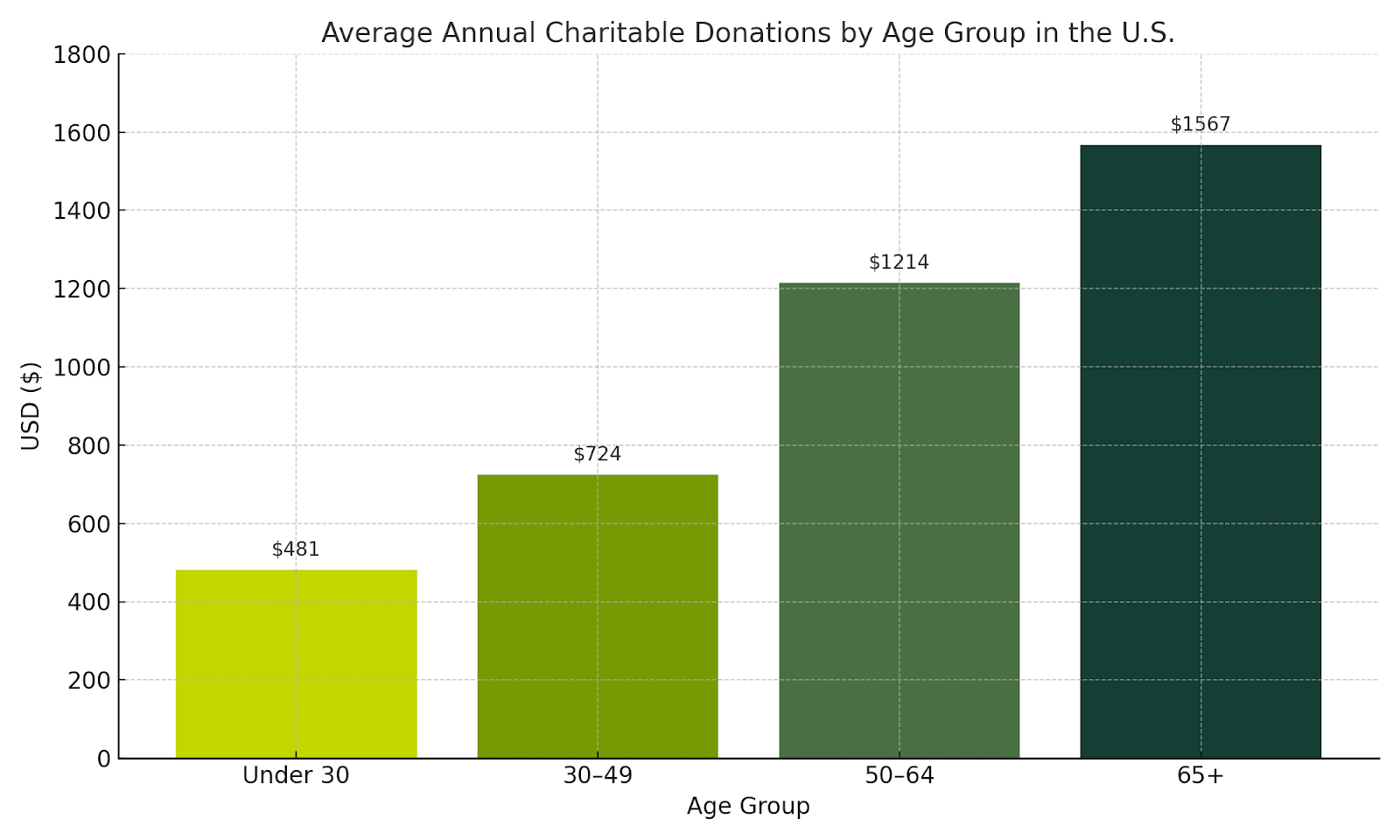
As Gen X and Y are entering their senior years and make up 46% of the US population, they will soon be the largest segment of supporters for most non-profit and educational organizations. Traditionally seniors donate more consistently, contribute higher dollar amounts, and often share causes with friends and family. Crafting intuitive and inclusive experiences for this newly senior demographic is a strategic opportunity to build lasting relationships and boost the impact of your mission over the next decade.

A chart showing how seniors 65+ are the largest donors for charitable organizations over any other younger age group, with an average of $1567 per 65+ donor.

This leads into how we can design effective websites for seniors so they can get the information they need, and you can get the conversions you want. At Kanopi, when we talk about design, we mean more than just visuals. We take a holistic approach, incorporating content, user experience, and functionality.

First, let’s talk about content.

Tell your story. Emotional storytelling is a powerful way to engage older audiences. As people age, they become more receptive to emotional connections. Use testimonials, reviews, and user-generated content. This helps build a connection between the user and your organization and can turn users into advocates.

Next, focus on messaging and clarity. 

Gen X and Boomers have been marketed to their entire lives. They know a sales pitch when they see one. They value authenticity and are skeptical of hyperbole. When we work with clients, we recommend acknowledging user struggles, empathizing with their experiences, and offering specific content solutions. Most importantly, guide them to what they need rather than simply telling them what to do.

Keep things simple. Stick to one idea per content block. Don’t overload the user with too much at once. Instead, craft a journey. Let users absorb information in small, manageable chunks. This makes your content easier to navigate and understand. It also helps users reach their goals, which improves conversions and ROI.

Refine the user experience, starting with mobile.

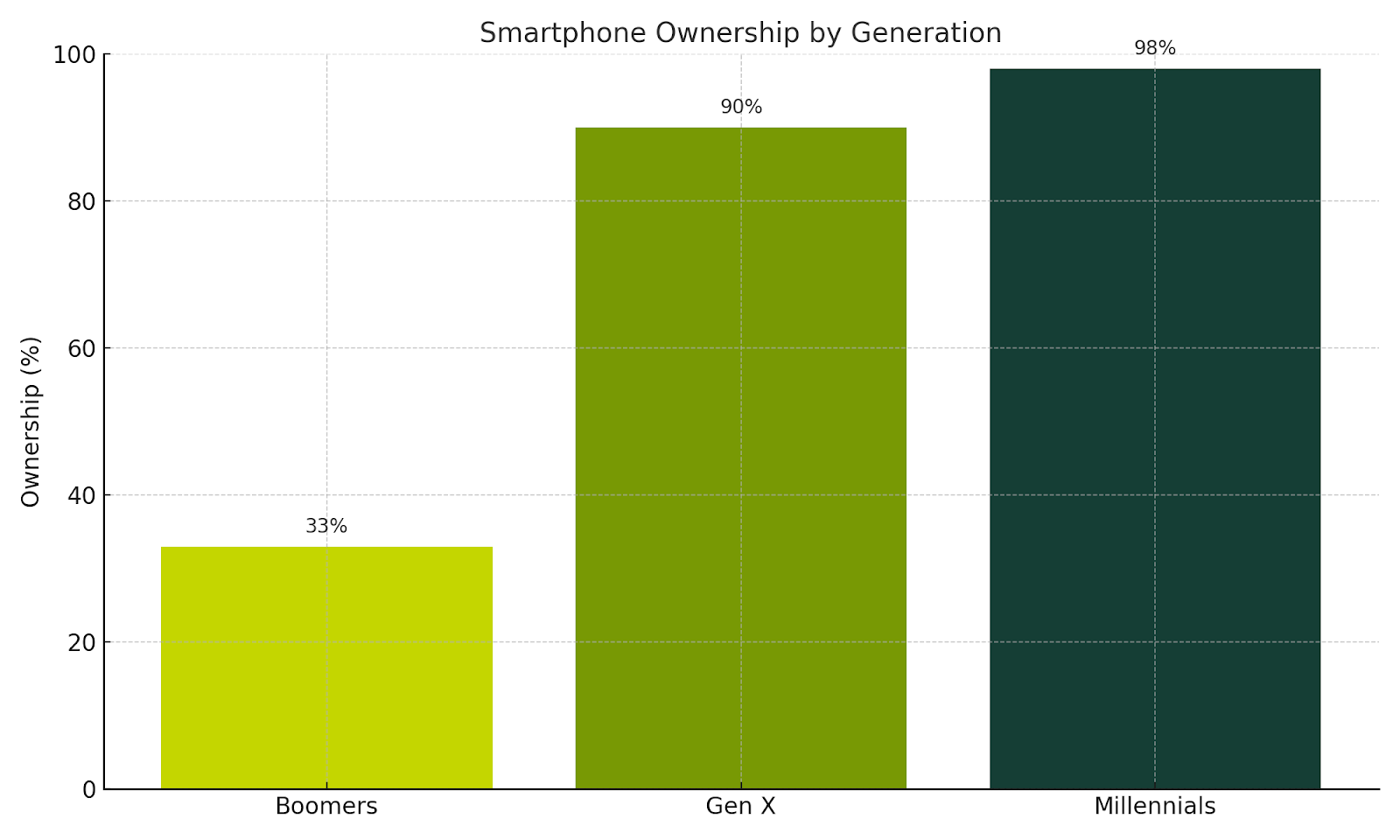
About one-third of Boomers don’t use cell phones and prefer desktop. But over 90% of Gen Xers own smartphones and use them for everything from casual browsing to task-focused activities. This means your mobile experience can’t be an afterthought. It has to be fully optimized and offer the same functionality as your desktop site.

A chart demonstrating smartphone ownership by generation, with Millennials in the lead with 98%, followed by GenX with 90% and Boomers at only 33%.

Shorten the user journey.

Evaluate your information architecture. Reduce the number of steps required to complete a task. Give users clear feedback on their progress during multi-step processes, like booking or checkout. If an error occurs, explain it in plain language and show users how to fix it. Empower them to learn and troubleshoot on their own.

Managing complexity is key. As the web grows more complex, seniors will need simplified pathways. Break large tasks into smaller steps using multi-stage forms. Let users save their progress and return later. This flexibility supports a better experience.

Train your users.

Gen X is willing to learn, so help them. Offer training videos, FAQs, how-tos, tooltips, and contextual help menus. Even chatbots can guide them through interfaces. Embed learning into their journey so they can grow more confident over time.

Color combinations matter.

Color is the first thing users experience. As people age, vision shifts. Blue cells in the eye fade, making it harder to see blue. If your brand uses blue for important UI elements, support it with sizing, shapes, or iconography. Avoid using blue and yellow together — or red and green. These combinations can be hard to distinguish.

Use a contrast checker.

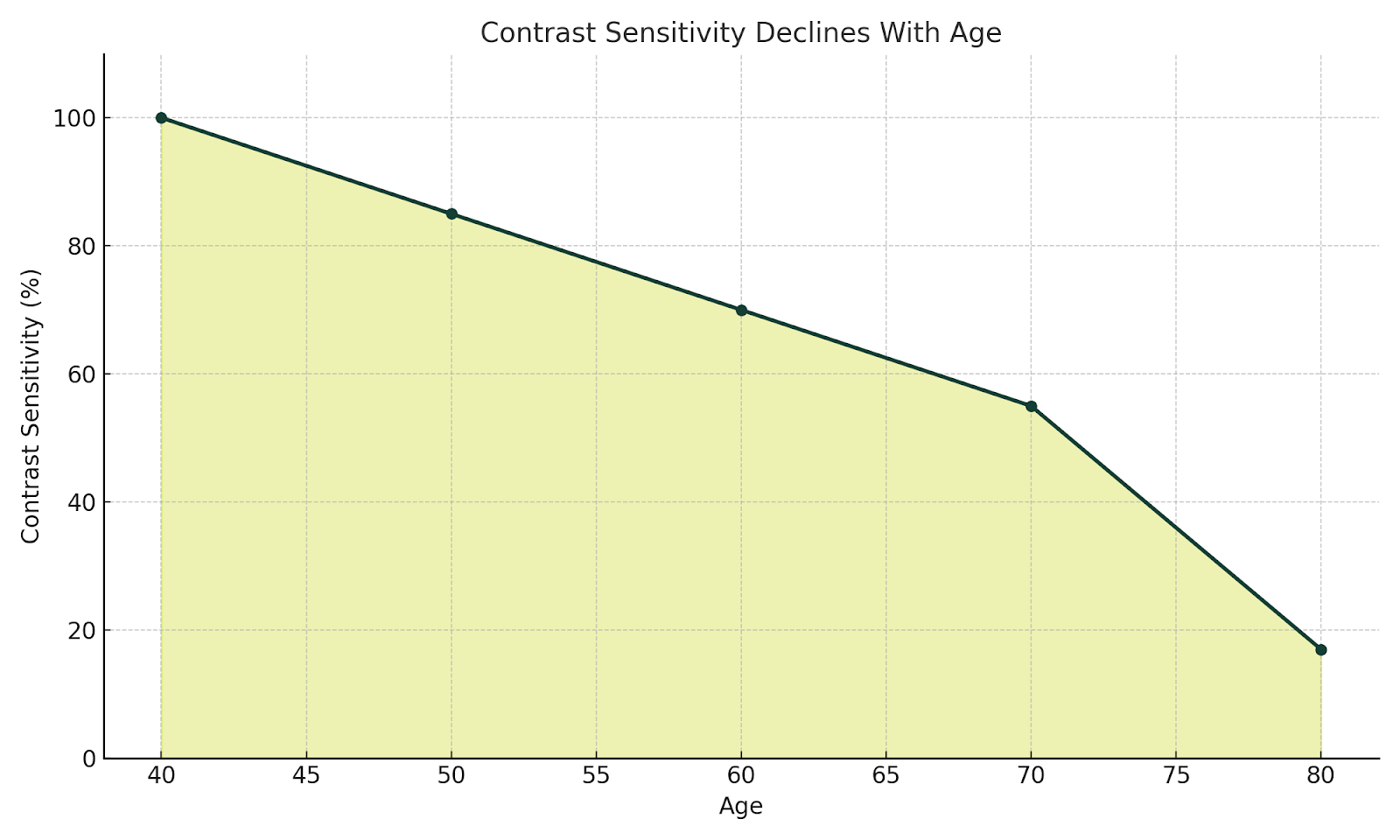
According to the National Library of Medicine, contrast sensitivity starts declining after age 40 and may be reduced by up to 83% by age 80. A 4.5:1 ratio is considered accessible, but 7:1 is ideal. Proper contrast helps users distinguish navigation, CTAs, and form inputs. WebAIM is a good contrast checker.

NO ALL CAPS (or rather, no all caps).

ALL CAPS reduces readability and disrupts the ability to quickly scan content, especially on mobile. Increase font size and use legible typefaces instead.

Put the ‘fun’ in functionality.

Personalized support helps users feel seen. Chatbots and virtual assistants offer real-time help. Provide access to help resources, contact options, and support channels. Boomers may prefer phone calls, while Gen X leans toward email or chat. Give users multiple ways to get assistance.

Support assistive technologies.

As Gen X ages, they’ll experience many of the same mobility and vision challenges as older Boomers. Make sure your site works with screen readers and voice recognition tools. This not only increases usability but also makes your users feel heard and supported.

Everyone benefits (including site owners)

So what are the benefits of doing all this?

  1. You reduce stigma. A well-designed site helps seniors feel welcome and avoids making them feel like outsiders who have to jump through hoops.
  2. You improve accessibility and usability. And with that comes an SEO bonus: accessible sites rank better.
  3. You boost engagement. Seniors trust and rely heavily on word-of-mouth  (especially Boomers). A positive experience encourages them to share it with friends and family, expanding your reach.
  4. Ultimately, good design improves lives. It’s what happens when people can easily find the information, services or solutions they need.

Keep measuring, keep improving.

It’s a question we often hear our clients ask: 

“How do you measure the success of implementing these practices?”

At Kanopi, we’re big believers in what comes next. We don’t consider a website “done” when it launches. Instead, we support it over time through regular checks, testing and user feedback, and continue to refine the experience to meet evolving goals. We use both qualitative and quantitative methods to track success, using both data and direct insights from users.

If something isn’t working like it should, we make changes. Ongoing improvement helps each site stay effective and relevant.

Want more? We held a webinar about this.

Interface of ON24's webinar platform with Cliff Persaud giving a webinar on best practices on building a website for an aging population.

Cliff Persaud is our wise yet not-quite-senior-aged Creative & Strategy Director here at Kanopi. If you’re interested in delving into more of his cranial treasures, check out his other blog posts below. Even better, set aside 30 minutes to watch his webinar on website best practices for aging populations.

Accessibility in the Design Process

(Note: If you’re short on time, click here for the tl:dr summary.)

We take web accessibility seriously here at Kanopi. It’s a key part of being an inclusive organization, which is one of our core values.

It’s also because we need to be. And so do you. 

Let’s start with the fact that it just makes good business sense. 

According to CDC stats, 27% of adults in the U.S. alone are permanently disabled (which itself is just one small portion of the entire disability spectrum). If your website doesn’t address their accessibility concerns, you’re essentially denying them the opportunity to become your customer, member, subscriber, applicant, or whatever your website goals may be. 

It’s also worth mentioning that, depending on the nature of your organization, you could even face potential legal liability if your website isn’t properly accessible.

In practice, it means we’ve baked accessibility considerations directly into our processes, throughout every department and team. For example, when our strategy team creates user personas, they ensure at least one of them has a specific accessibility need along with the standard set of attributes

Since many of the considerations regarding website accessibility are design considerations, our design team has created an Accessibility Checklist that we apply to everything we create. It’s based on the A11y Project plus our own team’s experience, and it’s meant to help ensure our designs meet the standards set forth by the Web Content Accessibility Guidelines (WCAG).

The A11y Project provides the most comprehensive explanation of WCAG. So, to quote them verbatim: 

The WCAG is a shared standard for web content accessibility for individuals, organizations, and governments. There are three levels of accessibility compliance in the WCAG, which reflect the priority of support:

  • A: Essential — If this isn’t met, assistive technology may not be able to read, understand, or fully operate the page or view.
  • AA: Ideal Support — Required for multiple government and public body websites. 
  • AAA: Specialized Support — This is typically reserved for parts of websites and web apps that serve a specialized audience.

As A11y points out, this list by itself won’t make your site fully accessible to everyone, but it will go a long way toward improving the overall user experience.

Kanopi Design Accessibility Checklist

Color Contrast

We check text contrast to prioritize readability, and meet a minimum WCAG AA-compliant 4.5:1 contrast ratio.

We also ensure that color contrast for non-text items (graphical objects, for example) meets the minimum standard 3:1.

We use Webaim’s contrast checker tool to ensure our contrast ratios are compliant.

Typography

WCAG guidelines require that text can be resized up to 200 percent without losing content or functionality, and without relying on assistive technology. This rule does not apply to captions or images of text.

We choose fonts that work well at both large and small sizes. They feature clear, distinct letterforms that are easy to read in many situations. This helps accommodate the variation found across different mobile devices.

We use a minimum size of 12 points or 16 pixels for all body copy. 

Animation & Motion

While most mobile and desktop operating systems now include ‘reduce motion’ settings, websites themselves should also allow for further controls. WCAG also states that users should always be able to exert some control over how they experience animation in websites. 

This is why the websites we design, build and support allow users to play and stop animations as it suits them. We also use motion strategically, so it enhances the experiences for some users without impeding the experiences for others.

Layout Design

We make sure all user interface elements in our designs are sized and spaced to make interaction (i.e. via ‘tap’ or alternative interfaces) as simple as possible for users with reduced motor functionality.

In addition to being compliant with WCAG guidelines regarding text spacing and other interface elements, it also aligns with more general design best practices — in this case, Jakob’s Law.

Accessibility benefits all users.

We’ve found that adhering to accessibility guidelines not only opens your websites to potential new users, but it creates a better user experience for everyone. 

These are just a sample of the user benefits accessible websites provide:

  • Reduced friction points within the website experience
  • Easier to consume and engage with content
  • Better mobile experience
  • Wider audience reach 
  • Reduced bounce rates
  • SEO benefits
  • Higher conversion rates

Feel free to borrow this checklist for your own organization, or formulate your own list that best reflects your user research. And if your website needs to be more accessible, a major redesign might be the right step. If you’re not sure, we’re here to help.

If you’re interested in learning more about accessibility, check out these posts: 

TL:DR Design Accessibility Checklist 

Note: As per our Accessibility Expert Candice Dexter, we should note that these checklist items apply to more than one rule each; but we’re focusing here on its primary compliance rule.

Color Contrast

Check for:

We prioritize fonts that perform at large and small sizes We test text contrast to prioritize readability, and meet a minimum AA-compliant 4.5:1 contrast ratio.

We also ensure that color contrast for non-text items (such as graphical objects) meets the minimum standard 3:1.

To comply with:

Typography

Check for:

We prioritize fonts that perform at large and small sizes that have distinct, easily identifiable letterforms. A minimum size of 12 points or 16 pixels is used for all body copy. 

We stick with fonts that can be easily read in a variety of scenarios, to account for the variation that can occur with mobile devices.

Animation & Motion

Check for:

Users should always be able to exert some control over how they experience animation in websites. While most mobile and desktop operating systems now include ‘reduce motion’ settings, websites themselves should also allow for further controls.

The websites we design, build and support give users the ability to play and stop animations as it suits them. We also use motion strategically, to enhance the experiences for some users without impeding others.

Layout Design

Check for:

We make sure all user interface elements in our designs are sized and spaced to make interaction (i.e. via ‘tap’ or alternative interfaces) as simple as possible for users with reduced motor functionality.

How to Evaluate a Web Design Proposal

Pushing a rhinoceros up a hill.

Cleaning a frat house the morning after a homecoming party.

Evaluating proposals to choose a new website design & development agency.

If you’ve ever had to perform the latter task on behalf of a mission-driven organization, you know firsthand that it can seem every bit as difficult as the others on that list. It’s one of the most critical investments an organization can make. Done correctly, it’s also one of the most time-consuming. 

As with most things, there are best practices you can adopt that will guide you to better results. UK-based creative digital agency Crucible recently published an insightful blog post with tips on how to effectively evaluate a web proposal, which we highly recommend reading.

On top of the standard evaluation criteria, mission-driven organizations frequently have additional factors they need to consider. In this post, we’ll share the most important questions your organization should be asking as part of your due diligence.

(And if you’re still trying to write your RFP, we have a blog post with an RFP template for website projects to help guide you through that as well.)

1. Does the agency understand your mission and goals?  

A strong proposal begins with a deep understanding of your organization:

  • Rather than just pitching generic services, look for signs that the agency has taken the time to truly understand your organization’s goals.
  • This includes both the full scope of work and the broader purpose of your website — whether it’s to inspire action, increase donations, or engage members/leadership.  

The best agencies will ask thoughtful questions during the proposal phase and reflect your priorities in their responses.

2. Do your values align?

For mission-driven organizations in particular, this is fundamentally important:  

  • Does the agency demonstrate a commitment to causes similar to yours?  
  • Are they mission-driven themselves, or do they approach projects solely from a commercial standpoint?  

An agency that shares your values will often bring more passion and insight to the project. 

3. Are they specialized in your field (but not too specialized)?

However, sometimes when you work with an agency that specializes exclusively in one specific vertical, you end up with a cookie-cutter design; this is why it’s also important to make sure their experience isn’t too narrow. Diversity in an agency’s portfolio is a sign of broader expertise and fresh ideas.

4. What’s their track record? 

Take a good look into their history and stability:  

  • How long have they been in business? An agency with many years of experience often brings a level of expertise that newer firms lack.
  • What are their employee and client retention rates? High retention is a strong indicator of a reliable, well-run agency.
  • What social proof validates their experience? Look for client testimonials, case studies, and ratings on platforms like Clutch.co, where reviews often provide detailed insights about an agency’s reliability, communication, and impact on similar projects. Have a gander at ours, for example.

5. Can they deliver the basics?

Before you fall in love with a proposal, ensure it meets your foundational needs:  

  • Timeline: Is it realistic for your organization’s schedule?  
  • Budget: Does it align with your financial constraints?  
  • Scope: Does it comprehensively address your requirements?  

Think of this as the Maslow hierarchy of needs for your project. After all, for your website to shine, first it needs to work!

6. Whom will you be working with day-to-day?  

This is a big one. You’ll work most closely with the agency’s design & dev teams, not their sales or marketing reps. So, ask to meet the people who will actually handle your project:  

  • Project Manager: Your primary point of contact.  
  • Designer: The person responsible for the website’s look and feel.  
  • Developer: The individual who will bring the design to life.  

Also ask how they intend to handle staffing requirements:

  • Full-time employees tend to have a more vested interest in the agency’s mission, and are familiar with their team members and internal processes; this often allows them to work more efficiently. 
  • Relying on contractors allows the agency to hand-pick specific skill sets for your project needs — but as hired guns, they may not be as invested in the project or the overall mission.

One more point: if they plan to use full-time staff, clarify if they’ll need to hire additional people. If so, ask how long their onboarding process usually takes. Not that this should be a dealbreaker; but knowing these things at the outset prevents surprises down the road.  

7. Do they have really great skills? 

Napoleon Dynamite’s astute observation about girls should also be true for your selection process. At least when it comes to technical skills. Bow-hunting, not so much.

Again, even the most beautiful website can fail if it doesn’t perform well. Run their sample websites through tools like Google Lighthouse to evaluate:  

  • Accessibility: Does the website work for users of all abilities?  
  • SEO Performance: Will it rank well in search engines?  
  • Code Quality: Is the website fast, secure, and maintainable?  

8. Can they provide realistic references? 

Any agency can provide glowing testimonials. Instead, try asking for a reference about a challenging project:  

  • What went wrong, and how did they resolve it?
  • Did the client remain with them afterward?  

Their answer will reveal a lot about how they handle obstacles and maintain relationships. It’s the reason this question is a standard part of job interviews. 

9. What happens after launch?

Websites aren’t static. They need ongoing care to function optimally and ensure longevity — and provide maximum value for your investment. That’s why it’s essential to ask any prospective agency these questions:  

  • Do they offer post-launch support or enhancements?
  • Will they help your site evolve as your needs change?  

F.W.I.W., here at Kanopi we believe that a website should look and work great on launch day — but it should look and work even better years down the road. Continuous support is not an add-on for us; it’s a core service. This is why the websites we design, build, and support regularly last 10 years or more. Just thought we’d put that out there. 😉

Strictly for the Drupal

Since this post is all about questions, we have one for you: 

Is your organization looking to build/rebuild in Drupal? 

If so, you’re in luck. The Drupal Association has created this helpful template & guide to help organizations in search of a Drupal Certified Partner write an effective RFP tailored specifically for, you guessed it, Drupal. 

And make no mistake about it, Drupalites, you do not want to mess around with providers who aren’t certified. Unless you enjoy living in a prolonged state of rage and tears while spending lots of money to fix problems caused by incompetence. (Did I neglect to mention that we’re one of just 100 Drupal Certified Partners in the whole wide world?)

In fact, we recommend that you check out the template & guide even if your site isn’t Drupal. Its structure and content will prove useful for anyone writing a website RFP.

You’re picking a partner, so make it a good fit! 

Particularly for mission-driven organizations, evaluating a web design proposal is about more than picking the cheapest or fastest option. It’s about finding a partner that truly believes in your mission and will create a website that supports your goals. By asking these vital questions, you can ensure that the agency you choose is the right fit for your organization — which hopefully means you won’t need to push that rhino up the hill again for a very long time.  

Need more guidance? Feel free to reach out — at Kanopi, we’re here to help mission-driven organizations like yours succeed.

The Power of Component-Driven Design

It’s been a stressful, harrowing quest — but at last, after all the tears, sweat, occasional rage and countless revisions, you can gaze at your screen with contentment and relief.

 After all, you’ve finally achieved a homepage design that’s nothing short of perfection: 

  • The brand expression is subtle but dynamic. 
  • Calls-to-action are irresistible as catnip to my two needlessly anxious cats.
  • All of which is served up with imagery worthy of the Louvre. 

Now, all that remains is to design some engaging, human-centric service pages. 

Sadly, this is where your weeping begins anew — as you now realize that functional issues have rendered your splendid visual design completely & utterly useless:

  • The lovely callout banners you’ve designed won’t accept more text without breaking.
  • Images are distorting and peoples’ faces are getting cropped.
  • The row that was built to hold four cards now needs to accommodate five.

Dear friends and readers, we’ve witnessed this scenario more times than we can count. And it’s exactly why, here at Kanopi, we focus on designing and building with web components.

The modular way to ensure your design works — always.

Strip away the visual styling and most web pages can be broken down into a few distinct content areas: 

  1. Navigation
  2. Main headline
  3. Body copy, including subheads, lists, and sidebars
  4. Collections of images
  5. Calls-to-action/pathways to take next steps.

These building blocks form the foundation of a reusable component library that can be combined and customized to create various types of pages. For example, a photo gallery page might only need a few components, whereas a longform article could require many. From the early stages of design and content strategy, we carefully plan the components a site will need and ensure they are designed to fit together seamlessly, enabling the creation of diverse and flexible layouts.

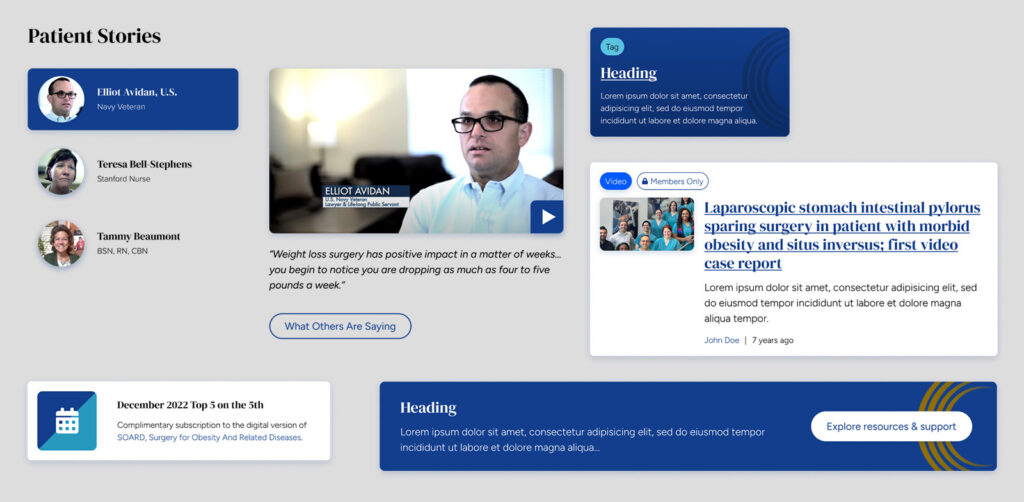
Design components from the American Society for Metabolic and Bariatric Surgery website

Examples of components:

  • Page headers and heroes
  • Card rows
  • CTA banners
  • Media galleries
  • Testimonials
  • Subnavigation and link lists

Ideal for websites of any and all sizes.

This is true even if you’re starting with just a single landing page. After all, what if you need to duplicate that page with variations for different audiences? Does the page lead to a form and link to ancillary pages like privacy policy and terms? Starting with components gives you the power to scale faster and more predictably than figuring it out as you go.

Modular doesn’t mean boring.

One of the coolest things about designing with components is that they allow us to create variants. Variants allow us to extend a component with different presentation styles, such as alternative color schemes, distinct text formatting, or layouts that switch between columns and rows. Even with all these different styles, the basic structure of the content stays the same, making it easy to read. This balance lets us keep the message consistent while adding variety, so each component fits the content just right.

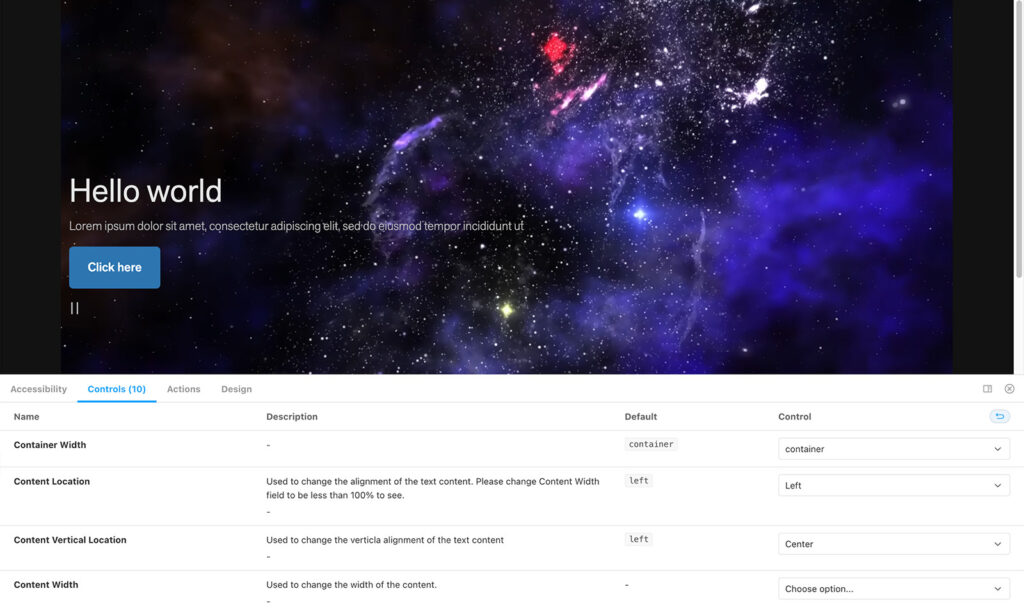
The hero component we developed for Exploratorium uses variants to open up a universe of options for media display and content formatting.
The hero component we developed for Exploratorium uses variants to open up a universe of options for media display and content formatting. 

Even more component benefits:

1. They align design and development.

If there’s one thing computers are good at, it’s duplicating things. Websites are coded in reusable blocks, so designing and planning content in similar blocks leads to a smooth handoff to developers. And since components live in a central library, a change only needs to be made in one place to propagate through the entire site. This is much simpler and less error-prone than making the same change manually in a thousand different places, wouldn’t you agree?

2. They simplify accessibility and quality assurance testing.

Teams can conduct preliminary accessibility and QA testing on components as they’re developed — making later rounds of testing faster and easier. No need to worry about whether a link is large enough or colors contrast adequately if those considerations have already been built into the component and its variants.

3. They’ll save you a bunch of money.

Of course, I saved the best part for last: components make estimating more accurate by breaking design and development deliverables into manageable chunks. Throughout the project, they act as guide rails to keep efforts on track and within scope, while also serving as a framework for content strategy and copywriting.

Looking for examples? We’ve got plenty.

As I mentioned, here at Kanopi we design all our websites using components, so feel free to check out virtually any of our case studies. However, if you’re curious to see our coolest examples — the ones that showcase the true potential of component-driven design — check out these sites in particular:

If you’re ready to explore the potential of component-driven design, our team is here to help you create a gorgeous-looking website that also works seamlessly for your needs. Even if you’re just curious about how your site could be reimagined with components, we’d love to hear from you.

Web Design Trends to Watch in 2025

How are we at the end of 2024 already? It feels like only yesterday that we were sitting right in this very spot asking, “how are we at the end of 2023 already?” 

In any case, here we are — which means it’s time for that one special holiday tradition specifically mandated by our Marketing department: our blog about which visual web design trends are going to be hottest throughout the coming year. Only this time around, we’re giving you, dear reader, the opportunity to weigh in as well. Do you agree with our predictions? Let us know below (and maybe next year blogs that incorporate surveys will be on everyone’s list of trends for 2026.)

As we move into 2025, design trends are blending innovative technology with a deeper emphasis on human connection. From dark mode and playful accents to an increased focus on inclusivity, the themes emerging this year underscore a balance between creativity and accessibility. This post explores the top design trends to watch, providing insights on how they can be applied thoughtfully to create engaging and authentic experiences for users.

Dark Mode Slowly Creeps Along  

Dark mode has become a standard on operating systems, but website adoption has been slower. While popular, dark mode design requires extensive adjustments to branding and color palettes, and often presents technical challenges. Until automation catches up, adding dark mode will remain time-intensive.

11
Web Design Trends to Watch in 2025 - Question 01

Do you agree? Will dark mode stick mainly to OS-level?

Is Minimalism Still a Big Deal?  

Minimalism’s clean aesthetic has become prevalent across a number of sectors. The fashion industry has been one prominent example. However, many brands are beginning to reconsider this approach, with some returning to traditional logos to avoid the blandness associated with certain minimalist styles. If you’re looking for an example outside the fashion industry, check out Microsoft’s new 3D illustration style with detailed lighting and translucent glass effects.

The key for brands is to align with their unique identity rather than chasing trends. As seen in high-profile rebrands like Burger King and Pizza Hut, success comes when brands stick with the visuals that truly resonate with audiences. 

10
Web Design Trends to Watch in 2025 - Question 02

Do you agree? Will more brands start keeping minimalism to a minimum?

Even More Inclusive People Images  

Inclusivity in visual media is evolving, with companies expanding representations to include disabilities, nonbinary identities, and various racial backgrounds. This trend moves beyond general categories to focus on individuality, showing a more nuanced human experience. Here’s our go-to list for finding inclusive images for your next blog or social post. 

10
Web Design Trends to Watch in 2025 - Question 03

What do you think? Has your organization become more inclusive in choosing the images that represent it?

Playful Accents 

Playful typography, ornamental elements, stickers and scribbles are seeing a resurgence, adding warmth and character to designs. Expect to see more ‘inflatable’ or ‘melty’ type treatments in packaging and branding. These organic elements bridge the physical and digital, reminiscent of creative touches like 2023’s Spotify Wrapped.

8
Web Design Trends to Watch in 2025 - Question 04

‘Inflatable’... ‘melty’... do you agree? Will playful accents continue to gain ground in 2025?

Return to the 90s and 00s 

The nostalgia for 90s and 00s styles has influenced fashion, packaging, and digital design. However, rather than simply imitating, brands should aim to capture the underlying spirit of those decades — focusing on authenticity and individuality.

9
Web Design Trends to Watch in 2025 - Question 05

Do you agree? Will styles continue to harken back to simpler, more flannel-y decades past?

Proof of Humanity  

In an era of rising digital distrust (hello artificial intelligence), brands need to show authenticity. This can mean avoiding generic stock photos in favor of real employee photos (which, trends aside, is something we’ve always urged our clients to do) and providing verifiable information to establish trust.

10
Web Design Trends to Watch in 2025 - Question 06

Does your organization prioritize using real photos instead of generic stock images?

Customizable UI  

User customization options are expanding, especially on platforms like iOS and Android, where users can personalize themes and icons. Young audiences are definitely embracing this trend, favoring platforms that allow for a tailored experience; however, it’s still too early to tell whether the OS trend will cross over to web design.

6
Web Design Trends to Watch in 2025 - Question 07

What do you think? Will the trend toward customizable UI carry over to web design in 2025?

Cool, But What About AI?  

AI in design is now mainstream but requires careful use, as AI-generated content very often needs to be refined by actual humans. While AI-driven photo editing is gaining ground quickly, it also raises serious questions about authenticity. Many companies now publish guidelines on responsible AI use, typically detailing their efforts to ensure transparency and accountability while addressing and mitigating bias.

Incidentally, our current policy at Kanopi is not to use AI in the generation of deliverables. However, we’re also keeping a close eye on developments in this area.

6
Web Design Trends to Watch in 2025 - Question 08

Would you say your organization is learning how to use AI intelligently?

Final Thoughts (for the next 11 months, at least) 

Design in 2025 will center on striking a harmony between the digital and the human, the bold and the soothing. By embracing these trends, brands can forge stronger connections with their audiences, combining aesthetic appeal with functionality and inclusivity. 

Finally, let’s be honest — by 2025, there will probably be more blog posts about ‘emerging design trends’ than there are actual trends. Just remember: for every new color palette, there’s a designer somewhere writing a thousand-word piece on why this is the year of ‘soothing yet bold’.